Automotive Data Solutions VW1 REMOTE CAR STARTER User Manual

Automotive Data Solutions Inc. REMOTE CAR STARTER

User Manual

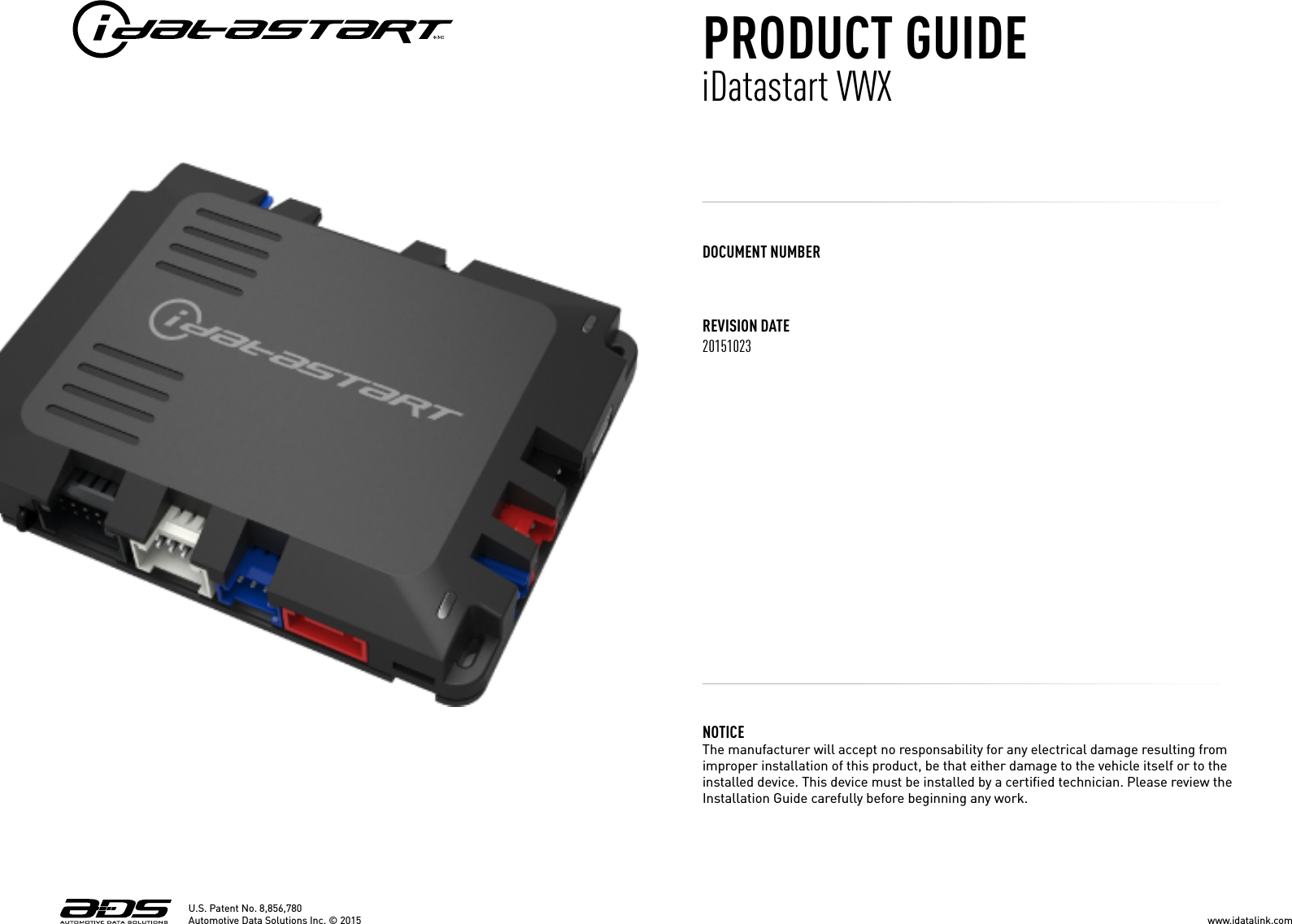
REVISION DATE20151023DOCUMENT NUMBERNOTICE The manufacturer will accept no responsability for any electrical damage resulting from improper installation of this product, be that either damage to the vehicle itself or to the installed device. This device must be installed by a certified technician. Please review the Installation Guide carefully before beginning any work. U.S. Patent No. 8,856,780PRODUCT GUIDEiDatastart VWXwww.idatalink.comAutomotive Data Solutions Inc. © 2015
U.S. Patent No. 8,856,780GETTING STARTEDWELCOMENEED HELP?Congratulations on the purchase of your iDataStart VWX solution. You are now a few simple steps away from enjoying your new remote starter unit with enhanced features. Before starting your installation, please ensure that your iDataStart VWX module is programmed with the correct fi rmware for your vehicle and that you care-fully review the install guide.1 866 427-2999support@idatalink.comidatalink.com/supportwww.12voltdata.com/forumwww.facebook.com/groups/idatatechTABLE OF CONTENTSBox Contents 3Module Pinout 4Tach Programming Procedure 5Remote Programming Procedure 6Valet Mode Programming Procedure 7Compatible Accessories 9Online Module Settings 10Module Diagnostics 11Remote Starter Error Codes 12Module Reset Procedure 1314www.idatalink.comAutomotive Data Solutions Inc. © 2015 iDatastart VWXPAGE 2 OF 14• 20151023FCC Statement&IC Statement
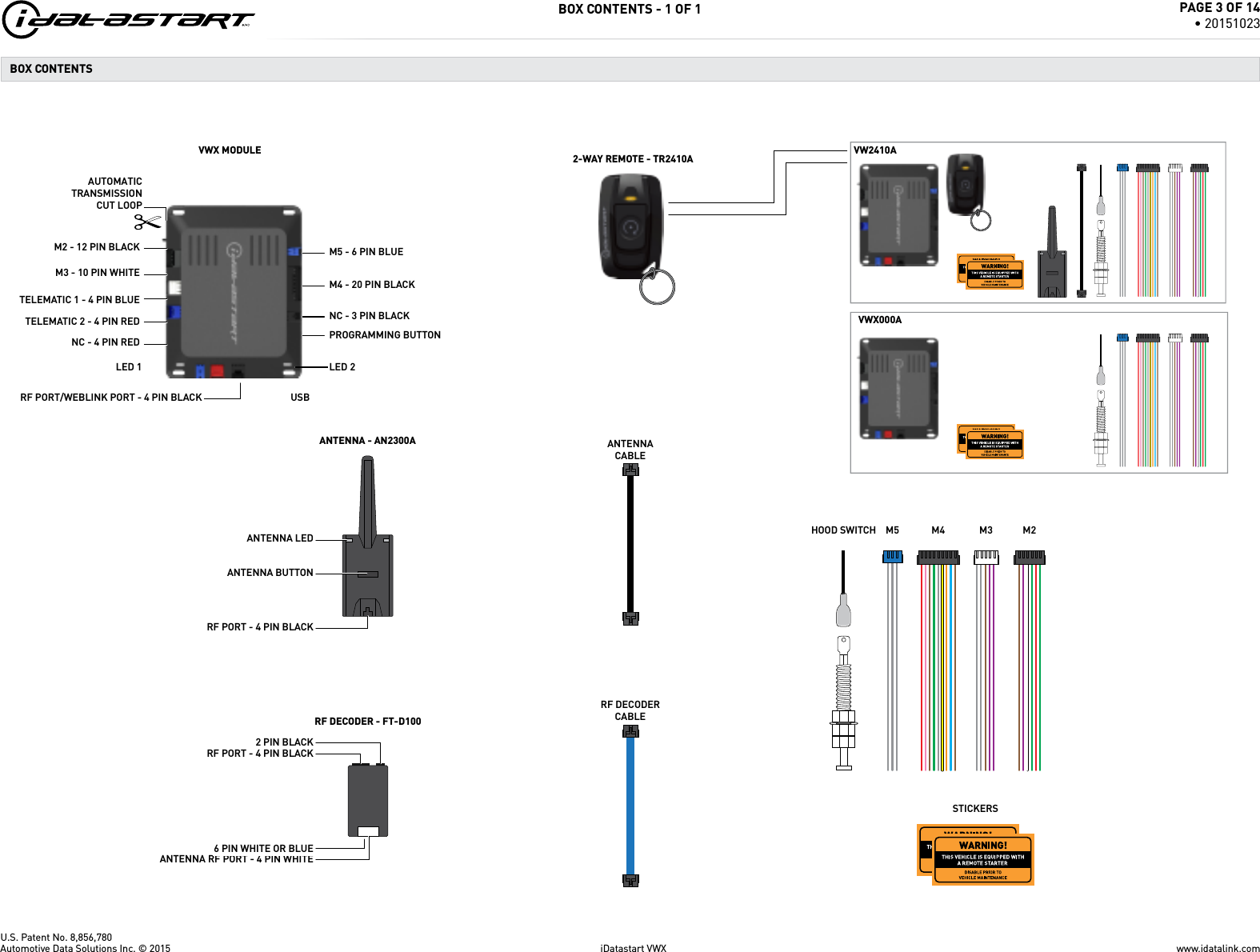
U.S. Patent No. 8,856,780BOX CONTENTS - 1 OF 1M3 - 10 PIN WHITEM2 - 12 PIN BLACKAUTOMATICTRANSMISSIONCUT LOOPM5 - 6 PIN BLUEM4 - 20 PIN BLACKVW2410AVWX000ABOX CONTENTS NC - 4 PIN REDTELEMATIC 2 - 4 PIN REDTELEMATIC 1 - 4 PIN BLUENC - 3 PIN BLACKPROGRAMMING BUTTONANTENNA BUTTONUSBLED 2ANTENNA LEDLED 1RF PORT/WEBLINK PORT - 4 PIN BLACK2 PIN BLACKRF PORT - 4 PIN BLACKRF PORT - 4 PIN BLACKANTENNA RF PORT - 4 PIN WHITE6 PIN WHITE OR BLUE2-WAY REMOTE - TR2410ARF DECODERCABLEM2M3M4M5HOOD SWITCHANTENNACABLERF DECODER - FT-D100STICKERSANTENNA - AN2300AVWX MODULEwww.idatalink.comAutomotive Data Solutions Inc. © 2015 iDatastart VWXPAGE 3 OF 14• 20151023
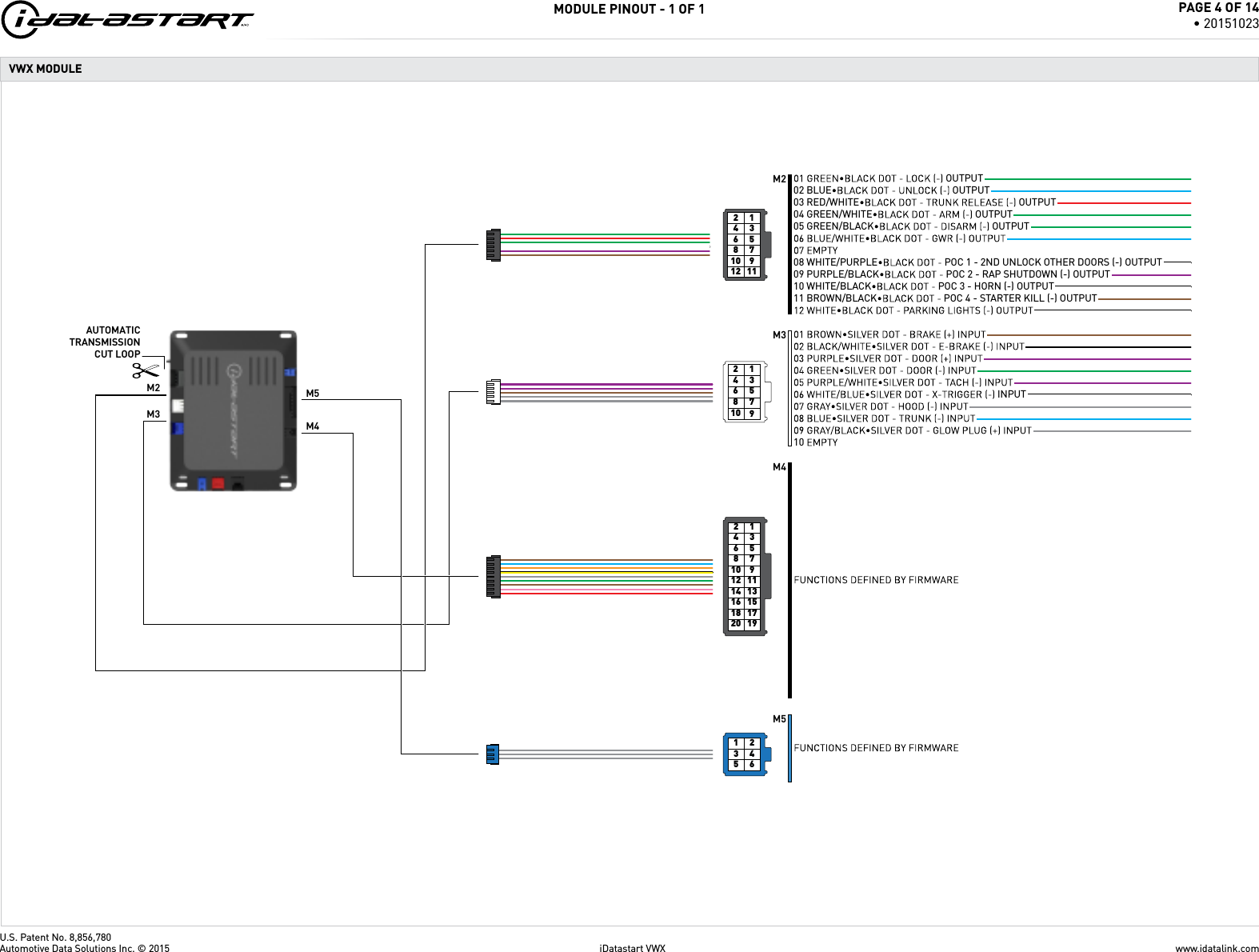
U.S. Patent No. 8,856,780MODULE PINOUT - 1 OF 1793108641257931081112641257931081113141215171819201664125453216M3M2 M5M4AUTOMATICTRANSMISSIONCUT LOOPM5M4OUTPUTOUTPUT02 BLUE OUTPUT02 BLUE OUTPUT03 RED/WHITE OUTPUT03 RED/WHITE OUTPUT04 GREEN/WHITE OUTPUT04 GREEN/WHITE OUTPUT05 GREEN/BLACK OUTPUT05 GREEN/BLACK OUTPUTPOC 1 - 2ND UNLOCK OTHER DOORS (-) OUTPUT08 WHITE/PURPLE POC 1 - 2ND UNLOCK OTHER DOORS (-) OUTPUTPOC 2 - RAP SHUTDOWN (-) OUTPUT09 PURPLE/BLACK POC 2 - RAP SHUTDOWN (-) OUTPUTPOC 3 - HORN (-) OUTPUT10 WHITE/BLACK POC 3 - HORN (-) OUTPUTPOC 4 - STARTER KILL (-) OUTPUT11 BROWN/BLACK POC 4 - STARTER KILL (-) OUTPUTINPUT10 M3M2VWX MODULEwww.idatalink.comAutomotive Data Solutions Inc. © 2015 iDatastart VWXPAGE 4 OF 14• 20151023
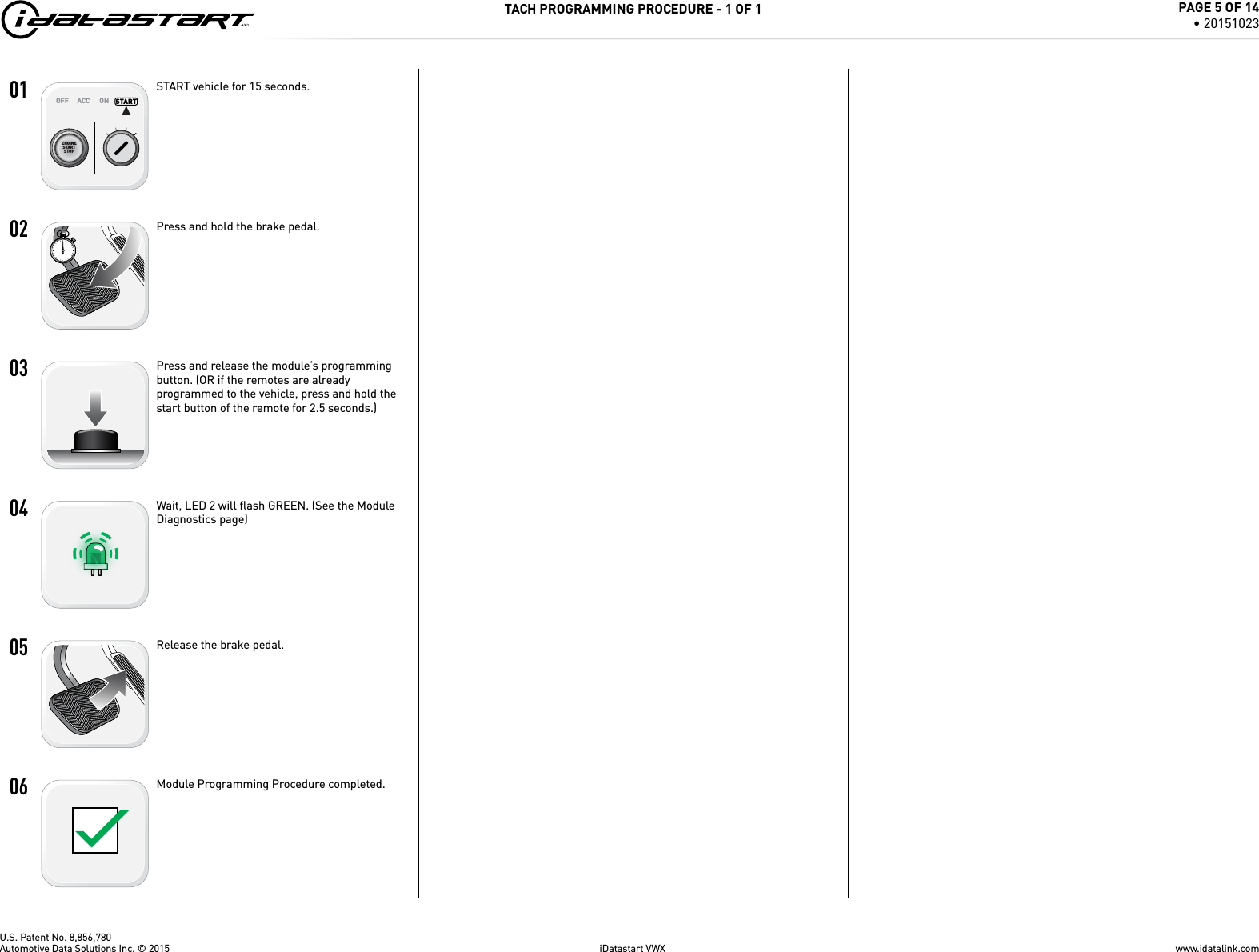
U.S. Patent No. 8,856,78001ENGINESTARTSTOPOFF ACC ON STARTSTARTSTART   02   03   04   05   06   TACH PROGRAMMING PROCEDURE - 1 OF 1START vehicle for 15 seconds.Press and hold the brake pedal.Press and release the module’s programming button. (OR if the remotes are already programmed to the vehicle, press and hold the start button of the remote for 2.5 seconds.)Wait, LED 2 will fl ash GREEN. (See the Module Diagnostics page)Release the brake pedal.Module Programming Procedure completed.www.idatalink.comAutomotive Data Solutions Inc. © 2015 iDatastart VWXPAGE 5 OF 14• 20151023
U.S. Patent No. 8,856,78001 [4x]   02ENGINESTARTSTOPOFF ACC ON STARTON   03   04   05   06   07   08ENGINESTARTSTOPOFF ACC ON STARTOFF   09_________________________________>>F_________________________________REMOTE PROGRAMMING PROCEDURE - 1 OF 1WARNING: Complete the module programming procedure and tach programming procedure before programming the remotes. A maximum of four [4x] remotes per system.Set ignition to ON position.Press and release the antenna button, then press and hold the antenna button. The antenna’s leds will turn solid BLUE.Parking Light will fl ash once [1x].Press once [1x] on the LOCK button of each remote.The antenna’s leds will fl ash BLUE once [1x] for each successful pairing.Release the antenna button. The antenna’s leds will turn OFF.Set ignition to OFF position.Remote Programming Procedure completed.To program an additional remote as second vehicle mode: Follow steps 1 to 4. Press twice [2x] on the “F” button then press once [1x] on the LOCK button of the remote. Follow steps 6 to 9.www.idatalink.comAutomotive Data Solutions Inc. © 2015 iDatastart VWXPAGE 6 OF 14• 20151023
U.S. Patent No. 8,856,780>>   01   02ENGINESTARTSTOPOFF ACC ON STARTON   03   04   05ENGINESTARTSTOPOFF ACC ON STARTOFF   06   >>   VALET MODE PROGRAMMING PROCEDURE - 1 OF 1NOTE: In Valet Mode, the Remote starter is not functional. Keyless entry, Lock and Unlock will remain functional. See RF kit user manual for alternate valet mode programming.Time restriction. Complete next step within 7 seconds.Cycle ignition ON twice [2x OFF/ON] rapidly.Press and release the BRAKE pedal three times [3x].Parking Light will fl ash once [1x] then will fl ash twice [2x].Set ignition to OFF position.Valet Mode Programming Procedure completed.To exit valet mode: repeat steps 1 to 5.www.idatalink.comAutomotive Data Solutions Inc. © 2015 iDatastart VWXPAGE 7 OF 14• 20151023
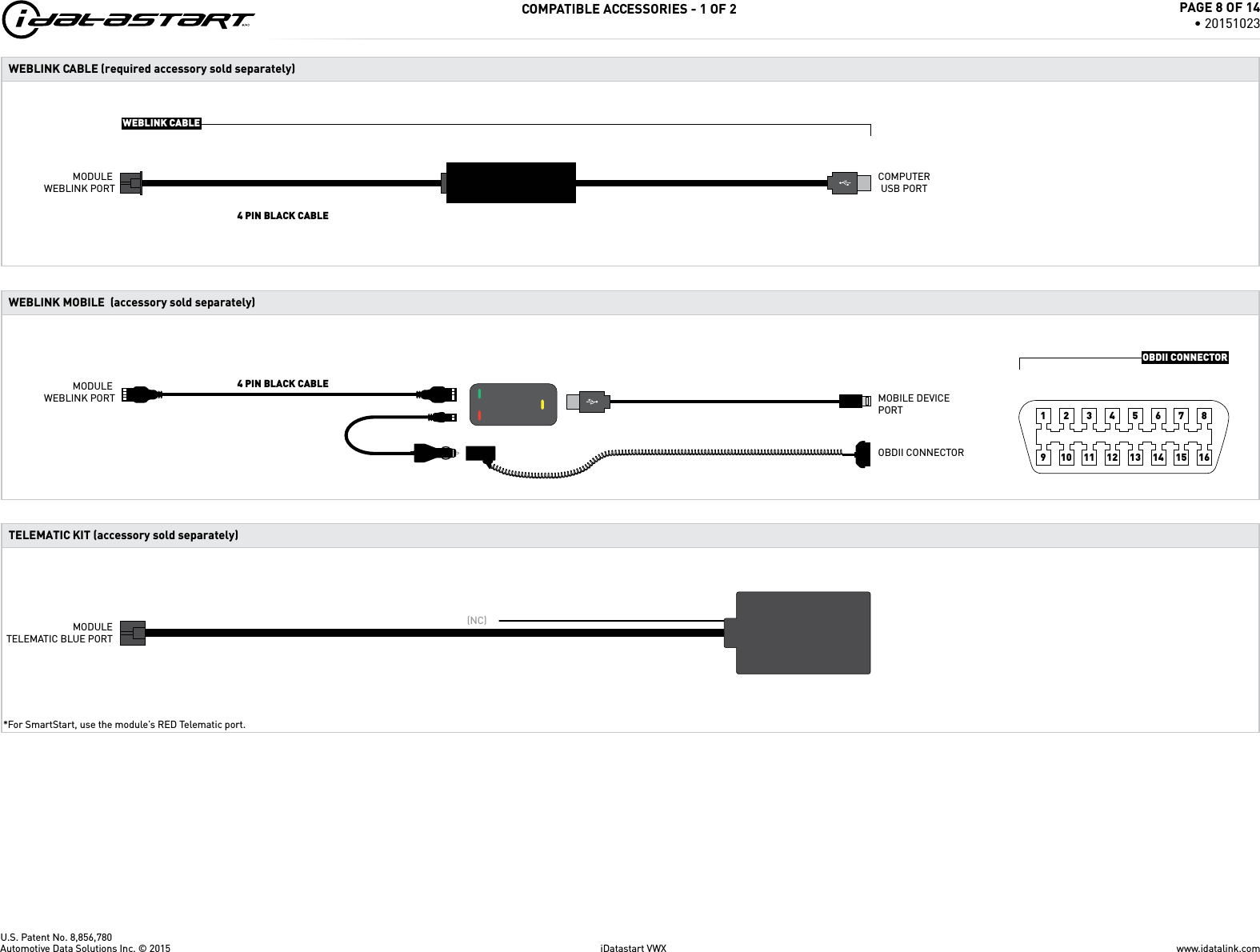
U.S. Patent No. 8,856,780www.idatalink.comAutomotive Data Solutions Inc. © 2015 iDatastart VWXPAGE 8 OF 14• 20151023COMPATIBLE ACCESSORIES - 1 OF 2MODULETELEMATIC BLUE PORT*For SmartStart, use the module’s RED Telematic port. (NC)TELEMATIC KIT (accessory sold separately)10 11 12 13 14 15 16123456789WEBLINK MOBILE  (accessory sold separately)  MOBILE DEVICE PORTOBDII CONNECTOR4 PIN BLACK CABLEMODULE WEBLINK PORTOBDII CONNECTORWEBLINK CABLE (required accessory sold separately)WEBLINK CABLECOMPUTERUSB PORT4 PIN BLACK CABLEMODULE WEBLINK PORT
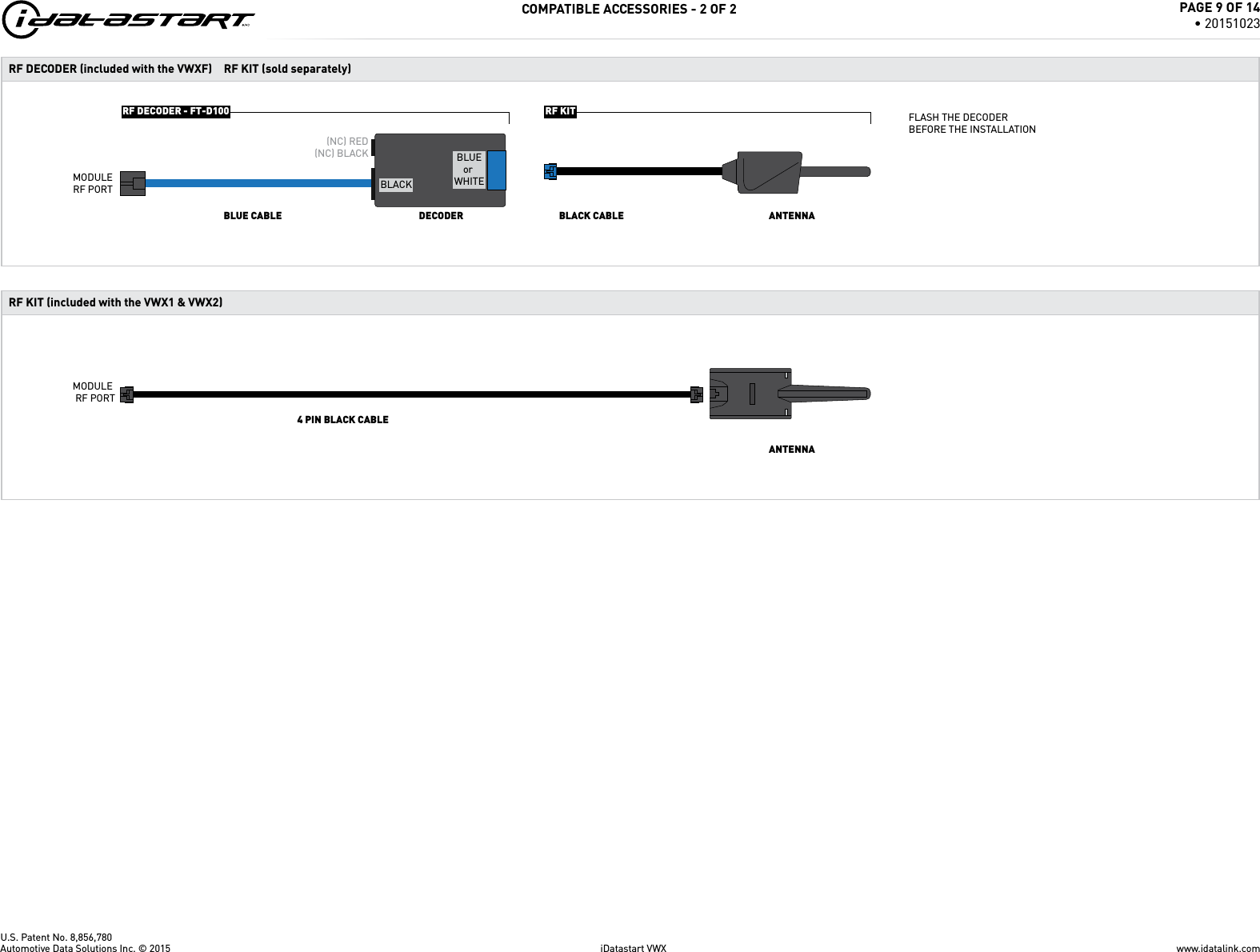
U.S. Patent No. 8,856,780www.idatalink.comAutomotive Data Solutions Inc. © 2015 iDatastart VWXPAGE 9 OF 14• 20151023COMPATIBLE ACCESSORIES - 2 OF 2RF KITRF DECODER - FT-D100RF DECODER (included with the VWXF)ANTENNAFLASH THE DECODERBEFORE THE INSTALLATIONDECODERBLUE CABLE BLACK CABLE(NC) RED(NC) BLACKBLACKBLUEor WHITEMODULERF PORTRF KIT (sold separately)4 PIN BLACK CABLEMODULE RF PORTRF KIT (included with the VWX1 & VWX2) ANTENNA
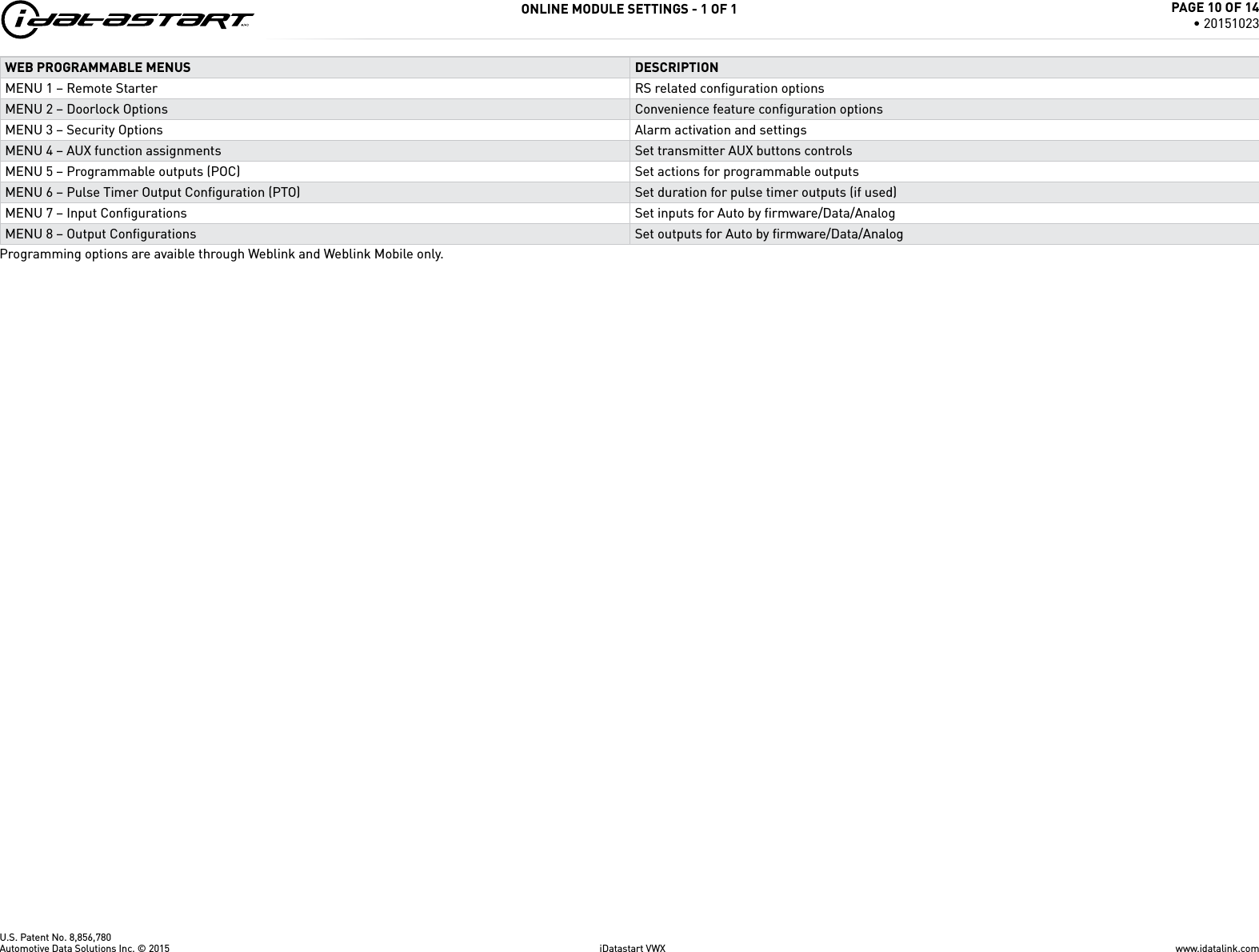
U.S. Patent No. 8,856,780ONLINE MODULE SETTINGS - 1 OF 1WEB PROGRAMMABLE MENUS DESCRIPTIONMENU 1 – Remote Starter RS related confi guration optionsMENU 2 – Doorlock Options Convenience feature confi guration optionsMENU 3 – Security Options Alarm activation and settingsMENU 4 – AUX function assignments Set transmitter AUX buttons controlsMENU 5 – Programmable outputs (POC) Set actions for programmable outputsMENU 6 – Pulse Timer Output Confi guration (PTO) Set duration for pulse timer outputs (if used)MENU 7 – Input Confi gurations Set inputs for Auto by fi rmware/Data/AnalogMENU 8 – Output Confi gurations Set outputs for Auto by fi rmware/Data/AnalogProgramming options are avaible through Weblink and Weblink Mobile only.www.idatalink.comAutomotive Data Solutions Inc. © 2015 iDatastart VWXPAGE 10 OF 14• 20151023
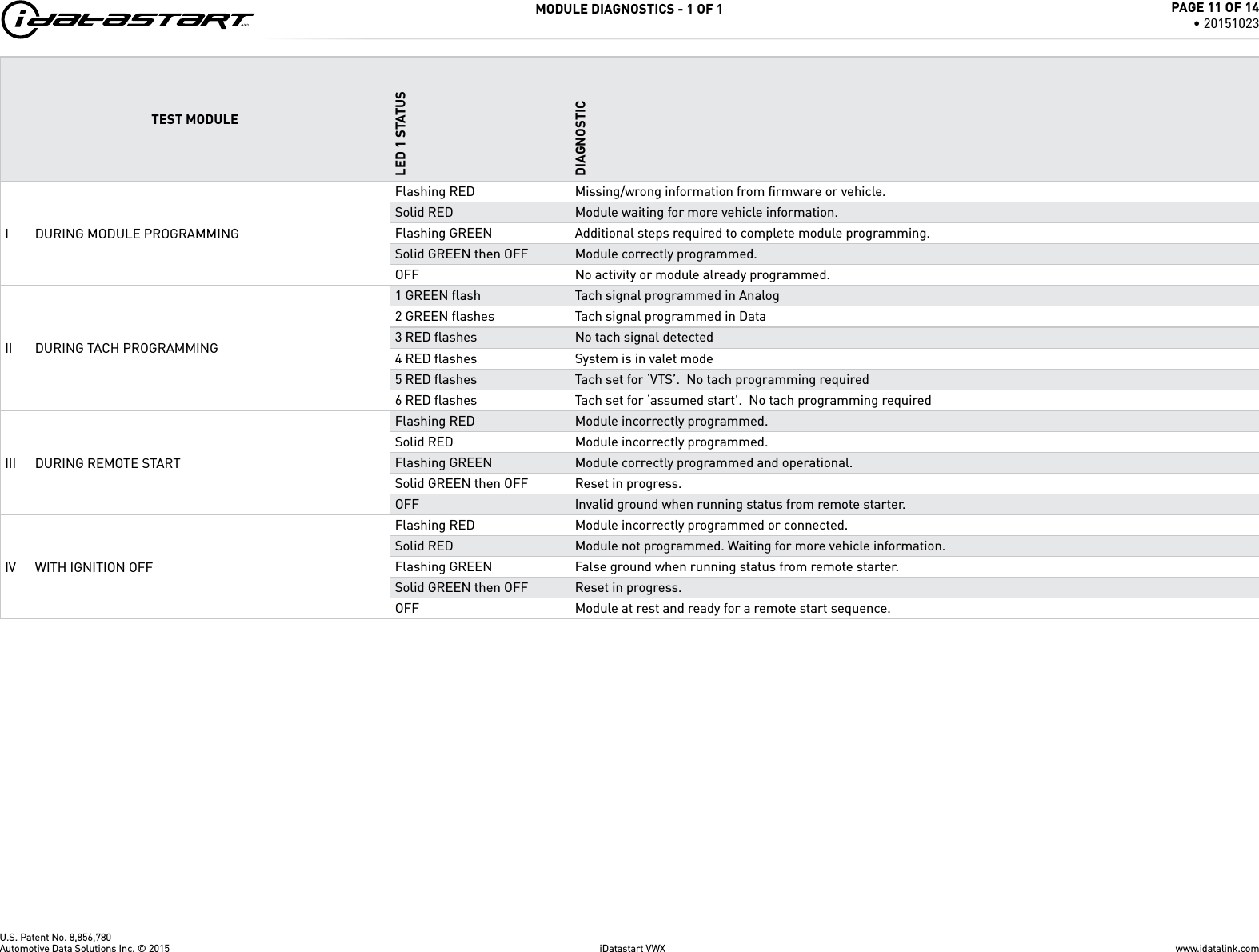
U.S. Patent No. 8,856,780MODULE DIAGNOSTICS - 1 OF 1TEST MODULELED 1 STATUSDIAGNOSTICI DURING MODULE PROGRAMMINGFlashing RED Missing/wrong information from fi rmware or vehicle.Solid RED Module waiting for more vehicle information.Flashing GREEN Additional steps required to complete module programming.Solid GREEN then OFF Module correctly programmed.OFF No activity or module already programmed.II DURING TACH PROGRAMMING1 GREEN fl ash Tach signal programmed in Analog2 GREEN fl ashes Tach signal programmed in Data3 RED fl ashes No tach signal detected4 RED fl ashes System is in valet mode5 RED fl ashes Tach set for ‘VTS’.  No tach programming required6 RED fl ashes Tach set for ‘assumed start’.  No tach programming requiredIII DURING REMOTE STARTFlashing RED Module incorrectly programmed.Solid RED Module incorrectly programmed.Flashing GREEN Module correctly programmed and operational.Solid GREEN then OFF Reset in progress.OFF Invalid ground when running status from remote starter.IV WITH IGNITION OFFFlashing RED Module incorrectly programmed or connected.Solid RED Module not programmed. Waiting for more vehicle information.Flashing GREEN False ground when running status from remote starter.Solid GREEN then OFF Reset in progress.OFF Module at rest and ready for a remote start sequence.www.idatalink.comAutomotive Data Solutions Inc. © 2015 iDatastart VWXPAGE 11 OF 14• 20151023
U.S. Patent No. 8,856,780REMOTE STARTER ERROR CODES - 1 OF 1REMOTE STARTER ERROR CODES:NOTES[X] NUMBER OF PARKING LIGHT FLASHESDIAGNOSTICI WARNING: The following applies only when the parking lights are connected and supported by the system.01 Engine running. 02 Key in ignition at ON position.II After a remote starter failure, the parking lights will fl ash three [3x] times, then will fl ash [X] number times to indicate an error code. See table.03 Door is open.04 Trunk is open.05 Foot brake is ON. 06 Hood is open.07 The reservation is OFF. (Manual transmission only)08 Tach failure.09 The vehicle is moving (VSS).10 System is in Valet Mode. 11 CAN communication failure12 RS not synchronized. Start vehicle with OEM key for 15 sec before trying a new RS sequence.13 Bypass problem.REMOTE STARTER SHUTDOWN ERROR CODES:NOTES[Y] NUMBER OF PARKING LIGHT FLASHESDIAGNOSTICI WARNING: The following applies only when the parking lights are connected and supported by the system.01 Engine tach signal is lost.02 Emergency brake is lost.II If the engine shuts down after a remote starter sequence: Press and hold the Trunk button and the Start button at the same time for 2.5 seconds when using a 1-WAY remote. OR Press once [1x] on button “4” when using a 2-WAY remote. The parking lights will fl ash four [4x] times, then will fl ash [Y] number times to indicate an error code. See table.03 Foot brake is ON. 04 Hood is open.05 Engine RPM limiter is ON.06 Glow plug timeout error.07 Vehicle is moving (VSS).08 N/A09 N/A10 Door is open.11 CAN communication failure during RS sequence.12 RS not synchronized. Start vehicle with OEM key for 15 sec before trying a new RS sequence.13 Takeover is not allowed.14 Shutdown error, board overheat protection.www.idatalink.comAutomotive Data Solutions Inc. © 2015 iDatastart VWXPAGE 12 OF 14• 20151023
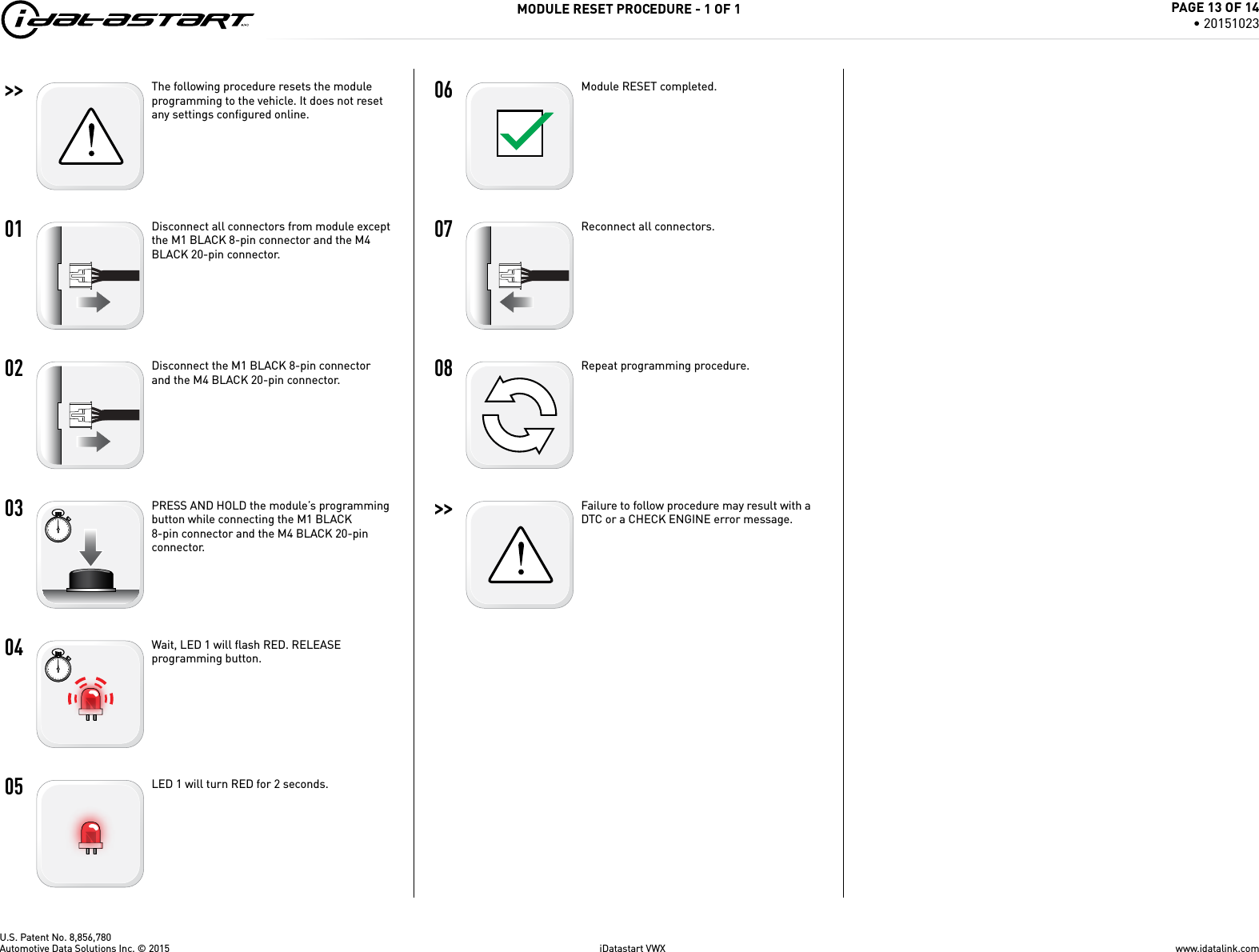
U.S. Patent No. 8,856,780>>   01   02   03   04   05   06   07   08   >>   MODULE RESET PROCEDURE - 1 OF 1The following procedure resets the module programming to the vehicle. It does not reset any settings confi gured online.Disconnect all connectors from module except the M1 BLACK 8-pin connector and the M4 BLACK 20-pin connector.Disconnect the M1 BLACK 8-pin connector and the M4 BLACK 20-pin connector.PRESS AND HOLD the module’s programming button while connecting the M1 BLACK 8-pin connector and the M4 BLACK 20-pin connector.Wait, LED 1 will flash RED. RELEASE programming button.LED 1 will turn RED for 2 seconds.Module RESET completed.Reconnect all connectors.Repeat programming procedure.Failure to follow procedure may result with a DTC or a CHECK ENGINE error message.www.idatalink.comAutomotive Data Solutions Inc. © 2015 iDatastart VWXPAGE 13 OF 14• 20151023
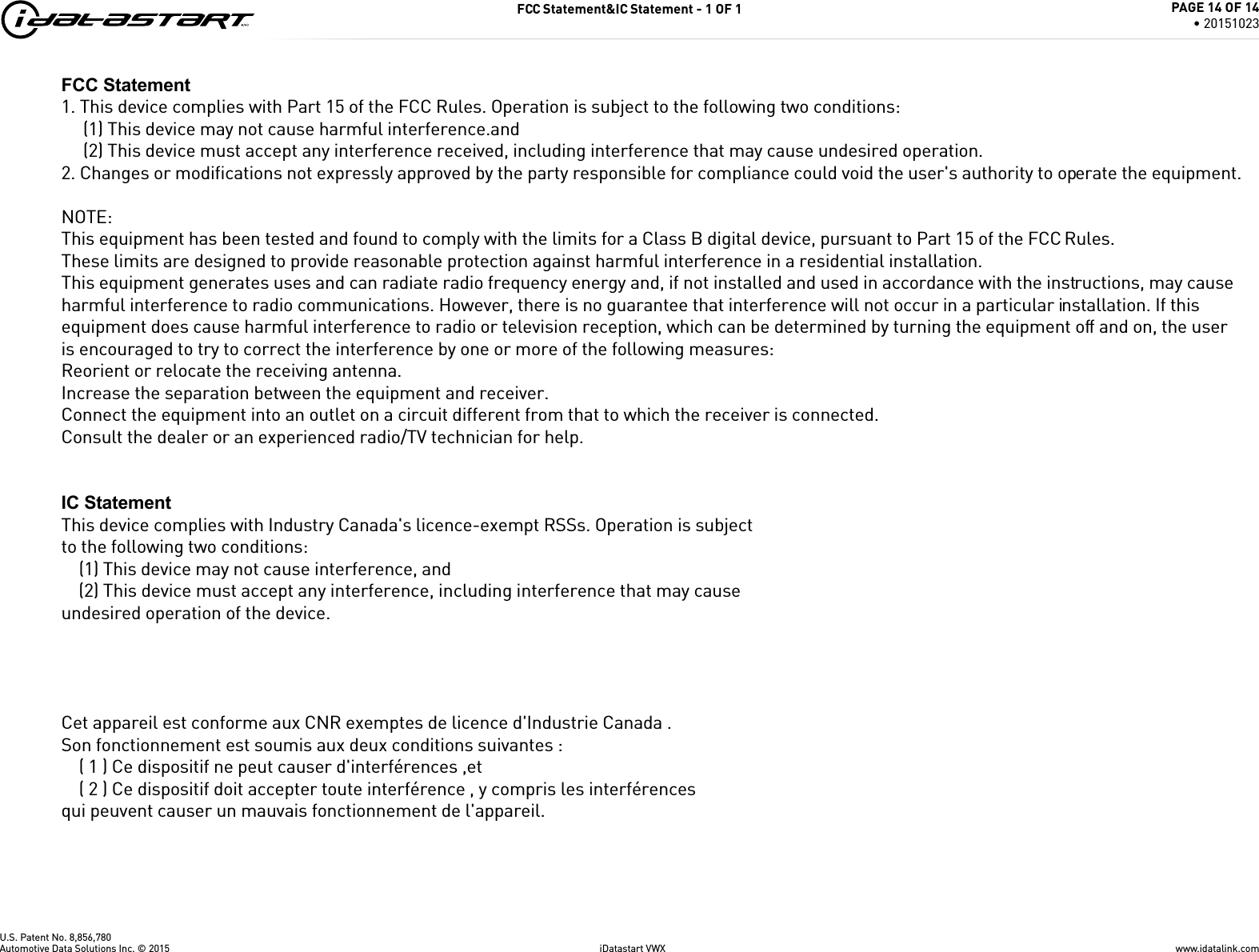
U.S. Patent No. 8,856,780FCC Statement&IC Statement - 1 OF 1www.idatalink.comAutomotive Data Solutions Inc. © 2015 iDatastart VWXPAGE 14 OF 14• 20151023FCC Statement1. This device complies with Part 15 of the FCC Rules. Operation is subject to the following two conditions:(1) This device may not cause harmful interference.and(2) This device must accept any interference received, including interference that may cause undesired operation.2. Changes or modifications not expressly approved by the party responsible for compliance could void the user's authority to operate the equipment.NOTE: This equipment has been tested and found to comply with the limits for a Class B digital device, pursuant to Part 15 of the FCC Rules.These limits are designed to provide reasonable protection against harmful interference in a residential installation.This equipment generates uses and can radiate radio frequency energy and, if not installed and used in accordance with the instructions, may cause harmful interference to radio communications. However, there is no guarantee that interference will not occur in a particular installation. If this equipment does cause harmful interference to radio or television reception, which can be determined by turning the equipment off and on, the user is encouraged to try to correct the interference by one or more of the following measures:Reorient or relocate the receiving antenna.Increase the separation between the equipment and receiver.Connect the equipment into an outlet on a circuit different from that to which the receiver is connected. Consult the dealer or an experienced radio/TV technician for help.IC StatementThis device complies with Industry Canada's licence-exempt RSSs. Operation is subjectto the following two conditions:    (1) This device may not cause interference, and    (2) This device must accept any interference, including interference that may causeundesired operation of the device. Cet appareil est conforme aux CNR exemptes de licence d'Industrie Canada .Son fonctionnement est soumis aux deux conditions suivantes :    ( 1 ) Ce dispositif ne peut causer d'interférences ,et    ( 2 ) Ce dispositif doit accepter toute interférence , y compris les interférencesqui peuvent causer un mauvais fonctionnement de l'appareil.

Navigation menu