BODYFRIEND BFR-8000US Massage Chair User Manual REV

BODYFRIEND Co.,Ltd. Massage Chair REV

User Manual REV

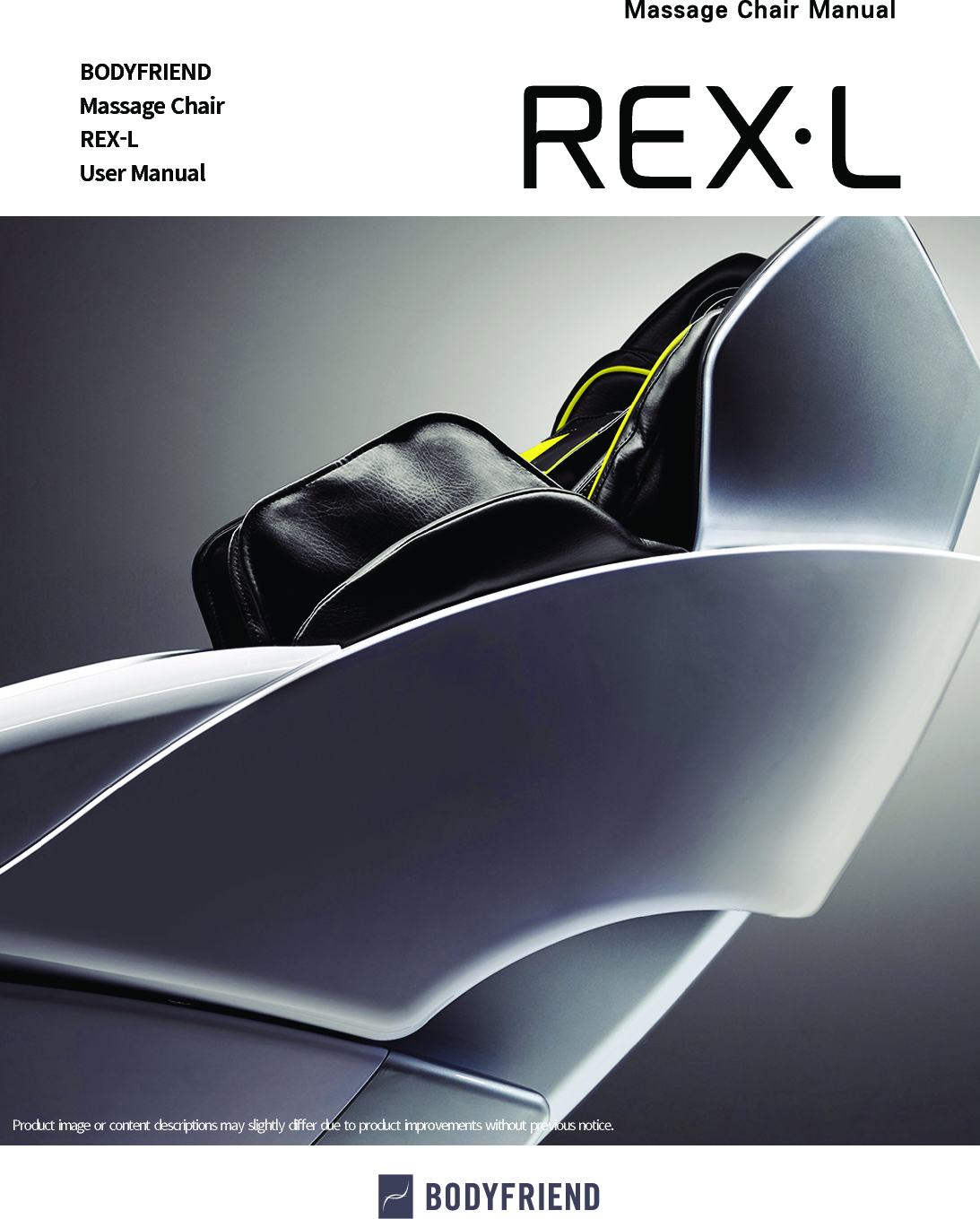
BODYFRIENDMassage ChairREX-LUser ManualProduct image or content  descriptions may  slightly  di󼴨er  due to product improvements without  previous notice.
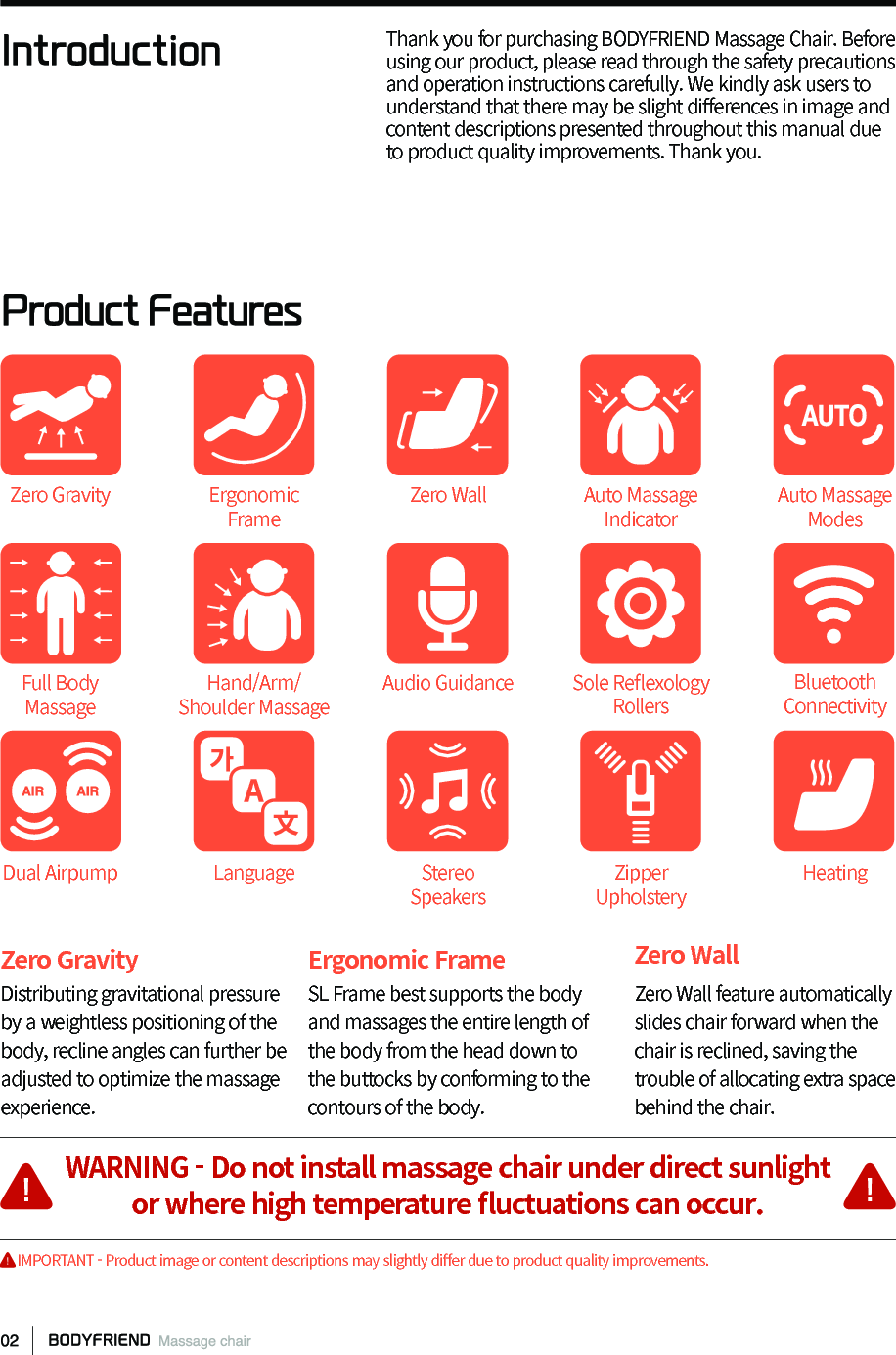
IntroductionProduct FeaturesThank you for purchasing BODYFRIEND Massage Chair. Before using our product, please read through the safety precautions and operation instructions carefully. We kindly ask users to understand that there may be slight di󼴨erences in image and content descriptions presented throughout this manual due to product quality improvements. Thank you.Zero Gravity Distributing gravitational pressure by a weightless positioning of the body, recline angles can further be adjusted to optimize the massage experience.Ergonomic FrameSL Frame best supports the body and massages the entire length of the body from the head down to the buttocks by conforming to the contours of the body.Zero WallZero Wall feature automatically slides chair forward when the chair is reclined, saving the trouble of allocating extra space behind the chair.Zero GravityFull Body MassageDual AirpumpErgonomic FrameHand/Arm/Shoulder MassageLanguageZero WallAudio GuidanceStereo SpeakersAuto Massage ModesSole Re󼴪exology RollersZipper UpholsteryAuto Massage IndicatorBluetooth ConnectivityHeatingWARNING - Do not install massage chair under direct sunlightor where high temperature 󼴪uctuations can occur.     IMPORTANT - Product image or content descriptions may slightly di󼴨er due to product quality improvements.
Table of ContentsBefore Use Instructions   Product Features 02       Safety Precautions 04 Important Safety Instructions 05 Components and Descriptions 06 Transporting/Grounding 07Installation Instructions Installation 08Controller Information Controller Button Descriptions 12 Controller Function Descriptions 14Program Descriptions  BODYFRIEND Customized Programs 19Product Specifications  Product Specifications 20Troubleshooting Troubleshooting 21 Customer Support Guidelines 22
Before Use: Safety PrecautionsBefore using, please carefully read the “Safety Precautions” section for proper installation and operation.WARNING - Please do not try to install or repairmassage chairs without the assistance of technicians.Bodyfriend is not  responsible for  replacement  costs if  the product  is damaged orbreaks due to self -troubleshooting.CAUTION - Please Do Not Install Outside the Home.This product is for  non-commercial household use only. Warranty  is subjectto cancellation if  the product  is used for  commercial purposes.To reduce injury and risk of 󼴩re:Prohibited01  Do not install in bathrooms or areas with        high humidity levels. Could result in         electric shock.02  Avoid using in areas with dust or areas        prone to rust.03  Do not operate this device in settings with        temperatures exceeding 104F°.04  Do not use outdoors.05  Do not use near heaters or anything        radiating heat.06  Install and use only when properly        grounded on 󼴪at surfaces.07  Use in areas with ample space and        reasonable air circulation.08  Do not use after disassembling parts.        Can result in product malfunctions.09  Do not use concurrently with other        electronic or medical devices.10  Do not use aerosol (spray) products.11  Do not place heavy objects on top of        this product.12  Please take precautionary measures to        ensure toddlers, pets, and small beings        do not crawl under the body of the chair,        leg rest, etc. to prevent any injuries or        damage.13  Do not allow more than one person to         operate the machine at a time.14  If the power cord or power plug becomes         damaged in any way, disconnect from         the main supply immediately and consult         an authorized service engineer for repair         or replacement.15  Do not damage, excessively bend,         pull, twist, or knot any device cords.16  Do not stand on the legrest before, after,        or while the device is sliding forward or         back to its original resting position.
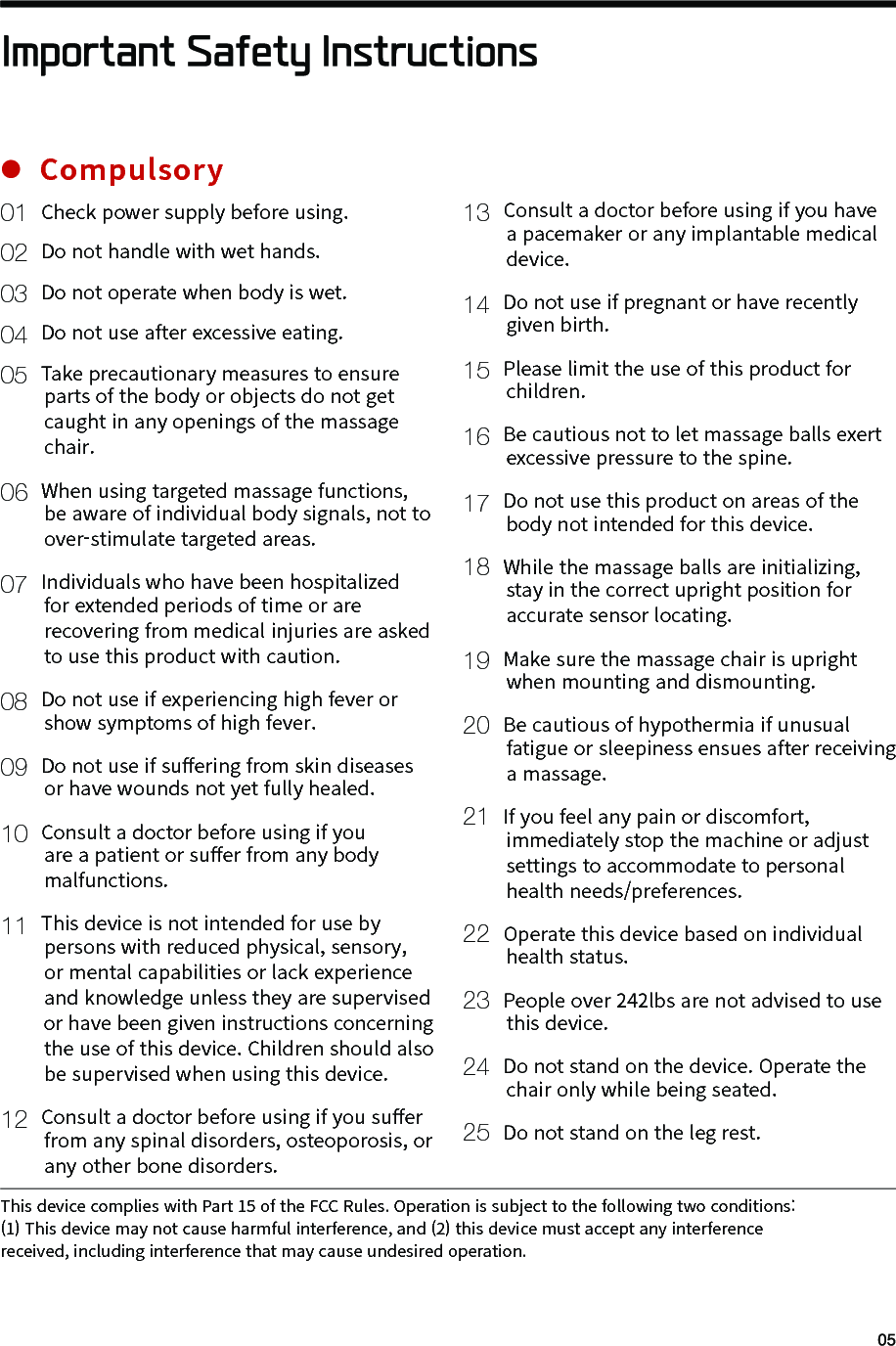
 01 Check power supply before using. 02 Do not handle with wet hands. 03 Do not operate when body is wet. 04 Do not use after excessive eating. 05 Take precautionary measures to ensure         parts of the body or objects do not get         caught in any openings of the massage         chair. 06 When using targeted massage functions,         be aware of individual body signals, not to         over-stimulate targeted areas. 07 Individuals who have been hospitalized         for extended periods of time or are         recovering from medical injuries are asked         to use this product with caution. 08 Do not use if experiencing high fever or         show symptoms of high fever. 09 Do not use if su󼴨ering from skin diseases         or have wounds not yet fully healed.10 Consult a doctor before using if you        are a patient or su󼴨er from any body         malfunctions. 11 This device is not intended for use by         persons with reduced physical, sensory,         or mental capabilities or lack experience         and knowledge unless they are supervised         or have been given instructions concerning         the use of this device. Children should also         be supervised when using this device.12 Consult a doctor before using if you su󼴨er         from any spinal disorders, osteoporosis, or         any other bone disorders.13 Consult a doctor before using if you have        a pacemaker or any implantable medical         device.14 Do not use if pregnant or have recently         given birth.15 Please limit the use of this product for         children.16 Be cautious not to let massage balls exert         excessive pressure to the spine.17 Do not use this product on areas of the         body not intended for this device.18  While the massage balls are initializing,         stay in the correct upright position for         accurate sensor locating.19 Make sure the massage chair is upright         when mounting and dismounting.20  Be cautious of hypothermia if unusual         fatigue or sleepiness ensues after receiving         a massage.21  If you feel any pain or discomfort,         immediately stop the machine or adjust         settings to accommodate to personal         health needs/preferences.22  Operate this device based on individual         health status.23  People over 242lbs are not advised to use        this device. 24  Do not stand on the device. Operate the         chair only while being seated.25  Do not stand on the leg rest.Important Safety InstructionsCompulsoryThis device complies with Part 15 of the FCC Rules. Operation is subject to the following two conditions: (1) This device may not cause harmful interference, and (2) this device must accept any interference received, including interference that may cause undesired operation.
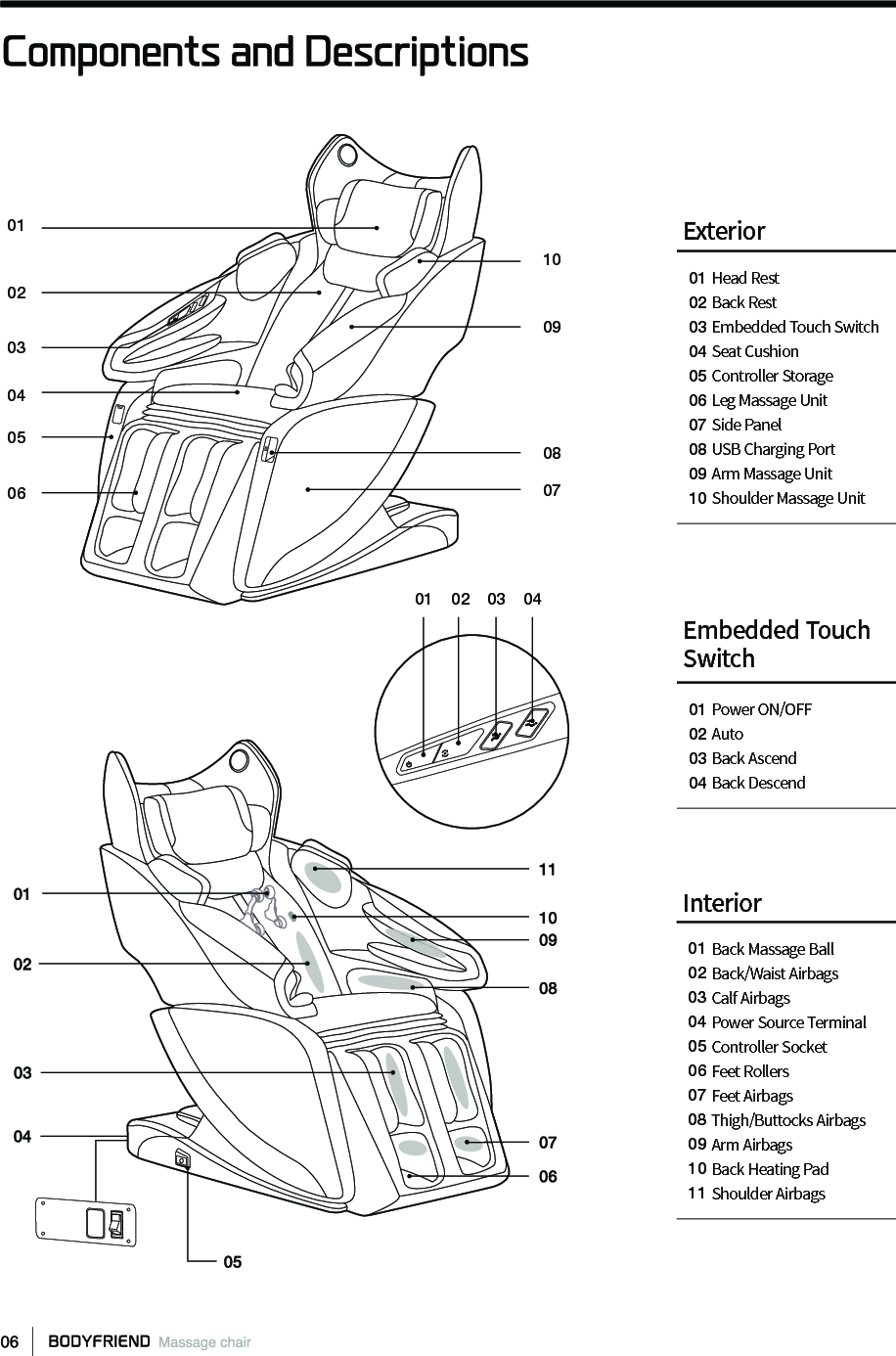
Components and Descriptions01 Head Rest02 Back Rest03 Embedded Touch Switch04 Seat Cushion05 Controller Storage06 Leg Massage Unit07 Side Panel08 USB Charging Port 09 Arm Massage Unit10 Shoulder Massage UnitExterior01 Power ON/OFF02 Auto03 Back Ascend04 Back DescendEmbedded TouchSwitch Interior01 Back Massage Ball02  Back/Waist Airbags03  Calf Airbags04  Power Source Terminal05  Controller Socket06  Feet Rollers07  Feet Airbags 08 Thigh/Buttocks Airbags09  Arm Airbags10  Back Heating Pad11  Shoulder Airbags060101 02 03 040209030510040807
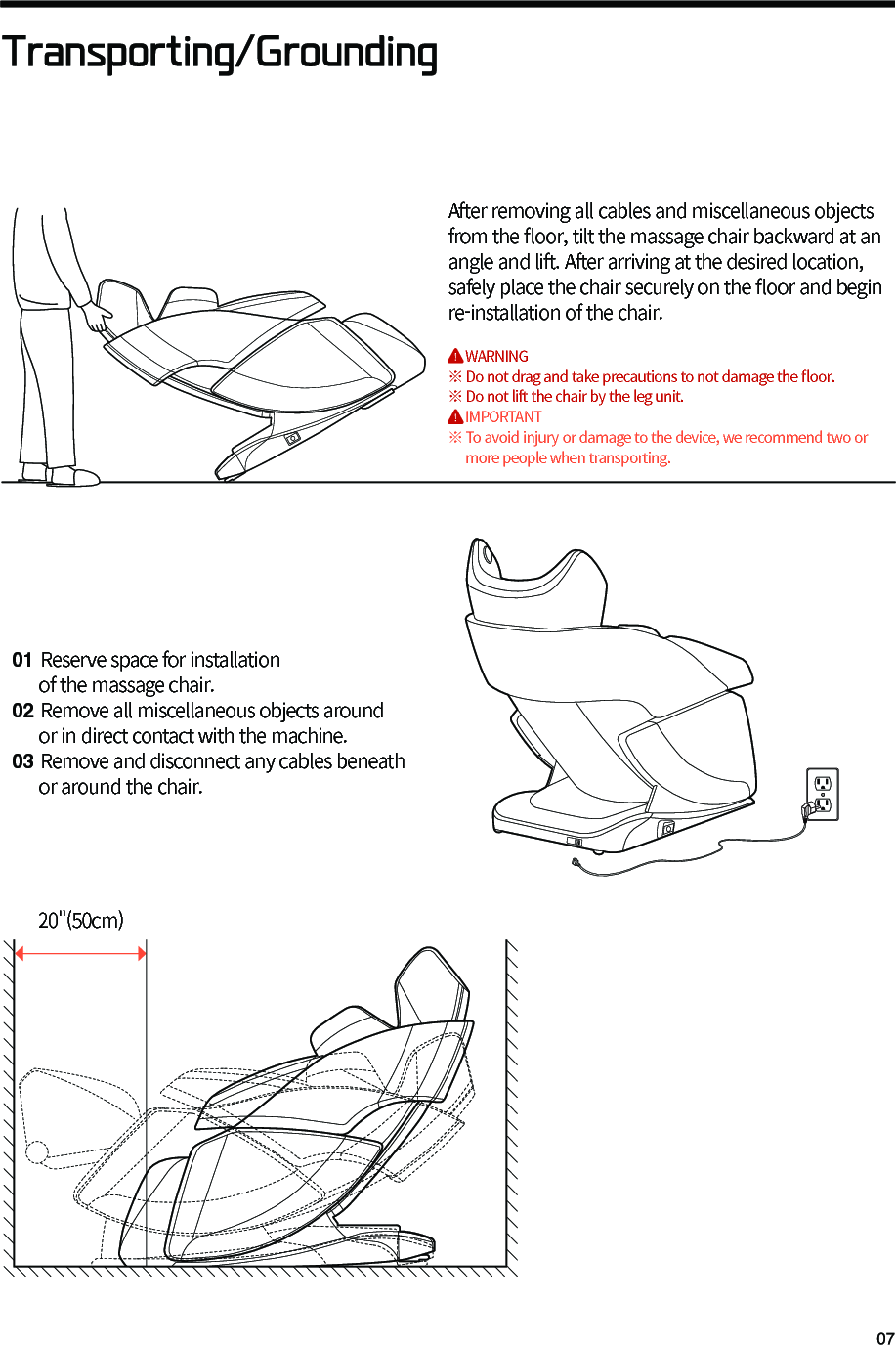
Transporting/Grounding01 Reserve space for installation      of the massage chair.02 Remove all miscellaneous objects around      or in direct contact with the machine.03 Remove and disconnect any cables beneath      or around the chair.After removing all cables and miscellaneous objects from the 󼴪oor, tilt the massage chair backward at an angle and lift. After arriving at the desired location, safely place the chair securely on the 󼴪oor and begin re-installation of the chair.     WARNING※ Do not drag and take precautions to not damage the 󼴪oor.※ Do not lift the chair by the leg unit.     IMPORTANT※ To avoid injury or damage to the device, we recommend two or     more people when transporting. 20"(50cm)
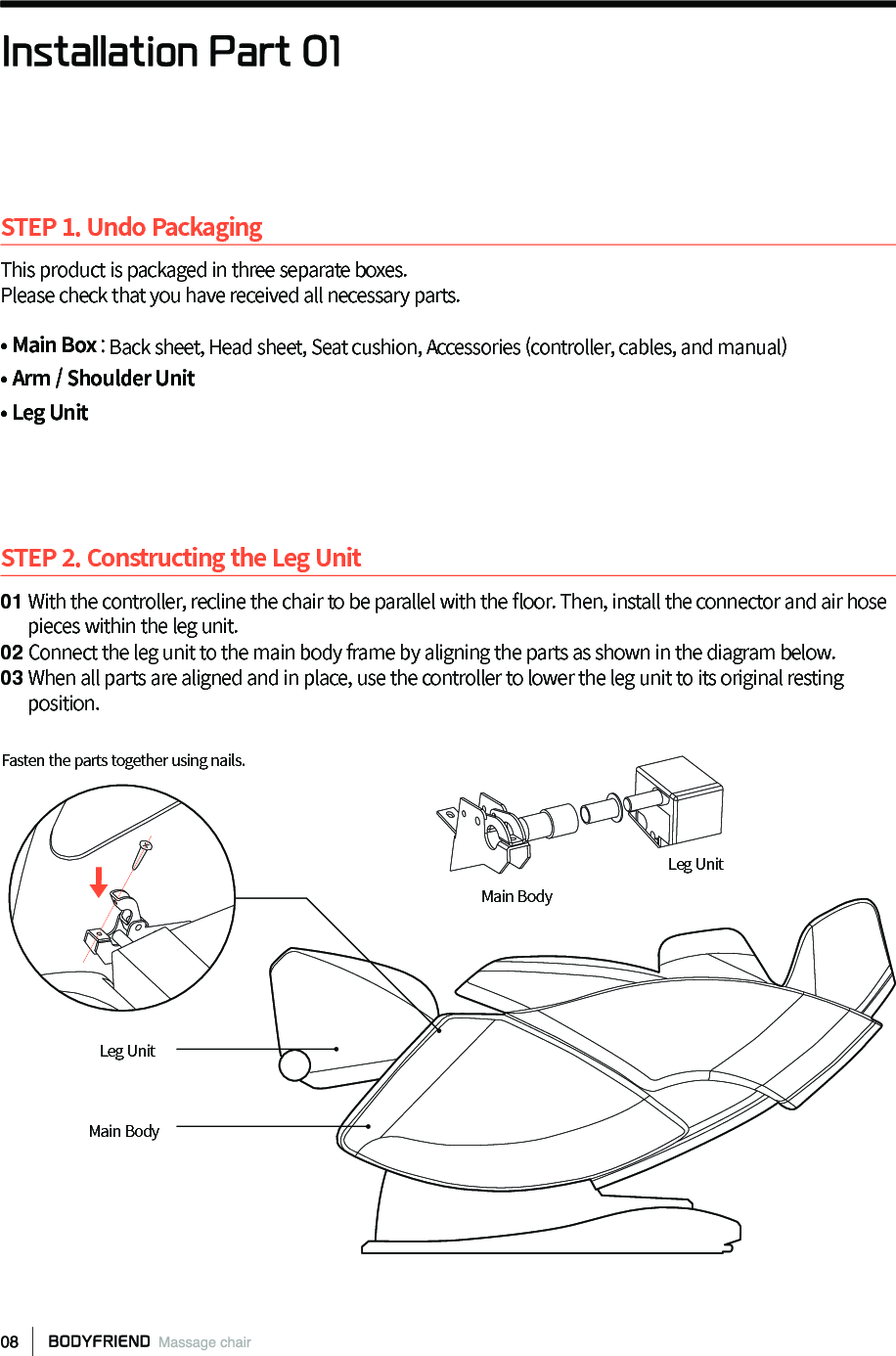
STEP 1. Undo PackagingThis product is packaged in three separate boxes.Please check that you have received all necessary parts.• Main Box : Back sheet, Head sheet, Seat cushion, Accessories (controller, cables, and manual)• Arm / Shoulder Unit • Leg UnitSTEP 2. Constructing the Leg Unit01 With the controller, recline the chair to be parallel with the 󼴪oor. Then, install the connector and air hose       pieces within the leg unit.02 Connect the leg unit to the main body frame by aligning the parts as shown in the diagram below. 03 When all parts are aligned and in place, use the controller to lower the leg unit to its original resting       position.Installation Part 01Main BodyMain BodyLeg UnitLeg UnitFasten the parts together using nails.
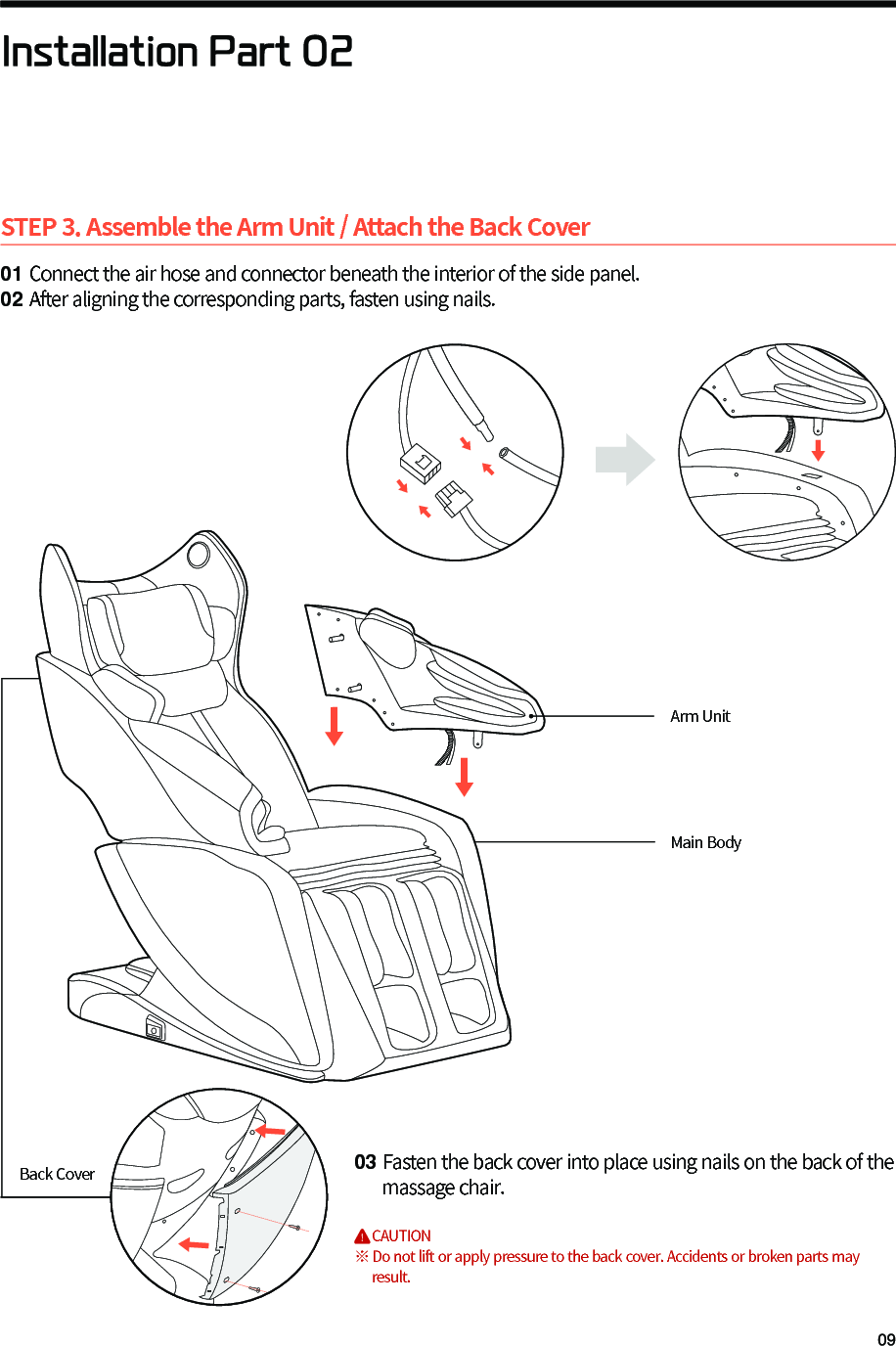
STEP 3. Assemble the Arm Unit / Attach the Back Cover01 Connect the air hose and connector beneath the interior of the side panel.02 After aligning the corresponding parts, fasten using nails.03 Fasten the back cover into place using nails on the back of the      massage chair.        CAUTION※ Do not lift or apply pressure to the back cover. Accidents or broken parts may      result.Installation Part 02Arm UnitMain BodyBack Cover
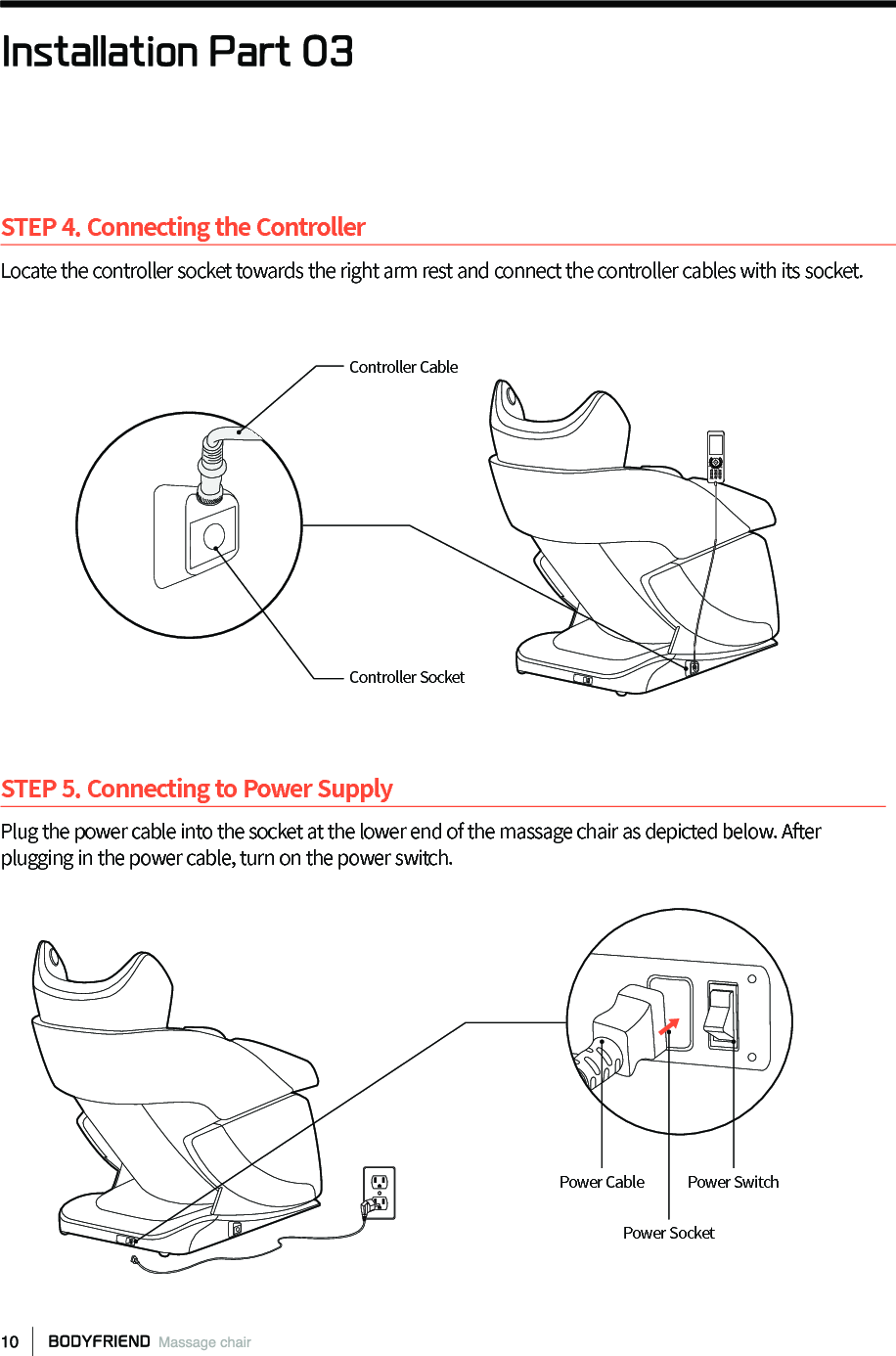
STEP 5. Connecting to Power SupplyPlug the power cable into the socket at the lower end of the massage chair as depicted below. After plugging in the power cable, turn on the power switch. STEP 4. Connecting the ControllerLocate the controller socket towards the right arm rest and connect the controller cables with its socket.Power SocketPower Cable Power SwitchController CableInstallation Part 03Controller Socket
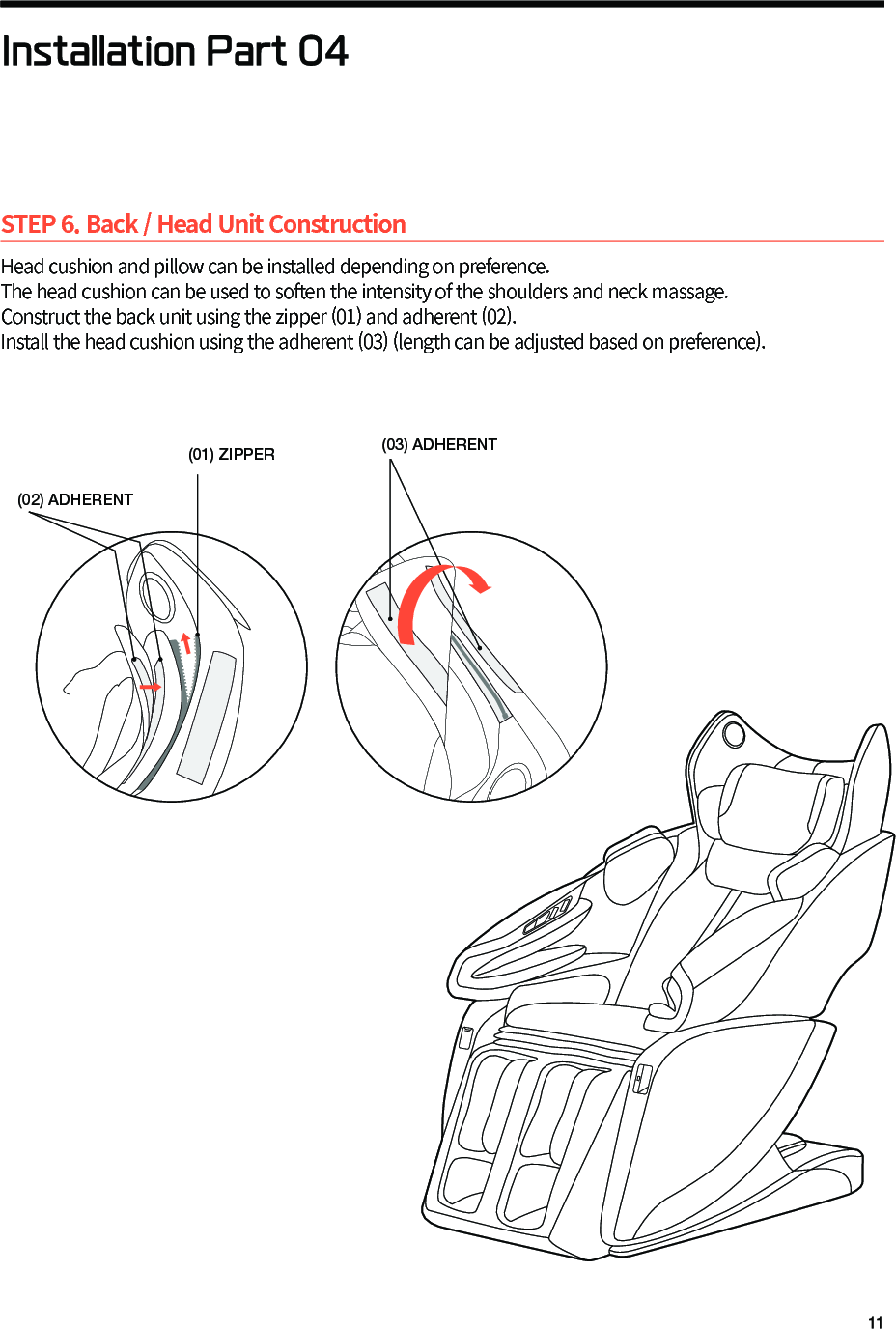
STEP 6. Back / Head Unit ConstructionHead cushion and pillow can be installed depending on preference.The head cushion can be used to soften the intensity of the shoulders and neck massage. Construct the back unit using the zipper (01) and adherent (02). Install the head cushion using the adherent (03) (length can be adjusted based on preference).Installation Part 04(03) ADHERENT(02) ADHERENT(01) ZIPPER
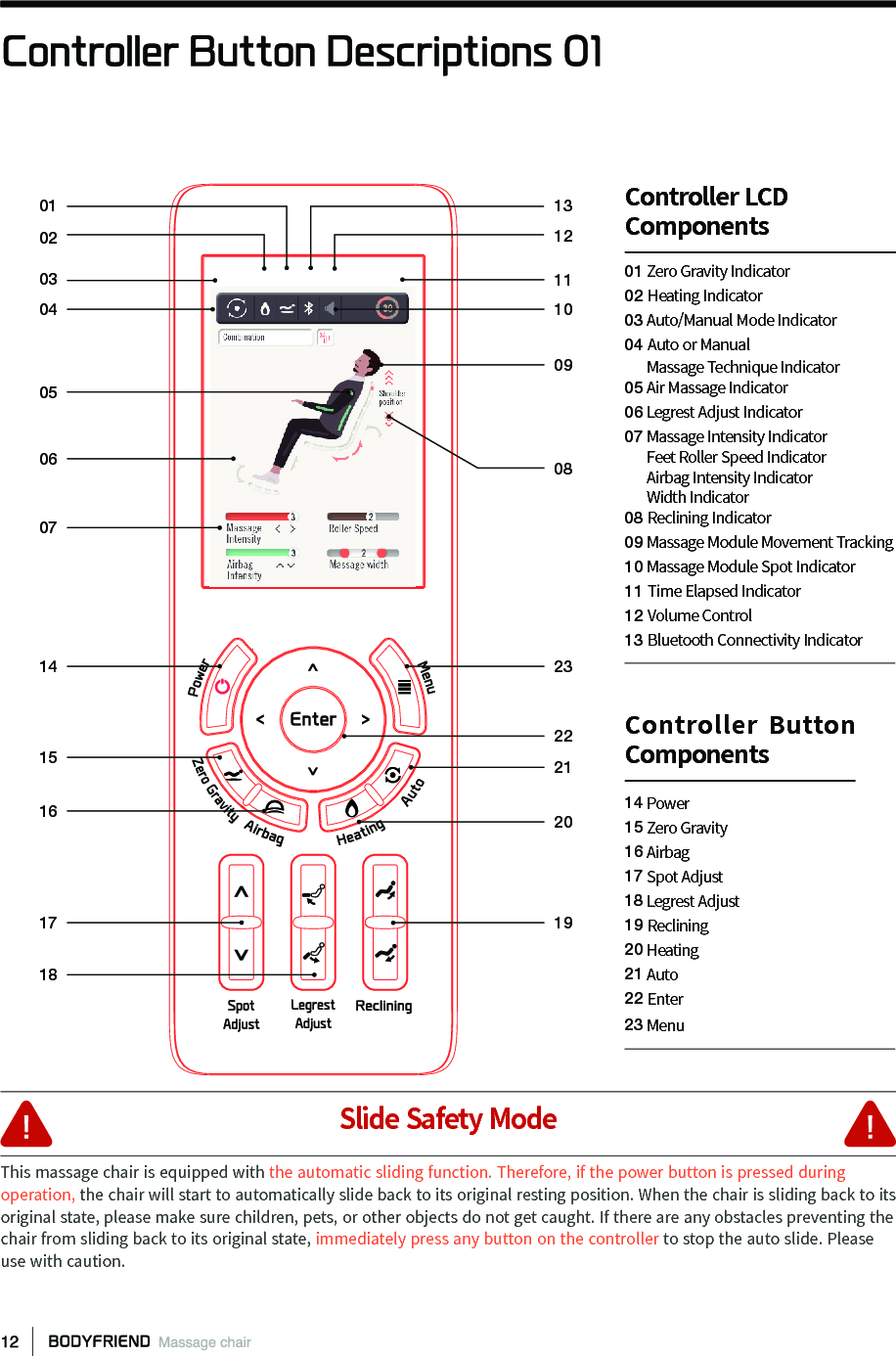
Controller Button Descriptions 01030201040506071415161718101112130908232122201901 Zero Gravity Indicator02 Heating Indicator03 Auto/Manual Mode Indicator04 Auto or Manual       Massage Technique Indicator05 Air Massage Indicator06 Legrest Adjust Indicator07 Massage Intensity Indicator      Feet Roller Speed Indicator      Airbag Intensity Indicator      Width Indicator08 Reclining Indicator09 Massage Module Movement Tracking10 Massage Module Spot Indicator11 Time Elapsed Indicator12 Volume Control13 Bluetooth Connectivity IndicatorController LCDComponents14 Power15 Zero Gravity 16 Airbag17 Spot Adjust18 Legrest Adjust19 Reclining20 Heating21 Auto22 Enter23 MenuController Button ComponentsSlide Safety ModeThis massage chair is equipped with the automatic sliding function. Therefore, if the power button is pressed during operation, the chair will start to automatically slide back to its original resting position. When the chair is sliding back to its original state, please make sure children, pets, or other objects do not get caught. If there are any obstacles preventing the chair from sliding back to its original state, immediately press any button on the controller to stop the auto slide. Please use with caution.
Controller Button Descriptions 02PowerThis is the power button. If the [Power] button is pressed during a massage, the screen will ask the user if he/she would like to end the massage. In the case of a ceased massage mode, massage balls, sliding features, and etc. will all return to its original resting state.Menu When the [Menu] button is pressed during operation, the menu screen will appear or take you back to the previous screen.Zero Gravity The [Zero Gravity] button will transition the body into the zero gravity position and angle.AirbagsWhen the [Airbag] button is pressed during operation, the airbag installation screen will appear, allowing airbag massage spot, intensity, and etc., to be adjusted.Auto  During a massage mode, press the [Auto] button to quickly transition the massage mode to a di󼴨erent auto massage mode. Heating Pressing the [Heating] button during operation will cause the heating screen to appear and heat temperature and heating location can be adjusted.Arrow Keys The arrow keys allow user to navigate the controller. On the main screen, the [left/right] buttons control massage intensity levels and the [up/down] buttons control airbag pressure levels.Spot AdjustThe controls displayed on the left adjust the spot of the massage balls on manual mode. The controls displaced on the left adjust the shoulder spot on automatic mode.Legrest Adjust  These buttons allow leg angles to be adjusted.Reclining Reclining buttons adjust the recline angles for the body.
Controller Function Descriptions 01StartPress the [Power] button to turn on the screen and activate the massage chair.When the child safety lock screen appears, hold down the [Enter] button for three seconds.FinishAfter 󼴩nishing a massage mode or if there isa need to quit during a massage, press the[Power] button. A screen will appear asking for con󼴩rmation toend the massage. Press [Enter] to con󼴩rm the end of the massagemode and the machine will shut down with allparts moving back to its original resting position.The child safety lock screen is emplaced as a safety precaution. After activating the controller, the child safety lock screen will appear requiring the user to hold down the [Enter] button for three seconds to transition to the next screen to start operating the massage chair. Users can make necessary changes in the settings option.The main screen shows the current state of the massage, time, and etc. [Right/Left] arrow keys control massage intensity levels.[Up/Down] arrow keys control airbag pressure levels.After the auto body scanning is complete, the [Up/Down] arrow keys allow shoulder spot adjustment.The menu screen will appear when the [Menu] button is pressed. Four options will appear: Auto Mode, Manual Mode, Massage Options, and Settings. Detailed massage setting can be accessed through Massage Options. Any other setting can be accessed through Settings.Child Safety Lock Screen  Main Screen  Menu Screen The pinch point prevention screen appears as a safety measure just before the device is turned o󼴨. Check for any objects that may prevent the chair from moving back to its original position and then press [Enter] to completely turn o󼴨 the device. Pinch Point Prevention Screen030102
Controller Function Descriptions 02Auto Modes[Menu] > Auto > Use the [Up/Down] arrow keys to pick preferred massage modes > [Enter] > Auto Body Scanning will use sensors to pinpoint areas of your body > Massage balls will relocate to corresponding locations > Massage session will begin.Refresh Massage mode that simultaneously uses kneading and tapping techniques on targeted shoulder area.Relax Massage mode concentrated on shoulders, back, and waist through continuous kneading and tapping.Hip-Up Massage mode that alternates acupressure and kneading techniques on the buttocks.Rest Massage mode that provides 30 minutes of concentrated kneading for the entire back.Athlete Massage mode that combines tapping, kneading, and acupressure techniques targeting the shoulders while operating dual chopping feet rollers.O󼴫ce Massage mode using tapping and acupressure massaging techniques focusing on the waist while automatically reclining the body at di󼴨erent angles to promote relaxation.Stretch Massage mode using tapping and kneading techniques while fully reclining the body at di󼴨erent angles to gently stretch the legs and body separately.Auto Upper  Massage mode that provides tapping for the shoulders and back while using acupressure and various other massaging techniques for the upper body.Auto Lower   Massage mode relieves tension in the lower body area by concentrating on the legs and operating rollers for the feet. Lymphatic Massage mode uses pinpointed massage therapy to stimulate the lymphatic system to drain toxins from the body.DigestiveMassage mode uses acupressure massage techniques to facilitate digestion, ease hangovers, and improve circulation throughout the arms and legs to the digestive organs.WaistFocused Massage mode uses massage balls targeted around the body's core to strengthen the waist and improve body posture.
Controller Function Descriptions 03Manual Modes[Menu] > Manual Mode > Choose preferred area of massage on the body > (Press [Menu] to go back to previous screen)[Up/Down] > Choose massage techniques > [Enter] > Massage set-up screen will appear[Right/Left] to personalize massage options > [Enter] to start massage mode.※ While in Auto Massage Mode, Manual Mode Options (massage techniques/spot/intensity) cannot be adjusted.󰦚 󰦚󰦚󰦚SpotAdjustAdjust the area of the back-side that needs to be massaged.Full Body: This massage incorporates all areas of the body.Shoulders: Massages area from the neck to shoulders.Back/Waist: Massages back and waist area.Buttocks: Massage the buttocks area.Leg: Massages the legs (detailed massage options cannot be adjusted)Massage TechniquesChoose among (kneading/tapping/chopping/combination (kneading and tapping)/acupressure) massage techniques.Speci󼴩cSettingsMassage intensity, width, and shift speeds are able to be adjusted.-Shift Speed: Speed in which massage balls move from upper body to lower body can be  adjusted from Level 1 to Level 3.-Intensity Levels: Di󼴨erent intensity level options starting from Level 1 to Level 3.-Width: Width of the massage modules can be adjusted (narrow/medium/wide)
Controller Function Descriptions 04Roller SpeedAdjust roller speeds for the feet, change to manual feet massage mode, and use [Right/Left] arrow keys to adjust roller speeds.HeatingThere are heating options for the back and waist. Heating temperature can also be adjusted in increments of 9°F from 86°F to 140°F. [Right/Left] arrow keys control di󼴨erent heating levels and at level 0, the heating function is shut o󼴨.AirbagsAirbag massage function (Airbag Spot/Intensity) can be set up.[Up/Down] arrow keys adjust the location of airbags.[Right/Left] arrow keys adjust airbag levels.󰦚󰦚 󰦚[Menu] > [Massage options] > roller speed, heating, airbag settings can be adjusted.
Controller Function Descriptions 05[Menu] > SettingsSet up massage duration times, child safety lock screen, language, Bluetooth connectivity, audio guidance volume, and etc.Child Safety Lock Screen Child safety lock screen can be emplaced to prevent young children from operating the massage chair. If the safety lock screen is set up, it will appear when the controller is turned on. When this screen appears, hold down the [Enter] button for three seconds to proceed to the main screen. Under settings, [Right/Left] arrow keys switch the safety lock screen on/o󼴨.Audio Guide Volume Audio guidance can be turned on/o󼴨 and volume controls can also be adjusted.LanguageChange language settings to either Korean, Chinese, or English. Use the [Right/Left] arrow keys to switch between languages to pick the preferred language.Time Elapsed Set massage duration times for 15/20/25/30 mins. [Right/Left] arrow keys increase or decrease duration times.(Sleep mode is pre-set at 30 min. and cannot be adjusted).Bluetooth Connectivity Sync personal mobile device with Bluetooth function to play music through the speakers while receiving a massage. Bluetooth Connectivity 01 Use the controller to turn the         Bluetooth function on under the       settings menu.02 Turn Bluetooth ON on mobile       device.03Pair the devices by 󼴩nding  "BODYFRIEND REX-BT1 "
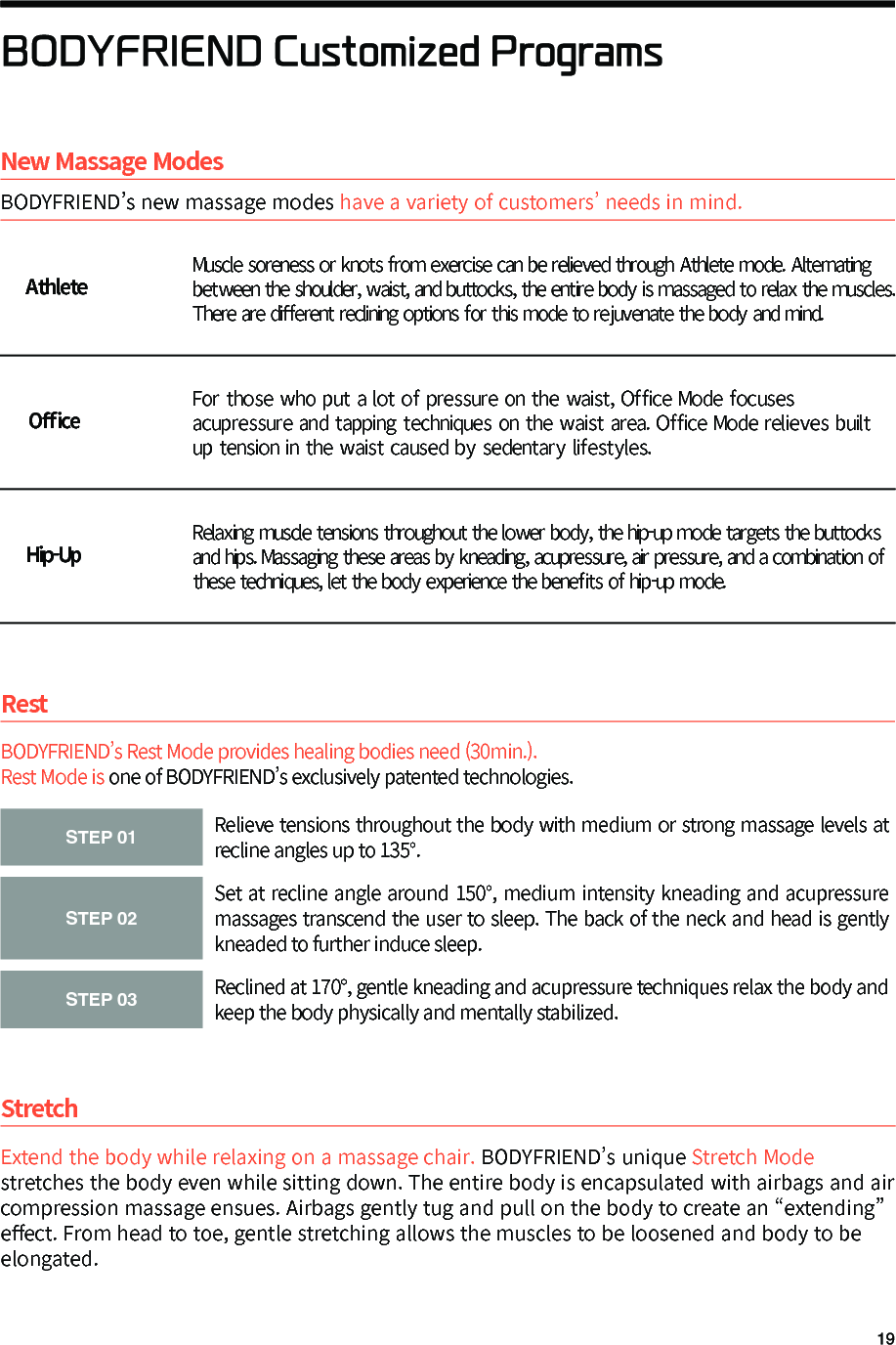
BODYFRIEND Customized ProgramsStretchExtend the body while relaxing on a massage chair. BODYFRIEND’s unique Stretch Mode stretches the body even while sitting down. The entire body is encapsulated with airbags and air compression massage ensues. Airbags gently tug and pull on the body to create an “extending” e󼴨ect. From head to toe, gentle stretching allows the muscles to be loosened and body to be elongated.STEP 01Relieve tensions throughout the body with medium or strong massage levels at recline angles up to 135°.STEP 02Set at recline angle around 150°, medium intensity kneading and acupressure massages transcend the user to sleep. The back of the neck and head is gently kneaded to further induce sleep.STEP 03Reclined at 170°, gentle kneading and acupressure techniques relax the body and keep the body physically and mentally stabilized.BODYFRIEND’s Rest Mode provides healing bodies need (30min.).Rest Mode is one of BODYFRIEND’s exclusively patented technologies.RestNew Massage ModesBODYFRIEND’s new massage modes have a variety of customers’ needs in mind.AthleteO󼴫ce Hip-UpMuscle soreness or knots from exercise can be relieved through Athlete mode. Alternating between the shoulder, waist, and buttocks, the entire body is massaged to relax the muscles. There are di󼴨erent reclining options for this mode to rejuvenate the body and mind.For those who put a lot of pressure on the waist, Office Mode focuses acupressure and tapping techniques on the waist area. Office Mode relieves built up tension in the waist caused by sedentary lifestyles.Relaxing muscle tensions throughout the lower body, the hip-up mode targets the buttocks and hips. Massaging these areas by kneading, acupressure, air pressure, and a combination of these techniques, let the body experience the bene󼴩ts of hip-up mode.
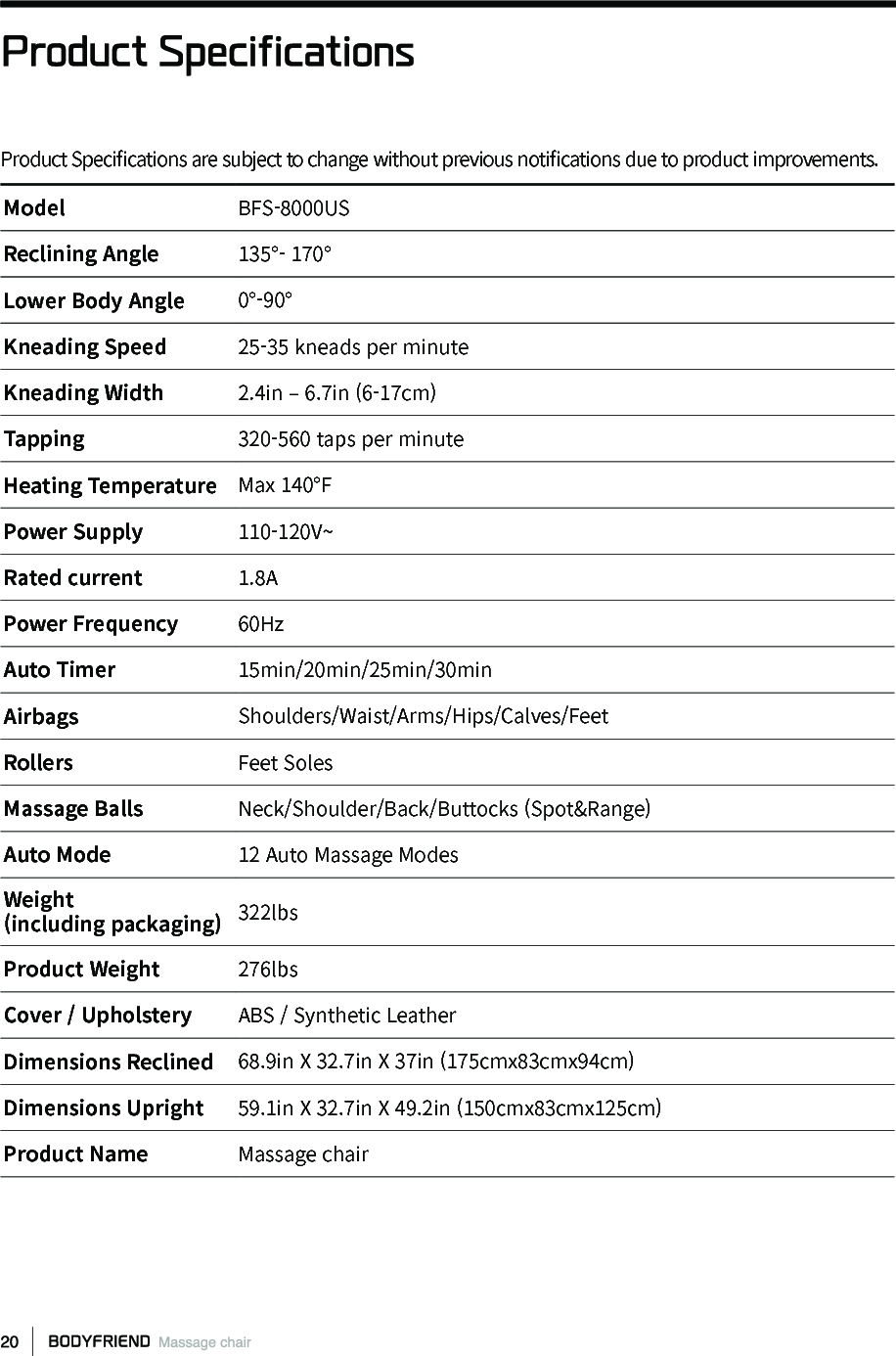
Product SpecificationsModel BFS-8000USReclining Angle 135°- 170° Lower Body Angle 0°-90°Kneading Speed 25-35 kneads per minuteKneading Width 2.4in – 6.7in (6-17cm) Tapping 320-560 taps per minuteHeating Temperature Max 140°FPower Supply 110-120V~Rated current 1.8APower Frequency 60Hz Auto Timer 15min/20min/25min/30minAirbags Shoulders/Waist/Arms/Hips/Calves/FeetRollers Feet SolesMassage Balls Neck/Shoulder/Back/Buttocks (Spot&Range)Auto Mode 12 Auto Massage ModesWeight(including packaging) 322lbsProduct Weight 276lbsCover / Upholstery ABS / Synthetic LeatherDimensions Reclined 68.9in X 32.7in X 37in (175cmx83cmx94cm) Dimensions Upright 59.1in X 32.7in X 49.2in (150cmx83cmx125cm) Product Name Massage chairProduct Speci󼴩cations are subject to change without previous noti󼴩cations due to product improvements.
TroubleshootingProblem Causes SolutionsMassage chair doesnot operate.Controller [Power] Button isnot turned on.Press [Power] to turn on thecontroller on.Auto Mode was not selected. Press [Enter] to select an Auto mode.Power cord is not properlyplugged in.  Properly plug power cord into socket.Dead power cord. Please contact Customer Support.Burnt fuse.  Please contact Customer Support.Non-electrical problem. Please contact Customer Support.Beeping during activation. Machine noises occur. Not a problem. Machines generate noise.Right and left shoulder massage balls donot align. Massage balls are manufacturedwith about 0.8”(2cm) di󼴨erencein alignment.Not a malfunction. Purposelymanufactured to createdalternating massage e󼴨ects. Noises get louderduring use.After extended hours of operation. Please turn o󼴨 the machine for30min and start again.Worn out after years of use. Please contact Customer Support.Machine suddenlystops during massage.Accidently pressed the OFF button. Press the [Power] to restart the machine.Massage time has 󼴩nished. Restart the massage after 30 minutes.Back motor andlegangle motor doesnot move. Check for any stuck objects. Remove stuck objects.Excessive pressure applied. Please turn o󼴨 the machine for30 mins and start again. Does not go back tooriginal resting state. Aggressive use. Please contact Customer Support.Controller overheating. Overuse. Please contact Customer Support.Power cord andcontroller cord overheating.Excessive use. Please turn o󼴨 machine for 30 minand start again.Other miscellaneous causes. Please contact Customer Support. Airbags don’t activate.Air hose disconnected. Connect the air hose.Air related power corddisconnected. Please contact Customer Support.If you encounter minor malfunctions or errors, please refer below before contacting Customer Support.
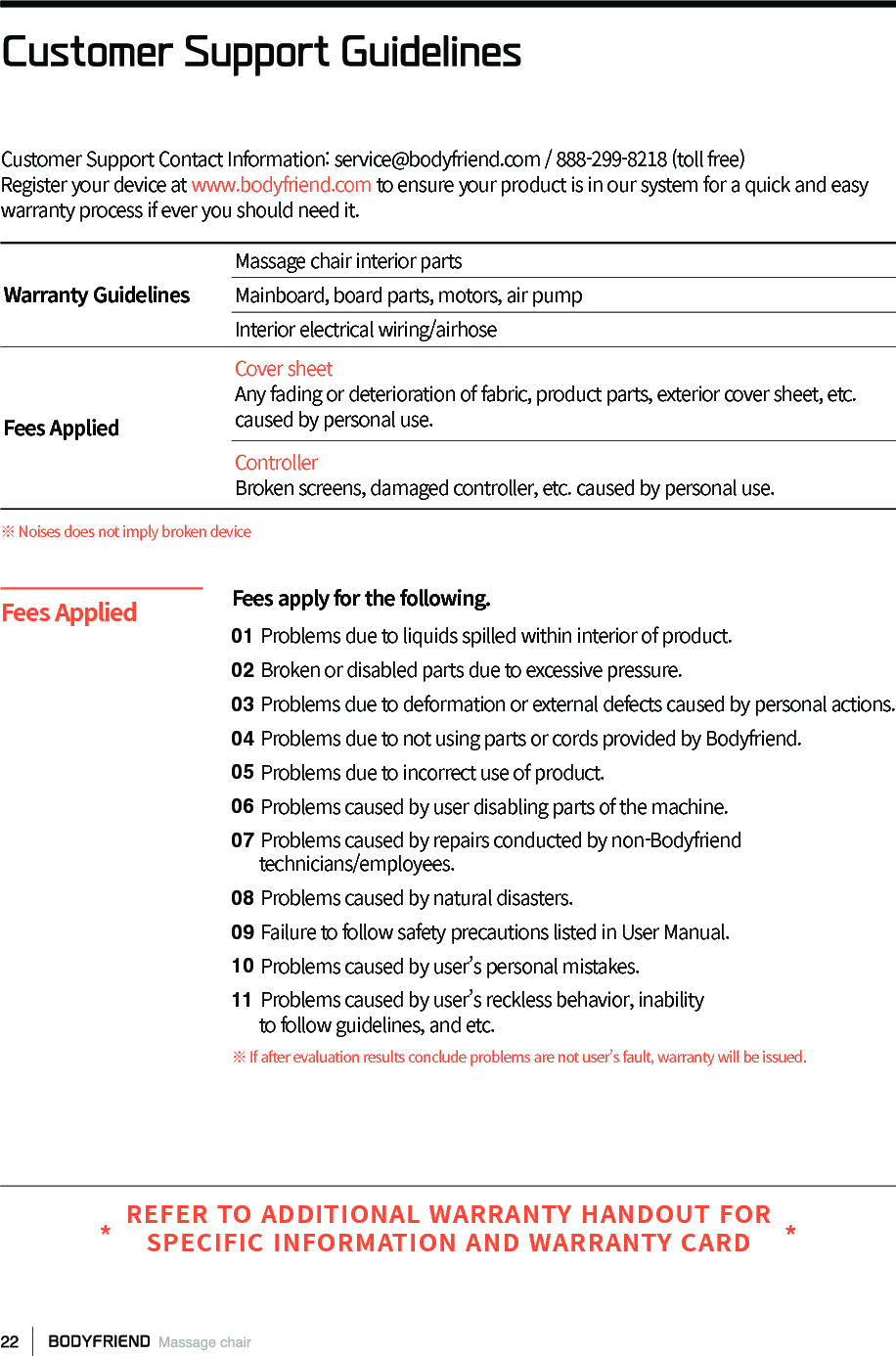
Customer Support Contact Information: service@bodyfriend.com / 888-299-8218 (toll free)Register your device at www.bodyfriend.com to ensure your product is in our system for a quick and easy warranty process if ever you should need it. Customer Support GuidelinesWarranty GuidelinesMassage chair interior partsMainboard, board parts, motors, air pumpInterior electrical wiring/airhoseFees AppliedCover sheetAny fading or deterioration of fabric, product parts, exterior cover sheet, etc. caused by personal use.ControllerBroken screens, damaged controller, etc. caused by personal use. ※ Noises does not imply broken deviceFees apply for the following.01 Problems due to liquids spilled within interior of product.02 Broken or disabled parts due to excessive pressure.03 Problems due to deformation or external defects caused by personal actions.04 Problems due to not using parts or cords provided by Bodyfriend.05 Problems due to incorrect use of product.06 Problems caused by user disabling parts of the machine.07 Problems caused by repairs conducted by non-Bodyfriend      technicians/employees.08 Problems caused by natural disasters.09 Failure to follow safety precautions listed in User Manual.10 Problems caused by user’s personal mistakes.11 Problems caused by user’s reckless behavior, inability      to follow guidelines, and etc.※ If after evaluation results conclude problems are not user’s fault, warranty will be issued.Fees AppliedREFER TO ADDITIONAL WARRANTY HANDOUT FOR SPECIFIC INFORMATION AND WARRANTY CARD* *
Memo
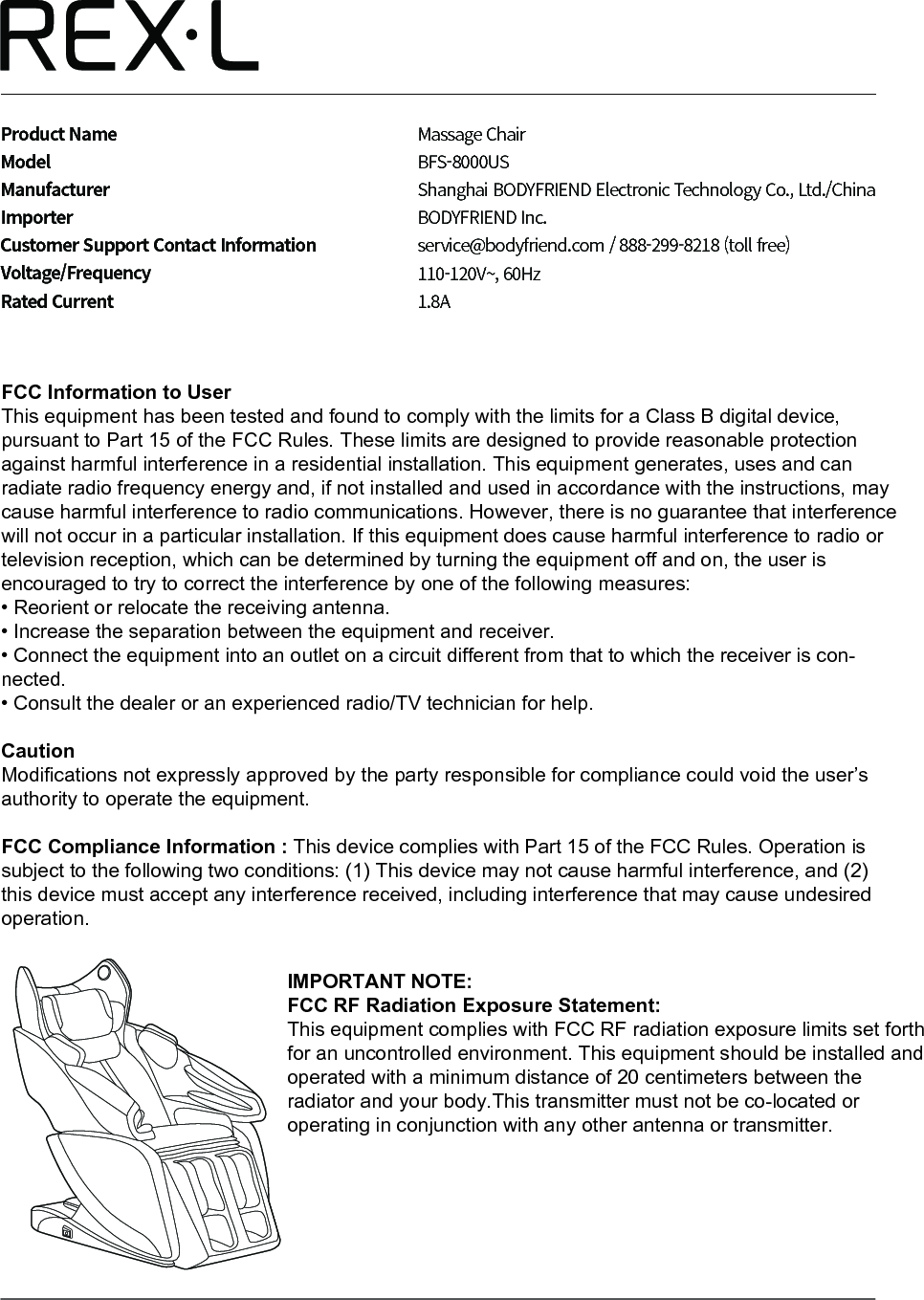
Product NameModelManufacturerImporterCustomer Support Contact InformationVoltage/FrequencyRated CurrentMassage Chair BFS-8000USShanghai BODYFRIEND Electronic Technology Co., Ltd./ChinaBODYFRIEND Inc.service@bodyfriend.com / 888-299-8218 (toll free)110-120V~, 60Hz1.8AFCC Information to UserThis equipment has been tested and found to comply with the limits for a Class B digital device, pursuant to Part 15 of the FCC Rules. These limits are designed to provide reasonable protection against harmful interference in a residential installation. This equipment generates, uses and can radiate radio frequency energy and, if not installed and used in accordance with the instructions, may cause harmful interference to radio communications. However, there is no guarantee that interference will not occur in a particular installation. If this equipment does cause harmful interference to radio or television reception, which can be determined by turning the equipment off and on, the user is encouraged to try to correct the interference by one of the following measures:• Reorient or relocate the receiving antenna.• Increase the separation between the equipment and receiver.• Connect the equipment into an outlet on a circuit different from that to which the receiver is con-nected.• Consult the dealer or an experienced radio/TV technician for help.CautionModifications not expressly approved by the party responsible for compliance could void the user’s authority to operate the equipment.FCC Compliance Information : This device complies with Part 15 of the FCC Rules. Operation is subject to the following two conditions: (1) This device may not cause harmful interference, and (2) this device must accept any interference received, including interference that may cause undesired operation.IMPORTANT NOTE:FCC RF Radiation Exposure Statement:This equipment complies with FCC RF radiation exposure limits set forth for an uncontrolled environment. This equipment should be installed and operated with a minimum distance of 20 centimeters between the radiator and your body.This transmitter must not be co-located or operating in conjunction with any other antenna or transmitter.

Navigation menu