CLEVER BRIGHT CB-33507 COLOR CHANGING BLUETOOTH TRANGLE SPEAKERS User Manual CB 335072 manual draft 12 11

CLEVER BRIGHT INTERNATIONAL (H.K.) LTD. COLOR CHANGING BLUETOOTH TRANGLE SPEAKERS CB 335072 manual draft 12 11

User manual

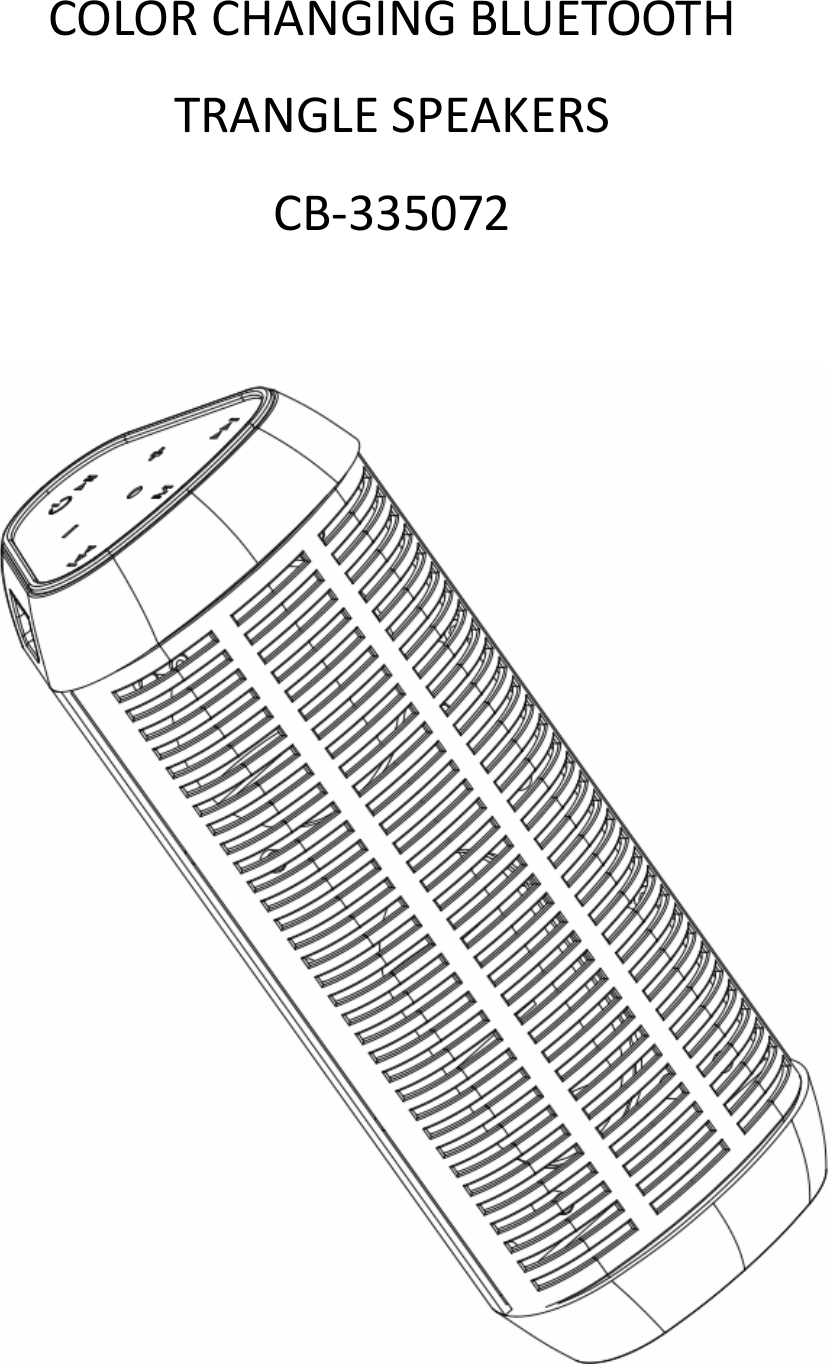
  COLORCHANGINGBLUETOOTHTRANGLESPEAKERSCB‐335072
  INSTRUCTIONMANUALPLEASEREADALLINSTRUCTIONSCAREFULLY&RETAINFORFUTUREUSEGettingStartedRemovetheunitfromthebox.Removeanypackagingfromtheproduct.Pleaseretainallpackaginguntilyouhavecheckedandcountedallthepartsandthecontentsagainstthepartslist.PackageContentsBT560LightShowSpeakerUSBrechargeablecable3.5mmAUXplugcableInstructionmanualFeatures1. WirelessBluetoothconnectivitytoiPad,iPodTouch,Android,WindowsPhone,Blackberry,smartphones,tablets,computersandmore.2. Multi‐ColorLightsjivetothebeatofmusic.3. PlaymusicthroughBluetooth,AuxiliaryandMicroSDCard*&USBFlashDrive*.4. FMradio5. Rechargeablebuilt‐inbattery*MicroSDCard&USBFlashDrivenotincluded.IMPORTANTSAFETYINFORMATION1. Readallinstructionsbeforeusingthisproduct.2. Donotleavethisproductunattendedwhileconnectedtothepowersupply.3. Donotimmerseinwateroranyotherliquids.4. Donotuseifunithasbeendroppedordamagedinanyway.5. Improperrepairsmayplaceuseratseriousrisk.Repairstoelectricalequipmentshouldonlybeperformedbyqualifiedpersonnel.Placeunitonsound,evensurface,freeofvibrationsandawayfromsourcesof6. heat.7. Donotusewithwethands.8. Keepfreeofdust,lint,hairetc.9. Donotputobjectsintoopenings.10. Donotusethisunitforanythingotherthanitsintendeduse.
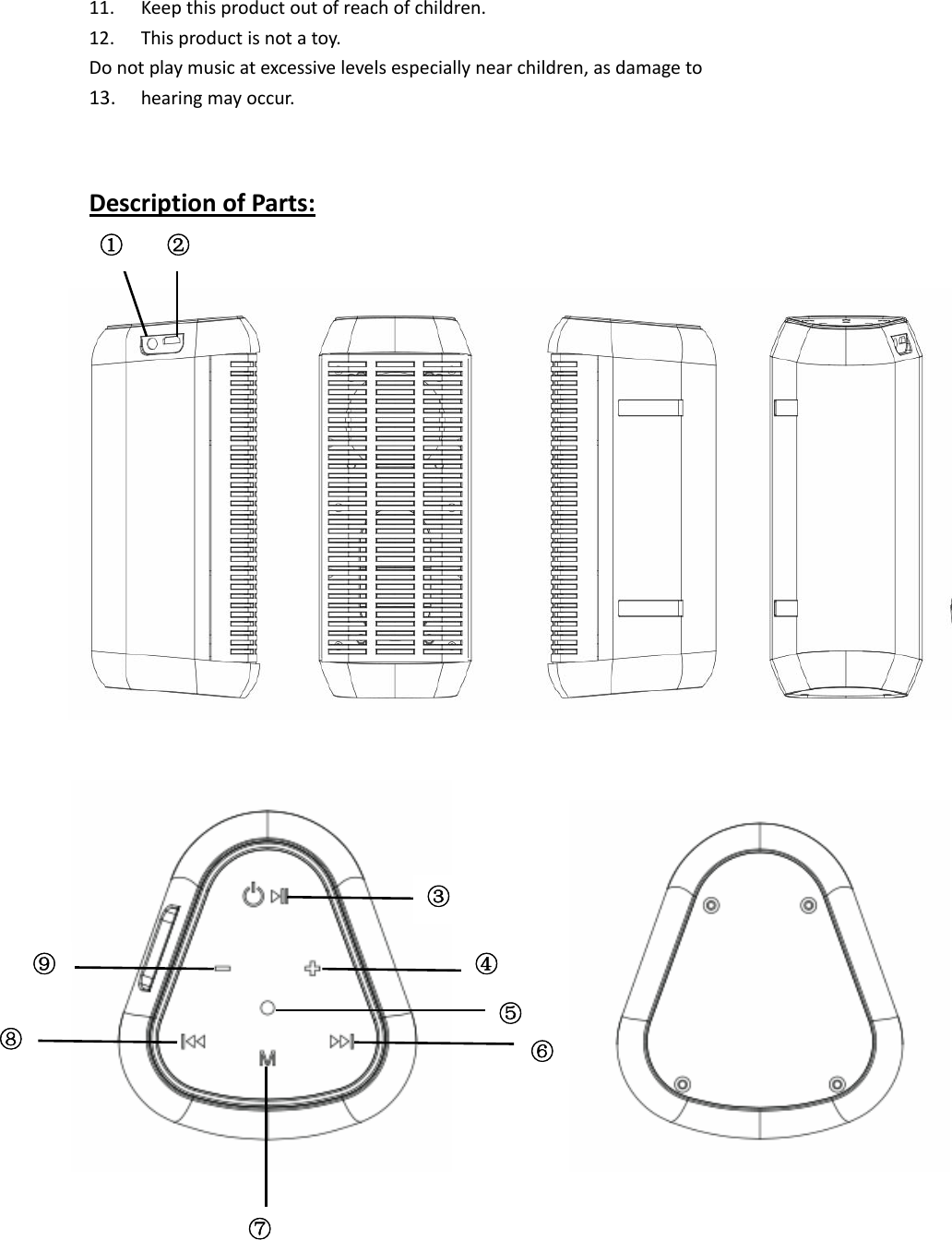
  11. Keepthisproductoutofreachofchildren.12. Thisproductisnotatoy.Donotplaymusicatexcessivelevelsespeciallynearchildren,asdamageto13. hearingmayoccur.DescriptionofParts:③ ⑤④⑥⑧ ⑦ ⑨ ① ②
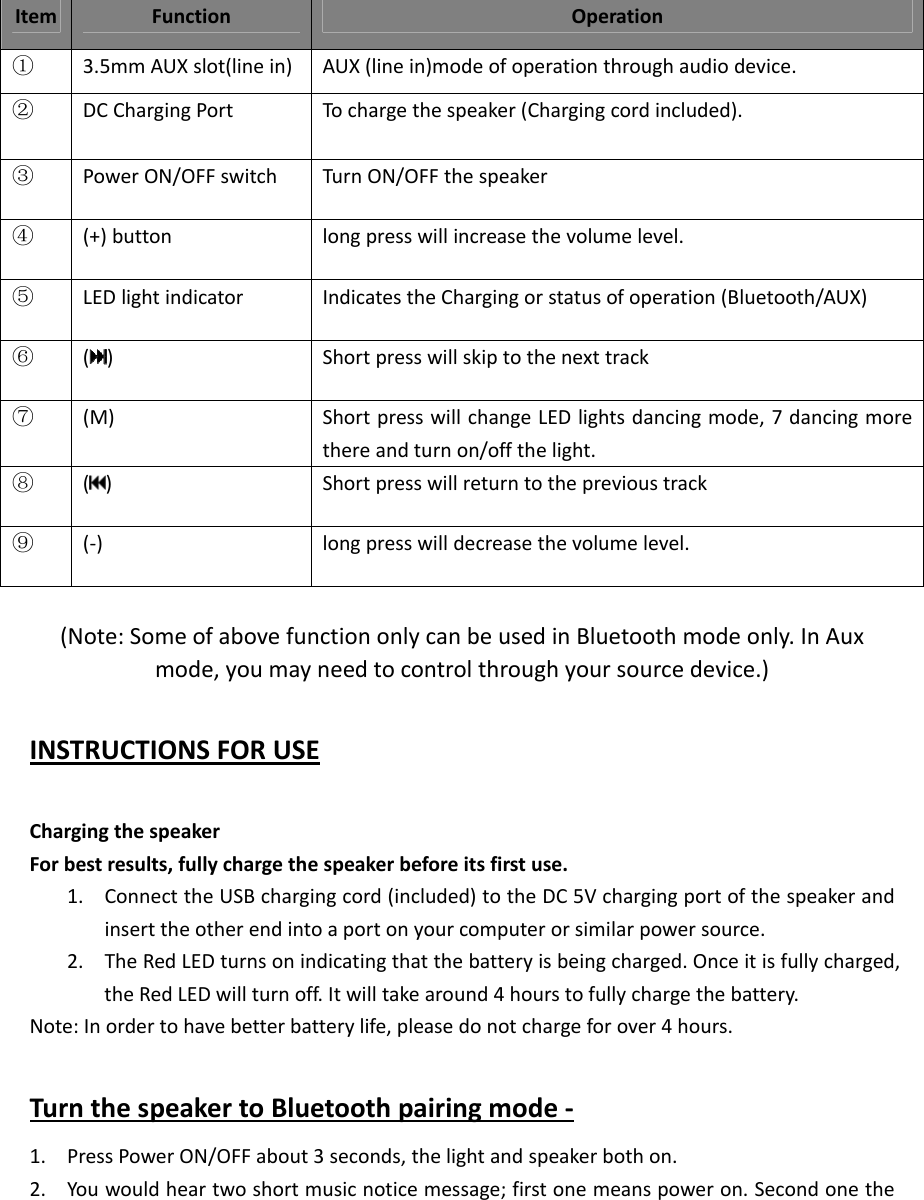
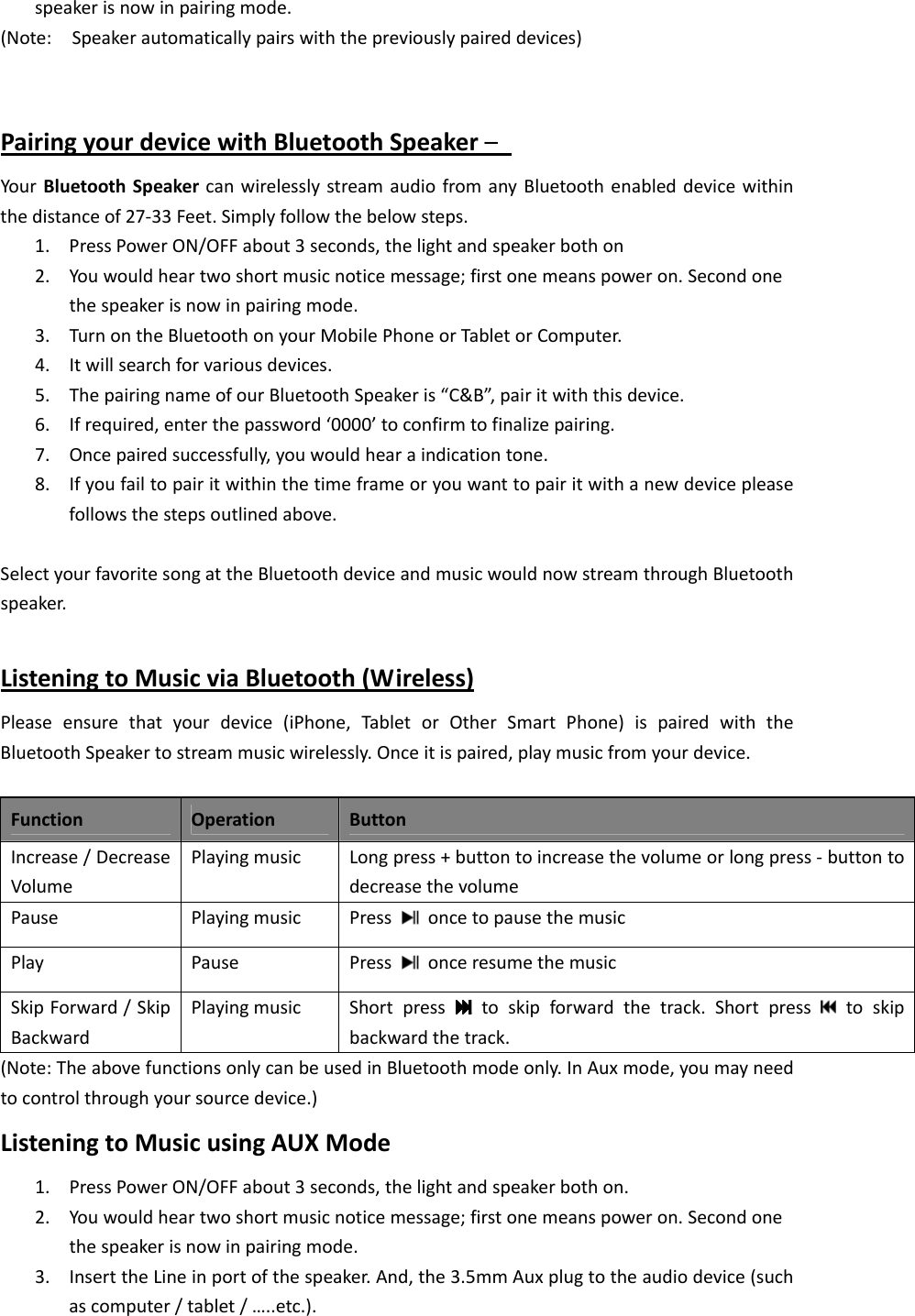
  (Note:SomeofabovefunctiononlycanbeusedinBluetoothmodeonly.InAuxmode,youmayneedtocontrolthroughyoursourcedevice.)INSTRUCTIONSFORUSEChargingthespeakerForbestresults,fullychargethespeakerbeforeitsfirstuse.1. ConnecttheUSBchargingcord(included)totheDC5Vchargingportofthespeakerandinserttheotherendintoaportonyourcomputerorsimilarpowersource.2. TheRedLEDturnsonindicatingthatthebatteryisbeingcharged.Onceitisfullycharged,theRedLEDwillturnoff.Itwilltakearound4hourstofullychargethebattery.Note:Inordertohavebetterbatterylife,pleasedonotchargeforover4hours.TurnthespeakertoBluetoothpairingmode‐1. PressPowerON/OFFabout3seconds,thelightandspeakerbothon.2. Youwouldheartwoshortmusicnoticemessage;firstonemeanspoweron.SecondonetheItemFunctionOperation①3.5mmAUXslot(linein)AUX(linein)modeofoperationthroughaudiodevice.②DCChargingPortTochargethespeaker(Chargingcordincluded).③PowerON/OFFswitchTurnON/OFFthespeaker④(+)buttonlongpresswillincreasethevolumelevel.⑤LEDlightindicatorIndicatestheChargingorstatusofoperation(Bluetooth/AUX)⑥( )Shortpresswillskiptothenexttrack⑦(M)ShortpresswillchangeLEDlightsdancingmode,7dancingmorethereandturnon/offthelight.⑧( ) Shortpresswillreturntotheprevioustrack⑨(‐) longpresswilldecreasethevolumelevel.
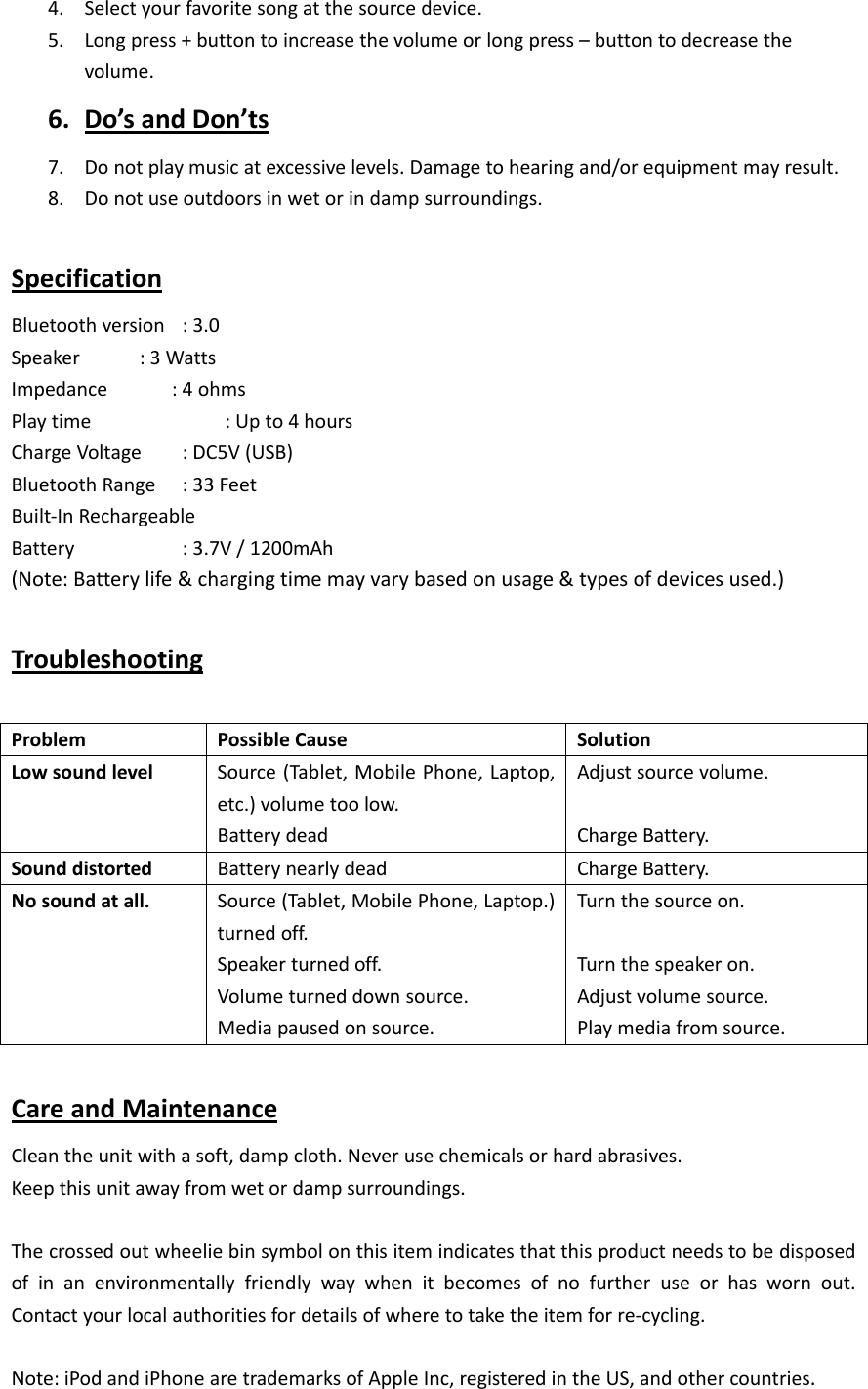
  speakerisnowinpairingmode.(Note:Speakerautomaticallypairswiththepreviouslypaireddevices)PairingyourdevicewithBluetoothSpeaker– YourBluetoothSpeakercanwirelesslystreamaudiofromanyBluetoothenableddevicewithinthedistanceof27‐33Feet.Simplyfollowthebelowsteps.1. PressPowerON/OFFabout3seconds,thelightandspeakerbothon2. Youwouldheartwoshortmusicnoticemessage;firstonemeanspoweron.Secondonethespeakerisnowinpairingmode.3. TurnontheBluetoothonyourMobilePhoneorTabletorComputer.4. Itwillsearchforvariousdevices.5. ThepairingnameofourBluetoothSpeakeris“C&B”,pairitwiththisdevice.6. Ifrequired,enterthepassword‘0000’toconfirmtofinalizepairing.7. Oncepairedsuccessfully,youwouldhearaindicationtone.8. Ifyoufailtopairitwithinthetimeframeoryouwanttopairitwithanewdevicepleasefollowsthestepsoutlinedabove.SelectyourfavoritesongattheBluetoothdeviceandmusicwouldnowstreamthroughBluetoothspeaker.ListeningtoMusicviaBluetooth(Wireless)Pleaseensurethatyourdevice(iPhone,TabletorOtherSmartPhone)ispairedwiththeBluetoothSpeakertostreammusicwirelessly.Onceitispaired,playmusicfromyourdevice.FunctionOperationButtonIncrease/DecreaseVolumePlayingmusicLongpress+buttontoincreasethevolumeorlongpress‐buttontodecreasethevolumePausePlayingmusicPress  oncetopausethemusicPlayPausePress  onceresumethemusicSkipForward/SkipBackwardPlayingmusicShortpress  toskipforwardthetrack.Shortpress toskipbackwardthetrack.(Note:TheabovefunctionsonlycanbeusedinBluetoothmodeonly.InAuxmode,youmayneedtocontrolthroughyoursourcedevice.)ListeningtoMusicusingAUXMode1. PressPowerON/OFFabout3seconds,thelightandspeakerbothon.2. Youwouldheartwoshortmusicnoticemessage;firstonemeanspoweron.Secondonethespeakerisnowinpairingmode.3. InserttheLineinportofthespeaker.And,the3.5mmAuxplugtotheaudiodevice(suchascomputer/tablet/…..etc.).
  4. Selectyourfavoritesongatthesourcedevice.5. Longpress+buttontoincreasethevolumeorlongpress–buttontodecreasethevolume.6. Do’sandDon’ts7. Donotplaymusicatexcessivelevels.Damagetohearingand/orequipmentmayresult.8. Donotuseoutdoorsinwetorindampsurroundings.SpecificationBluetoothversion:3.0Speaker :3WattsImpedance:4ohmsPlaytime :Upto4hoursChargeVoltage:DC5V(USB)BluetoothRange:33FeetBuilt‐InRechargeableBattery  :3.7V/1200mAh(Note:Batterylife&chargingtimemayvarybasedonusage&typesofdevicesused.)TroubleshootingProblemPossibleCauseSolutionLowsoundlevelSource(Tablet,MobilePhone,Laptop,etc.)volumetoolow.BatterydeadAdjustsourcevolume.ChargeBattery.SounddistortedBatterynearlydeadChargeBattery.Nosoundatall.Source(Tablet,MobilePhone,Laptop.)turnedoff.Speakerturnedoff.Volumeturneddownsource.Mediapausedonsource.Turnthesourceon.Turnthespeakeron.Adjustvolumesource.Playmediafromsource.CareandMaintenanceCleantheunitwithasoft,dampcloth.Neverusechemicalsorhardabrasives.Keepthisunitawayfromwetordampsurroundings.Thecrossedoutwheeliebinsymbolonthisitemindicatesthatthisproductneedstobedisposedofinanenvironmentallyfriendlywaywhenitbecomesofnofurtheruseorhaswornout.Contactyourlocalauthoritiesfordetailsofwheretotaketheitemforre‐cycling.Note:iPodandiPhonearetrademarksofAppleInc,registeredintheUS,andothercountries.
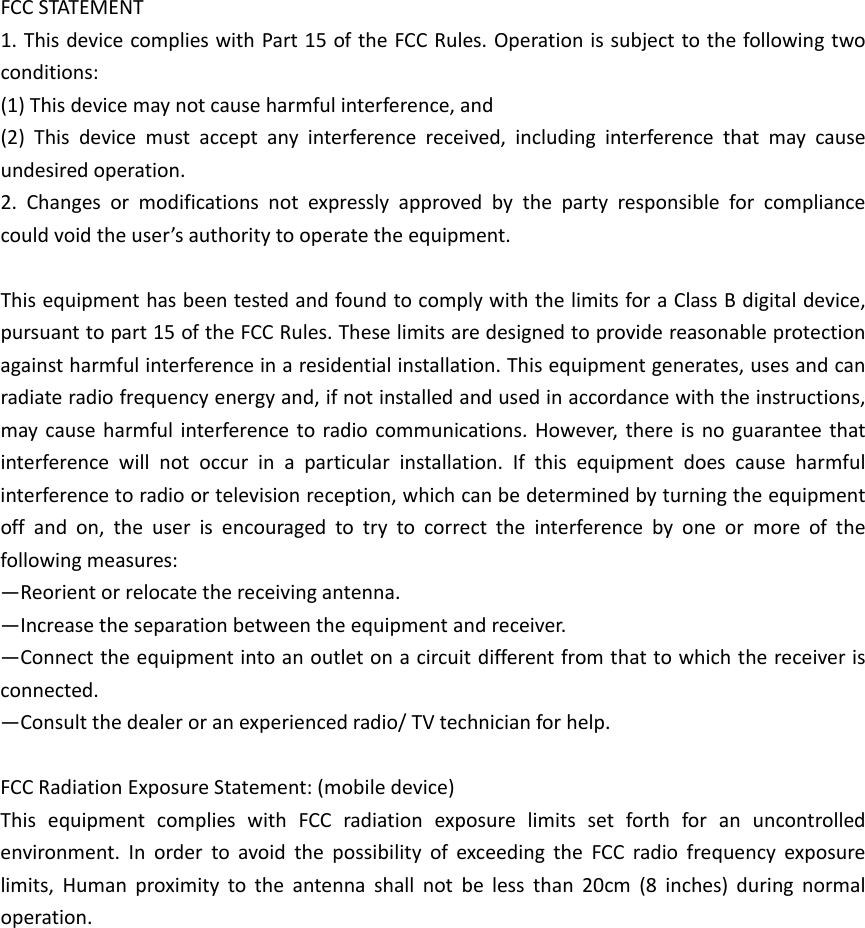
  FCCSTATEMENT1.ThisdevicecomplieswithPart15oftheFCCRules.Operationissubjecttothefollowingtwoconditions:(1)Thisdevicemaynotcauseharmfulinterference,and(2)Thisdevicemustacceptanyinterferencereceived,includinginterferencethatmaycauseundesiredoperation.2.Changesormodificationsnotexpresslyapprovedbythepartyresponsibleforcompliancecouldvoidtheuser’sauthoritytooperatetheequipment.ThisequipmenthasbeentestedandfoundtocomplywiththelimitsforaClassBdigitaldevice,pursuanttopart15oftheFCCRules.Theselimitsaredesignedtoprovidereasonableprotectionagainstharmfulinterferenceinaresidentialinstallation.Thisequipmentgenerates,usesandcanradiateradiofrequencyenergyand,ifnotinstalledandusedinaccordancewiththeinstructions,maycauseharmfulinterferencetoradiocommunications.However,thereisnoguaranteethatinterferencewillnotoccurinaparticularinstallation.Ifthisequipmentdoescauseharmfulinterferencetoradioortelevisionreception,whichcanbedeterminedbyturningtheequipmentoffandon,theuserisencouragedtotrytocorrecttheinterferencebyoneormoreofthefollowingmeasures:—Reorientorrelocatethereceivingantenna.—Increasetheseparationbetweentheequipmentandreceiver.—Connecttheequipmentintoanoutletonacircuitdifferentfromthattowhichthereceiverisconnected.—Consultthedealeroranexperiencedradio/TVtechnicianforhelp.FCCRadiationExposureStatement:(mobiledevice)ThisequipmentcomplieswithFCCradiationexposurelimitssetforthforanuncontrolledenvironment.InordertoavoidthepossibilityofexceedingtheFCCradiofrequencyexposurelimits,Humanproximitytotheantennashallnotbelessthan20cm(8inches)duringnormaloperation.

Navigation menu