Cavotec Micro control as MC-3-6TERM Industrial Remote Control Transmitter User Manual Operators manual MC 3000

Cavotec Micro-control as Industrial Remote Control Transmitter Operators manual MC 3000

Manual

    Micro-control as  Front page ”Operation and Maintenance Manual MC-3-series”  Page 1 of 1 MAN-05-006   Rev. 1              Operation and Maintenance Manual MC-3-series      Document number MAN-05-006   This page is not a part of the customer manual  and shall not be distributed!           Revision  1 2 3 4 5 Date 2005.07.14     Written by AB     Checked by  JL         Approved by            File name  G:\05\MAN\05-006-01 Operation and Maintenance Manual for MC-3-series   Revision history  Rev. Changes 1 First revision 2  3  4
    Micro-control as  Operation and Maintenance Manual for MC-3-series  Page 2 of 9 MAN-05-006   Rev. 1           Operation and Maintenance Manual MC-3-series       Document number MAN-05-006
    Micro-control as  Operation and Maintenance Manual for MC-3-series  Page 3 of 9 MAN-05-006   Rev. 1 Table of Contents 1. General information.......................................................................................................................4 1.1  The main parts of the system ...................................................................................................4 1.2 Security/ Safety.........................................................................................................................4 1.3 Environment..............................................................................................................................4 1.4 Documentation .........................................................................................................................5 2. Operating and Maintenance..........................................................................................................5 2.1 Terminal....................................................................................................................................5 2.1.1 Operating the terminal.......................................................................................................5 2.1.2 Maintenance......................................................................................................................5 2.1.3 Display Codes ...................................................................................................................5 2.1.4 Physical data .....................................................................................................................6  2.2 Battery Charger and Batteries..................................................................................................5 2.2.1 Changing the battery.........................................................................................................6 2.2.2 Battery Charger Installation and Use ................................................................................6 2.2.3 Disposing of the batteries..................................................................................................6   2.3 Base unit...................................................................................................................................6 2.3.1 Installation .........................................................................................................................6 2.3.2 Maintenance......................................................................................................................6 2.3.3 Display Codes ...................................................................................................................6 2.3.4 Physical data .....................................................................................................................6  2.4 Carrying Belt/Strap ...................................................................................................................6  2.5 Antenna ....................................................................................................................................6 2.5.1 Installation .........................................................................................................................7   3. Warranty .........................................................................................................................................8 4. Spare Parts.....................................................................................................................................9 5. Service ..........................................................................................................................................10  6. Display Codes ..............................................................................................................................11
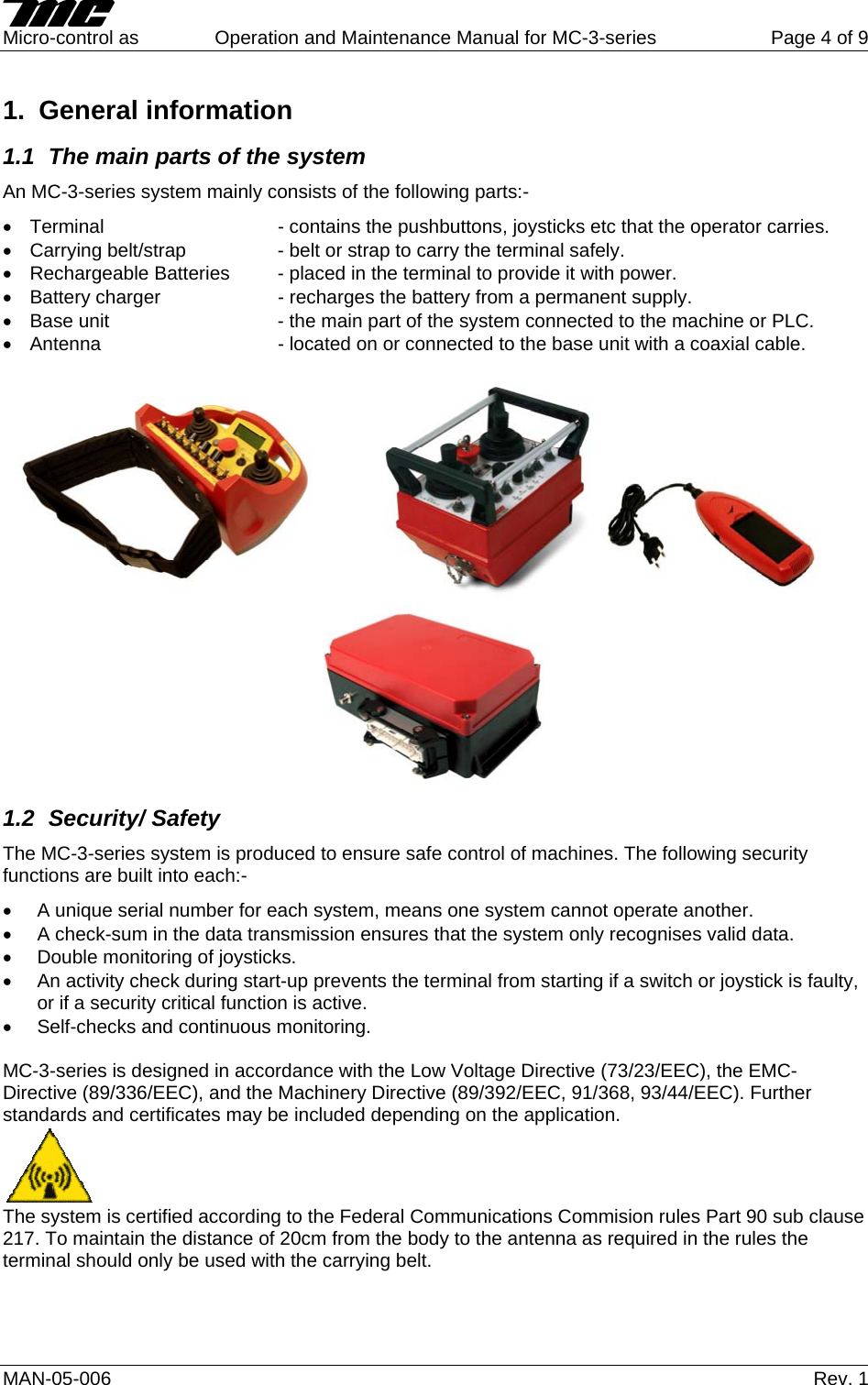
    Micro-control as  Operation and Maintenance Manual for MC-3-series  Page 4 of 9 1. General information 1.1  The main parts of the system  An MC-3-series system mainly consists of the following parts:- •  Terminal       - contains the pushbuttons, joysticks etc that the operator carries. •  Carrying belt/strap    - belt or strap to carry the terminal safely. •  Rechargeable Batteries  - placed in the terminal to provide it with power. •  Battery charger    - recharges the battery from a permanent supply. •  Base unit      - the main part of the system connected to the machine or PLC. •  Antenna      - located on or connected to the base unit with a coaxial cable.    1.2 Security/ Safety The MC-3-series system is produced to ensure safe control of machines. The following security functions are built into each:- •  A unique serial number for each system, means one system cannot operate another. •  A check-sum in the data transmission ensures that the system only recognises valid data. •  Double monitoring of joysticks. •  An activity check during start-up prevents the terminal from starting if a switch or joystick is faulty, or if a security critical function is active. •  Self-checks and continuous monitoring.  MC-3-series is designed in accordance with the Low Voltage Directive (73/23/EEC), the EMC-Directive (89/336/EEC), and the Machinery Directive (89/392/EEC, 91/368, 93/44/EEC). Further standards and certificates may be included depending on the application.  The system is certified according to the Federal Communications Commision rules Part 90 sub clause 217. To maintain the distance of 20cm from the body to the antenna as required in the rules the terminal should only be used with the carrying belt.  MAN-05-006   Rev. 1
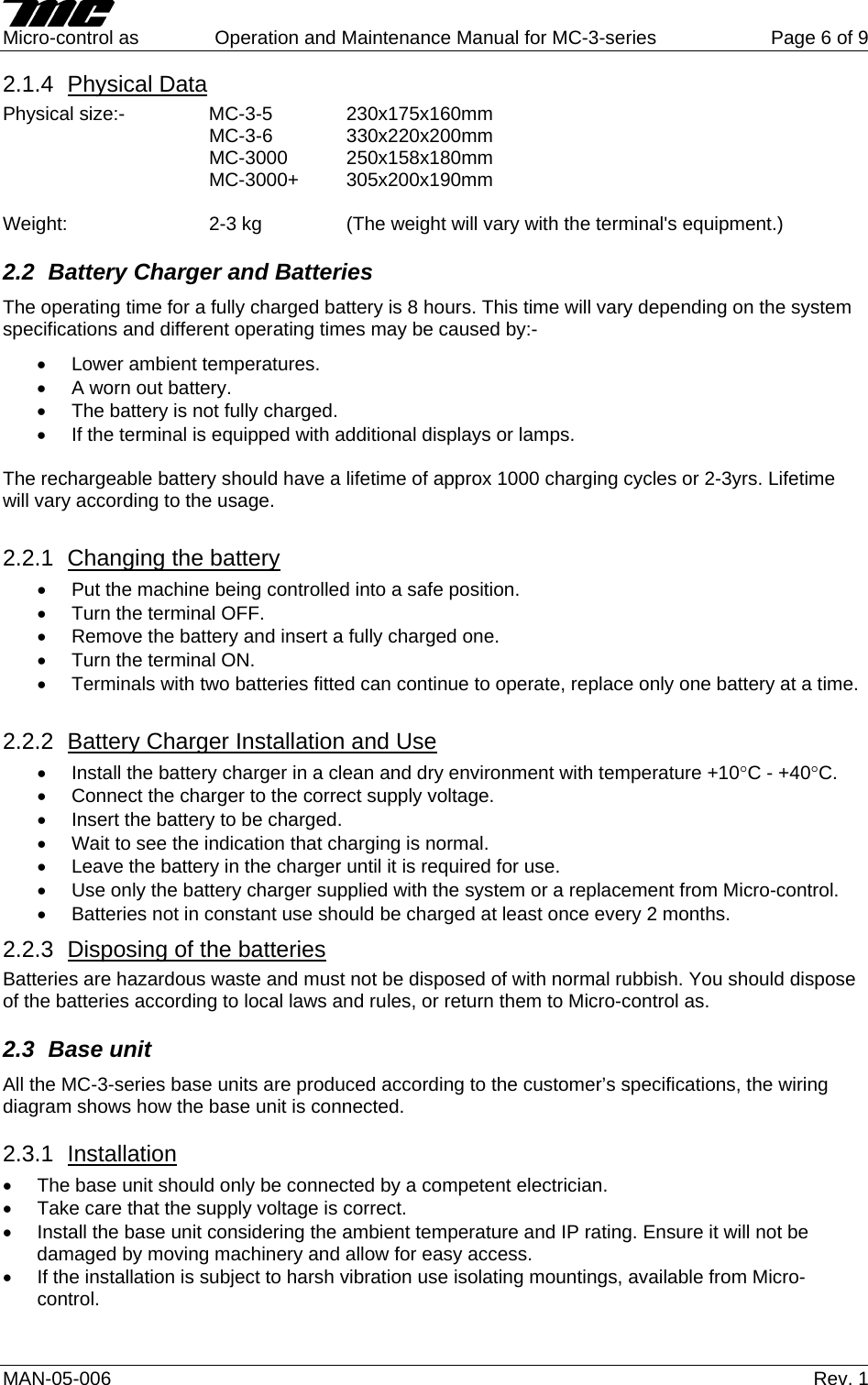
    Micro-control as  Operation and Maintenance Manual for MC-3-series  Page 5 of 9 MAN-05-006   Rev. 1 1.3 Environment Terminal and Base Unit are designed for use with ambient temperatures between -25°C and +50°C. The housings are also tested against dust and water ingress to IP-65 (optionally the terminal can have an IP-66 classification). The battery charger is IP40, install in a clean and dry area, temperature between +10°C and +40°C.  1.4 Documentation The documentation with an MC-3-series system consists of the following documents:- •  This Operation and Maintenance Manual • Wiring diagrams • Layout drawings •  Bill of materials, connections and configuration sheets •  Additional Manuals specific to the delivery (optional) •  Additional Module specifications if required (optional) 2.  Operating and Maintenance 2.1 Terminal All the MC-3-series terminals are produced in accordance with the customer's specifications and the operation will vary between deliveries. It is important that the operator is familiar with the machine being controlled and has been given the necessary training. This document deals with MC-3-series generally, and special instructions in the use of the terminal cannot be given here. The functions that are described in this chapter are common for all MC-3-series deliveries. Micro-control can supply manuals for specific machines if requested to do so. 2.1.1  Operating the terminal Check that a fully charged battery is in the terminal. Pull/twist the Emergency Stop pushbutton out and turn the terminal ON. Press the start pushbutton if fitted. After a self test (approx 1 second) the terminal will establish contact with the base unit. 2.1.2  Maintenance  If the terminal is dirty it must be cleaned with a damp cloth to ensure that:- •  Symbols and text can be read. •  Aggressive chemicals cannot corrode the rubber boots of joysticks and switches. If the rubber boots of the joysticks are damaged, replace them at once. •  Prevent deposit of salt or dirt on buttons or handles which in turn may involve malfunction. The terminal contains advanced electronic equipment and should be treated accordingly.  2.1.3  Display Codes A yellow light emitting diode is used to indicate the status of the system. The most common indications are:- •  Steady light - normal operation, no errors are detected and the battery voltage is OK. •  Flashing light (1 flash per second)- battery voltage is low. Change the battery. •  2 short flashes per second – One or more of the joysticks or switches are active when the terminal is turned on. Deactivate the functions and the terminal will start normally.  Further indications are listed in the enclosed table.
    Micro-control as  Operation and Maintenance Manual for MC-3-series  Page 6 of 9 MAN-05-006   Rev. 1 2.1.4  Physical Data Physical size:-  MC-3-5  230x175x160mm    MC-3-6  330x220x200mm    MC-3000 250x158x180mm    MC-3000+ 305x200x190mm  Weight:     2-3 kg     (The weight will vary with the terminal's equipment.) 2.2  Battery Charger and Batteries The operating time for a fully charged battery is 8 hours. This time will vary depending on the system specifications and different operating times may be caused by:- •  Lower ambient temperatures. •  A worn out battery. •  The battery is not fully charged. •  If the terminal is equipped with additional displays or lamps.  The rechargeable battery should have a lifetime of approx 1000 charging cycles or 2-3yrs. Lifetime will vary according to the usage.  2.2.1  Changing the battery •  Put the machine being controlled into a safe position. •  Turn the terminal OFF. •  Remove the battery and insert a fully charged one. •  Turn the terminal ON. •  Terminals with two batteries fitted can continue to operate, replace only one battery at a time.  2.2.2  Battery Charger Installation and Use •  Install the battery charger in a clean and dry environment with temperature +10°C - +40°C. •  Connect the charger to the correct supply voltage. •  Insert the battery to be charged. •  Wait to see the indication that charging is normal. •  Leave the battery in the charger until it is required for use. •  Use only the battery charger supplied with the system or a replacement from Micro-control. •  Batteries not in constant use should be charged at least once every 2 months. 2.2.3  Disposing of the batteries Batteries are hazardous waste and must not be disposed of with normal rubbish. You should dispose of the batteries according to local laws and rules, or return them to Micro-control as. 2.3 Base unit All the MC-3-series base units are produced according to the customer’s specifications, the wiring diagram shows how the base unit is connected.  2.3.1  Installation •  The base unit should only be connected by a competent electrician. •  Take care that the supply voltage is correct. •  Install the base unit considering the ambient temperature and IP rating. Ensure it will not be damaged by moving machinery and allow for easy access. •  If the installation is subject to harsh vibration use isolating mountings, available from Micro-control.
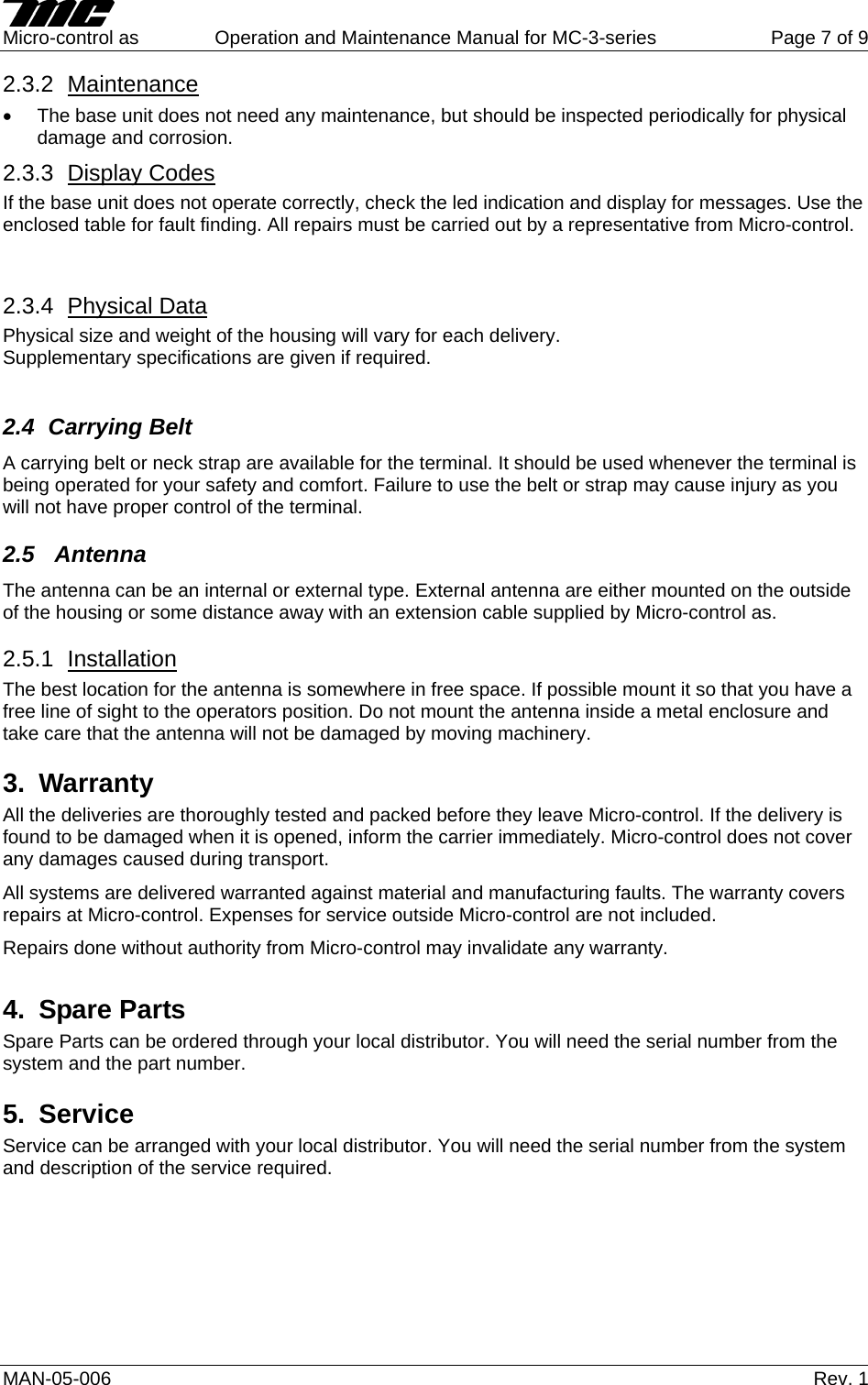
    Micro-control as  Operation and Maintenance Manual for MC-3-series  Page 7 of 9 MAN-05-006   Rev. 1 2.3.2  Maintenance •  The base unit does not need any maintenance, but should be inspected periodically for physical damage and corrosion. 2.3.3  Display Codes If the base unit does not operate correctly, check the led indication and display for messages. Use the enclosed table for fault finding. All repairs must be carried out by a representative from Micro-control.  2.3.4  Physical Data Physical size and weight of the housing will vary for each delivery. Supplementary specifications are given if required.  2.4 Carrying Belt A carrying belt or neck strap are available for the terminal. It should be used whenever the terminal is being operated for your safety and comfort. Failure to use the belt or strap may cause injury as you will not have proper control of the terminal. 2.5  Antenna The antenna can be an internal or external type. External antenna are either mounted on the outside of the housing or some distance away with an extension cable supplied by Micro-control as. 2.5.1  Installation The best location for the antenna is somewhere in free space. If possible mount it so that you have a free line of sight to the operators position. Do not mount the antenna inside a metal enclosure and take care that the antenna will not be damaged by moving machinery.  3. Warranty All the deliveries are thoroughly tested and packed before they leave Micro-control. If the delivery is found to be damaged when it is opened, inform the carrier immediately. Micro-control does not cover any damages caused during transport. All systems are delivered warranted against material and manufacturing faults. The warranty covers repairs at Micro-control. Expenses for service outside Micro-control are not included. Repairs done without authority from Micro-control may invalidate any warranty. 4. Spare Parts Spare Parts can be ordered through your local distributor. You will need the serial number from the system and the part number. 5. Service Service can be arranged with your local distributor. You will need the serial number from the system and description of the service required.
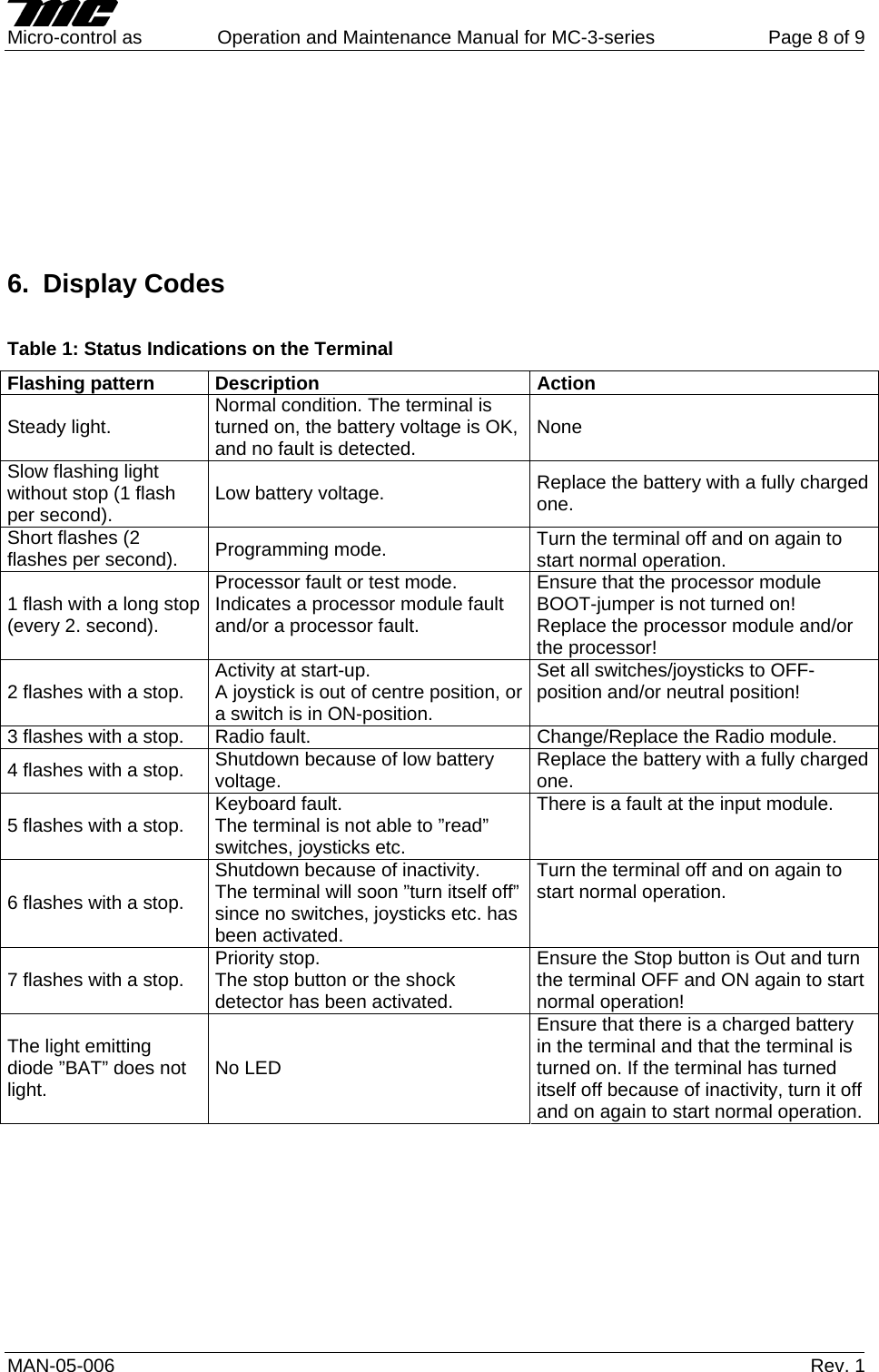
    Micro-control as  Operation and Maintenance Manual for MC-3-series  Page 8 of 9 MAN-05-006   Rev. 1         6. Display Codes  Table 1: Status Indications on the Terminal Flashing pattern  Description  Action Steady light.  Normal condition. The terminal is turned on, the battery voltage is OK, and no fault is detected.  None Slow flashing light without stop (1 flash per second).  Low battery voltage.  Replace the battery with a fully charged one. Short flashes (2 flashes per second).  Programming mode.  Turn the terminal off and on again to start normal operation. 1 flash with a long stop (every 2. second). Processor fault or test mode.  Indicates a processor module fault and/or a processor fault. Ensure that the processor module BOOT-jumper is not turned on!  Replace the processor module and/or the processor! 2 flashes with a stop.  Activity at start-up.  A joystick is out of centre position, or a switch is in ON-position. Set all switches/joysticks to OFF-position and/or neutral position!  3 flashes with a stop.  Radio fault.  Change/Replace the Radio module. 4 flashes with a stop.  Shutdown because of low battery voltage.  Replace the battery with a fully charged one. 5 flashes with a stop.  Keyboard fault. The terminal is not able to ”read” switches, joysticks etc.  There is a fault at the input module. 6 flashes with a stop. Shutdown because of inactivity. The terminal will soon ”turn itself off” since no switches, joysticks etc. has been activated. Turn the terminal off and on again to start normal operation. 7 flashes with a stop.  Priority stop. The stop button or the shock detector has been activated. Ensure the Stop button is Out and turn the terminal OFF and ON again to start normal operation! The light emitting diode ”BAT” does not light.  No LED Ensure that there is a charged battery in the terminal and that the terminal is turned on. If the terminal has turned itself off because of inactivity, turn it off and on again to start normal operation.
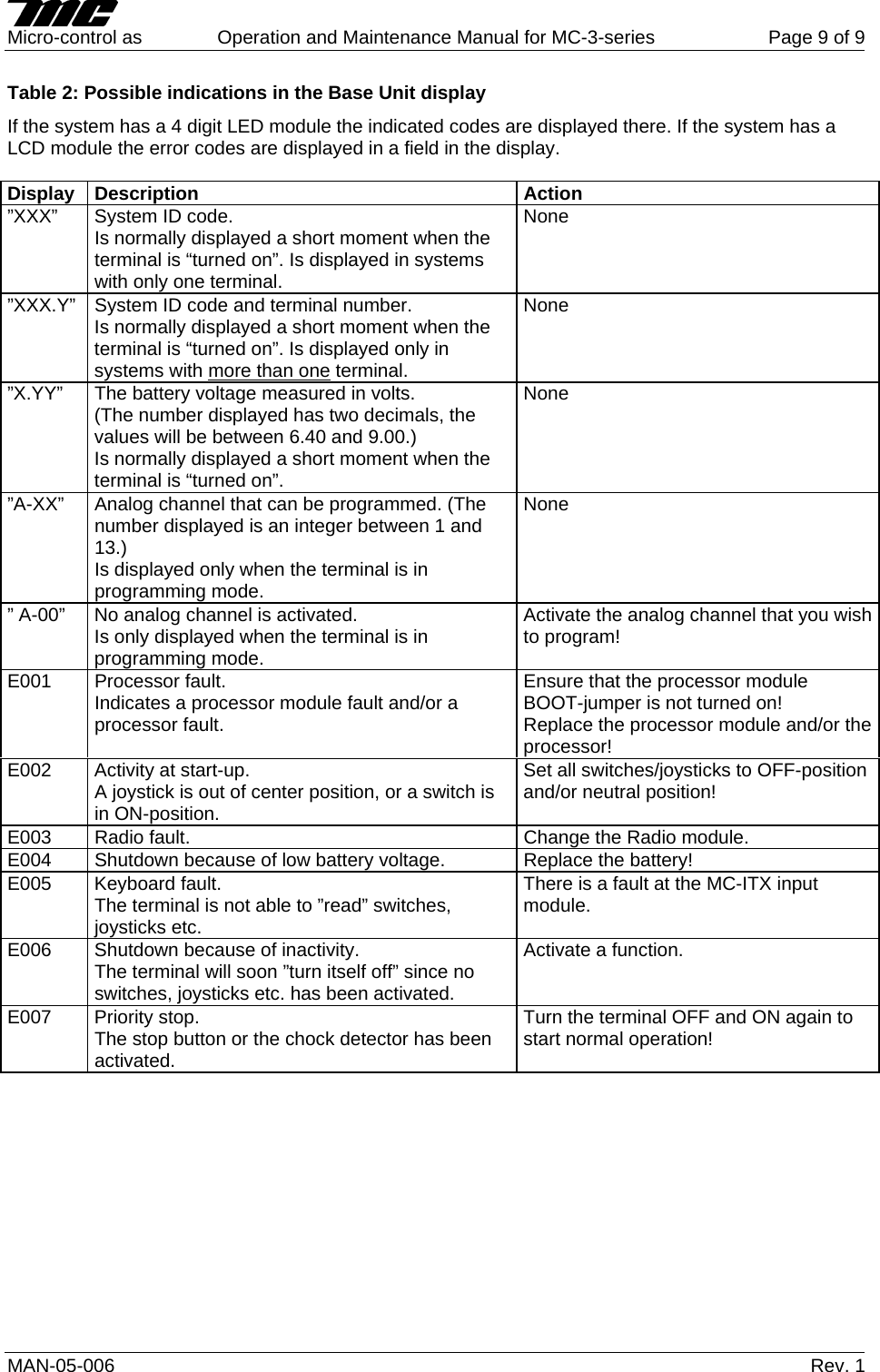
    Micro-control as  Operation and Maintenance Manual for MC-3-series  Page 9 of 9 MAN-05-006   Rev. 1 Table 2: Possible indications in the Base Unit display If the system has a 4 digit LED module the indicated codes are displayed there. If the system has a LCD module the error codes are displayed in a field in the display.  Display Description Action ”XXX”  System ID code. Is normally displayed a short moment when the terminal is “turned on”. Is displayed in systems with only one terminal. None ”XXX.Y”  System ID code and terminal number. Is normally displayed a short moment when the terminal is “turned on”. Is displayed only in systems with more than one terminal. None ”X.YY”  The battery voltage measured in volts.  (The number displayed has two decimals, the values will be between 6.40 and 9.00.) Is normally displayed a short moment when the terminal is “turned on”. None ”A-XX”  Analog channel that can be programmed. (The number displayed is an integer between 1 and 13.) Is displayed only when the terminal is in programming mode. None ” A-00”  No analog channel is activated. Is only displayed when the terminal is in programming mode. Activate the analog channel that you wish to program! E001  Processor fault.  Indicates a processor module fault and/or a processor fault. Ensure that the processor module BOOT-jumper is not turned on!  Replace the processor module and/or the processor! E002  Activity at start-up.  A joystick is out of center position, or a switch is in ON-position. Set all switches/joysticks to OFF-position and/or neutral position!  E003  Radio fault.  Change the Radio module. E004  Shutdown because of low battery voltage.  Replace the battery! E005 Keyboard fault. The terminal is not able to ”read” switches, joysticks etc.  There is a fault at the MC-ITX input module. E006  Shutdown because of inactivity. The terminal will soon ”turn itself off” since no switches, joysticks etc. has been activated. Activate a function. E007 Priority stop. The stop button or the chock detector has been activated. Turn the terminal OFF and ON again to start normal operation!

Navigation menu