Design Pattern Quick Guide
User Manual:
Open the PDF directly: View PDF  .
.
Page Count: 106 [warning: Documents this large are best viewed by clicking the View PDF Link!]
Previous Page Next Page
Design Pattern Quick GuideDesign Pattern Quick Guide
Design Pattern Quick Guide
Advertisements
Design patterns represent the best practices used by experienced object-oriented software
developers. Design patterns are solutions to general problems that software developers
faced during software development. These solutions were obtained by trial and error by
numerous software developers over quite a substantial period of time.
In 1994, four authors Erich Gamma, Richard Helm, Ralph Johnson und John Vlissides
published a book titled Design Patterns - Elements of Reusable Object-Oriented
Software which initiated the concept of Design Pattern in Software development.
These authors are collectively known as Gang of Four (GOF). According to these authors
design patterns are primarily based on the following principles of object orientated design.
Program to an interface not an implementation
Favor object composition over inheritance
Design Patterns have two main usages in software development.
Design patterns provide a standard terminology and are specific to particular scenario. For
example, a singleton design pattern signifies use of single object so all developers familiar
with single design pattern will make use of single object and they can tell each other that
program is following a singleton pattern.
What is Gang of Four (GOF)?What is Gang of Four (GOF)?
What is Gang of Four (GOF)?
Usage of Design PatternUsage of Design Pattern
Usage of Design Pattern
Common platform for developersCommon platform for developers
Common platform for developers
Best PracticesBest Practices
Best Practices
Design patterns have been evolved over a long period of time and they provide best
solutions to certain problems faced during software development. Learning these patterns
helps un-experienced developers to learn software design in an easy and faster way.
As per the design pattern reference book Design Patterns - Elements of Reusable
Object-Oriented Software , there are 23 design patterns. These patterns can be
classified in three categories: Creational, Structural and behavioral patterns. We'll also
discuss another category of design patterns: J2EE design patterns.
S.N. Pattern & Description
1
Creational Patterns
These design patterns provides way to create objects while hiding the creation logic,
rather than instantiating objects directly using new operator. This gives program more
flexibility in deciding which objects need to be created for a given use case.
2
Structural Patterns
These design patterns concern class and object composition. Concept of inheritance is
used to compose interfaces and define ways to compose objects to obtain new
functionalities.
3Behavioral Patterns
These design patterns are specifically concerned with communication between objects.
4
J2EE Patterns
These design patterns are specifically concerned with the presentation tier. These patterns
are identified by Sun Java Center.
Factory PatternFactory Pattern
Factory Pattern
Factory pattern is one of the most used design patterns in Java. This type of design pattern
comes under creational pattern as this pattern provides one of the best ways to create an
object.
In Factory pattern, we create object without exposing the creation logic to the client and
refer to newly created object using a common interface.
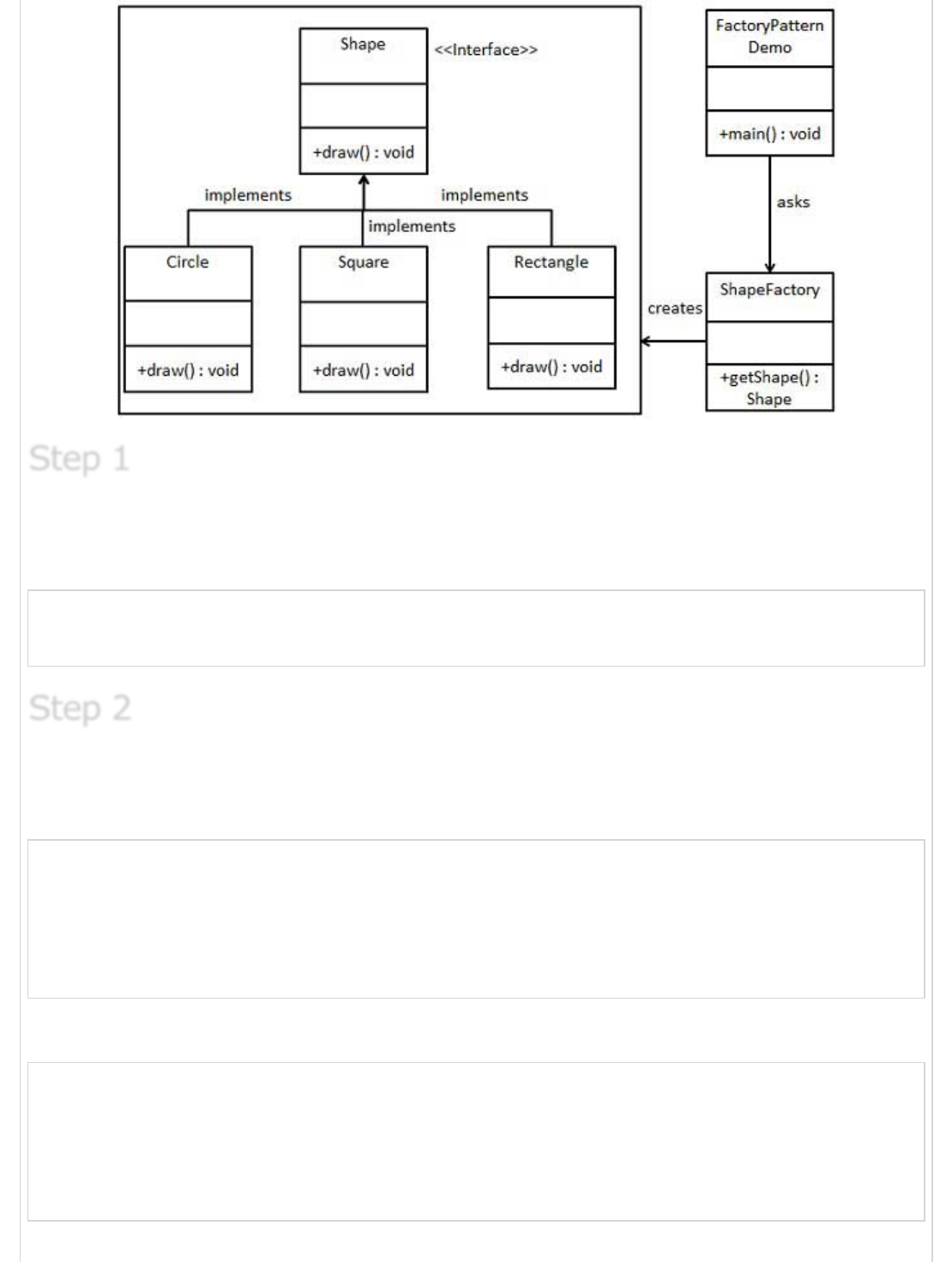
We're going to create a Shape interface and concrete classes implementing the Shape
interface. A factory class ShapeFactory is defined as a next step.
FactoryPatternDemo, our demo class will use ShapeFactory to get a Shape object. It will
pass information (CIRCLE / RECTANGLE / SQUARE) to ShapeFactory to get the type of
object it needs.
Types of Design PatternTypes of Design Pattern
Types of Design Pattern
ImplementationImplementation
Implementation
Create an interface.
Shape.java
public interface Shape {
void draw();
}
Create concrete classes implementing the same interface.
Rectangle.java
public class Rectangle implements Shape {
@Override
public void draw() {
System.out.println("Inside Rectangle::draw() method.");
}
}
Square.java
public class Square implements Shape {
@Override
public void draw() {
System.out.println("Inside Square::draw() method.");
}
}
Step 1Step 1
Step 1
Step 2Step 2
Step 2
Circle.java
public class Circle implements Shape {
@Override
public void draw() {
System.out.println("Inside Circle::draw() method.");
}
}
Create a Factory to generate object of concrete class based on given information.
ShapeFactory.java
public class ShapeFactory {
//use getShape method to get object of type shape
public Shape getShape(String shapeType){
if(shapeType == null){
return null;
}
if(shapeType.equalsIgnoreCase("CIRCLE")){
return new Circle();
} else if(shapeType.equalsIgnoreCase("RECTANGLE")){
return new Rectangle();
} else if(shapeType.equalsIgnoreCase("SQUARE")){
return new Square();
}
return null;
}
}
Use the Factory to get object of concrete class by passing an information such as type.
FactoryPatternDemo.java
public class FactoryPatternDemo {
public static void main(String[] args) {
ShapeFactory shapeFactory = new ShapeFactory();
//get an object of Circle and call its draw method.
Shape shape1 = shapeFactory.getShape("CIRCLE");
//call draw method of Circle
shape1.draw();
//get an object of Rectangle and call its draw method.
Shape shape2 = shapeFactory.getShape("RECTANGLE");
//call draw method of Rectangle
shape2.draw();
Step 3Step 3
Step 3
Step 4Step 4
Step 4
//get an object of Square and call its draw method.
Shape shape3 = shapeFactory.getShape("SQUARE");
//call draw method of square
shape3.draw();
}
}
Verify the output.
Inside Circle::draw() method.
Inside Rectangle::draw() method.
Inside Square::draw() method.
Abstract Factory PatternAbstract Factory Pattern
Abstract Factory Pattern
Abstract Factory patterns works around a super-factory which creates other factories. This
factory is also called as Factory of factories. This type of design pattern comes under
creational pattern as this pattern provides one of the best ways to create an object.
In Abstract Factory pattern an interface is responsible for creating a factory of related
objects, without explicitly specifying their classes. Each generated factory can give the
objects as per the Factory pattern.
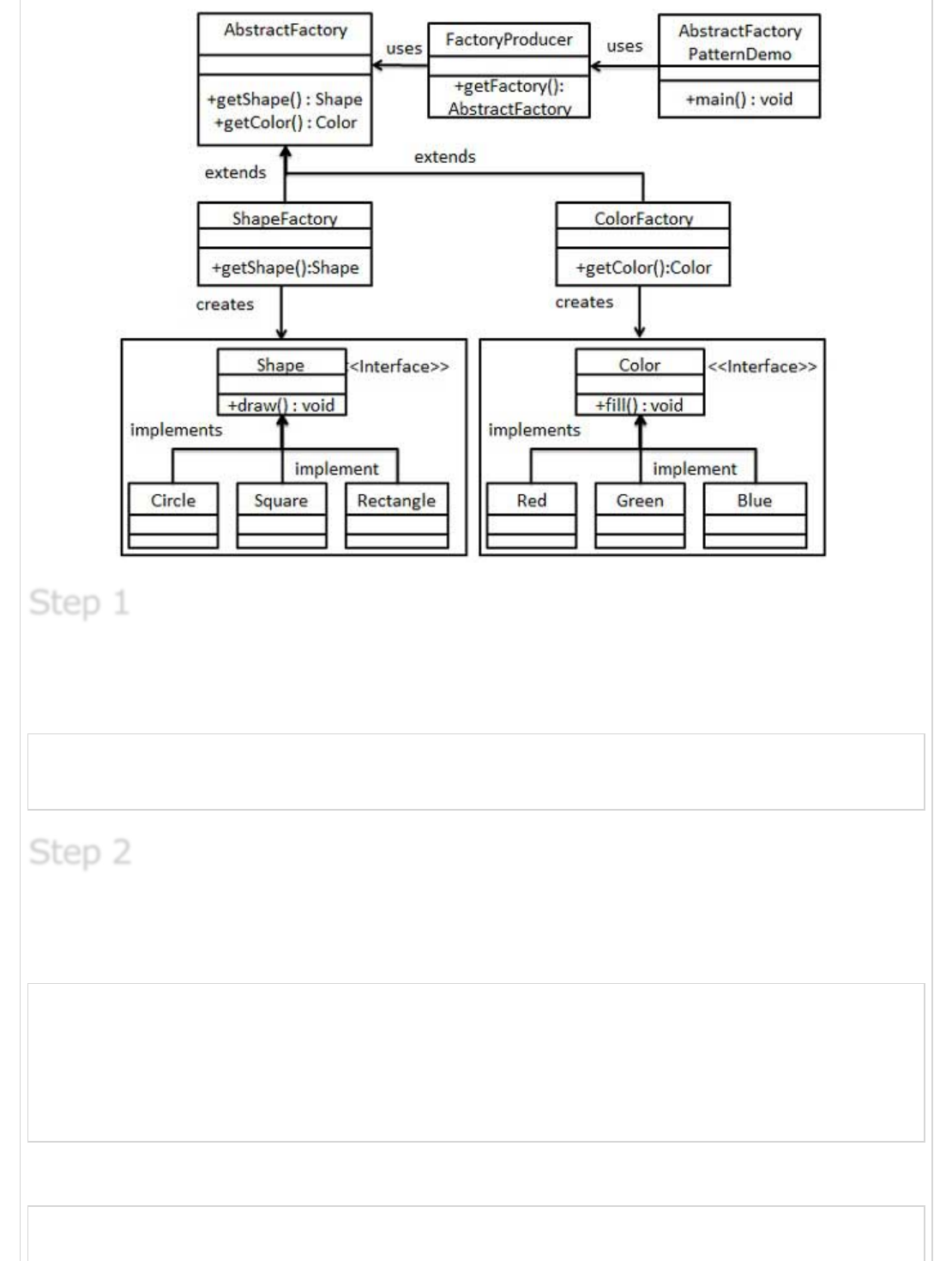
We're going to create a Shape and Color interfaces and concrete classes implementing
these interfaces. We creates an abstract factory class AbstractFactory as next step. Factory
classes ShapeFactory and ColorFactory are defined where each factory extends
AbstractFactory. A factory creator/generator class FactoryProducer is created.
AbstractFactoryPatternDemo, our demo class uses FactoryProducer to get a
AbstractFactory object. It will pass information (CIRCLE / RECTANGLE / SQUARE for
Shape) to AbstractFactory to get the type of object it needs. It also passes information
(RED / GREEN / BLUE for Color) to AbstractFactory to get the type of object it needs.
Step 5Step 5
Step 5
ImplementationImplementation
Implementation
Create an interface for Shapes.
Shape.java
public interface Shape {
void draw();
}
Create concrete classes implementing the same interface.
Rectangle.java
public class Rectangle implements Shape {
@Override
public void draw() {
System.out.println("Inside Rectangle::draw() method.");
}
}
Square.java
public class Square implements Shape {
Step 1Step 1
Step 1
Step 2Step 2
Step 2
@Override
public void draw() {
System.out.println("Inside Square::draw() method.");
}
}
Circle.java
public class Circle implements Shape {
@Override
public void draw() {
System.out.println("Inside Circle::draw() method.");
}
}
Create an interface for Colors.
Color.java
public interface Color {
void fill();
}
Create concrete classes implementing the same interface.
Red.java
public class Red implements Color {
@Override
public void fill() {
System.out.println("Inside Red::fill() method.");
}
}
Green.java
public class Green implements Color {
@Override
public void fill() {
System.out.println("Inside Green::fill() method.");
}
}
Blue.java
public class Blue implements Color {
Step 3Step 3
Step 3
Step4Step4
Step4
@Override
public void fill() {
System.out.println("Inside Blue::fill() method.");
}
}
Create an Abstract class to get factories for Color and Shape Objects.
AbstractFactory.java
public abstract class AbstractFactory {
abstract Color getColor(String color);
abstract Shape getShape(String shape) ;
}
Create Factory classes extending AbstractFactory to generate object of concrete class
based on given information.
ShapeFactory.java
public class ShapeFactory extends AbstractFactory {
@Override
public Shape getShape(String shapeType){
if(shapeType == null){
return null;
}
if(shapeType.equalsIgnoreCase("CIRCLE")){
return new Circle();
} else if(shapeType.equalsIgnoreCase("RECTANGLE")){
return new Rectangle();
} else if(shapeType.equalsIgnoreCase("SQUARE")){
return new Square();
}
return null;
}
@Override
Color getColor(String color) {
return null;
}
}
ColorFactory.java
public class ColorFactory extends AbstractFactory {
@Override
public Shape getShape(String shapeType){
return null;
}
Step 5Step 5
Step 5
Step 6Step 6
Step 6
@Override
Color getColor(String color) {
if(color == null){
return null;
}
if(color.equalsIgnoreCase("RED")){
return new Red();
} else if(color.equalsIgnoreCase("GREEN")){
return new Green();
} else if(color.equalsIgnoreCase("BLUE")){
return new Blue();
}
return null;
}
}
Create a Factory generator/producer class to get factories by passing an information such
as Shape or Color
FactoryProducer.java
public class FactoryProducer {
public static AbstractFactory getFactory(String choice){
if(choice.equalsIgnoreCase("SHAPE")){
return new ShapeFactory();
} else if(choice.equalsIgnoreCase("COLOR")){
return new ColorFactory();
}
return null;
}
}
Use the FactoryProducer to get AbstractFactory in order to get factories of concrete classes
by passing an information such as type.
AbstractFactoryPatternDemo.java
public class AbstractFactoryPatternDemo {
public static void main(String[] args) {
//get shape factory
AbstractFactory shapeFactory = FactoryProducer.getFactory("SHAPE");
//get an object of Shape Circle
Shape shape1 = shapeFactory.getShape("CIRCLE");
//call draw method of Shape Circle
shape1.draw();
//get an object of Shape Rectangle
Shape shape2 = shapeFactory.getShape("RECTANGLE");
Step 7Step 7
Step 7
Step 8Step 8
Step 8
//call draw method of Shape Rectangle
shape2.draw();
//get an object of Shape Square
Shape shape3 = shapeFactory.getShape("SQUARE");
//call draw method of Shape Square
shape3.draw();
//get color factory
AbstractFactory colorFactory = FactoryProducer.getFactory("COLOR");
//get an object of Color Red
Color color1 = colorFactory.getColor("RED");
//call fill method of Red
color1.fill();
//get an object of Color Green
Color color2 = colorFactory.getColor("Green");
//call fill method of Green
color2.fill();
//get an object of Color Blue
Color color3 = colorFactory.getColor("BLUE");
//call fill method of Color Blue
color3.fill();
}
}
Verify the output.
Inside Circle::draw() method.
Inside Rectangle::draw() method.
Inside Square::draw() method.
Inside Red::fill() method.
Inside Green::fill() method.
Inside Blue::fill() method.
Singleton PatternSingleton Pattern
Singleton Pattern
Singleton pattern is one of the simplest design patterns in Java. This type of design pattern
comes under creational pattern as this pattern provides one of the best way to create an
object.
This pattern involves a single class which is responsible to creates own object while making
sure that only single object get created. This class provides a way to access its only object
which can be accessed directly without need to instantiate the object of the class.
Step 9Step 9
Step 9
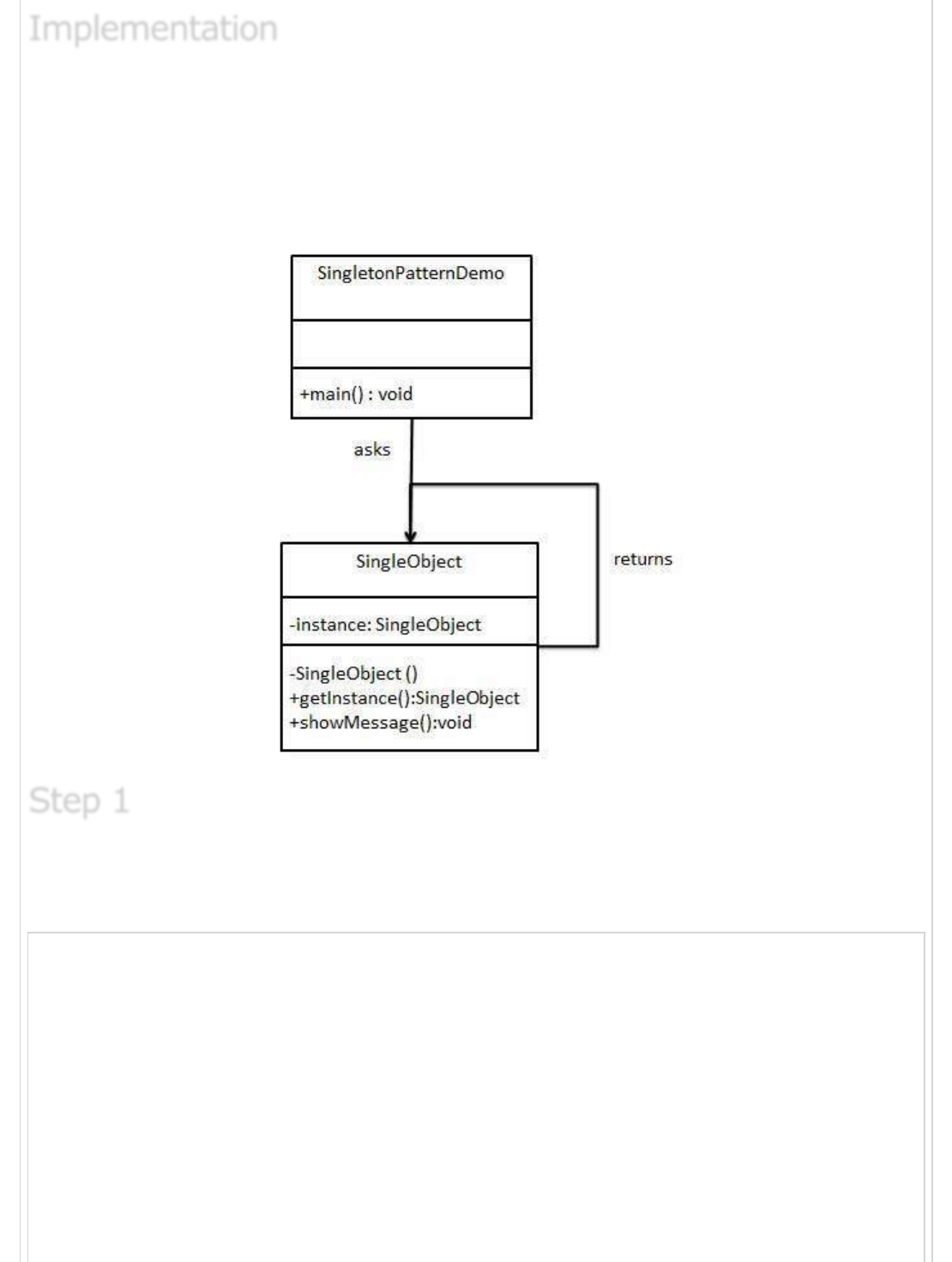
We're going to create a SingleObject class. SingleObject class have its constructor as
private and have a static instance of itself.
SingleObject class provides a static method to get its static instance to outside world.
SingletonPatternDemo, our demo class will use SingleObject class to get a SingleObject
object.
Create a Singleton Class.
SingleObject.java
public class SingleObject {
//create an object of SingleObject
private static SingleObject instance = new SingleObject();
//make the constructor private so that this class cannot be
//instantiated
private SingleObject(){}
//Get the only object available
public static SingleObject getInstance(){
return instance;
}
public void showMessage(){
ImplementationImplementation
Implementation
Step 1Step 1
Step 1
System.out.println("Hello World!");
}
}
Get the only object from the singleton class.
SingletonPatternDemo.java
public class SingletonPatternDemo {
public static void main(String[] args) {
//illegal construct
//Compile Time Error: The constructor SingleObject() is not visible
//SingleObject object = new SingleObject();
//Get the only object available
SingleObject object = SingleObject.getInstance();
//show the message
object.showMessage();
}
}
Verify the output.
Hello World!
Builder PatternBuilder Pattern
Builder Pattern
Builder pattern builds a complex object using simple objects and using a step by step
approach. This type of design pattern comes under creational pattern as this pattern
provides one of the best ways to create an object.
A Builder class builds the final object step by step. This builder is independent of other
objects.
We've considered a business case of fast-food restaurant where a typical meal could be a
burger and a cold drink. Burger could be either a Veg Burger or Chicken Burger and will be
packed by a wrapper. Cold drink could be either a coke or pepsi and will be packed in a
bottle.
We're going to create an Item interface representing food items such as burgers and cold
drinks and concrete classes implementing the Item interface and a Packing interface
Step 2Step 2
Step 2
Step 3Step 3
Step 3
ImplementationImplementation
Implementation
representing packaging of food items and concrete classes implementing the Packing
interface as burger would be packed in wrapper and cold drink would be packed as bottle.
We then create a Meal class having ArrayList of Item and a MealBuilder to build different
types of Meal object by combining Item. BuilderPatternDemo, our demo class will use
MealBuilder to build a Meal.
Create an interface Item representing food item and packing.
Item.java
public interface Item {
public String name();
public Packing packing();
public float price();
}
Packing.java
public interface Packing {
public String pack();
}
Create concreate classes implementing the Packing interface.
Step 1Step 1
Step 1
Step 2Step 2
Step 2
Wrapper.java
public class Wrapper implements Packing {
@Override
public String pack() {
return "Wrapper";
}
}
Bottle.java
public class Bottle implements Packing {
@Override
public String pack() {
return "Bottle";
}
}
Create abstract classes implementing the item interface providing default functionalities.
Burger.java
public abstract class Burger implements Item {
@Override
public Packing packing() {
return new Wrapper();
}
@Override
public abstract float price();
}
ColdDrink.java
public abstract class ColdDrink implements Item {
@Override
public Packing packing() {
return new Bottle();
}
@Override
public abstract float price();
}
Create concrete classes extending Burger and ColdDrink classes
Step 3Step 3
Step 3
Step 4Step 4
Step 4
VegBurger.java
public class VegBurger extends Burger {
@Override
public float price() {
return 25.0f;
}
@Override
public String name() {
return "Veg Burger";
}
}
ChickenBurger.java
public class ChickenBurger extends Burger {
@Override
public float price() {
return 50.5f;
}
@Override
public String name() {
return "Chicken Burger";
}
}
Coke.java
public class Coke extends ColdDrink {
@Override
public float price() {
return 30.0f;
}
@Override
public String name() {
return "Coke";
}
}
Pepsi.java
public class Pepsi extends ColdDrink {
@Override
public float price() {
return 35.0f;
}
@Override
public String name() {
return "Pepsi";
}
}
Create a Meal class having Item objects defined above.
Meal.java
import java.util.ArrayList;
import java.util.List;
public class Meal {
private List<Item> items = new ArrayList<Item>();
public void addItem(Item item){
items.add(item);
}
public float getCost(){
float cost = 0.0f;
for (Item item : items) {
cost += item.price();
}
return cost;
}
public void showItems(){
for (Item item : items) {
System.out.print("Item : "+item.name());
System.out.print(", Packing : "+item.packing().pack());
System.out.println(", Price : "+item.price());
}
}
}
Create a MealBuilder class, the actual builder class responsible to create Meal objects.
MealBuilder.java
public class MealBuilder {
public Meal prepareVegMeal (){
Meal meal = new Meal();
meal.addItem(new VegBurger());
meal.addItem(new Coke());
return meal;
}
public Meal prepareNonVegMeal (){
Meal meal = new Meal();
meal.addItem(new ChickenBurger());
meal.addItem(new Pepsi());
return meal;
Step 5Step 5
Step 5
Step 6Step 6
Step 6
}
}
BuiderPatternDemo uses MealBuider to demonstrate builder pattern.
BuilderPatternDemo.java
public class BuilderPatternDemo {
public static void main(String[] args) {
MealBuilder mealBuilder = new MealBuilder();
Meal vegMeal = mealBuilder.prepareVegMeal();
System.out.println("Veg Meal");
vegMeal.showItems();
System.out.println("Total Cost: " +vegMeal.getCost());
Meal nonVegMeal = mealBuilder.prepareNonVegMeal();
System.out.println("\n\nNon-Veg Meal");
nonVegMeal.showItems();
System.out.println("Total Cost: " +nonVegMeal.getCost());
}
}
Verify the output.
Veg Meal
Item : Veg Burger, Packing : Wrapper, Price : 25.0
Item : Coke, Packing : Bottle, Price : 30.0
Total Cost: 55.0
Non-Veg Meal
Item : Chicken Burger, Packing : Wrapper, Price : 50.5
Item : Pepsi, Packing : Bottle, Price : 35.0
Total Cost: 85.5
Prototype PatternPrototype Pattern
Prototype Pattern
Prototype pattern refers to creating duplicate object while keeping performance in mind.
This type of design pattern comes under creational pattern as this pattern provides one of
the best way to create an object.
This pattern involves implementing a prototype interface which tells to create a clone of
the current object. This pattern is used when creation of object directly is costly. For
example, a object is to be created after a costly database operation. We can cache the
Step 7Step 7
Step 7
Step 8Step 8
Step 8
object, returns its clone on next request and update the database as as and when needed
thus reducing database calls.
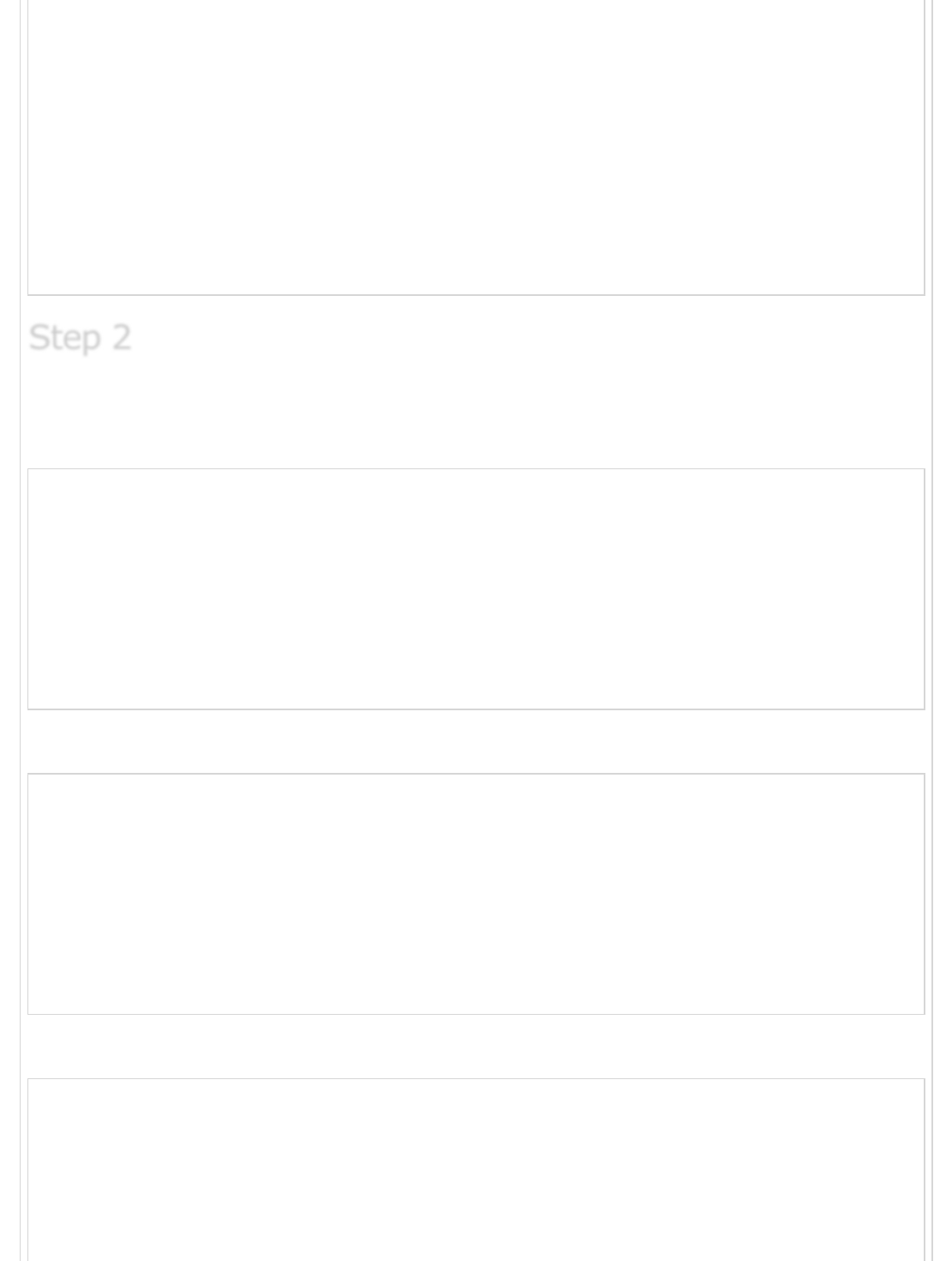
We're going to create an abstract class Shape and concrete classes extending the Shape
class. A class ShapeCache is defined as a next step which stores shape objects in a
Hashtable and returns their clone when requested.
PrototypPatternDemo, our demo class will use ShapeCache class to get a Shape object.
Create an abstract class implementing Clonable interface.
Shape.java
public abstract class Shape implements Cloneable {
private String id;
protected String type;
abstract void draw();
public String getType(){
return type;
}
public String getId() {
return id;
}
ImplementationImplementation
Implementation
Step 1Step 1
Step 1
public void setId(String id) {
this.id = id;
}
public Object clone() {
Object clone = null;
try {
clone = super.clone();
} catch (CloneNotSupportedException e) {
e.printStackTrace();
}
return clone;
}
}
Create concrete classes extending the above class.
Rectangle.java
public class Rectangle extends Shape {
public Rectangle(){
type = "Rectangle";
}
@Override
public void draw() {
System.out.println("Inside Rectangle::draw() method.");
}
}
Square.java
public class Square extends Shape {
public Square(){
type = "Square";
}
@Override
public void draw() {
System.out.println("Inside Square::draw() method.");
}
}
Circle.java
public class Circle extends Shape {
public Circle(){
type = "Circle";
}
@Override
public void draw() {
Step 2Step 2
Step 2
System.out.println("Inside Circle::draw() method.");
}
}
Create a class to get concreate classes from database and store them in a Hashtable.
ShapeCache.java
import java.util.Hashtable;
public class ShapeCache {
private static Hashtable<String, Shape> shapeMap
= new Hashtable<String, Shape>();
public static Shape getShape(String shapeId) {
Shape cachedShape = shapeMap.get(shapeId);
return (Shape) cachedShape.clone();
}
// for each shape run database query and create shape
// shapeMap.put(shapeKey, shape);
// for example, we are adding three shapes
public static void loadCache() {
Circle circle = new Circle();
circle.setId("1");
shapeMap.put(circle.getId(),circle);
Square square = new Square();
square.setId("2");
shapeMap.put(square.getId(),square);
Rectangle rectangle = new Rectangle();
rectangle.setId("3");
shapeMap.put(rectangle.getId(),rectangle);
}
}
PrototypePatternDemo uses ShapeCache class to get clones of shapes stored in a
Hashtable.
PrototypePatternDemo.java
public class PrototypePatternDemo {
public static void main(String[] args) {
ShapeCache.loadCache();
Shape clonedShape = (Shape) ShapeCache.getShape("1");
System.out.println("Shape : " + clonedShape.getType());
Shape clonedShape2 = (Shape) ShapeCache.getShape("2");
System.out.println("Shape : " + clonedShape2.getType());
Step 3Step 3
Step 3
Step 4Step 4
Step 4
Shape clonedShape3 = (Shape) ShapeCache.getShape("3");
System.out.println("Shape : " + clonedShape3.getType());
}
}
Verify the output.
Shape : Circle
Shape : Square
Shape : Rectangle
Adapter PatternAdapter Pattern
Adapter Pattern
Adapter pattern works as a bridge between two incompatible interfaces. This type of
design pattern comes under structural pattern as this pattern combines the capability of
two independent interfaces.
This pattern involves a single class which is responsible to join functionalities of
independent or incompatible interfaces. A real life example could be a case of card reader
which acts as an adapter between memory card and a laptop. You plugins the memory
card into card reader and card reader into the laptop so that memory card can be read via
laptop.
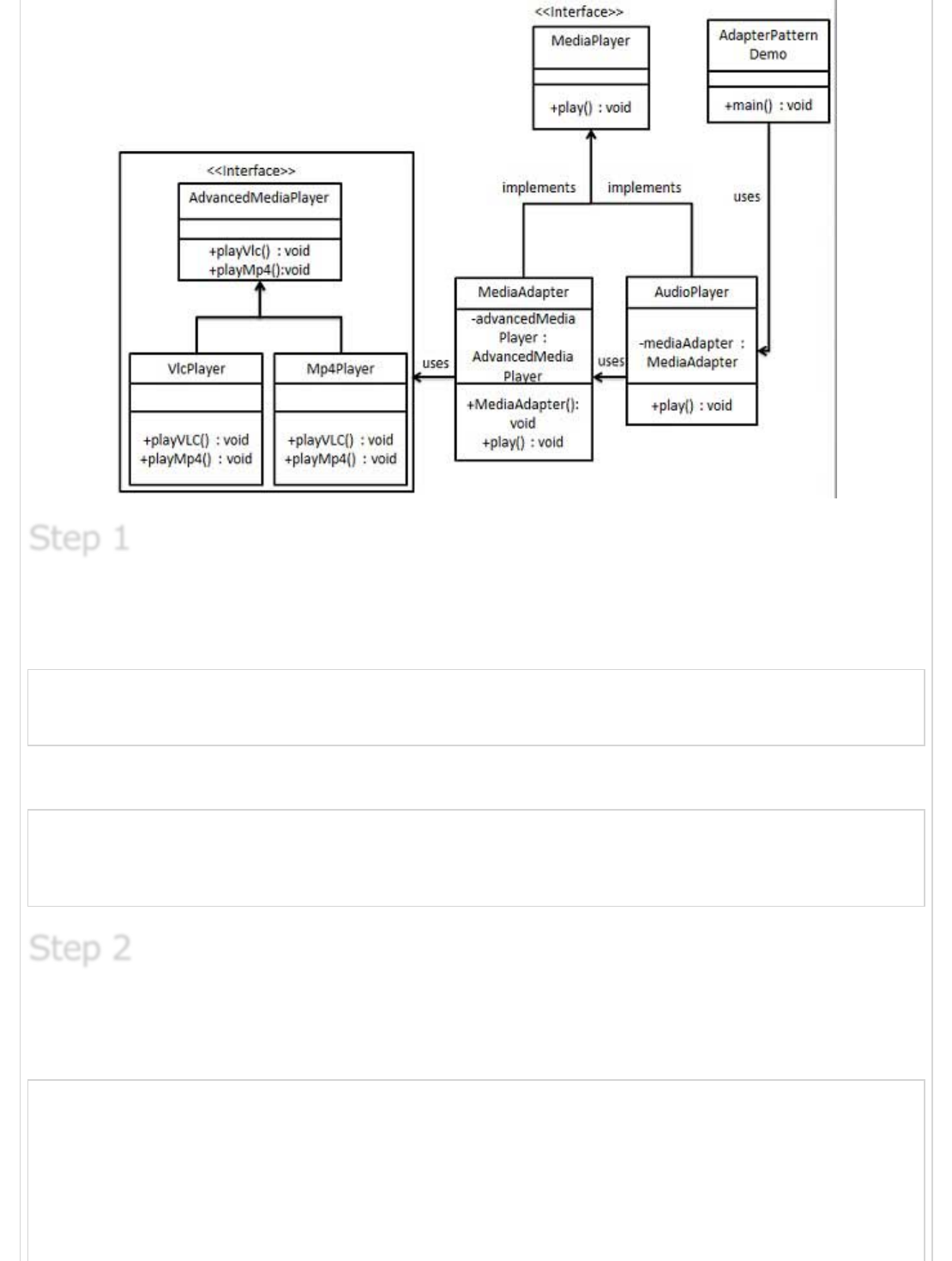
We are demonstrating use of Adapter pattern via following example in which an audio
player device can play mp3 files only and wants to use an advanced audio player capable
of playing vlc and mp4 files.
We've an interface MediaPlayer interface and a concrete class AudioPlayer implementing
the MediaPlayer interface. AudioPlayer can play mp3 format audio files by default.
We're having another interface AdvancedMediaPlayer and concrete classes implementing
the AdvancedMediaPlayer interface.These classes can play vlc and mp4 format files.
We want to make AudioPlayer to play other formats as well. To attain this, we've created
an adapter class MediaAdapter which implements the MediaPlayer interface and uses
AdvancedMediaPlayer objects to play the required format.
AudioPlayer uses the adapter class MediaAdapter passing it the desired audio type without
knowing the actual class which can play the desired format. AdapterPatternDemo, our
demo class will use AudioPlayer class to play various formats.
Step 5Step 5
Step 5
ImplementationImplementation
Implementation
Create interfaces for Media Player and Advanced Media Player.
MediaPlayer.java
public interface MediaPlayer {
public void play(String audioType, String fileName);
}
AdvancedMediaPlayer.java
public interface AdvancedMediaPlayer {
public void playVlc(String fileName);
public void playMp4(String fileName);
}
Create concrete classes implementing the AdvancedMediaPlayer interface.
VlcPlayer.java
public class VlcPlayer implements AdvancedMediaPlayer{
@Override
public void playVlc(String fileName) {
System.out.println("Playing vlc file. Name: "+ fileName);
}
@Override
public void playMp4(String fileName) {
Step 1Step 1
Step 1
Step 2Step 2
Step 2
//do nothing
}
}
Mp4Player.java
public class Mp4Player implements AdvancedMediaPlayer{
@Override
public void playVlc(String fileName) {
//do nothing
}
@Override
public void playMp4(String fileName) {
System.out.println("Playing mp4 file. Name: "+ fileName);
}
}
Create adapter class implementing the MediaPlayer interface.
MediaAdapter.java
public class MediaAdapter implements MediaPlayer {
AdvancedMediaPlayer advancedMusicPlayer;
public MediaAdapter(String audioType){
if(audioType.equalsIgnoreCase("vlc") ){
advancedMusicPlayer = new VlcPlayer();
} else if (audioType.equalsIgnoreCase("mp4")){
advancedMusicPlayer = new Mp4Player();
}
}
@Override
public void play(String audioType, String fileName) {
if(audioType.equalsIgnoreCase("vlc")){
advancedMusicPlayer.playVlc(fileName);
}else if(audioType.equalsIgnoreCase("mp4")){
advancedMusicPlayer.playMp4(fileName);
}
}
}
Create concrete class implementing the MediaPlayer interface.
AudioPlayer.java
public class AudioPlayer implements MediaPlayer {
MediaAdapter mediaAdapter;
Step 3Step 3
Step 3
Step 4Step 4
Step 4
@Override
public void play(String audioType, String fileName) {
//inbuilt support to play mp3 music files
if(audioType.equalsIgnoreCase("mp3")){
System.out.println("Playing mp3 file. Name: "+ fileName);
}
//mediaAdapter is providing support to play other file formats
else if(audioType.equalsIgnoreCase("vlc")
|| audioType.equalsIgnoreCase("mp4")){
mediaAdapter = new MediaAdapter(audioType);
mediaAdapter.play(audioType, fileName);
}
else{
System.out.println("Invalid media. "+
audioType + " format not supported");
}
}
}
Use the AudioPlayer to play different types of audio formats.
AdapterPatternDemo.java
public class AdapterPatternDemo {
public static void main(String[] args) {
AudioPlayer audioPlayer = new AudioPlayer();
audioPlayer.play("mp3", "beyond the horizon.mp3");
audioPlayer.play("mp4", "alone.mp4");
audioPlayer.play("vlc", "far far away.vlc");
audioPlayer.play("avi", "mind me.avi");
}
}
Verify the output.
Playing mp3 file. Name: beyond the horizon.mp3
Playing mp4 file. Name: alone.mp4
Playing vlc file. Name: far far away.vlc
Invalid media. avi format not supported
Bridge PatternBridge Pattern
Bridge Pattern
Bridge is used where we need to decouple an abstraction from its implementation so that
the two can vary independently. This type of design pattern comes under structural pattern
as this pattern decouples implementation class and abstract class by providing a bridge
structure between them.
Step 5Step 5
Step 5
Step 6Step 6
Step 6
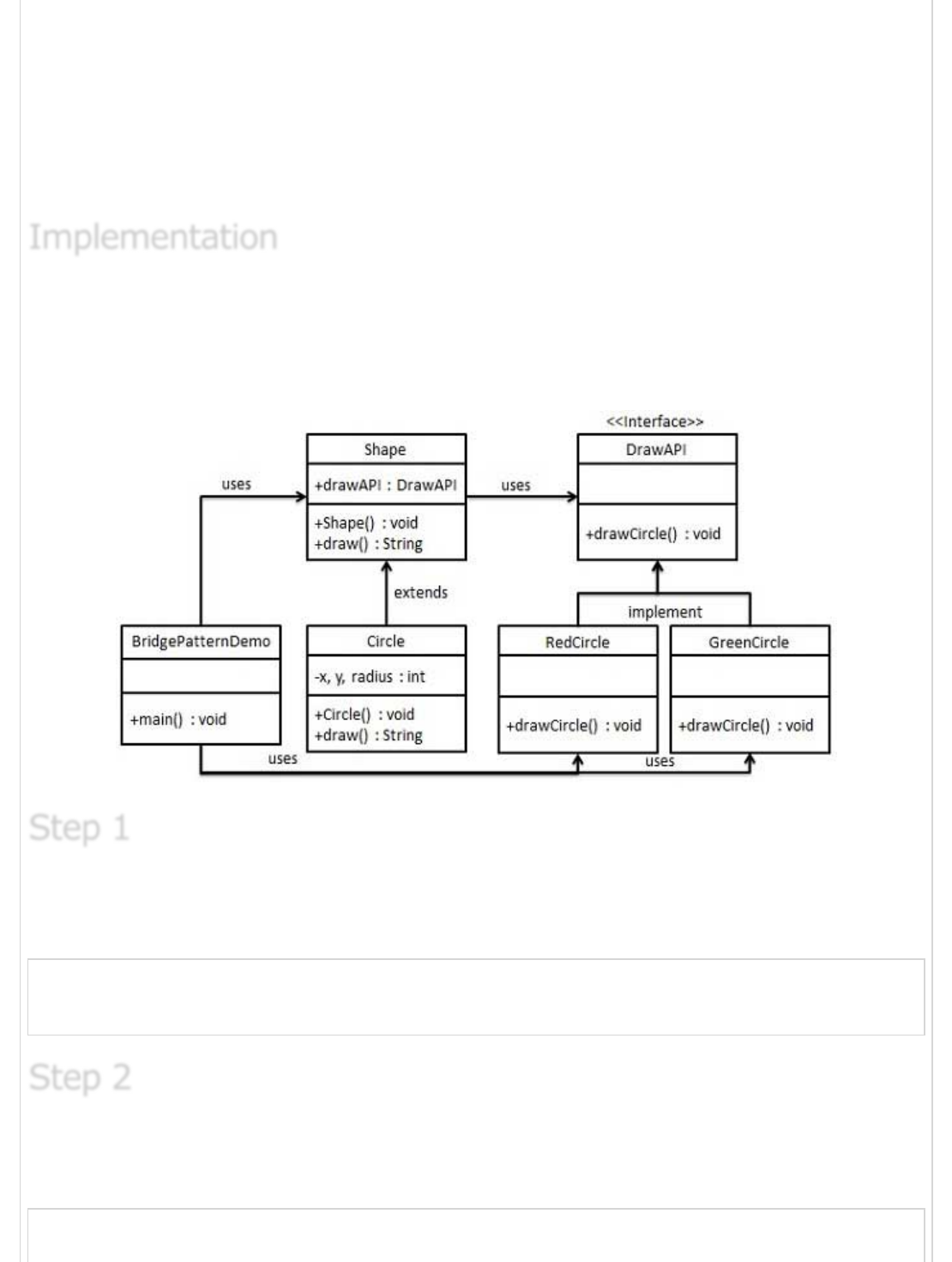
This pattern involves an interface which acts as a bridge which makes the functionality of
concrete classes independent from interface implementer classes. Both types of classes
can be altered structurally without affecting each other.
We are demonstrating use of Bridge pattern via following example in which a circle can be
drawn in different colors using same abstract class method but different bridge
implementer classes.
We've an interface DrawAPI interface which is acting as a bridge implementer and concrete
classes RedCircle, GreenCircle implementing the DrawAPI interface. Shape is an abstract
class and will use object of DrawAPI. BridgePatternDemo, our demo class will use Shape
class to draw different colored circle.
Create bridge implementer interface.
DrawAPI.java
public interface DrawAPI {
public void drawCircle(int radius, int x, int y);
}
Create concrete bridge implementer classes implementing the DrawAPI interface.
RedCircle.java
public class RedCircle implements DrawAPI {
@Override
ImplementationImplementation
Implementation
Step 1Step 1
Step 1
Step 2Step 2
Step 2
public void drawCircle(int radius, int x, int y) {
System.out.println("Drawing Circle[ color: red, radius: "
+ radius +", x: " +x+", "+ y +"]");
}
}
GreenCircle.java
public class GreenCircle implements DrawAPI {
@Override
public void drawCircle(int radius, int x, int y) {
System.out.println("Drawing Circle[ color: green, radius: "
+ radius +", x: " +x+", "+ y +"]");
}
}
Create an abstract class Shape using the DrawAPI interface.
Shape.java
public abstract class Shape {
protected DrawAPI drawAPI;
protected Shape(DrawAPI drawAPI){
this.drawAPI = drawAPI;
}
public abstract void draw();
}
Create concrete class implementing the Shape interface.
Circle.java
public class Circle extends Shape {
private int x, y, radius;
public Circle(int x, int y, int radius, DrawAPI drawAPI) {
super(drawAPI);
this.x = x;
this.y = y;
this.radius = radius;
}
public void draw() {
drawAPI.drawCircle(radius,x,y);
}
}
Use the Shape and DrawAPI classes to draw different colored circles.
Step 3Step 3
Step 3
Step 4Step 4
Step 4
Step 5Step 5
Step 5
BridgePatternDemo.java
public class BridgePatternDemo {
public static void main(String[] args) {
Shape redCircle = new Circle(100,100, 10, new RedCircle());
Shape greenCircle = new Circle(100,100, 10, new GreenCircle());
redCircle.draw();
greenCircle.draw();
}
}
Verify the output.
Drawing Circle[ color: red, radius: 10, x: 100, 100]
Drawing Circle[ color: green, radius: 10, x: 100, 100]
Filter/Criteria PatternFilter/Criteria Pattern
Filter/Criteria Pattern
Filter pattern or Criteria pattern is a design pattern that enables developers to filter a set
of objects, using different criteria, chaining them in a decoupled way through logical
operations. This type of design pattern comes under structural pattern as this pattern is
combining multiple criteria to obtain single criteria.
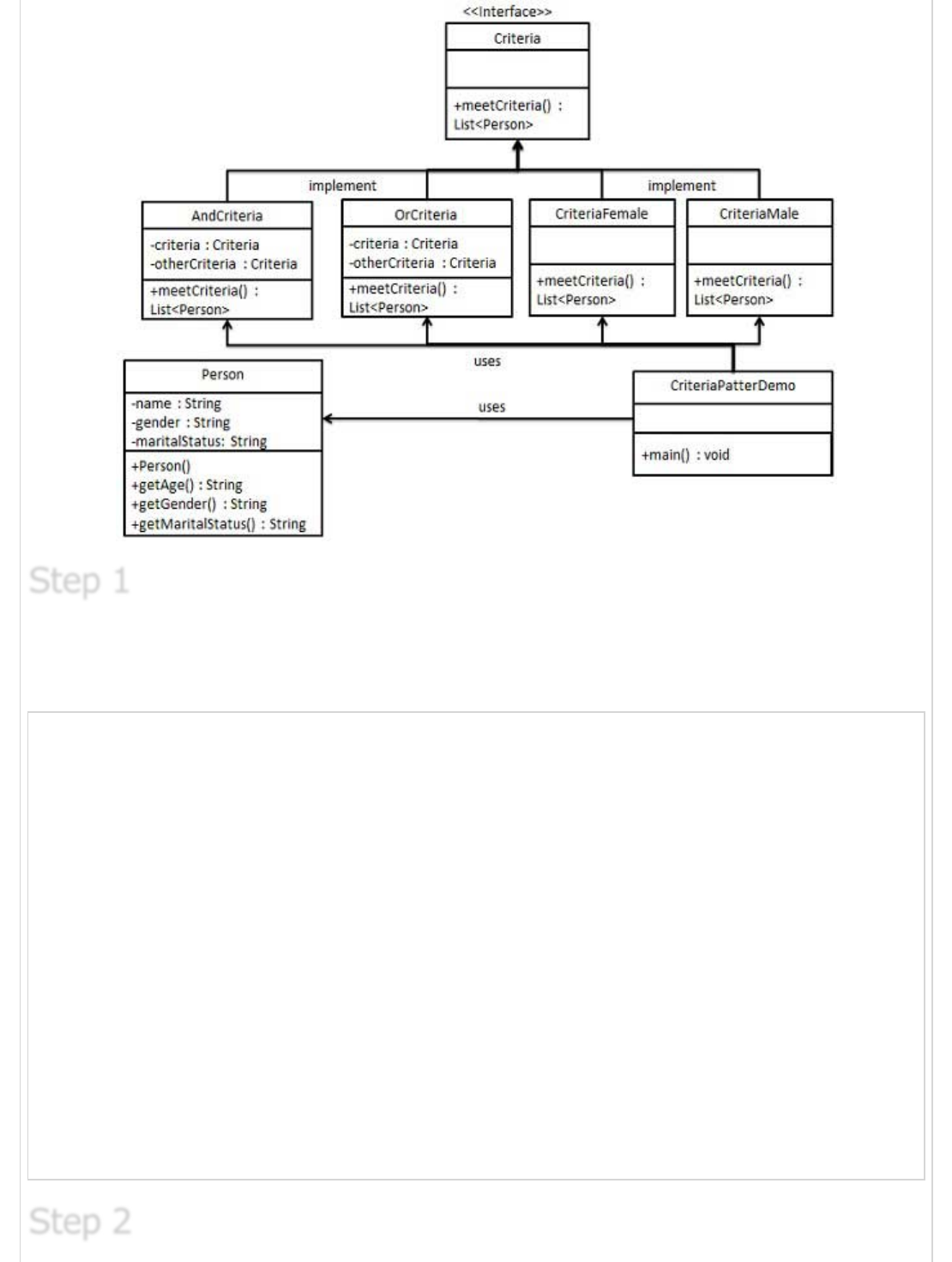
We're going to create a Person object, Criteria interface and concrete classes implementing
this interface to filter list of Person objects. CriteriaPatternDemo, our demo class uses
Criteria objects to filter List of Person objects based on various criteria and their
combinations.
Step 6Step 6
Step 6
ImplementationImplementation
Implementation
Create a class on which criteria is to be applied.
Person.java
public class Person {
private String name;
private String gender;
private String maritalStatus;
public Person(String name,String gender,String maritalStatus){
this.name = name;
this.gender = gender;
this.maritalStatus = maritalStatus;
}
public String getName() {
return name;
}
public String getGender() {
return gender;
}
public String getMaritalStatus() {
return maritalStatus;
}
}
Step 1Step 1
Step 1
Step 2Step 2
Step 2
Create an interface for Criteria.
Criteria.java
import java.util.List;
public interface Criteria {
public List<Person> meetCriteria(List<Person> persons);
}
Create concrete classes implementing the Criteria interface.
CriteriaMale.java
import java.util.ArrayList;
import java.util.List;
public class CriteriaMale implements Criteria {
@Override
public List<Person> meetCriteria(List<Person> persons) {
List<Person> malePersons = new ArrayList<Person>();
for (Person person : persons) {
if(person.getGender().equalsIgnoreCase("MALE")){
malePersons.add(person);
}
}
return malePersons;
}
}
CriteriaFemale.java
import java.util.ArrayList;
import java.util.List;
public class CriteriaFemale implements Criteria {
@Override
public List<Person> meetCriteria(List<Person> persons) {
List<Person> femalePersons = new ArrayList<Person>();
for (Person person : persons) {
if(person.getGender().equalsIgnoreCase("FEMALE")){
femalePersons.add(person);
}
}
return femalePersons;
}
}
CriteriaSingle.java
import java.util.ArrayList;
import java.util.List;
Step 3Step 3
Step 3

public class CriteriaSingle implements Criteria {
@Override
public List<Person> meetCriteria(List<Person> persons) {
List<Person> singlePersons = new ArrayList<Person>();
for (Person person : persons) {
if(person.getMaritalStatus().equalsIgnoreCase("SINGLE")){
singlePersons.add(person);
}
}
return singlePersons;
}
}
AndCriteria.java
import java.util.List;
public class AndCriteria implements Criteria {
private Criteria criteria;
private Criteria otherCriteria;
public AndCriteria(Criteria criteria, Criteria otherCriteria) {
this.criteria = criteria;
this.otherCriteria = otherCriteria;
}
@Override
public List<Person> meetCriteria(List<Person> persons) {
List<Person> firstCriteriaPersons = criteria.meetCriteria(persons);
return otherCriteria.meetCriteria(firstCriteriaPersons);
}
}
OrCriteria.java
import java.util.List;
public class AndCriteria implements Criteria {
private Criteria criteria;
private Criteria otherCriteria;
public AndCriteria(Criteria criteria, Criteria otherCriteria) {
this.criteria = criteria;
this.otherCriteria = otherCriteria;
}
@Override
public List<Person> meetCriteria(List<Person> persons) {
List<Person> firstCriteriaItems = criteria.meetCriteria(persons);
List<Person> otherCriteriaItems = otherCriteria.meetCriteria(persons);
for (Person person : otherCriteriaItems) {
if(!firstCriteriaItems.contains(person)){
firstCriteriaItems.add(person);
}
}
return firstCriteriaItems;
}
}
Use different Criteria and their combination to filter out persons.
CriteriaPatternDemo.java
import java.util.ArrayList;
import java.util.List;
public class CriteriaPatternDemo {
public static void main(String[] args) {
List<Person> persons = new ArrayList<Person>();
persons.add(new Person("Robert","Male", "Single"));
persons.add(new Person("John","Male", "Married"));
persons.add(new Person("Laura","Female", "Married"));
persons.add(new Person("Diana","Female", "Single"));
persons.add(new Person("Mike","Male", "Single"));
persons.add(new Person("Bobby","Male", "Single"));
Criteria male = new CriteriaMale();
Criteria female = new CriteriaFemale();
Criteria single = new CriteriaSingle();
Criteria singleMale = new AndCriteria(single, male);
Criteria singleOrFemale = new OrCriteria(single, female);
System.out.println("Males: ");
printPersons(male.meetCriteria(persons));
System.out.println("\nFemales: ");
printPersons(female.meetCriteria(persons));
System.out.println("\nSingle Males: ");
printPersons(singleMale.meetCriteria(persons));
System.out.println("\nSingle Or Females: ");
printPersons(singleOrFemale.meetCriteria(persons));
}
public static void printPersons(List<Person> persons){
for (Person person : persons) {
System.out.println("Person : [ Name : " + person.getName()
+", Gender : " + person.getGender()
+", Marital Status : " + person.getMaritalStatus()
+" ]");
}
}
}
Verify the output.
Step4Step4
Step4
Step 5Step 5
Step 5
Males:
Person : [ Name : Robert, Gender : Male, Marital Status : Single ]
Person : [ Name : John, Gender : Male, Marital Status : Married ]
Person : [ Name : Mike, Gender : Male, Marital Status : Single ]
Person : [ Name : Bobby, Gender : Male, Marital Status : Single ]
Females:
Person : [ Name : Laura, Gender : Female, Marital Status : Married ]
Person : [ Name : Diana, Gender : Female, Marital Status : Single ]
Single Males:
Person : [ Name : Robert, Gender : Male, Marital Status : Single ]
Person : [ Name : Mike, Gender : Male, Marital Status : Single ]
Person : [ Name : Bobby, Gender : Male, Marital Status : Single ]
Single Or Females:
Person : [ Name : Robert, Gender : Male, Marital Status : Single ]
Person : [ Name : Diana, Gender : Female, Marital Status : Single ]
Person : [ Name : Mike, Gender : Male, Marital Status : Single ]
Person : [ Name : Bobby, Gender : Male, Marital Status : Single ]
Person : [ Name : Laura, Gender : Female, Marital Status : Married ]
Composite PatternComposite Pattern
Composite Pattern
Composite pattern is used where we need to treat a group of objects in similar way as a
single object. Composite pattern composes objects in term of a tree structure to represent
part as well as whole hierarchy . This type of design pattern comes under structural
pattern as this pattern creates a tree structure of group of objects.
This pattern creates a class contains group of its own objects. This class provides ways to
modify its group of same objects.
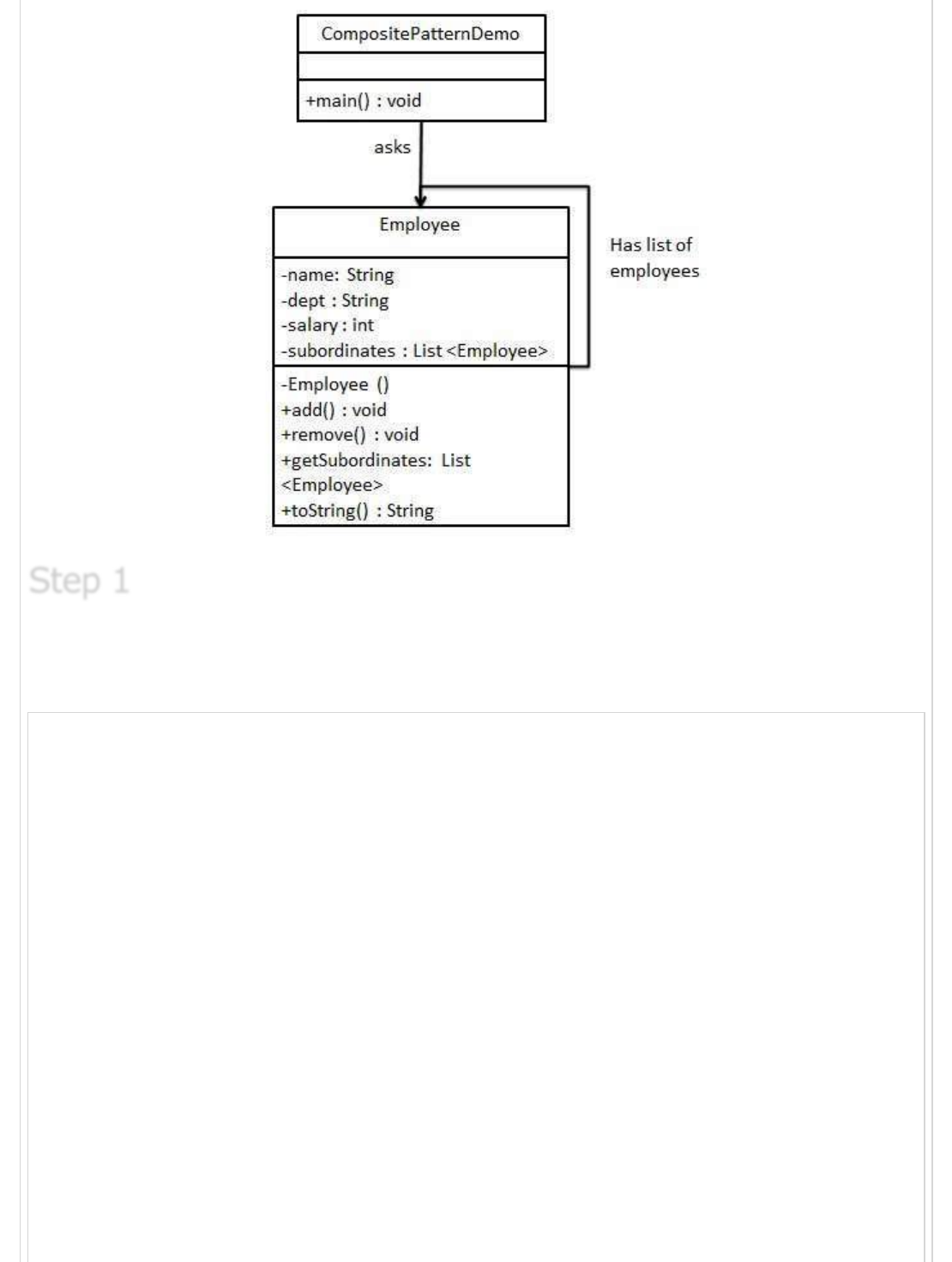
We are demonstrating use of Composite pattern via following example in which show
employees hierarchy of an organization.
We've a class Employee which acts as composite pattern actor class.
CompositePatternDemo, our demo class will use Employee class to add department level
hierarchy and print all employees.
ImplementationImplementation
Implementation
Create Employee class having list of Employee objects.
Employee.java
import java.util.ArrayList;
import java.util.List;
public class Employee {
private String name;
private String dept;
private int salary;
private List<Employee> subordinates;
// constructor
public Employee(String name,String dept, int sal) {
this.name = name;
this.dept = dept;
this.salary = sal;
subordinates = new ArrayList<Employee>();
}
public void add(Employee e) {
subordinates.add(e);
}
public void remove(Employee e) {
subordinates.remove(e);
}
public List<Employee> getSubordinates(){
Step 1Step 1
Step 1
return subordinates;
}
public String toString(){
return ("Employee :[ Name : "+ name
+", dept : "+ dept + ", salary :"
+ salary+" ]");
}
}
Use the Employee class to create and print employee hierarchy.
CompositePatternDemo.java
public class CompositePatternDemo {
public static void main(String[] args) {
Employee CEO = new Employee("John","CEO", 30000);
Employee headSales = new Employee("Robert","Head Sales", 20000);
Employee headMarketing = new Employee("Michel","Head Marketing", 20000);
Employee clerk1 = new Employee("Laura","Marketing", 10000);
Employee clerk2 = new Employee("Bob","Marketing", 10000);
Employee salesExecutive1 = new Employee("Richard","Sales", 10000);
Employee salesExecutive2 = new Employee("Rob","Sales", 10000);
CEO.add(headSales);
CEO.add(headMarketing);
headSales.add(salesExecutive1);
headSales.add(salesExecutive2);
headMarketing.add(clerk1);
headMarketing.add(clerk2);
//print all employees of the organization
System.out.println(CEO);
for (Employee headEmployee : CEO.getSubordinates()) {
System.out.println(headEmployee);
for (Employee employee : headEmployee.getSubordinates()) {
System.out.println(employee);
}
}
}
}
Verify the output.
Employee :[ Name : John, dept : CEO, salary :30000 ]
Employee :[ Name : Robert, dept : Head Sales, salary :20000 ]
Step 2Step 2
Step 2
Step 3Step 3
Step 3
Employee :[ Name : Richard, dept : Sales, salary :10000 ]
Employee :[ Name : Rob, dept : Sales, salary :10000 ]
Employee :[ Name : Michel, dept : Head Marketing, salary :20000 ]
Employee :[ Name : Laura, dept : Marketing, salary :10000 ]
Employee :[ Name : Bob, dept : Marketing, salary :10000 ]
Decorator PatternDecorator Pattern
Decorator Pattern
Decorator pattern allows to add new functionality an existing object without altering its
structure. This type of design pattern comes under structural pattern as this pattern acts
as a wrapper to existing class.
This pattern creates a decorator class which wraps the original class and provides
additional functionality keeping class methods signature intact.
We are demonstrating use of Decorator pattern via following example in which we'll
decorate a shape with some color without alter shape class.
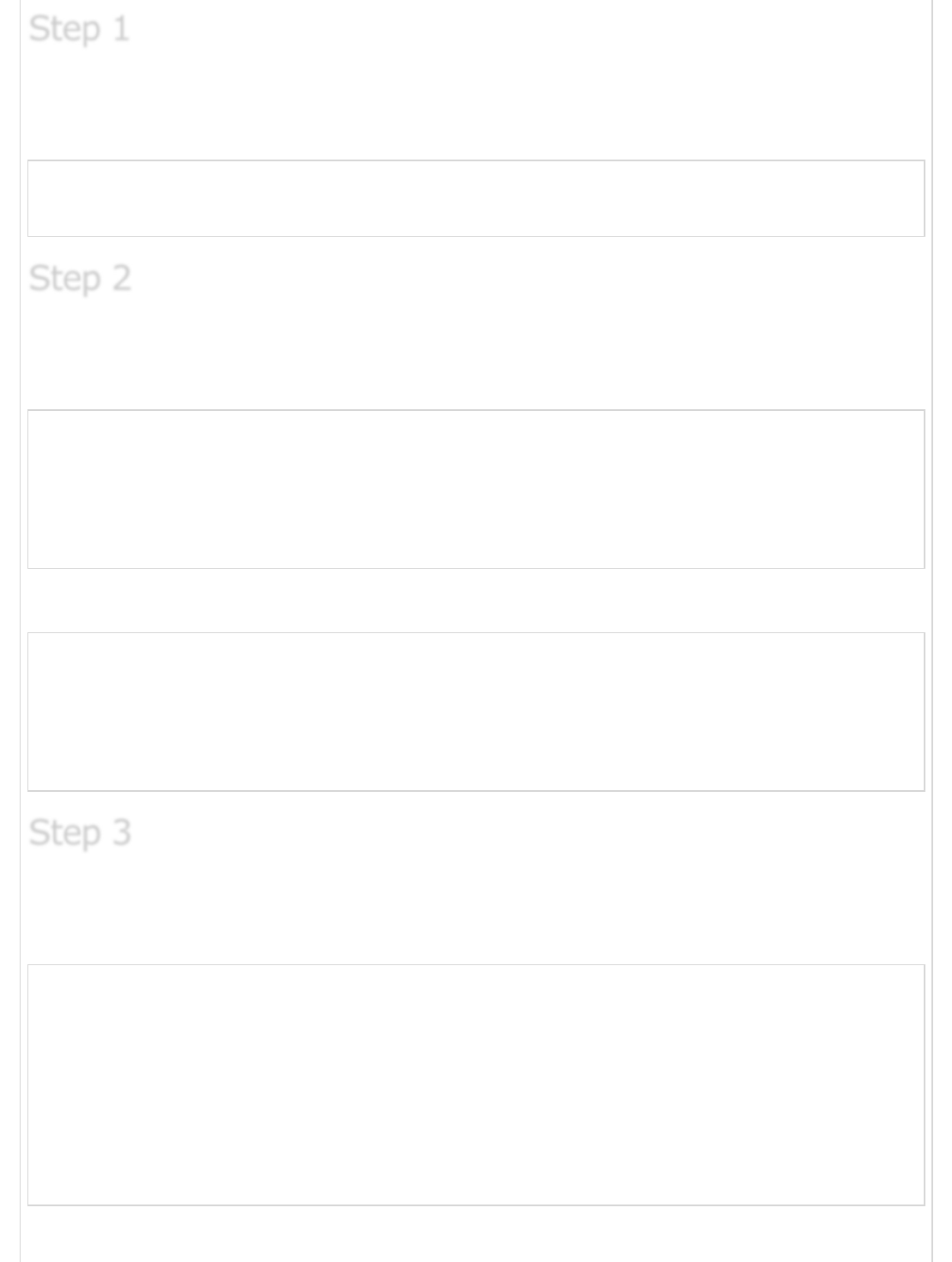
We're going to create a Shape interface and concrete classes implementing the Shape
interface. We then create a abstract decorator class ShapeDecorator implementing the
Shape interface and having Shape object as its instance variable.
RedShapeDecorator is concrete class implementing ShapeDecorator.
DecoratorPatternDemo, our demo class will use RedShapeDecorator to decorate Shape
objects.
ImplementationImplementation
Implementation
Create an interface.
Shape.java
public interface Shape {
void draw();
}
Create concrete classes implementing the same interface.
Rectangle.java
public class Rectangle implements Shape {
@Override
public void draw() {
System.out.println("Shape: Rectangle");
}
}
Circle.java
public class Circle implements Shape {
@Override
public void draw() {
System.out.println("Shape: Circle");
}
}
Create abstract decorator class implementing the Shape interface.
ShapeDecorator.java
public abstract class ShapeDecorator implements Shape {
protected Shape decoratedShape;
public ShapeDecorator(Shape decoratedShape){
this.decoratedShape = decoratedShape;
}
public void draw(){
decoratedShape.draw();
}
}
Step 1Step 1
Step 1
Step 2Step 2
Step 2
Step 3Step 3
Step 3
Create concrete decorator class extending the ShapeDecorator class.
RedShapeDecorator.java
public class RedShapeDecorator extends ShapeDecorator {
public RedShapeDecorator(Shape decoratedShape) {
super(decoratedShape);
}
@Override
public void draw() {
decoratedShape.draw();
setRedBorder(decoratedShape);
}
private void setRedBorder(Shape decoratedShape){
System.out.println("Border Color: Red");
}
}
Use the RedShapeDecorator to decorate Shape objects.
DecoratorPatternDemo.java
public class DecoratorPatternDemo {
public static void main(String[] args) {
Shape circle = new Circle();
Shape redCircle = new RedShapeDecorator(new Circle());
Shape redRectangle = new RedShapeDecorator(new Rectangle());
System.out.println("Circle with normal border");
circle.draw();
System.out.println("\nCircle of red border");
redCircle.draw();
System.out.println("\nRectangle of red border");
redRectangle.draw();
}
}
Verify the output.
Circle with normal border
Shape: Circle
Step 4Step 4
Step 4
Step 5Step 5
Step 5
Step 6Step 6
Step 6
Circle of red border
Shape: Circle
Border Color: Red
Rectangle of red border
Shape: Rectangle
Border Color: Red
Facade PatternFacade Pattern
Facade Pattern
Facade pattern hides the complexities of the system and provides an interface to the client
using which the client can access the system. This type of design pattern comes under
structural pattern as this pattern adds an interface to exiting system to hide its
complexities.
This pattern involves a single class which provides simplified methods which are required
by client and delegates calls to existing system classes methods.
We're going to create a Shape interface and concrete classes implementing the Shape
interface. A facade class ShapeMaker is defined as a next step.
ShapeMaker class uses the concrete classes to delegates user calls to these classes.
FacadePatternDemo, our demo class will use ShapeMaker class to show the results.
Create an interface.
ImplementationImplementation
Implementation
Step 1Step 1
Step 1
Shape.java
public interface Shape {
void draw();
}
Create concrete classes implementing the same interface.
Rectangle.java
public class Rectangle implements Shape {
@Override
public void draw() {
System.out.println("Rectangle::draw()");
}
}
Square.java
public class Square implements Shape {
@Override
public void draw() {
System.out.println("Square::draw()");
}
}
Circle.java
public class Circle implements Shape {
@Override
public void draw() {
System.out.println("Circle::draw()");
}
}
Create a facade class.
ShapeMaker.java
public class ShapeMaker {
private Shape circle;
private Shape rectangle;
private Shape square;
public ShapeMaker() {
circle = new Circle();
rectangle = new Rectangle();
Step 2Step 2
Step 2
Step 3Step 3
Step 3
square = new Square();
}
public void drawCircle(){
circle.draw();
}
public void drawRectangle(){
rectangle.draw();
}
public void drawSquare(){
square.draw();
}
}
Use the facade to draw various types of shapes.
FacadePatternDemo.java
public class FacadePatternDemo {
public static void main(String[] args) {
ShapeMaker shapeMaker = new ShapeMaker();
shapeMaker.drawCircle();
shapeMaker.drawRectangle();
shapeMaker.drawSquare();
}
}
Verify the output.
Circle::draw()
Rectangle::draw()
Square::draw()
Flyweight PatternFlyweight Pattern
Flyweight Pattern
Flyweight pattern is primarily used to reduce the number of objects created, to decrease
memory footprint and increase performance. This type of design pattern comes under
structural pattern as this pattern provides ways to decrease objects count thus improving
application required objects structure.
Flyweight pattern try to reuse already existing similar kind objects by storing them and
creates new object when no matching object is found. We'll demonstrate this pattern by
drawing 20 circle of different locations but we'll creating only 5 objects. Only 5 colors are
available so color property is used to check already existing Circle objects.
Step 4Step 4
Step 4
Step 5Step 5
Step 5
ImplementationImplementation
Implementation
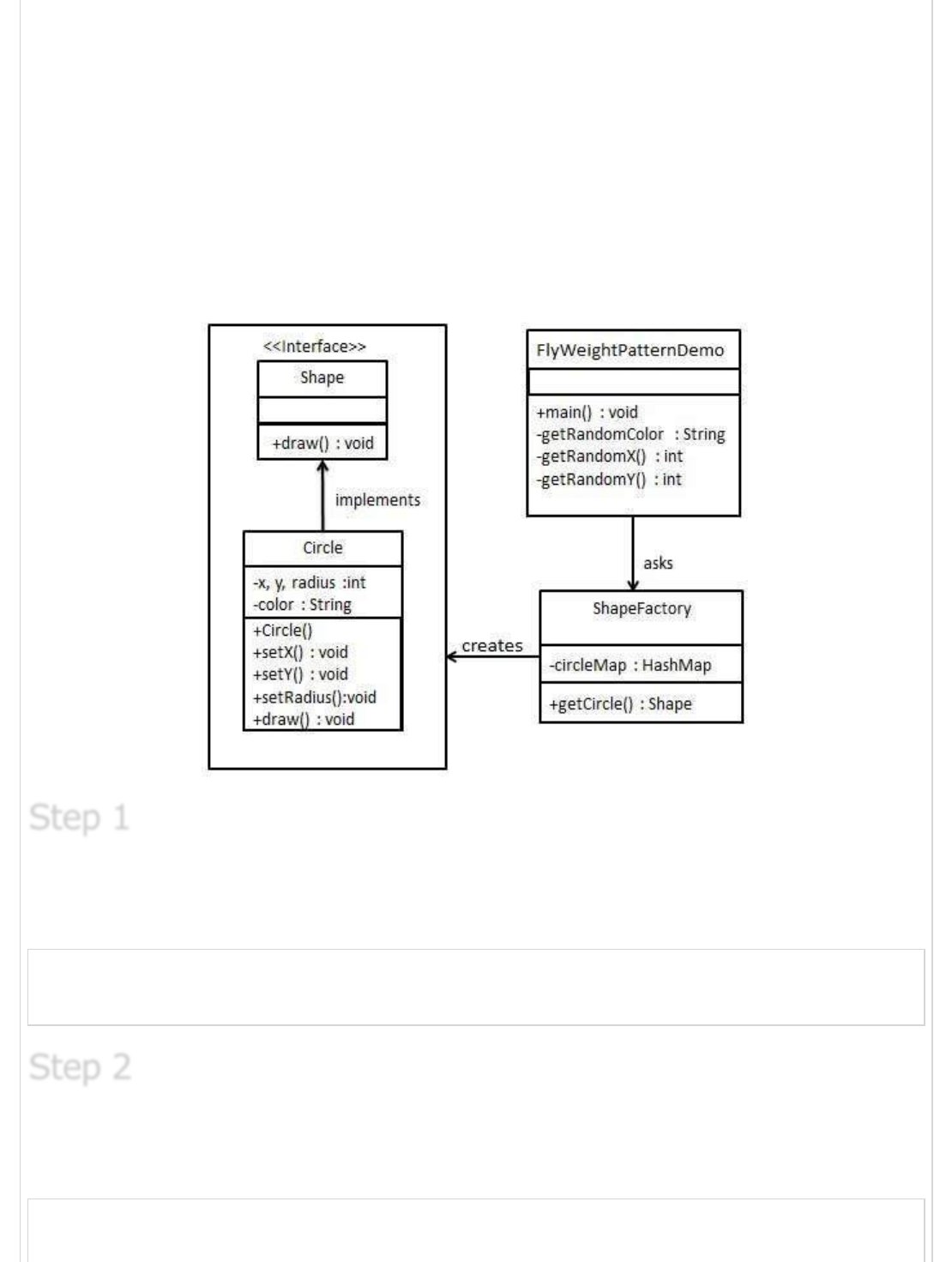
We're going to create a Shape interface and concrete class Circle implementing the Shape
interface. A factory class ShapeFactory is defined as a next step.
ShapeFactory have a HashMap of Circle having key as color of the Circle object. Whenever
a request comes to create a circle of particular color to ShapeFactory. ShapeFactory
checks the circle object in its HashMap, if object of Circle found, that object is returned
otherwise a new object is created, stored in hashmap for future use and returned to client.
FlyWeightPatternDemo, our demo class will use ShapeFactory to get a Shape object. It will
pass information (red / green / blue/ black / white) to ShapeFactory to get the circle of
desired color it needs.
Create an interface.
Shape.java
public interface Shape {
void draw();
}
Create concrete class implementing the same interface.
Circle.java
public class Circle implements Shape {
private String color;
Step 1Step 1
Step 1
Step 2Step 2
Step 2
private int x;
private int y;
private int radius;
public Circle(String color){
this.color = color;
}
public void setX(int x) {
this.x = x;
}
public void setY(int y) {
this.y = y;
}
public void setRadius(int radius) {
this.radius = radius;
}
@Override
public void draw() {
System.out.println("Circle: Draw() [Color : " + color
+", x : " + x +", y :" + y +", radius :" + radius);
}
}
Create a Factory to generate object of concrete class based on given information.
ShapeFactory.java
import java.util.HashMap;
public class ShapeFactory {
// Uncomment the compiler directive line and
// javac *.java will compile properly.
// @SuppressWarnings("unchecked")
private static final HashMap circleMap = new HashMap();
public static Shape getCircle(String color) {
Circle circle = (Circle)circleMap.get(color);
if(circle == null) {
circle = new Circle(color);
circleMap.put(color, circle);
System.out.println("Creating circle of color : " + color);
}
return circle;
}
}
Use the Factory to get object of concrete class by passing an information such as color.
Step 3Step 3
Step 3
Step 4Step 4
Step 4
FlyweightPatternDemo.java
public class FlyweightPatternDemo {
private static final String colors[] =
{ "Red", "Green", "Blue", "White", "Black" };
public static void main(String[] args) {
for(int i=0; i < 20; ++i) {
Circle circle =
(Circle)ShapeFactory.getCircle(getRandomColor());
circle.setX(getRandomX());
circle.setY(getRandomY());
circle.setRadius(100);
circle.draw();
}
}
private static String getRandomColor() {
return colors[(int)(Math.random()*colors.length)];
}
private static int getRandomX() {
return (int)(Math.random()*100 );
}
private static int getRandomY() {
return (int)(Math.random()*100);
}
}
Verify the output.
Creating circle of color : Black
Circle: Draw() [Color : Black, x : 36, y :71, radius :100
Creating circle of color : Green
Circle: Draw() [Color : Green, x : 27, y :27, radius :100
Creating circle of color : White
Circle: Draw() [Color : White, x : 64, y :10, radius :100
Creating circle of color : Red
Circle: Draw() [Color : Red, x : 15, y :44, radius :100
Circle: Draw() [Color : Green, x : 19, y :10, radius :100
Circle: Draw() [Color : Green, x : 94, y :32, radius :100
Circle: Draw() [Color : White, x : 69, y :98, radius :100
Creating circle of color : Blue
Circle: Draw() [Color : Blue, x : 13, y :4, radius :100
Circle: Draw() [Color : Green, x : 21, y :21, radius :100
Circle: Draw() [Color : Blue, x : 55, y :86, radius :100
Circle: Draw() [Color : White, x : 90, y :70, radius :100
Circle: Draw() [Color : Green, x : 78, y :3, radius :100
Circle: Draw() [Color : Green, x : 64, y :89, radius :100
Circle: Draw() [Color : Blue, x : 3, y :91, radius :100
Circle: Draw() [Color : Blue, x : 62, y :82, radius :100
Step 5Step 5
Step 5
Circle: Draw() [Color : Green, x : 97, y :61, radius :100
Circle: Draw() [Color : Green, x : 86, y :12, radius :100
Circle: Draw() [Color : Green, x : 38, y :93, radius :100
Circle: Draw() [Color : Red, x : 76, y :82, radius :100
Circle: Draw() [Color : Blue, x : 95, y :82, radius :100
Proxy PatternProxy Pattern
Proxy Pattern
In Proxy pattern, a class represents functionality of another class. This type of design
pattern comes under structural pattern.
In Proxy pattern, we create object having original object to interface its functionality to
outer world.
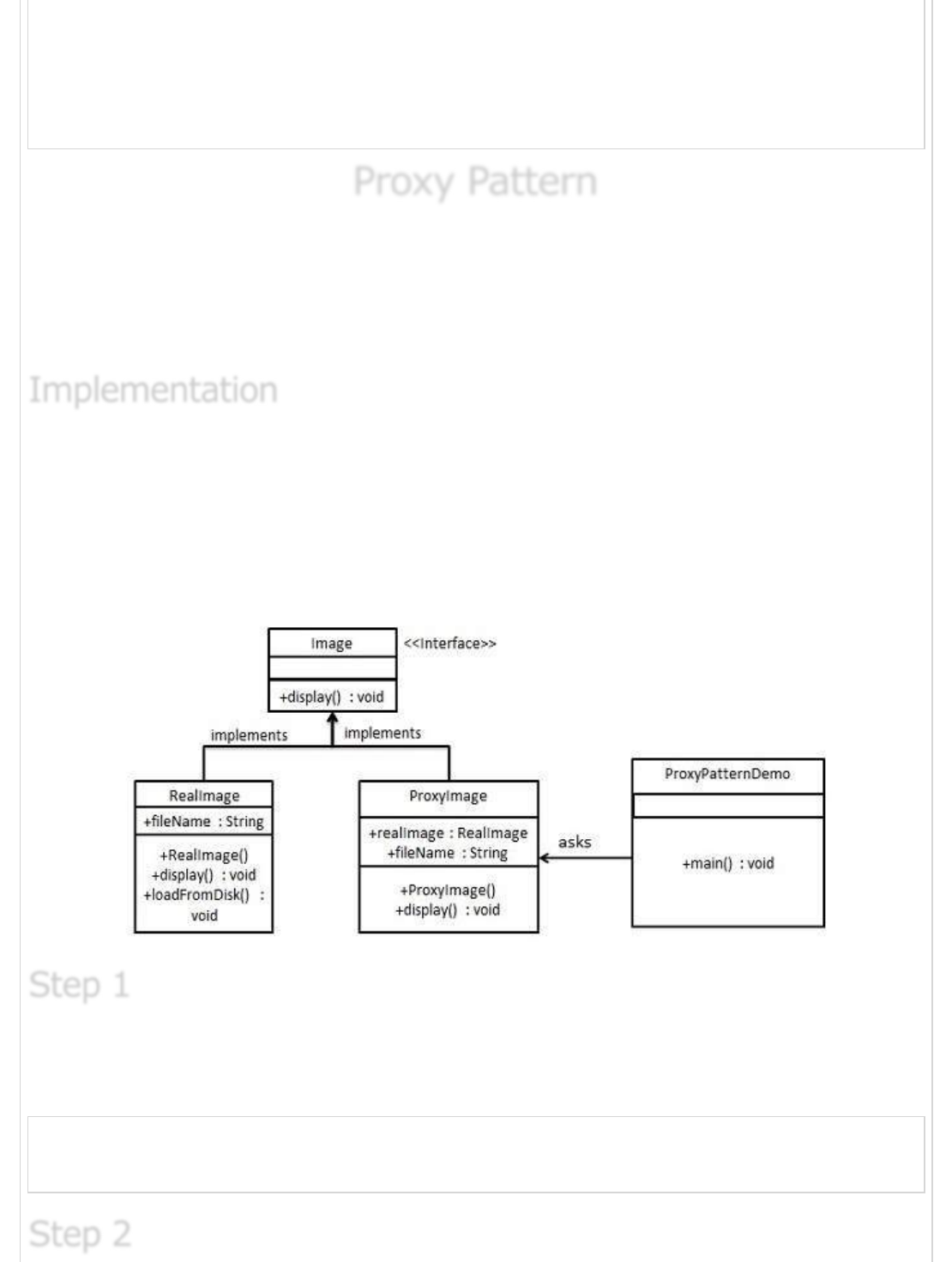
We're going to create a Image interface and concrete classes implementing the Image
interface. ProxyImage is a a proxy class to reduce memory footprint of RealImage object
loading.
ProxyPatternDemo, our demo class will use ProxyImage to get a Image object to load and
display as it needs.
Create an interface.
Image.java
public interface Image {
void display();
}
ImplementationImplementation
Implementation
Step 1Step 1
Step 1
Step 2Step 2
Step 2
Create concrete classes implementing the same interface.
RealImage.java
public class RealImage implements Image {
private String fileName;
public RealImage(String fileName){
this.fileName = fileName;
loadFromDisk(fileName);
}
@Override
public void display() {
System.out.println("Displaying " + fileName);
}
private void loadFromDisk(String fileName){
System.out.println("Loading " + fileName);
}
}
ProxyImage.java
public class ProxyImage implements Image{
private RealImage realImage;
private String fileName;
public ProxyImage(String fileName){
this.fileName = fileName;
}
@Override
public void display() {
if(realImage == null){
realImage = new RealImage(fileName);
}
realImage.display();
}
}
Use the ProxyImage to get object of RealImage class when required.
ProxyPatternDemo.java
public class ProxyPatternDemo {
public static void main(String[] args) {
Image image = new ProxyImage("test_10mb.jpg");
//image will be loaded from disk
image.display();
System.out.println("");
Step 3Step 3
Step 3
//image will not be loaded from disk
image.display();
}
}
Verify the output.
Loading test_10mb.jpg
Displaying test_10mb.jpg
Displaying test_10mb.jpg
Chain of Responsibility PatternChain of Responsibility Pattern
Chain of Responsibility Pattern
As the name suggest, the chain of responsibility pattern creates a chain of receiver objects
for a request. This pattern decouples sender and receiver of a request based on type of
request. This pattern comes under behavioral patterns.
In this pattern, normally each receiver contains reference to another receiver. If one object
cannot handle the request then it passes the same to the next receiver and so on.
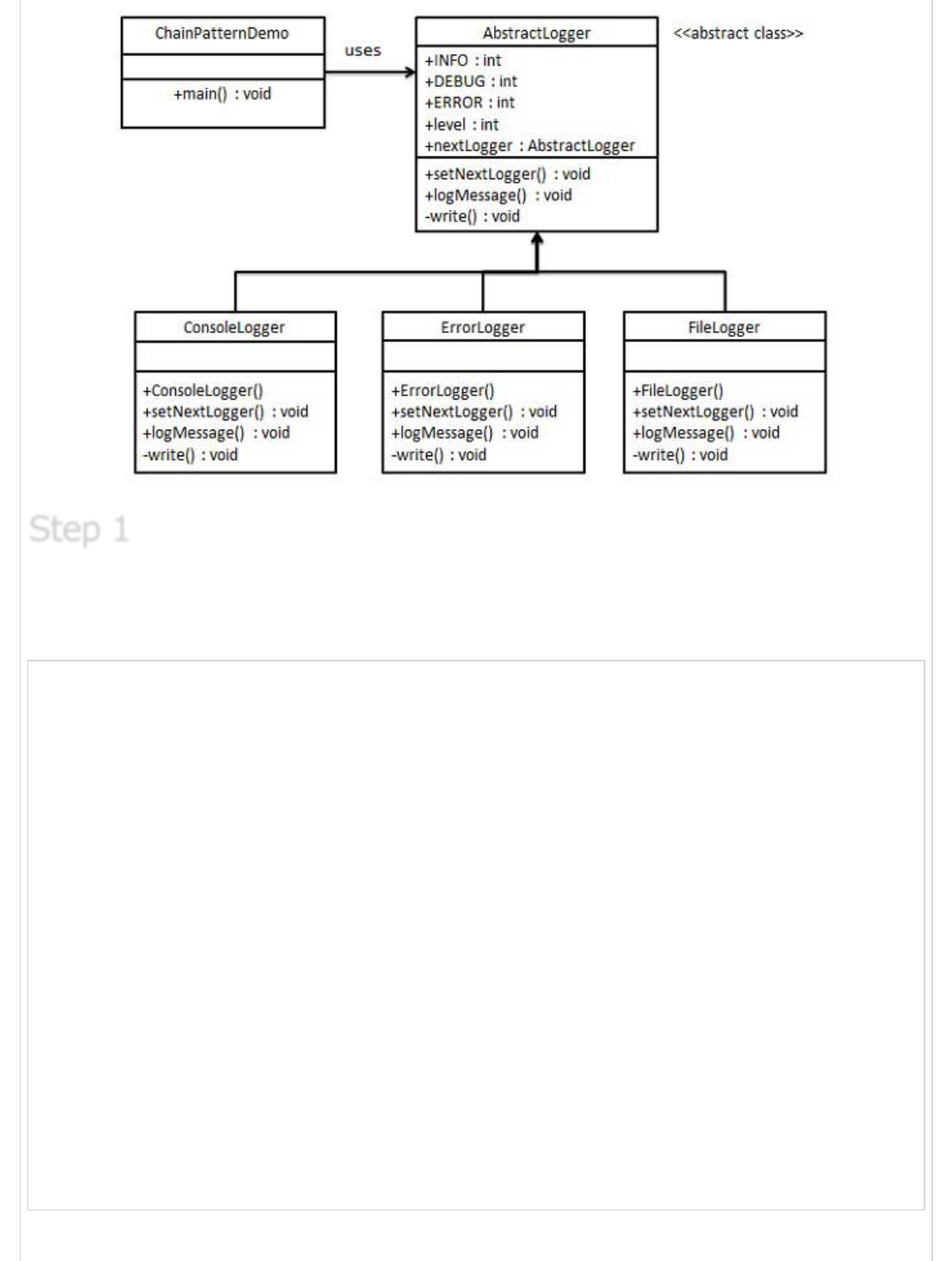
We've created an abstract class AbstractLogger with a level of logging. Then we've created
three types of loggers extending the AbstractLogger. Each logger checks the level of
message to its level and print accordingly otherwise does not print and pass the message
to its next logger.
Step 4Step 4
Step 4
ImplementationImplementation
Implementation
Create an abstract logger class.
AbstractLogger.java
public abstract class AbstractLogger {
public static int INFO = 1;
public static int DEBUG = 2;
public static int ERROR = 3;
protected int level;
//next element in chain or responsibility
protected AbstractLogger nextLogger;
public void setNextLogger(AbstractLogger nextLogger){
this.nextLogger = nextLogger;
}
public void logMessage(int level, String message){
if(this.level <= level){
write(message);
}
if(nextLogger !=null){
nextLogger.logMessage(level, message);
}
}
abstract protected void write(String message);
}
Step 1Step 1
Step 1
Create concrete classes extending the logger.
ConsoleLogger.java
public class ConsoleLogger extends AbstractLogger {
public ConsoleLogger(int level){
this.level = level;
}
@Override
protected void write(String message) {
System.out.println("Standard Console::Logger: " + message);
}
}
ErrorLogger.java
public class ErrorLogger extends AbstractLogger {
public ErrorLogger(int level){
this.level = level;
}
@Override
protected void write(String message) {
System.out.println("Error Console::Logger: " + message);
}
}
FileLogger.java
public class FileLogger extends AbstractLogger {
public FileLogger(int level){
this.level = level;
}
@Override
protected void write(String message) {
System.out.println("File::Logger: " + message);
}
}
Create different types of loggers. Assign them error levels and set next logger in each
logger. Next logger in each logger represents the part of the chain.
ChainPatternDemo.java
Step 2Step 2
Step 2
Step 3Step 3
Step 3
public class ChainPatternDemo {
private static AbstractLogger getChainOfLoggers(){
AbstractLogger errorLogger = new ErrorLogger(AbstractLogger.ERROR);
AbstractLogger fileLogger = new FileLogger(AbstractLogger.DEBUG);
AbstractLogger consoleLogger = new ConsoleLogger(AbstractLogger.INFO);
errorLogger.setNextLogger(fileLogger);
fileLogger.setNextLogger(consoleLogger);
return errorLogger;
}
public static void main(String[] args) {
AbstractLogger loggerChain = getChainOfLoggers();
loggerChain.logMessage(AbstractLogger.INFO,
"This is an information.");
loggerChain.logMessage(AbstractLogger.DEBUG,
"This is an debug level information.");
loggerChain.logMessage(AbstractLogger.ERROR,
"This is an error information.");
}
}
Verify the output.
Standard Console::Logger: This is an information.
File::Logger: This is an debug level information.
Standard Console::Logger: This is an debug level information.
Error Console::Logger: This is an error information.
File::Logger: This is an error information.
Standard Console::Logger: This is an error information.
Command PatternCommand Pattern
Command Pattern
Command pattern is a data driven design pattern and falls under behavioral pattern
category. A request is wrapped under a object as command and passed to invoker object.
Invoker object looks for the appropriate object which can handle this command and pass
the command to the corresponding object and that object executes the command.
We've created an interface Order which is acting as a command. We've created a Stock
class which acts as a request. We've concrete command classes BuyStock and SellStock
Step 4Step 4
Step 4
ImplementationImplementation
Implementation
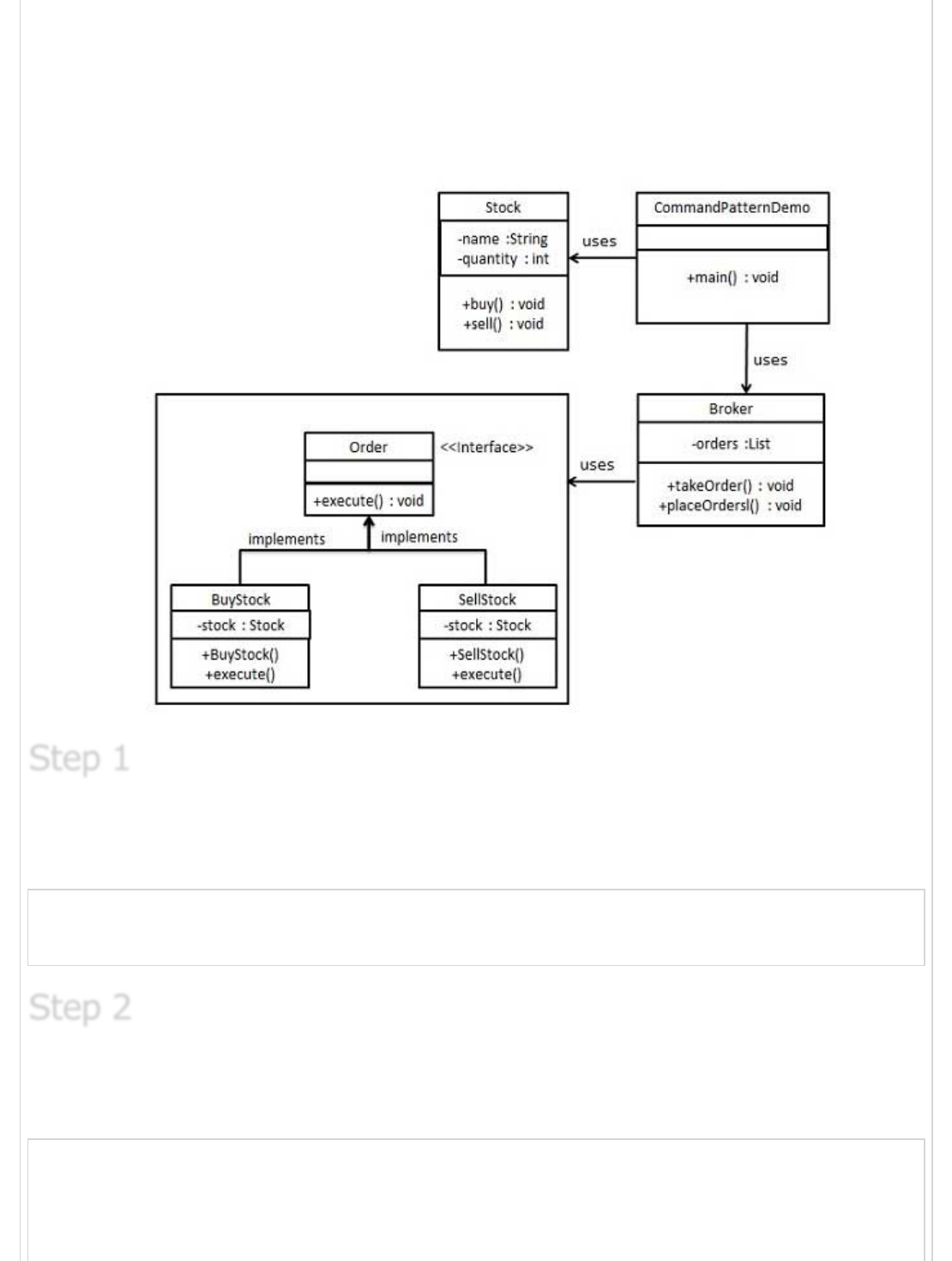
implementing Order interface which will do actual command processing. A class Broker is
created which acts as a invoker object. It can take order and place orders.
Broker object uses command pattern to identify which object will execute which command
based on type of command. CommandPatternDemo, our demo class will use Broker class
to demonstrate command pattern.
Create a command interface.
Order.java
public interface Order {
void execute();
}
Create a request class.
Stock.java
public class Stock {
private String name = "ABC";
private int quantity = 10;
Step 1Step 1
Step 1
Step 2Step 2
Step 2
public void buy(){
System.out.println("Stock [ Name: "+name+",
Quantity: " + quantity +" ] bought");
}
public void sell(){
System.out.println("Stock [ Name: "+name+",
Quantity: " + quantity +" ] sold");
}
}
Create concrete classes implementing the Order interface.
BuyStock.java
public class BuyStock implements Order {
private Stock abcStock;
public BuyStock(Stock abcStock){
this.abcStock = abcStock;
}
public void execute() {
abcStock.buy();
}
}
SellStock.java
public class SellStock implements Order {
private Stock abcStock;
public SellStock(Stock abcStock){
this.abcStock = abcStock;
}
public void execute() {
abcStock.sell();
}
}
Create command invoker class.
Broker.java
import java.util.ArrayList;
import java.util.List;
public class Broker {
private List<Order> orderList = new ArrayList<Order>();
public void takeOrder(Order order){
orderList.add(order);
Step 3Step 3
Step 3
Step 4Step 4
Step 4
}
public void placeOrders(){
for (Order order : orderList) {
order.execute();
}
orderList.clear();
}
}
Use the Broker class to take and execute commands.
CommandPatternDemo.java
public class CommandPatternDemo {
public static void main(String[] args) {
Stock abcStock = new Stock();
BuyStock buyStockOrder = new BuyStock(abcStock);
SellStock sellStockOrder = new SellStock(abcStock);
Broker broker = new Broker();
broker.takeOrder(buyStockOrder);
broker.takeOrder(sellStockOrder);
broker.placeOrders();
}
}
Verify the output.
Stock [ Name: ABC, Quantity: 10 ] bought
Stock [ Name: ABC, Quantity: 10 ] sold
Interpreter PatternInterpreter Pattern
Interpreter Pattern
Interpreter pattern provides way to evaluate language grammar or expression. This type of
pattern comes under behavioral patterns. This pattern involves implementing a expression
interface which tells to interpret a particular context. This pattern is used in SQL parsing,
symbol processing engine etc.
We're going to create an interface Expression and concrete classes implementing the
Expression interface. A class TerminalExpression is defined which acts as a main
interpreter of context in question. Other classes OrExpression, AndExpression are used to
create combinational expressions.
Step 5Step 5
Step 5
Step 6Step 6
Step 6
ImplementationImplementation
Implementation
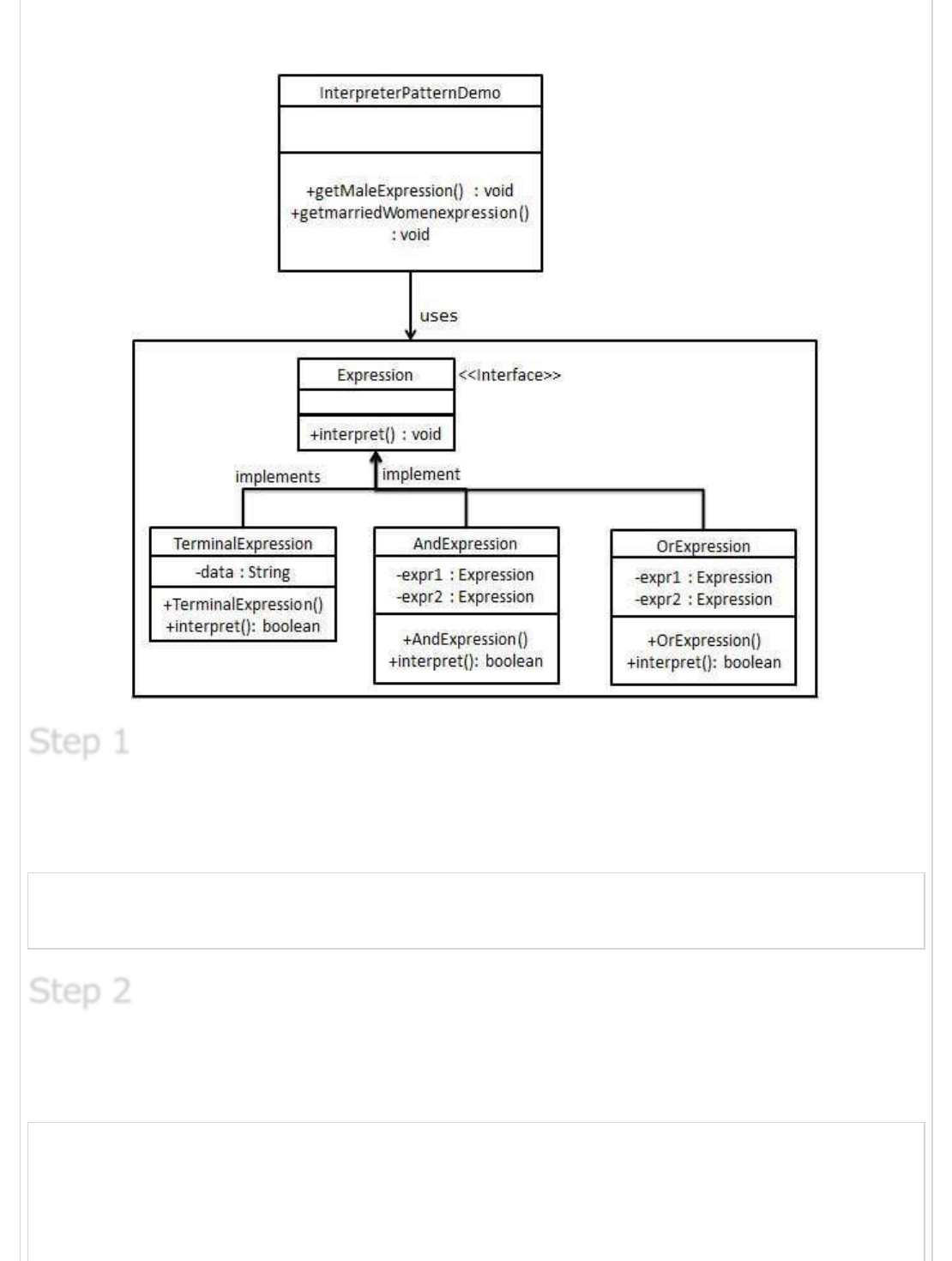
InterpreterPatternDemo, our demo class will use Expression class to create rules and
demonstrate parsing of expressions.
Create an expression interface.
Expression.java
public interface Expression {
public boolean interpret(String context);
}
Create concrete classes implementing the above interface.
TerminalExpression.java
public class TerminalExpression implements Expression {
private String data;
public TerminalExpression(String data){
this.data = data;
Step 1Step 1
Step 1
Step 2Step 2
Step 2
}
@Override
public boolean interpret(String context) {
if(context.contains(data)){
return true;
}
return false;
}
}
OrExpression.java
public class OrExpression implements Expression {
private Expression expr1 = null;
private Expression expr2 = null;
public OrExpression(Expression expr1, Expression expr2) {
this.expr1 = expr1;
this.expr2 = expr2;
}
@Override
public boolean interpret(String context) {
return expr1.interpret(context) || expr2.interpret(context);
}
}
AndExpression.java
public class AndExpression implements Expression {
private Expression expr1 = null;
private Expression expr2 = null;
public AndExpression(Expression expr1, Expression expr2) {
this.expr1 = expr1;
this.expr2 = expr2;
}
@Override
public boolean interpret(String context) {
return expr1.interpret(context) && expr2.interpret(context);
}
}
InterpreterPatternDemo uses Expression class to create rules and then parse them.
InterpreterPatternDemo.java
public class InterpreterPatternDemo {
//Rule: Robert and John are male
public static Expression getMaleExpression(){
Step 3Step 3
Step 3
Expression robert = new TerminalExpression("Robert");
Expression john = new TerminalExpression("John");
return new OrExpression(robert, john);
}
//Rule: Julie is a married women
public static Expression getMarriedWomanExpression(){
Expression julie = new TerminalExpression("Julie");
Expression married = new TerminalExpression("Married");
return new AndExpression(julie, married);
}
public static void main(String[] args) {
Expression isMale = getMaleExpression();
Expression isMarriedWoman = getMarriedWomanExpression();
System.out.println("John is male? " + isMale.interpret("John"));
System.out.println("Julie is a married women? "
+ isMarriedWoman.interpret("Married Julie"));
}
}
Verify the output.
John is male? true
Julie is a married women? true
Iterator PatternIterator Pattern
Iterator Pattern
Iterator pattern is very commonly used design pattern in Java and .Net programming
environment. This pattern is used to get a way to access the elements of a collection
object in sequential manner without any need to know its underlying representation.
Iterator pattern falls under behavioral pattern category.
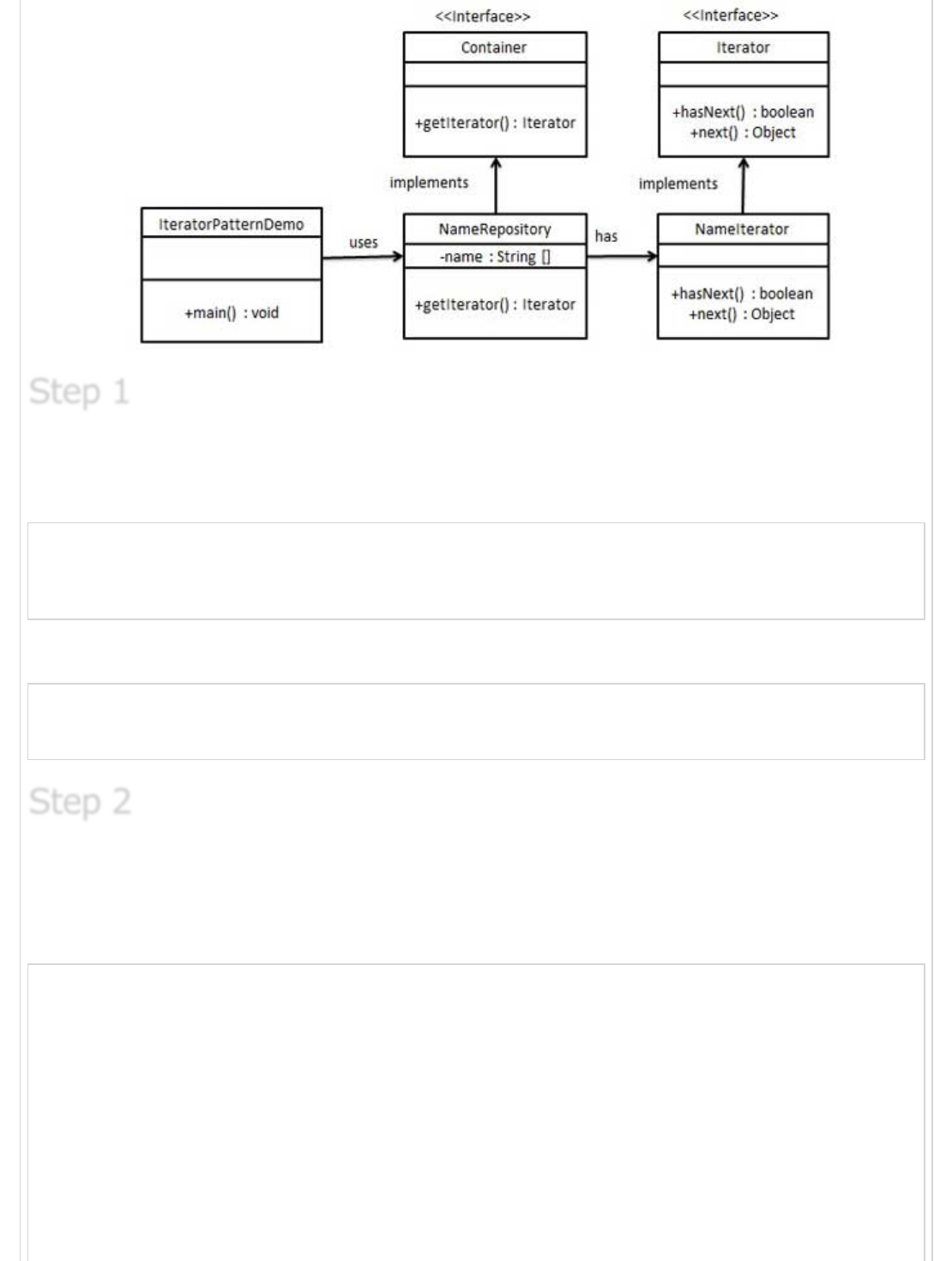
We're going to create a Iterator interface which narrates navigation method and a
Container interface which retruns the iterator . Concrete classes implementing the
Container interface will be responsible to implement Iterator interface and use it
IteratorPatternDemo, our demo class will use NamesRepository, a concrete class
implementation to print a Names stored as a collection in NamesRepository.
Step 4Step 4
Step 4
ImplementationImplementation
Implementation
Create interfaces.
Iterator.java
public interface Iterator {
public boolean hasNext();
public Object next();
}
Container.java
public interface Container {
public Iterator getIterator();
}
Create concrete class implementing the Container interface. This class has inner class
NameIterator implementing the Iterator interface.
NameRepository.java
public class NameRepository implements Container {
public String names[] = {"Robert" , "John" ,"Julie" , "Lora"};
@Override
public Iterator getIterator() {
return new NameIterator();
}
private class NameIterator implements Iterator {
int index;
@Override
public boolean hasNext() {
Step 1Step 1
Step 1
Step 2Step 2
Step 2
if(index < names.length){
return true;
}
return false;
}
@Override
public Object next() {
if(this.hasNext()){
return names[index++];
}
return null;
}
}
}
Use the NameRepository to get iterator and print names.
IteratorPatternDemo.java
public class IteratorPatternDemo {
public static void main(String[] args) {
NameRepository namesRepository = new NameRepository();
for(Iterator iter = namesRepository.getIterator(); iter.hasNext();){
String name = (String)iter.next();
System.out.println("Name : " + name);
}
}
}
Verify the output.
Name : Robert
Name : John
Name : Julie
Name : Lora
Mediator PatternMediator Pattern
Mediator Pattern
Mediator pattern is used to reduce communication complexity between multiple objects or
classes. This pattern provides a mediator class which normally handles all the
communications between different classes and supports easy maintainability of the code
by loose coupling. Mediator pattern falls under behavioral pattern category.
Step 3Step 3
Step 3
Step 4Step 4
Step 4
ImplementationImplementation
Implementation
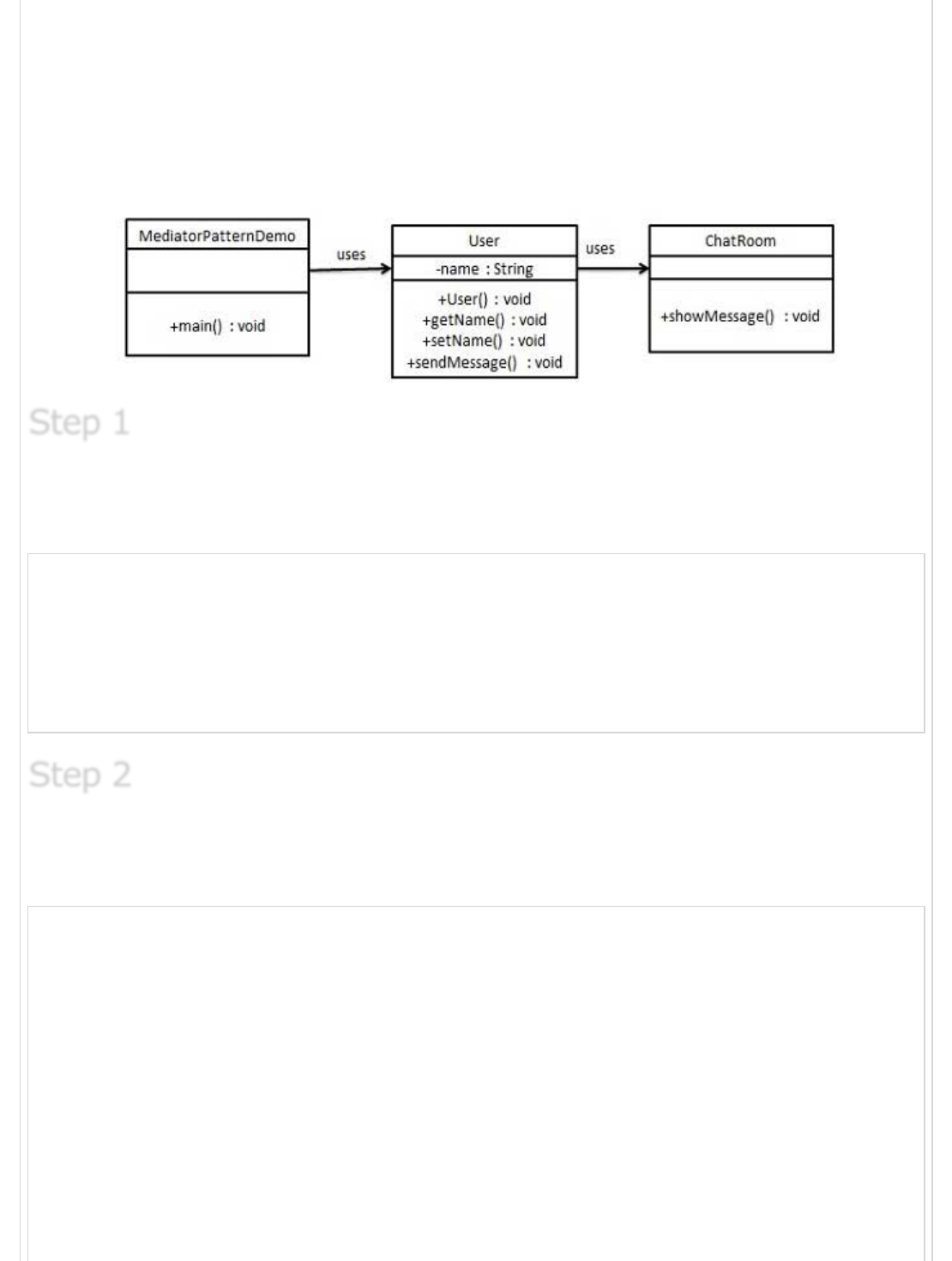
We're demonstrating mediator pattern by example of a Chat Room where multiple users
can send message to Chat Room and it is the responsibility of Chat Room to show the
messages to all users. We've created two classes ChatRoom and User. User objects will
use ChatRoom method to share their messages.
MediatorPatternDemo, our demo class will use User objects to show communication
between them.
Create mediator class.
ChatRoom.java
import java.util.Date;
public class ChatRoom {
public static void showMessage(User user, String message){
System.out.println(new Date().toString()
+ " [" + user.getName() +"] : " + message);
}
}
Create user class
User.java
public class User {
private String name;
public String getName() {
return name;
}
public void setName(String name) {
this.name = name;
}
public User(String name){
this.name = name;
}
public void sendMessage(String message){
Step 1Step 1
Step 1
Step 2Step 2
Step 2
ChatRoom.showMessage(this,message);
}
}
Use the User object to show communications between them.
MediatorPatternDemo.java
public class MediatorPatternDemo {
public static void main(String[] args) {
User robert = new User("Robert");
User john = new User("John");
robert.sendMessage("Hi! John!");
john.sendMessage("Hello! Robert!");
}
}
Verify the output.
Thu Jan 31 16:05:46 IST 2013 [Robert] : Hi! John!
Thu Jan 31 16:05:46 IST 2013 [John] : Hello! Robert!
Memento PatternMemento Pattern
Memento Pattern
Memento pattern is used to reduce where we want to restore state of an object to a
previous state. Memento pattern falls under behavioral pattern category.
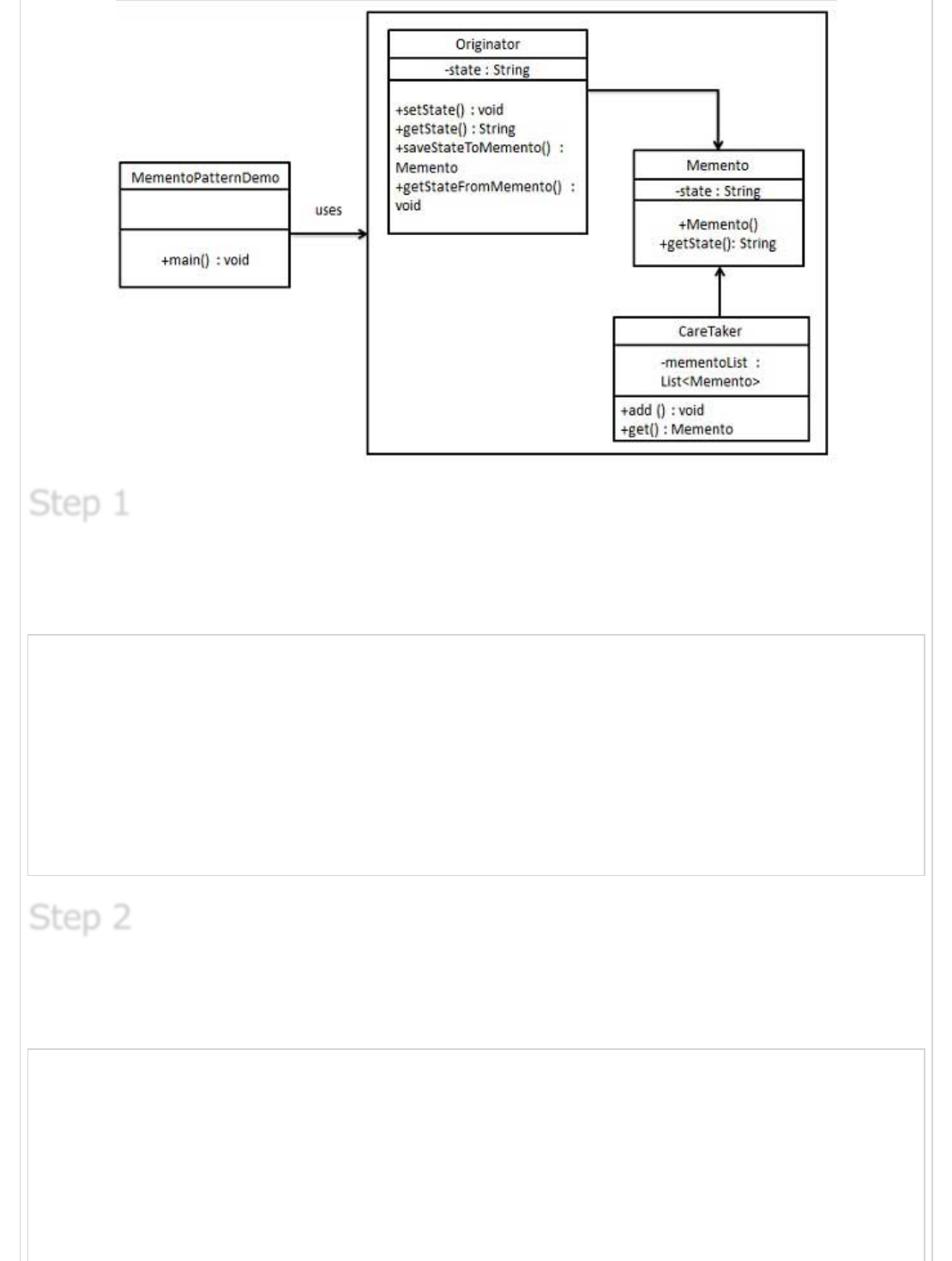
Memento pattern uses three actor classes. Memento contains state of an object to be
restored. Originator creates and stores states in Memento objects and Caretaker object
which is responsible to restore object state from Memento. We've created classes
Memento, Originator and CareTaker.
MementoPatternDemo, our demo class will use CareTaker and Originator objects to show
restoration of object states.
Step 3Step 3
Step 3
Step 4Step 4
Step 4
ImplementationImplementation
Implementation
Create Memento class.
Memento.java
public class Memento {
private String state;
public Memento(String state){
this.state = state;
}
public String getState(){
return state;
}
}
Create Originator class
Originator.java
public class Originator {
private String state;
public void setState(String state){
this.state = state;
}
public String getState(){
return state;
Step 1Step 1
Step 1
Step 2Step 2
Step 2
}
public Memento saveStateToMemento(){
return new Memento(state);
}
public void getStateFromMemento(Memento Memento){
state = memento.getState();
}
}
Create CareTaker class
CareTaker.java
import java.util.ArrayList;
import java.util.List;
public class CareTaker {
private List<Memento> mementoList = new ArrayList<Memento>();
public void add(Memento state){
mementoList.add(state);
}
public Memento get(int index){
return mementoList.get(index);
}
}
Use CareTaker and Originator objects.
MementoPatternDemo.java
public class MementoPatternDemo {
public static void main(String[] args) {
Originator originator = new Originator();
CareTaker careTaker = new CareTaker();
originator.setState("State #1");
originator.setState("State #2");
careTaker.add(originator.saveStateToMemento());
originator.setState("State #3");
careTaker.add(originator.saveStateToMemento());
originator.setState("State #4");
System.out.println("Current State: " + originator.getState());
originator.getStateFromMemento(careTaker.get(0));
System.out.println("First saved State: " + originator.getState());
originator.getStateFromMemento(careTaker.get(1));
System.out.println("Second saved State: " + originator.getState());
}
}
Step 3Step 3
Step 3
Step 4Step 4
Step 4
Verify the output.
Current State: State #4
First saved State: State #2
Second saved State: State #3
Observer PatternObserver Pattern
Observer Pattern
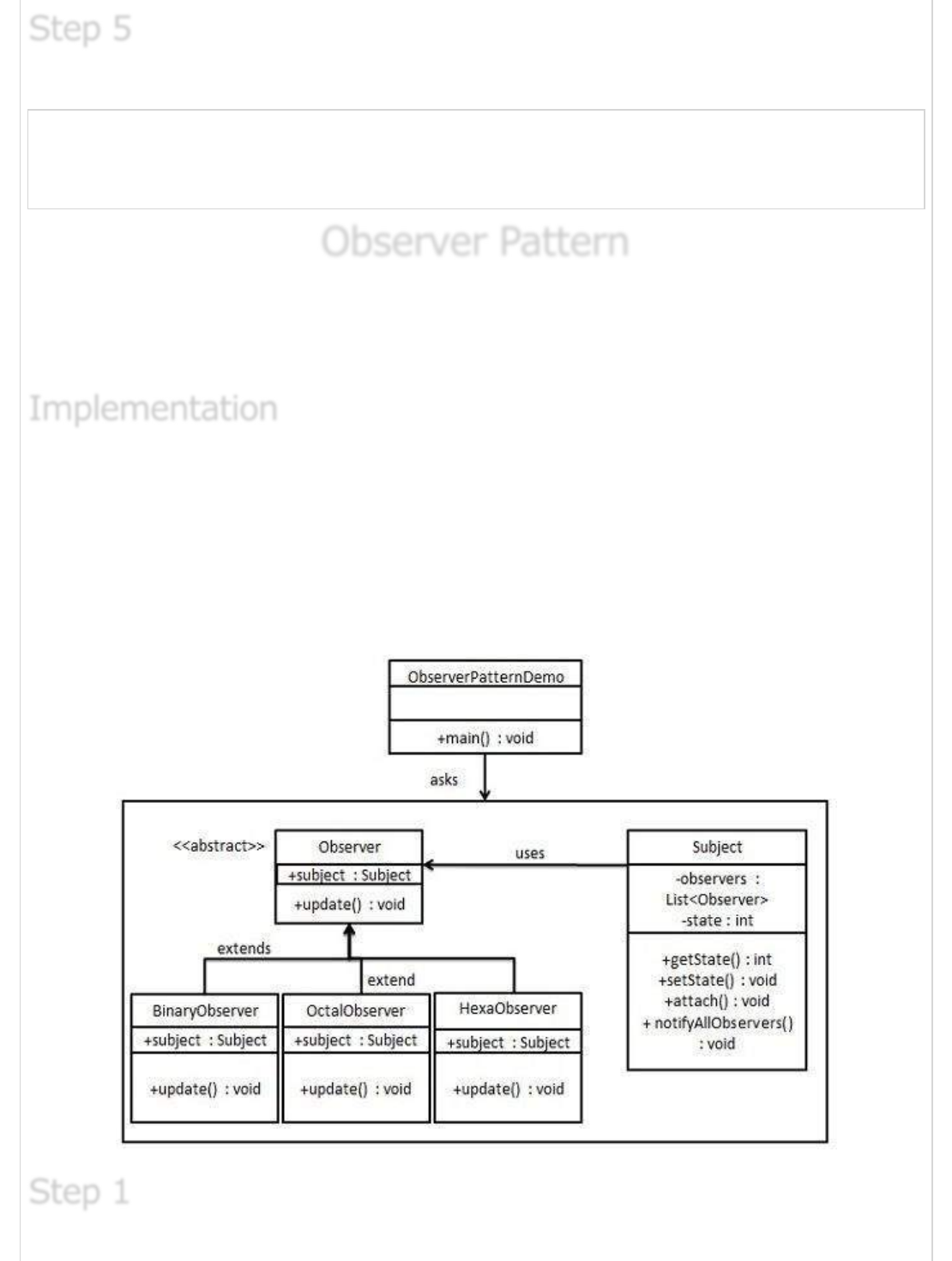
Observer pattern is used when there is one to many relationship between objects such as
if one object is modified, its depenedent objects are to be notified automatically. Observer
pattern falls under behavioral pattern category.
Observer pattern uses three actor classes. Subject, Observer and Client. Subject, an object
having methods to attach and de-attach observers to a client object. We've created classes
Subject, Observer abstract class and concrete classes extending the abstract class the
Observer.
ObserverPatternDemo, our demo class will use Subject and concrete class objects to show
observer pattern in action.
Step 5Step 5
Step 5
ImplementationImplementation
Implementation
Step 1Step 1
Step 1
Create Subject class.
Subject.java
import java.util.ArrayList;
import java.util.List;
public class Subject {
private List<Observer> observers
= new ArrayList<Observer>();
private int state;
public int getState() {
return state;
}
public void setState(int state) {
this.state = state;
notifyAllObservers();
}
public void attach(Observer observer){
observers.add(observer);
}
public void notifyAllObservers(){
for (Observer observer : observers) {
observer.update();
}
}
}
Create Observer class.
Observer.java
public abstract class Observer {
protected Subject subject;
public abstract void update();
}
Create concrete observer classes
BinaryObserver.java
public class BinaryObserver extends Observer{
public BinaryObserver(Subject subject){
this.subject = subject;
this.subject.attach(this);
}
Step 2Step 2
Step 2
Step 3Step 3
Step 3
@Override
public void update() {
System.out.println( "Binary String: "
+ Integer.toBinaryString( subject.getState() ) );
}
}
OctalObserver.java
public class OctalObserver extends Observer{
public OctalObserver(Subject subject){
this.subject = subject;
this.subject.attach(this);
}
@Override
public void update() {
System.out.println( "Octal String: "
+ Integer.toOctalString( subject.getState() ) );
}
}
HexaObserver.java
public class HexaObserver extends Observer{
public HexaObserver(Subject subject){
this.subject = subject;
this.subject.attach(this);
}
@Override
public void update() {
System.out.println( "Hex String: "
+ Integer.toHexString( subject.getState() ).toUpperCase() );
}
}
Use Subject and concrete observer objects.
ObserverPatternDemo.java
public class ObserverPatternDemo {
public static void main(String[] args) {
Subject subject = new Subject();
new HexaObserver(subject);
new OctalObserver(subject);
new BinaryObserver(subject);
System.out.println("First state change: 15");
subject.setState(15);
System.out.println("Second state change: 10");
Step 4Step 4
Step 4
subject.setState(10);
}
}
Verify the output.
First state change: 15
Hex String: F
Octal String: 17
Binary String: 1111
Second state change: 10
Hex String: A
Octal String: 12
Binary String: 1010
State PatternState Pattern
State Pattern
In State pattern a class behavior changes based on its state. This type of design pattern
comes under behavior pattern.
In State pattern, we create objects which represent various states and a context object
whose behavior varies as its state object changes.
We're going to create a State interface defining a action and concrete state classes
implementing the State interface. Context is a class which carries a State.
StaePatternDemo, our demo class will use Context and state objects to demonstrate
change in Context behavior based on type of state it is in.
Step 5Step 5
Step 5
ImplementationImplementation
Implementation
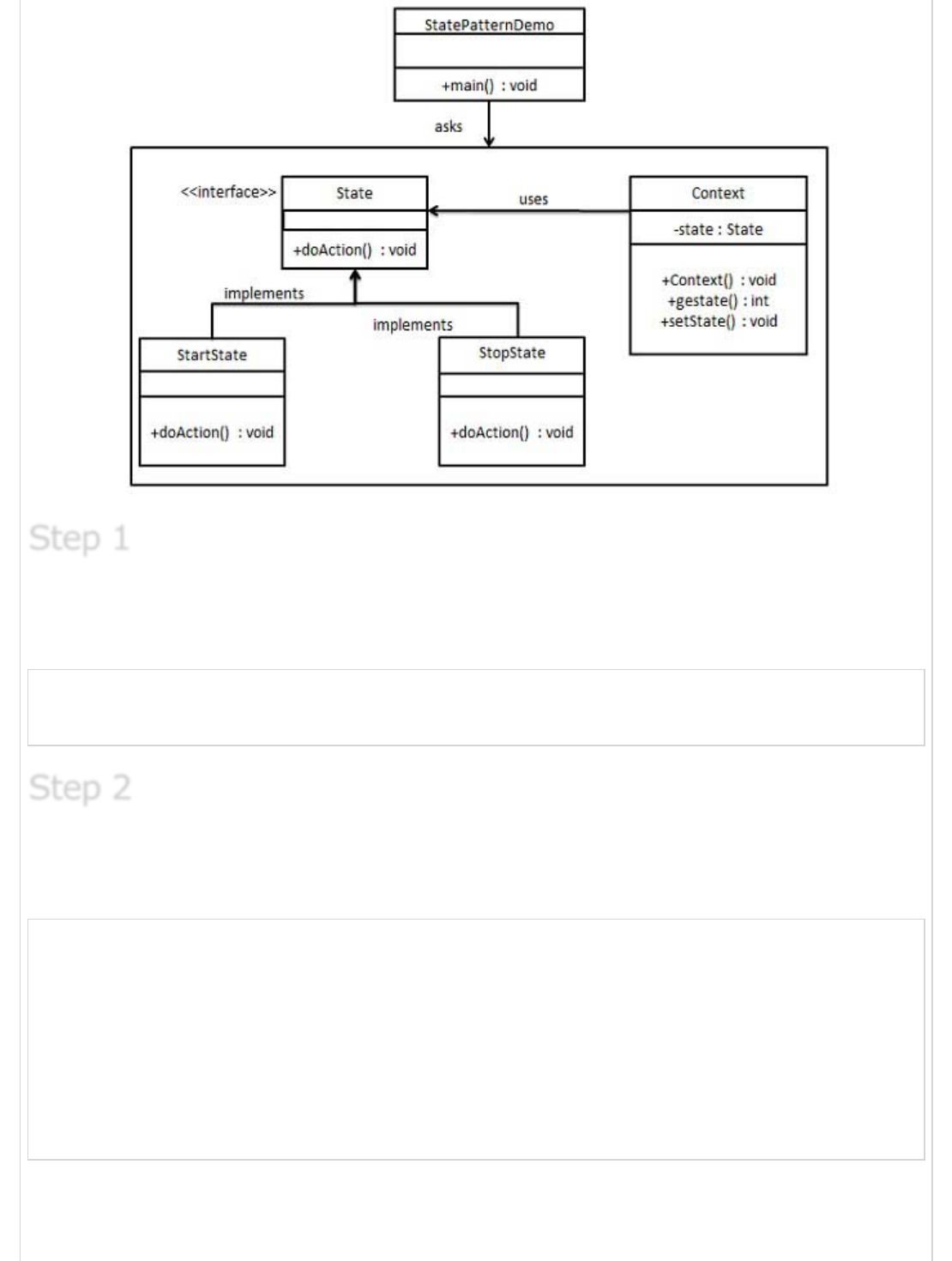
Create an interface.
Image.java
public interface State {
public void doAction(Context context);
}
Create concrete classes implementing the same interface.
StartState.java
public class StartState implements State {
public void doAction(Context context) {
System.out.println("Player is in start state");
context.setState(this);
}
public String toString(){
return "Start State";
}
}
StopState.java
Step 1Step 1
Step 1
Step 2Step 2
Step 2
public class StopState implements State {
public void doAction(Context context) {
System.out.println("Player is in stop state");
context.setState(this);
}
public String toString(){
return "Stop State";
}
}
Create Context Class.
Context.java
public class Context {
private State state;
public Context(){
state = null;
}
public void setState(State state){
this.state = state;
}
public State getState(){
return state;
}
}
Use the Context to see change in behaviour when State changes.
StatePatternDemo.java
public class StatePatternDemo {
public static void main(String[] args) {
Context context = new Context();
StartState startState = new StartState();
startState.doAction(context);
System.out.println(context.getState().toString());
StopState stopState = new StopState();
stopState.doAction(context);
System.out.println(context.getState().toString());
}
}
Step 3Step 3
Step 3
Step 4Step 4
Step 4
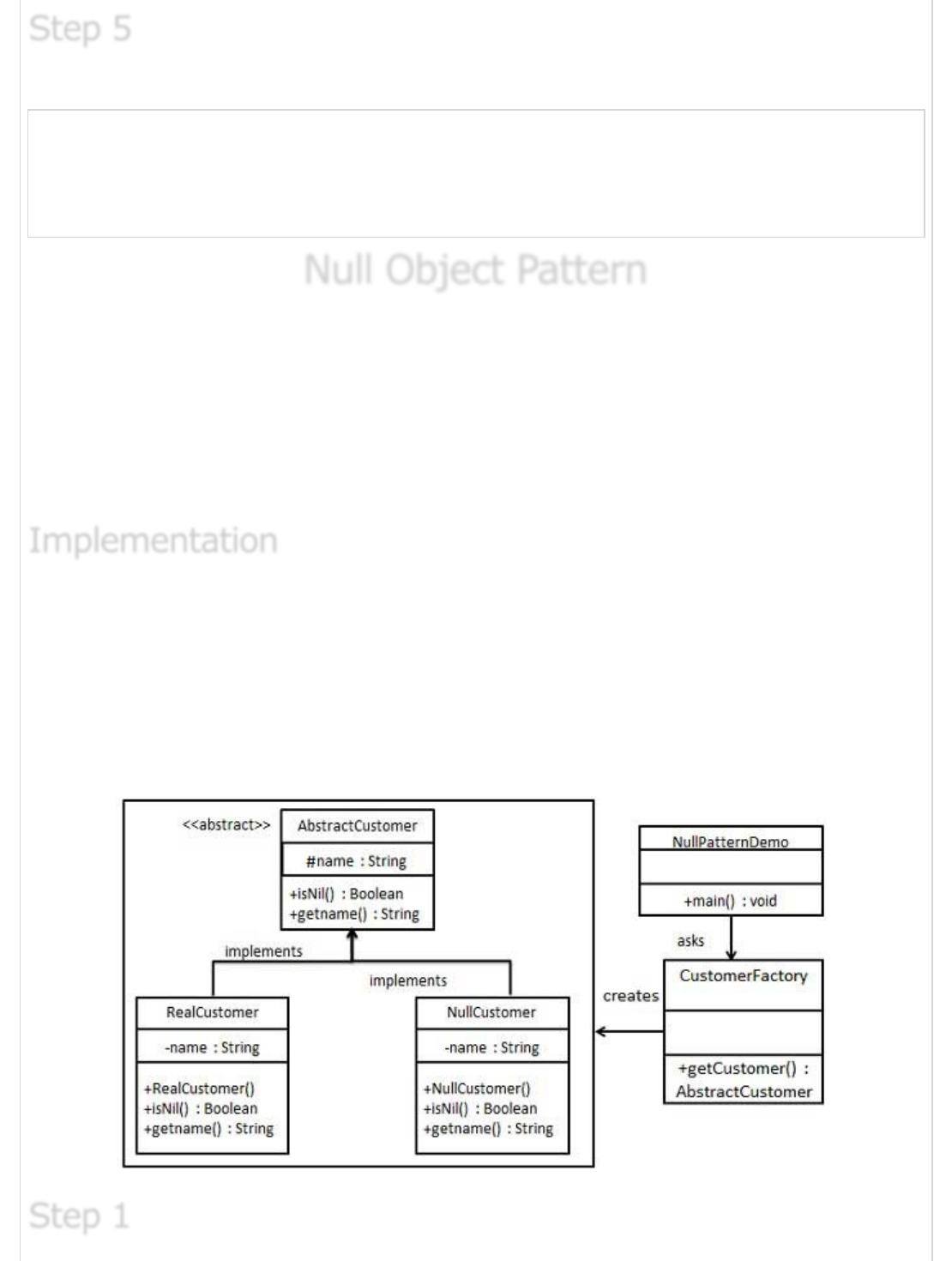
Verify the output.
Player is in start state
Start State
Player is in stop state
Stop State
Null Object PatternNull Object Pattern
Null Object Pattern
In Null Object pattern, a null object replaces check of NULL object instance. Instead of
putting if check for a null value, Null Object reflects a do nothing relationship. Such Null
object can also be used to provide default behaviour in case data is not available.
In Null Object pattern, we create a abstract class specifying the various operations to be
done, concreate classes extending this class and a null object class providing do nothing
implemention of this class and will be used seemlessly where we need to check null value.
We're going to create a AbstractCustomer abstract class defining opearations, here the
name of the customer and concrete classes extending the AbstractCustomer class. A
factory class CustomerFactory is created to return either RealCustomer or NullCustomer
objects based on the name of customer passed to it.
NullPatternDemo, our demo class will use CustomerFactory to demonstrate use of Null
Object pattern.
Step 5Step 5
Step 5
ImplementationImplementation
Implementation
Step 1Step 1
Step 1
Create an abstract class.
AbstractCustomer.java
public abstract class AbstractCustomer {
protected String name;
public abstract boolean isNil();
public abstract String getName();
}
Create concrete classes extending the above class.
RealCustomer.java
public class RealCustomer extends AbstractCustomer {
public RealCustomer(String name) {
this.name = name;
}
@Override
public String getName() {
return name;
}
@Override
public boolean isNil() {
return false;
}
}
NullCustomer.java
public class NullCustomer extends AbstractCustomer {
@Override
public String getName() {
return "Not Available in Customer Database";
}
@Override
public boolean isNil() {
return true;
}
}
Create CustomerFactory Class.
CustomerFactory.java
Step 2Step 2
Step 2
Step 3Step 3
Step 3
public class CustomerFactory {
public static final String[] names = {"Rob", "Joe", "Julie"};
public static AbstractCustomer getCustomer(String name){
for (int i = 0; i < names.length; i++) {
if (names[i].equalsIgnoreCase(name)){
return new RealCustomer(name);
}
}
return new NullCustomer();
}
}
Use the CustomerFactory get either RealCustomer or NullCustomer objects based on the
name of customer passed to it.
NullPatternDemo.java
public class NullPatternDemo {
public static void main(String[] args) {
AbstractCustomer customer1 = CustomerFactory.getCustomer("Rob");
AbstractCustomer customer2 = CustomerFactory.getCustomer("Bob");
AbstractCustomer customer3 = CustomerFactory.getCustomer("Julie");
AbstractCustomer customer4 = CustomerFactory.getCustomer("Laura");
System.out.println("Customers");
System.out.println(customer1.getName());
System.out.println(customer2.getName());
System.out.println(customer3.getName());
System.out.println(customer4.getName());
}
}
Verify the output.
Customers
Rob
Not Available in Customer Database
Julie
Not Available in Customer Database
Strategy PatternStrategy Pattern
Strategy Pattern
In Strategy pattern, a class behavior or its algorithm can be changed at run time. This
type of design pattern comes under behavior pattern.
Step 4Step 4
Step 4
Step 5Step 5
Step 5
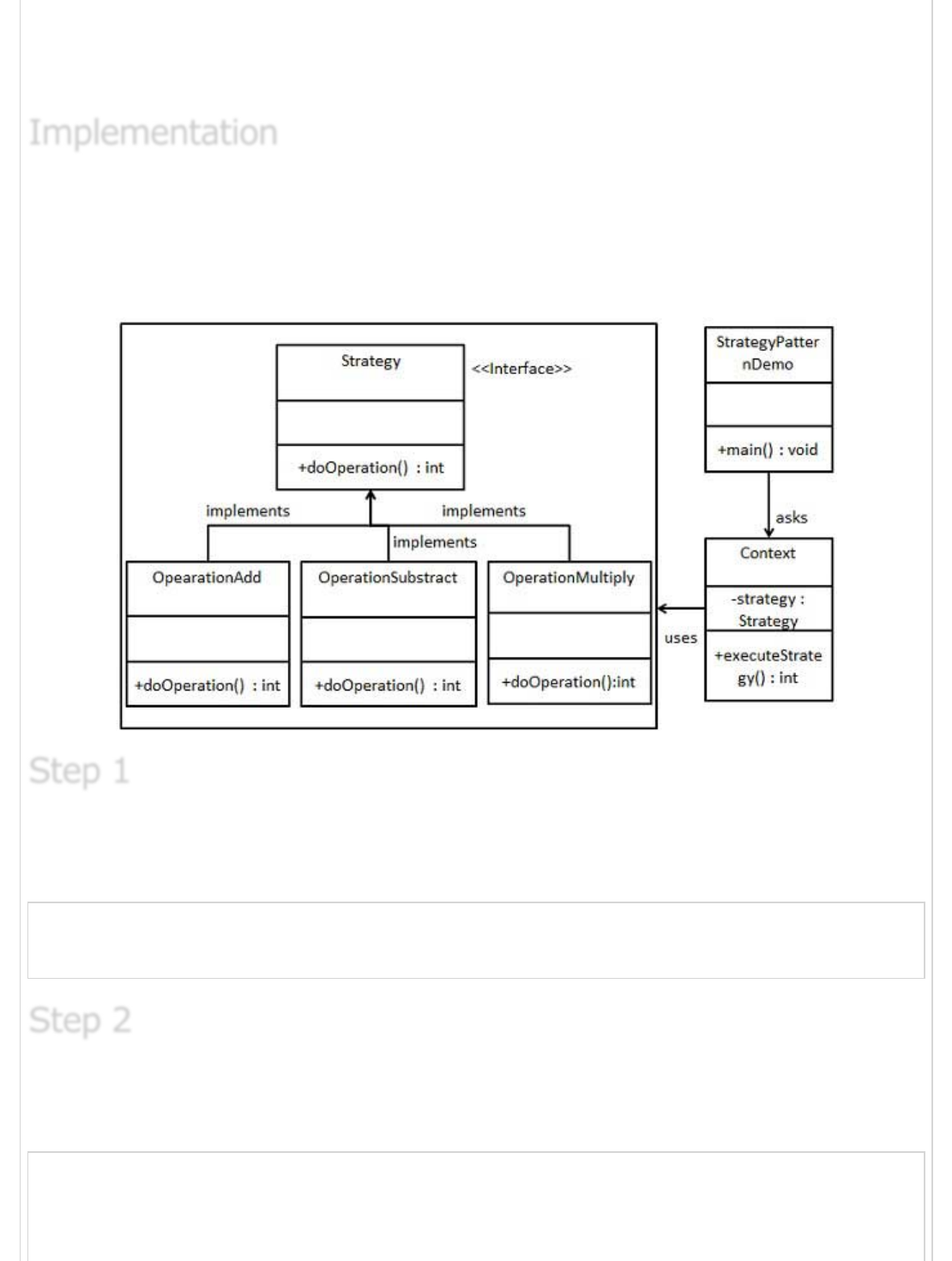
In Strategy pattern, we create objects which represent various strategies and a context
object whose behavior varies as per its strategy object. The strategy object changes the
executing algorithm of the context object.
We're going to create a Strategy interface defining a action and concrete strategy classes
implementing the Strategy interface. Context is a class which uses a Strategy.
StrategyPatternDemo, our demo class will use Context and strategy objects to
demonstrate change in Context behaviour based on strategy it deploys or uses.
Create an interface.
Strategy.java
public interface Strategy {
public int doOperation(int num1, int num2);
}
Create concrete classes implementing the same interface.
OperationAdd.java
public class OperationAdd implements Strategy{
@Override
public int doOperation(int num1, int num2) {
return num1 + num2;
ImplementationImplementation
Implementation
Step 1Step 1
Step 1
Step 2Step 2
Step 2
}
}
OperationSubstract.java
public class OperationSubstract implements Strategy{
@Override
public int doOperation(int num1, int num2) {
return num1 - num2;
}
}
OperationMultiply.java
public class OperationMultiply implements Strategy{
@Override
public int doOperation(int num1, int num2) {
return num1 * num2;
}
}
Create Context Class.
Context.java
public class Context {
private Strategy strategy;
public Context(Strategy strategy){
this.strategy = strategy;
}
public int executeStrategy(int num1, int num2){
return strategy.doOperation(num1, num2);
}
}
Use the Context to see change in behaviour when it changes its Strategy.
StatePatternDemo.java
public class StrategyPatternDemo {
public static void main(String[] args) {
Context context = new Context(new OperationAdd());
System.out.println("10 + 5 = " + context.executeStrategy(10, 5));
context = new Context(new OperationSubstract());
System.out.println("10 - 5 = " + context.executeStrategy(10, 5));
context = new Context(new OperationMultiply());
System.out.println("10 * 5 = " + context.executeStrategy(10, 5));
Step 3Step 3
Step 3
Step 4Step 4
Step 4
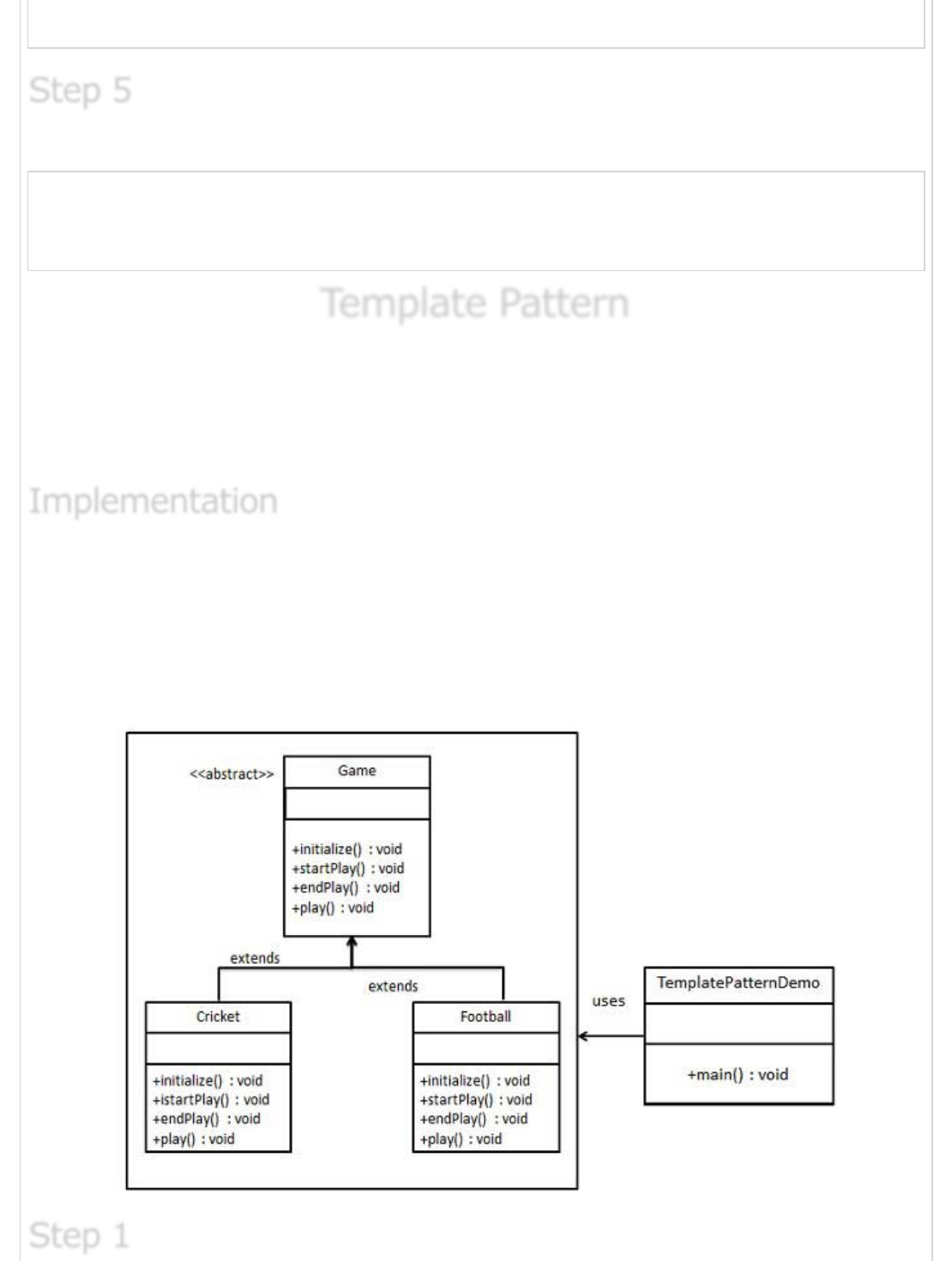
}
}
Verify the output.
10 + 5 = 15
10 - 5 = 5
10 * 5 = 50
Template PatternTemplate Pattern
Template Pattern
In Template pattern, an abstract class exposes defined way(s)/template(s) to execute its
methods. Its subclasses can overrides the method implementations as per need basis but
the invocation is to be in the same way as defined by an abstract class. This pattern comes
under behavior pattern category.
We're going to create a Game abstract class defining operations with a template method
set to be final so that it cannot be overridden. Cricket and Football are concrete classes
extend Game and override its methods.
TemplatePatternDemo, our demo class will use Game to demonstrate use of template
pattern.
Step 5Step 5
Step 5
ImplementationImplementation
Implementation
Step 1Step 1
Step 1
Create an abstract class with a template method being final.
Game.java
public abstract class Game {
abstract void initialize();
abstract void startPlay();
abstract void endPlay();
//template method
public final void play(){
//initialize the game
initialize();
//start game
startPlay();
//end game
endPlay();
}
}
Create concrete classes extending the above class.
Cricket.java
public class Cricket extends Game {
@Override
void endPlay() {
System.out.println("Cricket Game Finished!");
}
@Override
void initialize() {
System.out.println("Cricket Game Initialized! Start playing.");
}
@Override
void startPlay() {
System.out.println("Cricket Game Started. Enjoy the game!");
}
}
Football.java
public class Football extends Game {
@Override
void endPlay() {
System.out.println("Football Game Finished!");
}
@Override
void initialize() {
Step 2Step 2
Step 2
System.out.println("Football Game Initialized! Start playing.");
}
@Override
void startPlay() {
System.out.println("Football Game Started. Enjoy the game!");
}
}
Use the Game's template method play() to demonstrate a defined way of playing game.
TemplatePatternDemo.java
public class TemplatePatternDemo {
public static void main(String[] args) {
Game game = new Cricket();
game.play();
System.out.println();
game = new Football();
game.play();
}
}
Verify the output.
Cricket Game Initialized! Start playing.
Cricket Game Started. Enjoy the game!
Cricket Game Finished!
Football Game Initialized! Start playing.
Football Game Started. Enjoy the game!
Football Game Finished!
Visitor PatternVisitor Pattern
Visitor Pattern
In Visitor pattern, we use a visitor class which changes the executing algorithm of an
element class. By this way, execution algorithm of element can varies as visitor varies.
This pattern comes under behavior pattern category. As per the pattern, element object
has to accept the visitor object so that visitor object handles the operation on the element
object.
Step 3Step 3
Step 3
Step 4Step 4
Step 4
ImplementationImplementation
Implementation
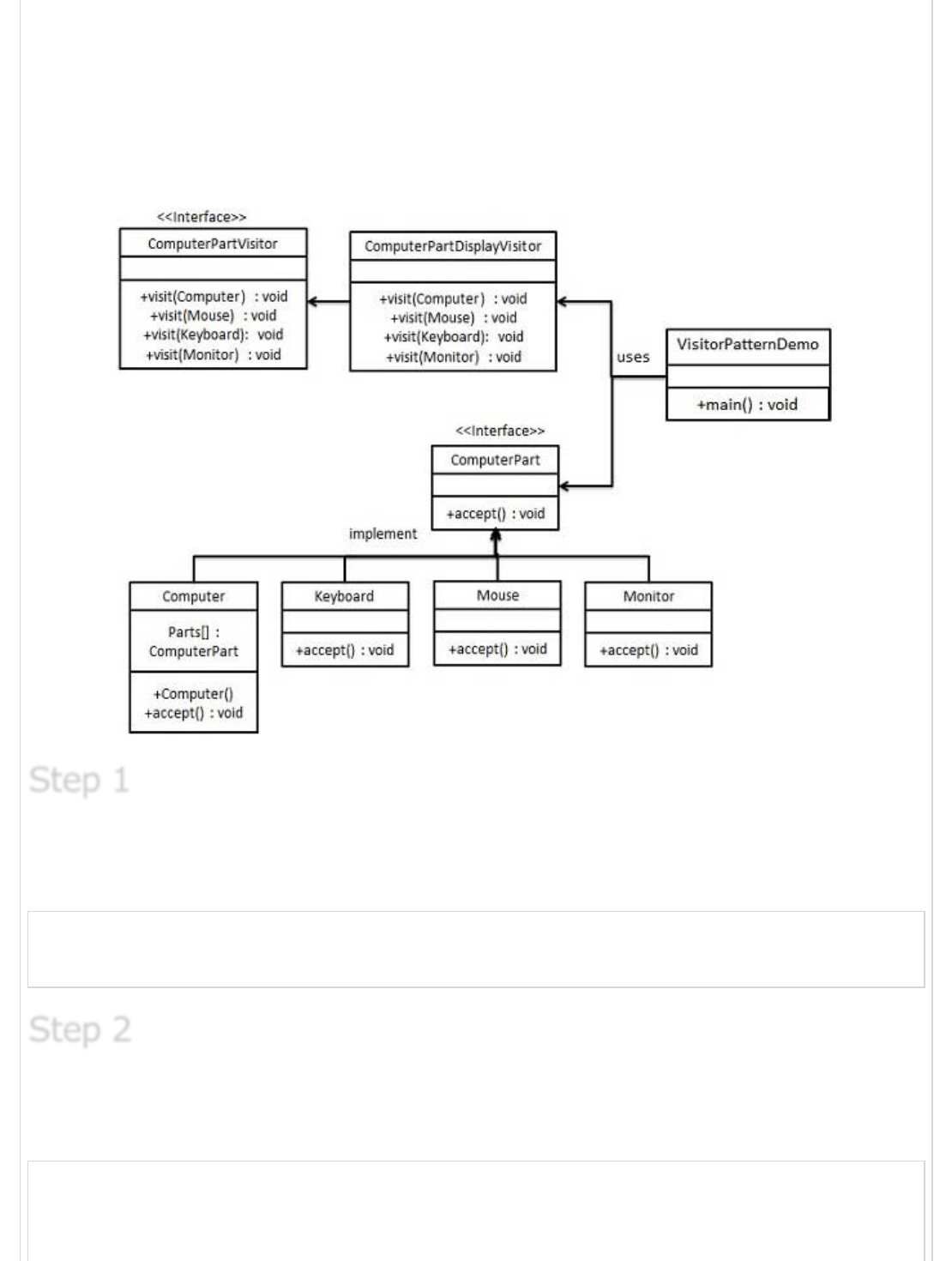
We're going to create a ComputerPart interface defining accept opearation.Keyboard,
Mouse, Monitor and Computer are concrete classes implementing ComputerPart interface.
We'll define another interface ComputerPartVisitor which will define a visitor class
operations. Computer uses concrete visitor to do corresponding action.
VisitorPatternDemo, our demo class will use Computer, ComputerPartVisitor classes to
demonstrate use of visitor pattern.
Define an interface to represent element.
ComputerPart.java
public interface class ComputerPart {
public void accept(ComputerPartVisitor computerPartVisitor);
}
Create concrete classes extending the above class.
Keyboard.java
public class Keyboard implements ComputerPart {
@Override
public void accept(ComputerPartVisitor computerPartVisitor) {
Step 1Step 1
Step 1
Step 2Step 2
Step 2
computerPartVisitor.visit(this);
}
}
Monitor.java
public class Monitor implements ComputerPart {
@Override
public void accept(ComputerPartVisitor computerPartVisitor) {
computerPartVisitor.visit(this);
}
}
Mouse.java
public class Mouse implements ComputerPart {
@Override
public void accept(ComputerPartVisitor computerPartVisitor) {
computerPartVisitor.visit(this);
}
}
Computer.java
public class Computer implements ComputerPart {
ComputerPart[] parts;
public Computer(){
parts = new ComputerPart[] {new Mouse(), new Keyboard(), new Monitor()};
}
@Override
public void accept(ComputerPartVisitor computerPartVisitor) {
for (int i = 0; i < parts.length; i++) {
parts[i].accept(computerPartVisitor);
}
computerPartVisitor.visit(this);
}
}
Define an interface to represent visitor.
ComputerPartVisitor.java
public interface ComputerPartVisitor {
public void visit(Computer computer);
public void visit(Mouse mouse);
public void visit(Keyboard keyboard);
public void visit(Monitor monitor);
}
Step 3Step 3
Step 3
Create concrete visitor implementing the above class.
ComputerPartDisplayVisitor.java
public class ComputerPartDisplayVisitor implements ComputerPartVisitor {
@Override
public void visit(Computer computer) {
System.out.println("Displaying Computer.");
}
@Override
public void visit(Mouse mouse) {
System.out.println("Displaying Mouse.");
}
@Override
public void visit(Keyboard keyboard) {
System.out.println("Displaying Keyboard.");
}
@Override
public void visit(Monitor monitor) {
System.out.println("Displaying Monitor.");
}
}
Use the ComputerPartDisplayVisitor to display parts of Computer.
VisitorPatternDemo.java
public class VisitorPatternDemo {
public static void main(String[] args) {
ComputerPart computer = new Computer();
computer.accept(new ComputerPartDisplayVisitor());
}
}
Verify the output.
Displaying Mouse.
Displaying Keyboard.
Displaying Monitor.
Displaying Computer.
MVC PatternMVC Pattern
MVC Pattern
Step 4Step 4
Step 4
Step 5Step 5
Step 5
Step 6Step 6
Step 6
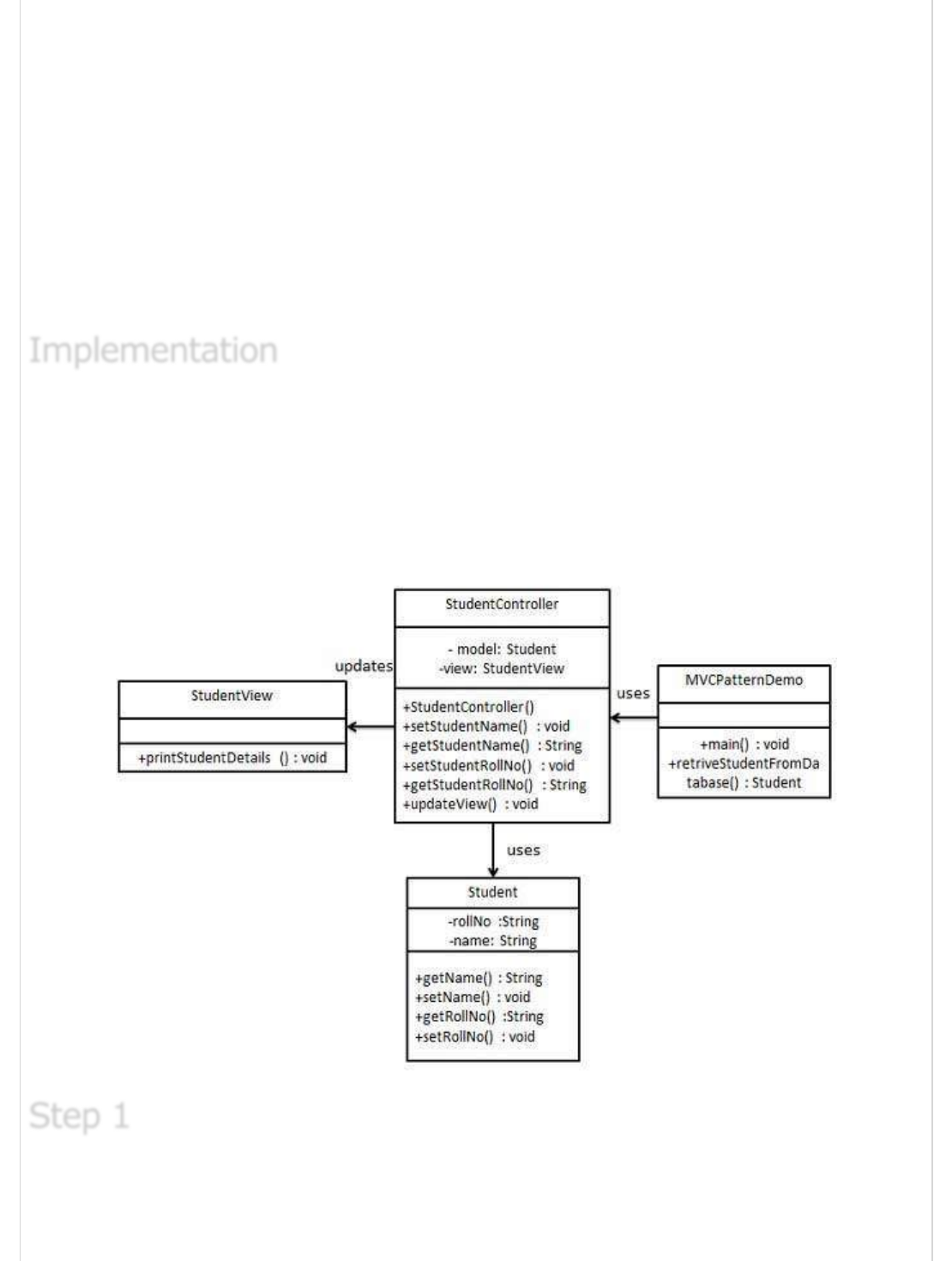
MVC Pattern stands for Model-View-Controller Pattern. This pattern is used to separate
application's concerns.
Model - Model represents an object or JAVA POJO carrying data. It can also have
logic to update controller if its data changes.
View - View represents the visualization of the data that model contains.
Controller - Controller acts on both Model and view. It controls the data flow into
model object and updates the view whenever data changes. It keeps View and
Model separate.
We're going to create a Student object acting as a model.StudentView will be a view class
which can print student details on console and StudentController is the controller class
responsible to store data in Student object and update view StudentView accordingly.
MVCPatternDemo, our demo class will use StudentController to demonstrate use of MVC
pattern.
Create Model.
Student.java
ImplementationImplementation
Implementation
Step 1Step 1
Step 1
public class Student {
private String rollNo;
private String name;
public String getRollNo() {
return rollNo;
}
public void setRollNo(String rollNo) {
this.rollNo = rollNo;
}
public String getName() {
return name;
}
public void setName(String name) {
this.name = name;
}
}
Create View.
StudentView.java
public class StudentView {
public void printStudentDetails(String studentName, String studentRollNo){
System.out.println("Student: ");
System.out.println("Name: " + studentName);
System.out.println("Roll No: " + studentRollNo);
}
}
Create Controller.
StudentController.java
public class StudentController {
private Student model;
private StudentView view;
public StudentController(Student model, StudentView view){
this.model = model;
this.view = view;
}
public void setStudentName(String name){
model.setName(name);
}
public String getStudentName(){
return model.getName();
}
public void setStudentRollNo(String rollNo){
model.setRollNo(rollNo);
Step 2Step 2
Step 2
Step 3Step 3
Step 3
}
public String getStudentRollNo(){
return model.getRollNo();
}
public void updateView(){
view.printStudentDetails(model.getName(), model.getRollNo());
}
}
Use the StudentController methods to demonstrate MVC design pattern usage.
MVCPatternDemo.java
public class MVCPatternDemo {
public static void main(String[] args) {
//fetch student record based on his roll no from the database
Student model = retriveStudentFromDatabase();
//Create a view : to write student details on console
StudentView view = new StudentView();
StudentController controller = new StudentController(model, view);
controller.updateView();
//update model data
controller.setStudentName("John");
controller.updateView();
}
private static Student retriveStudentFromDatabase(){
Student student = new Student();
student.setName("Robert");
student.setRollNo("10");
return student;
}
}
Verify the output.
Student:
Name: Robert
Roll No: 10
Student:
Name: Julie
Roll No: 10
Step 4Step 4
Step 4
Step 5Step 5
Step 5
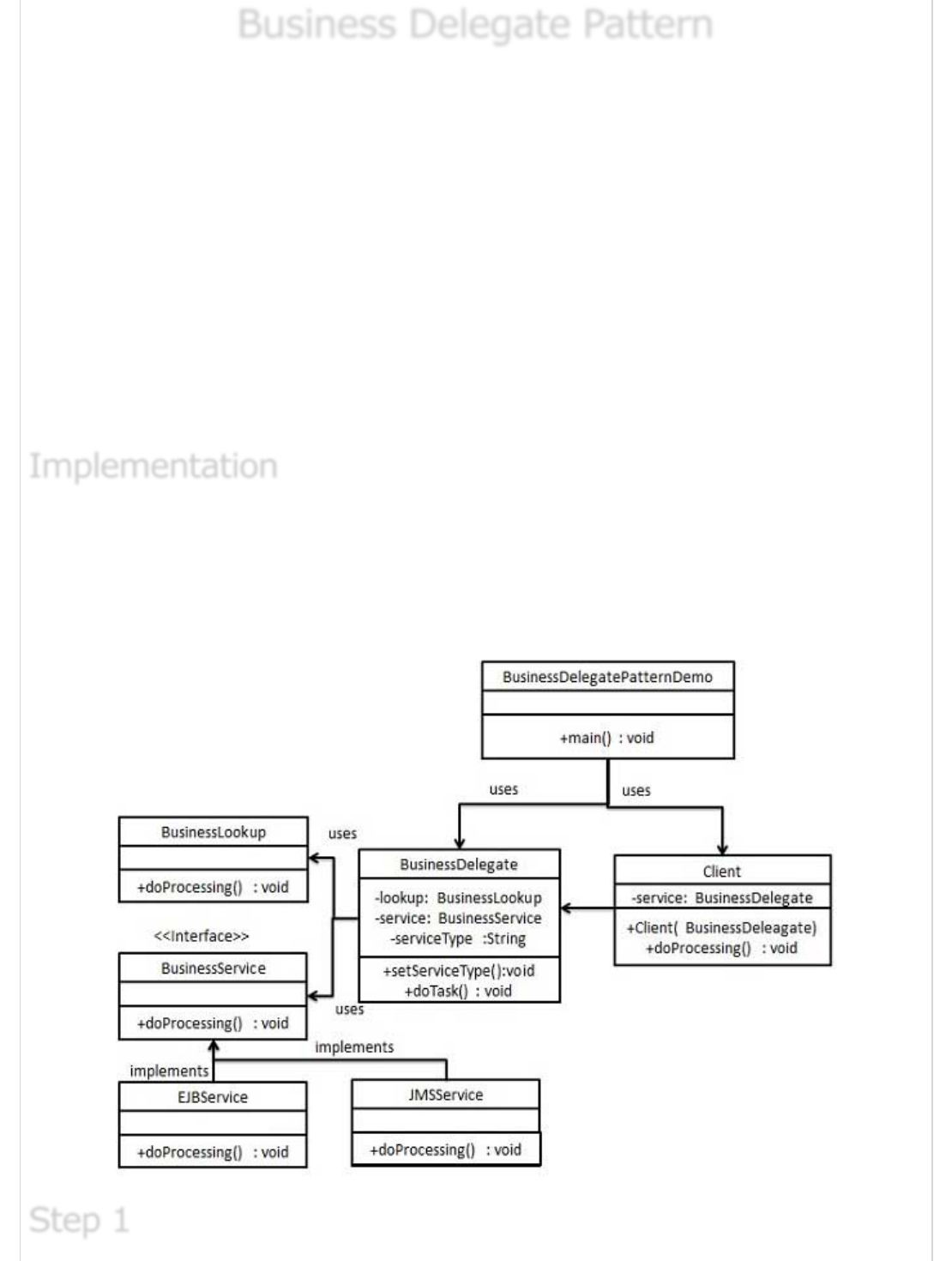
Business Delegate PatternBusiness Delegate Pattern
Business Delegate Pattern
Business Delegate Pattern is used to decouple presentation tier and business tier. It is
basically use to reduce communication or remote lookup functionality to business tier code
in presentation tier code. In business tier we've following entities.
Client - Presentation tier code may be JSP, servlet or UI java code.
Business Delegate - A single entry point class for client entities to provide access
to Business Service methods.
LookUp Service - Lookup service object is responsible to get relative business
implementation and provide business object access to business delegate object.
Business Service - Business Service interface. Concrete classes implements this
business service to provide actual business implementation logic.
We're going to create a Client, BusinessDelegate, BusinessService, LookUpService,
JMSService and EJBService representing various entities of Business Delegate pattern.
BusinessDelegatePatternDemo, our demo class will use BusinessDelegate and Client to
demonstrate use of Business Delegate pattern.
ImplementationImplementation
Implementation
Step 1Step 1
Step 1
Create BusinessService Interface.
BusinessService.java
public interface BusinessService {
public void doProcessing();
}
Create Concreate Service Classes.
EJBService.java
public class EJBService implements BusinessService {
@Override
public void doProcessing() {
System.out.println("Processing task by invoking EJB Service");
}
}
JMSService.java
public class JMSService implements BusinessService {
@Override
public void doProcessing() {
System.out.println("Processing task by invoking JMS Service");
}
}
Create Business Lookup Service.
BusinessLookUp.java
public class BusinessLookUp {
public BusinessService getBusinessService(String serviceType){
if(serviceType.equalsIgnoreCase("EJB")){
return new EJBService();
}else {
return new JMSService();
}
}
}
Create Business Delegate.
BusinessLookUp.java
Step 2Step 2
Step 2
Step 3Step 3
Step 3
Step 4Step 4
Step 4
public class BusinessDelegate {
private BusinessLookUp lookupService = new BusinessLookUp();
private BusinessService businessService;
private String serviceType;
public void setServiceType(String serviceType){
this.serviceType = serviceType;
}
public void doTask(){
businessService = lookupService.getBusinessService(serviceType);
businessService.doProcessing();
}
}
Create Client.
Student.java
public class Client {
BusinessDelegate businessService;
public Client(BusinessDelegate businessService){
this.businessService = businessService;
}
public void doTask(){
businessService.doTask();
}
}
Use BusinessDelegate and Client classes to demonstrate Business Delegate pattern.
BusinessDelegatePatternDemo.java
public class BusinessDelegatePatternDemo {
public static void main(String[] args) {
BusinessDelegate businessDelegate = new BusinessDelegate();
businessDelegate.setServiceType("EJB");
Client client = new Client(businessDelegate);
client.doTask();
businessDelegate.setServiceType("JMS");
client.doTask();
}
}
Step 5Step 5
Step 5
Step 6Step 6
Step 6
Verify the output.
Processing task by invoking EJB Service
Processing task by invoking JMS Service
Composite Entity PatternComposite Entity Pattern
Composite Entity Pattern
Composite Entity pattern is used in EJB persistence mechanism. A Composite entity is an
EJB entity bean which represents a graph of objects. When a composite entity is updated,
internally dependent objects beans get updated automatically as being managed by EJB
entity bean. Following are the participants in Composite Entity Bean.
Composite Entity - It is primary entity bean.It can be coarse grained or can
contain a coarse grained object to be used for persistence purpose.
Coarse-Grained Object -This object contains dependent objects. It has its own
life cycle and also manages life cycle of dependent objects.
Dependent Object - Dependent objects is an object which depends on Coarse-
Grained object for its persistence lifecycle.
Strategies - Strategies represents how to implement a Composite Entity.
We're going to create CompositeEntity object acting as CompositeEntity.
CoarseGrainedObject will be a class which contains dependent objects.
CompositeEntityPatternDemo, our demo class will use Client class to demonstrate use of
Composite Entity pattern.
Step 7Step 7
Step 7
ImplementationImplementation
Implementation
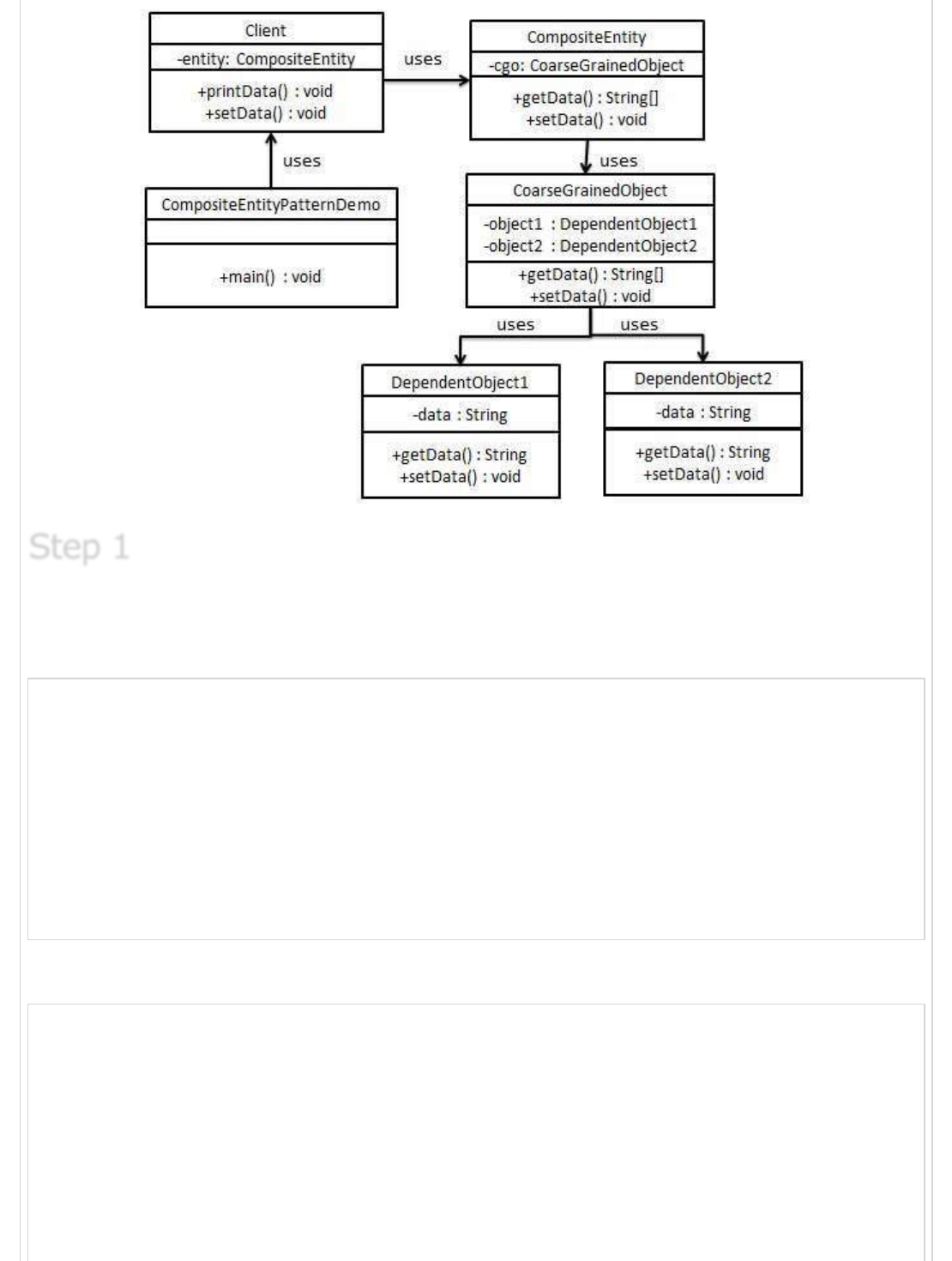
Create Dependent Objects.
DependentObject1.java
public class DependentObject1 {
private String data;
public void setData(String data){
this.data = data;
}
public String getData(){
return data;
}
}
DependentObject2.java
public class DependentObject2 {
private String data;
public void setData(String data){
this.data = data;
}
public String getData(){
return data;
}
}
Step 1Step 1
Step 1
Create Coarse Grained Object.
CoarseGrainedObject.java
public class CoarseGrainedObject {
DependentObject1 do1 = new DependentObject1();
DependentObject2 do2 = new DependentObject2();
public void setData(String data1, String data2){
do1.setData(data1);
do2.setData(data2);
}
public String[] getData(){
return new String[] {do1.getData(),do2.getData()};
}
}
Create Composite Entity.
CompositeEntity.java
public class CompositeEntity {
private CoarseGrainedObject cgo = new CoarseGrainedObject();
public void setData(String data1, String data2){
cgo.setData(data1, data2);
}
public String[] getData(){
return cgo.getData();
}
}
Create Client class to use Composite Entity.
Client.java
public class Client {
private CompositeEntity compositeEntity = new CompositeEntity();
public void printData(){
for (int i = 0; i < compositeEntity.getData().length; i++) {
System.out.println("Data: " + compositeEntity.getData()[i]);
}
}
Step 2Step 2
Step 2
Step 3Step 3
Step 3
Step 4Step 4
Step 4
public void setData(String data1, String data2){
compositeEntity.setData(data1, data2);
}
}
Use the Client to demonstrate Composite Entity design pattern usage.
CompositeEntityPatternDemo.java
public class CompositeEntityPatternDemo {
public static void main(String[] args) {
Client client = new Client();
client.setData("Test", "Data");
client.printData();
client.setData("Second Test", "Data1");
client.printData();
}
}
Verify the output.
Data: Test
Data: Data
Data: Second Test
Data: Data1
Data Access Object PatternData Access Object Pattern
Data Access Object Pattern
Data Access Object Pattern or DAO pattern is used to separate low level data accessing API
or operations from high level business services. Following are the participants in Data
Access Object Pattern.
Data Access Object Interface - This interface defines the standard operations to
be performed on a model object(s).
Data Access Object concrete class -This class implements above interface. This
class is responsible to get data from a datasource which can be database / xml or
any other storage mechanism.
Model Object or Value Object - This object is simple POJO containing get/set
methods to store data retrieved using DAO class.
Step 5Step 5
Step 5
Step 6Step 6
Step 6
ImplementationImplementation
Implementation
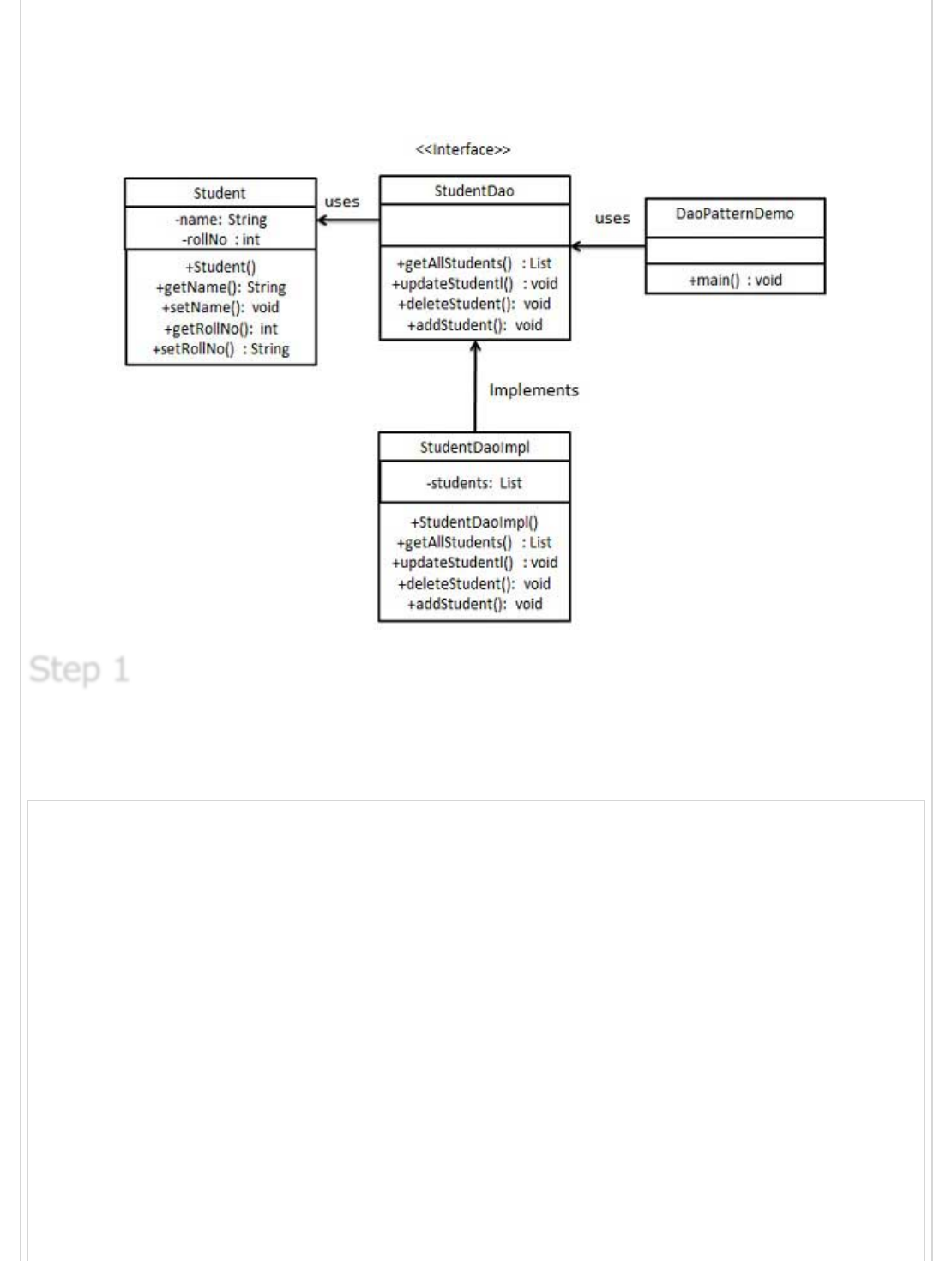
We're going to create a Student object acting as a Model or Value Object.StudentDao is
Data Access Object Interface.StudentDaoImpl is concrete class implementing Data Access
Object Interface. DaoPatternDemo, our demo class will use StudentDao demonstrate use
of Data Access Object pattern.
Create Value Object.
Student.java
public class Student {
private String name;
private int rollNo;
Student(String name, int rollNo){
this.name = name;
this.rollNo = rollNo;
}
public String getName() {
return name;
}
public void setName(String name) {
this.name = name;
}
public int getRollNo() {
return rollNo;
}
Step 1Step 1
Step 1
public void setRollNo(int rollNo) {
this.rollNo = rollNo;
}
}
Create Data Access Object Interface.
StudentDao.java
import java.util.List;
public interface StudentDao {
public List<Student> getAllStudents();
public Student getStudent(int rollNo);
public void updateStudent(Student student);
public void deleteStudent(Student student);
}
Create concreate class implementing above interface.
StudentDaoImpl.java
import java.util.ArrayList;
import java.util.List;
public class StudentDaoImpl implements StudentDao {
//list is working as a database
List<Student> students;
public StudentDaoImpl(){
students = new ArrayList<Student>();
Student student1 = new Student("Robert",0);
Student student2 = new Student("John",1);
students.add(student1);
students.add(student2);
}
@Override
public void deleteStudent(Student student) {
students.remove(student.getRollNo());
System.out.println("Student: Roll No " + student.getRollNo()
+", deleted from database");
}
//retrive list of students from the database
@Override
public List<Student> getAllStudents() {
return students;
}
@Override
public Student getStudent(int rollNo) {
return students.get(rollNo);
Step 2Step 2
Step 2
Step 3Step 3
Step 3
}
@Override
public void updateStudent(Student student) {
students.get(student.getRollNo()).setName(student.getName());
System.out.println("Student: Roll No " + student.getRollNo()
+", updated in the database");
}
}
Use the StudentDao to demonstrate Data Access Object pattern usage.
CompositeEntityPatternDemo.java
public class DaoPatternDemo {
public static void main(String[] args) {
StudentDao studentDao = new StudentDaoImpl();
//print all students
for (Student student : studentDao.getAllStudents()) {
System.out.println("Student: [RollNo : "
+student.getRollNo()+", Name : "+student.getName()+" ]");
}
//update student
Student student =studentDao.getAllStudents().get(0);
student.setName("Michael");
studentDao.updateStudent(student);
//get the student
studentDao.getStudent(0);
System.out.println("Student: [RollNo : "
+student.getRollNo()+", Name : "+student.getName()+" ]");
}
}
Verify the output.
Student: [RollNo : 0, Name : Robert ]
Student: [RollNo : 1, Name : John ]
Student: Roll No 0, updated in the database
Student: [RollNo : 0, Name : Michael ]
Front Controller PatternFront Controller Pattern
Front Controller Pattern
The front controller design pattern is used to provide a centralized request handling
mechanism so that all requests will be handled by a single handler. This handler can do the
Step 4Step 4
Step 4
Step 5Step 5
Step 5
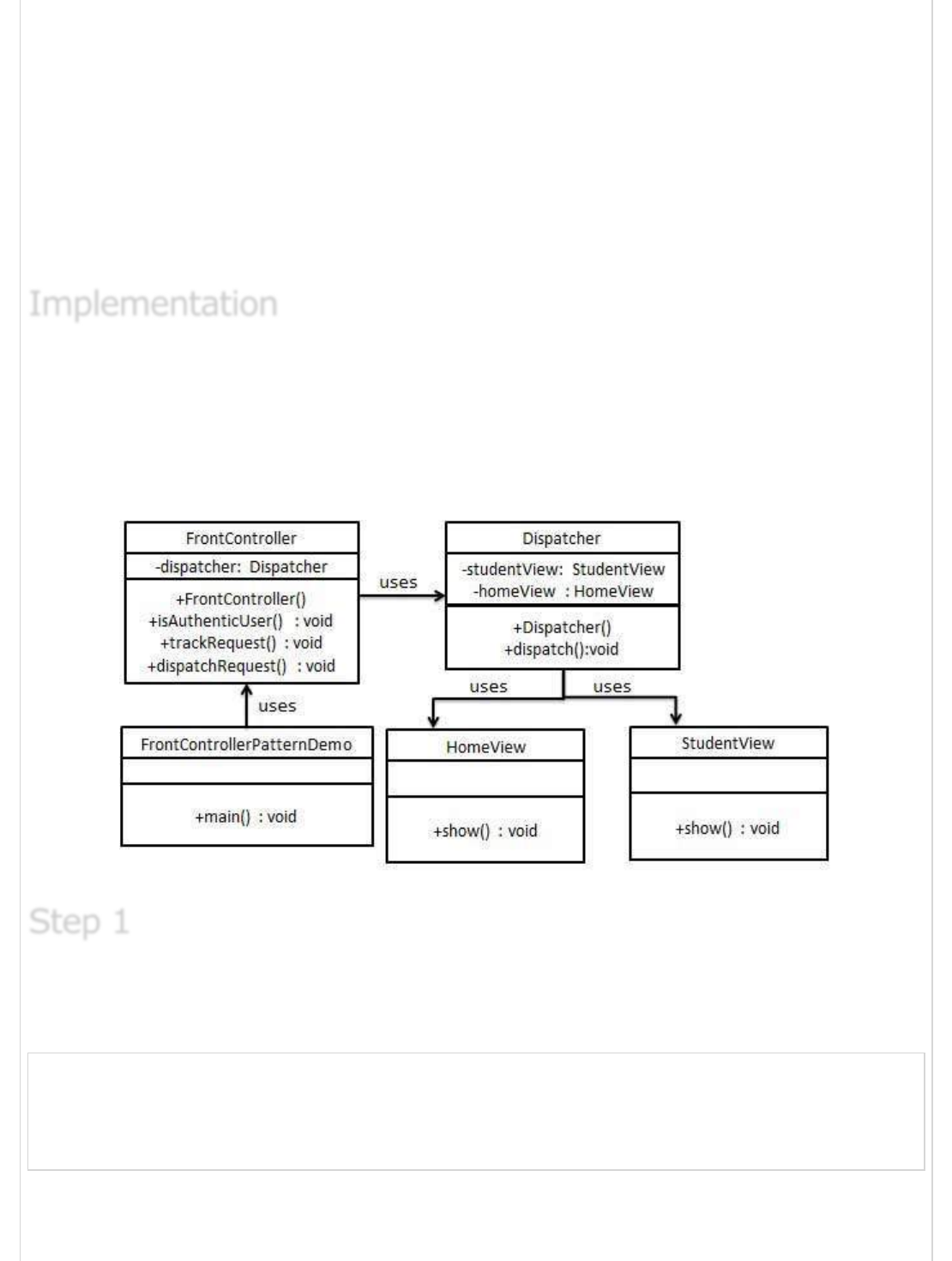
authentication/ authorization/ logging or tracking of request and then pass the requests to
corresponding handlers. Following are the entities of this type of design pattern.
Front Controller - Single handler for all kind of request coming to the application
(either web based/ desktop based).
Dispatcher - Front Controller may use a dispatcher object which can dispatch the
request to corresponding specific handler.
View - Views are the object for which the requests are made.
We're going to create a FrontController,Dispatcher to act as Front Controller and
Dispatcher correspondingly. HomeView and StudentView represent various views for which
requests can come to front controller.
FrontControllerPatternDemo, our demo class will use FrontController ato demonstrate
Front Controller Design Pattern.
Create Views.
HomeView.java
public class HomeView {
public void show(){
System.out.println("Displaying Home Page");
}
}
StudentView.java
ImplementationImplementation
Implementation
Step 1Step 1
Step 1
public class StudentView {
public void show(){
System.out.println("Displaying Student Page");
}
}
Create Dispatcher.
Dispatcher.java
public class Dispatcher {
private StudentView studentView;
private HomeView homeView;
public Dispatcher(){
studentView = new StudentView();
homeView = new HomeView();
}
public void dispatch(String request){
if(request.equalsIgnoreCase("STUDENT")){
studentView.show();
}else{
homeView.show();
}
}
}
Create FrontController
Context.java
public class FrontController {
private Dispatcher dispatcher;
public FrontController(){
dispatcher = new Dispatcher();
}
private boolean isAuthenticUser(){
System.out.println("User is authenticated successfully.");
return true;
}
private void trackRequest(String request){
System.out.println("Page requested: " + request);
}
public void dispatchRequest(String request){
//log each request
trackRequest(request);
//authenticate the user
Step 2Step 2
Step 2
Step 3Step 3
Step 3
if(isAuthenticUser()){
dispatcher.dispatch(request);
}
}
}
Use the FrontController to demonstrate Front Controller Design Pattern.
FrontControllerPatternDemo.java
public class FrontControllerPatternDemo {
public static void main(String[] args) {
FrontController frontController = new FrontController();
frontController.dispatchRequest("HOME");
frontController.dispatchRequest("STUDENT");
}
}
Verify the output.
Page requested: HOME
User is authenticated successfully.
Displaying Home Page
Page requested: STUDENT
User is authenticated successfully.
Displaying Student Page
Intercepting Filter PatternIntercepting Filter Pattern
Intercepting Filter Pattern
The intercepting filter design pattern is used when we want to do some pre-processing /
post-processing with request or response of the application. Filters are defined and applied
on the request before passing the request to actual target application. Filters can do the
authentication/ authorization/ logging or tracking of request and then pass the requests to
corresponding handlers. Following are the entities of this type of design pattern.
Filter - Filter which will perform certain task prior or after execution of request by
request handler.
Filter Chain - Filter Chain carries multiple filters and help to execute them in
defined order on target.
Target - Target object is the request handler
Filter Manager - Filter Manager manages the filters and Filter Chain.
Client - Client is the object who sends request to the Target object.
Step 4Step 4
Step 4
Step 5Step 5
Step 5
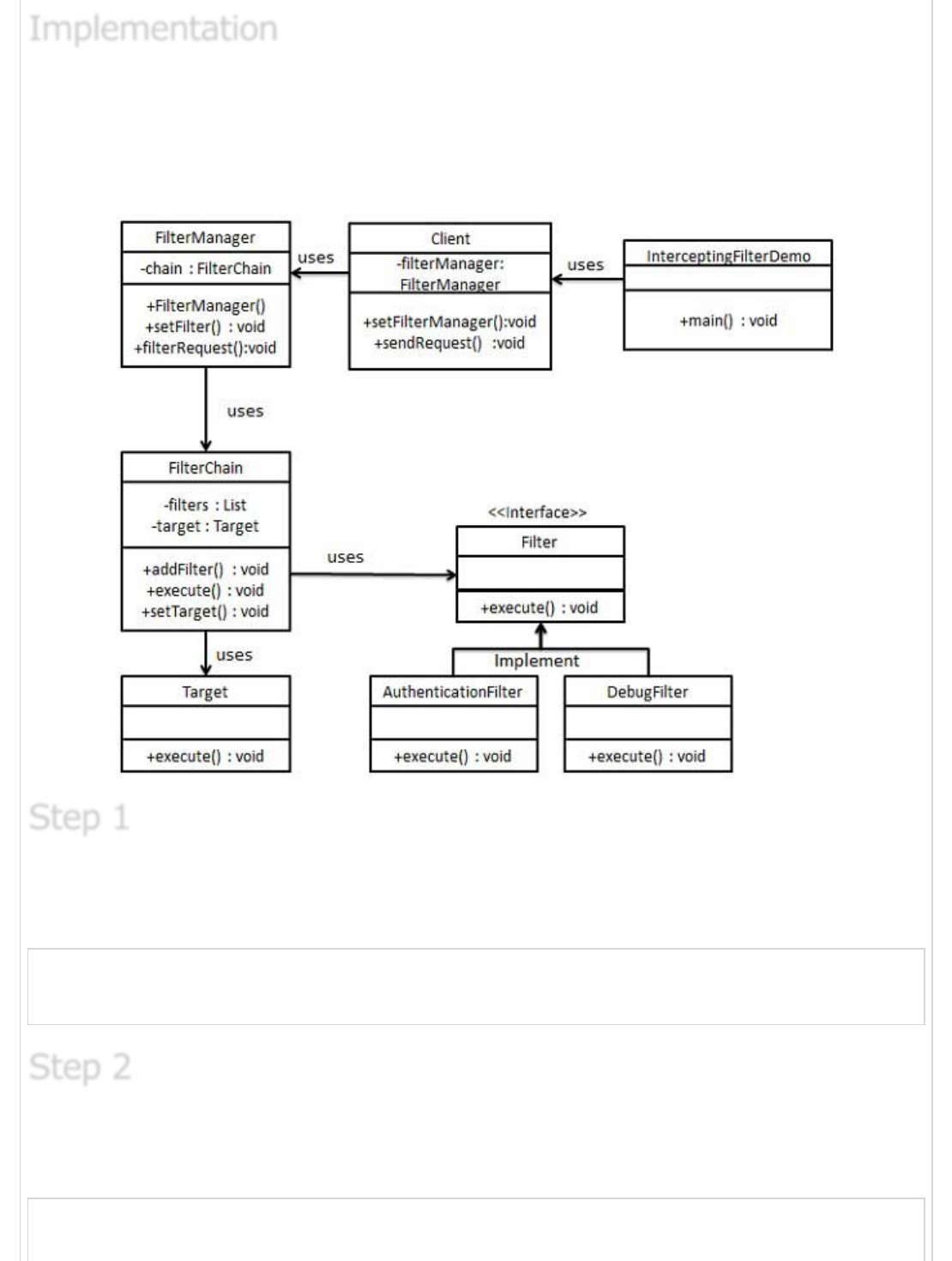
We're going to create a FilterChain,FilterManager, Target, Client as various objects
representing our entities.AuthenticationFilter and DebugFilter represents concrete filters.
InterceptingFilterDemo, our demo class will use Client to demonstrate Intercepting Filter
Design Pattern.
Create Filter interface.
Filter.java
public interface Filter {
public void execute(String request);
}
Create concrete filters.
AuthenticationFilter.java
public class AuthenticationFilter implements Filter {
public void execute(String request){
ImplementationImplementation
Implementation
Step 1Step 1
Step 1
Step 2Step 2
Step 2
System.out.println("Authenticating request: " + request);
}
}
DebugFilter.java
public class DebugFilter implements Filter {
public void execute(String request){
System.out.println("request log: " + request);
}
}
Create Target
Target.java
public class Target {
public void execute(String request){
System.out.println("Executing request: " + request);
}
}
Create Filter Chain
FilterChain.java
import java.util.ArrayList;
import java.util.List;
public class FilterChain {
private List<Filter> filters = new ArrayList<Filter>();
private Target target;
public void addFilter(Filter filter){
filters.add(filter);
}
public void execute(String request){
for (Filter filter : filters) {
filter.execute(request);
}
target.execute(request);
}
public void setTarget(Target target){
this.target = target;
}
}
Step 3Step 3
Step 3
Step 4Step 4
Step 4
Step 5Step 5
Step 5
Create Filter Manager
FilterManager.java
public class FilterManager {
FilterChain filterChain;
public FilterManager(Target target){
filterChain = new FilterChain();
filterChain.setTarget(target);
}
public void setFilter(Filter filter){
filterChain.addFilter(filter);
}
public void filterRequest(String request){
filterChain.execute(request);
}
}
Create Client
Client.java
public class Client {
FilterManager filterManager;
public void setFilterManager(FilterManager filterManager){
this.filterManager = filterManager;
}
public void sendRequest(String request){
filterManager.filterRequest(request);
}
}
Use the Client to demonstrate Intercepting Filter Design Pattern.
FrontControllerPatternDemo.java
public class InterceptingFilterDemo {
public static void main(String[] args) {
FilterManager filterManager = new FilterManager(new Target());
filterManager.setFilter(new AuthenticationFilter());
filterManager.setFilter(new DebugFilter());
Client client = new Client();
client.setFilterManager(filterManager);
client.sendRequest("HOME");
}
}
Step 6Step 6
Step 6
Step 7Step 7
Step 7
Verify the output.
Authenticating request: HOME
request log: HOME
Executing request: HOME
Service Locator PatternService Locator Pattern
Service Locator Pattern
The service locator design pattern is used when we want to locate various services using
JNDI lookup. Considering high cost of looking up JNDI for a service, Service Locator
pattern makes use of caching technique. For the first time a service is required, Service
Locator looks up in JNDI and caches the service object. Further lookup or same service via
Service Locator is done in its cache which improves the performance of application to great
extent. Following are the entities of this type of design pattern.
Service - Actual Service which will process the request. Reference of such service
is to be looked upon in JNDI server.
Context / Initial Context -JNDI Context, carries the reference to service used for
lookup purpose.
Service Locator - Service Locator is a single point of contact to get services by
JNDI lookup, caching the services.
Cache - Cache to store references of services to reuse them
Client - Client is the object who invokes the services via ServiceLocator.
We're going to create a ServiceLocator,InitialContext, Cache, Service as various objects
representing our entities.Service1 and Service2 represents concrete services.
ServiceLocatorPatternDemo, our demo class is acting as a client here and will use
ServiceLocator to demonstrate Service Locator Design Pattern.
Step 8Step 8
Step 8
ImplementationImplementation
Implementation
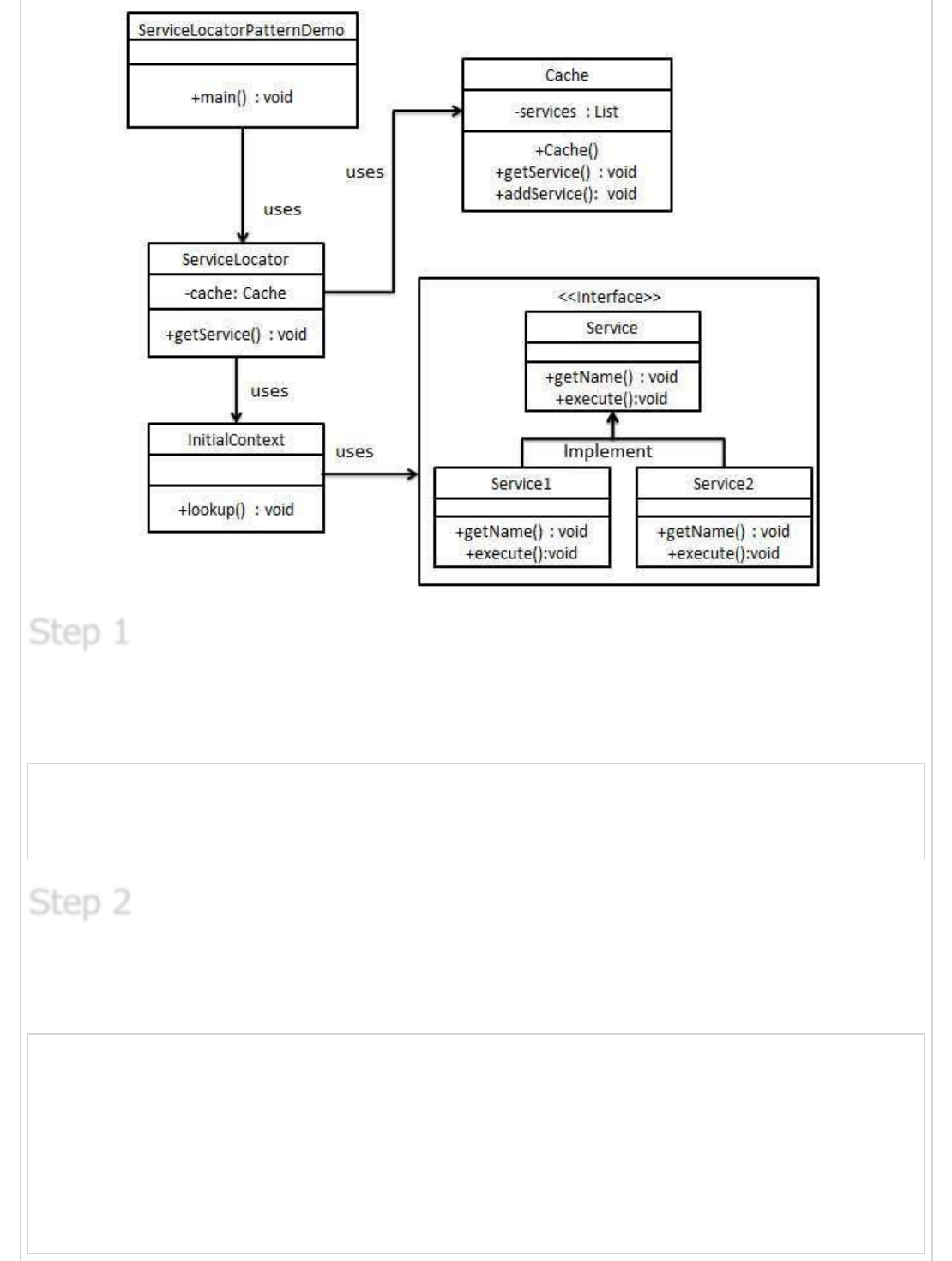
Create Service interface.
Service.java
public interface Service {
public String getName();
public void execute();
}
Create concrete services.
Service1.java
public class Service1 implements Service {
public void execute(){
System.out.println("Executing Service1");
}
@Override
public String getName() {
return "Service1";
}
}
Step 1Step 1
Step 1
Step 2Step 2
Step 2
Service2.java
public class Service2 implements Service {
public void execute(){
System.out.println("Executing Service2");
}
@Override
public String getName() {
return "Service2";
}
}
Create InitialContext for JNDI lookup
InitialContext.java
public class InitialContext {
public Object lookup(String jndiName){
if(jndiName.equalsIgnoreCase("SERVICE1")){
System.out.println("Looking up and creating a new Service1 object");
return new Service1();
}else if (jndiName.equalsIgnoreCase("SERVICE2")){
System.out.println("Looking up and creating a new Service2 object");
return new Service2();
}
return null;
}
}
Create Cache
Cache.java
import java.util.ArrayList;
import java.util.List;
public class Cache {
private List<Service> services;
public Cache(){
services = new ArrayList<Service>();
}
public Service getService(String serviceName){
for (Service service : services) {
if(service.getName().equalsIgnoreCase(serviceName)){
System.out.println("Returning cached "+serviceName+" object");
return service;
}
}
Step 3Step 3
Step 3
Step 4Step 4
Step 4
return null;
}
public void addService(Service newService){
boolean exists = false;
for (Service service : services) {
if(service.getName().equalsIgnoreCase(newService.getName())){
exists = true;
}
}
if(!exists){
services.add(newService);
}
}
}
Create Service Locator
ServiceLocator.java
public class ServiceLocator {
private static Cache cache;
static {
cache = new Cache();
}
public static Service getService(String jndiName){
Service service = cache.getService(jndiName);
if(service != null){
return service;
}
InitialContext context = new InitialContext();
Service service1 = (Service)context.lookup(jndiName);
cache.addService(service1);
return service1;
}
}
Use the ServiceLocator to demonstrate Service Locator Design Pattern.
ServiceLocatorPatternDemo.java
public class ServiceLocatorPatternDemo {
public static void main(String[] args) {
Service service = ServiceLocator.getService("Service1");
service.execute();
service = ServiceLocator.getService("Service2");
service.execute();
service = ServiceLocator.getService("Service1");
Step 5Step 5
Step 5
Step 6Step 6
Step 6
service.execute();
service = ServiceLocator.getService("Service2");
service.execute();
}
}
Verify the output.
Looking up and creating a new Service1 object
Executing Service1
Looking up and creating a new Service2 object
Executing Service2
Returning cached Service1 object
Executing Service1
Returning cached Service2 object
Executing Service2
Transfer Object PatternTransfer Object Pattern
Transfer Object Pattern
The Transfer Object pattern is used when we want to pass data with multiple attributes in
one shot from client to server. Transfer object is also known as Value Object. Transfer
Object is a simple POJO class having getter/setter methods and is serializable so that it
can be transferred over the network. It do not have any behavior. Server Side business
class normally fetches data from the database and fills the POJO and send it to the client
or pass it by value. For client, transfer object is read-only. Client can create its own
transfer object and pass it to server to update values in database in one shot. Following
are the entities of this type of design pattern.
Business Object - Business Service which fills the Transfer Object with data.
Transfer Object -Simple POJO, having methods to set/get attributes only.
Client - Client either requests or sends the Transfer Object to Business Object.
We're going to create a StudentBO as Business Object,Student as Transfer Object
representing our entities.
TransferObjectPatternDemo, our demo class is acting as a client here and will use
StudentBO and Student to demonstrate Transfer Object Design Pattern.
Step 7Step 7
Step 7
ImplementationImplementation
Implementation
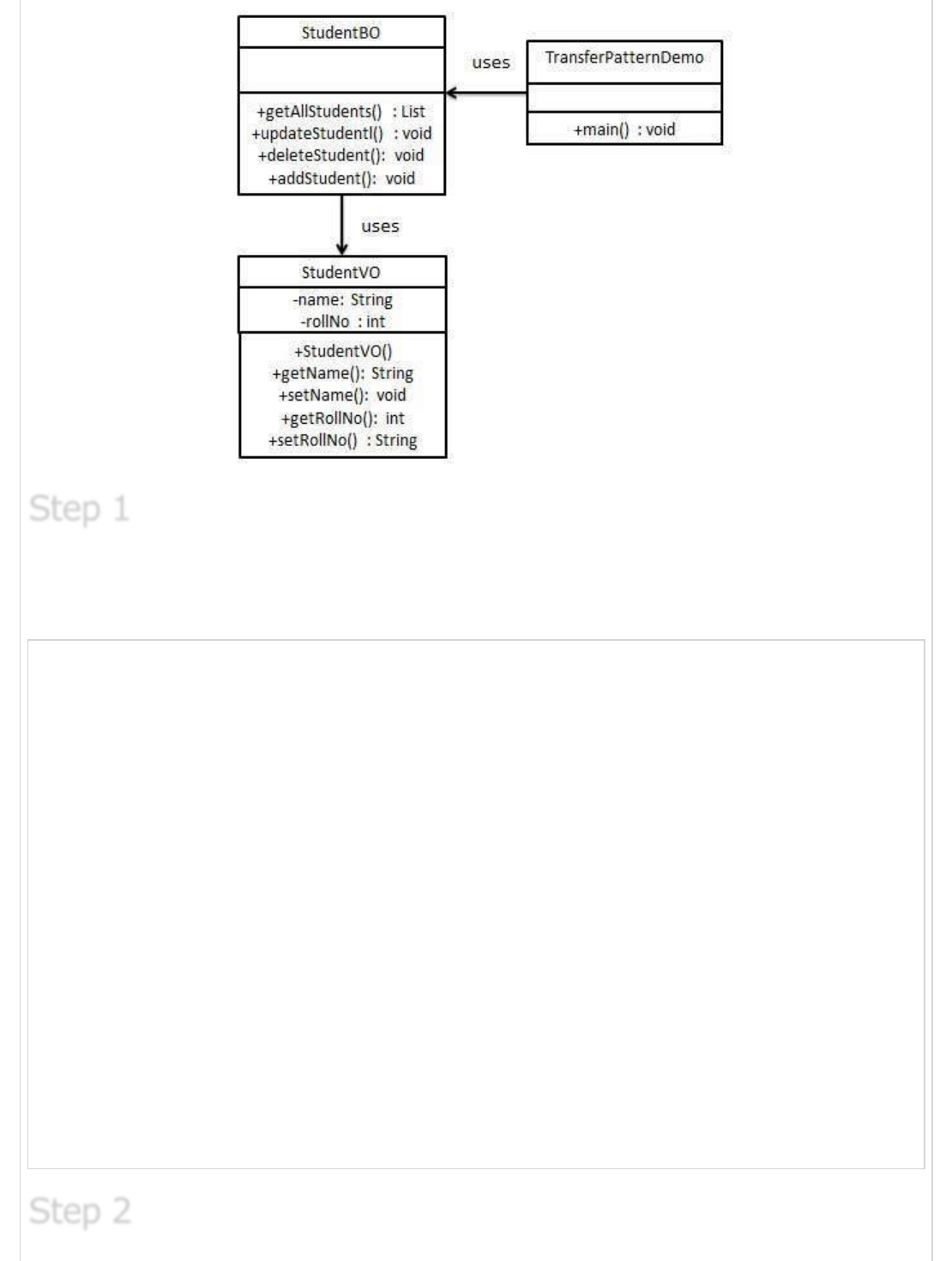
Create Transfer Object.
StudentVO.java
public class StudentVO {
private String name;
private int rollNo;
StudentVO(String name, int rollNo){
this.name = name;
this.rollNo = rollNo;
}
public String getName() {
return name;
}
public void setName(String name) {
this.name = name;
}
public int getRollNo() {
return rollNo;
}
public void setRollNo(int rollNo) {
this.rollNo = rollNo;
}
}
Step 1Step 1
Step 1
Step 2Step 2
Step 2
Create Business Object.
StudentBO.java
import java.util.ArrayList;
import java.util.List;
public class StudentBO {
//list is working as a database
List<StudentVO> students;
public StudentBO(){
students = new ArrayList<StudentVO>();
StudentVO student1 = new StudentVO("Robert",0);
StudentVO student2 = new StudentVO("John",1);
students.add(student1);
students.add(student2);
}
public void deleteStudent(StudentVO student) {
students.remove(student.getRollNo());
System.out.println("Student: Roll No "
+ student.getRollNo() +", deleted from database");
}
//retrive list of students from the database
public List<StudentVO> getAllStudents() {
return students;
}
public StudentVO getStudent(int rollNo) {
return students.get(rollNo);
}
public void updateStudent(StudentVO student) {
students.get(student.getRollNo()).setName(student.getName());
System.out.println("Student: Roll No "
+ student.getRollNo() +", updated in the database");
}
}
Use the StudentBO to demonstrate Transfer Object Design Pattern.
TransferObjectPatternDemo.java
public class TransferObjectPatternDemo {
public static void main(String[] args) {
StudentBO studentBusinessObject = new StudentBO();
//print all students
for (StudentVO student : studentBusinessObject.getAllStudents()) {
System.out.println("Student: [RollNo : "
+student.getRollNo()+", Name : "+student.getName()+" ]");
}
//update student
Step 3Step 3
Step 3
Previous Page Next Page
StudentVO student =studentBusinessObject.getAllStudents().get(0);
student.setName("Michael");
studentBusinessObject.updateStudent(student);
//get the student
studentBusinessObject.getStudent(0);
System.out.println("Student: [RollNo : "
+student.getRollNo()+", Name : "+student.getName()+" ]");
}
}
Verify the output.
Student: [RollNo : 0, Name : Robert ]
Student: [RollNo : 1, Name : John ]
Student: Roll No 0, updated in the database
Student: [RollNo : 0, Name : Michael ]
Step 4Step 4
Step 4
Advertisements