LEIYON INTELLIGENCE TECHNOLOGY LYBX30 2.1CH Karaoke System User Manual LY BX30 Manual ENG

GUANGDONG LEIYON INTELLIGENCE TECHNOLOGY CORP. 2.1CH Karaoke System LY BX30 Manual ENG

manual

LY-BX30
This device complies with part 15 of the FCC Rules.  Operation is subject to the following two conditions: (1) this device may not cause harmful interference, and (2) this device must accept any interference received, including interference that may cause undesired operation.Changes or Modifications not expressly approved by the party responsible could void the user’s authority to operate this device.“The normal function of the product may be disturbed by strong Electro-Magnetic Interference. If so, simply reset the product to resume normal operation by following the instruction manual. In case the function could not resume, please use the product in other location.”This equipment has been tested and found to comply with the limits for a Class B digital device, pursuant to Part 15 of the FCC Rules. These limits are designed to provide reasonable protection against harmful interference in a residential installation. This equipment generates, uses and can radiate radio frequency energy and, if not installed and used in accordance with the instructions, may cause harmful interference to radio communications. However, there is no guarantee that interference will not occur in a particular installation.If this equipment does cause harmful interference to radio or television reception, which can be determined by turning the equipment off and on, the user is encouraged to try to correct the interference by one or more of the following measures:-- Reorient or relocate the receiving antenna.-- Increase the separation between the equipment and receiver.-- Connect the equipment into an outlet on a circuit different from that to which the receiver is connected.-- Consult the dealer or an experienced radio/TV technician for help.This equipment complies with the FCC RF radiation exposure limits set forth for an uncontrolled environment. This equipment should be installed and operated with a minimum distance of 20 centimeters between the radiator and your body.
 This symbol means that this unit is double insulated. An earth connection is not required.•  The appliance must be connected to a 110-240 volt 50/60Hz AC supply by means of a three pin socket.•  Unplug this apparatus during lightning storms or when unused for long periods of time - to prevent damage to this product.•  Opening or removing covers may expose you to dangerous voltages or other hazards.•  To prevent risk of fire or electric shock, avoid overloading wall outlets, extension cords, or integral convenience receptacles.•  Use suitable power sources - Plug the product into a suitable power source, as described in the operating instructions or as marked on the product.•  The supply voltage should be the same as that indicated in the technical specifications and the appliance rating plate.•  If the socket outlets in your home are not suitable for the plug supplied with this unit check with a qualified electrician for replacement.•  In order to disconnect the apparatus from the mains completely, switch off the outlet and remove the mains plug completely.•  Do not bend, stretch or pull the supply cable in order to avoid electric shock.•  When installed, the power socket must be within easy reach.Moisture and waterDo not use this apparatus near water or moisture.•  Do not use this product near a bathtub, washbowl, kitchen sink, and laundry tub, in a wet basement, near a swimming pool, or anywhere else that water or moisture is  present.Batteries shall not be exposed to excessive heat such as sun, fire or the like•  To prevent risk of fire or electric shock, avoid overloading wall outlets, Refer all servicing to qualified service personnel•  Servicing is required when the apparatus has been damaged in any way: such as liquid has been spilled or objects have fallen into the apparatus; the apparatus has been exposed to rain or moisture, does not operate normally, or has been dropped• • • extension cords, or integral convenience receptacles.1
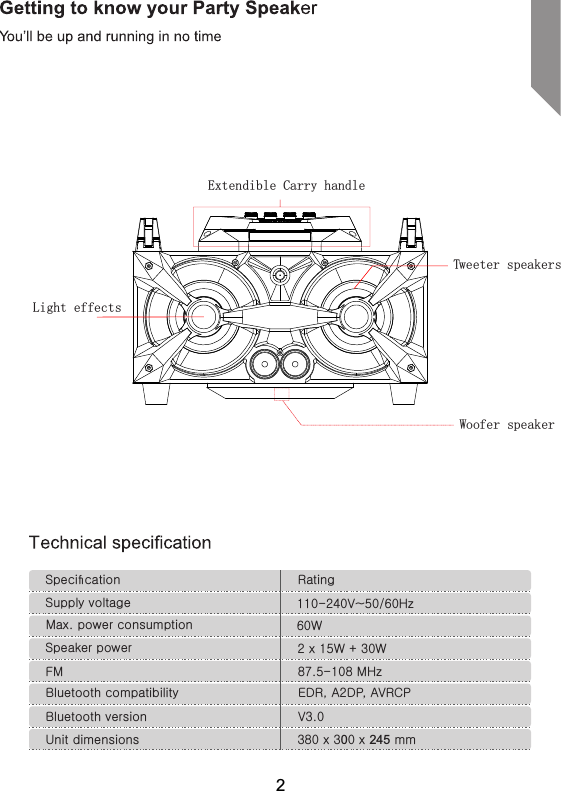
Specification RatingSupply voltage 110-240V~50/60HzMax. power consumption 60WSpeaker power 2 x 15W + 30WFM 87.5-108 MHzBluetooth compatibility EDR, A2DP, AVRCPBluetooth version V3.0Unit dimensions 380 x 300 x 245 mmExtendible Carry handleTweeter speakersLight effects Woofer speaker2
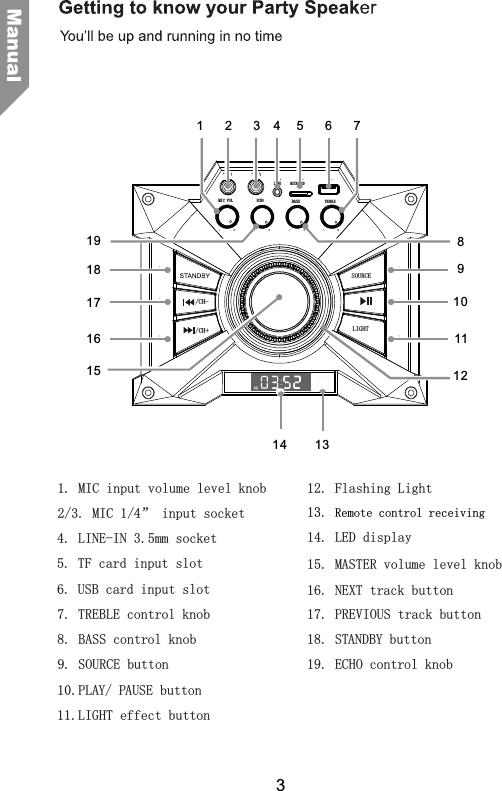
14. LED display17. PREVIOUS track button10.PLAY/ PAUSE button9. SOURCE button7. TREBLE control knob8. BASS control knob 18. STANDBY button4. LINE-IN 3.5mm socket1. MIC input volume level knob2/3. MIC 1/4” input socket5. TF card input slot6. USB card input slot11.LIGHT effect button16. NEXT track button19. ECHO control knob15. MASTER volume level knob12. Flashing Light1. 3Remote control receiving3MIC VOL BASSLIGHT/CH-SOURCEMIC 1ECHO TREBLEMIC 2LINE MICRO SD/CH+1 2 345678910111213141516171819
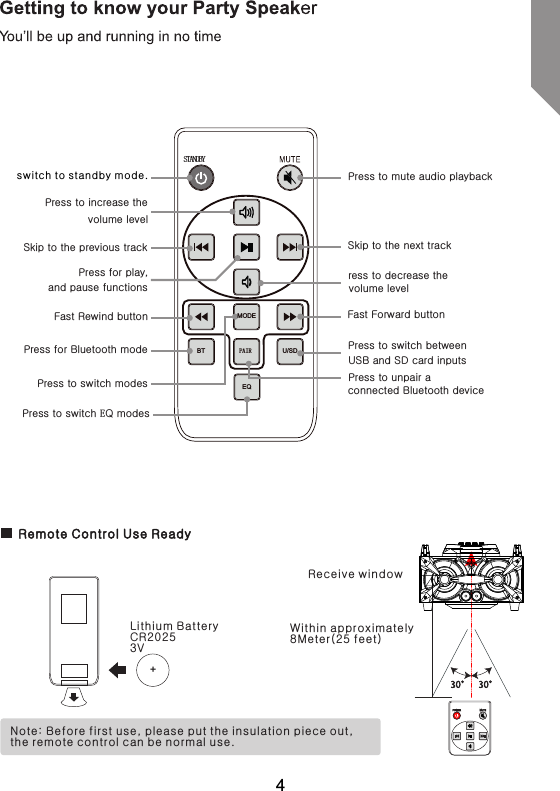
Note: Before first use, please put the insulation piece out, the remote control can be normal use.switch to standby mode.Remote Control Use Ready+Lithium BatteryCR20253VWithin approximately8Meter(25 feet)Receive windowPAIRSTANDBYSkip to the previous trackFast Rewind buttonPress for Bluetooth modePress to switch modesPress to mute audio playback Fast Forward buttonress to decrease the volume levelSkip to the next trackPress to increase the volume level Press for play, and pause functionsPress to switch between USB and SD card inputsPress to unpair a connected Bluetooth deviceMODEEQBT U/SDPress to switch EQ modes4
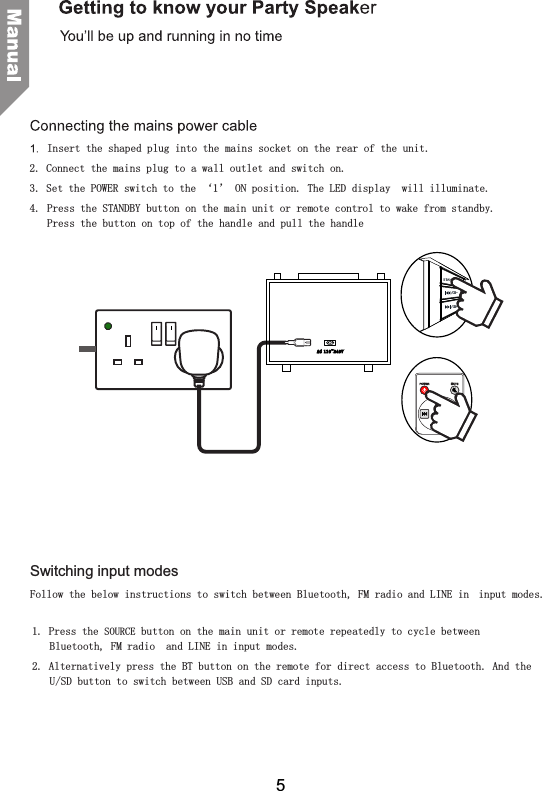
Insert the shaped plug into the mains socket on the rear of the unit.2. Connect the mains plug to a wall outlet and switch on. 3. Set the POWER switch to the ‘1’ ON position. The LED display  will illuminate.4.  Press the STANDBY button on the main unit or remote control to wake from standby. Press the button on top of the handle and pull the handle Switching input modesFollow the below instructions to switch between Bluetooth, FM radio and LINE in  input modes.1. Press the SOURCE button on the main unit or remote repeatedly to cycle between Bluetooth, FM radio  and LINE in input modes.2. Alternatively press the BT button on the remote for direct access to Bluetooth. And the U/SD button to switch between USB and SD card inputs.AC 110~2 4 0 V/CH-/CH+5
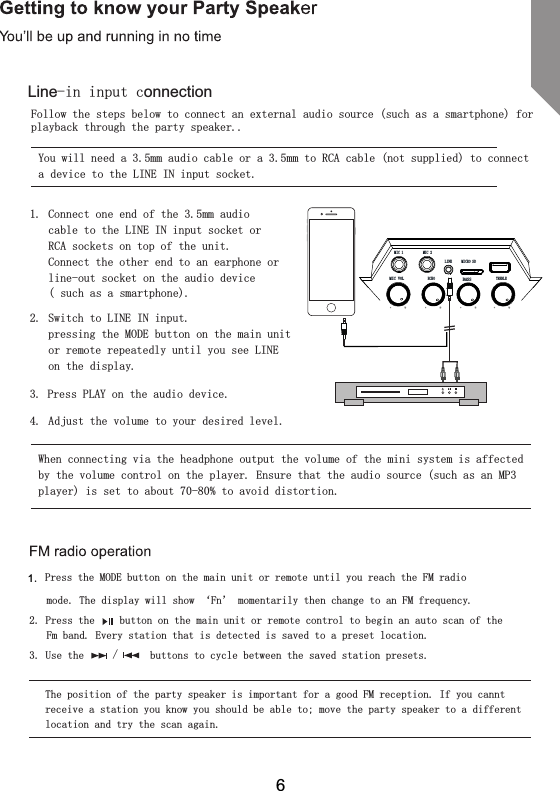
Follow the steps below to connect an external audio source (such as a smartphone) for playback through the party speaker..You will need a 3.5mm audio cable or a 3.5mm to RCA cable (not supplied) to connect a device to the LINE IN input socket.1.  Connect one end of the 3.5mm audio cable to the LINE IN input socket or RCA sockets on top of the unit.Connect the other end to an earphone or line-out socket on the audio device  ( such as a smartphone).2.  Switch to LINE IN input.  pressing the MODE button on the main unit or remote repeatedly until you see LINE on the display.3. Press PLAY on the audio device.4.  Adjust the volume to your desired level.When connecting via the headphone output the volume of the mini system is affected by the volume control on the player. Ensure that the audio source (such as an MP3 player) is set to about 70-80% to avoid distortion.   Press the MODE button on the main unit or remote until you reach the FM radio  mode. The display will show ‘Fn’ momentarily then change to an FM frequency.2. Press the   button on the main unit or remote control to begin an auto scan of the Fm band. Every station that is detected is saved to a preset location.3. Use the    /    buttons to cycle between the saved station presets.The position of the party speaker is important for a good FM reception. If you cannt receive a station you know you should be able to; move the party speaker to a different 1.location and try the scan again.6Line-in input connectionMIC VOL BASSMIC 1ECHO TREBLEMIC 2LINE MICRO SD
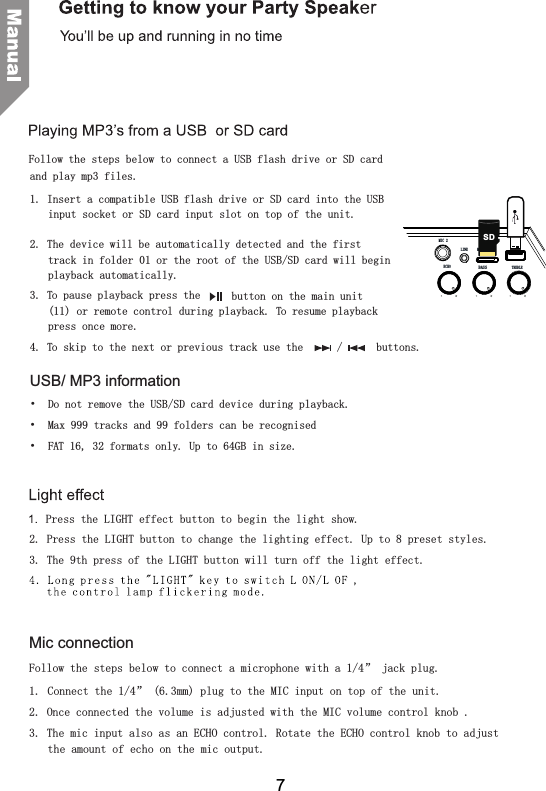
and play mp3 files.1. Insert a compatible USB flash drive or SD card into the USB input socket or SD card input slot on top of the unit. 2. The device will be automatically detected and the first track in folder 01 or the root of the USB/SD card will begin playback automatically.3. To pause playback press the   button on the main unit (11) or remote control during playback. To resume playback press once more.4. To skip to the next or previous track use the   /   buttons.USB/ MP3 information•  Do not remove the USB/SD card device during playback.•  Max 999 tracks and 99 folders can be recognised•  FAT 16, 32 formats only. Up to 64GB in size.Follow the steps below to connect a USB flash drive or SD cardMic connectionFollow the steps below to connect a microphone with a 1/4” jack plug.1.  Connect the 1/4” (6.3mm) plug to the MIC input on top of the unit.2. Once connected the volume is adjusted with the MIC volume control knob .3. The mic input also as an ECHO control. Rotate the ECHO control knob to adjust the amount of echo on the mic output. to begin the light show.2. Press the LIGHT button to change the lighting effect. Up to 8 preset styles.3. The 9th press of the LIGHT button will turn off the light effect.Press the LIGHT effect button7BASSECHO TREBLEMIC 2LINE MICRO SDSD
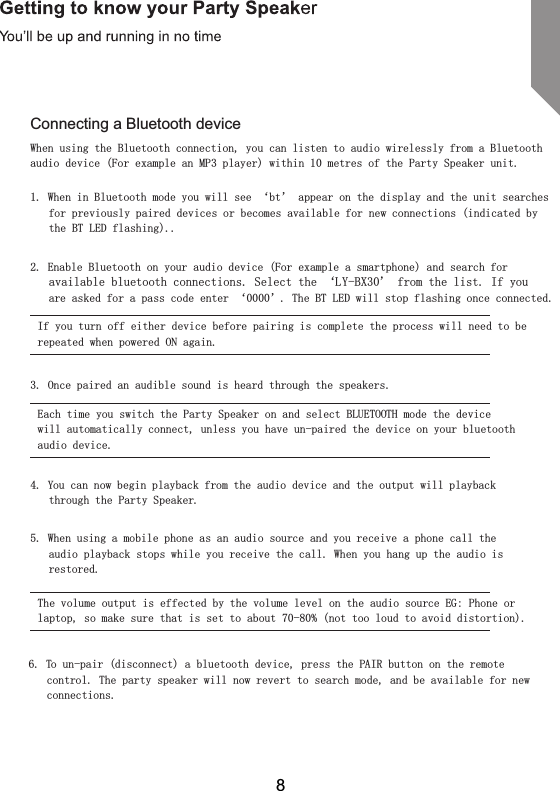
Connecting a Bluetooth deviceWhen using the Bluetooth connection, you can listen to audio wirelessly from a Bluetooth audio device (For example an MP3 player) within 10 metres of the Party Speaker unit.1. When in Bluetooth mode you will see ‘bt’ appear on the display and the unit searches for previously paired devices or becomes available for new connections (indicated by the BT LED flashing)..2. Enable Bluetooth on your audio device (For example a smartphone) and search for available bluetooth connections. Select the ‘LY-BX30’ from the list. If you are asked for a pass code enter ‘0000’. The BT LED will stop flashing once connected.If you turn off either device before pairing is complete the process will need to be repeated when powered ON again.3. Once paired an audible sound is heard through the speakers.Each time you switch the Party Speaker on and select BLUETOOTH mode the device will automatically connect, unless you have un-paired the device on your bluetooth audio device.4. You can now begin playback from the audio device and the output will playback through the Party Speaker.5. When using a mobile phone as an audio source and you receive a phone call the audio playback stops while you receive the call. When you hang up the audio is restored.The volume output is effected by the volume level on the audio source EG: Phone or laptop, so make sure that is set to about 70-80% (not too loud to avoid distortion).6. To un-pair (disconnect) a bluetooth device, press the PAIR button on the remote control. The party speaker will now revert to search mode, and be available for new connections.8
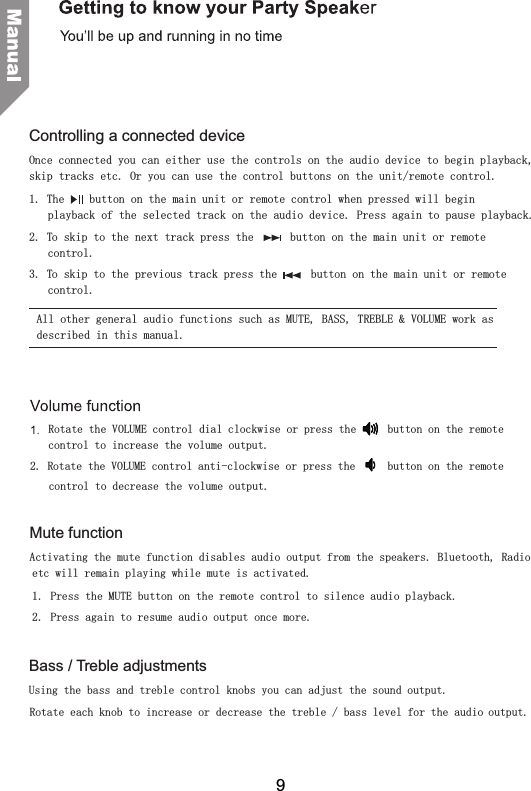
Rotate the VOLUME control dial clockwise or press the   button on the remote control to increase the volume output.2. Rotate the VOLUME control anti-clockwise or press the   button on the remote Mute functionActivating the mute function disables audio output from the speakers. Bluetooth, Radio etc will remain playing while mute is activated.1.  Press the MUTE button on the remote control to silence audio playback.2.  Bass / Treble adjustmentsUsing the bass and treble control knobs you can adjust the sound output.Rotate each knob to increase or decrease the treble / bass level for the audio output.Controlling a connected deviceOnce connected you can either use the controls on the audio device to begin playback, skip tracks etc. Or you can use the control buttons on the unit/remote control.1. The   button on the main unit or remote control when pressed will begin playback of the selected track on the audio device. Press again to pause playback.2. To skip to the next track press the      button on the main unit or remote control.3. To skip to the previous track press the   button on the main unit or remote control.All other general audio functions such as MUTE, BASS, TREBLE & VOLUME work as described in this manual.control to decrease the volume output.Press again to resume audio output once more.9
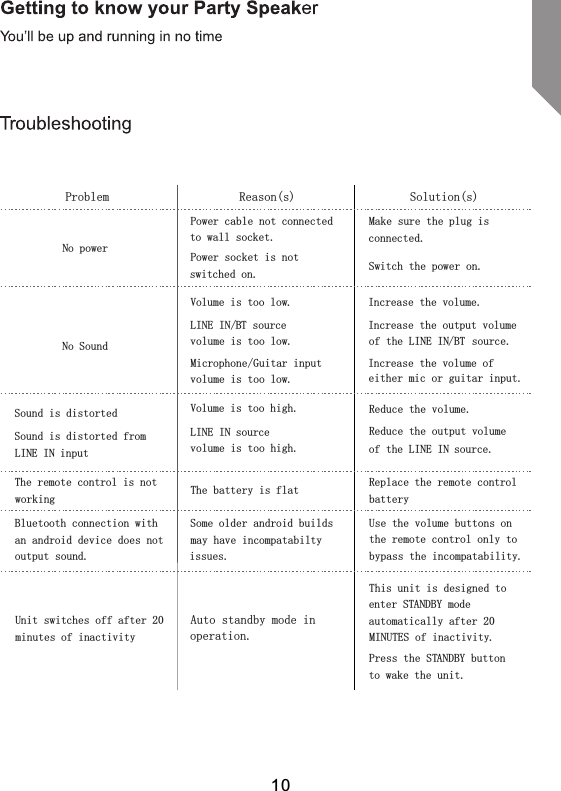
Reason(s) Solution(s)Volume is too low.LINE IN/BT source volume is too low.Microphone/Guitar input volume is too low.Increase the volume.Increase the output volume of the LINE IN/BT source. Increase the volume of either mic or guitar input.Sound is distortedSound is distorted from LINE IN inputVolume is too high.LINE IN source volume is too high.Reduce the volume.Reduce the output volume of the LINE IN source.The remote control is not working The battery is flat Replace the remote control batteryBluetooth connection with an android device does not output sound.Some older android builds may have incompatabilty issues.Use the volume buttons on the remote control only to bypass the incompatability.Unit switches off after 20 minutes of inactivityAuto standby mode in operation.This unit is designed to enter STANDBY mode automatically after 20 MINUTES of inactivity.  Press the STANDBY button to wake the unit.ProblemPower cable not connected to wall socket.Power socket is not switched on.Make sure the plug is connected.Switch the power on.No powerNo Sound10
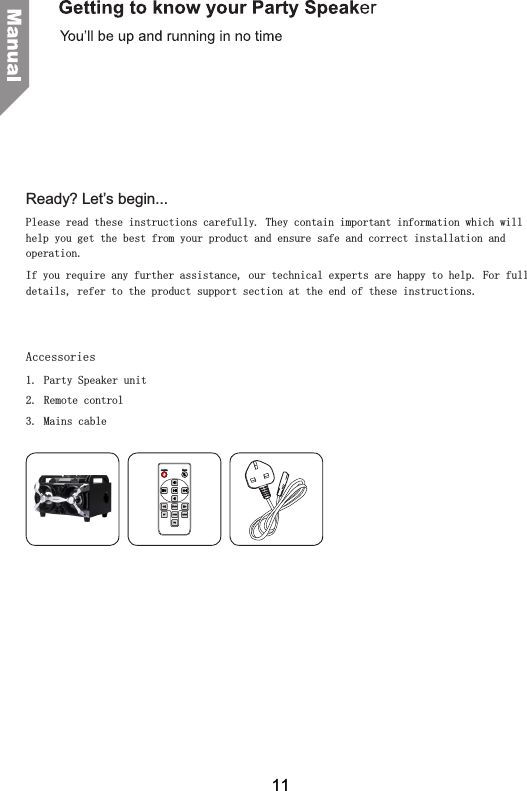
Ready? Let’s begin...Please read these instructions carefully. They contain important information which will help you get the best from your product and ensure safe and correct installation and operation.If you require any further assistance, our technical experts are happy to help. For full details, refer to the product support section at the end of these instructions.   Accessories1. Party Speaker unit2.  Remote control3.  Mains cable11

Navigation menu