Leotec Electronics LT-BT707UC Bluetooth Speaker User Manual LT BT707UC

LEOTEC ELECTRONICS CO.,LTD Bluetooth Speaker LT BT707UC

User Manual

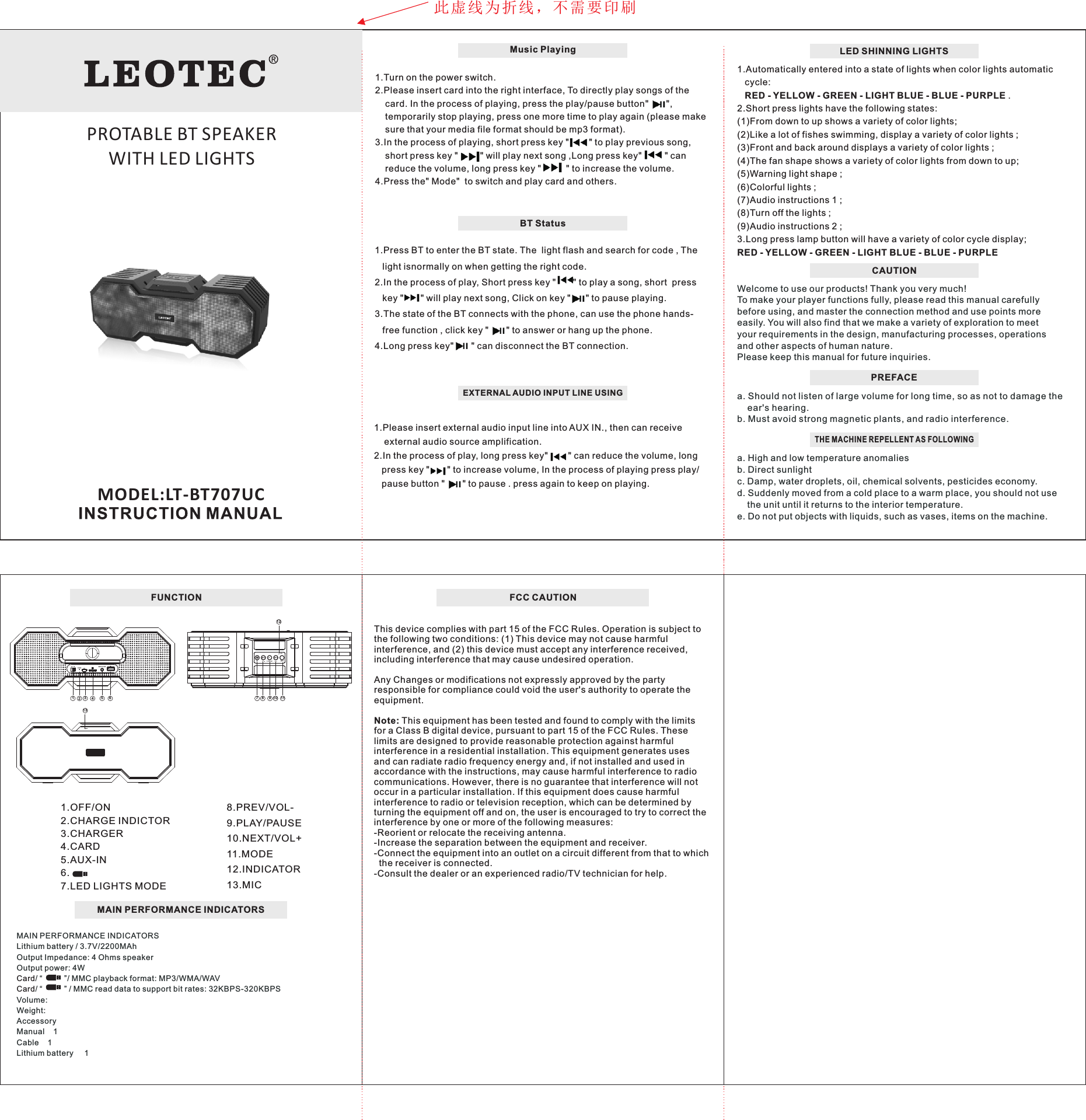
LED SHINNING LIGHTSWelcome to use our products! Thank you very much! To make your player functions fully, please read this manual carefully before using, and master the connection method and use points more easily. You will also find that we make a variety of exploration to meet your requirements in the design, manufacturing processes, operations and other aspects of human nature.Please keep this manual for future inquiries.  PREFACEa. Should not listen of large volume for long time, so as not to     ear's hearing.b. Must avoid strong magnetic plants, and radio interference. damage the THE MACHINE REPELLENT AS FOLLOWINGa. High and low temperature anomalies b. Direct sunlight c. Damp, water droplets, oil, chemical solvents, pesticides economy. d. Suddenly moved from a cold place to a warm place, you should not use     the unit until it returns to the interior temperature. e. Do not put objects with liquids, such as vases, items on the machine.CAUTION 1.Automatically entered into a state of lights when color lights automatic    cycle:    RED - YELLOW - GREEN - LIGHT BLUE - BLUE - PURPLE .2.Short press lights have the following states:(1)From down to up shows a variety of color lights;(2)Like a lot of fishes swimming, display a variety of color lights ;(3)Front and back around displays a variety of color lights ;(4)The fan shape shows a variety of color lights from down to up;(5)Warning light shape ;(6)Colorful lights ;(7)Audio instructions 1 ;(8)Turn off the lights ;(9)Audio instructions 2 ;3.Long press lamp button will have a variety of color cycle display; RED - YELLOW - GREEN - LIGHT BLUE - BLUE - PURPLEFUNCTIONMODEL:LT-BT707UCMAIN PERFORMANCE INDICATORSMAIN PERFORMANCE INDICATORSLithium battery / 3.7V/2200MAhOutput Impedance: 4 Ohms speakerOutput power: 4W/ “          ”/ MMC playback format: MP3/WMA/WAV/ “          ” / MMC read data to support bit rates: 32KBPS-320KBPSVolume:Weight:AccessoryManual    1Cable    1Lithium battery     1CardCard8.PREV/VOL-9.PLAY/PAUSE10.NEXT/VOL+11.MODE12.INDICATOR13.MIC1.OFF/ON2.CHARGE INDICTOR3.CHARGER 4.CARD5.AUX-IN6. 7.LED LIGHTS MODEPLAYLED MODEMIC1234567 8 9 10 111312ONOFF MUSIC PLAYERCHARGE 5VEXTERNAL AUDIO INPUT LINE USING1.Please insert external audio input line into AUX IN., then can receive     external audio source amplification.2.In the process of play, long press key"        " can reduce the volume, long    press key "       " to increase volume, In the process of playing press play/    pause button "       " to pause . press again to keep on playing.Music Playing1.Turn on the power switch.2.Please insert card into the right interface, To directly play songs of the         card. In the process of playing, press the play/pause button"       ",     temporarily stop playing, press one more time to play again (please make      sure that your media file format should be mp3 format).3.In the process of playing, short press key "       " to play previous song,     short press key "        " will play next song ,Long press key"        " can     reduce the volume, long press key "         " to increase the volume.4.Press the" Mode"  to switch and play card and others.BT Status1.Press BT to enter the BT state. The  light flash and search for code , The     light isnormally on when getting the right code.2.In the process of play, Short press key "      " to play a song, short  press    key "      " will play next song, Click on key "      " to pause playing.3.The state of the BT connects with the phone, can use the phone hands-   free function , click key "       " to answer or hang up the phone.4.Long press key"       " can disconnect the BT connection.此虚线为折线,不需要印刷PROTABLE BT SPEAKER WITH LED LIGHTSFCC CAUTIONThis device complies with part 15 of the FCC Rules. Operation is subject to the following two conditions: (1) This device may not cause harmfulinterference, and (2) this device must accept any interference received, including interference that may cause undesired operation.Any Changes or modifications not expressly approved by the party responsible for compliance could void the user's authority to operate the equipment.Note: This equipment has been tested and found to comply with the limits for a Class B digital device, pursuant to part 15 of the FCC Rules. These limits are designed to provide reasonable protection against harmful interference in a residential installation. This equipment generates uses and can radiate radio frequency energy and, if not installed and used in accordance with the instructions, may cause harmful interference to radio communications. However, there is no guarantee that interference will not occur in a particular installation. If this equipment does cause harmful interference to radio or television reception, which can be determined by turning the equipment off and on, the user is encouraged to try to correct the interference by one or more of the following measures:-Reorient or relocate the receiving antenna.-Increase the separation between the equipment and receiver.-Connect the equipment into an outlet on a circuit different from that to which   the receiver is connected.-Consult the dealer or an experienced radio/TV technician for help.

Navigation menu