Mobile Communications BTUX623 Consumer Wide-band Coupling Booster User Manual BTUX615 FINAL Mar 29 16
Mobile Communications Inc. Consumer Wide-band Coupling Booster User Manual BTUX615 FINAL Mar 29 16
Contents
- 1. User Manual 1
- 2. User Manual 2 Rev
User Manual 1
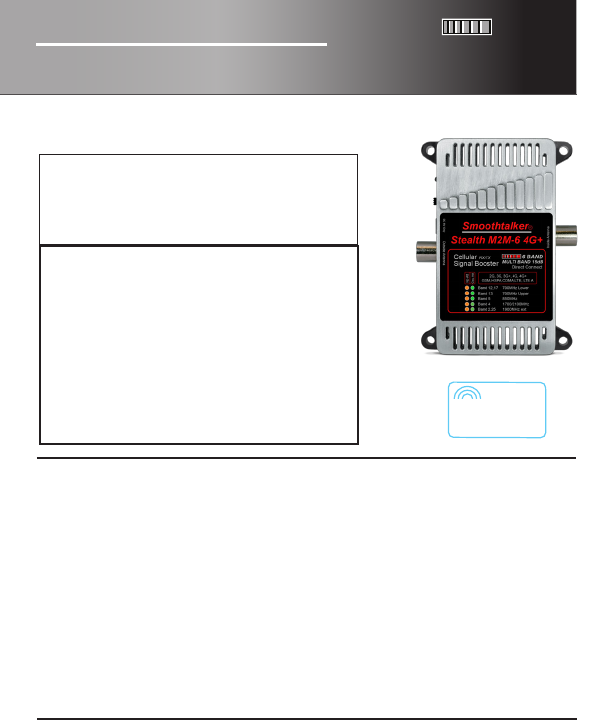
STEALTH M2M-6 4G+
Direct Connect Cellular Machine
to Machine Signal Booster
stealth
tech
®
15dB
MULTI BAND
6 BAND
Boosts the outside signal into your M2M device
and the M2M device signal back to the tower.
User Manual USA
Cellular
Signal Booster
RX/TX
MULTI BAND 15dB
15dB 6 BAND
GSM,HSPA,CDMA,LTE, LTE A
Machine to Machine
DIRECT CONNECT
Band 12,17
Band 13
Band 5
Band 4
Band 2,25
700MHz Upper
850MHz
1700/2100MHz
2G, 3G, 3G+, 4G, 4G+
1900MHz ext
700MHz Lower
Smoothtalker.com
In 2001 Smoothtalker produced the rst digital mobile cellular signal booster
in North America with FCC and ICAN approval. We continue to lead with the
most powerful and intelligent boosters in the world.
Our dynamic adaptive proprietary algorithms make them very network friendly.
We call it STEALTH TECH technology.
Contents
All parts shown are not included in all kits.
Please check your model number for more details at smoothtalker.com
To comply with FCC rules, this booster must only be operated with cables, antennas
and coupling devices that have been approved for use with this equipment.
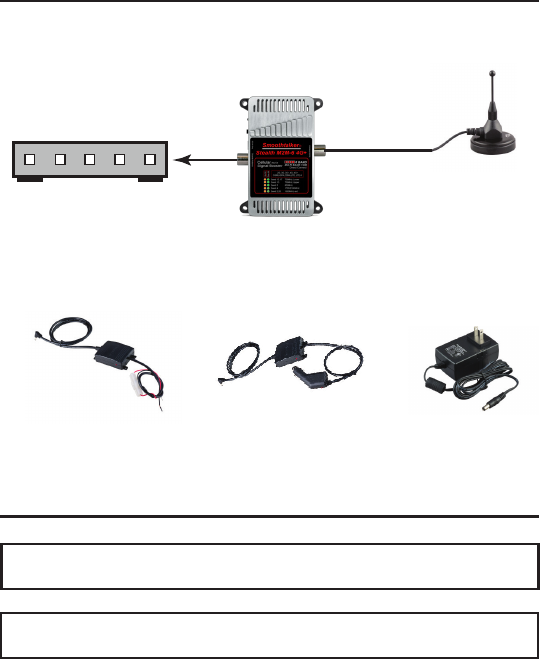
Cellular Modem or
other M2M device
(Not included)
Cellular Booster
Outside antenna
Fig. 1
12 volt install fused type 12 volt socket CLA plug type 120 volt AC/DC
1
NOTE: It is normal for the booster to be quite warm while the phone is in use state.
Optional Power Types
Installation & Assembly
Applications
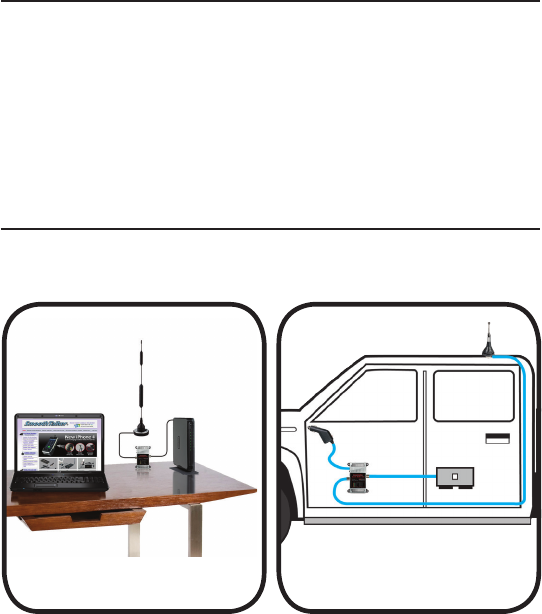
This Direct Connect M2M Booster is designed to be placed between the cellular
device and it’s outside antenna.
Make all connections as in Fig. 1 and see Applications in Fig.2 & Fig. 3
Important: Use only the power supply included with the booster.
Connecting any other power supply at any time will result in damage to the
booster and will void the warranty.
Do not turn on the power switch until ALL cables have been screwed or plugged
into the booster or you can cause damage to the booster.
Fig. 2 Fig. 3
Desktop Direct Connect 120V Power Type
Mobile Tracking Direct Connect
CLA 12V Socket Type
2
Understanding the lights
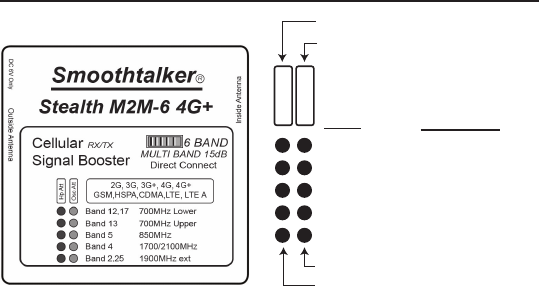
Band 12, 17 700MHz Lower
Band Frequency
Band 13 700MHz Upper
Band 5 850MHz
Band 4 1700/2100MHz
Band 2, 25 1900MHz ext
RX High Power Attenuation
Oscillation Attenuation
Orange LED
Green LED
Hp Att
Osc Att
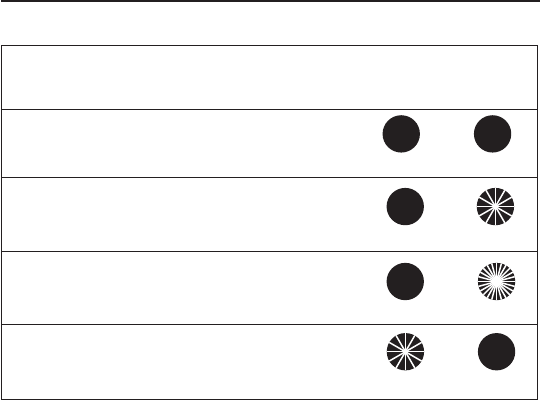
The “LEDS” on the face of the booster indicate operating gain state.
In any given frequency band there is a Green and Orange LED which indicate the
gain status of the band. When both of these LEDS are “SOLID ON” it means that the
booster is operating normally and with full gain (No attenuation) in that band.
If the booster has reduced its gain, one or both of the LEDS will indicate
by ashing. (Per the chart on pg. 4)
Any reduction of gain will be due to either:
A) High outside signal level (close to tower)
B) Loop Oscillation will only occur if you were to connect the inside antenna port
to outside antenna port. This is not normal and not recommended.
When the booster is o it will be indicated as follows:
When inside and outside antenna ports are connected together the Green LED
will fast ash and the Orange LED will turn o indicating that the booster is
o due to loop oscillation.
3
Understanding the lights
ON ON
ON
SLOW FLASHING
SOLID ONSOLID ON
SLOW FLASHING
FAST FLASHING
OFF
ON
ORANGE LED
High Power
GREEN LED
Attenuation
Orange Solid ON = Full Gain - Green Solid ON = Full Gain
Orange Solid ON & Green Slow Flashing = Oscillation Att
Orange O & Green Fast Flashing = Oscillation Shutdown
Orange Slow Flashing & Green Solid ON = RX High Power Att
What do the LED ashes mean?
Each ash indicates 3dB of gain reduction also known as gain attenuation.
For example: three ashes equals 9dB of attenuation.
Green LED indicates loop oscillation status. When ashing it means reduction of
gain. This will not occur in this type of direct connect Booster unless you mistakenly
connected the inside antenna port to the outside antenna port.
Orange LED indicates RX (outside signal strength) status. When ashing it means
reduction of gain also known as attenuation of gain. You cannot prevent this
condition. As you drive away from the nearby cell tower and get far enough away
the ashing Orange will automatically stop ashing which indicates that the
boooster is no longer attenuated. As you appproch another nearby cell tower the
Orange may begin ashing again and will stop ashing as you get farther away.
This is the normal operating process.
4
Each ash indicates 3dB of gain reduction also known as gain attenuation.
For example: three ashes equals 9dB of attenuation.
Specications Stealth M2M-6 4G+
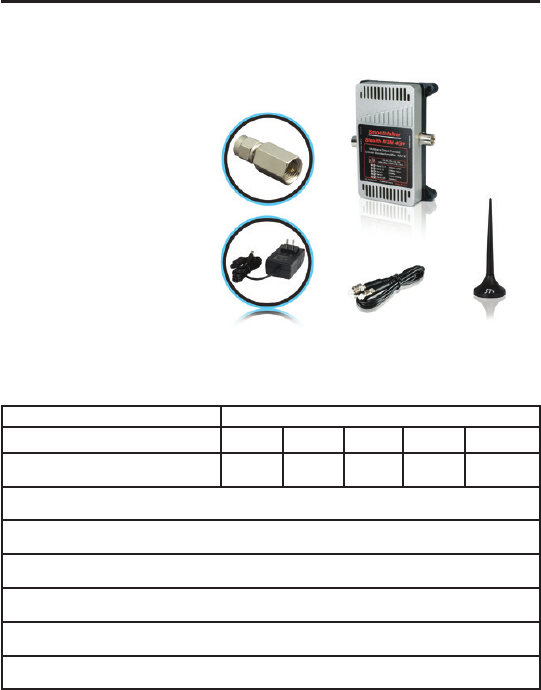
FREQUENCIES
OPERATIONAL BANDS
MODULATIONS 2G, 3G, 3G+, 4G, 4G+, GSM, HSPA, CDMA, LTE, LTE A
TX POWER 1 watt EIRP
GAIN 15 dB
POWER SUPPLY 12V DC CLA OR 12V DC fused or 120V AC/DC
OPERATING TEMP
-22 F TO + 185 F
DIMENSIONS L 4.56 xW 2.15 x H 1.25 (inch)
WEIGHT 0.65 lb
1900
MHz
1700/2100
MHz
850
MHz
700 MHz
upper
700 MHz
lower
Band 2/25Band 4Band 5Band 13Band 12/17
Model shown
BTUX615Min81H
6 Band M2M Direct Connect Kit
Typical Booster Kit (with SMA adaptor)
5

Extension Cables
Magnetic base Antennas
ACX100
ACX900
CBXmaXfe10
CBXmaXfe20
CBXmaXfe30
CBXmaXfe40
CBXmaXfe50
CBXmaXfe60
SEMiniX1 SEM2M series
SEM11M series SEM14M series
SEM2LGM series SEM11LGM series
SEM14LGM series SEM26LGM series
SEM2LGML series SEM11LGML series
SEM14LGML series SEM26LGML series
Directional antennas
SEMD1 series
SEMDA2 series
SEMO series
SEMPN1 series
Thru-hole Antennas
SEM2TH series SEM11TH series
SEM14TH series SEM26TH series
SEM2THL series SEM11THL series
SEM14THL series SEM26THL series
6
Approved Equipment List
For specications of any of the Smoothalker FCC approved part numbers
listed below visit smoothtalker.com
FCC requirements prohibit the use of unauthorized Antennas, Cables,
and/or Coupling devices.
Contact information for Booster registration:
Some providers have set up web-sites for booster registration. If you don’t see your provider
on this list, please contact your provider for information on how to register your booster.
AT&T: https://securec45.securewebsession.com/attsignalbooster.com/
Verizon: http://www.verizonwireless.com/solutions-and-services/accessories/
register-signal-booster/
T-mobile: https://www.signalboosterregistration.com/
Sprint: https://www.sprint.com/legal/fcc_boosters.html
Us Cellular: http://www.uscellular.com/uscellular/support/fcc-booster-registration.jsp
This is a CONSUMER device.
BEFORE USE, you MUST REGISTER THIS DEVICE with your wireless provider and
have your provider’s consent.
Most wireless providers consent to the use of signal boosters. Some providers
may not consent to the use of this device on their network. If you are unsure,
contact your provider.
You MUST operate this device with approved antennas and cables as specied by
the manufacturer. Antennas MUST be installed at least 20 cm (8 inches) from any
person. You MUST cease operating this device immediately if requested by the
FCC or a licensed wireless service provider.
WARNING. E911 location information may not be provided or may be inaccurate
for calls served by using this device.
Operational description:
To comply with FCC NPS (Network Protection Standard) requirements: NPS and other
compliance/safeguard features for AGC and anti-oscillation have been implemented.
NPS and other compliance/safeguard features are defaulted to be “On” (in operation). NPS and
other compliance/safeguard features can not be eld recongured, disabled or removed.
This booster is not user programmable, does not need ne tuning or adjustment,
does not require professional installation.
Warranty:
2 Year on manufacturing defects. Does not include misuse or customer damage.
Original Bill of Sale is required for all Warranty Claims
info@smoothtalker.com
Tel: 1 877 726 3444
Smoothtalker.com
Made in
North
America
2 Year
Warranty
2 Year
Warranty
FCC
Approved stealth
tech
®
Automatic power
control protects the
Cellular Network