Multilaser S A ORION 3G WCDMA+GSM SMART PHONE User Manual Manual
Multilaser Industrial S/A 3G WCDMA+GSM SMART PHONE Manual
Contents
- 1. User Manual
- 2. Users Manual
User Manual

Multilaser Industrial S/A
Av. Brigadeiro Faria Lima, 1811 - 15andar - Jardim Paulistano, Brazil
Tel:+551136168888 Fax: +551136168888
1
3GWCDMA+GSMSmartPhone
Orion Manual
Safety Notice
Before using the mobile phone, please read the Notice carefully, and make sure that
your children have understand the information. For more details, please refer to
“Safety Warnings and Precautions”.
Do not impact, drop or puncture the mobile phone, and also avoid dropping, crushing
and bending.
Do not use the mobile phone in moist environment such as the bathroom, and also do
not soak or wash the mobile phone in liquid.
Do not switch on the phone at places where usage of mobile phone is prohibited or if
mobile phone may cause interference or danger.
Do not use the mobile phone when you are driving.
Please follow the rules or regulations in medical facilities, and turn off the mobile
phone near medical instruments.
Please turn off the mobile phone when boarding the airplane to avoid interference.
Please turn off the mobile phone near high precision electronic devices to avoid
malfunction of the electronic devices.
Only qualified organizations can maintain the phone. Do not disassemble the phone or
accessories by yourself.
Do not put the mobile phone and accessories in the appliances with strong
electromagnetic field.
Please keep the mobile phone away from magnetic devices, or else the radiation from
the mobile phone may erase the data saved in the magnetic devices.
Do not use the mobile phone near high temperature or inflammable gas (e.g. gas
station).
Please keep the mobile phone and accessories away from the children; do not let the
children use the mobile phone unattended.
Use authorized battery and charger only, otherwise, it may cause explosion.
Please follow local laws and regulation when using the mobile phone, and respect the
privacy and legal rights of others.
When using USB data cable, please follow the instructions in this Manual, or else
your mobile phone or PC may be damaged.

Multilaser Industrial S/A
Av. Brigadeiro Faria Lima, 1811 - 15andar - Jardim Paulistano, Brazil
Tel:+551136168888 Fax: +551136168888
2
SpecialNote
ThismobilephoneisdualSIMdualstandbysinglecalldesign,thatis,twoSIM
cardsareinsertedsimultaneouslyandonlyoneSIMcardcanbeusedtomakecallor
accesstheInternetatonetime,whiletheotherSIMisinvalid;ifsomeoneiscalling
theotherSIM,itwillprompt“thesubscriberyoudialedisoutofservice”.This
promptiscausedbysinglecalldesignofthemobilephone,andisunrelatedtothe
networkoftheoperator.
Singlecallisduetosinglechipdesignofthemobilephone,whichcan
significantlyimprovethestandbydurationandreducethepowerconsumption.
Pleaseconsultlocalnetworkoperator,andsubscribeforthe“CallerID”serviceto
avoidmissingcalls.
Multilaser Industrial S/A
Av. Brigadeiro Faria Lima, 1811 - 15andar - Jardim Paulistano, Brazil
Tel:+551136168888 Fax: +551136168888
3
Introductiontomobilephone
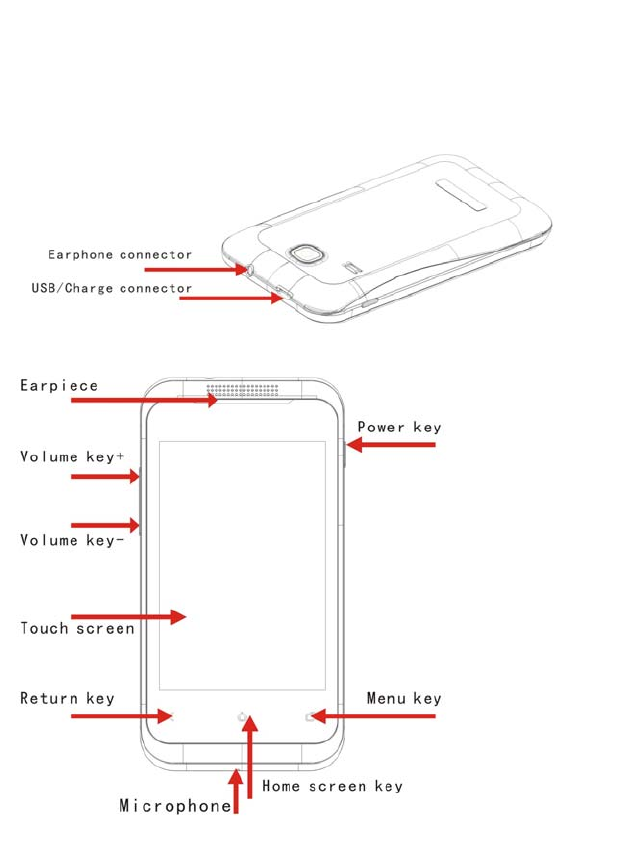
Key Description
Power Key
• Press to turn on the mobile phone
• Press and hold to pop-up the option box in power-on state and turn on the
silent or flight mode,or choose to restart or shutdown
• Press to make the mobile phone into sleep state
• Press to wake up the screen in sleep state
Home screen key
• Press to back home screen in any page
• Press and hold to pop-up the recently used program
Menu Key
• Press to pop-up the menu bar options
Return Key
• Press to return the previous screen
Volume Key
• Press to adjust the volume
• Press and hold the volume(-) to the minimun to turn into the silent mode
Multilaser Industrial S/A
Av. Brigadeiro Faria Lima, 1811 - 15andar - Jardim Paulistano, Brazil
Tel:+551136168888 Fax: +551136168888
4
Phoneinstallation
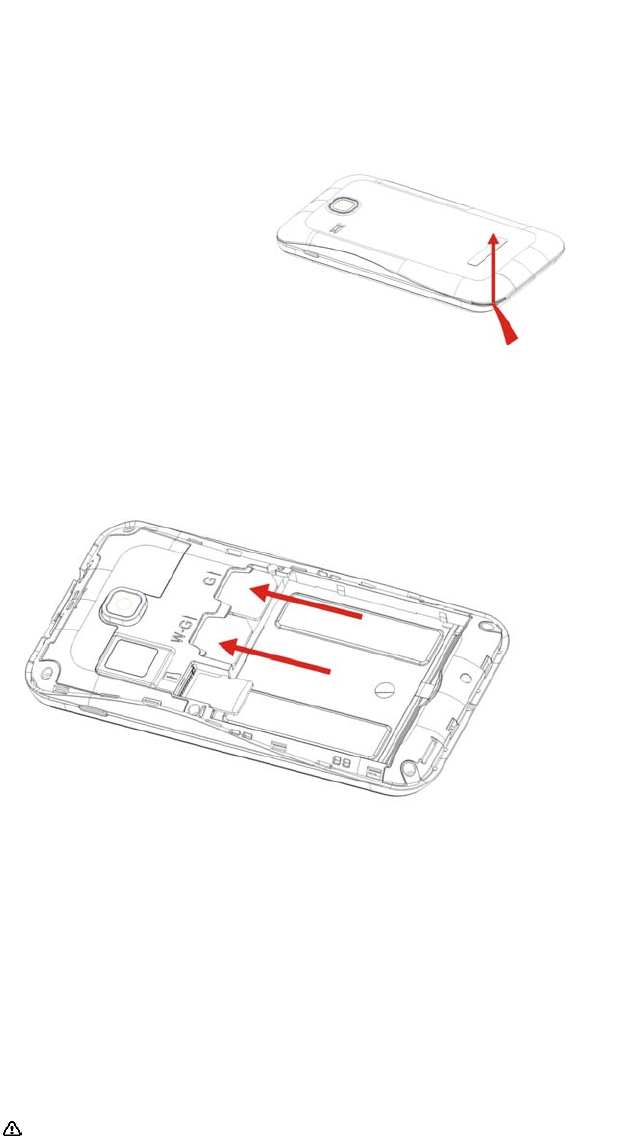
Removethecoverofbattery
InsertaSIMcard
Important:Thecardof3GWCDMAonlyadjusttotheInternetdataconnectioninsertthecardof
3GWCDMAintothecardslotofG,youcannotusetheInternetdataconnection.Andthecardof
GSMnotonlyadjusttothecardslotofW,butthecardslotofG
PrecautionsofSIMcard
BysettingPIN(personalidentificationnumber)codeoftheSIMcard,youcanprotectyourSIM
cardfromillegaloperation.
IfthePINcodeisenabled,youneedtoenterthevalidPINcodewhenyouturnonthemobile
phone.
Ifyouinputwrongcodeforthreetimescontinuously,yourSIMcardwillbelockedandyouneed
toinputPUKcode.
Note:YournetworkserviceproviderwillsetastandardPINcode(4‐8digits)foryourSIMcard.
Pleasechangeitwithyourprivatepasswordassoonaspossible.
Connectingtonetwork
WhentheSIMcardisdecrypted,themobilephonewillscanregisterednetworkoravailablelocal
networkautomatically.Onceconnected,thelogoofthenetworkoperatorappearsinthetopof
thescreen,indicatingthemobilephoneisinstandbystate,andyoucanmakeoranswercalls.
PleasecontactyournetworkoperatorifafailureoccurredtotheSIMcard.

Multilaser Industrial S/A
Av. Brigadeiro Faria Lima, 1811 - 15andar - Jardim Paulistano, Brazil
Tel:+551136168888 Fax: +551136168888
5
PrecautionsofSIMcard:
∙PuttheSIMcardoutofchildren’sreach.
∙Pleaseuse,insertandremovetheSIMcardcarefullybecausetheSIMcardanditscontactpoints
arepronetobescratchedordamagedbybending.
∙DonotexposetheSIMcardtoelectrostatic,dustyormoistenvironmenttoelectrostatic,dusty
environmentormoistenvironment.
OperationandinstallationmethodsofSDcard
SDcardisaremovablemobilememorycardinsertedinsidethemobilephoneandusedfor
extendingthestoragespaceofthemobilephone.
Batteryandchargingmethods
1.ConnectthechargerwiththeprovidedUSBcable.
2.Insertthechargerplugintothepoweroutlet.
3.ConnecttheUSBcabletothemobilephone;thebatterystatuschangesto ,indicating
chargingstarts.
4.Thechargingcompleteswhenthebatteryiconchangesto ;pleasedisconnectthecharger
withthepoweroutlet.
5.Disconnectthechargerwiththemobilephone.
Note:Ifthebatteryisn’tusedforalongtimeorthebatteryisusedup,themobilephonemay
benotturnedonnormallywhilecharging.Itisnormal.Pleasechargeforawhile,and
thenturnonthemobilephone.
Thebatterycanbechargedrepeatedly;however,itisaconsumableproduct,please
replacewithanewbatteryifthestandbydurationreducessignificantly.
Thedataserviceconsumesmorepowerandwillreducethestandbyduration.
Thechargingtimevariesaccordingtothetemperatureandbatteryusage.
Apromptwillshowifthebatteryisinsufficient.Themobilephonewillbeoff
automaticallyifbatteryistoolow.
Insrtuctionsforuse
Homescreen
• Itisthestartingofmobilephone,youcanmakeyourhomescreenmorepersonalizedand
youcanusemoreconvenientandquickwhenyouaddshortcutsofyourfrequentlyused
programsandsomesmallparts.
OpentheInternetdataconnection
• WhenyouwanttouseyourGPRStoconnectthenetworks,pleaseenterthe

Multilaser Industrial S/A
Av. Brigadeiro Faria Lima, 1811 - 15andar - Jardim Paulistano, Brazil
Tel:+551136168888 Fax: +551136168888
6
Wireless&networksintheSetting,choosetoentertheMobilenetworks.
• AfterenteringthepageoftheMobilenetworks,checktheselectionboxbehindthe
Dataenable,andyoucanconnecttothenetwork.
Connecttowirelessnetworks
• Whenyouwanttousewirelessnetworksconnectiononyourmobilephone,pleaseenter
theWireless&networksintheSettingfirstly,checktheselectionboxbehindthe
WLAN.SecondlyentertheWLANsettings,pressthemenukeytosearchthewireless
networks.Thirdlychoosethenameofwirelessnetworkwhichyouneed,theninputthe
correspondingpasswordtoconnect.
Switchthedeviceon/off
• PressthePowerkeytoswitchthedeviceon(Pleasemakesurewhetheryouhave
insertedtheSIMcardorthebatterycanbeused.
• PressandholdthePowerkeytopop‐uptheoptionbox,choosePoweroffandcheck
Ok.
Lockthescreen
• Afterreachingthesettimeinidlestate,thescreenofmobilephonewillswitchoff
automaticallytosavepowerandbelockedinordertopreventtheusererror.
• PressthePowerkeyalsocanmakethescreenlocked.
Unlockthescreen
• Important:Ifyourphoneissettingpatternlocking,PINcodeorpassword,youneedto
drawtheunlockpatternorinputthecorrectcodeorpasswordtounlockthescreen.
PhoneFeatures
Making a call
You can make calls in different ways, e.g. from dial pad, Contacts, Call log and Messaging.
Makingacallwithdialpad
You can tap the Dial key on the screen to switch to the dial pad; or tap the Call key and then select
Dial to enter dial pad. In the dial pad, tap digit keys or the digit keys which represents the initial
letters of the contact person, the number will match up automatically.
Makinganemergencycall
Your service provider has set up one or several emergency numbers that can be called under any
condition. You can make an emergency call even without a SIM card as long as you are in the
service area.
Note:Theemergencynumbermaynotbereachedduetonetworkproblem,environment
factorsorotherinterference.
Answering a call
When the phone rings and the screen prompts incoming call, tap the button in the left to answer
the call; or tap the button in the right to reject the call. After connected, you can press the volume
key to adjust the receiver volume during the call.

Multilaser Industrial S/A
Av. Brigadeiro Faria Lima, 1811 - 15andar - Jardim Paulistano, Brazil
Tel:+551136168888 Fax: +551136168888
7
Conferencecall
You can make a conference call with the mobile phone, and communicate with multiple specified
parties.
Note: Whether this function is available depends on whether the network operator provides this
function and whether you have applied for this function.
Video call
During the video call process, you can execute different kinds of operation through different
options on the screen and functions in Menu. You can select Silent or Cancel to turn on/off the
speaker, and switch between the Camera, View and Capture picture functions.
Rejecting and sending message
When the phone rings and the screen prompts incoming call, you can select Reject in the menu to
reject a message. If you select Reject, the incoming call will pause, and the mobile phone will
send a preset message to the sender, informing you have rejected the incoming message.
CallSettings
Default SIM setting
You can set SIM1 or SIM2 as default SIM card.
SIM1callsettings
You can perform settings for SIM1, such as call diverting, voicemail, call waiting, etc.
Note:Whetherthesefunctionsareavailabledependsonwhetherthenetworkoperator
providesandwhetheryouhaveappliedforthefunctions.
SIM2callsettings
You can perform settings for SIM2, such as call diverting, voicemail, call waiting, etc.
Note:Whetherthesefunctionsareavailabledependsonwhetherthenetworkoperator
providessuchservicesandwhetheryouhaveappliedforthesefunctions.
Rejecting message
Youcaneditthecontentofthemessageinformingthesenderthatyourejectedhis/hermessage.
Turning off data service
Youcansetthetimetoturnoffdataserviceinstandbystate.

Multilaser Industrial S/A
Av. Brigadeiro Faria Lima, 1811 - 15andar - Jardim Paulistano, Brazil
Tel:+551136168888 Fax: +551136168888
8
CallLog
Youcanviewallcalllogs,includingcalltime,calltype,etc.
ManagingContactList
You can save contact name, phone number, e-mail address and other information in Contact List.
Addingordeletingcontacts
Adding a contact
1. Open Contacts list.
2. Click the Add button in the left of the search box to add a contact.
3. If SIM card has been inserted, you can select storage media to save the contact.
4. Enter contact information.
5. Tap Save to save the contact information.
Deleting a contact
1. Enter Contacts list.
2. Tap and hold a contact to be deleted and select Delete in the popup option menu.
3. Tap OK to delete the contact.
Editingacontact
Editing contact information
1. Enter Contacts list.
2. Tap and hold a contact to be edited and select Edit in the popup option.
3. Enter the information, and tap Save to save the contact. Tap Cancel to cancel the editing.
Editing default number of the contact
1. Enter Contacts list.
2. Tap the contact to set the default number.
3. Tap and hold the number you want to set to default and select Set as default in the popup
option menu.
Setting caller ringtone
1. Enter Contacts list.
2. Click on the contact you want to set a caller ringtone.
3. Tap Settings > Ringtone > Select a ringtone from the ringtone library or music library.
4. Select the ringtone to be set.
5. Tap OK to finish the setting.
Searchingforcontact
1. Enter Contacts list.
2. Tap the search box or press the search key directly.
3. Input the contact name and the result shows in the bottom of the search bar.
Managingcontacts
YoucanimportthecontactinformationfromSDcardorSIMcardtothemobilephone,viceversa.

Multilaser Industrial S/A
Av. Brigadeiro Faria Lima, 1811 - 15andar - Jardim Paulistano, Brazil
Tel:+551136168888 Fax: +551136168888
9
Enteringtext
Usinginputpanel
Youcanusethetouchscreentoentertext,andcreatemessagesandcontacts.Ifyouneedto
entertext,youcantapthetextenterareatoentertheinputpanel.
Switchbetweendifferentinputmethods
1. Intexteditinginterface,tapandholdthetextenterareasothateditmenuwillpopup.
2. Taptheinputmethod.
3. Selectdesiredinputmethod.
SOGOUinputmethod
Voice,handwriting,pinyin,strokesandEnglishareavailable.
Messaging
YoucansendandreceiveSMSorMMS.
Accessingthemessagingmenu
•Inthehomescreen,taptheMessagingbutton.
•Inthehomescreen,taptheMainmenubuttontoenterthemainmenuandthenselect
Messaging.
Sendingtextmessage
1. EnterMessaging,andtapthebuttonintheupperlefttocreateanewmessage.
2. TaptheRecipientfieldtotypetherecipientnumber;ortap+toselectrecipientfrom
Contacts.
3. TaptheContentfield,andtypethemessage.
4. Afterediting,sendthroughSIM1orSIM2.
Sendingmultimediamessage
1. EnterMessaging,andtapthebuttonintheupperlefttocreateanewmessage.
2. TaptheRecipientfieldtotypetherecipientnumber;ortap+toselectrecipientfrom
Contacts.
3. TaptheContentfield,andtypethemessage.
4. TaptheAttachmentbuttonintheleftofthecontentfield,andinsertpicture,videoor
audiofiles.
5. Afteraddingattachmentsuccessfully,typethesubjectofthemessagewhentheoption
Addsubjectappears.
6. Afterediting,sendthroughSIM1orSIM2.
Reply
Whenyoureceivenewmessage,respectiveiconandpromptwillappearinthetopofthe

Multilaser Industrial S/A
Av. Brigadeiro Faria Lima, 1811 - 15andar - Jardim Paulistano, Brazil
Tel:+551136168888 Fax: +551136168888
10
notificationbar.Youcanselecttoreplythemessage.
1. EnterMessaging.
2. Selectamessageinthelist.
3. TaptheContentfield,andtypethemessage.
4. Afterediting,sendthroughSIM1orSIM2.
Delete
1. EnterMessaging.
2. Youcandeletethemessagewiththefollowingoperations.
•Selectaconversationinthemessagelist,tapandholdtheconversation,andselect
Deleteinthepopupoptionmenu.
•Selectaconversationinthemessagelist,andthentaptoentertheconversation.Select
amessageintheconversationlist,taptheselectedmessage,andselectDeleteinthe
popupoptionmenu.
E‐mail
Youcansendandreceivee‐mailwiththisoption.YoucanaddPOP3orIMAPe‐mailaccountfrom
commonwebe‐mailserviceprovider(e.g.Sohu,163andotheroperators).
Addinge‐mailaccount
Note:Youneedtochangethee‐mailsetupbeforesendingorreceivinge‐mail.Network
connectionisrequiredtosendandreceivee‐mail.
1. Inthehomescreen,taptheMainMenubuttontoenterMainMenuandthenselectE‐mail.
2. Typethee‐mailaddressandpassword,andtapNextorManualsetting.
Note:IfyouselectManualsetting,pleasecontactyoure‐mailserviceproviderforthe
specificparametersetting.
3. Followthescreenprompttofinishthesetting.
Deletinge‐mailaccount
1. EnterMainMenu,andselectE‐mailtoenteryouraccountinterface.
Note:Incertaininterfaces,youneedtopresstheMenukeytoselecttheaccountand
thenentertheaccountinterface.
2. Inyouraccountinterface,tapandholdtheaccounttobedeleted,andselectDeleteinthe
popupoptionmenu.
3. TapOKtodeletetheaccount.
Sendinge‐mail
1. EnterMainMenu,andselectE‐mailtoenteryouraccountinterface.
2. Inyouraccountinterface,tapthee‐mailaccountyouwanttouse.
3. IntheInboxinterface,presstheMenukeyandselectWriteinthepopupoptionmenu.
4. Inrecipientfield,typethee‐mailaddressoftherecipient.

Multilaser Industrial S/A
Av. Brigadeiro Faria Lima, 1811 - 15andar - Jardim Paulistano, Brazil
Tel:+551136168888 Fax: +551136168888
11
5. Insubjectfield,typethesubjectofthee‐mail.
6. Ineditingfield,typethee‐mailcontent.
7. TapSendtosendthee‐mail.
Checkinge‐mail
1. EnterMainMenu,andselectE‐mailtoenteryouraccountinterface.
2. Selectthee‐mailboxtobechecked.
3. PresstheMenukey,selectRefreshinthepopupoptionmenu,andupdateinformation
ofnewe‐mailstotheInbox.
4. Tapthee‐mailtoread.
EstablishingConnection
Startingdataservice
Dataserviceallowsyoutotransmitdata.AllInternetaccessserviceswillbeaffectedbythis
setting,e.g.synchronization,Internetservice,e‐mail,etc.Youcanstart/terminatethedata
service.
WirelessLAN
YoucanaccesstohighspeedInternetsurfingandexecutedownloadingbyconnectingtowireless
LAN(WLAN).
Internet
YoucanusetheInternettobrowsewebpagesandaccessweb‐basedapplications.
Note:Accessingnetworkwillincuradditionalcharges.Pleaseconsultyourserviceproviderfor
specificrates.
AccessingInternet
Inthehomescreen,taptheBrowserbutton;orenterthemainmenu,andselectBrowsertostart
thebrowser.YoucanalsotypethewebaddresstoaccesstheInternet.
CustomizingInternetsetting
AccesstheInternet,taptheMenukeytoselectMore>Settings,andthenyoucanvieworedit
webpagecontentsetting,privacysetting,securitysetting,advancedsetting,etc.
UsingBluetooth
YourmobilephonesupportswirelessconnectionthroughBluetooth.Youcancreatewireless
connectionbetweenthemobilephoneandcompatibledevice,andtransmitdata.Themobile
phonecanbeconnectedthroughBluetoothtoadevicewithinadistanceofnomorethan10m.
TheBluetoothconnectionmaybeaffectedbybarriers,e.g.wallorotherelectronicdevice.
Note:Bluetoothdevicesandaccessoriesmayberestrictedorprohibitedincertain
publicplacesordistricts;pleasefollowlocallawsandregulations;pleaseconnectthe
Bluetoothdeviceinsafeandprivateplacestoensuredevicesafety.

Multilaser Industrial S/A
Av. Brigadeiro Faria Lima, 1811 - 15andar - Jardim Paulistano, Brazil
Tel:+551136168888 Fax: +551136168888
12
TakingpicturesandVideoRecording
Note:TakingpicturesandvideorecordingfunctionsrequireSDcardsupport;otherwisethese
functionsarenotapplicable.
Turning on/off camera
•EnterthemainmenuandselectCamera.
•UnderViewFinderstate,presstheBackkeytoturnoffthecamera.
Taking pictures
1. Turnonthecamera.
2. UnderViewFinderstate,focusthelensontheobjectandadjust.
3. TaptheCamerabuttontotakeapicture.
Viewing pictures
1. Aftertakingapicture,thethumbnailwillappearinthelowerleftofthescreen,andyou
cantapthethumbnailtoviewthepicture.
2. Whenviewingpictures,youcanexecuterelatededitingandoperationtothem.
Video Recording
1. Turnonthecameraandswitchtovideomode.
2. Focusthelensontheobjectandadjust.
3. TaptheRecordbuttontostartrecording.
4. TaptheStopbuttontostoprecording.
Viewing video
1.Aftervideorecording,athumbnailwillappearinthelowerrightofthescreen,andyou
cantapthethumbnailtoviewthevideo.
FMRadio
Note:Youneedtoinsertanearphonetolistentotheradionormally.
Turning on/off
• Whenanearphoneisinserted,enterMainMenu,andselectFMradiototurnonthe
radio.
• InFMRadiointerface,taptheMenukey,andselectExittoexittheFMradio;orremove
theearphone,andselectExitinthepopupdialogboxtoexittheFMradio.

Multilaser Industrial S/A
Av. Brigadeiro Faria Lima, 1811 - 15andar - Jardim Paulistano, Brazil
Tel:+551136168888 Fax: +551136168888
13
FM
1. Inchannelinterface,slidethechannelsearchcursorleftandrighttomodulatethe
frequency.
2. TapthequickFMkeytolocatethechannelquickly.
3. TaptheTrimkeytotrimthechannel.
Favorite channels
1. Inthechannelbroadcastinginterface,taptheFavoritebuttoninthebottomtosavethe
currentchannel.
2. Tapachannelinthelisttosaveitinthepresetinterface,inwhichyoucanperform
relatedoperations.
Settings
1. Inchannelbroadcastinginterface,taptheSettingsbuttontoentertheinterfaceand
performrelatedsettingsofFMradio.
2. Settingsforaudiomode,audiooutputpath,RDSswitchandfrequencybandsare
accessible.
MusicPlayer
Youcanplayorpausethemusicfiles(supportfilesintheformatofMP3,MIDI,AMR,OGG,etc.)
Enteringmusicapplication
•Inthehomescreen,taptheMusicbutton.
•EntertheMusicinterface(thedefaultsettingistheArtistinterface),andyoucanswitchtoother
interfaces.
Playing
1. Enterthemusiclistandtapmusictoplay.
2. Enteramusicinterface(e.g.Artist),tapandholdacertainiteminthelistandselectPlay.
Pause
1. Entertheplayinginterface
2. TapPausebutton
3. Themusicwillpause.
Previous/nexttrack
1. Entertheplayinginterface
2. TapPrevious/Nextbutton.

Multilaser Industrial S/A
Av. Brigadeiro Faria Lima, 1811 - 15andar - Jardim Paulistano, Brazil
Tel:+551136168888 Fax: +551136168888
14
3. Switchtoprevious/nextmusic(remarks:whentapPrevious,theplayingtimeshouldn’tbe
longerthan2s,orelsethemusicwillbereplayed).
Adjustingvolume
1. Tapthevolumekeyintherighttoadjustthevolume.
Displayinglyrics
1. Renamethedownloadedlyricstointheformatofartist–music.lrc.
2. Savethelyricsfilesundersdcard/lyric.
3. Whenplayingmusic,theMusicPlayerwillautomaticallyscanwhetherthefolderhas
matchinglyricsanddisplaycorrespondingcontent.
Favorite
1. SavecurrentmusicinFavorite.
Othersettings
Inplayinginterface,tapMenukey,youcanseefunctionsasMusiclibrary,Random,Addtoplaying
list,Sendtoringtone,DeleteandShare.
1. Musiclibrary:Returntorespectiveplayinginterfaceandviewthemusicfiles.
2. Random:PlaythefilesintheMusiclibraryinrandom.
3. Addtoplayinglist:Addcurrentlyplayedmusictocurrentornewplayinglist.
4. Sendtoringtone:Sendcurrentlyplayedmusicforcaller,alarmornotificationringtone.
5. Delete:Deletethecurrentlyplayedmusic.
6. Share:SharecurrentmusicthroughBluetoothore‐mail.
VideoPlayer
Youcanplayorpausethevideofiles(supportfilesintheformatofMP4,3GP,etc.)
Playing
•Inthehomescreen,taptheGallerybutton.
•Tapallvideo.
•Selectavideotoplay.
Pause
1. Entertheplayinginterface
2. TapthePausebutton
3. Thevideowillpause.
Fastforward/reverse
1. Entertheplayinginterface
2. TaptheFF/FRbutton.
3. Increaseorreducetheplayingspeed.

Multilaser Industrial S/A
Av. Brigadeiro Faria Lima, 1811 - 15andar - Jardim Paulistano, Brazil
Tel:+551136168888 Fax: +551136168888
15
Share
1. Tapandholdavideo.
2. SelectShare.
3. SelecttosharethroughBluetoothormessage.
Deleting
1. Tapandholdavideo.
2. SelectDelete.
Adjustingvolume
1. Tapthevolumekeyintherighttoadjustthevolume.
Gallery
Viewing pictures
YoucanviewthepicturesandvideofilesintheSDcardwithGallery.
1. TaptheGalleryicontoentergroups.
2. Tapagroupandselectapicture.
3. Viewthepicture.
Deleting pictures
YoucandeletethepicturesfromSDcard.
1. TaptheGalleryicontoenter.
2. Viewthepictures
3. TapandholdapictureandselectDelete.
Cropping picture
YoucancropsinglepictureintheGallery.
1. EnterGallery.
2. Viewsinglepicture.
3. TapMENUkeyandselectCrop.
4. Zoomin/outtheselectedarea.
5. TapOKtocropthepicture.
Playing lantern slide
1. EnterGallery.
2. TapandholdtheGalleryfolderandselectPlaylanternslide
Zooming in/out pictures
1. EnterGallery.

Multilaser Industrial S/A
Av. Brigadeiro Faria Lima, 1811 - 15andar - Jardim Paulistano, Brazil
Tel:+551136168888 Fax: +551136168888
16
2. Viewsinglepicture.
3. Slidetozoomin/outthepicture.
Deleting all
1. TaptheicontoenterGallery.
2. Selectsinglegrouppicture
3. TapandholdtheMENUkey,andselectDeletetodeleteallthepicturesincurrentgroup.
Multiple selection
1. TaptheicontoenterGallery.
2. Selectsinglegrouppicture
3. TaptheMenukeyandselectMultipletoenterthemultipleselectionstate.
4. Then,youcanshareordeletemultiplepictures.
Photographing
1. TaptheicontoenterGallery.
2. TaptheMENUkeyandselectPhotographing.
Video Recording
1. TaptheicontoenterGallery.
2. TaptheMENUkeyandselectVideoRecording.
SoundRecorder
Sound recording
Theformatofsoundrecordingfileis.amr.YouneedtoinsertanSDcardbeforerecording.
TherecordingtimedependsonthefreespaceoftheSDcard(max:2hour).
1.1Entertheinterface,tapthecircularicononthelefttostartrecording.
1.2Afterrecording,tapthesquareicontofinishandsaveinSDcardautomatically.Youcan
alsocanceltodeletetherecordingfile.
Playing
1.Whentherecordingisstopped,andbeforesaving,tapthetriangleicontopre‐listenthe
recording,andtapthesquareicontostopplaying.
2.Tapthefileiconontherighttoenterthelistofrecordedfiles,tapdesiredfileandselectPlay.
3.Whenarecordedfileisselectedinthelist,youcanalsoperformthefollowingoperations:
Renaming
Renametheselectedfile.

Multilaser Industrial S/A
Av. Brigadeiro Faria Lima, 1811 - 15andar - Jardim Paulistano, Brazil
Tel:+551136168888 Fax: +551136168888
17
Deleting
Deletetheselectedfile.
AlarmClock
1.Youcanaddandeditoneorseveralalarmclocks.
2.Youcansetthetimeofthethreecitiesasaworldclockdisplay
3.Youcanthetimingandcountdown.
Browser
Browsing WebPages
1. AccesstheInternet.
2. Typethedesiredwebaddress,andtapGototoopendesiredwebsite.Youcanalsotap
theMENUkeytoselectBookmark,andaccessthedesiredwebsitebychoosingthelinks
inbookmark,mostvisitedwebsiteorhistoryrecord.
3. Openthewebpage,andslideonthescreentobrowseandviewothersectionsofthe
webpage.
Zooming in/out page
Whenbrowsingwebpage,youcanzoomin/outthepageinthefollowingmethods.
•Taponthescreentwiceconsecutivelytozoominthepage,andthentaptwicetozoomout
thepage.
•Slidetoanydirectionquicklyonthescreen,andthebottomwillshowthezoomingicon.
Searching in the web
1. Whenbrowsingtheweb,taptheMENUkeytoselectMore>Searchwithinthepage.
2. Typedesiredcontent,andthematchingresultswillbehighlighted.
3. Presstheleft/rightarrowtomovetopreviousornextmatchingresult.
Adding the page to bookmark
1. Whenyoubrowsetheweb,taptheMENUkeytoselectBookmark>Add>Add
bookmark.
2. Editthenameofthebookmark.
3. TapOKtofinish.
Launching multiple windows
Youcanlaunchmultiplewindowsandswitchamongeachwindow.
1. WhenbrowsingWebPages,youcantaptheMENUkeytoselectNewwindow.
2. Launchanotherwebpageinthenewwindow.

Multilaser Industrial S/A
Av. Brigadeiro Faria Lima, 1811 - 15andar - Jardim Paulistano, Brazil
Tel:+551136168888 Fax: +551136168888
18
3. TaptheMENUkeytoselectawindow,andbrowsecurrentlylaunchedwebpage.
4. Selectthedesiredwebpage.
Browsing history
YoucanviewtheWebPagesthatyouhavevisited.
1. Whenbrowsingthewebpage,youcantaptheMENUkeytoselectBookmark>History.
2. ViewthehistoryofvisitedWebPages.
Exiting the browser
Youcanexitthebrowser.
1. Whenbrowsingthewebpage,youcantaptheMENUkeytoselectExit.
Exitthebrowser
Selecting text
Youcanselecttocopythetextonthewebpage.
1. Afteropeningthewebpage,taptheMENUkeytoselectthetextmenu.
2. Then,clickonthetexttobecopied.
3. Finally,tapandholdthetextinputboxandselectPaste.
Downloading
Youcanviewthefilesdownloadedbythebrowser.
1. OpenthewebpageandselectDownload,andthebrowserwillpromptdownloading.
2. Afterdownloaded,tapMENUkeytoselectthecontenttobedownloaded.
Entertoviewthedownloadinglist.
Managingthephone
EnterMainMenu,selectSettings,andthenyoucanperformthedetailedsettingsofthemobile
phone.
Setting date and time
Themobilephonewillusedefaultdate,timezoneandtimeprovidedbythesystem
automatically.
Display settings
Adjustingscreenbrightness
1. EnterthemainmenuandselectSettings>Display.
2. TapBrightness.
3. Dragthebrightnessslidebartothelefttoreducethescreenbrightness,ordragtothe

Multilaser Industrial S/A
Av. Brigadeiro Faria Lima, 1811 - 15andar - Jardim Paulistano, Brazil
Tel:+551136168888 Fax: +551136168888
19
righttoincreasethebrightness.
4. TapOKtosavethesetting.
Settingscreentimeout
Youcansetthescreentimeouttoadjustthedelaybeforethescreenturnsoffautomatically.
1. EnterMainMenuandselectSettings>Display.
2. TapScreentimeout.
3. Taptheselectedtimeouttofinishthesetting.
CancellingG‐sensor
1. EnterMainMenuandselectSettings>Display.
2. Then,clearthecheckboxofauto‐rotatescreentocancelG‐sensorfunction.
G‐sensorcalibration
1. EnterMainMenuandselectSettings>Display.
2. TapG‐sensorcalibrationtoentertheinterfaceandcalibratetheG‐sensoraccordingto
theprompt.
Sound settings
Activatesilentmode
1. EnterMainMenuandselectSettings>Sound.
2. Selectthecheckboxofsilentmode,andallsoundsexceptformediaandalarmclockwill
bedisabled.
Note:YoucanalsopressandholdthePowerkey,andselectSilentmodeinthepopupmenu
toenable/disablethesilentmode.
Settingringervolume
1. EnterMainMenuandselectSettings>Sound>Volume.
2. Dragtheslidebartothelefttoreducethevolume,ordragtotherighttoincreasethe
volume.
3. TapOKtosavethesetting.
Changingringtone
1. EnterMainMenuandselectSettings>Sound>Notificationringtonetoaccessthe
ringtonelist.
2. Selectthedesiredringtone,andthentapOK.
Settingvibrator
1. EnterMainMenuandselectSettings>Sound>Vibrator.
2. Selectthedesiredvibrator,andthismodeisactivatedwhenthereisincomingcall.
Services
Callsettings
Enterthemainmenu,selectSettings>Call>SelectSIM(SIM1/SIM2),andthenyoucansetthe
functionssuchasvoicemail,diverting,callwaiting,etc.Fordetailsoftheseservices,please
consultyourserviceprovider.
Turningondataroaming
Ifyouareoutofthecoverageareaofyourserviceprovider,dataroamingenablesyoutoconnect
tothepartnernetworkofyourserviceprovidertousedataservice.

Multilaser Industrial S/A
Av. Brigadeiro Faria Lima, 1811 - 15andar - Jardim Paulistano, Brazil
Tel:+551136168888 Fax: +551136168888
20
Note:Usingdataserviceswhenroamingmayincuradditionalcharges.Forspecificroaming
rate,pleaseconsultyourserviceprovider.
Setting phone language
1. Enterthemainmenu,selectSettings>Languageandkeyboard>selectlanguage.
2. Tapthedesiredlanguage.
Managing applications
Viewinginstalledapplications
1. EnterMainMenu,selectSettings>Applicationprograms>Managingapplicationprograms,
andopentheapplicationslist.
2. Youcanperformthefollowingoperations:
•Tapthedesiredapplicationprogramtoviewthedetailsoftheapplication.
•PresstheMENUkeyandselectArrangebysizeinthepopupmenu,andtheapplication
programswillbearrangedbysizeautomatically.
Uninstallingapplicationprograms
1. EnterMainMenu,selectSettings>Applications>Managingapplication,andopenthe
applicationslist.
2. Tapanapplicationprogramandenterdetailedinformationinterfaceoftheapplication
program.
3. TaptheUninstallbuttonandfollowtheOSDprompttouninstalltheapplication.
Managingrunningserviceprograms
1.EnterMainMenu,selectSettings>ApplicationPrograms>Runningservicesandopenthe
listofrunningservices.
2.Youcanperformthefollowingoperations:
•Viewcurrentrunningserviceprograms.
•Tapaserviceprogramtomanageorstopit.
Managing memory
ViewingphonememoryandfreespaceofSDcard
EnterMainMenu,selectSettings>SDcardandphonememory,andviewthefreespaceof
phonememoryandSDcard.
Releasingphonememory
Ifthephonememoryisinsufficient,pleasetrythefollowingmethods:
•Copyfilesande‐mailattachmentstoSDcard.
•Clearallwebcontentcacheandhistory.
•Uninstalltheapplicationprogramsthatwon’tbeused.
•Resetthemobilephonetofactorydefault.
Reset
Theresettingoperationwillclearalldata,includingdownloadedapplicationprograms,andreset
themobilephonetofactorydefault.

Multilaser Industrial S/A
Av. Brigadeiro Faria Lima, 1811 - 15andar - Jardim Paulistano, Brazil
Tel:+551136168888 Fax: +551136168888
21
Note:Pleasebackuptheimportantdatainmobilephonebeforeresetting.
1. EnterMainMenu,andselectSettings>Privacy>Reset.
2. FollowtheOSDprompttoresetthemobilephone.
Auxiliary function
Youcanselecttheauto‐restartfunction,andcustomizethetimeandmodeofauto‐restart.
Profiles
Inthissetting,youcanselectfromsuchmodels:General,Meeting,SilentorOutdoor.
Troubleshooting
Pleaserefertothefollowingproblemsandsolutionsifthereisanyabnormitywhenyouusethe
mobilephone.Pleasecontactthedistributororserviceproviderifitstilldoesn’twork.
ProblemReasonSolution
Thenetworkoperatordoesn’t
providethisserviceoryoudon’t
applythisservice
Pleasecontactandconsultyour
networkoperatorforinformationof
howtoapplyandusethisservice
Can’tconnectto
Internetnormally
whenusing
browserThesettingisnotcorrectPleaserefertospecificintroductions
ofthebrowser
SIMcardisdamagedPleasecontactyournetworkoperator
TheSIMcardisn‘tinstalled
properly.ChecktheSIMcard
SIMcarderror
ThemetalsurfaceoftheSIMcardis
dirtyCleanitwithcleancloth
Usethemobilephoneinplaces
withpoorsignal,forexample,near
tallbuildingorinbasement.
Pleasemakeoransweracallinplaces
withstrongsignal
PoorsignalUsemobilephoneduringbusy
periodwhentrafficcongestion
occurs
Trytoavoidusingmobilephonewhen
trafficisbusy
Can’tswitchonBatterytoolowChargethebattery
Can’tmakeacallCallbarringisactiveCancelcallbarring
SIMcardisinvalidPleasecontactyournetworkoperator
BeyondserviceareaMovetoserviceareaofyournetwork
operator
Can’tconnectto
network
WeaksignalMovetoaplacewithstrongsignal
andtryagain
Thevoltagedisagreeswithrated
rangeofthecharger
Usethevoltageagreeswiththerated
rangeofthecharger
UsenonstandardchargerUseachargerspeciallydesignedfor
themobilephone
Can’tcharge
PoorcontactCheckwhethertheplugisconnected
properly

Multilaser Industrial S/A
Av. Brigadeiro Faria Lima, 1811 - 15andar - Jardim Paulistano, Brazil
Tel:+551136168888 Fax: +551136168888
22
FCCRegulations
Thismobilephonecomplieswithpart15oftheFCCRules.Operationissubjecttothe
followingtwoconditions:(1)Thisdevicemaynotcauseharmfulinterference,and(2)
thisdevicemustacceptanyinterferencereceived,includinginterferencethatmaycause
undesiredoperation.
ThismobilephonehasbeentestedandfoundtocomplywiththelimitsforaClassB
digitaldevice,pursuanttoPart15oftheFCCRules.Theselimitsaredesignedtoprovide
reasonableprotectionagainstharmfulinterferenceinaresidentialinstallation.This
equipmentgeneratesusesandcanradiateradiofrequencyenergyand,ifnotinstalled
andusedinaccordancewiththeinstructions,maycauseharmfulinterferencetoradio
communications.However,thereisnoguaranteethatinterferencewillnotoccurina
particularinstallationIfthisequipmentdoescauseharmfulinterferencetoradioor
televisionreception,whichcanbedeterminedbyturningtheequipmentoffandon,the
userisencouragedtotrytocorrecttheinterferencebyoneormoreofthefollowing
measures:
‐Reorientorrelocatethereceivingantenna.
‐Increasetheseparationbetweentheequipmentandreceiver.
‐Connecttheequipmentintoanoutletonacircuitdifferentfromthattowhichthe
receiverisconnected.
‐Consultthedealeroranexperiencedradio/TVtechnicianforhelp.
Changesormodificationsnotexpresslyapprovedbythepartyresponsiblefor
compliancecouldvoidtheuser‘sauthoritytooperatetheequipment.
Themanufacturerisnotresponsibleforanyradioortvinterferencecausedby
unauthorizedmodificationstothisequipment.Suchmodificationscouldvoidtheuser’s
authoritytooperatetheequipment.
Theantenna(s)usedforthistransmittermustnotbeco‐locatedoroperatingin
conjunctionwithanyotherantennaortransmitter.
RFExposureInformation(SAR)
Thismobilephonemeetsthegovernment’srequirementsforexposuretoradiowaves.
Thisphoneisdesignedandmanufacturednottoexceedtheemissionlimitsforexposure
toradiofrequency(RF)energysetbytheFederalCommunications
CommissionoftheU.S.Government
Theexposurestandardforwirelessmobilephonesemploysaunitofmeasurement
knownastheSpecificAbsorptionRate,orSAR.TheSARlimitsetbytheFCCis1.6W/kg.
*TestsforSARareconductedusingstandardoperatingpositionsacceptedbytheFCC
withthephonetransmittingatitshighestcertifiedpowerlevelinalltestedfrequency
bands.AlthoughtheSARisdeterminedatthehighestcertifiedpowerlevel,theactual
SARlevelofthephonewhileoperatingcanbewellbelowthemaximumvalue.Thisis
becausethephoneisdesignedtooperateatmultiplepowerlevelssoastouseonlythe
poserrequiredtoreachthenetwork.Ingeneral,thecloseryouaretoawirelessbase
stationantenna,thelowerthepoweroutput.ThehighestSARvalueforthemodel
phoneasreportedtotheFCCwhentestedforuseattheearis0.535W/kg andwhen
wornonthebody,asdescribedinthisuserguide,is0.656W/kg(Body‐wo rn
measurementsdifferamongphonemodels,dependinguponavailableaccessoriesand
FCCrequirements.)
WhiletheremaybedifferencesbetweentheSARlevelsofvariousphonesandatvarious
positions,theyallmeetthegovernmentrequirement.
TheFCChasgrantedanEquipmentAuthorizationforthismodelphonewithallreported
SARlevelsevaluatedasincompliancewiththeFCCRFexposureguidelines.SAR
informationonthismodelphoneisonfilewiththeFCCandcanbefoundunderthe
DisplayGrantsectionofwww.fcc.gov/oet/ea/fccidaftersearchingonFCCID:
2AAVQORION.
Forbodywornoperation,thisphonehasbeentestedandmeetstheFCCRFexposure
guidelinesforusewithanaccessorythatcontainsnometalandthepositionsthe
handsetaminimumof1.5cmfromthebody.Useofotheraccessoriesmaynotensure
compliancewithFCCRFexposureguidelines.Ifyoudonotuseabody‐wornaccessory
andarenotholdingthephoneattheear,positionthehandsetaminimumof1.5cm
fromyourbodywhenthephoneisswitchedon.
Pleasemakesurethetemperatureforproductionunitwillbebetween‐10~50˚C.