Neurio Technology ULC PTSMIHP1 PowerPortal User Manual 100 00002A A PowerPortal DRAFT
Energy Aware Technology Inc PowerPortal 100 00002A A PowerPortal DRAFT
Contents
- 1. User Manual 1
- 2. User Manual 2
User Manual 1

Copyright © 2009, Energy Aware Technology Inc.
All rights reserved.
Page 0
PowerPortal User Manual
100.00002A.A
August 4, 2009
Copyright © 2009, Energy Aware Technology Inc.
All rights reserved.
Page 1
Change History
Date
Rev
Author
Description
August 4th, 2009
A
LK
First Draft, derived from 100.00001A.C
Changes to make more generic for various
service providers, LED section changed.

Copyright © 2009, Energy Aware Technology Inc.
All rights reserved.
Page 2
Table of Contents
Change History ....................................................................................................1
1 Introduction .................................................................................................... 3
2 IHD Basics ......................................................................................................5
2.1 Your IHD’s power modes ...................................................................................5
2.2 Charging your IHD ..............................................................................................5
2.3 Joining your meter’s network ...........................................................................5
2.4 Navigating your IHD screens.............................................................................7
2.5 Signal strength and battery charge indicators ................................................7
3 Using Your IHD............................................................................................... 9
3.1 Viewing your current electricity use .................................................................9
3.2 Tracking your electricity use over time ..........................................................10
3.3 Receiving messages from your service provider..........................................10
3.4 Understanding the lights on your IHD ............................................................11
4 Troubleshooting/FAQ .................................................................................. 13
4.1 If your IHD fails to join the network ................................................................13
4.2 If your IHD has lost the network......................................................................13
4.3 If your IHD won’t turn on..................................................................................14
4.4 Your Running Total does not match your electricity bill ..............................14
4.5 How to figure out the consumption rate of an individual appliance............14
4.6 Your current use value does not change when you turn on/off a light .......14
4.7 Your service provider send you a message, where did it go? .....................14
5 Energy Savings Tips.................................................................................... 15
6 Appendix....................................................................................................... 16
6.1 Safety Instructions ...........................................................................................16
6.2 Product specifications .....................................................................................17
6.3 FCC Compliance ...............................................................................................17
6.4 Warranty ............................................................................................................18
6.5 Manufacturing Information ..............................................................................19
Copyright © 2009, Energy Aware Technology Inc.
All rights reserved.
Page 3
1 Introduction
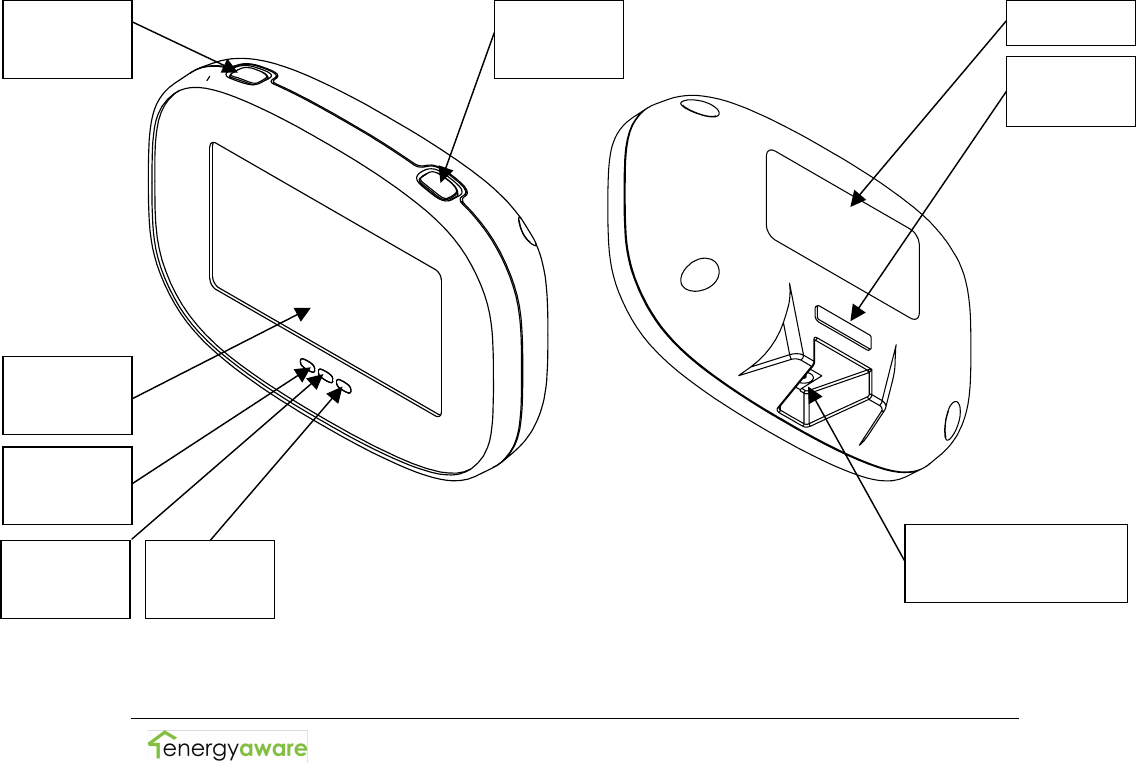
The Comverge PowerPortal In-Home Display (IHD) is a wireless
device that communicates directly with the electricity meter
outside your home. It is rechargeable, and has a magnetic
backing so it can be placed on your refrigerator, or it can stand
upright on a table or countertop.
Your IHD allows you to:
• View your current household electricity use
• Track your electricity consumption and associated costs
over time
• Test consumption and costs of operating individual devices
• Receive and acknowledge messages from your utility
service provider
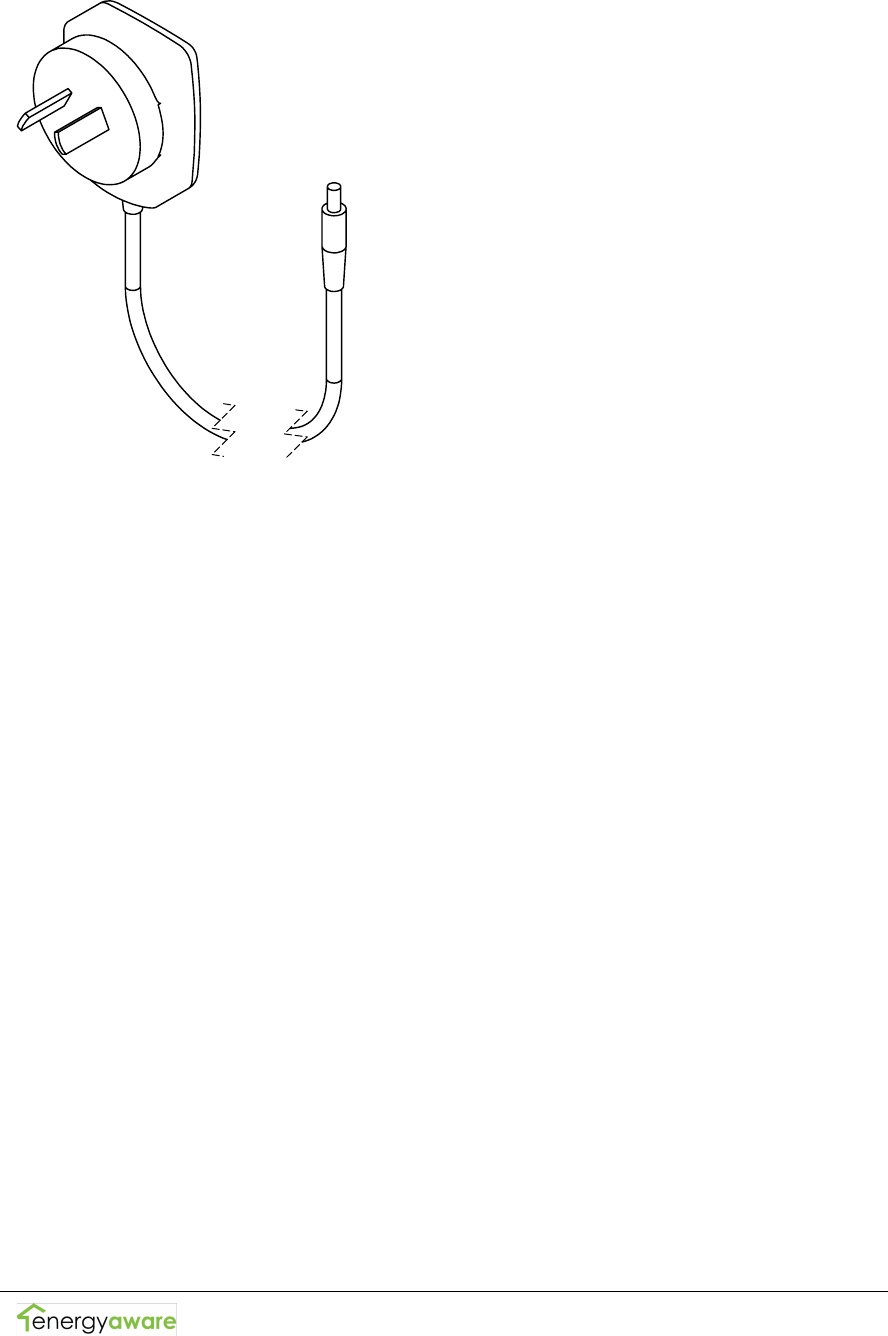
Your IHD package contains a display unit and a battery charger:
<L>
Button
<R>
Button
LCD
Screen
Green
LED
Yellow
LED
Red
LED
Magnet
DC Power
Adaptor Jack
Friction
sticker
Copyright © 2009, Energy Aware Technology Inc.
All rights reserved.
Page 4

Copyright © 2009, Energy Aware Technology Inc.
All rights reserved.
Page 5
2 IHD Basics
This section provides information on the primary functions of
your IHD.
2.1 Your IHD’s power modes
Your IHD has three power modes: On, Off, and Sleep.
To turn your IHD on, press either <L> or <R>.
Turn your IHD off by pressing and holding <L> for three seconds. A
confirmation screen will appear. Press <L> again ("Yes") to approve
the shutdown.
Note: Your IHD is unable to receive text messages from your
service provider when it is off.
When not connected to external power, your IHD will go to sleep after
5 minutes of inactivity. To wake it up, press <L>, <R>, or plug it in.
2.2 Charging your IHD
To charge your IHD, connect the power adapter to the DC power
adapter jack and plug your IHD into a power outlet.
Note: Leaving your IHD plugged in for extended periods of
time will adversely affect your battery life. To maximize
battery life, unplug your IHD when it's finished charging and
allow it to fully discharge before recharging.
2.3 Joining your meter’s network
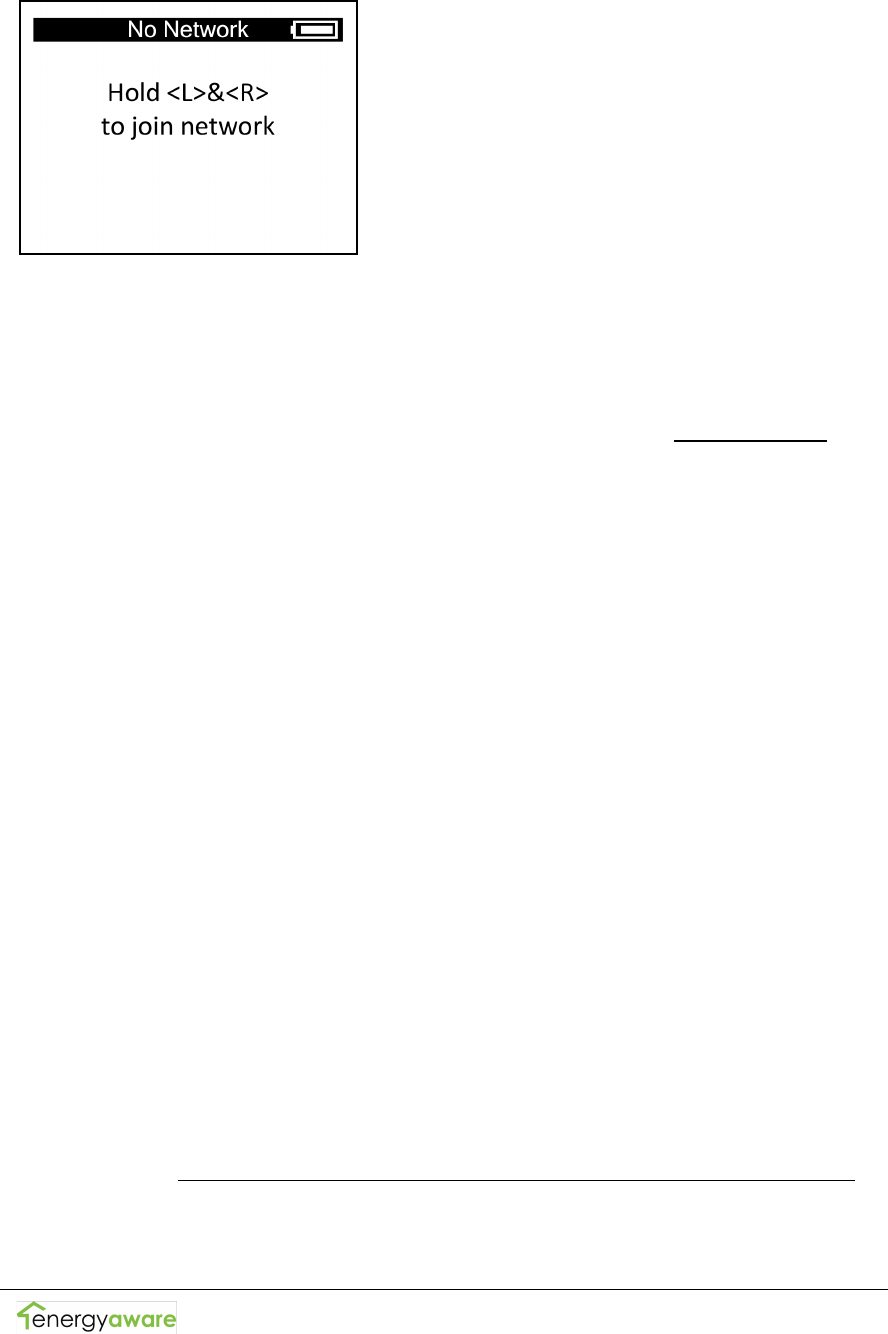
When your IHD is not joined to a network, it will display the
following screen:
Copyright © 2009, Energy Aware Technology Inc.
All rights reserved.
Page 6
In order to connect your IHD to your meter's network, contact
your service provider via phone (XXX-XXX-XXXX) or web
(http://www.serviceprovider.com) and request that they allow
your IHD to join. You will then have XX minutes to join your IHD
by holding <L> and <R> for three seconds at the No Network
screen.
Note: It is advisable to keep your IHD connected to external
power while attempting to join a network to prevent any
possible interruptions due to power failure.
Your IHD may take up to 5 minutes to complete the network
joining process. During this time it scans for the network,
authenticates the meter, and then discovers the services
available on the meter.
To remove your IHD from your meter's network:
1. Turn the device off
2. Turn the device on
3. While the startup screen is shown, hold <L> and <R> for 10
seconds
4. Press <L> ("Yes") at the network leave confirmation screen
that appears
Note: Involvement from your service provider will be required
to commission your IHD when you want to join a meter's
network again. Only leave the network if you are moving, or if
you were specifically asked to do so by your service provider.
Copyright © 2009, Energy Aware Technology Inc.
All rights reserved.
Page 7
2.4 Navigating your IHD screens
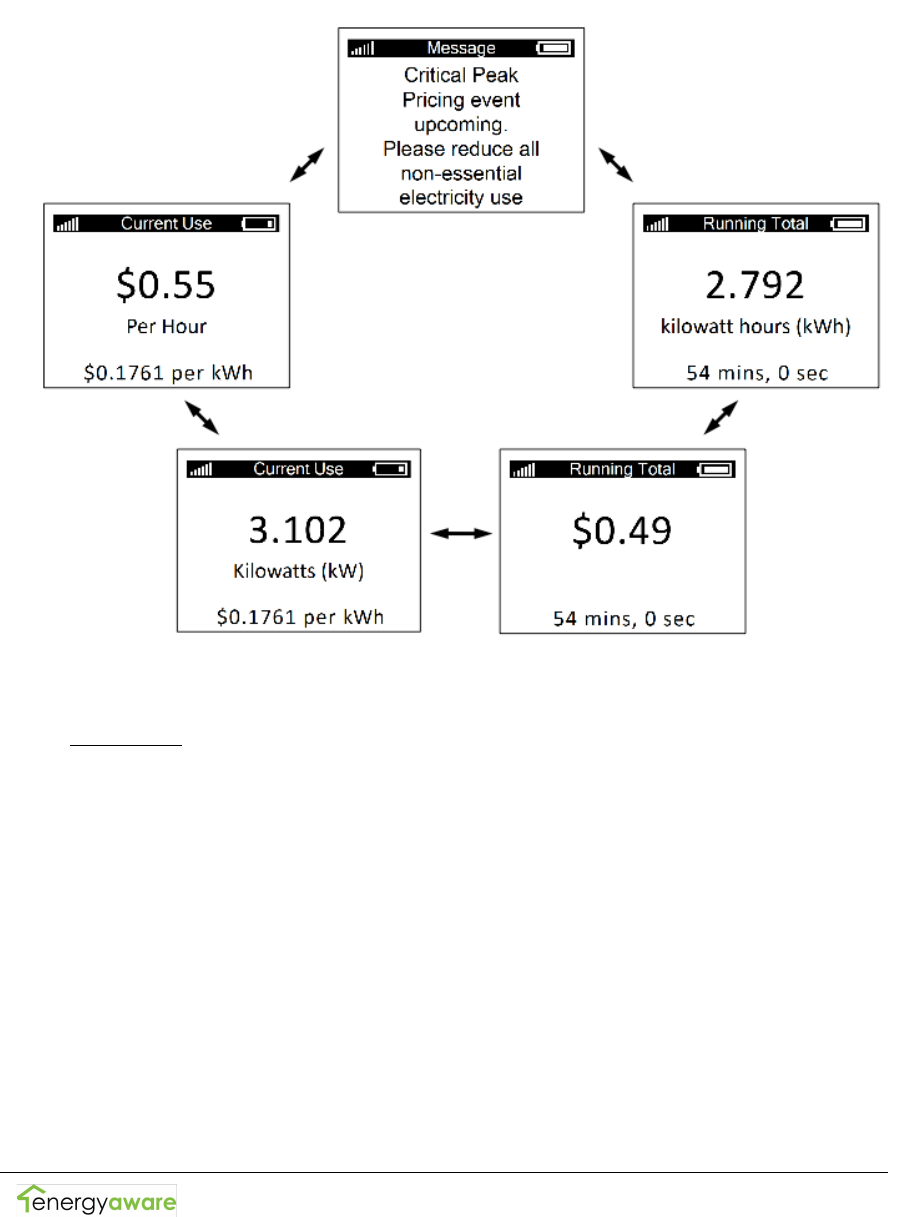
The main screens of your IHD are arranged in a loop. Navigate
through the screens by pressing <L> or <R>.
The Message screen is only available when there is at least one
message available. Additional message screens will be included
in the loop when there are multiple messages available.
2.5 Signal strength and battery charge indicators
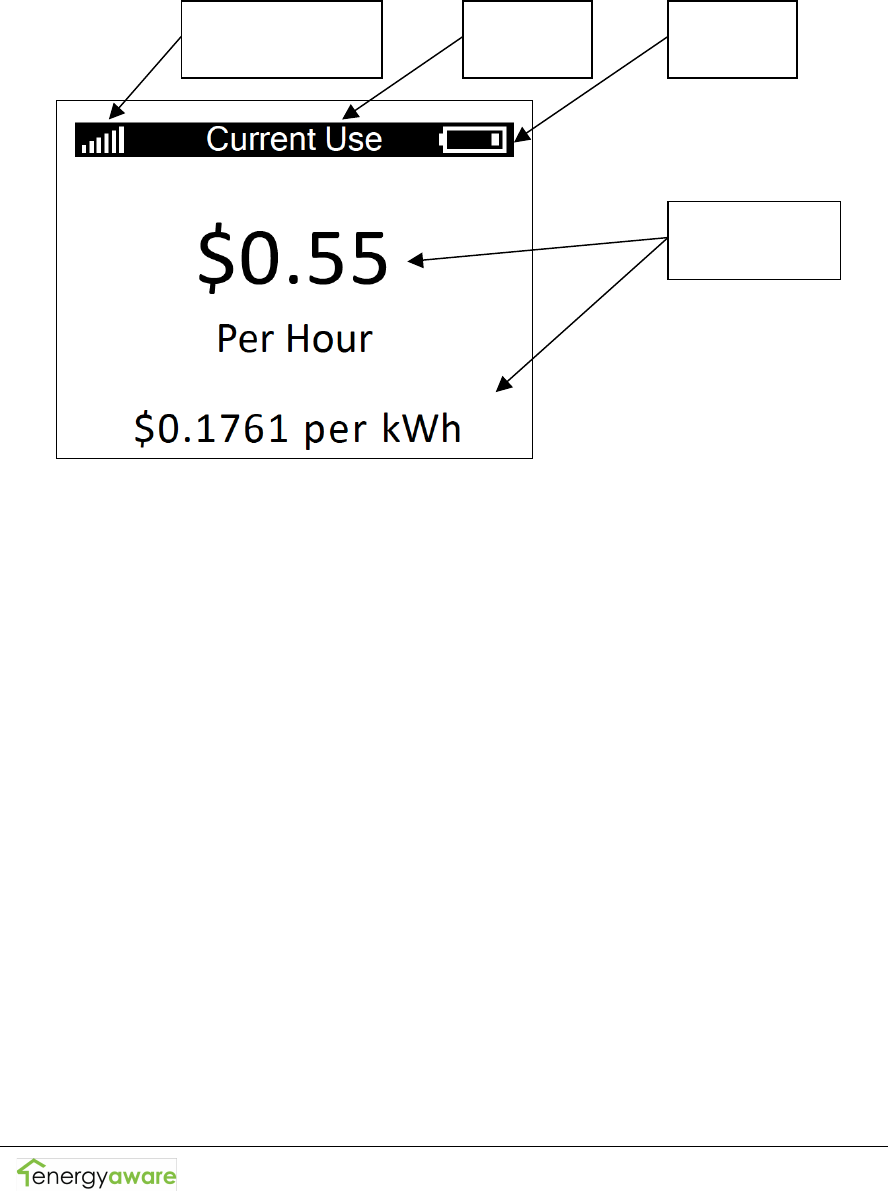
The battery icon in the top-right corner of your IHD screen shows
an approximation of the IHD's remaining charge. When
connected to external power, the battery icon will animate to
show that your IHD is charging. When the animation ceases,
charging has finished.
Copyright © 2009, Energy Aware Technology Inc.
All rights reserved.
Page 8
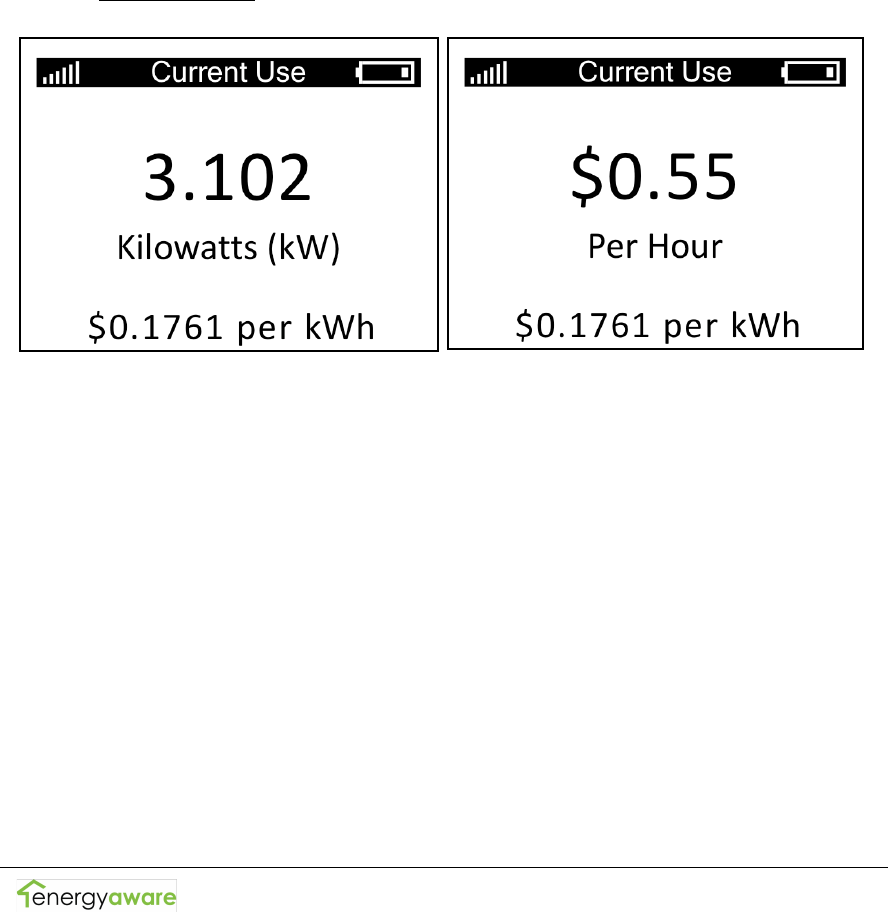
The vertical bars in the top-left corner of your IHD screen show
the strength of your IHD's connection to the network. A full six
bars indicates the highest signal strength, while one bar indicates
that your IHD is nearly outside the network's range.
Battery
Icon
Screen
Title
Signal Strength
Indicator
Screen
Information
Copyright © 2009, Energy Aware Technology Inc.
All rights reserved.
Page 9
3 Using Your IHD
Your IHD provides you with feedback that will enable you to
better understand your electricity bills and manage your
consumption. This section covers the ways in which you can use
your IHD.
3.1 Viewing your current electricity use
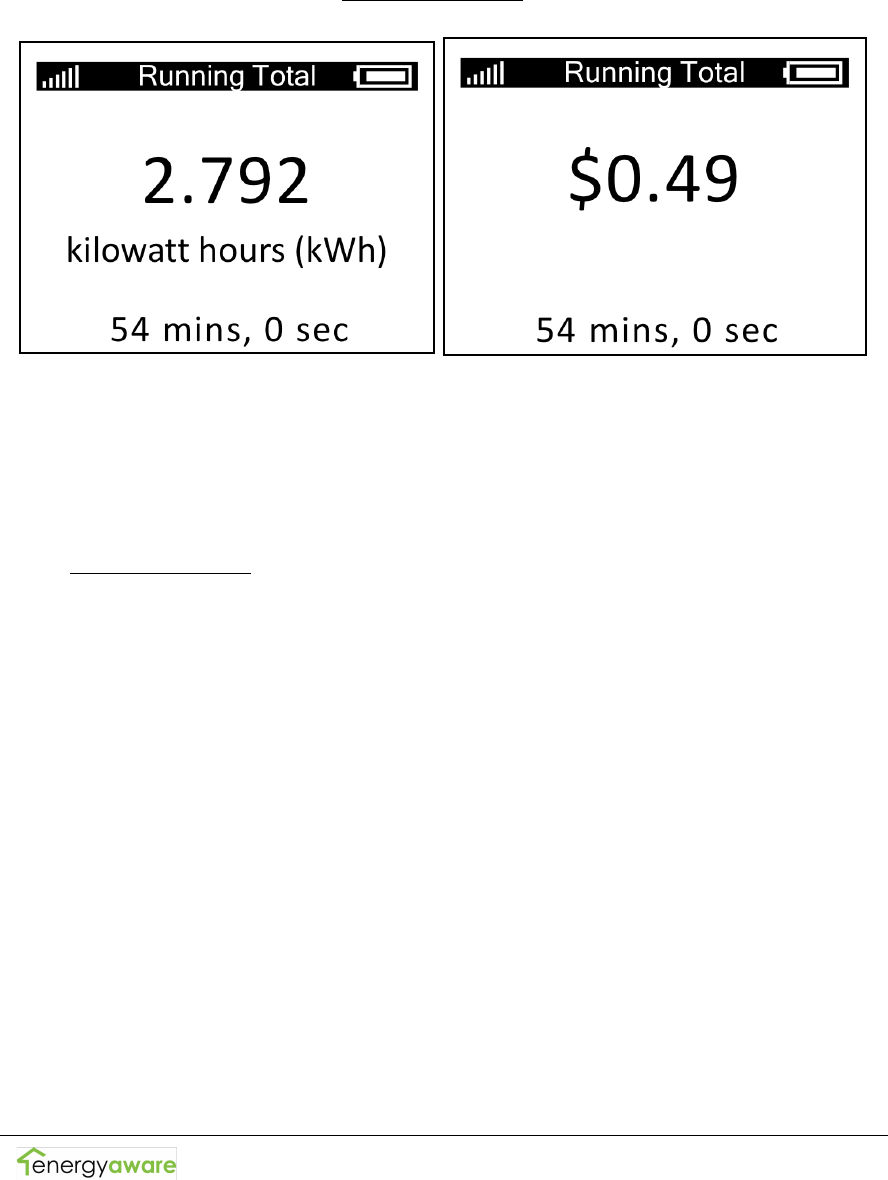
To view your home's current rate of electricity consumption, go
to the Current Use screens on your IHD shown below.
The large number on one screen shows your consumption rate in
kilowatts. The large number on the other screen shows the
associated cost of your consumption rate in dollars per hour. The
smaller number at the bottom of the screens show the current
tariff you are being charged for each kilowatt-hour of electricity
consumed.
To determine the cost of operating a single appliance, check the
current consumption rate on your IHD. Now, turn on an
appliance and note the difference between your first consumption
rate and the new consumption rate.
Copyright © 2009, Energy Aware Technology Inc.
All rights reserved.
Page 10
3.2 Tracking your electricity use over time
To view your home's total electricity consumption over a fixed
period of time, go to the Running Total screens on your IHD
shown below.
The large number on one screen shows your accumulated
electricity consumption in kilowatt-hours. The large number on
the other screen shows the associated cost of your consumption
in dollars.
The Running Total can be reset by pressing <L> and <R> at the
same time. The small numbers at the bottom of the screens
show how much time has elapsed since the last reset. If you
want to see how much you spend on electricity during a certain
event or time period, reset the total and then check it once the
event is done.
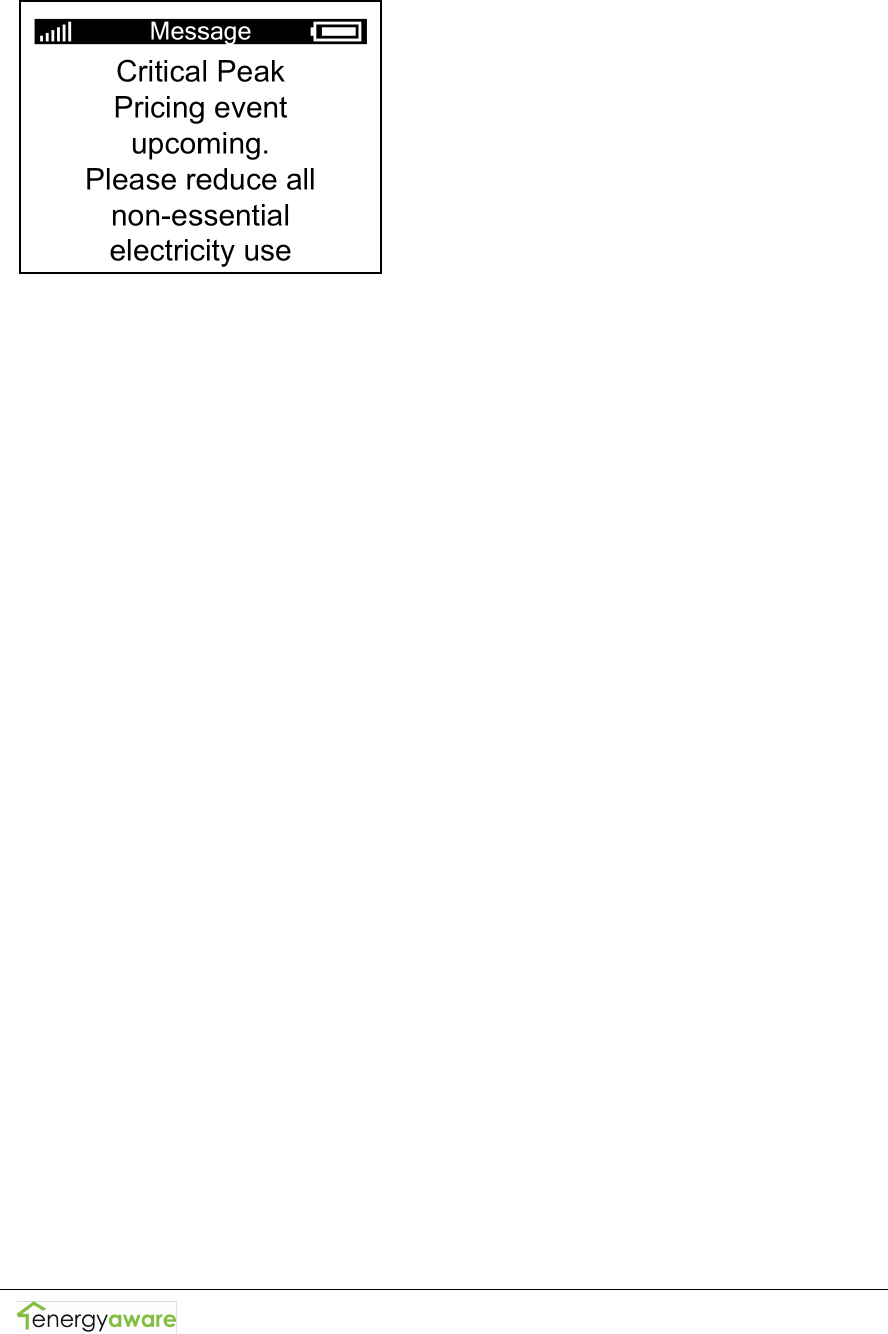
3.3 Receiving messages from your service provider
If your service provider has sent you a message, it will appear on
its own screen. An example message is shown below.
Copyright © 2009, Energy Aware Technology Inc.
All rights reserved.
Page 11
Messages will remain viewable on your IHD until they expire.
Expiry times are set by your service provider. Expired messages
are not retrievable.
Some messages may require that you acknowledge them and will
instruct you to do so. Press <L> and <R> at the same time to
acknowledge the message.
3.4 Understanding the lights on your IHD
Your IHD includes three Light Emitting Diodes (LEDs) which it
uses to indicate the presence of new messages and the current
relative cost of electricity.
Note: the LEDs will continue to function while the IHD is asleep.
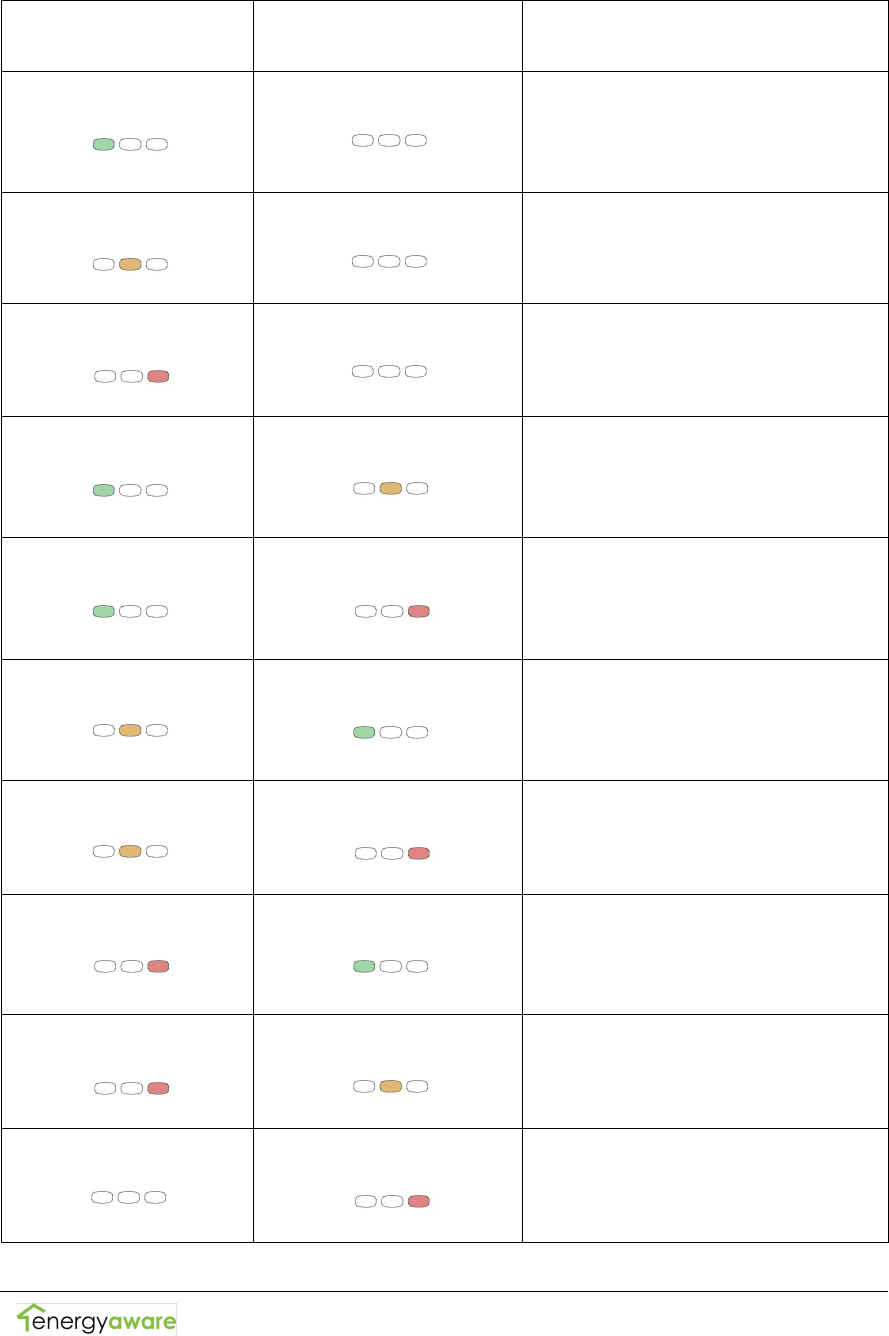
When a new or unacknowledged message is available on your
IHD, the LEDs will show this by simultaneously blinking once
every 5 seconds. The LEDs will continue to blink until you have
acknowledged this message or changed to another screen.
When no new messages are present, the LEDS will indicate the
current relative cost of electricity. A pulsing LED indicates the
tariff period you are currently in, while a blinking LED in
conjunction with a pulsing LED indicates an upcoming tariff
period change. The colour of the blinking LED indicates the
upcoming tariff period. The special case of Critical Peak Pricing
(CPP) is indicated when the red LED is blinking on its own. The
following table clearly defines the LEDs' behaviour for your
service providers tariff structure.
Copyright © 2009, Energy Aware Technology Inc.
All rights reserved.
Page 12
Pulsing LED
“-- -- -- -- “
Blinking LED
“- - - - -“
Description
Green
None
Off-Peak Rates in effect
Amber
None
Mid-Peak Rates in effect
Red
None
On-Peak Rates in effect
Green
Amber
Off-Peak Rates in effect
Mid-Peak Rates upcoming
Green
Red
Off-Peak Rates in effect
On-Peak Rates upcoming
Amber
Green
Mid-Peak Rates in effect
Off-Peak Rates upcoming
Amber
Red
Mid-Peak Rates in effect
On-Peak Rates upcoming
Red
Green
On-Peak Rates in effect
Off-Peak Rates upcoming
Red
Amber
On-Peak Rates in effect, Mid-
Peak Rates upcoming
None
Red
CPP Event in Effect
Copyright © 2009, Energy Aware Technology Inc.
All rights reserved.
Page 13
4 Troubleshooting/FAQ
Solutions to most of the problems you might encounter with your
IHD are described in this section.
4.1 If your IHD fails to join the network
If your IHD says "No networks found." after you attempt to join
your meter's network, your IHD may not be in wireless range of
your meter. Try moving closer to your meter and attempt joining
again. If this fails, there may have been an issue commissioning
the IHD. Contact your service provider and ask them to
commission your IHD again, then attempt joining a third time.
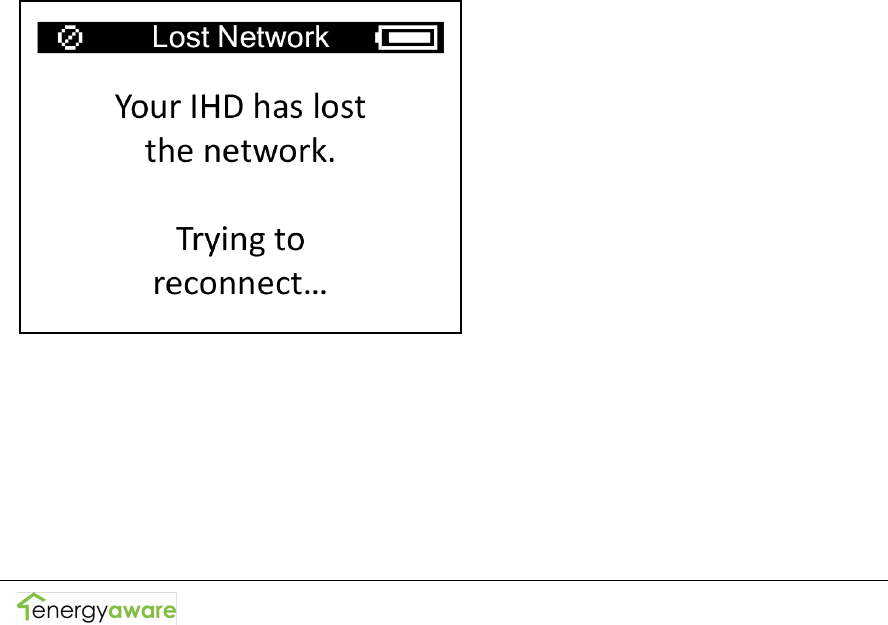
4.2 If your IHD has lost the network
When your IHD loses connection to the network you will see the
screen below.
This may have occurred because:
• Your IHD is not within wireless range of your meter. Try
moving your IHD closer to the meter or away from large
obstacles.
• Your meter's network has gone down due to a power
outage or due to being serviced by a field technician.

Copyright © 2009, Energy Aware Technology Inc.
All rights reserved.
Page 14
4.3 If your IHD won’t turn on
If your IHD will not turn on in response to a button-press, its
battery may be dead. Try connecting the power adapter to the
DC power adapter jack and plug your IHD into a power outlet.
4.4 Your Running Total does not match your electricity bill
Your IHD is intended for feedback purposes and is not a billing
tool. Discrepancies may exist between you IHD running total and
your bill, even if you reset your running total at the beginning of
your billing cycle.
4.5 How to figure out the consumption rate of an individual
appliance
Your IHD displays the electricity used by your entire home.
Electricity consumed by individual outlets or appliances can only
be indirectly measured by comparing your home's consumption
rate with those appliances on and off.
4.6 Your current use value does not change when you turn
on/off a light
Some electrical loads are too small to register a change in your
meter's current electricity use value. For example, Compact
Florescent Light bulbs (CFLs) draw very little electricity and may
not cause a change on your IHD's Current Use screen.
4.7 Your service provider sent you a message, where did it go?
Your service provider sends messages with a pre-set expiration
time. Once a message has expired it can no longer be viewed.
Generally, messages will not be set to expire until they are no
longer relevant.
Copyright © 2009, Energy Aware Technology Inc.
All rights reserved.
Page 15
5 Energy Savings Tips
The following is a list of energy savings tips that can help you
conserve electricity around your home.
1. Turn off lights when you leave the room.
2. Turn electronics like your computer and printer off rather
than leaving them on standby.
3. Plug appliances and electronics into a power bar and turn
the power bar off when it is not in use.
4. Replace old appliances with ENERGY STAR approved
products.
5. Replace incandescent bulbs with energy-efficient compact
fluorescents.
6. Only run your washer, dryer and dishwasher when they are
full.
7. Switch to cold water when doing your laundry.
8. Adjust your thermostat while you're sleeping at night and
when no one is at home.
9. Ensure your air conditioner is properly maintained and
reduce usage when you're not at home.
For more energy savings tips visit www.serviceprovider.com
(note: will change depending on who the service provider is).

Copyright © 2009, Energy Aware Technology Inc.
All rights reserved.
Page 16
6 Appendix
6.1 Safety Instructions
To ensure your IHDis used safely, please read these Safety
Instructions and the rest of this User Manual thoroughly before
using the product.
• The IHD contains a magnet. Do not place the IHD directly
on credit cards, computers or other pieces of electronic
equipment, as this may cause damage.
• Do not attempt to repair the In-Home Display or DC Power
Adaptor yourself. If you are experiencing problems with
the device, contact Your service provider for assistance.
Opening the product casings for any reason will void the
product warranty.
• Do not touch any exposed electronic circuitry of the device
if it becomes damaged
• Do not immerse the IHD in water.
• Avoid using the IHD in high moisture areas such as a
bathroom for extended periods of time.
• Only use the IHD indoors.
• Keep the IHD away from heat sources such as stoves and
heaters.
• Do not drop the IHD or cause any sudden impact to it. The
IHD warranty will not cover drops or impacts.
• Take care when handling a damaged LCD display as the
liquid crystals can be harmful to your health. If any fluid
does leak from the IHD LCD, immediately wash with soap
and water.
• Do not use this device in aircrafts or hospitals. The use of
radio frequency can cause malfunctions in the control
devices of other equipment.

Copyright © 2009, Energy Aware Technology Inc.
All rights reserved.
Page 17
6.2 Product specifications
Communications
• Frequency Band: 2.4GHz
• Radio Output Power: 20dBm
• Protocol: IEEE 802.15.4
Size and Weight
• Length: 28 mm (1.10 inches)
• Width: 108 mm (4.25 inches)
• Height: 79 mm (3.11 inches)
• Weight: 134 grams (4.7 ounces)
Battery
• Approximate life: 2 weeks
• Recharge time: 8 hours
6.3 FCC Compliance
FCC Class B Part 15
This device complies with part 15 of the FCC Rules. Operation is
subject to the following two conditions:
• This device may not cause harmful interference, and
• This device must accept any interference received, including
interference that may cause undesired operation.
Changes or modifications not expressly approved by Energy
Aware Technology Inc. may void the user’s authority to operate
the equipment.
This equipment has been tested and found to comply with the
limits for a Class B digital device, pursuant to part 15 of the FCC
Rules. These limits are designed to provide reasonable protection
against harmful interference in a residential installation. This
equipment generates, uses and can radiate radio frequency
energy and, if not installed and used in accordance with the
instructions, may cause harmful interference to radio
communications. However, there is no guarantee that
interference will not occur in a particular installation. If this
equipment does cause harmful interference to radio or television
reception, which can be determined by turning the equipment off
and on, the user is encouraged to try to correct the interference

Copyright © 2009, Energy Aware Technology Inc.
All rights reserved.
Page 18
by one or more of the following measures:
• Reorient or relocate the receiving antenna.
• Increase the separation between the equipment and
receiver.
• Connect the equipment into an outlet on a circuit different
from that to which the receiver is connected.
• Consult the dealer or an experienced radio/TV technician for
help.
ICES-003 Compliance
This Class B digital apparatus complies with Canadian ICES-003.
FCC RF Exposure Statement
This equipment complies with FCC radiation exposure limits set
forth for an uncontrolled environment. The antenna(s) used for
this equipment must be installed to provide a separation distance
of at least 8 inches (20cm) from all persons.
6.4 Warranty
Limited One-Year Warranty
Energy Aware Technology Inc. warrants this In Home Display
System (the “Product”) to be free from defects in materials and
workmanship under normal consumer usage (the “Warranty”) for
a period of one year from the date of sale (the “Warranty
Period”). Labour charges for removal and installation of the
Product are the consumer’s responsibility. During the Warranty
Period, as the consumer’s exclusive remedy for a defective
Product, all defective parts will be replaced or repaired free of
charge. To obtain Warranty service the consumer must return
the Product, freight paid, with a copy of the sales receipt or other
proof of purchase that shows the date of sale, to Energy Aware
Technology Inc. within the Warranty Period.
The consumer shall NOT have any claim under this Warranty,
including but not limited to for repair or adjustment expenses if:
1. The problem is caused by any improper operation or

Copyright © 2009, Energy Aware Technology Inc.
All rights reserved.
Page 19
storage; misuse, abuse, accident or neglect; contact with
liquids, extreme humidity or heat; contact with sand, dirt,
food or the like; fire, or other cause, or other acts which
are not the fault of Energy Aware Technology Inc.; or any
other acts that are outside the course of normal consumer
usage.
2. The problem is caused by modification or repair by
anyone other than Energy Aware Technology Inc.
3. Serial numbers or product labels have been removed,
altered or obliterated, or broken seals that show evidence
of tampering.
4. Proof of purchase is not presented when requesting
Warranty service.
This Warranty shall not extend beyond the Warranty Period and
is in lieu of all other warranties, including, without limitation, any
statutory or implied warranty or condition, including, without
limitation, of merchantability or of fitness for a particular
purpose, or those arising by custom, usage or trade.
In no circumstance will Energy Aware Technology Inc. be liable
for any direct, indirect, consequential or incidental damages,
including without limitation, damages resulting from the use,
inability to use, or inaccuracy of the Product or loss of data.
Repair or replacement as provided under this Warranty is the
consumer’s exclusive remedy for any defects in materials or
workmanship of a Product. The Warranty applies only to new
Products and claims made by the original purchaser as evidenced
by a sales receipt or other proof of purchase.
6.5 Manufacturing Information
Designed by Energy Aware Technology Inc.
134 Abbott Street, Suite 604
Vancouver BC
V6B 2K4
Made in Canada in an ISO 9000-2001 certified facility