ONYX Healthcare lnc MP3 Mobile Medical Assistant Tablet User Manual
ONYX Healthcare lnc. Mobile Medical Assistant Tablet Users Manual
Contents
- 1. Users Manual
- 2. User Manual
Users Manual
Mobile Medical Assistant ONYX-MD116
ONYX-MD116
11.6” LCD with LED Backlight
Intel® Apollo Lake processor
Dual smart card readers for multiple-care workflow
Instant vehicle docking system
Mobile Medical Assistant
ONYX-MD116 Manual 1st Ed
June., 2017

Mobile Medical Assistant ONYX-MD116
Copyright Notice
This document is copyrighted, 2017. All rights are reserved. The
original manufacturer reserves the right to make improvements to
the products described in this manual at any time without notice.
No part of this manual may be reproduced, copied, translated, or
transmitted in any form or by any means without the prior written
permission of the original manufacturer. Information provided in
this manual is intended to be accurate and reliable. However, the
original manufacturer assumes no responsibility for its use, nor for
any infringements upon the rights of third parties, which may result
from its use.
The material in this document is for product information only and
is subject to change without notice. While reasonable efforts have
been made in the preparation of this document to assure its
accuracy, ONYX Healthcare Inc., assumes no liabilities resulting
from errors or omissions in this document, or from the use of the
information contained herein
ONYX Healthcare Inc. reserves the right to make changes in the
product design without notice to its users

Mobile Medical Assistant ONYX-MD116
Acknowledgments
Intel® PentiumTM is registered trademarks of Intel® Corporation.
Microsoft® Windows is a registered trademark of Microsoft®
Corporation.
All other product names or trademarks are properties of their
respective owners.

Mobile Medical Assistant ONYX-MD116
Packing List
Before you begin installing your Mobile Medical Assistant, please
make sure that the following items have been shipped:
ONYX-MD116 Mobile Medical Assistant
ONYX-MD116 Docking Station
Four VESA Screws(M:4mm x P:0.7mm x L:10mm)

Mobile Medical Assistant ONYX-MD116
If any of these items are missing or damaged, you should contact
your distributor or sales representative immediately.
Headquarters
Onyx Healthcare Inc.
2F, No.135, Lane 235, Pao-Chiao Rd.,
Hsin-Tien City, Taipei 231, Taiwan, R.O.C.
TEL: +886-2-8919-2188
FAX: +886-2-8919-1699
E-mail: sales@onyx-healthcare.com
http://www.onyx-healthcare.com
Worldwide Offices:
Onyx Healthcare Inc.
2F., No.135, Ln. 235, Baoqiao Rd., Xindian Dist.,
New Taipei City 231, Taiwan (R.O.C.)
TEL: +886-2-8919-2188
FAX: +886-2-8919-1699
E-mail: sales@onyx-healthcare.com
http://www.onyx-healthcare.com
Worldwide Offices:
Onyx Healthcare, USA Inc.
324W. Blueridge Ave., Orange,, CA 92865, USA
Tel : +1-714-792-0774
Fax: +1-714-792-0481

Mobile Medical Assistant ONYX-MD116
Email: usasales@onyx-healthcare.com
Onyx Healthcare EUROPE B.V.
Primulalaan 42, 5582 GL Waalre, Netherlands
Tel : +31-(0)499-745600
Email: eusales@onyx-healthcare.com
Onyx Healthcare (Shanghai) INC.
20F, unit D, GEM Building, No. 487 Tianlin Road,
Shanghai, China
Tel: +86-021-64956588
Fax: +86-021-64956889
Email: cnsales@onyx-healthcare.com

Mobile Medical Assistant ONYX-MD116
Safety & Warranty
1. Read these safety instructions carefully.
2. Keep this user's manual for later reference.
3. Disconnect this equipment from any AC outlet before cleaning.
Do not use liquid or spray detergents for cleaning. Use a damp
cloth.
4. For pluggable equipment, the power outlet must be installed
near the equipment and must be easily accessible.
5. Keep this equipment away from humidity.
6. Put this equipment on a reliable surface during installation.
Dropping it or letting it fall could cause damage.
7. The openings on the enclosure are for air convection. Protect
the equipment from overheating. DO NOT COVER THE
OPENINGS.
8. Make sure the voltage of the power source is correct before
connecting the equipment to the power outlet.
9. Warning: To avoid risk of electric shock, this equipment
must only be connected to a supply mains with protective
earth. (Avertissement: Pour éviter tout risque de choc
électrique, cet appareil doit être connecté à une
alimentation secteur avec une prise de terre)
10. Position the power cord so that people cannot step on it. Do
not place anything over the power cord.
11. All cautions and warnings on the equipment should be noted.

Mobile Medical Assistant ONYX-MD116
12. If the equipment is not used for a long time, disconnect it from
the power source to avoid damage by transient over-voltage.
13. Never pour any liquid into an opening. This could cause fire or
electrical shock.
14. Never open the equipment. For safety reasons, only
qualified service personnel should open the equipment.
15. Warning: Do not modify this equipment without
authorization of the manufacturer. (Avertissement: Ne pas
modifier cet équipement sans l'autorisation du fabricant)
16. Warning : It is necessary for checking or replacing the
battery pack every year. (Avertissement: Il est nécessaire de
vérifier ou de remplacer la batterie chaque année)

Mobile Medical Assistant ONYX-MD116
16. If any of the following situations arises, get the equipment
checked by service personnel:
a. The power cord or plug is damaged.
b. Liquid has penetrated into the equipment.
c. The equipment has been exposed to moisture.
d. The equipment does not work well, or you cannot get it
to work according to the users manual.
e. The equipment has been dropped and damaged.
f. The equipment has obvious signs of breakage.
17. DO NOT LEAVE THIS EQUIPMENT IN AN UNCONTROLLED
ENVIRONMENT WHERE THE STORAGE TEMPERATURE IS
BELOW -20° C (-4°F) OR ABOVE 60° C (140° F). IT MAY
DAMAGE THE EQUIPMENT.
18. External equipment intended for connection to signal
input/output or other connectors, shall comply with
relevant UL / IEC standard (e.g. UL 1950 for IT equipment
and ANSI/AAMI ES 60601-1: 2005 AND CAN/CSA-C22.2 No.
60601-1:08 / IEC 60601 series for systems – shall comply
with the standard IEC 60601-1-1, Safety requirements for
medical electrical systems. Equipment not complying
with UL 60601-1 shall be kept outside the patient
environment, as defined in the standard.
Caution:
It may cause the danger of explosion if battery is incorrectly
replaced. Replace only with same or equivalent type
recommended by the manufacturer.

Mobile Medical Assistant ONYX-MD116
Classification
1. Degree of production against electric shock: not classified
2. Degree of protection against the ingress of water: IPX0
3. Mode of operation: Continuous
4. Type of protection against electric shock: Class I equipment
5. No Applied Part, No AP/APG
Mobile Medical Assistant ONYX-MD116
FCC
This device complies with Part 18 FCC
Rules. Operation is subject to the following
two conditions: (1) this device may not
cause harmful interference, and (2) this
device must accept any interference
received including interference that may
cause undesired operation.
Mobile Medical Assistant ONYX-MD116
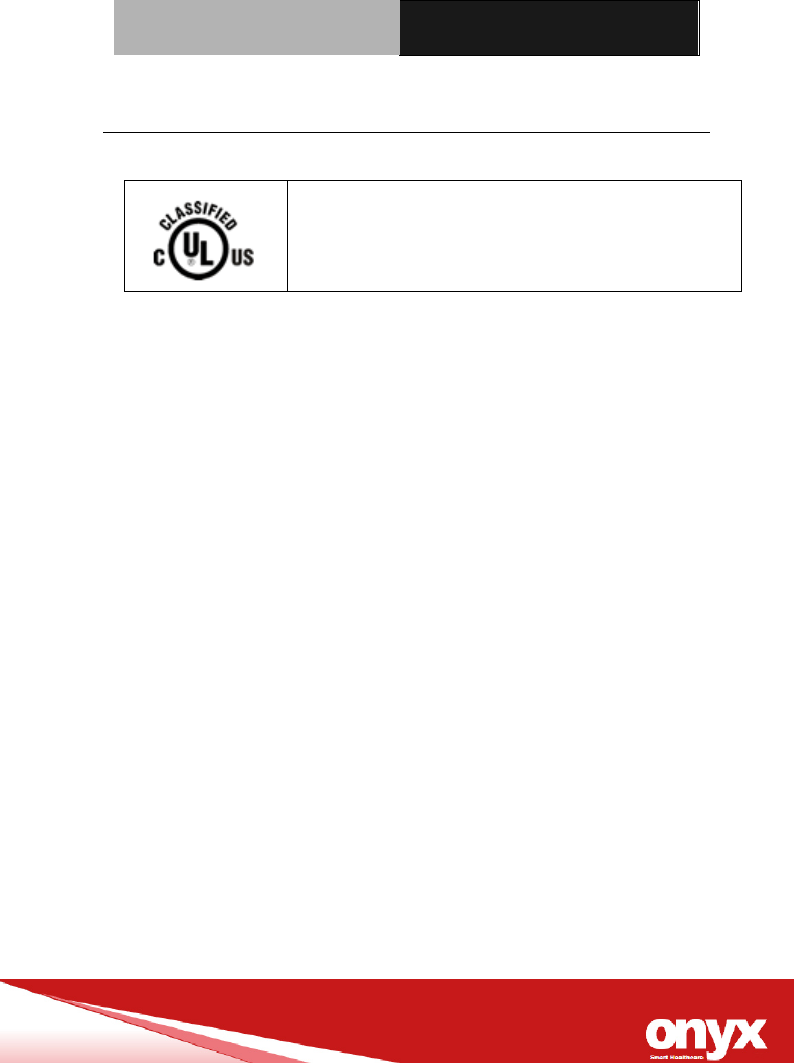
UL Module Description
ONYX-MD116 module is developed to
suitable for the Classification Mark
requirement
Mobile Medical Assistant ONYX-MD116
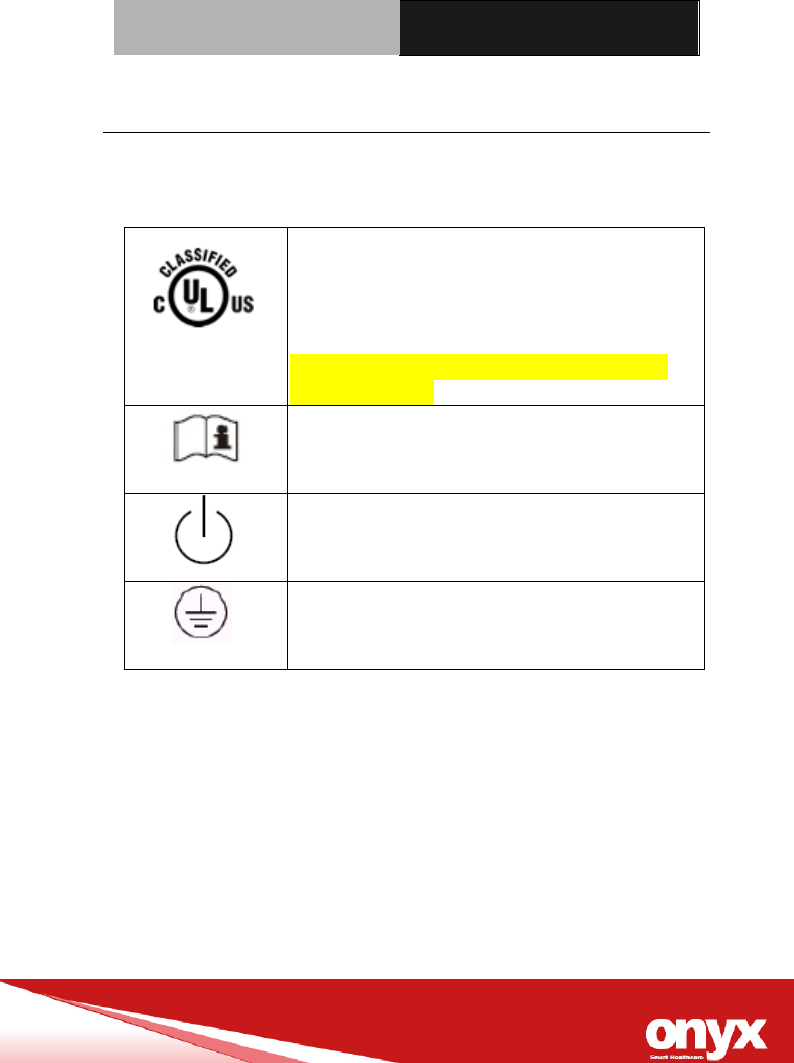
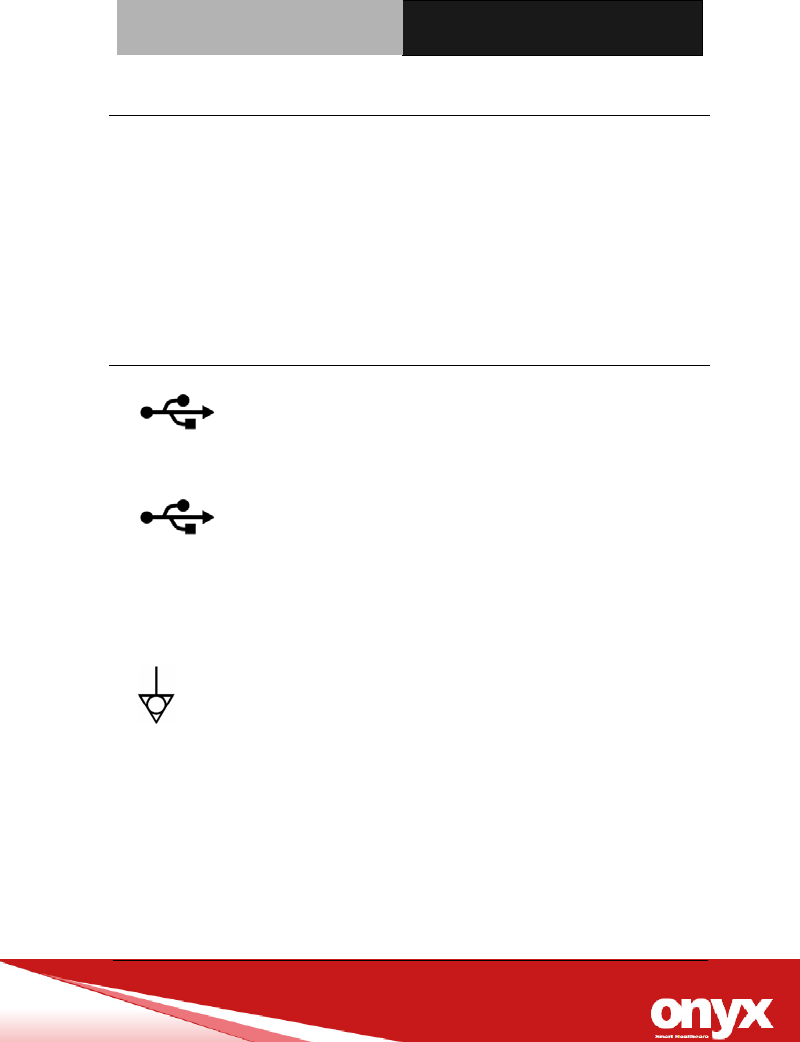
Safety Symbol Description
The following safety symbols are the further explanations for your
reference.
MEDICAL – GENERAL MEDICAL
EQUIPMENT AS TO ELECTRICAL
SHOCK, FIRE AND MECHANICAL
HAZARDS ONLY IN ACCORDANCE
WITH ANSI/AAMI ES 60601-1 (2005) +
AMD (2012) and CAN/CSA-C22.2 No.
6060-1 (2014).
Attention, consult ACCOMPANYING
DOCUMENTS.
Stand-by
Ground wire
Protective Ground wire.

Mobile Medical Assistant ONYX-MD116
Contents
Chapter 1 General Information
1.1 Introduction .................................................................... 1-2
1.2 Feature ............................................................................ 1-3
1.3 Specification ................................................................... 1-4
1.4 Dimension ....................................................................... 1-8
Chapter 2 Hardware Installation
2.1 Safety Precautions ......................................................... 2-2
2.2 Quick Tour of ONYX-MD116 .......................................... 2-3
2.3 Mounting…………………………………………………… 2-6
2.4 Turn On and Boot up into Windows…………………….2-6
2.5 Turn off……………………………………………………….2-6
Chapter 3 Driver Installation
Appendix A Miscellanea
A.1 General Cleaning Tips.................................................. C-2
A.2 Cleaning Tools .............................................................. C-3
A.3 Scrap Computer Recycling ........................................ C-5

Mobile Medical Assistant ONYX-MD116
General
Information
Chapter
1

Slim Medical Panel PC ONYX-MD116
Chapter 1 General Information 1-1
1.1 Introduction
ONYX-MD116 Mobile Medical Assistant is based on Intel®
PentiumTM N4200 Quad Core processor, which delivers a
performance improvement of more than 100 percent compared to
systems running traditional single-core processors. With four cores
computing engines, ONYX-MD116 can simultaneously execute four
computing tasks. It accommodates one M.2 2242 Interface SATA
SSD and one DDRIII SODIMM up to 16GB.
The high brightness LCD, zero noise solution, integrated
multimedia functions make them the perfect platform upon which to
build comprehensive lifestyle computing applications.
ONYX-MD116 includes all the features of a powerful computer into
a slim and attractive chassis. It has a 11.6” 600 nits TFT display
with 1920 x 1080 resolution. ONYX-MD116 owns Dual smart card
reader to support ID check. Combining ONYX-MD116 into your
system can achieve both cost-saving and efficient improvements in
common medical applications. ONYX-MD116 is definitely your
perfect choice.

Slim Medical Panel PC ONYX-MD116
Chapter 1 General Information 1-2
1.2 Feature
Intel® Apollo Lake N4200 Quad Core Processor
Supports One DDR3 SODIMM up to16GB
Built-in RFID and Dual Smart Card Security
Dual hot-swappable batteries for 24/7 operation
Instant vehicle docking system
ORION client compatible
Slim Medical Panel PC ONYX-MD116
Chapter 1 General Information 1-3
1.3 Specification
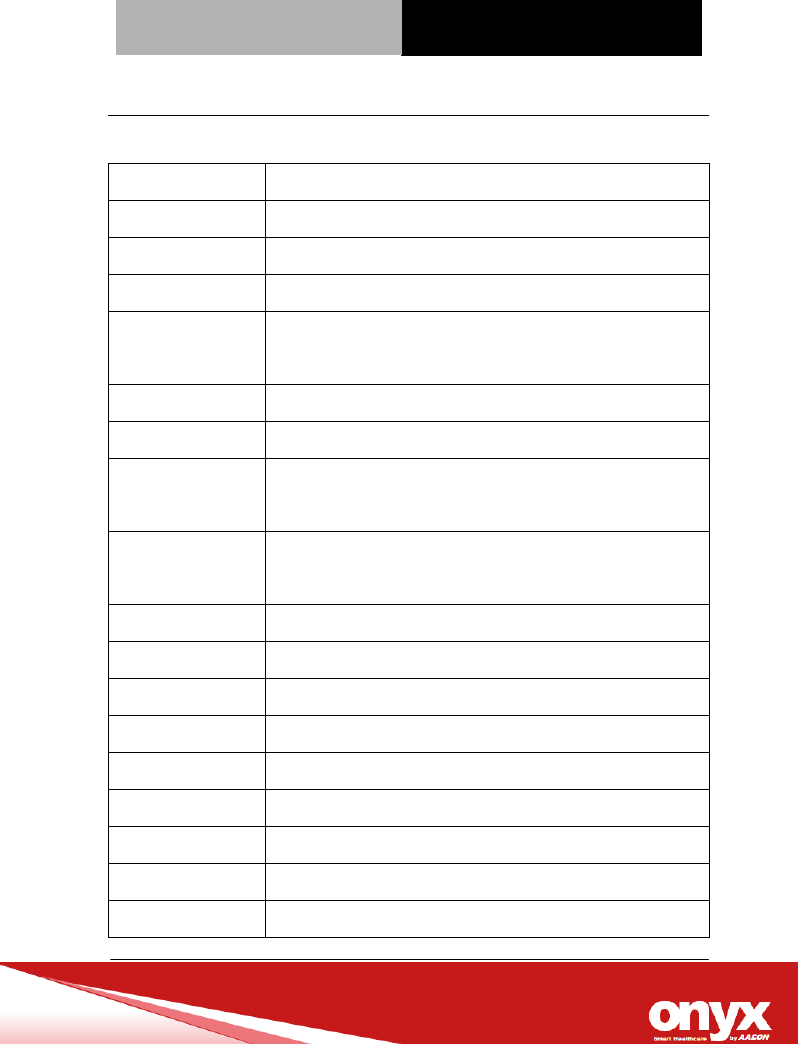
Hardware Specifications
Processor Processor Intel® Apollo Lake Processor
System Memory DDR3L SO-DIMM x1, Default 4 GB (Up to 16 GB)
OS Support Microsoft® Windows 10
Storage M.2 Interface x1, Default 64 GB
Wireless
Communication
802.11 a/b/g/n + BT4.0 (Optional)
Camera 2 MP (Front) / 5 MP (Rear)
Touchscreen w/Soda Lime Glass (Default); Gorilla Glass
Digital
Accelerometer
ADI ADXL345
Ambient Light
Sensor
TAOS TSL2581
LTE+GPS Telit LN930 x 2 (Optional)
Function Keys x2
LED Indicators x2
USB USB 3.0 (Type-A) x1, USB 2.0 (Type-A) x1
Ethernet Gigabit LAN x1
DC-In DC-In Jack x1
Docking Docking Connector x1
Battery Type Polymer
Battery Capacity 3300 mAh x2
Slim Medical Panel PC ONYX-MD116
Chapter 1 General Information 1-4
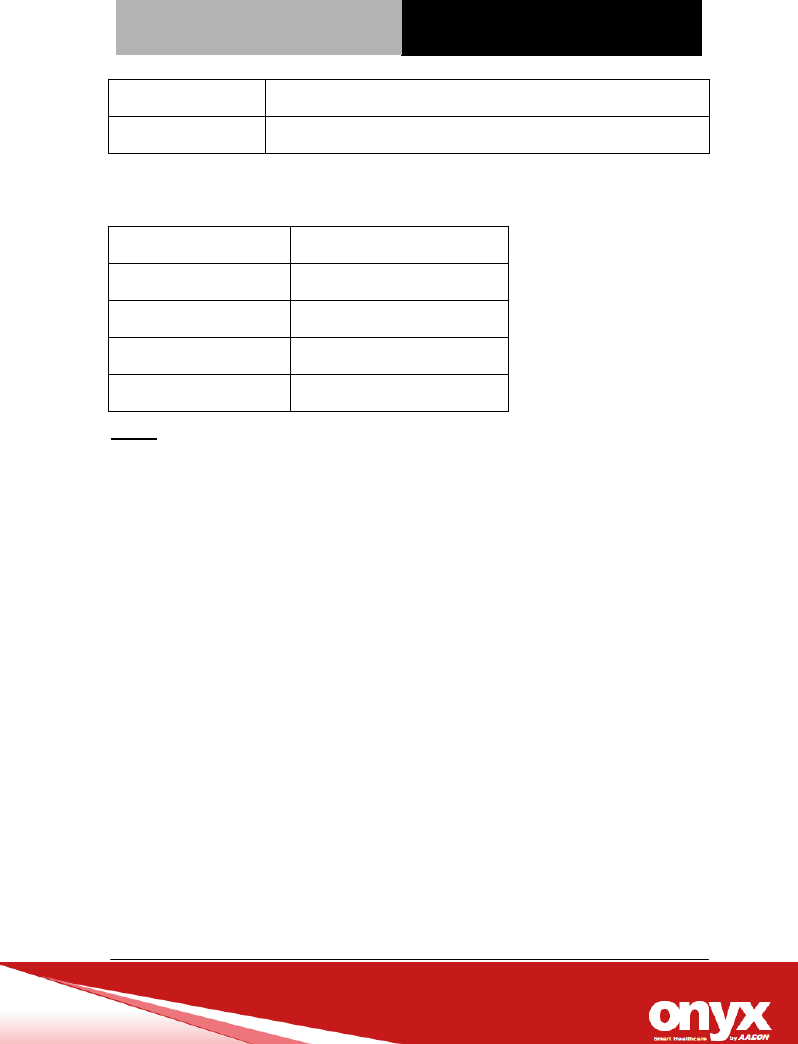
Battery Run Time Approx. 5 hrs
Speaker 3W x1
LCD Specifications
Display Type 11.6” LCD
Max. Resolution 1920 x 1080
Contrast Ratio 800:1
Luminance (cd/m2) 600TYP)
Back Light Life Time >50,000 Hrs
Note:
All ONYX LCD products are manufactured with High precision technology.
However, there are a small number of defective pixels in all LCD panels
that are not able to change color. This is a normal occurrence for all LCD
displays from all manufacturers and should not be noticeable or
objectionable under normal operation. All LCD panels are qualified for
industry standard conditions in the following: total 7 dead pixels on a
screen or if there are 3 within 1 inch square area of each other on the
display.
Slim Medical Panel PC ONYX-MD116
Chapter 1 General Information 1-5
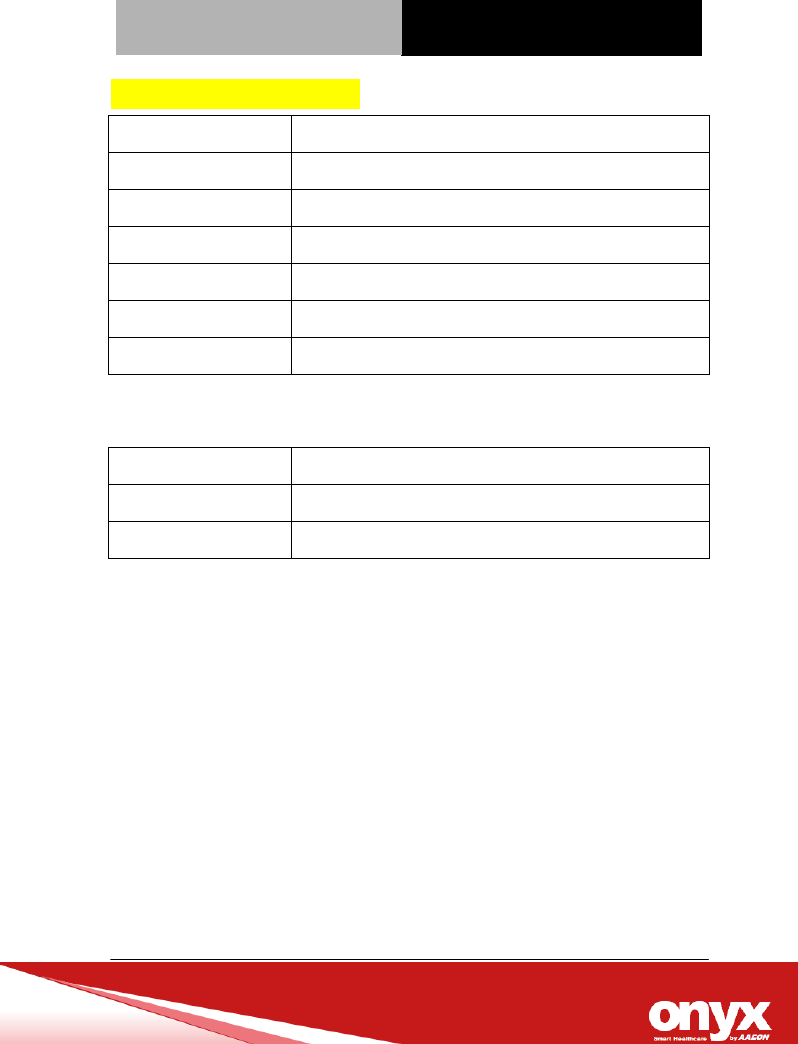
Mechanical Specifications
Architecture Close-frame
Color Dark Gray
Mounting / Holder VESA 75/100mm, Screw type:M4*8mm
Construction 3mm ABS + PC TYPE Plastic housing
Rear cover magnesium
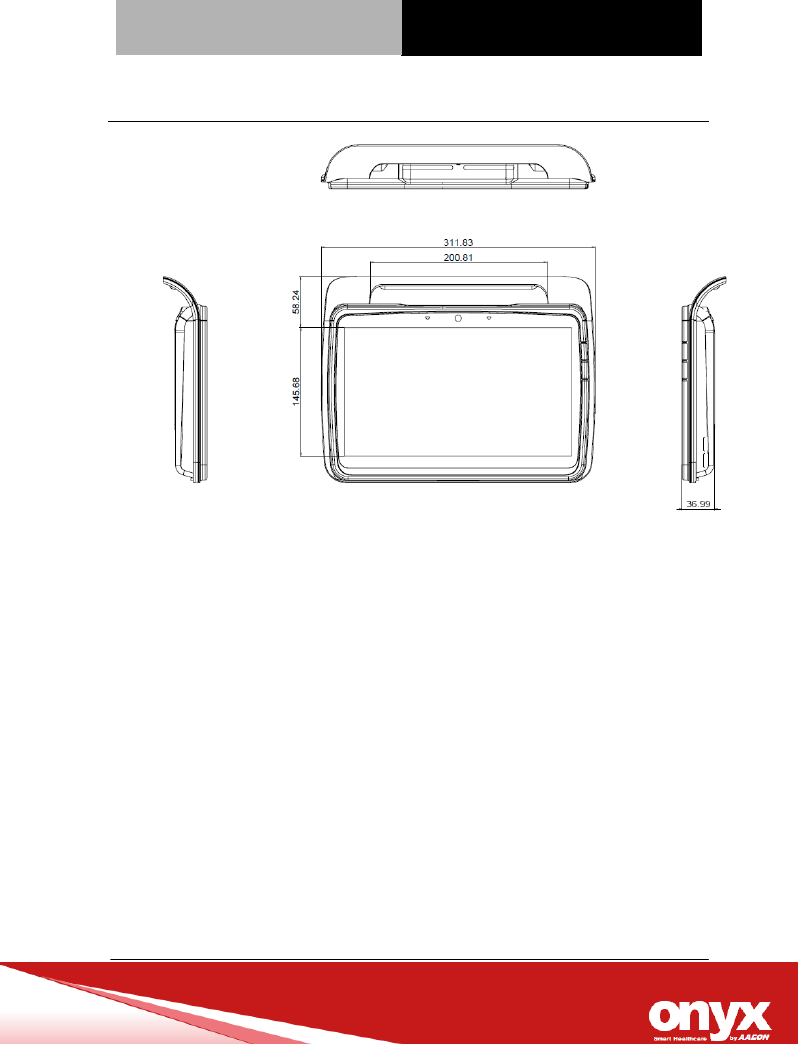
Dimension (WxHxD) 312 (W) x 239 (H) x 37 (D) mm
Net Weight Approx. 1.8 kg
Power Supply Specifications
Model Adapter FSP096-AHAN2
Input Voltage 100-240V AC @ 50-60 Hz
Output Voltage 12V, 5A, 96W max.
Slim Medical Panel PC ONYX-MD116
Chapter 1 General Information 1-6
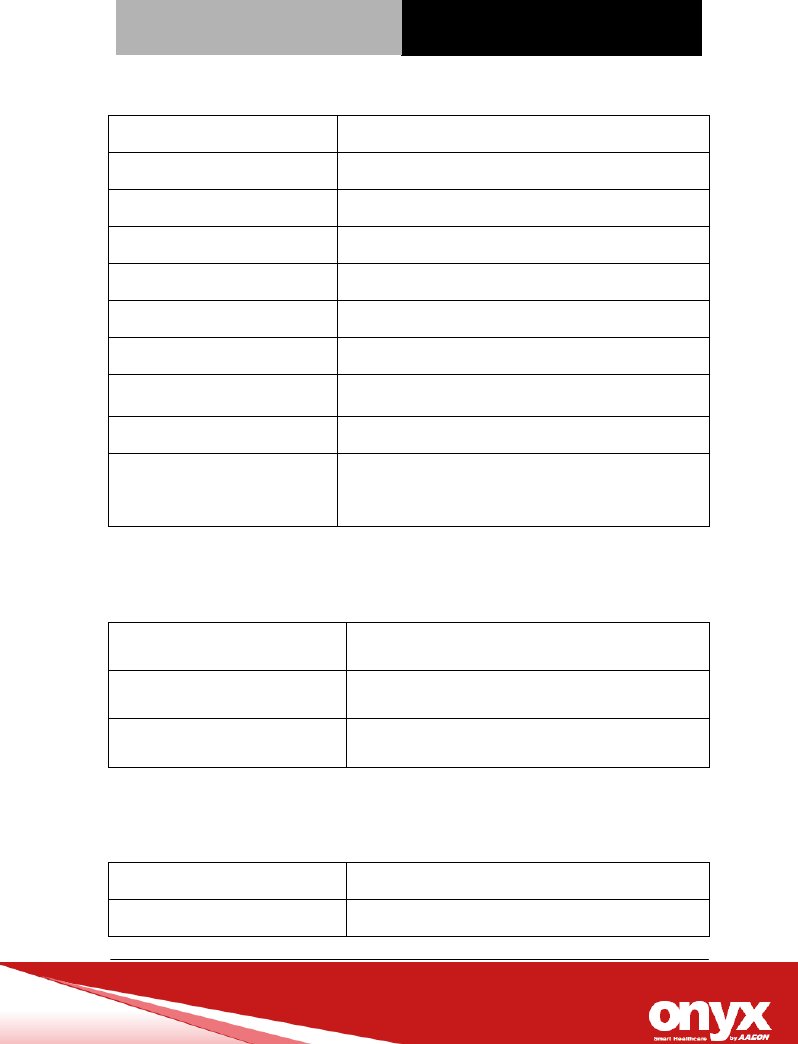
Environmental Specifications
Operating Temperature -10°C ~ 55°C (14°F ~ 131°F)
Operating Humidity 30% to 75% RH, non-condensing
Operating Pressure 700 to 1060 hPa
Storage Temperature -20°C ~ 60°C (-4°F ~ 140°F)
Storage Humidity 10%~95%@35°C, non-condensing
Storage Pressure 700 to 1060 hPa
Vibration 0.5G / 5 ~ 500Hz (Random) / operation
Shock 20G peak acceleration (11 msec. duration) /
operation
Drop(with packaging) 80 cm (1 Corner, 3 Edge, 6 Surface)
EMI / Safety CE/FCC Class B, UL60601-1, EN60601-1,
E1, EN1789
Touch Screen
Type Projective Capacitive / 5-wire Resistive
Interface USB interface
Light Transmission > 80%
Docking Station
Power DC 12~19V
Battery 3300 mAh x2

Slim Medical Panel PC ONYX-MD116
Chapter 1 General Information 1-7
USB USB 3.0 (Type-A) x1, USB 2.0 (Type-A) x1
Ethernet Ethernet Gigabit LAN x1
Slim Medical Panel PC ONYX-MD116
Chapter 1 General Information 1-8
1.4 Dimension

Slim Medical Panel PC ONYX-MD116
Chapter 2 Hardware Installation 2-1
Hardware
Installation
Chapter
2
Slim Medical Panel PC ONYX-MD116
Chapter3 Award BIOS Setup 3-1
2.1 Safety Precautions
Always completely disconnect the power cord
from your board whenever you are working on
it. Do not make connections while the power is
on, because a sudden rush of power can
damage sensitive electronic components.
Always ground yourself to remove any static
charge before touching the board. Modern
electronic devices are very sensitive to static
electric charges. Use a grounding wrist strap at
all times. Place all electronic components on a
static-dissipative surface or in a static-shielded
bag when they are not in the chassis
Slim Medical Panel PC ONYX-MD116
Chapter3 Award BIOS Setup 3-2
2.2 Quick Tour of ONYX-MD116
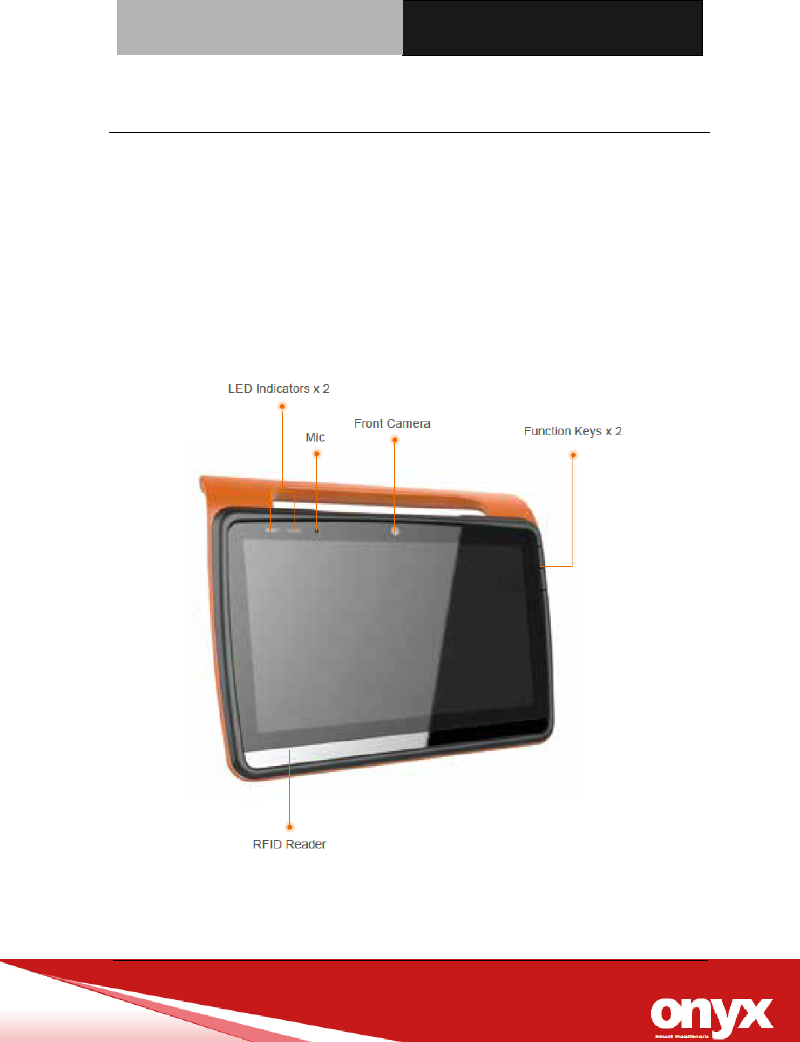
Before you start to set up ONYX-MD116, take a moment to become
familiar with the locations and purposes of the controls, drives,
connections and ports, which are illustrated in the figures below.
When you place ONYX-MD116 upright on the desktop, its front
panel appears as shown in Picture 2-1.
Picture 2.1: Front View of ONYX-MD116 Series
Slim Medical Panel PC ONYX-MD116
Chapter3 Award BIOS Setup 3-3
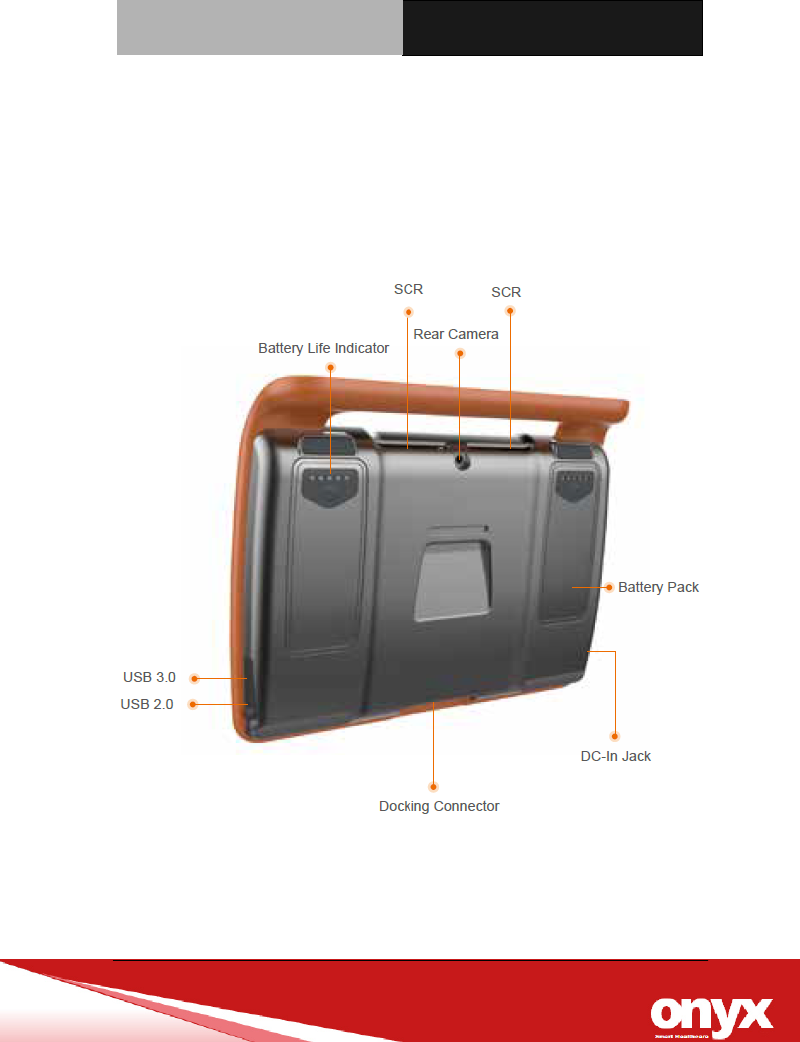
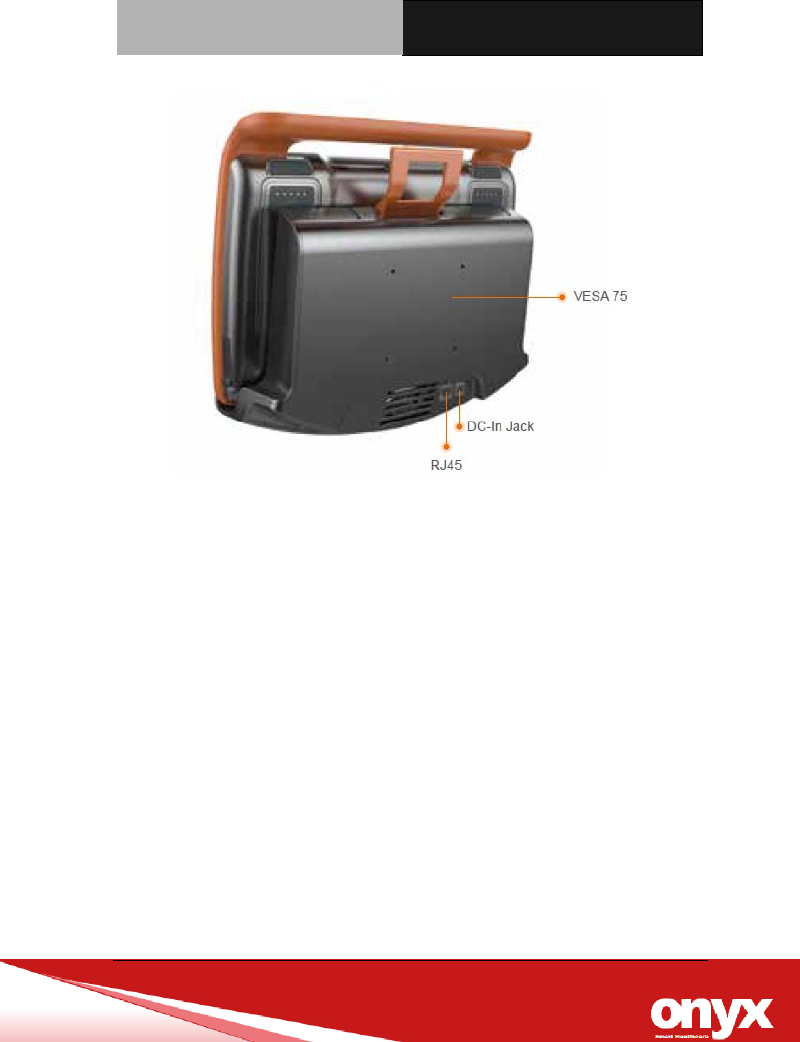
When you turn the Mobile Medical Assistant around and look at its
rear cover, the I/O port in left and right side, as shown in Picture 2-2.
(The I/O section includes various I/O ports, including a DC-IN Jack,
1 Ethernet ports, 2 USB ports.). Top side have 2 smart card reader.
Picture 2.2 Rear view of ONYX-MD116 Series IO Port
Slim Medical Panel PC ONYX-MD116
Chapter3 Award BIOS Setup 3-4
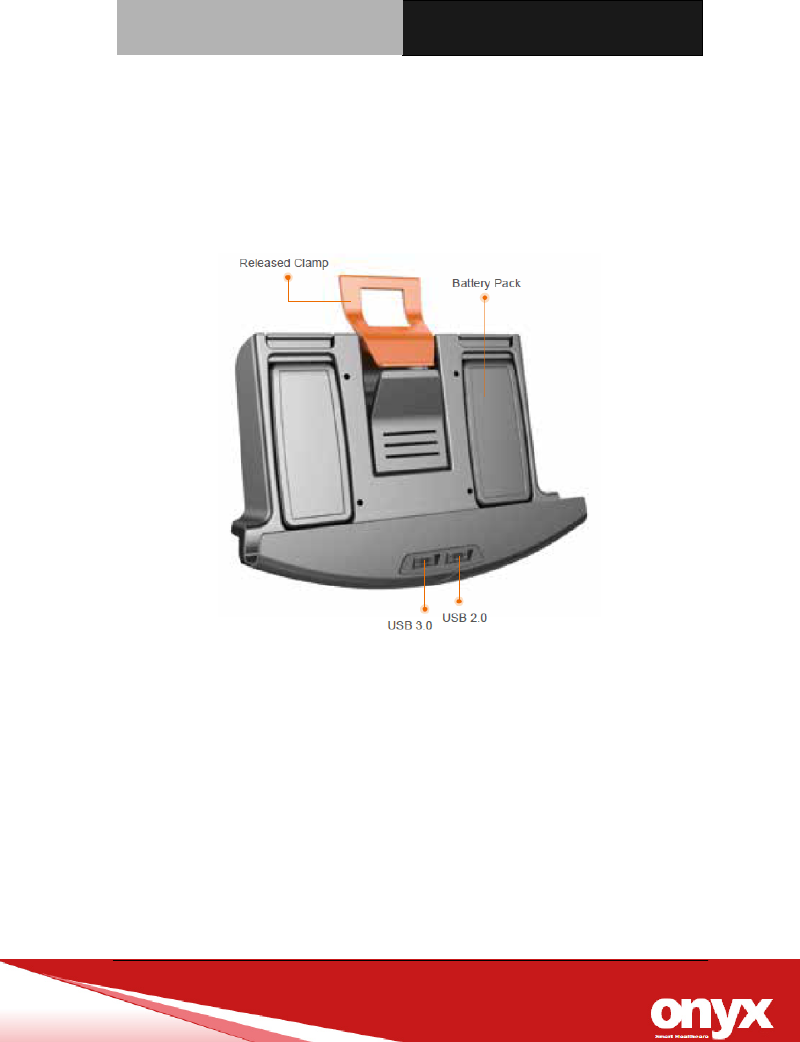
Below picture 2-3/2-4 show the Docking front and rear view. In front
view have 2 USB port and Battery charging hole. Back side have
DC-IN Jack and phoenix connector/ Line-out/ RJ 45 port.
Picture 2.3: ONYX-MD116 Docking front side
Slim Medical Panel PC ONYX-MD116
Chapter3 Award BIOS Setup 3-5
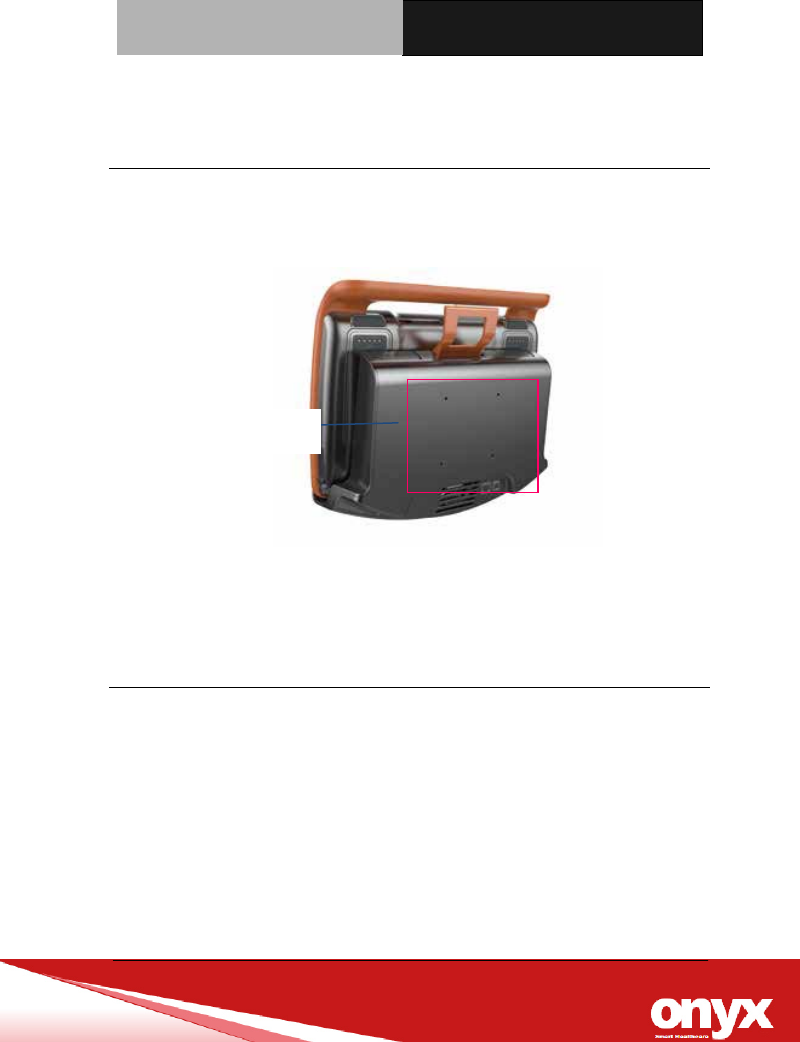
Picture 2.4: ONYX-MD116 back side view
Slim Medical Panel PC ONYX-MD116
Chapter3 Award BIOS Setup 3-6
2.3 Mounting
ONYX-MD116 Docking be mounted with 75mm x 75mm or 100mm x
100mm VESA holes in the rear cover by wall-mount or desktop stand.
2.4 Turn On and Boot up into Windows OS
This section is for Windows operating system only. If you are
installing a different operating system, please contact your vendor
for installation details.
Your ONYX-MD116 will begin loading Windows OS once you push
the power button to turn power on. After less than one minute,
Windows desktop screen will appear.
You can select the programs from the start menu in the left-down
corner of the desktop screen.
VESA Holes
Slim Medical Panel PC ONYX-MD116
Chapter3 Award BIOS Setup 3-7
2.5 Turn off
Turning off ONYX-MD116 properly is important for system reliability.
There are two ways to turn off the system.
1. On the start menu, click “shut down” and select “OK”
2. Push the power button and then the system will shut
down automatically
2.6 Connectors
1. USB 2.0 port These 4-pin Universal Serial Bus (USB)
ports are available for connecting USB 2.0 devices.
2. USB 3.0 These 9 Universal Serial Bus (USB) ports are
available for connecting USB 3.0 devices.
3. COM port. This 9-pin COM port is for serial devices.
4. LAN (RJ-45) port. These port allows Gigabit connection
5. POTENTIAL EQUALIZATION CONDUCTOR.
The purpose of additional potential equalization is to
equalize potentials between different metal parts that can
be touched simultaneously, or to reduce differences of
potential which can occur during operation between the
bodies of medical electrical devices and conductive parts
of other objects. The connector is specially shaped so as
to prevent chance disconnection when used as intended,
while allowing the lead to be removed without the need for
tools.

Slim Medical Panel PC ONYX-MD116
Chapter3 Driver Installation 3-1
Driver
Installation
Chapter
3

Slim Medical Panel PC ONYX-MD116
Chapter 4 Drivers Installation 3-2
There are several installation ways depending on the driver
package under different Operating Systems.
Please follow the sequence below to install the drivers:
For Windows 10:
Step 1 – Chipset Driver
Step 2 – Graphics Driver
Step 3 – SIO Driver
Step 4 – TXE Driver
Step 5 – Audio Driver
Step 6 –BT Driver
Step 7 –GPS Driver
Step 8 – Ethernet on Docking Driver
Step 9 – LAN Driver
Step 10 – SMART CARD READER Driver

Slim Medical Panel PC ONYX-MD116
Appendix A Miscellanea A-1
Miscellanea
Appendix
A

Slim Medical Panel PC ONYX-MD116
Appendix A Miscellanea A-2
A.1 General Cleaning Tips
You may need the following precautions before you begin to clean
the computer. When you clean any single part or component for the
computer, please read and understand the details below fully.
1. Never spray or squirt the liquids directly onto any computer
component. If you need to clean the device, please rub it
with a piece of dry cloth.
2. Be cautious of the tiny removable components when you
use a vacuum cleaner to absorb the dirt on the floor.
3. Turn the system off before you start to clean up the
component or computer.
4. Never drop the components inside the computer or get
circuit board damp or wet.
5. Be cautious of all kinds of cleaning solvents or chemicals
when you use it for the sake of cleaning. Some individuals
may be allergic to the ingredients.
6. Try not to put any food, drink or cigarette around the
computer.
7. ONYX Healthcare Inc. has tested and verified these
cleaning disinfectants, CIDEX, Viraguard, Control III
Disinfectant Germicide, Caviwipes, Dispatch Disinfectant
Cleaner CLH69101, Puregreen 24 Disinfectant, can be
used with ONYX-MD116. Use of any other disinfectants will

Slim Medical Panel PC ONYX-MD116
Appendix A Miscellanea A-3
void the warranty.
A.2 Cleaning tools
Although many companies have created products to help improve
the process of cleaning your computer and peripherals users can
also use household items to clean their computers and peripherals.
Below is a listing of items you may need or want to use while
cleaning your computer or computer peripherals.
Keep in mind that some components in your computer may only be
able to be cleaned using a product designed for cleaning that
component, if this is the case it will be mentioned in the cleaning
tips.
Cloth - A piece of cloth is the best tool to use when rubbing
up a component. Although paper towels or tissues can be
used on most hardware as well, we still recommend you to
rub it with a piece of cloth.
Water or rubbing alcohol – You may moisten a piece of
cloth a bit with some water or rubbing alcohol and rub it on
the computer. Unknown solvents may be harmful to the
plastics parts.
Vacuum cleaner - Absorb the dust, dirt, hair, cigarette
particles, and other particles out of a computer can be one
of the best methods of cleaning a computer. Over time
these items can restrict the airflow in a computer and cause

Slim Medical Panel PC ONYX-MD116
Appendix A Miscellanea A-4
circuitry to corrode.
Cotton swabs - Cotton swaps moistened with rubbing
alcohol or water are excellent tools for wiping hard to reach
areas in your keyboard, mouse, and other locations.
Foam swabs - Whenever possible it is better to use lint
free swabs such as foam swabs.
Please follow the steps below.
1. Close all application programs.
2. Close operating software.
3. Turn off power switch
4. Remove all device
5. Pull out power cable
Note:
We strongly recommended that you should shut down the
system before you start to clean any single components.

Slim Medical Panel PC ONYX-MD116
Appendix A Miscellanea A-5
A.3 Scrap Computer Recycling
If the computer equipments need the maintenance or are beyond
repair, we strongly recommended that you should inform us as
soon as possible for the suitable solution. For the computers that
are no longer useful or work well, please contact with worldwide
distributors for recycling.
The worldwide distributors show on the following website:
http://www.onyx-healthcare.com.tw/Contact.php
Note:
Follow the national requirement to dispose unit

Slim Medical Panel PC ONYX-MD116
Appendix A Miscellanea A-6
FEDERAL COMMUNICATIONS COMMISSION INTERFERENCE STATEMENT
ThisequipmenthasbeentestedandfoundtocomplywiththelimitsforaClassBdigital
device,pursuanttopart15oftheFCCRules.Theselimitsaredesignedtoprovide
reasonableprotectionagainstharmfulinterferenceinaresidentialinstallation.This
equipmentgenerates,usesandcanradiateradiofrequencyenergyand,ifnotinstalled
andusedinaccordancewiththeinstructions,maycauseharmfulinterferencetoradio
communications.However,thereisnoguaranteethatinterferencewillnotoccurina
particularinstallation.Ifthisequipmentdoescauseharmfulinterferencetoradioor
televisionreception,whichcanbedeterminedbyturningtheequipmentoffandon,the
userisencouragedtotrytocorrecttheinterferencebyoneormoreofthefollowing
measures:
‐Reorientorrelocatethereceivingantenna.
‐Increasetheseparationbetweentheequipmentandreceiver.
‐Connecttheequipmentintoanoutletonacircuitdifferentfromthattowhichthe
receiverisconnected.
‐Consultthedealeroranexperiencedradio/TVtechnicianforhelp.
CAUTION:
Anychangesormodificationsnotexpresslyapprovedbythegranteeofthisdevice
couldvoidtheuser'sauthoritytooperatetheequipment.
Slim Medical Panel PC ONYX-MD116
Appendix A Miscellanea A-7
TheFCChasgrantedanEquipmentAuthorizationforthisdevicewithallreportedSARlevelsevaluated
asincompliancewiththeFCCRFexposureguidelines.SARinformationonthisdeviceisonfilewiththe
FCCandcanbefoundundertheDisplayGrantsectionofwww.fcc.gov/eot/ea/fccidaftersearchingon
FCCID:RZ5‐MP3
Antenna List
No.ManufacturerPart No.Antenna TypePeak Gain
1ARISTOTLE RFA-25-AP152-70B340R (Main)
RFA-25-AP152-70-285L (Aux)
PIFA Antenna3.93dBi for 2.4 GHz
7.19dBi For 5.15~5.25GHz
7.30dBi For 5.25~5.35GHz
7.44dBi For 5.47~5.725GHz
7.57dBi For 5.725~5.850GHz
RFExposureInformation(SAR)
Thisdevicemeetsthegovernment’srequirementsforexposuretoradiowaves.Thisdeviceisdesigned
andmanufacturednottoexceedtheemissionlimitsforexposuretoradiofrequency(RF)energysetby
theFederalCommunicationsCommissionoftheU.S.Government.
TheexposurestandardemploysaunitofmeasurementknownastheSpecificAbsorptionRate,orSAR.
TheSARlimitsetbytheFCCis1.6W/kg.TestsforSARareconductedusingstandardoperatingpositions
acceptedbytheFCCwiththeEUTtransmittingatthespecifiedpowerlevelindifferentchannels.