STONEX SRL B2029 GPS Receiver User Manual Contents

STONEX SRL GPS Receiver Contents

Contents

User Manual --4.18_Host

                   Contents 1                Version: 1.4 Revision: D- Applicate alcune correzioni di katherine , Alice e James. Da impaginare e completare . Data: 18-04-2013 Revised by: RC
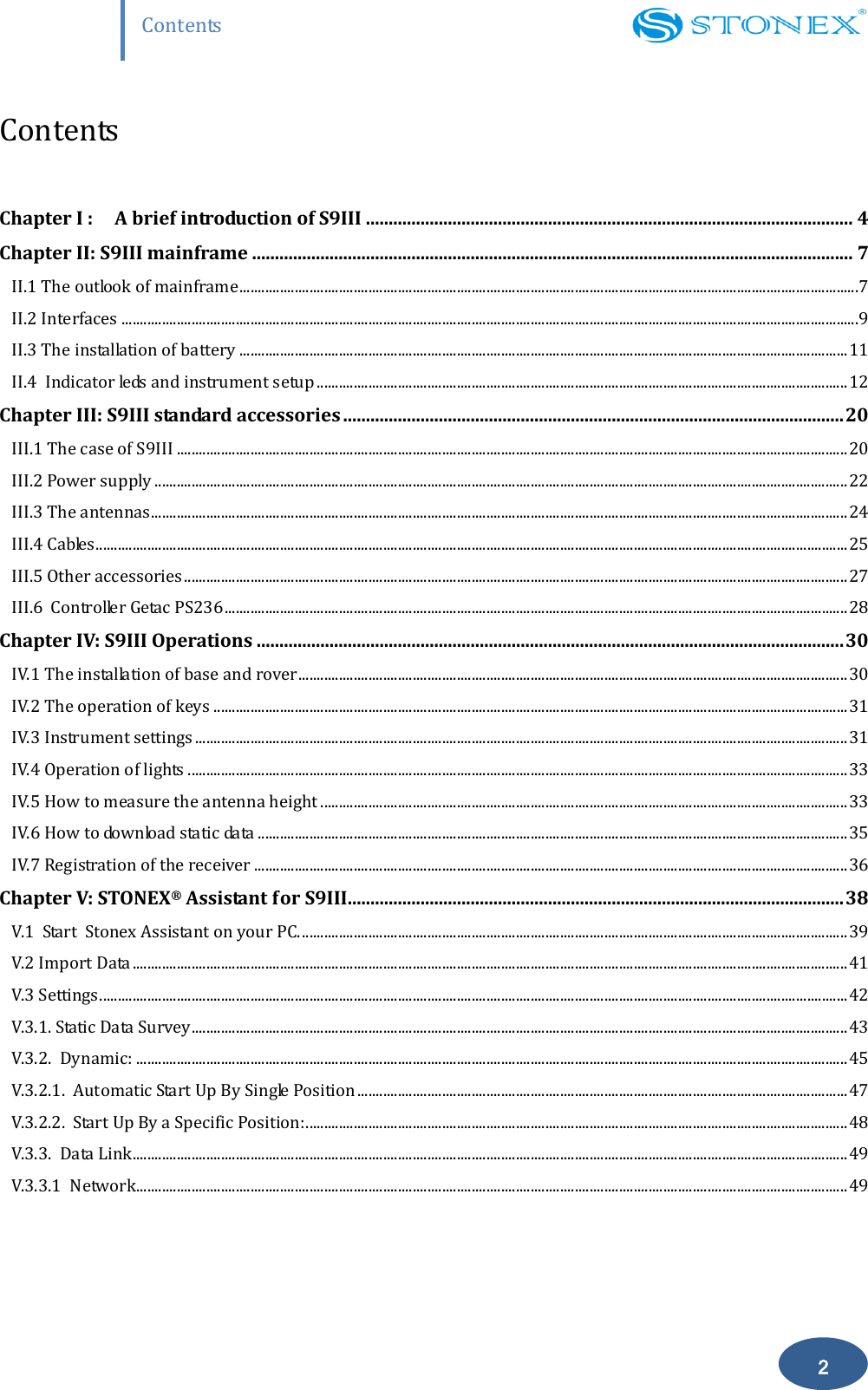
                   Contents 2 Contents  Chapter I : A brief introduction of S9III ........................................................................................................... 4 Chapter II: S9III mainframe .................................................................................................................................... 7 II.1 The outlook of mainframe ........................................................................................................................................................................7 II.2 Interfaces ........................................................................................................................................................................................................9 II.3 The installation of battery ..................................................................................................................................................................... 11 II.4  Indicator leds and instrument setup ................................................................................................................................................ 12 Chapter III: S9III standard accessories .............................................................................................................. 20 III.1 The case of S9III ...................................................................................................................................................................................... 20 III.2 Power supply ............................................................................................................................................................................................ 22 III.3 The antennas............................................................................................................................................................................................. 24 III.4 Cables ............................................................................................................................................................................................................ 25 III.5 Other accessories .................................................................................................................................................................................... 27 III.6  Controller Getac PS236 ......................................................................................................................................................................... 28 Chapter IV: S9III Operations ................................................................................................................................. 30 IV.1 The installation of base and rover ..................................................................................................................................................... 30 IV.2 The operation of keys ............................................................................................................................................................................ 31 IV.3 Instrument settings ................................................................................................................................................................................. 31 IV.4 Operation of lights ................................................................................................................................................................................... 33 IV.5 How to measure the antenna height ............................................................................................................................................... 33 IV.6 How to download static data ................................................................................................................................................................ 35 IV.7 Registration of the receiver ................................................................................................................................................................. 36 Chapter V: STONEX® Assistant for S9III............................................................................................................. 38 V.1  Start  Stonex Assistant on your PC. .................................................................................................................................................... 39 V.2 Import Data .................................................................................................................................................................................................. 41 V.3 Settings ........................................................................................................................................................................................................... 42 V.3.1. Static Data Survey .................................................................................................................................................................................. 43 V.3.2.  Dynamic: ................................................................................................................................................................................................. 45 V.3.2.1.  Automatic Start Up By Single Position ..................................................................................................................................... 47 V.3.2.2.  Start Up By a Specific Position: ................................................................................................................................................... 48 V.3.3.  Data Link .................................................................................................................................................................................................. 49 V.3.3.1  Network................................................................................................................................................................................................. 49
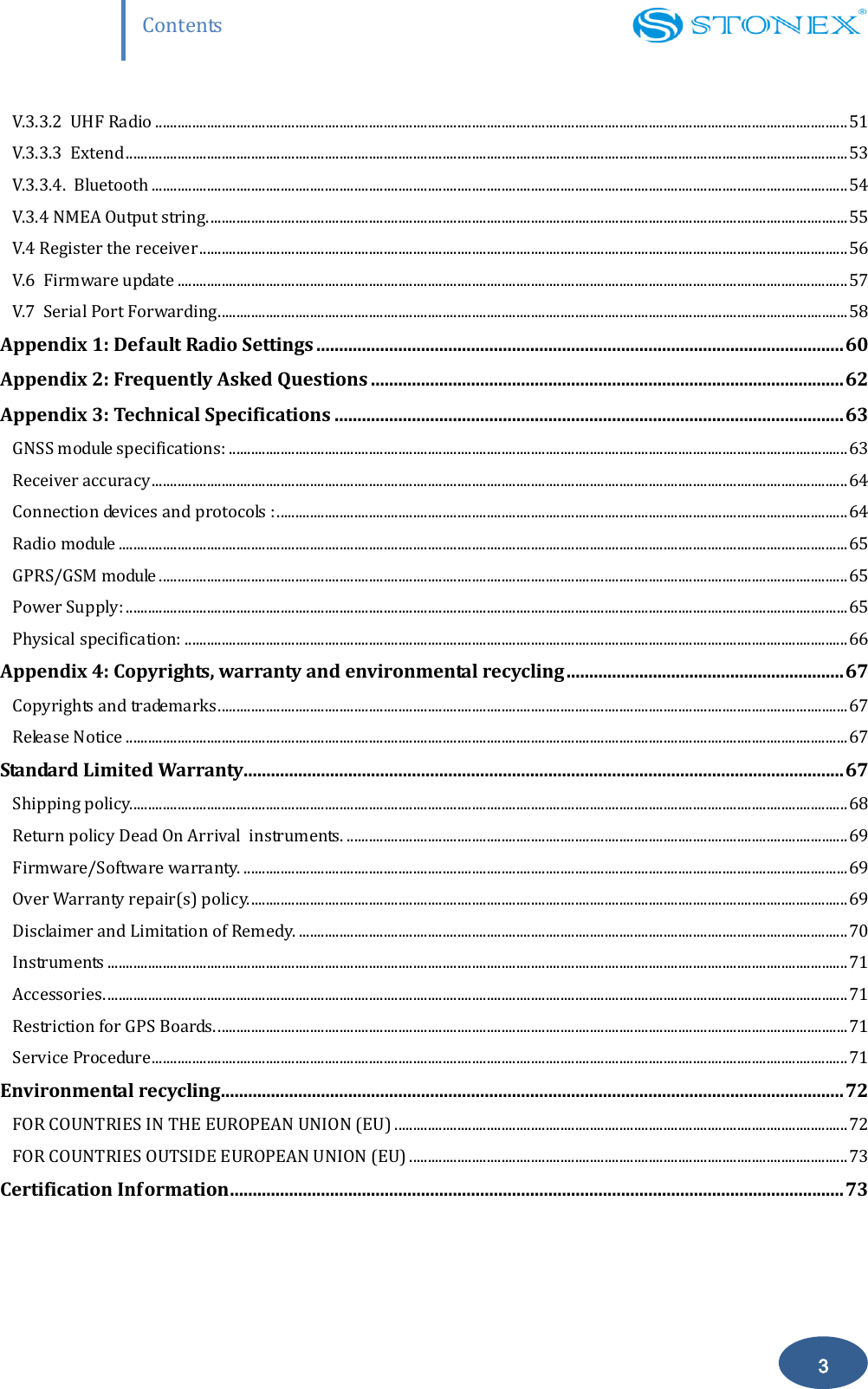
                   Contents 3 V.3.3.2  UHF Radio ............................................................................................................................................................................................ 51 V.3.3.3  Extend .................................................................................................................................................................................................... 53 V.3.3.4.  Bluetooth ............................................................................................................................................................................................. 54 V.3.4 NMEA Output string. ............................................................................................................................................................................. 55 V.4 Register the receiver ................................................................................................................................................................................ 56 V.6  Firmware update ...................................................................................................................................................................................... 57 V.7  Serial Port Forwarding ........................................................................................................................................................................... 58 Appendix 1: Default Radio Settings .................................................................................................................... 60 Appendix 2: Frequently Asked Questions ........................................................................................................ 62 Appendix 3: Technical Specifications ................................................................................................................ 63 GNSS module specifications: ........................................................................................................................................................................ 63 Receiver accuracy ............................................................................................................................................................................................. 64 Connection devices and protocols : ........................................................................................................................................................... 64 Radio module ...................................................................................................................................................................................................... 65 GPRS/GSM module ........................................................................................................................................................................................... 65 Power Supply: .................................................................................................................................................................................................... 65 Physical specification: .................................................................................................................................................................................... 66 Appendix 4: Copyrights, warranty and environmental recycling ............................................................. 67 Copyrights and trademarks ........................................................................................................................................................................... 67 Release Notice .................................................................................................................................................................................................... 67 Standard Limited Warranty .................................................................................................................................... 67 Shipping policy................................................................................................................................................................................................... 68 Return policy Dead On Arrival  instruments. ........................................................................................................................................ 69 Firmware/Software warranty. .................................................................................................................................................................... 69 Over Warranty repair(s) policy. .................................................................................................................................................................. 69 Disclaimer and Limitation of Remedy. ..................................................................................................................................................... 70 Instruments ......................................................................................................................................................................................................... 71 Accessories. ......................................................................................................................................................................................................... 71 Restriction for GPS Boards. ........................................................................................................................................................................... 71 Service Procedure ............................................................................................................................................................................................. 71 Environmental recycling ......................................................................................................................................... 72 FOR COUNTRIES IN THE EUROPEAN UNION (EU) ........................................................................................................................... 72 FOR COUNTRIES OUTSIDE EUROPEAN UNION (EU) ....................................................................................................................... 73 Certification Information ....................................................................................................................................... 73
                   Chapter I: A brief introduction of S9 III 4  Chapter I : A brief introduction of S9III The manufacture of this device is Stonex Europe Srl. STONEX® devoted itself to offer to surveyors the most advanced GPS tools. GPS RTK surveying technology plays an important role in surveying tasks and its use is getting more and more widespread. As a leading GPS RTK instrument producer, STONEX® guarantees that the S9III, our latest RTK GPS receiver,  is suited for nowadays demands of precision, reliability and user friendliness.  S9III is able to receive both of GPS signal frequencies, but also satellite signals from GLONASS and GALILEO, so we must correctly speak of “GNSS” receiver.    S9III  mainframe  integrates  a  GNSS  antenna,  GNSS  module,  UHF  transmitting  and  receiving radio,  radio  antenna,  GSM/GPRS  modem,  Bluetooth  device  and  battery.  So  S9III  is  totally integrated:  it means that the surveyor only needs the handheld to start its job. The  exquisite  outlook  and  the  amazing  color  bring  you  a  fashioned  surveying  station.  This device has a higher stability, lesser power consumption, smaller volume and lighter weight than the  previous  STONEX®  receivers.  S9III  has  a  special  design  which  makes  it  waterproof, dustproof  and  vibration-proof.  The  batteries  and  built-in  radio  are  set  in  the  bottom  of mainframe,  giving  more  effective  dustproof  and  waterproof  qualities and  makes  the  S9III  a better performer in field of surveying. The Wireless receiver unit (weighs) 1.2 kg: the rover is light and easy to carry. The low power consumption of receiver allows users to carry out  and work in long time  with only one  single battery.  Integrated  design  and  anti-jamming  property  are  combined  perfectly:  the  former  avoids  the problem  of  a  cumbersome  external  antenna,  and  the  mainframe  design  can  resolve  the jamming problem effectively. The performance of data-transfer radio technology is state-of-the-art: the bit error rate (BER) is 10-7 and the radio collision problem is reduced.  UHF  antenna  is  studied  in  order  to  make  its  electromagnetic  center  connected  with  the electromagnetic center of dual-frequency antenna: in this way it reduces at the same time the
                   Chapter I: A brief introduction of S9 III 5 interference and makes the volume much smaller. The tight electronic shielding can avoid the interference more effectively. The S9III receiver mounts a GPS/GLONASS antenna with a four feed technology.  This design is able to reduce the electrical phase center error ellipsoid and in addiction it improves the Right Hand  Circular  Polarization  Characteristics  (RHCP)  of the antenna,  resulting in enhanced  GPS signal  tracking  and  improved  multipath  rejection,  in  case  a  polarization  reversal  has  taken place as a result of the signal reflection. At  the  same  time  S9III  has  a  GPRS/GSM  module  which  supports  different  network  RTK technologies  (VRS,  FKP,  etc.).  This  allows  STONEX®  S9III  receiver  to  be  a  flexible  system  for demanding  surveying  applications.  As  a  rover,  it  can  be  used  as  a  static  double  frequency receiver or in a RTK configuration, where differential corrections are received from CORS via GSM/GPRS data modem (maximum range 70 km) or by another S9III receiver acting as base, linked by GSM/GPRS data modem or UHF radio modem.  In the last case S9III in base configuration can transmit with the built-in 0.5 W radio or can be connected to a more powerful external radio at user's disposal in order to reach the requested metric range.  The  receiver  can  be  connected  to  different  RTK  software  for  different applications.  The  data transfer is easy and fast, like a Plug and Play USB drive. STONEX® provides two year of warranty to S9III receivers . It should be noted that high power signals  from  a  nearby  radio  or  radar  transmitter  can  overwhelm  the  receiver  circuits.  Low power  transmitter  like  those  used  in  cell-phones  do  not  normally  interfere  with  receiver’s operations. It’s important to draw your attention to the operational temperatures, limits which should not be exceeded for a correct functioning (see pag. 55).  It  is  also  important  to  point  out  that  in  each  weather  case  after  coming  back  from  the  field you should keep  the container open in a warm and dry place and at the same time take out the controller and receiver from the container, in order to make them dry. Anyway we recommend you to manage the instrument with reasonable care.  Even if you have used other GPS or GNSS products before, we recommend that you spend some time reading this manual to learn about the special features of this product.
                   Chapter I: A brief introduction of S9 III 6 If you are not familiar with GNSS technology, we suggest you read a specific book in order to better understand the contents of this manual. Any way you can ask for any technical support by sending an email to our address support@stonex or contact your local dealer.    ATTENTION: In order to facilitate reading and operating, we offer one manual which take the S9Ⅲ GNSS for example  to introduce our products.  This manual is valid for S9Ⅲ GNSS, S9ⅢN GNSS, S8 GNS S, S8N GNSS. Most of their constructions, functions and operations are the same, just a little different between them and we list them on the page7, 8, 63, 64, 65. All of these will not affect the use of the products.
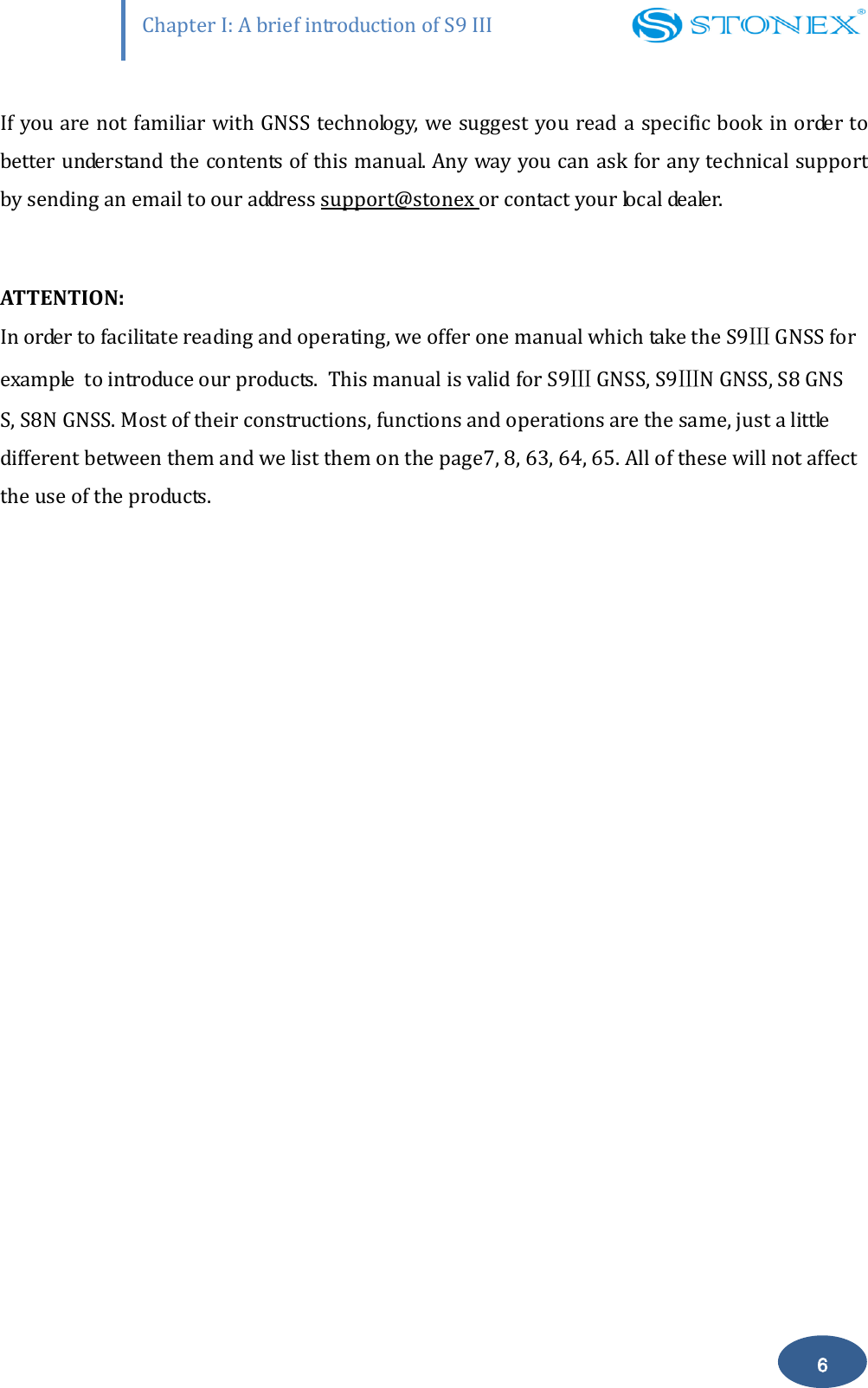
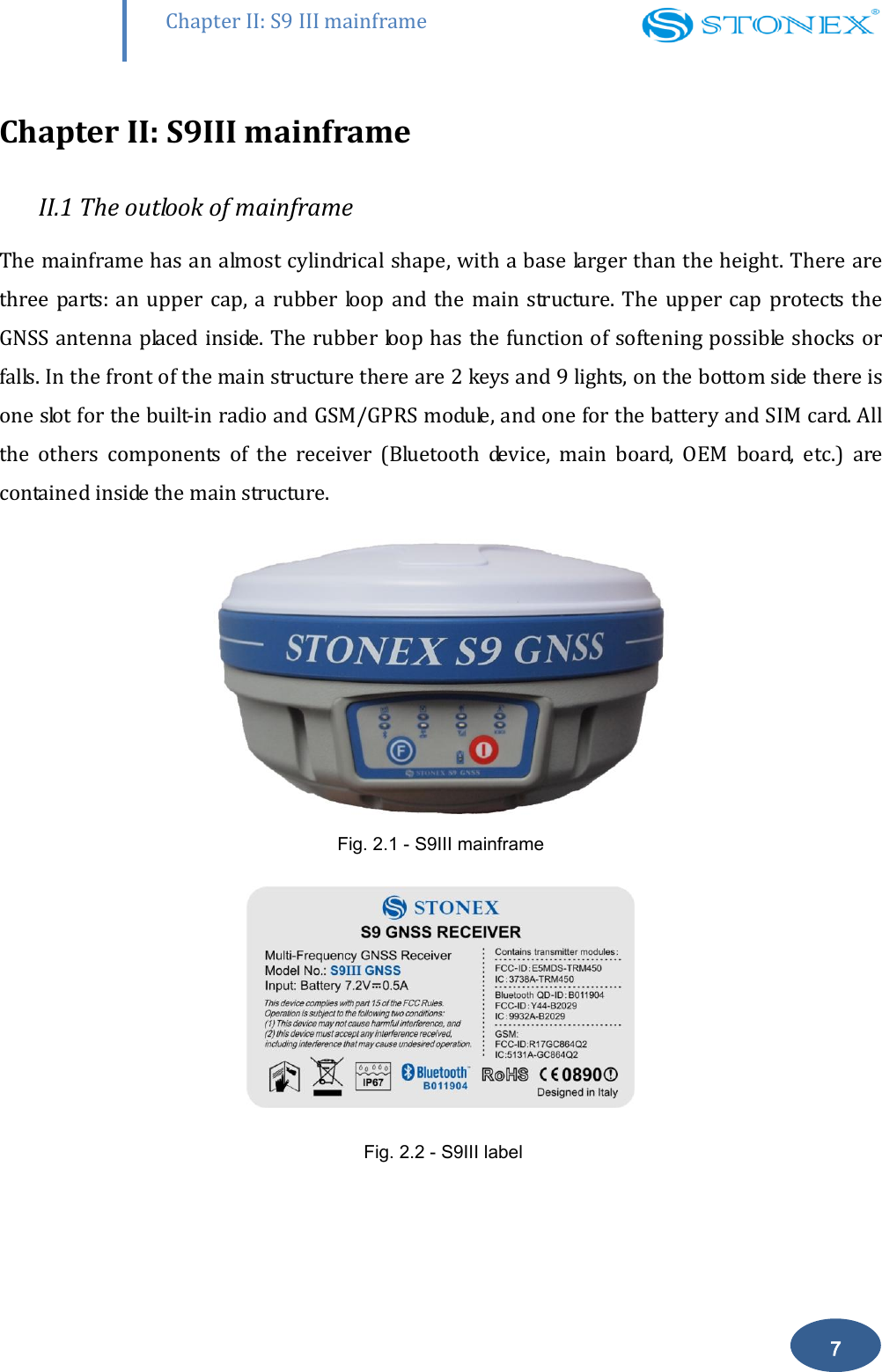
       Chapter II: S9 III mainframe 7 Chapter II: S9III mainframe II.1 The outlook of mainframe The mainframe has an almost cylindrical shape, with a base larger than the height. There are three parts:  an upper cap, a rubber  loop and the  main  structure.  The upper  cap protects the GNSS antenna placed inside. The rubber loop has the function of softening possible  shocks or falls. In the front of the main structure there are 2 keys and 9 lights, on the bottom side there is one slot for the built-in radio and GSM/GPRS module, and one for the battery and SIM card. All the  others  components  of  the  receiver  (Bluetooth  device,  main  board,  OEM  board,  etc.)  are contained inside the main structure.  Fig. 2.1 - S9III mainframe   Fig. 2.2 - S9III label
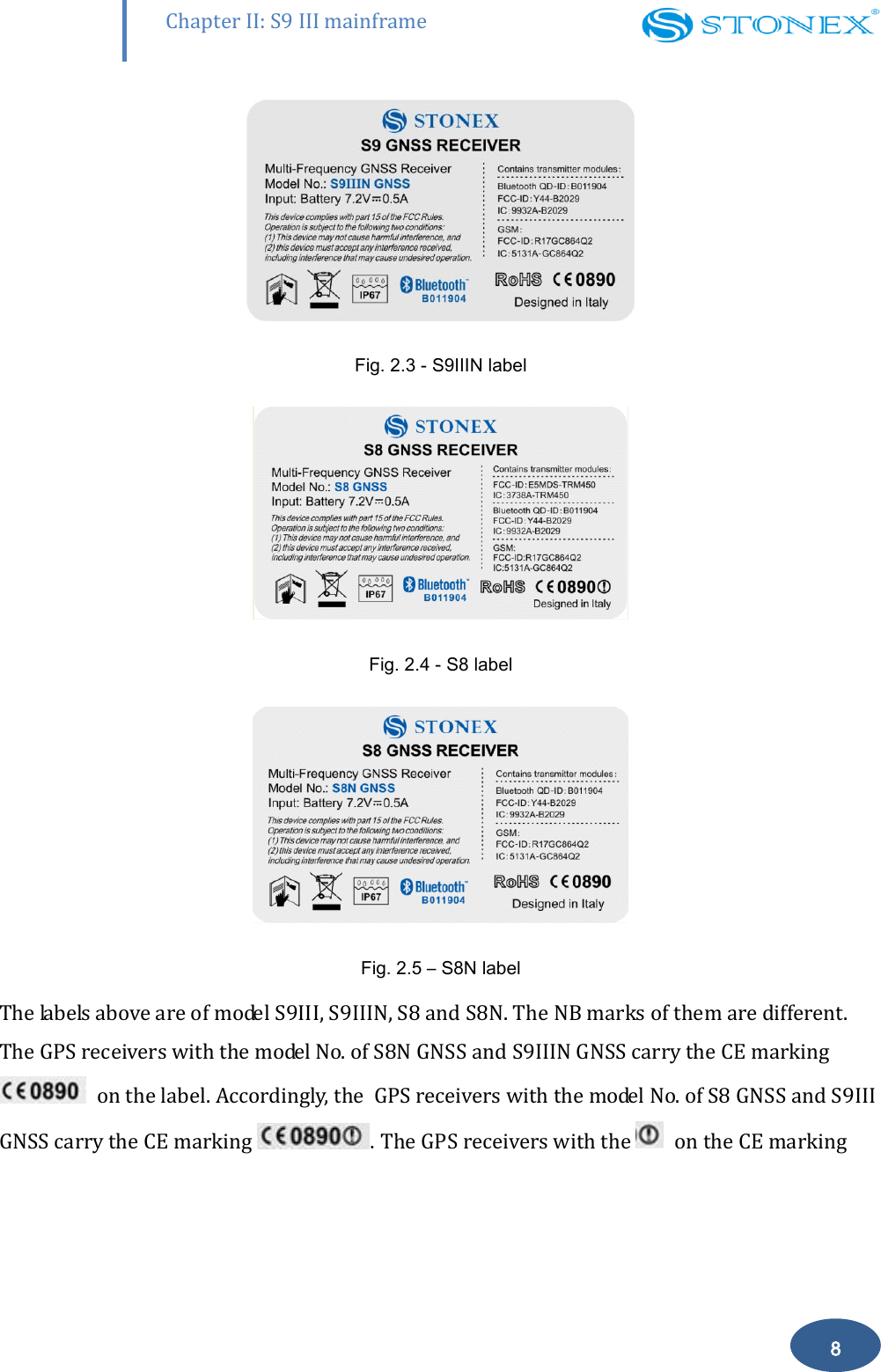
       Chapter II: S9 III mainframe 8   Fig. 2.3 - S9IIIN label  Fig. 2.4 - S8 label  Fig. 2.5 – S8N label  The labels above are of model S9III, S9IIIN, S8 and S8N. The NB marks of them are different. The GPS receivers with the model No. of S8N GNSS and S9IIIN GNSS carry the CE marking   on the label. Accordingly, the  GPS receivers with the model No. of S8 GNSS and S9III GNSS carry the CE marking  .The GPS receivers with the   on the CE marking
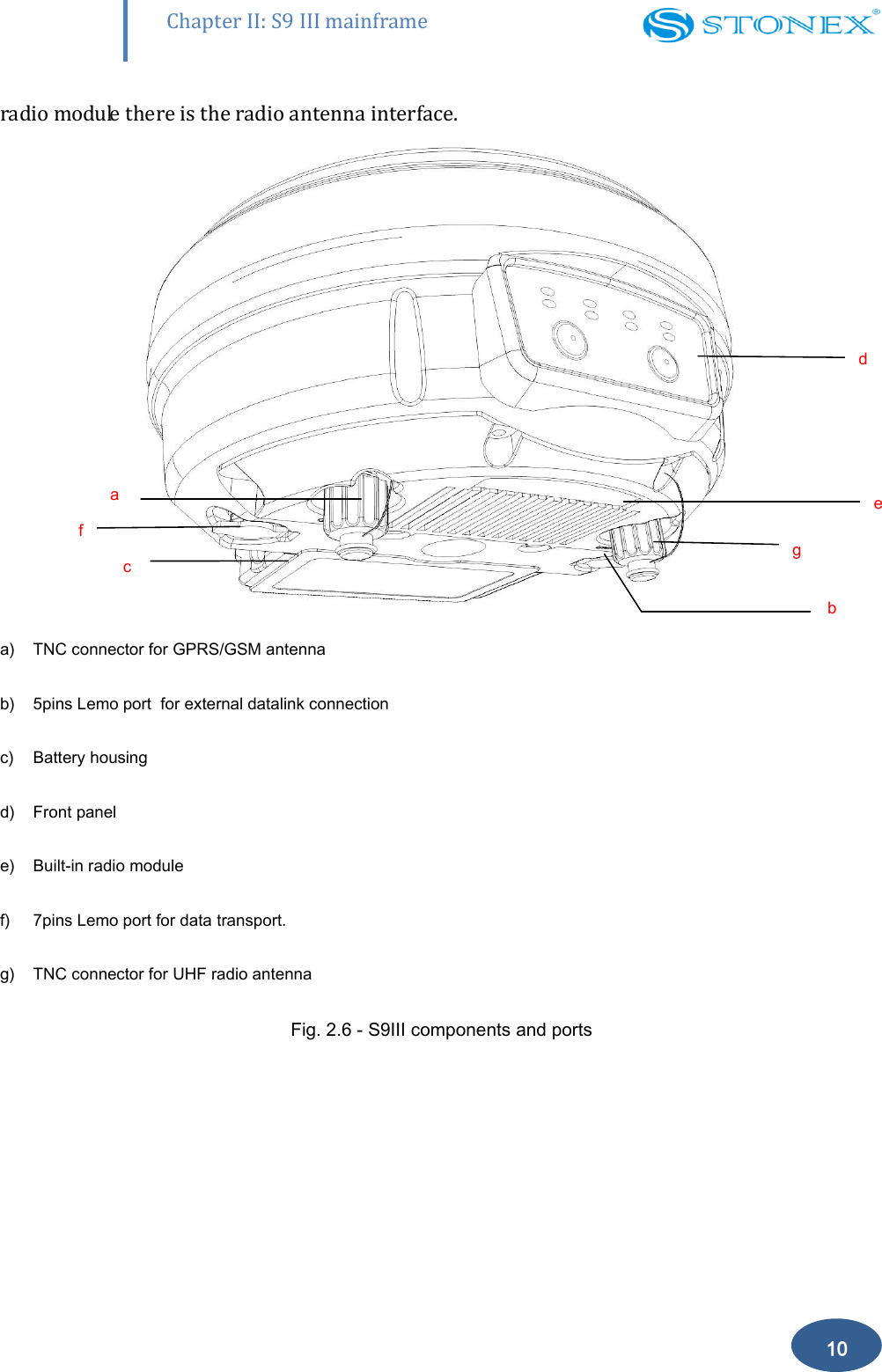
       Chapter II: S9 III mainframe 9 are sold to the countries of  Europe listed as follow: Belgium Croatia - Slovenia - Bosnia-Herzegovina Czech Republic Finland France Germany Greece Hungary Slovakia Italy Luxembourg Netherlands Poland Portugal Romania Russian Federation Spain Switzerland Turkey Ukraine United Kingdom  II.2 Interfaces The  mainframe  interfaces  are  shown  in  Fig.  2.6:  the  left  port  (five  pins  LEMO)  is  used  for external  power supply  and external  radio,  the  right port  (seven  pins LEMO)  is  used  for  data transferring between receiver and computer or between receiver and the handheld.  Near the
       Chapter II: S9 III mainframe 10 radio module there is the radio antenna interface.  a) TNC connector for GPRS/GSM antenna  b) 5pins Lemo port  for external datalink connection c) Battery housing d) Front panel e) Built-in radio module f) 7pins Lemo port for data transport. g) TNC connector for UHF radio antenna  Fig. 2.6 - S9III components and ports a f c d) e g b
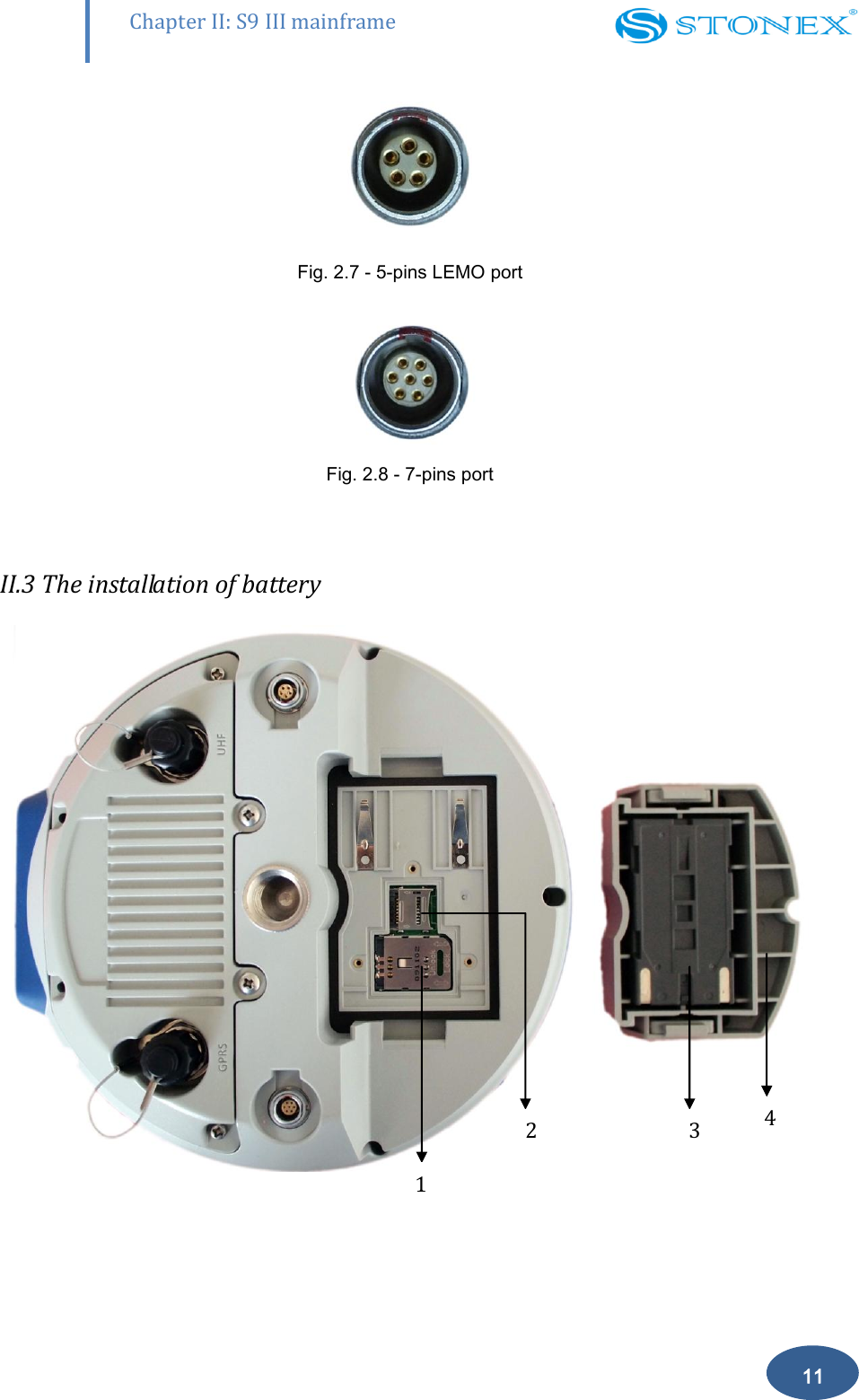
       Chapter II: S9 III mainframe 11  Fig. 2.7 - 5-pins LEMO port  Fig. 2.8 - 7-pins port  II.3 The installation of battery  1 3 4 2
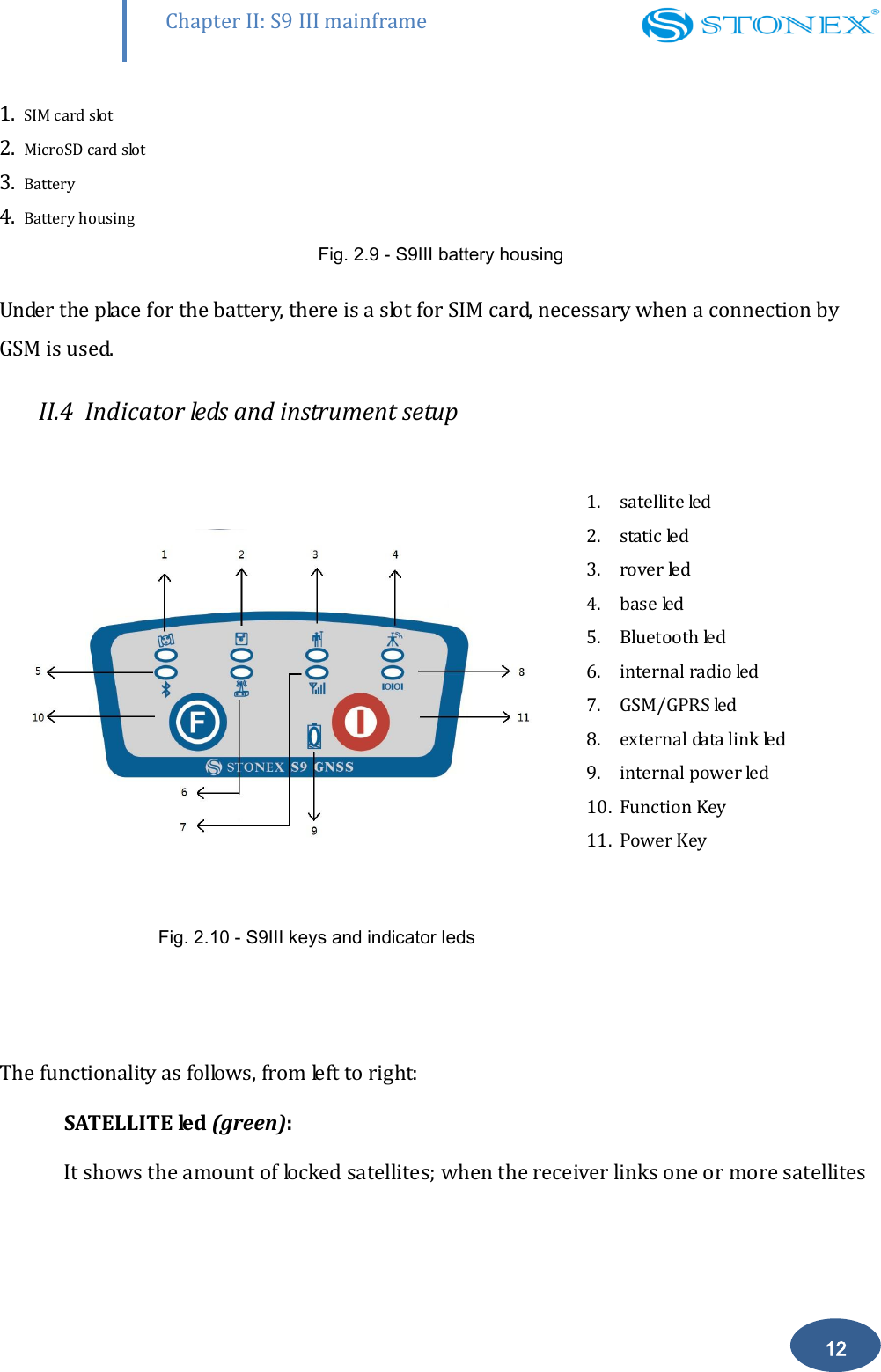
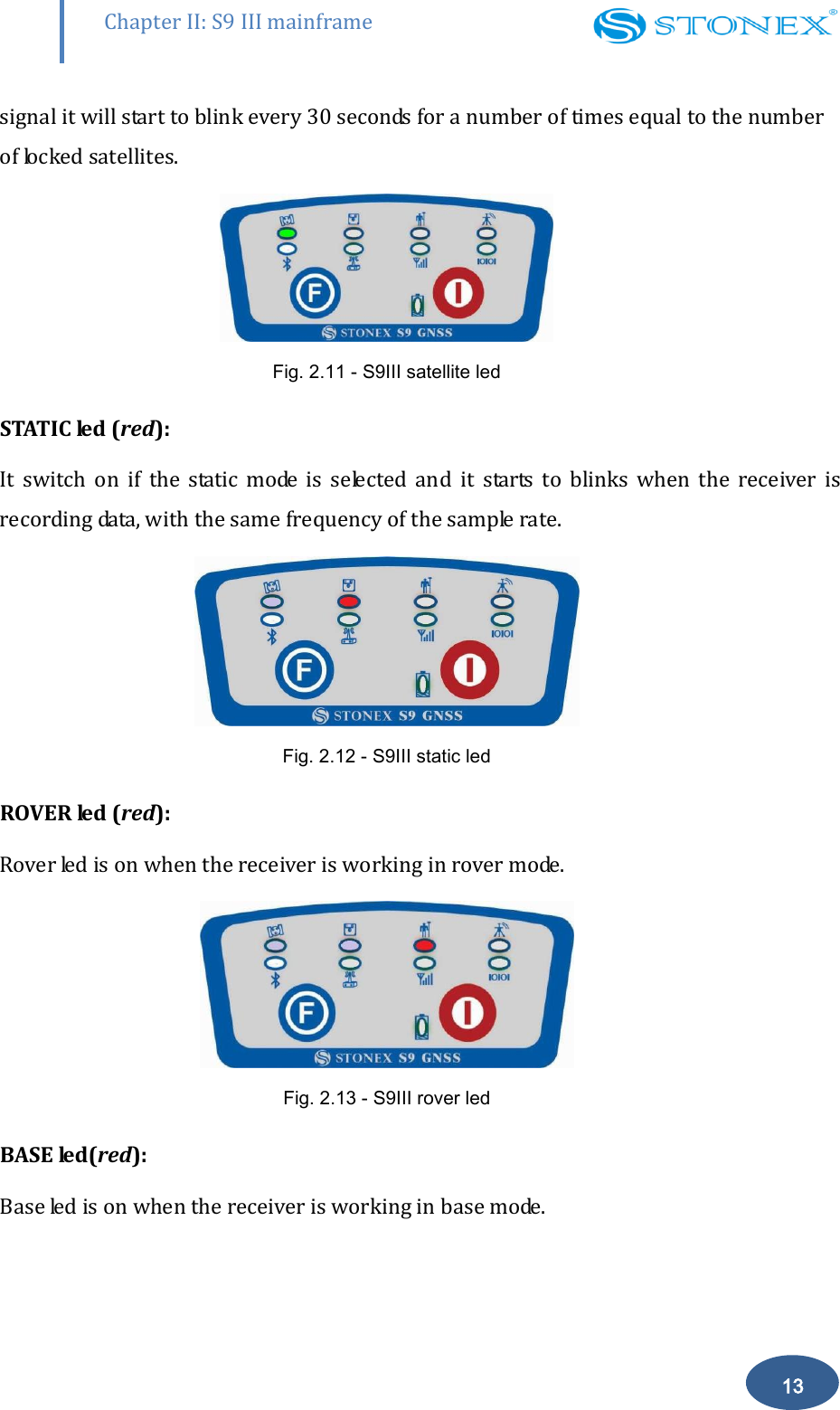
       Chapter II: S9 III mainframe 12 1. SIM card slot 2. MicroSD card slot 3. Battery 4. Battery housing Fig. 2.9 - S9III battery housing  Under the place for the battery, there is a slot for SIM card, necessary when a connection by GSM is used. II.4  Indicator leds and instrument setup                  Fig. 2.10 - S9III keys and indicator leds   1. satellite led 2. static led 3. rover led 4. base led 5. Bluetooth led 6. internal radio led 7. GSM/GPRS led 8. external data link led 9. internal power led 10. Function Key  11. Power Key   The functionality as follows, from left to right: SATELLITE led (green):  It shows the amount of locked satellites; when the receiver links one or more satellites
       Chapter II: S9 III mainframe 13 signal it will start to blink every 30 seconds for a number of times equal to the number of locked satellites.  Fig. 2.11 - S9III satellite led STATIC led (red):   It  switch  on  if  the  static  mode  is  selected  and  it  starts  to  blinks  when  the  receiver  is recording data, with the same frequency of the sample rate.   Fig. 2.12 - S9III static led ROVER led (red):  Rover led is on when the receiver is working in rover mode.  Fig. 2.13 - S9III rover led BASE led(red):  Base led is on when the receiver is working in base mode.
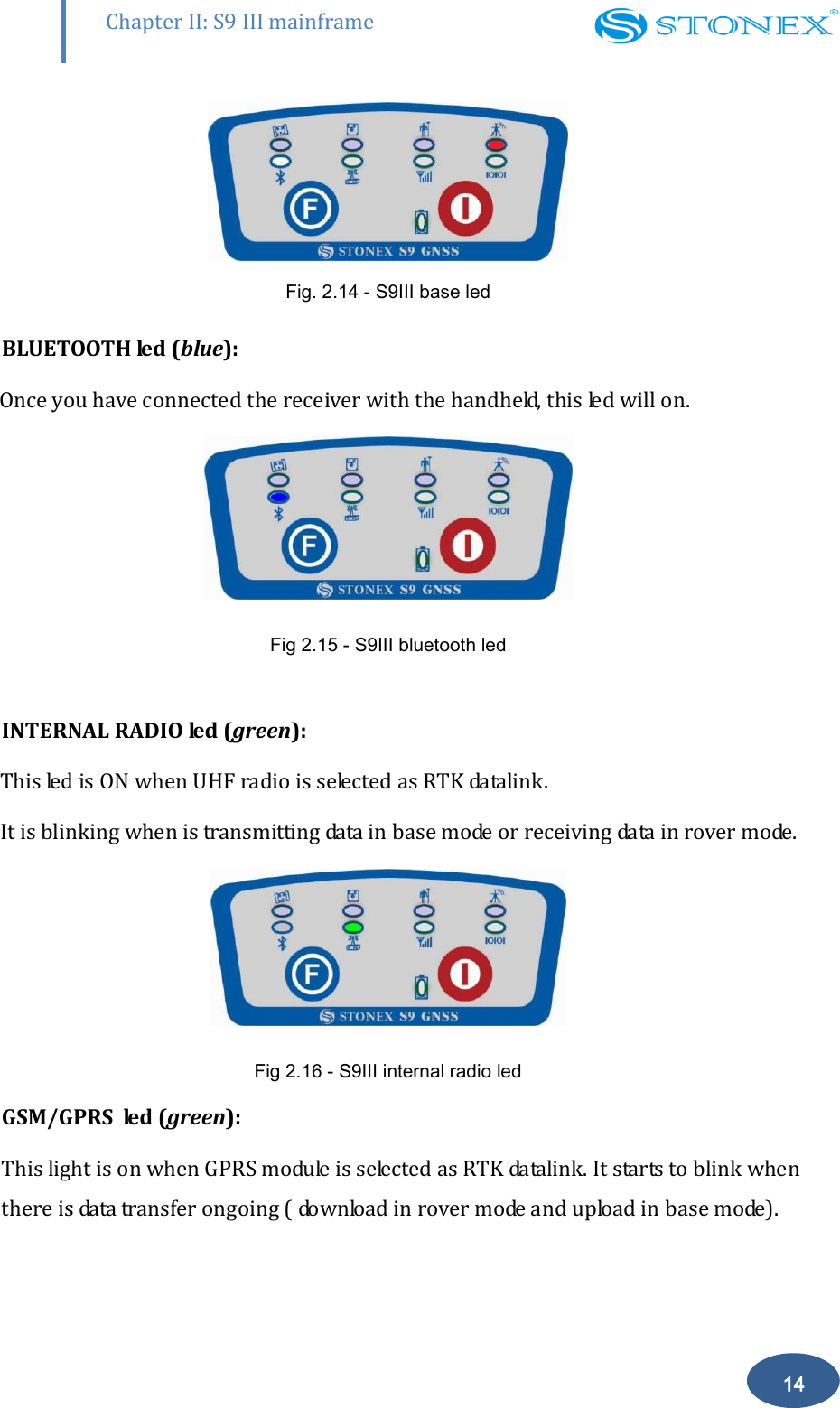
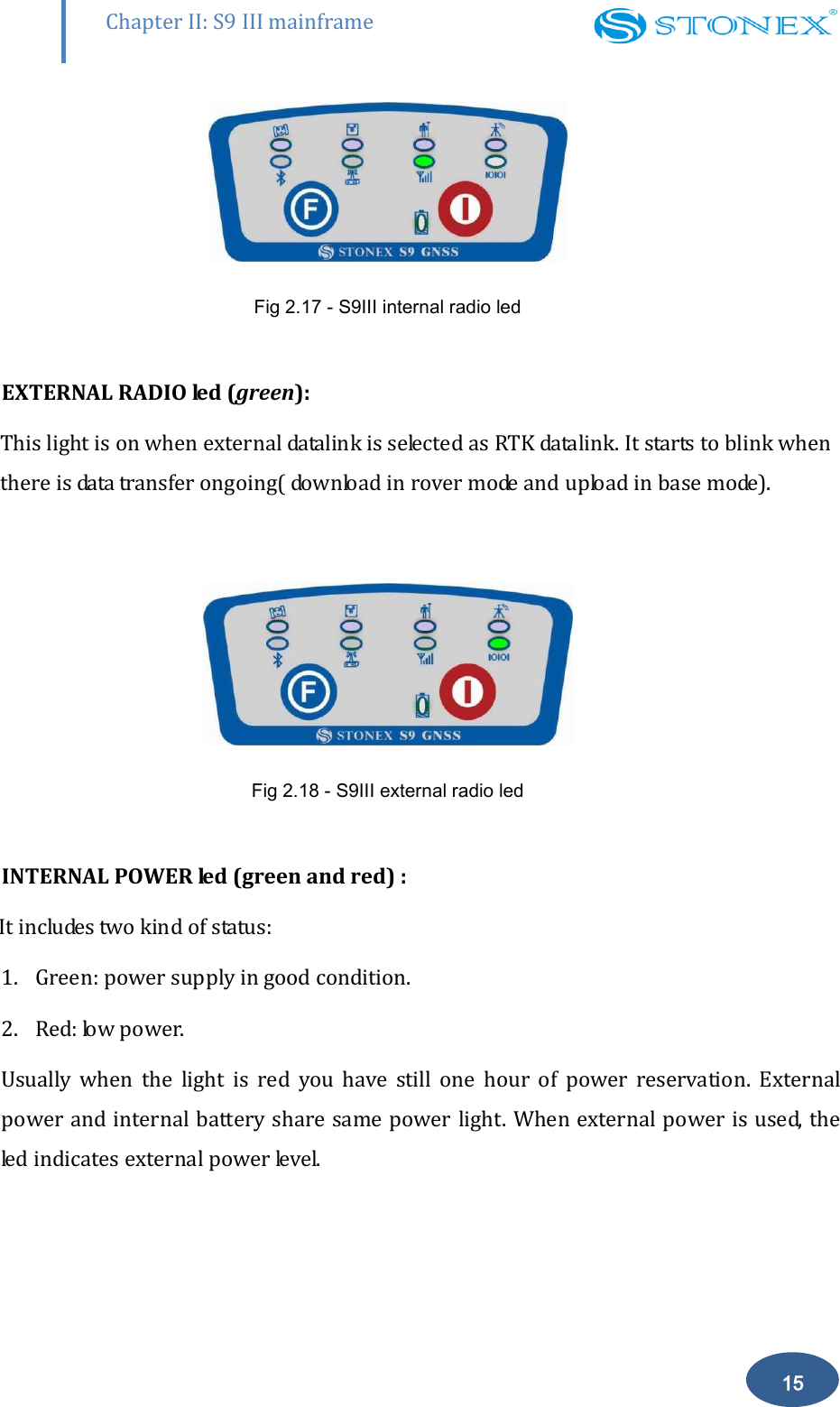
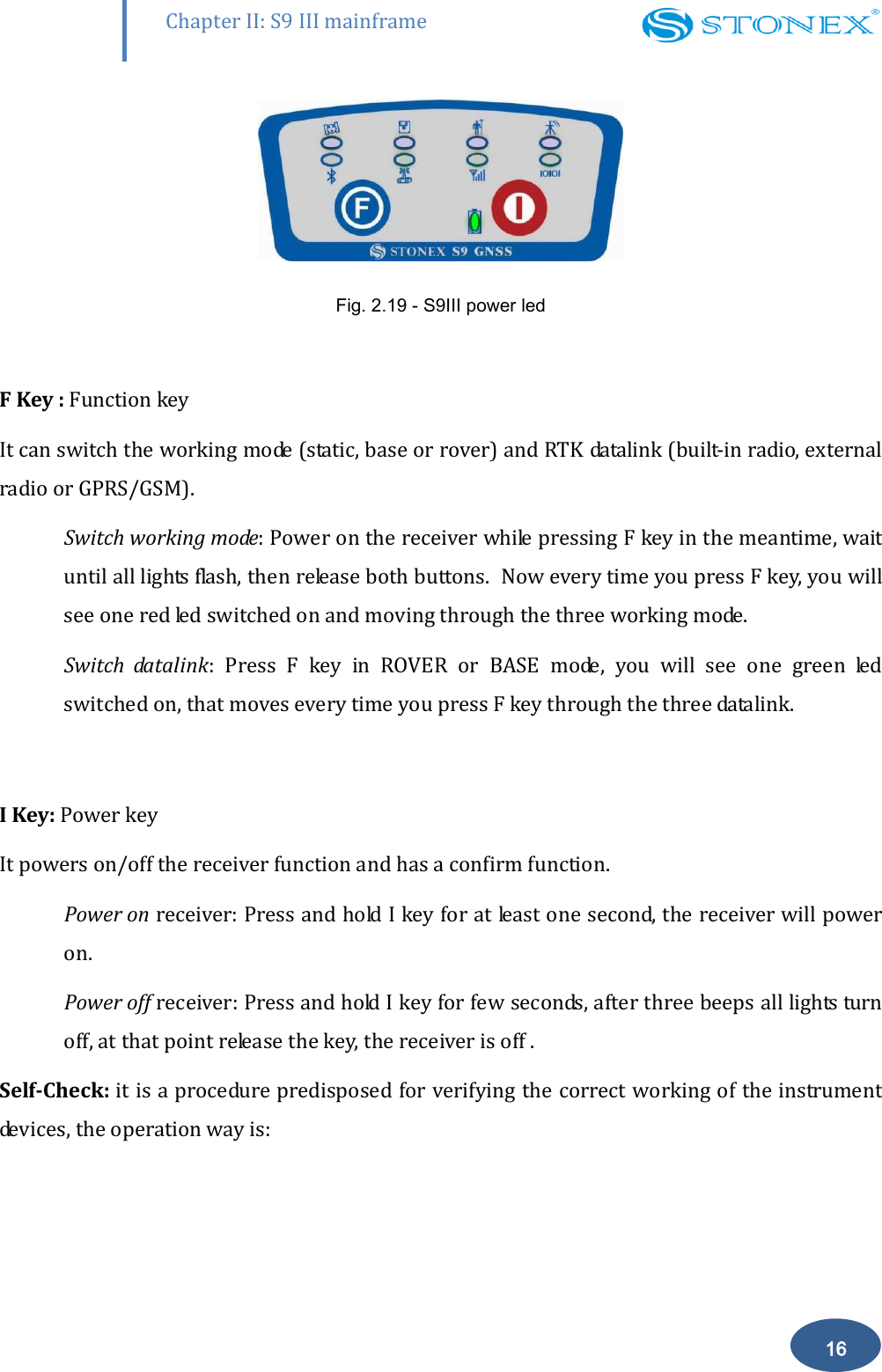
       Chapter II: S9 III mainframe 14  Fig. 2.14 - S9III base led BLUETOOTH led (blue):              Once you have connected the receiver with the handheld, this led will on.  Fig 2.15 - S9III bluetooth led  INTERNAL RADIO led (green): This led is ON when UHF radio is selected as RTK datalink. It is blinking when is transmitting data in base mode or receiving data in rover mode.  Fig 2.16 - S9III internal radio led GSM/GPRS  led (green):  This light is on when GPRS module is selected as RTK datalink. It starts to blink when there is data transfer ongoing ( download in rover mode and upload in base mode).
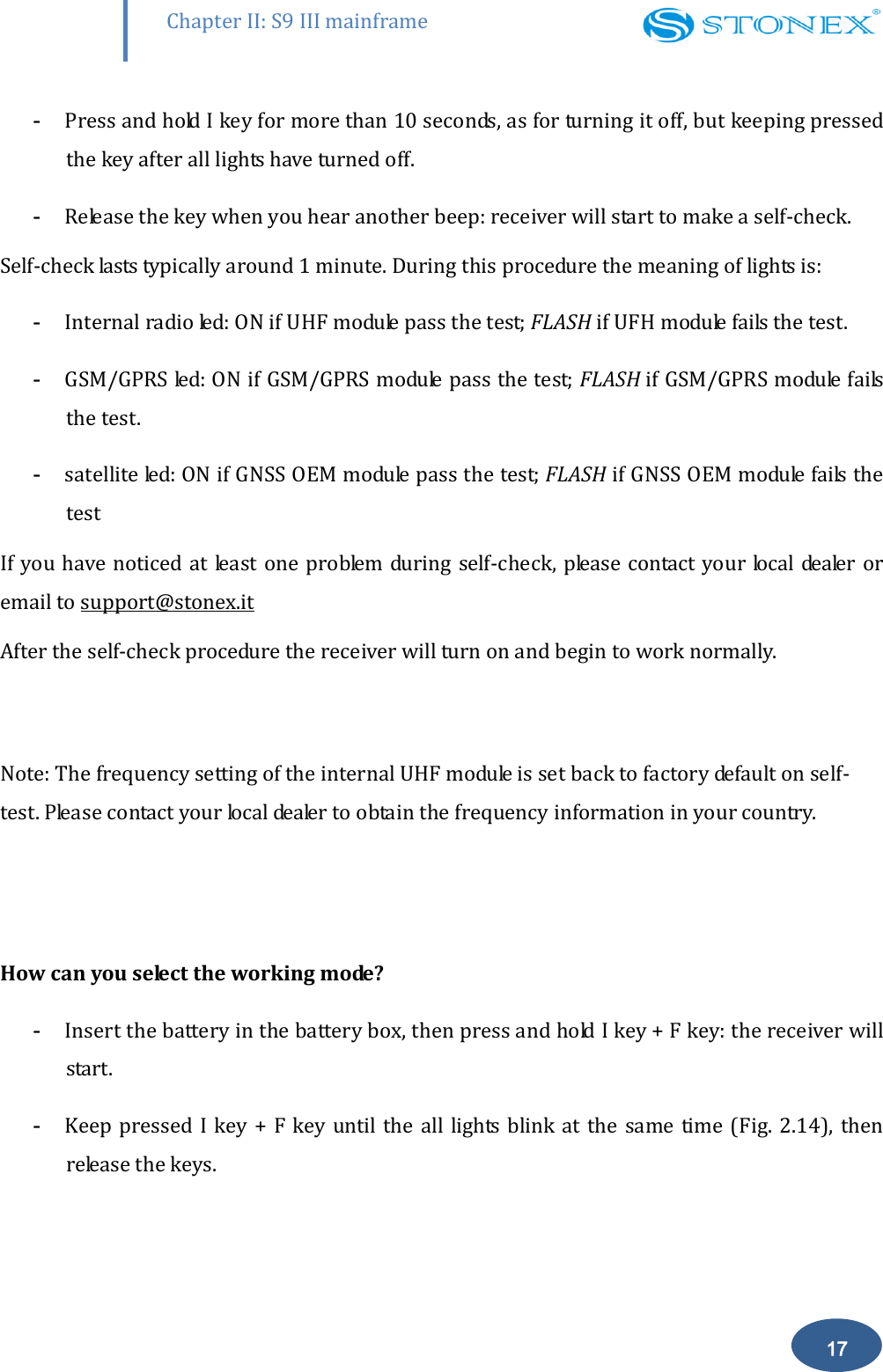
       Chapter II: S9 III mainframe 15  Fig 2.17 - S9III internal radio led  EXTERNAL RADIO led (green):   This light is on when external datalink is selected as RTK datalink. It starts to blink when there is data transfer ongoing( download in rover mode and upload in base mode).    Fig 2.18 - S9III external radio led  INTERNAL POWER led (green and red) :        It includes two kind of status: 1. Green: power supply in good condition.  2. Red: low power.  Usually  when  the  light  is  red  you  have  still  one  hour  of  power  reservation.  External power and internal battery share same power light. When external power is used, the led indicates external power level.
       Chapter II: S9 III mainframe 16  Fig. 2.19 - S9III power led  F Key : Function key It can switch the working mode (static, base or rover) and RTK datalink (built-in radio, external radio or GPRS/GSM). Switch working mode: Power on the receiver while pressing F key in the meantime, wait until all lights flash, then release both buttons.  Now every time you press F key, you will see one red led switched on and moving through the three working mode. Switch  datalink:  Press  F  key  in  ROVER  or  BASE  mode,  you  will  see  one  green  led switched on, that moves every time you press F key through the three datalink.  I Key: Power key It powers on/off the receiver function and has a confirm function.  Power on receiver: Press and hold I key for at least one second, the receiver will power on. Power off receiver: Press and hold I key for few seconds, after three beeps all lights turn off, at that point release the key, the receiver is off .  Self-Check: it is a procedure predisposed for verifying the correct working of the instrument devices, the operation way is:
       Chapter II: S9 III mainframe 17 - Press and hold I key for more than 10 seconds, as for turning it off, but keeping pressed the key after all lights have turned off.  - Release the key when you hear another beep: receiver will start to make a self-check.  Self-check lasts typically around 1 minute. During this procedure the meaning of lights is: - Internal radio led: ON if UHF module pass the test; FLASH if UFH module fails the test. - GSM/GPRS led: ON if GSM/GPRS module pass the test; FLASH if GSM/GPRS module fails the test. - satellite led: ON if GNSS OEM module pass the test; FLASH if GNSS OEM module fails the test If you have noticed at least  one problem during self-check, please contact your  local dealer or email to support@stonex.it After the self-check procedure the receiver will turn on and begin to work normally.   Note: The frequency setting of the internal UHF module is set back to factory default on self-test. Please contact your local dealer to obtain the frequency information in your country.    How can you select the working mode? - Insert the battery in the battery box, then press and hold I key + F key: the receiver will start. - Keep pressed I key  + F  key until the  all lights  blink at  the same  time (Fig. 2.14),  then release the keys.
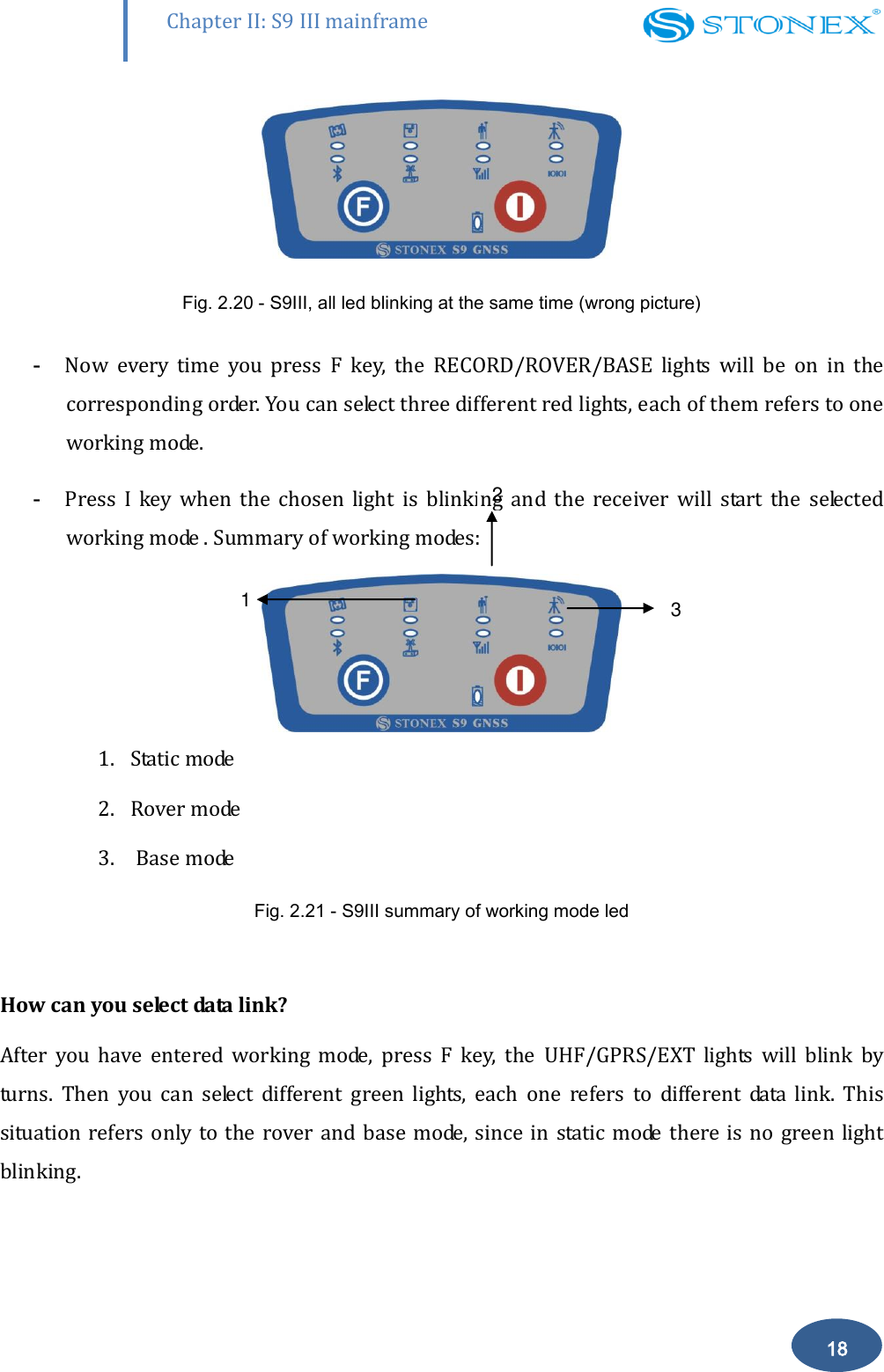
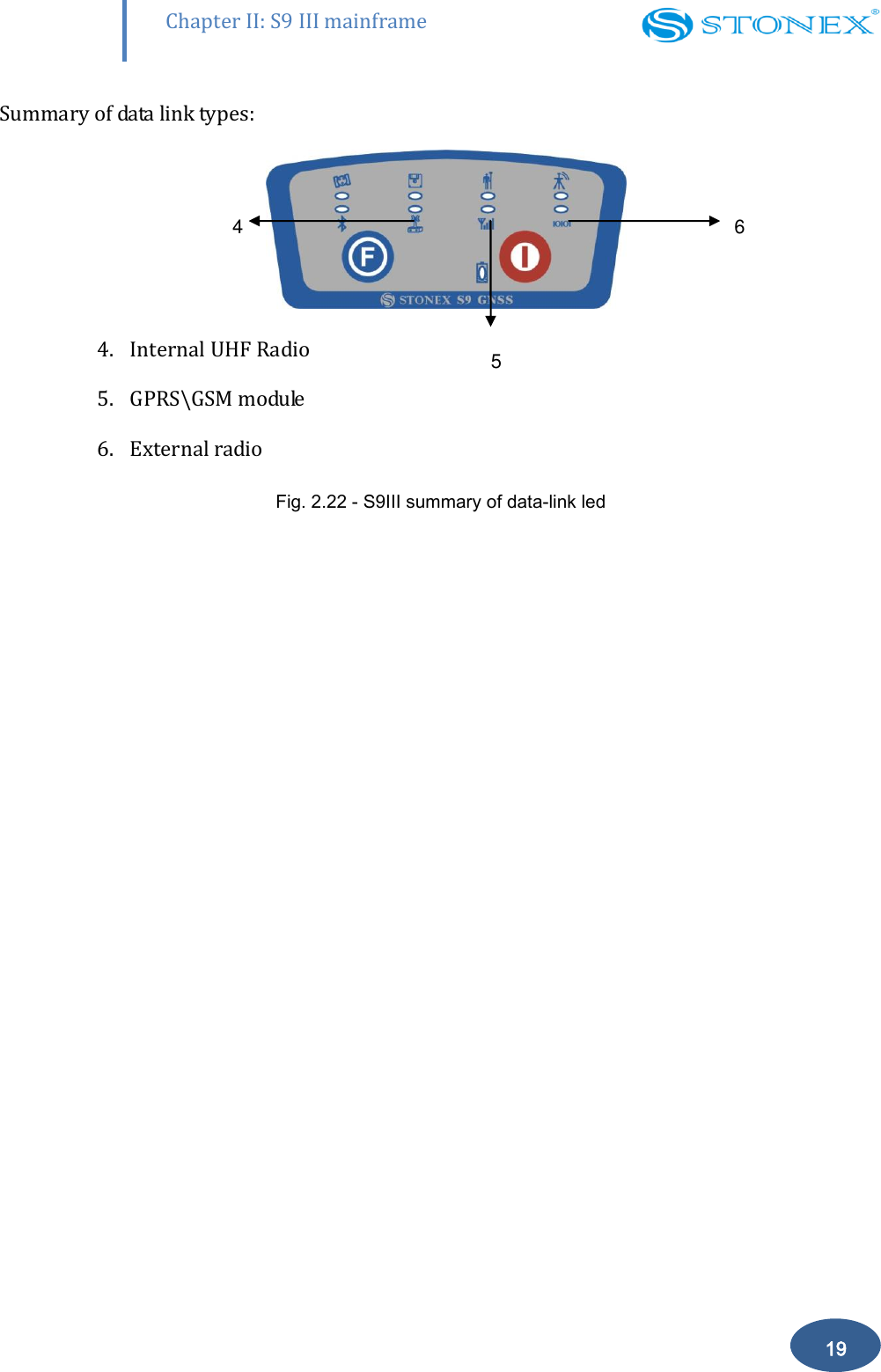
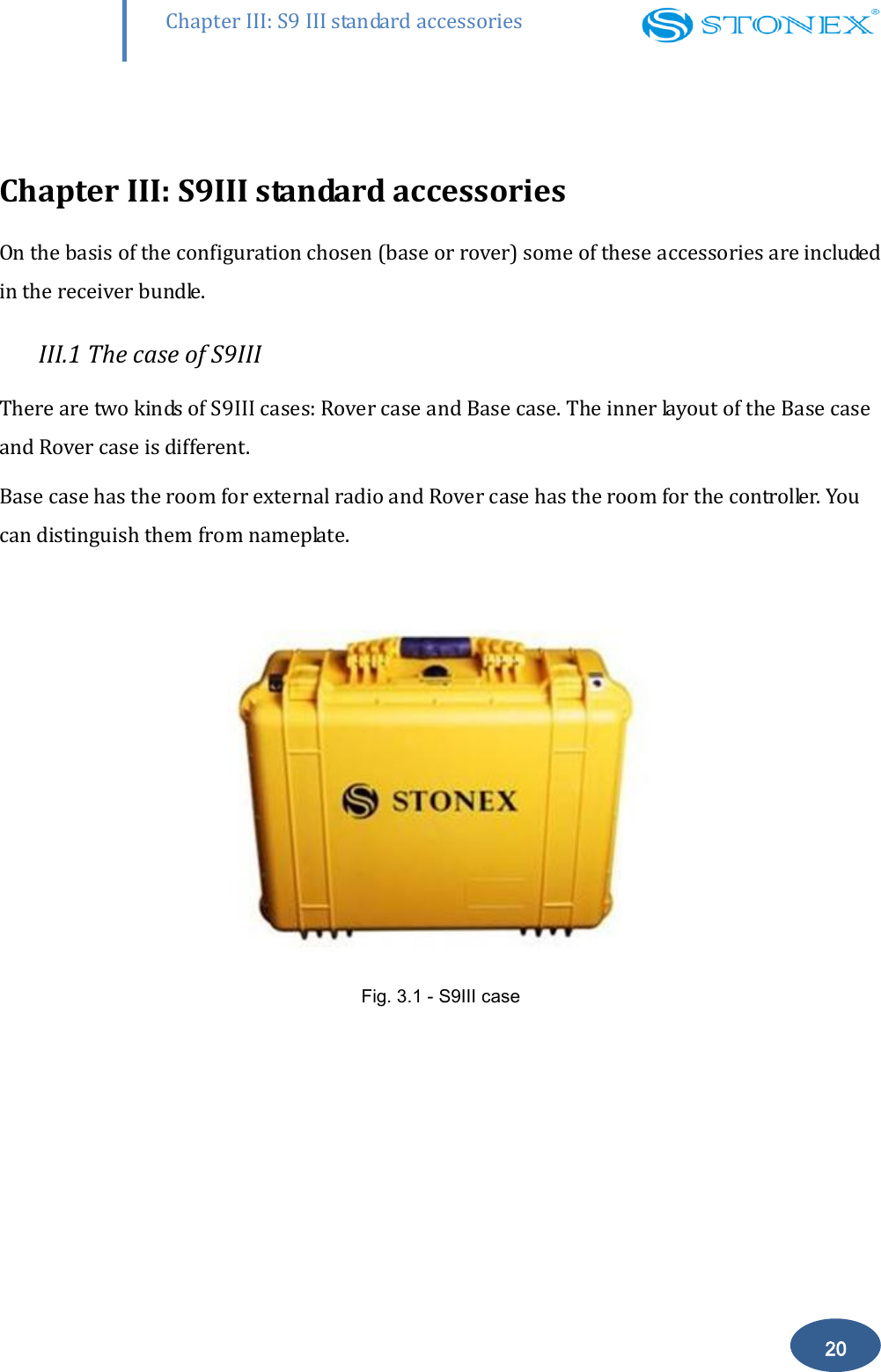
       Chapter II: S9 III mainframe 18   Fig. 2.20 - S9III, all led blinking at the same time (wrong picture) - Now  every  time  you  press  F  key,  the  RECORD/ROVER/BASE  lights  will  be  on  in  the corresponding order. You can select three different red lights, each of them refers to one working mode.  - Press  I  key  when  the  chosen  light  is  blinking  and  the  receiver  will  start  the  selected working mode . Summary of working modes:  1. Static mode   2. Rover mode                          3.  Base mode Fig. 2.21 - S9III summary of working mode led    How can you select data link?  After  you  have  entered  working  mode,  press  F  key,  the  UHF/GPRS/EXT  lights  will  blink  by turns.  Then  you  can  select  different  green  lights,  each  one  refers  to  different  data  link.  This situation refers  only  to the  rover and base mode, since in  static mode  there is no green light blinking.  1 2 3
       Chapter II: S9 III mainframe 19 Summary of data link types:                                                     4. Internal UHF Radio  5. GPRS\GSM module 6. External radio Fig. 2.22 - S9III summary of data-link led 6 5 4
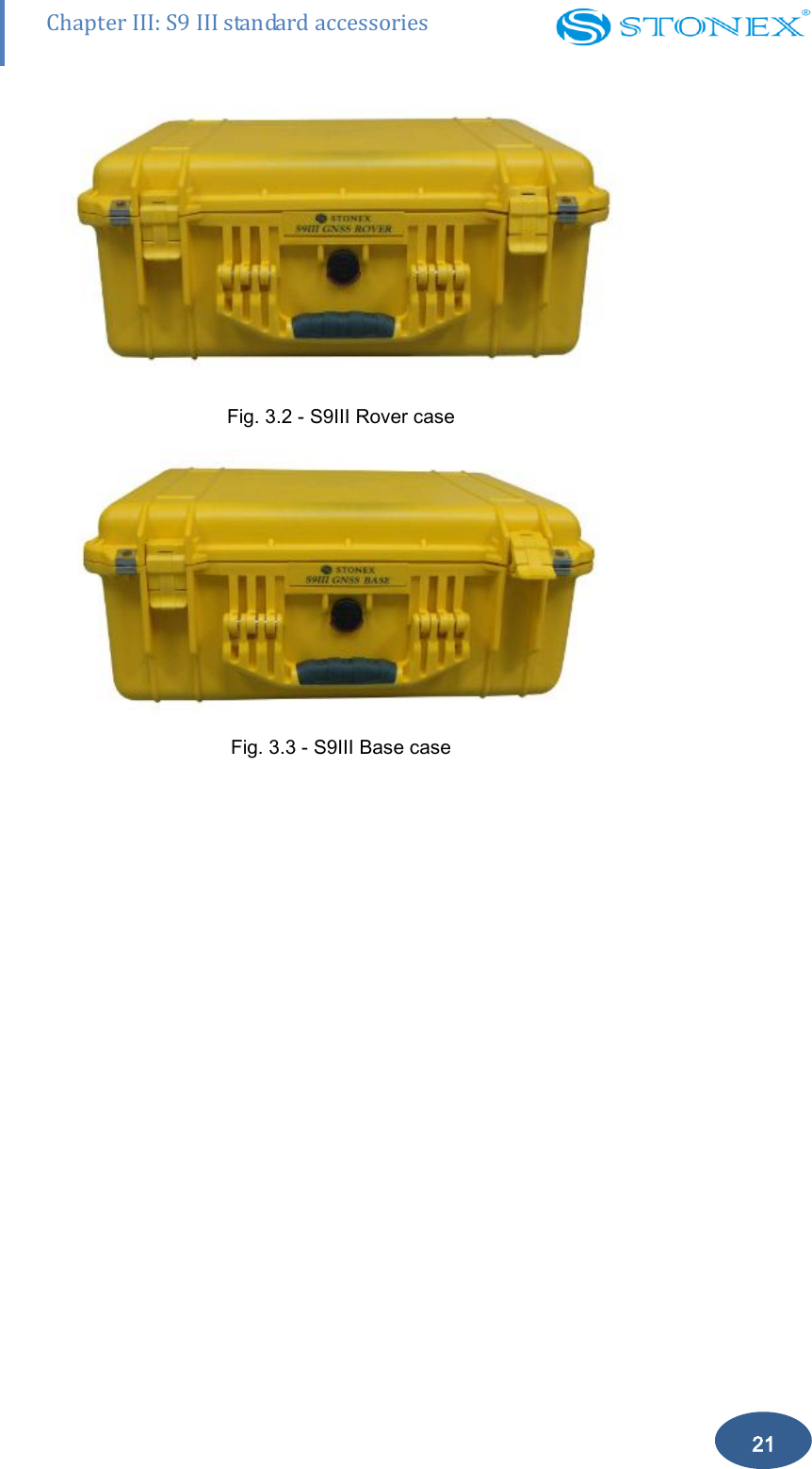
       20 Chapter III: S9 III standard accessories  Chapter III: S9III standard accessories On the basis of the configuration chosen (base or rover) some of these accessories are included in the receiver bundle. III.1 The case of S9III There are two kinds of S9III cases: Rover case and Base case. The inner layout of the Base case and Rover case is different.  Base case has the room for external radio and Rover case has the room for the controller. You can distinguish them from nameplate.   Fig. 3.1 - S9III case
       21 Chapter III: S9 III standard accessories  Fig. 3.2 - S9III Rover case    Fig. 3.3 - S9III Base case
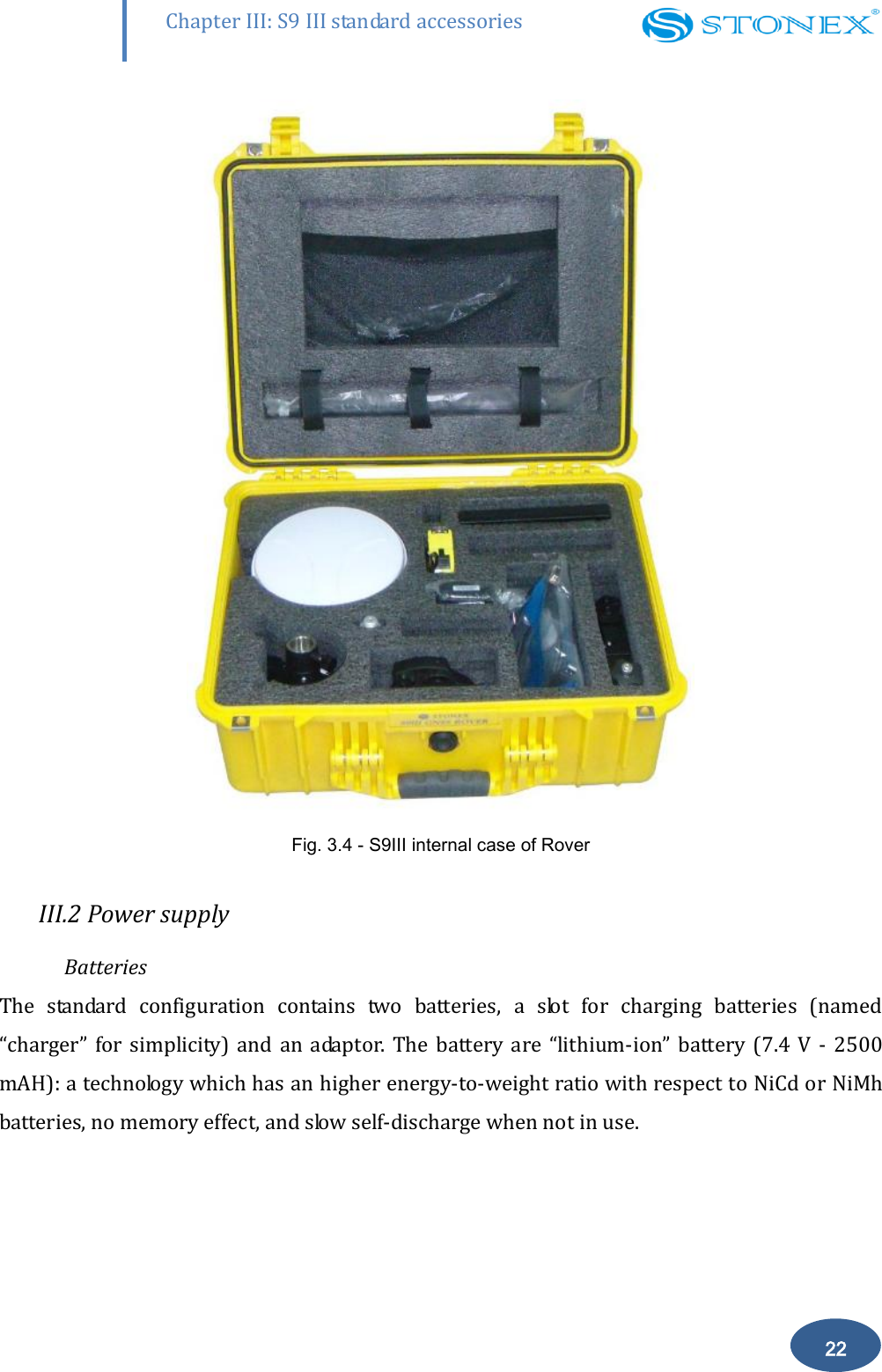
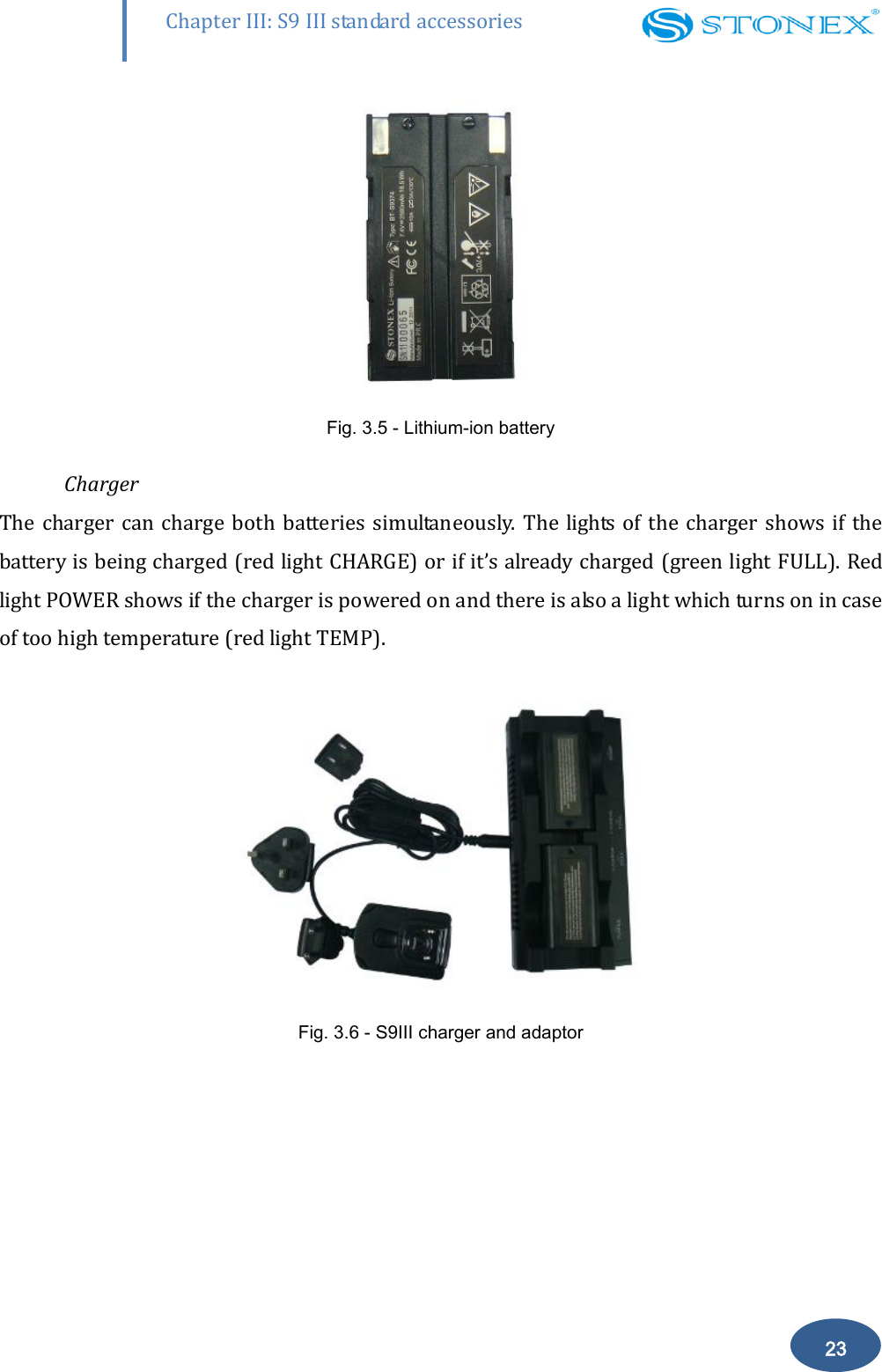
       22 Chapter III: S9 III standard accessories  Fig. 3.4 - S9III internal case of Rover  III.2 Power supply Batteries The  standard  configuration  contains  two  batteries,  a  slot  for  charging  batteries  (named “charger”  for  simplicity)  and  an  adaptor.  The  battery  are  “lithium-ion”  battery  (7.4  V  -  2500 mAH): a technology which has an higher energy-to-weight ratio with respect to NiCd or NiMh batteries, no memory effect, and slow self-discharge when not in use.
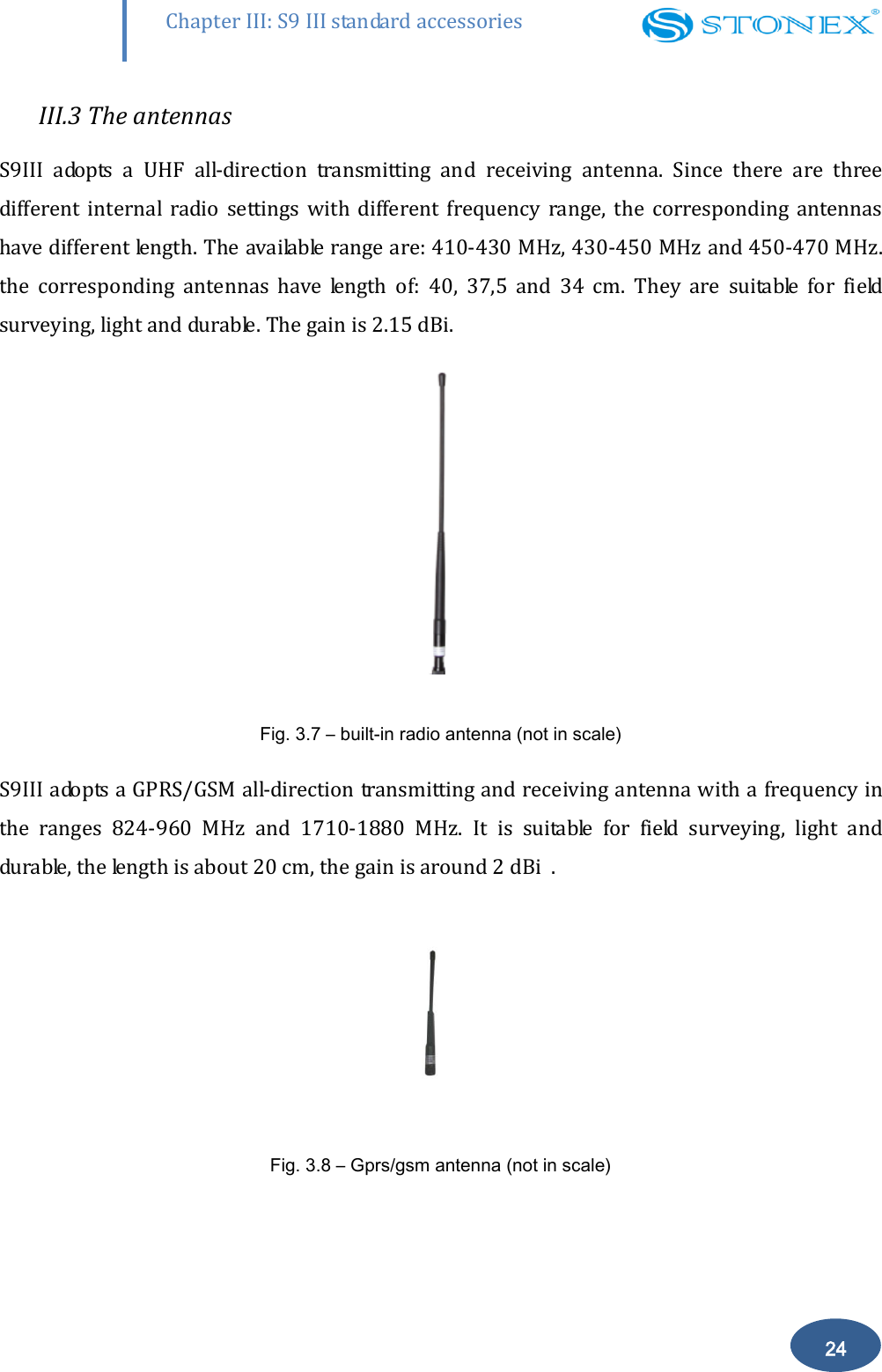
       23 Chapter III: S9 III standard accessories  Fig. 3.5 - Lithium-ion battery    Charger The charger can charge  both batteries simultaneously.  The lights  of the charger shows  if the battery is being charged (red light CHARGE) or if it’s already charged (green light FULL). Red light POWER shows if the charger is powered on and there is also a light which turns on in case of too high temperature (red light TEMP).   Fig. 3.6 - S9III charger and adaptor
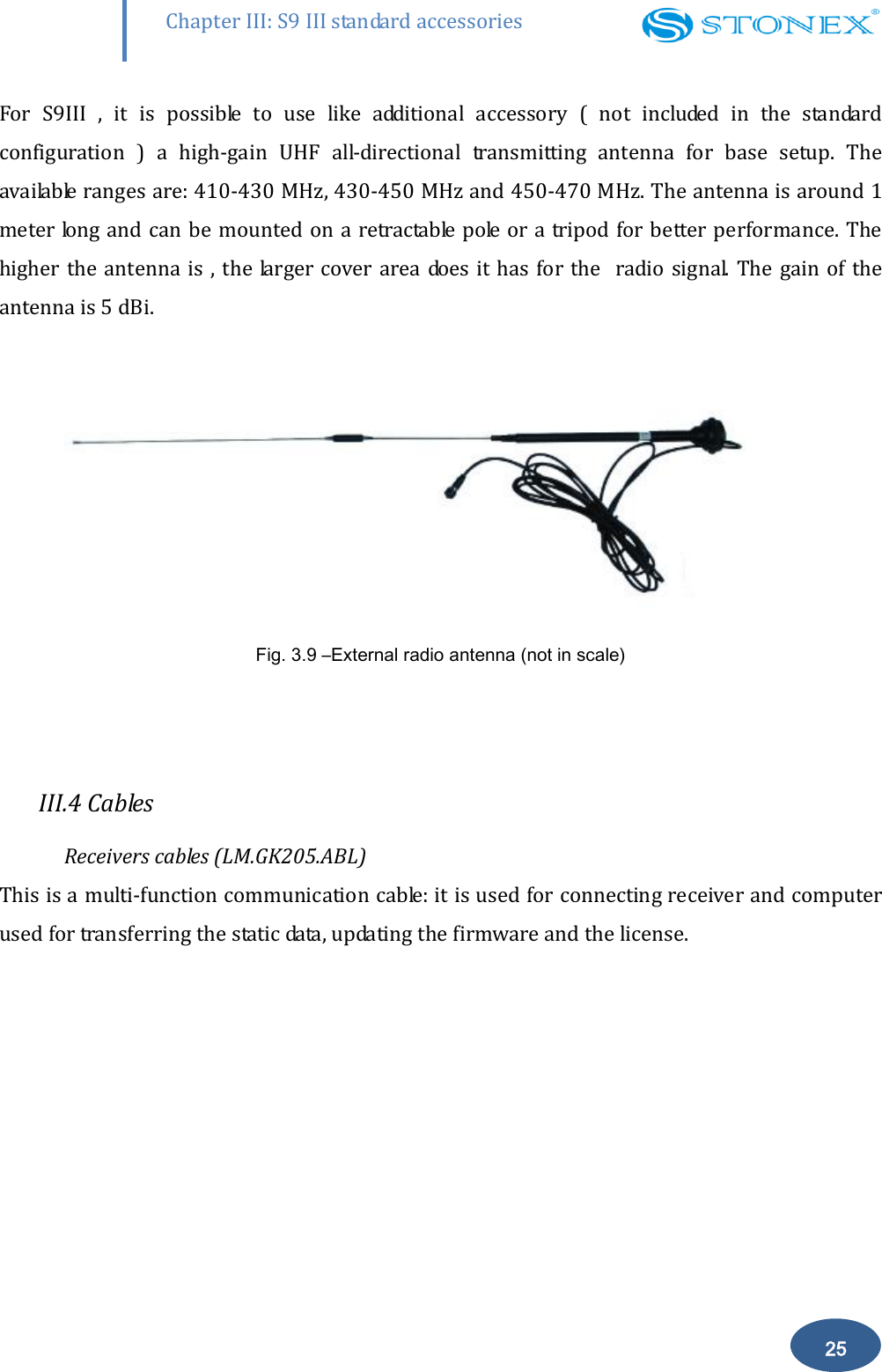
       24 Chapter III: S9 III standard accessories III.3 The antennas S9III  adopts  a  UHF  all-direction  transmitting  and  receiving  antenna.  Since  there  are  three different  internal  radio  settings  with  different  frequency  range,  the  corresponding  antennas have different length. The available range are: 410-430 MHz, 430-450 MHz and 450-470 MHz. the  corresponding  antennas  have  length  of:  40,  37,5  and  34  cm.  They  are  suitable  for  field surveying, light and durable. The gain is 2.15 dBi.   Fig. 3.7 – built-in radio antenna (not in scale) S9III adopts a GPRS/GSM all-direction transmitting and receiving antenna with a frequency in the  ranges  824-960  MHz  and  1710-1880  MHz.  It  is  suitable  for  field  surveying,  light  and durable, the length is about 20 cm, the gain is around 2 dBi  .   Fig. 3.8 – Gprs/gsm antenna (not in scale)
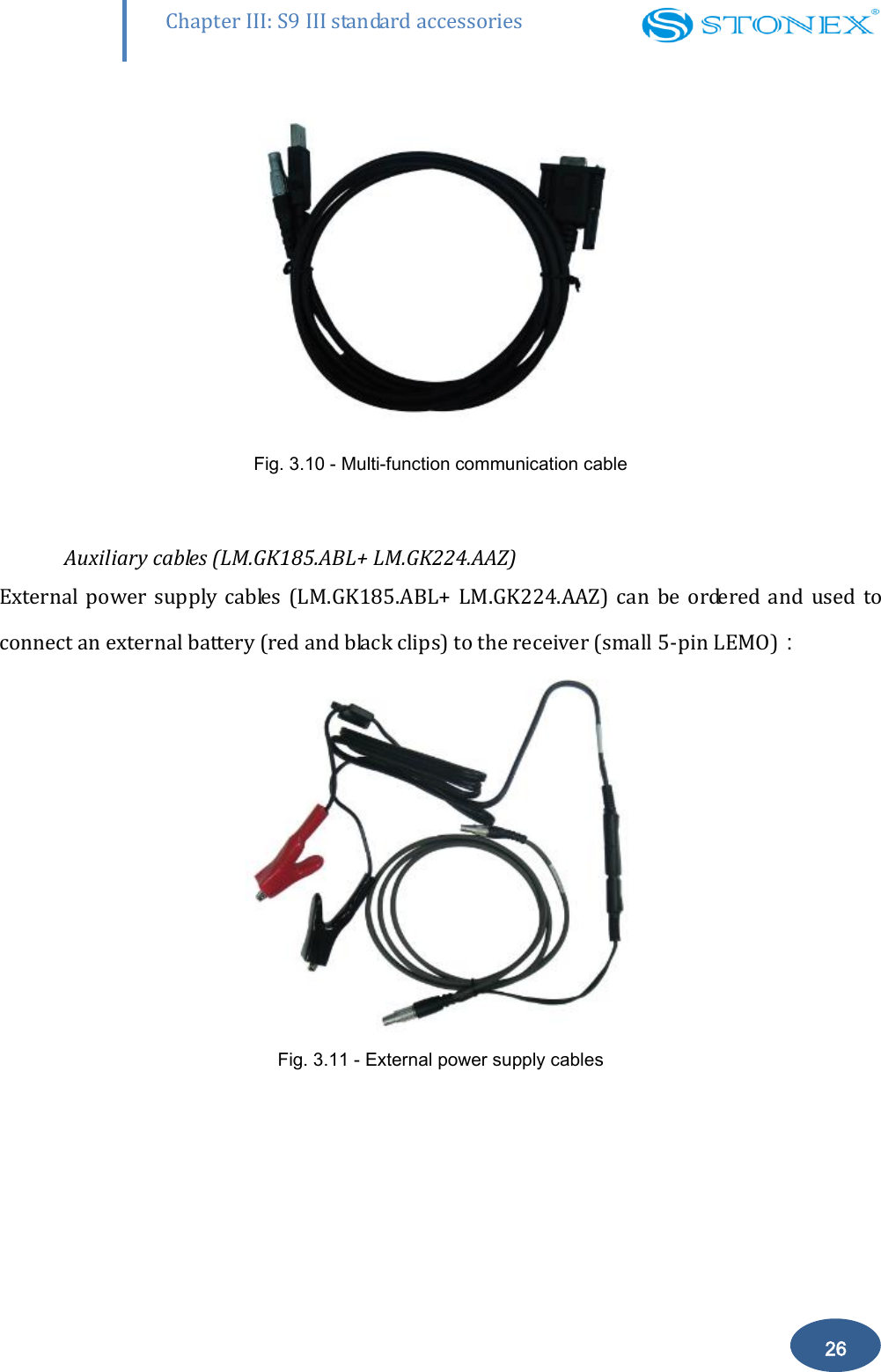
       25 Chapter III: S9 III standard accessories For  S9III  ,  it  is  possible  to  use  like  additional  accessory  (  not  included  in  the  standard configuration  )  a  high-gain  UHF  all-directional  transmitting  antenna  for  base  setup.  The available ranges are: 410-430 MHz, 430-450 MHz and 450-470 MHz. The antenna is around 1 meter long and can be  mounted on a retractable pole or a tripod for better performance. The higher the antenna is , the larger cover area does it has for  the   radio signal. The  gain of the antenna is 5 dBi.                Fig. 3.9 –External radio antenna (not in scale)  III.4 Cables Receivers cables (LM.GK205.ABL) This is a multi-function communication cable: it is used for connecting receiver and computer used for transferring the static data, updating the firmware and the license.
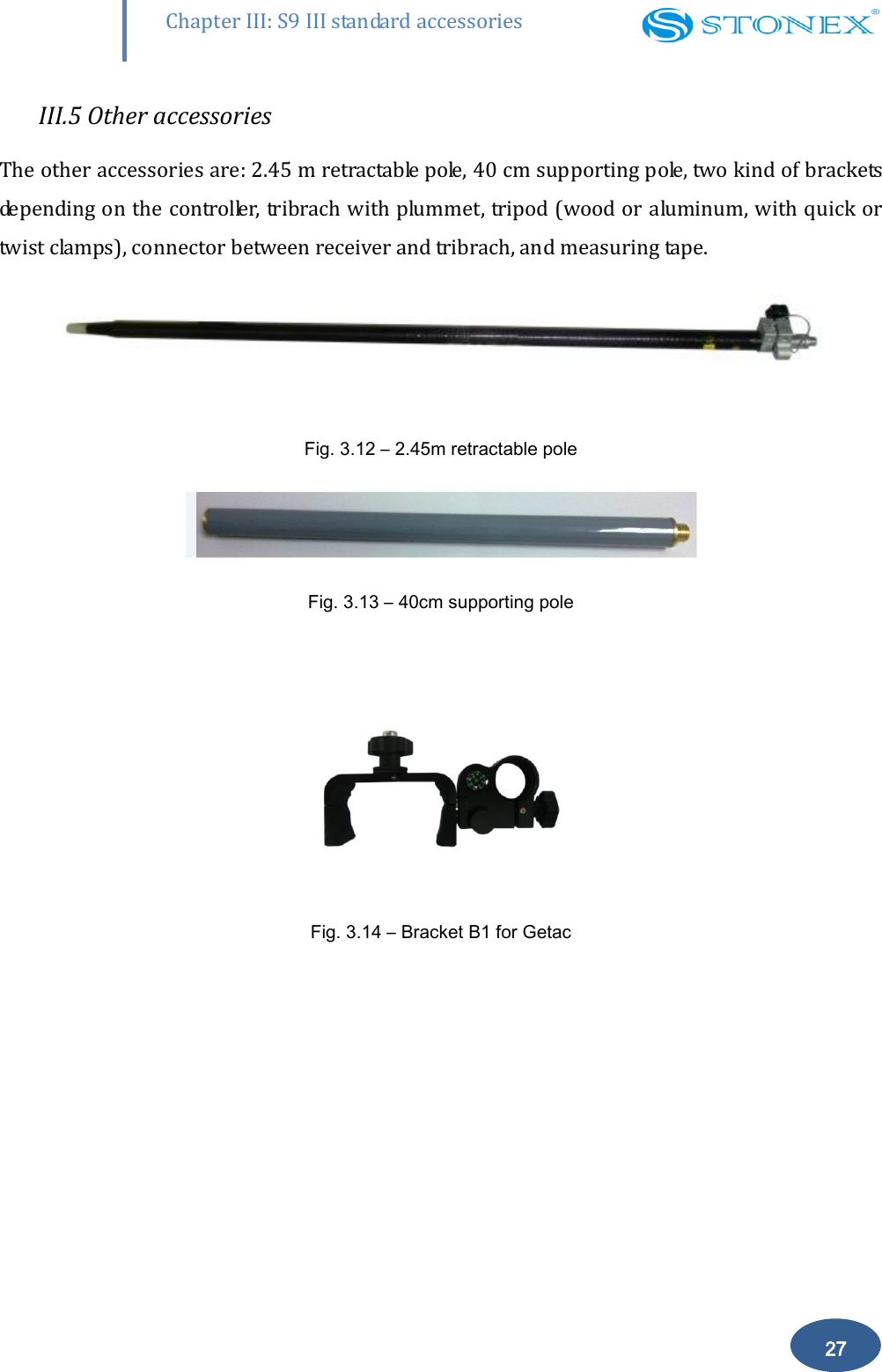
       26 Chapter III: S9 III standard accessories  Fig. 3.10 - Multi-function communication cable  Auxiliary cables (LM.GK185.ABL+ LM.GK224.AAZ) External  power supply  cables (LM.GK185.ABL+  LM.GK224.AAZ)  can  be  ordered and  used  to connect an external battery (red and black clips) to the receiver (small 5-pin LEMO):  Fig. 3.11 - External power supply cables
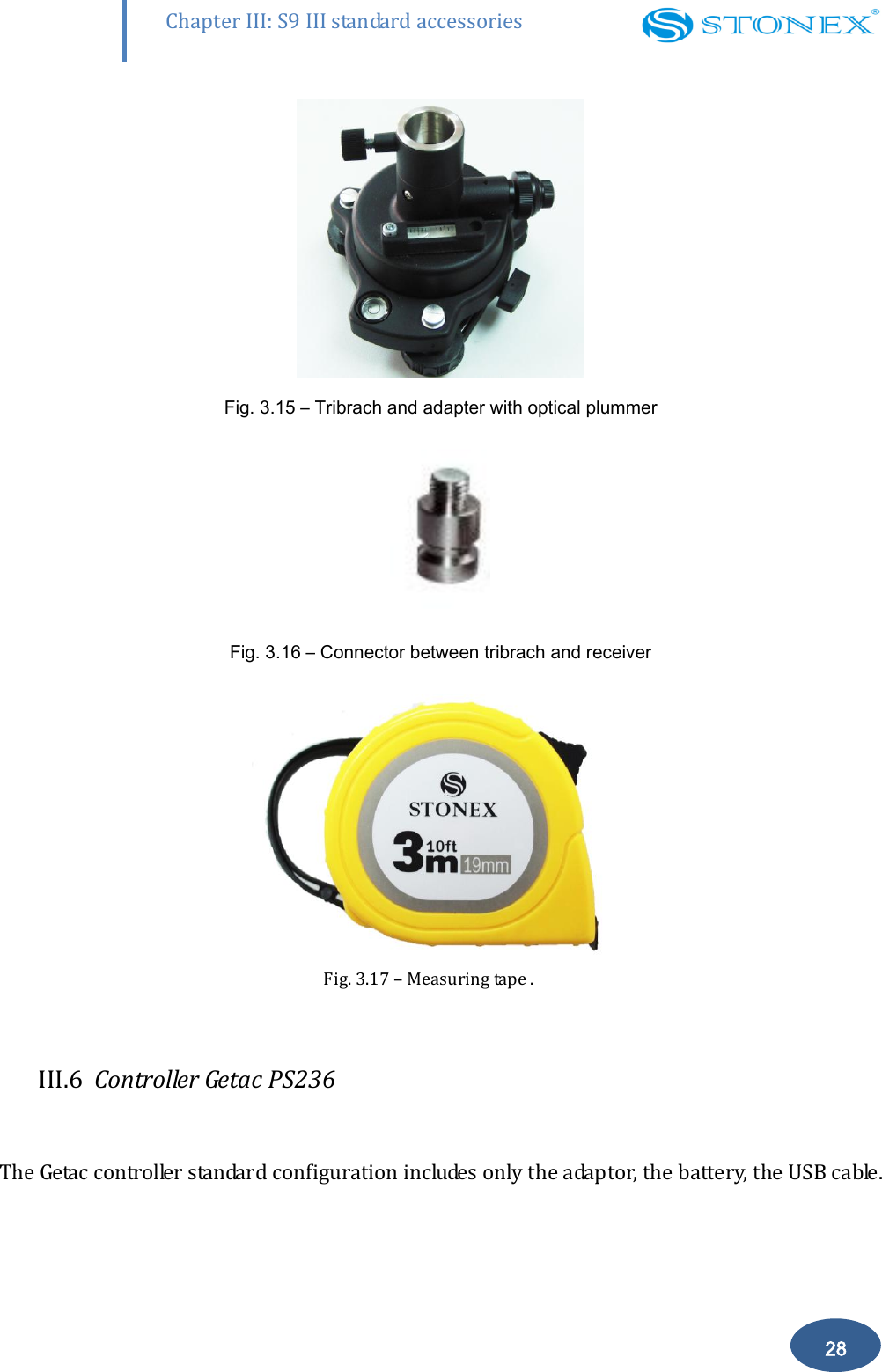
       27 Chapter III: S9 III standard accessories III.5 Other accessories The other accessories are: 2.45 m retractable pole, 40 cm supporting pole, two kind of brackets depending on the controller, tribrach with plummet, tripod (wood or aluminum, with quick or twist clamps), connector between receiver and tribrach, and measuring tape.  Fig. 3.12 – 2.45m retractable pole  Fig. 3.13 – 40cm supporting pole   Fig. 3.14 – Bracket B1 for Getac
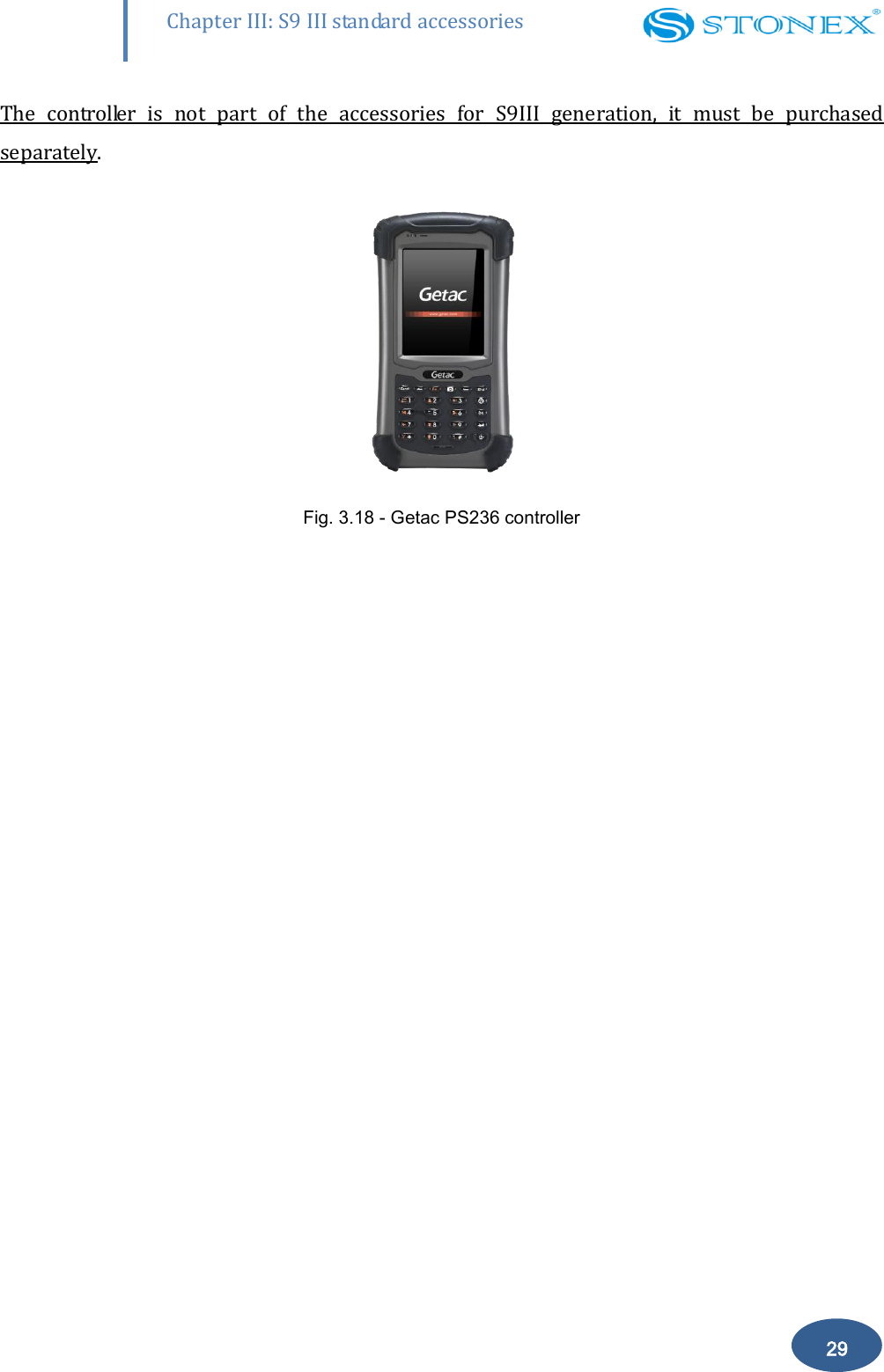
       28 Chapter III: S9 III standard accessories  Fig. 3.15 – Tribrach and adapter with optical plummer  Fig. 3.16 – Connector between tribrach and receiver  Fig. 3.17 – Measuring tape .  III.6  Controller Getac PS236  The Getac controller standard configuration includes only the adaptor, the battery, the USB cable.
       29 Chapter III: S9 III standard accessories The  controller  is  not  part  of  the  accessories  for  S9III  generation,  it  must  be  purchased  separately.  Fig. 3.18 - Getac PS236 controller
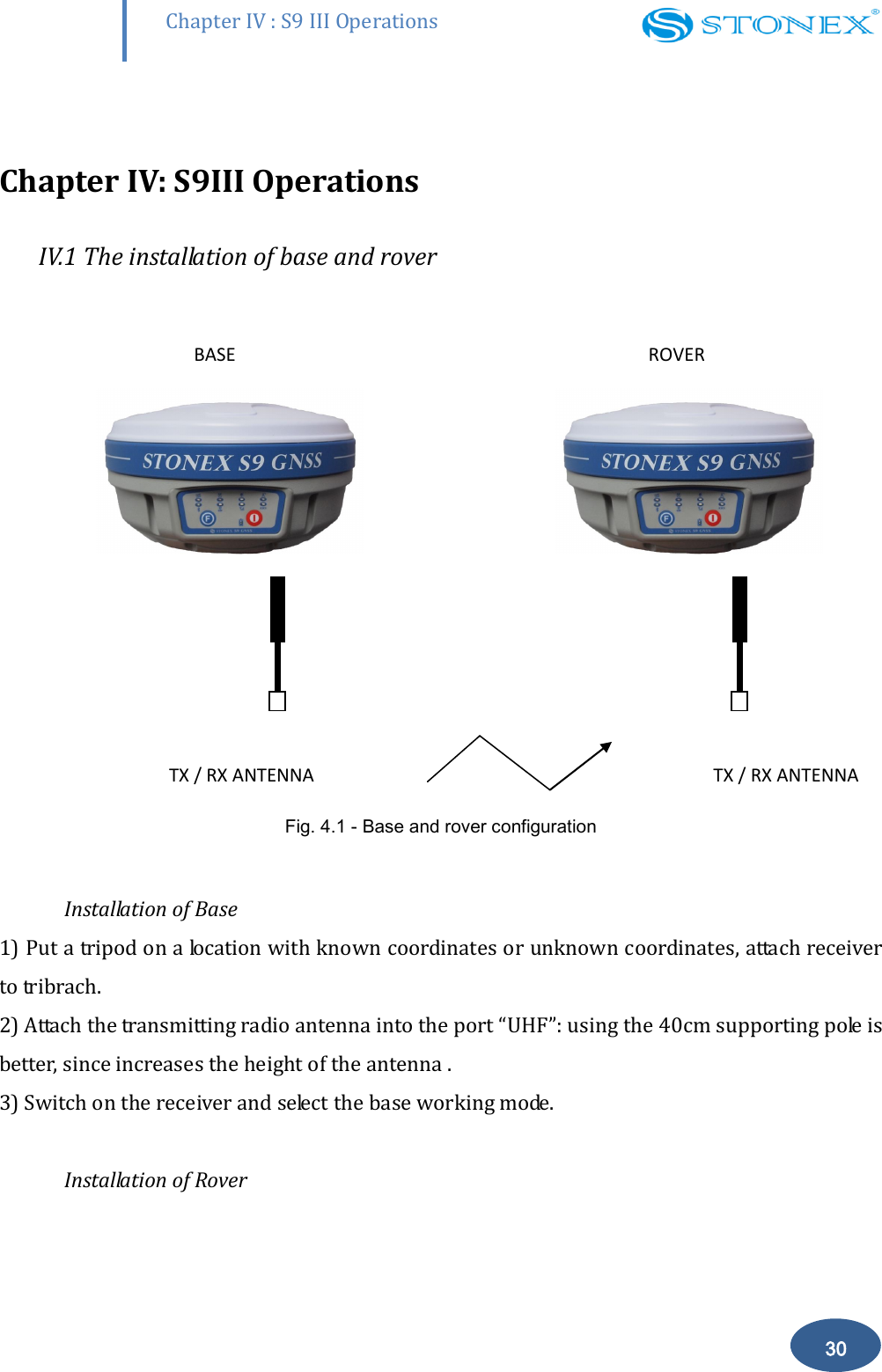
       Chapter IV : S9 III Operations 30  Chapter IV: S9III Operations IV.1 The installation of base and rover      BASE              ROVER                                                    TX / RX ANTENNA              TX / RX ANTENNA Fig. 4.1 - Base and rover configuration   Installation of Base 1) Put a tripod on a location with known coordinates or unknown coordinates, attach receiver to tribrach.  2) Attach the transmitting radio antenna into the port “UHF”: using the 40cm supporting pole is better, since increases the height of the antenna . 3) Switch on the receiver and select the base working mode.   Installation of Rover
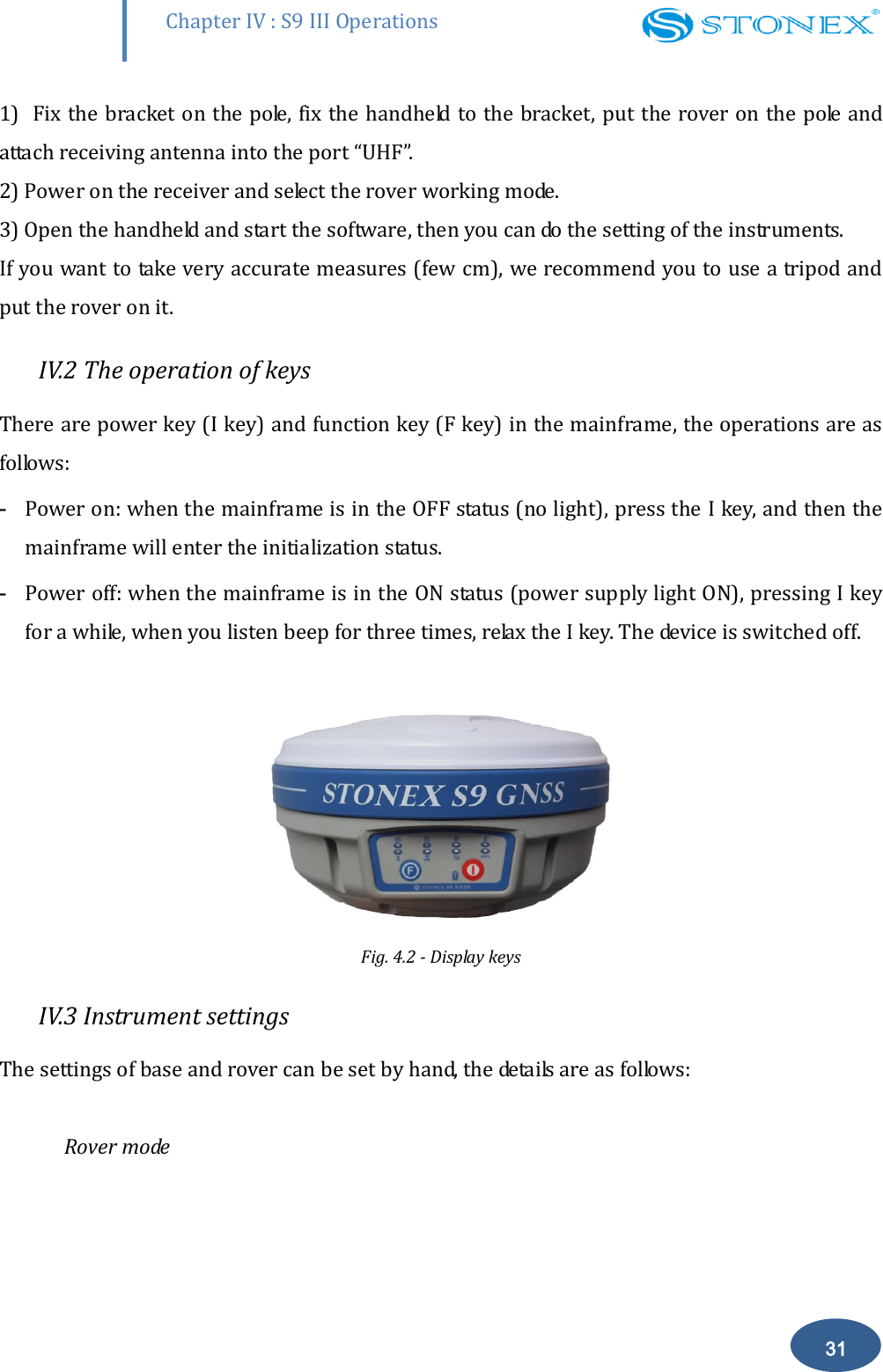
       Chapter IV : S9 III Operations 31 1)  Fix the bracket on the pole, fix the handheld to the bracket,  put the rover on the pole and attach receiving antenna into the port “UHF”.  2) Power on the receiver and select the rover working mode.  3) Open the handheld and start the software, then you can do the setting of the instruments.  If you want to take very accurate measures (few cm), we recommend you to use a tripod and put the rover on it.  IV.2 The operation of keys There are power key (I key) and function key (F key) in the mainframe, the operations are as follows:  - Power on: when the mainframe is in the OFF status (no light), press the I key, and then the mainframe will enter the initialization status.  - Power off: when the mainframe is in the ON status (power supply light ON), pressing I key for a while, when you listen beep for three times, relax the I key. The device is switched off.   Fig. 4.2 - Display keys IV.3 Instrument settings The settings of base and rover can be set by hand, the details are as follows:   Rover mode
       Chapter IV : S9 III Operations 32 Keep pressing I + F keys and wait for all lights flashing at the same time, then press F key to choose the working mode: press I key when ROVER is lighted to choose the working mode of rover. Wait for several seconds and then  press the  F key  down for about 5 seconds, after one beep release F key, press F key to choose the data link. When  RADIO is lighted, press I key to confirm the choosing of built-in radio data link mode. When GSM/GPRS is lighted, press I key to confirm the choosing of GSM/GPRS data link mode. When EXTERNAL is lighted, press I key to confirm the chosen external radio data link mode.  Base mode Keep pressing I + F keys and wait for six lights flashing at the same time, then press F key to choose the  working mode: press  I  key  when  BASE  is  lighted to  choose the  working mode  of base.  The setting of the data link is the same described in the Rover mode configuration.  Static mode Keep pressing I + F keys and wait for six lights flashing at the same time, then press F key to choose the working mode, press I key when the STATIC is lighted to choose the static mode.   The next time you  open the receiver, the working mode will be the last selected. If you prefer, you can select the correct data link by handheld software, but remember that you can’t switch from one working mode to another by handheld, but only by hand or by STONEX®  Assistant (see Cap. V).   By  handheld  software  or  by  Assistant  you  can  set  some  rover  parameters,  for  instance sampling  interval,  minimum  elevation  angle,  antenna  height,  etc.  Without  modifying  the parameters the receiver will work with default parameters.  The static mode parameters cannot be selected by the controller, but only by Assistant.
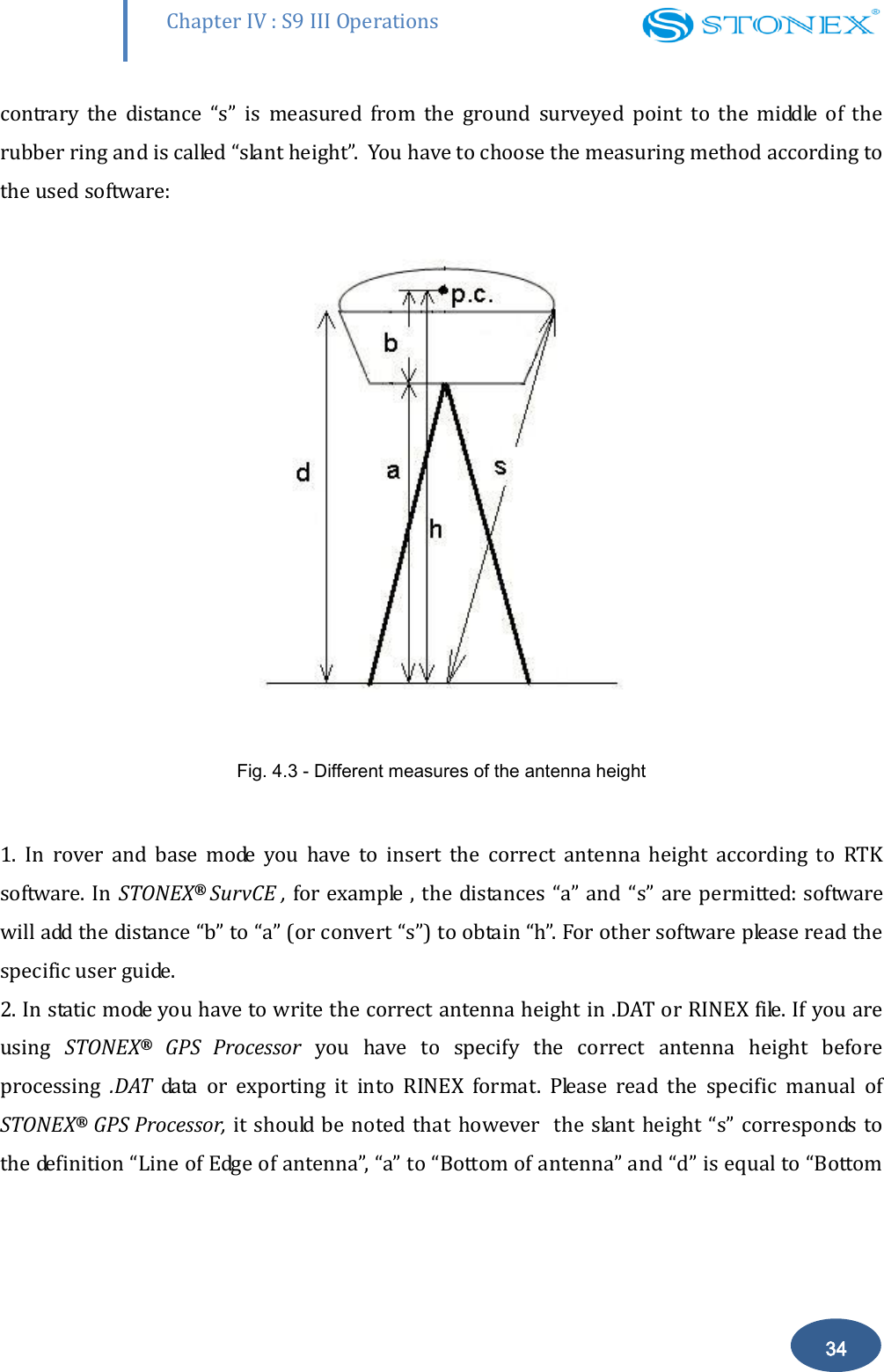
       Chapter IV : S9 III Operations 33 IV.4 Operation of lights Static mode The STATIC and power light will keep lighted. When satellites fulfill the conditions (at least 4 GPS or 4 GLONASS satellite, PDOP< 3.5), receiver will start recording epochs, you will hear a beep, STATIC light will flash according to sampling interval (if you don’t set up, the default is 1 second) and the satellite light will flash a number of times equal to the locked satellites.    Base mode  After setting up the mode, power on the mainframe, the base will enter into the transmit mode, Using  external  radio  EXTERNAL  light  flashing  every  one  second  means  the  base  transmit normal, the interval is 1 second. In the same  way using built-in radio INTERNAL RADIO light will flash. If you need to change the transmit conditions, you should connect the handheld with mainframe by cable or Bluetooth firstly.   Rover mode Bluetooth  and  power  light  will  keep  lighted.  The  satellite  light  will  blink  according  to  the number of satellites as described for static mode.  Using  GPRS/GSM,  GSM/GPRS  light  starts  to  blink  with  the  frequency  of  the  received  data packets . In the same way using built-in radio INTERNAL RADIO light will flash. IV.5 How to measure the antenna height The  height  of  receiver  is  99mm,  the  diameter  is  190mm,  the  height  from  the  center  of  the sealed rubber ring to the bottom is 62mm.  The antenna height is conventionally defined as the vertical height from the phase centre to the ground surveyed point (the distance “h” in fig. 4.3). It is not possible to measure it directly: you have to measure other reachable heights (the distances “a”, “d”, “s” in fig.4.3). The distance “a” is the vertical height from the ground to the mainframe’s bottom, “d” is the vertical height from the  ground  to  the  middle  of  the  rubber  ring:  both  are  defined  as  “vertical  heights”.  On  the
       Chapter IV : S9 III Operations 34 contrary  the  distance  “s”  is  measured  from  the  ground  surveyed  point  to  the  middle  of  the rubber ring and is called “slant height”.  You have to choose the measuring method according to the used software:  Fig. 4.3 - Different measures of the antenna height   1.  In  rover  and  base  mode  you  have  to  insert  the  correct  antenna  height  according  to  RTK software. In  STONEX®  SurvCE , for example , the distances  “a” and “s” are permitted: software will add the distance “b” to “a” (or convert “s”) to obtain “h”. For other software please read the specific user guide. 2. In static mode you have to write the correct antenna height in .DAT or RINEX file. If you are using  STONEX®  GPS  Processor  you  have  to  specify  the  correct  antenna  height  before processing  .DAT  data  or  exporting  it  into  RINEX  format.  Please  read  the  specific  manual  of STONEX® GPS Processor, it should be noted that however   the slant height “s” corresponds  to the definition “Line of Edge of antenna”, “a” to “Bottom of antenna” and “d” is equal to “Bottom
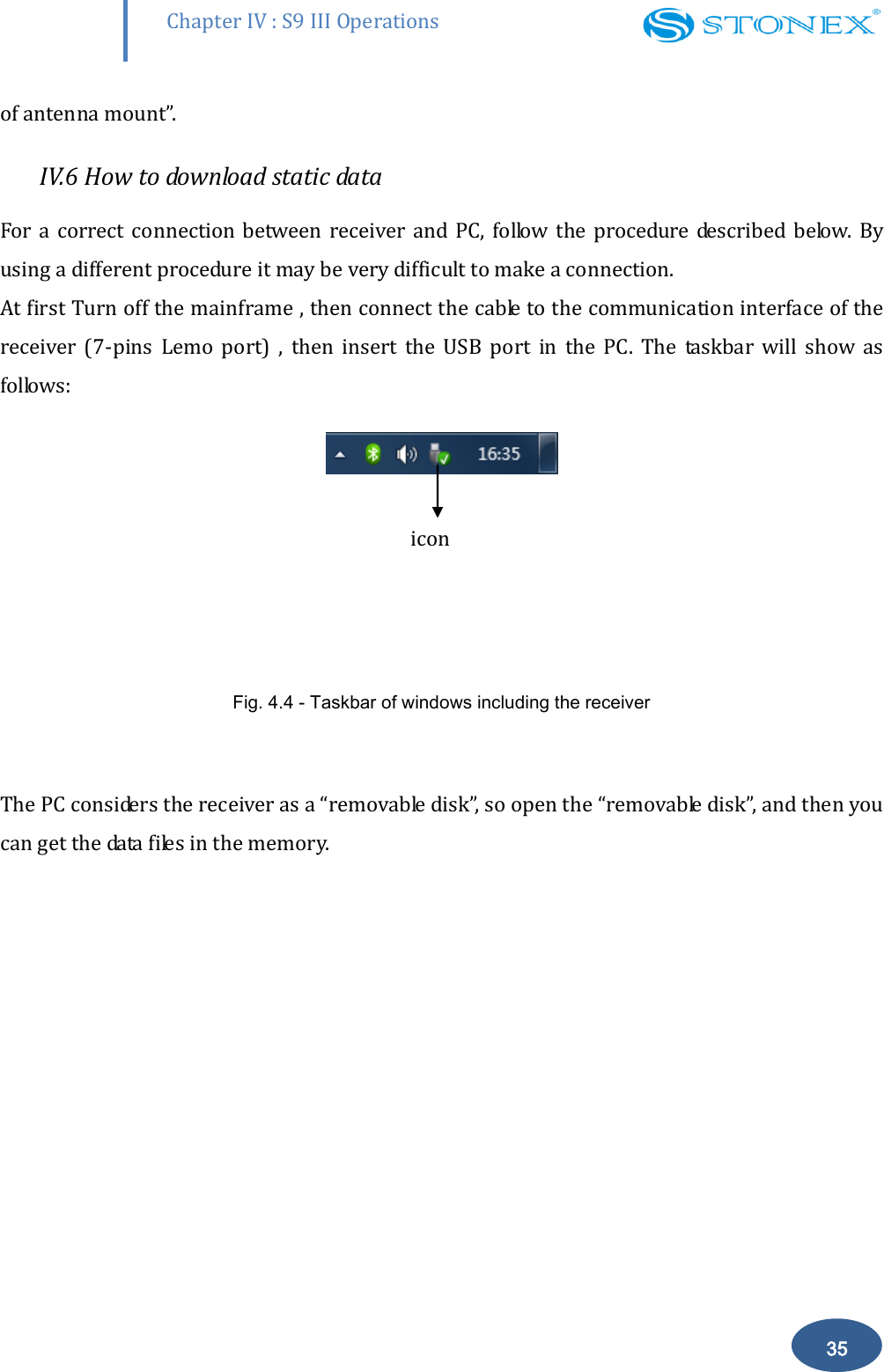
       Chapter IV : S9 III Operations 35 of antenna mount”.  IV.6 How to download static data For a correct  connection  between  receiver  and PC,  follow the  procedure described  below.  By using a different procedure it may be very difficult to make a connection.  At first Turn off the mainframe , then connect the cable to the communication interface of the receiver  (7-pins  Lemo  port)  ,  then  insert  the  USB  port  in  the  PC.  The  taskbar  will  show  as follows:     Fig. 4.4 - Taskbar of windows including the receiver  The PC considers the receiver as a “removable disk”, so open the “removable disk”, and then you can get the data files in the memory.   icon
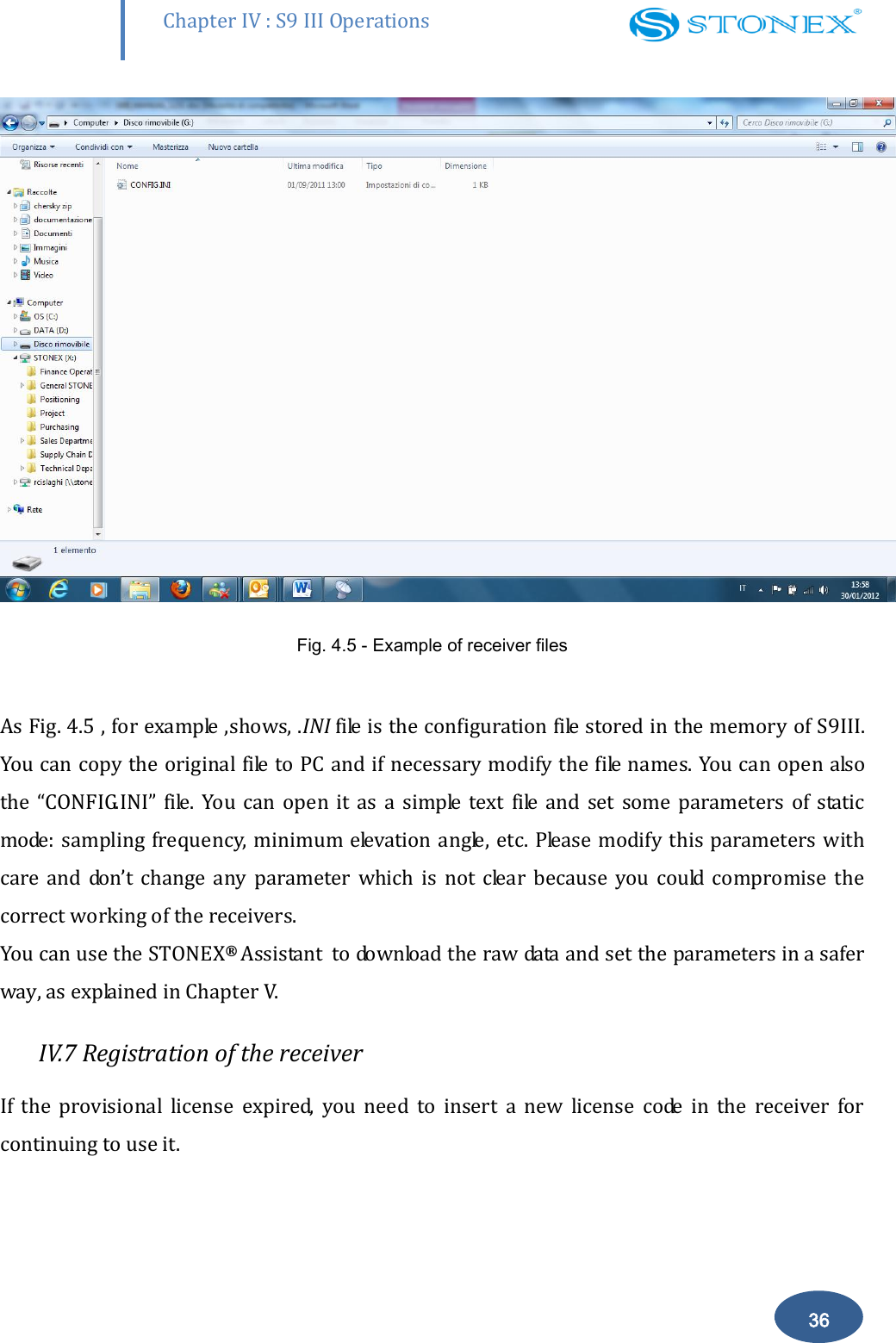
       Chapter IV : S9 III Operations 36  Fig. 4.5 - Example of receiver files  As Fig. 4.5 , for example ,shows, .INI file is the configuration file stored in the memory of S9III. You can copy the original file to PC and if necessary modify the file names. You can open also the  “CONFIG.INI”  file.  You  can  open  it  as  a  simple  text file  and  set  some  parameters  of  static mode: sampling frequency, minimum elevation angle, etc.  Please modify this  parameters  with care  and  don’t  change  any  parameter  which  is  not  clear  because  you  could  compromise  the correct working of the receivers. You can use the STONEX®  Assistant  to download the raw data and set the parameters in a safer way, as explained in Chapter V. IV.7 Registration of the receiver If  the  provisional  license  expired,  you  need  to  insert  a  new  license  code  in  the  receiver  for continuing to use it.
       Chapter IV : S9 III Operations 37 The license is composed of a 32 characters code. For inserting the new license you can use RTK software STONEX® SurvCE: you have to enter into the submenu “Equipment”  “GPS utilities”  “Send command”, then write the command “SET,DEVICE.REGI,[license code]”. However  it  is  also  possible  to  register  the  receiver  using  the  STONEX®  Assistant ,  a  software tool which is explained in Chapter V.
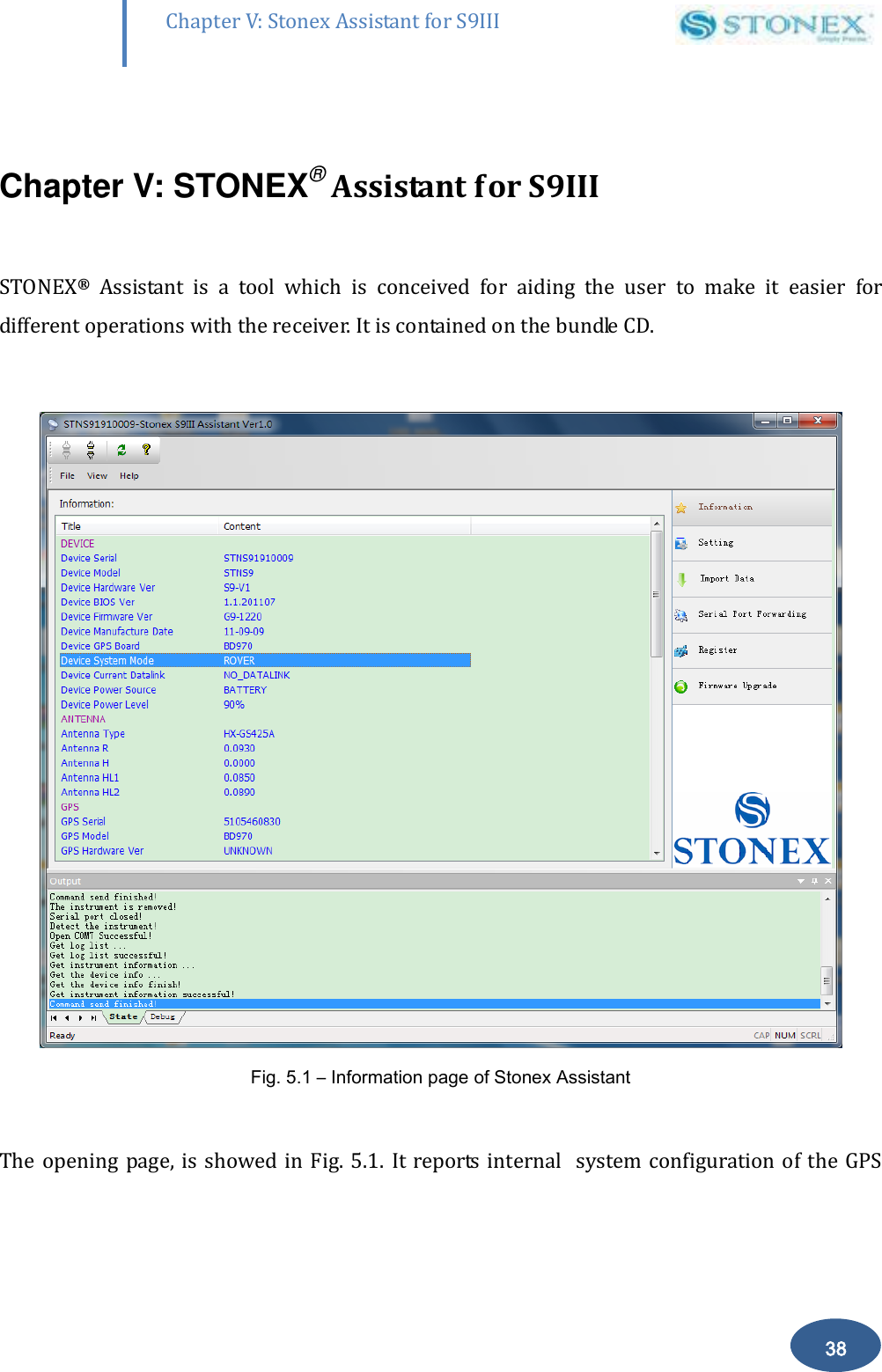
       38 Chapter V: Stonex Assistant for S9III DefRadSettings  Chapter V: STONEX® Assistant for S9III  STONEX®  Assistant  is  a  tool  which  is  conceived  for  aiding  the  user  to  make  it  easier  for different operations with the receiver. It is contained on the bundle CD.   Fig. 5.1 – Information page of Stonex Assistant  The opening page, is showed in  Fig. 5.1.  It reports  internal   system configuration of the  GPS
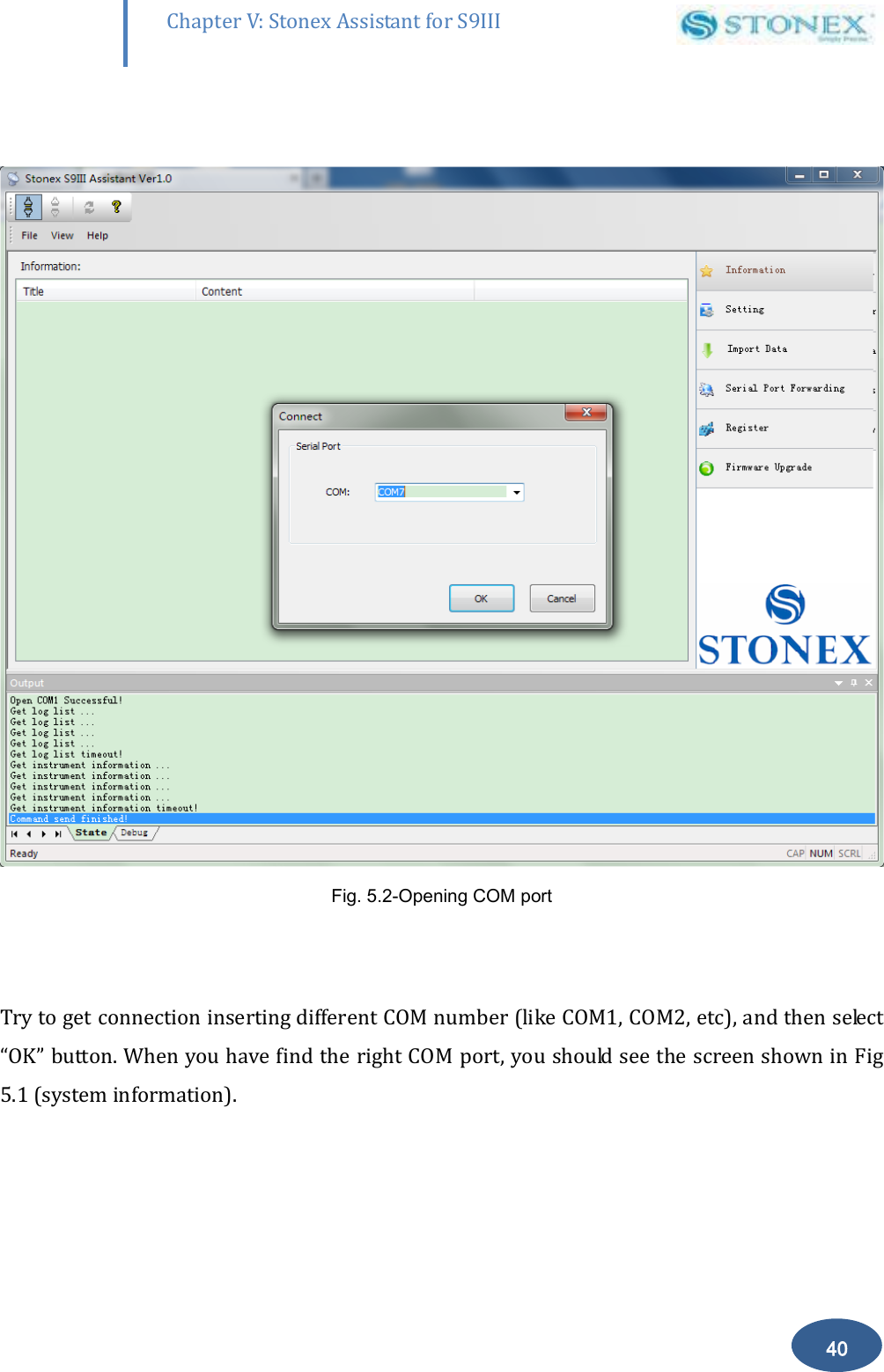
       39 Chapter V: Stonex Assistant for S9III DefRadSettings receiver S9 after get PC connection.  V.1  Start  Stonex Assistant on your PC. Connect the S9 to the PC using Lemo7 –USB/Serial cable . Switch  on  the  receiver;  automatically  the  program  should  search  the  COM  port  where  the receiver is connected. If this doesn’t happen, select the right COM port manually. To select the right COM port manually, please click on “File”“Connect“ and you will get the Connect page, see Fig 5.2:
       40 Chapter V: Stonex Assistant for S9III DefRadSettings   Fig. 5.2-Opening COM port   Try to get connection inserting different COM number (like COM1, COM2, etc), and then select “OK” button. When you have find the right COM port, you should see the screen shown in Fig 5.1 (system information).
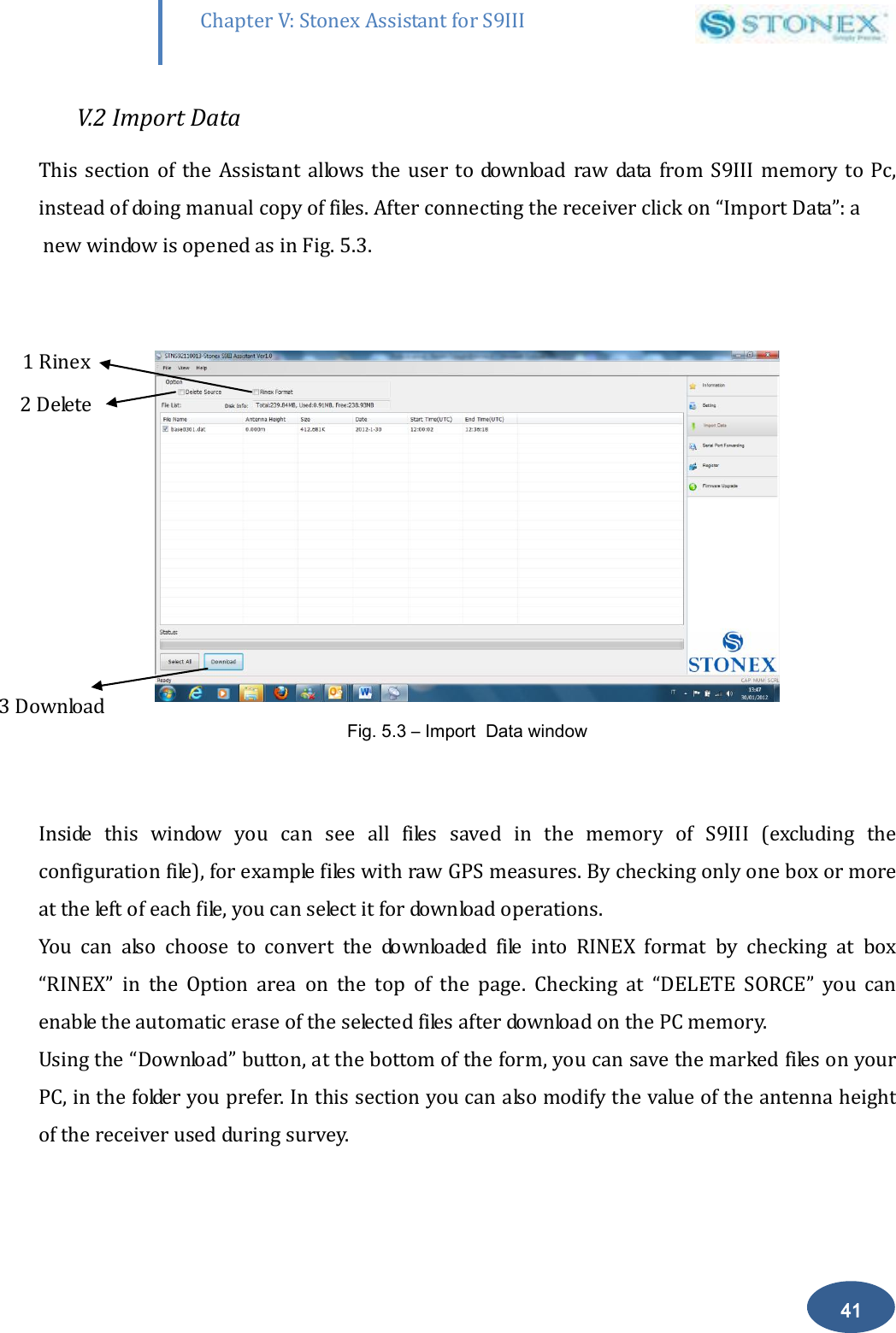
       41 Chapter V: Stonex Assistant for S9III DefRadSettings V.2 Import Data This  section  of the  Assistant  allows  the user  to download  raw  data  from S9III memory  to  Pc, instead of doing manual copy of files. After connecting the receiver click on “Import Data”: a  new window is opened as in Fig. 5.3.   Fig. 5.3 – Import  Data window  Inside  this  window  you  can  see  all  files  saved  in  the  memory  of  S9III  (excluding  the configuration file), for example files with raw GPS measures. By checking only one box or more  at the left of each file, you can select it for download operations. You  can  also  choose  to  convert  the  downloaded  file  into  RINEX  format  by  checking  at  box “RINEX”  in  the  Option  area  on  the  top  of  the  page.  Checking  at  “DELETE  SORCE”  you  can enable the automatic erase of the selected files after download on the PC memory. Using the “Download” button, at the bottom of the form, you can save the marked files on your PC, in the folder you prefer. In this section you can also modify the value of the antenna height of the receiver used during survey. 1 Rinex   2 Delete 3 Download
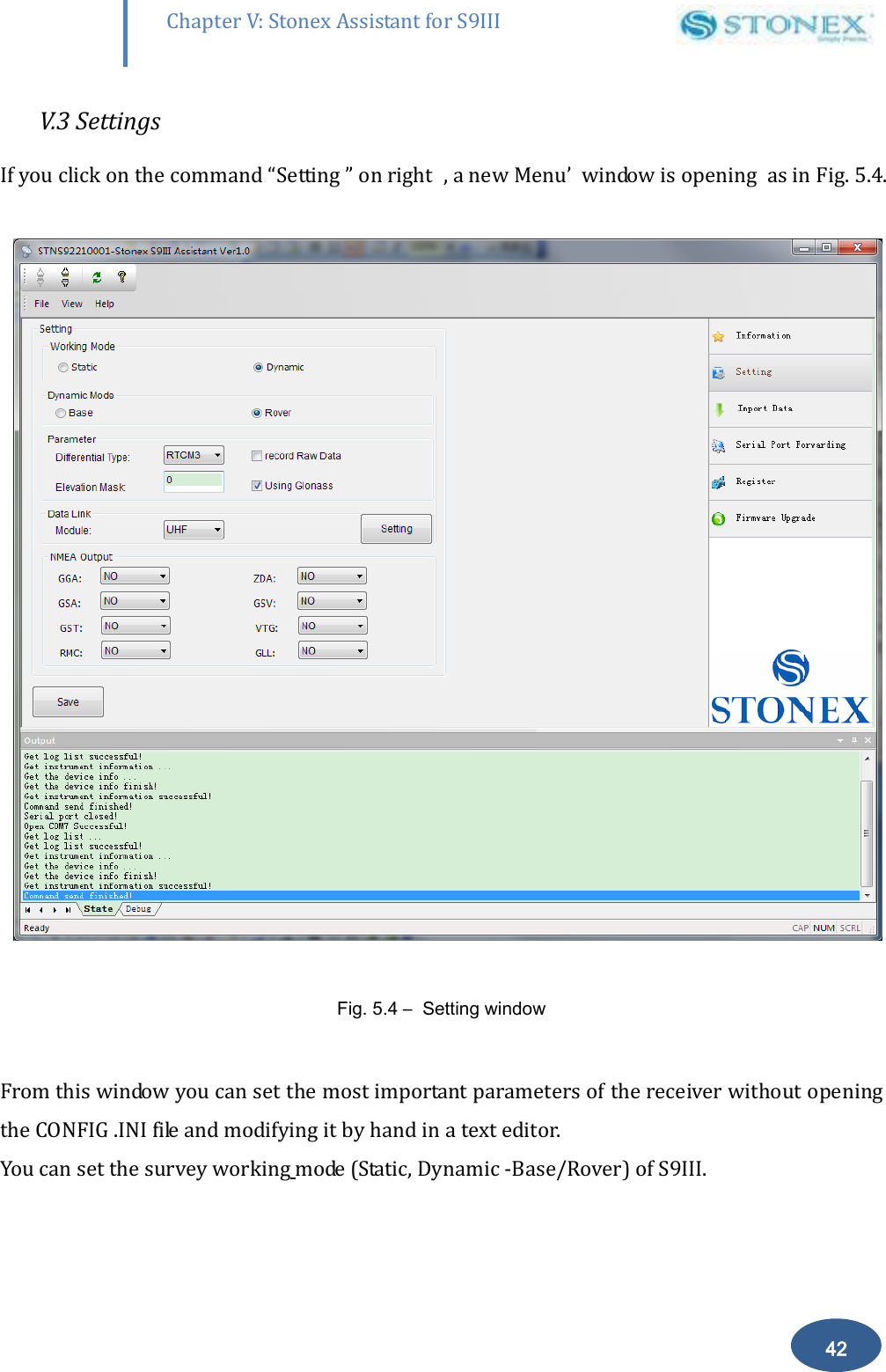
       42 Chapter V: Stonex Assistant for S9III DefRadSettings V.3 Settings If you click on the command “Setting ” on right  , a new Menu’  window is opening  as in Fig. 5.4.    Fig. 5.4 –  Setting window  From this window you can set the most important parameters of the receiver without opening the CONFIG .INI file and modifying it by hand in a text editor. You can set the survey working mode (Static, Dynamic -Base/Rover) of S9III.
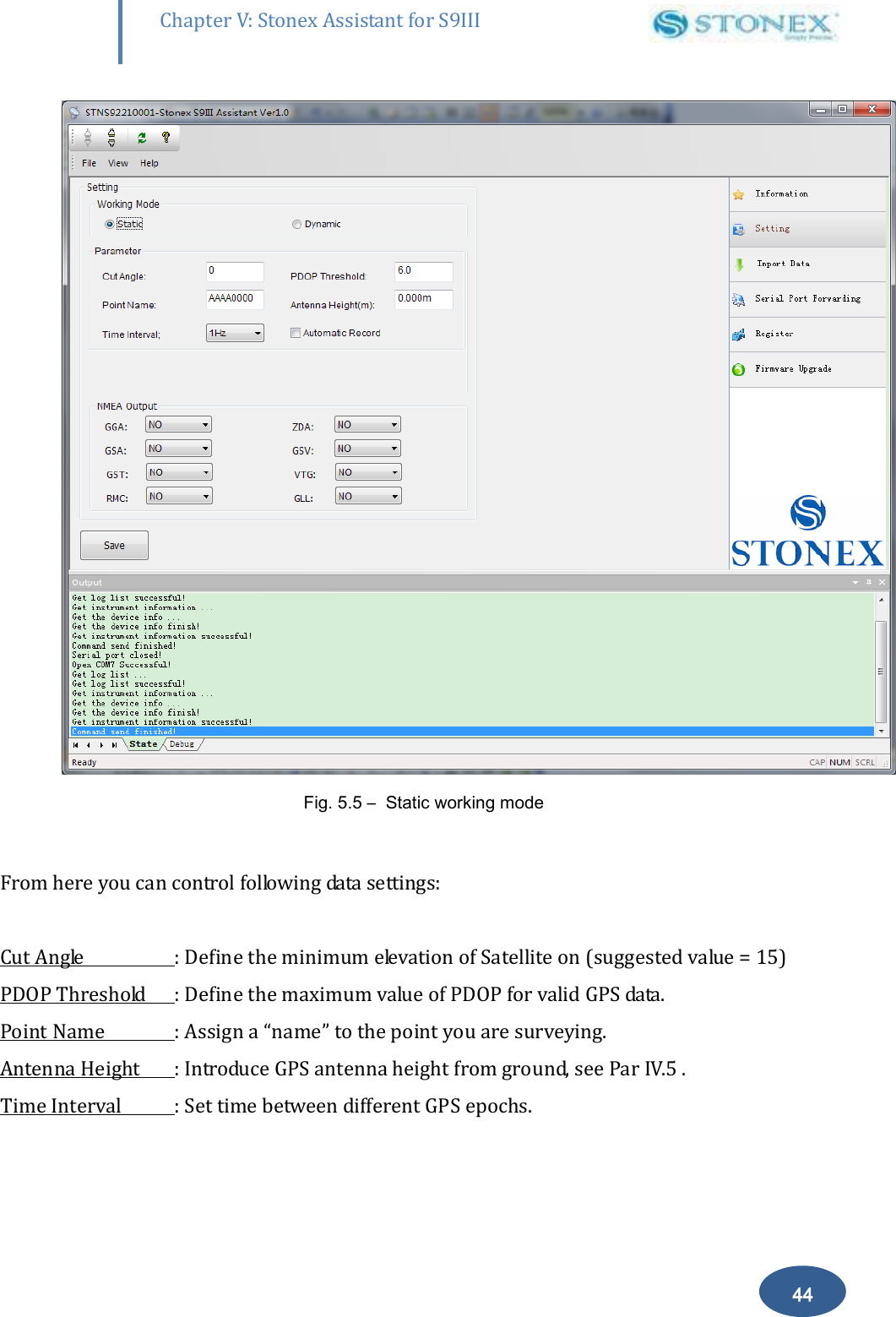
       43 Chapter V: Stonex Assistant for S9III DefRadSettings Setting  the  Dynamic  working  mode  (Rover  or  Base)  the  following  parameters  should  be specified:  a) Differential type: To select the format of the differential correction. b) Elevation mask: to enable reception of signal only above the inserted horizontal angle. c) Record Raw data: to record raw data inside memory of S9III. d) Using Glonass: To enable/Disable Glonass reception.   Select “Static” for a  Static Survey operation , “Dynamic” if you want to do RTK measures with your S9III.   V.3.1. Static Data Survey Static mode data entry page is reported on Fig 5.5:
       44 Chapter V: Stonex Assistant for S9III DefRadSettings  Fig. 5.5 –  Static working mode  From here you can control following data settings:  Cut Angle  : Define the minimum elevation of Satellite on (suggested value = 15) PDOP Threshold  : Define the maximum value of PDOP for valid GPS data. Point Name  : Assign a “name” to the point you are surveying. Antenna Height  : Introduce GPS antenna height from ground, see Par IV.5 . Time Interval  : Set time between different GPS epochs.
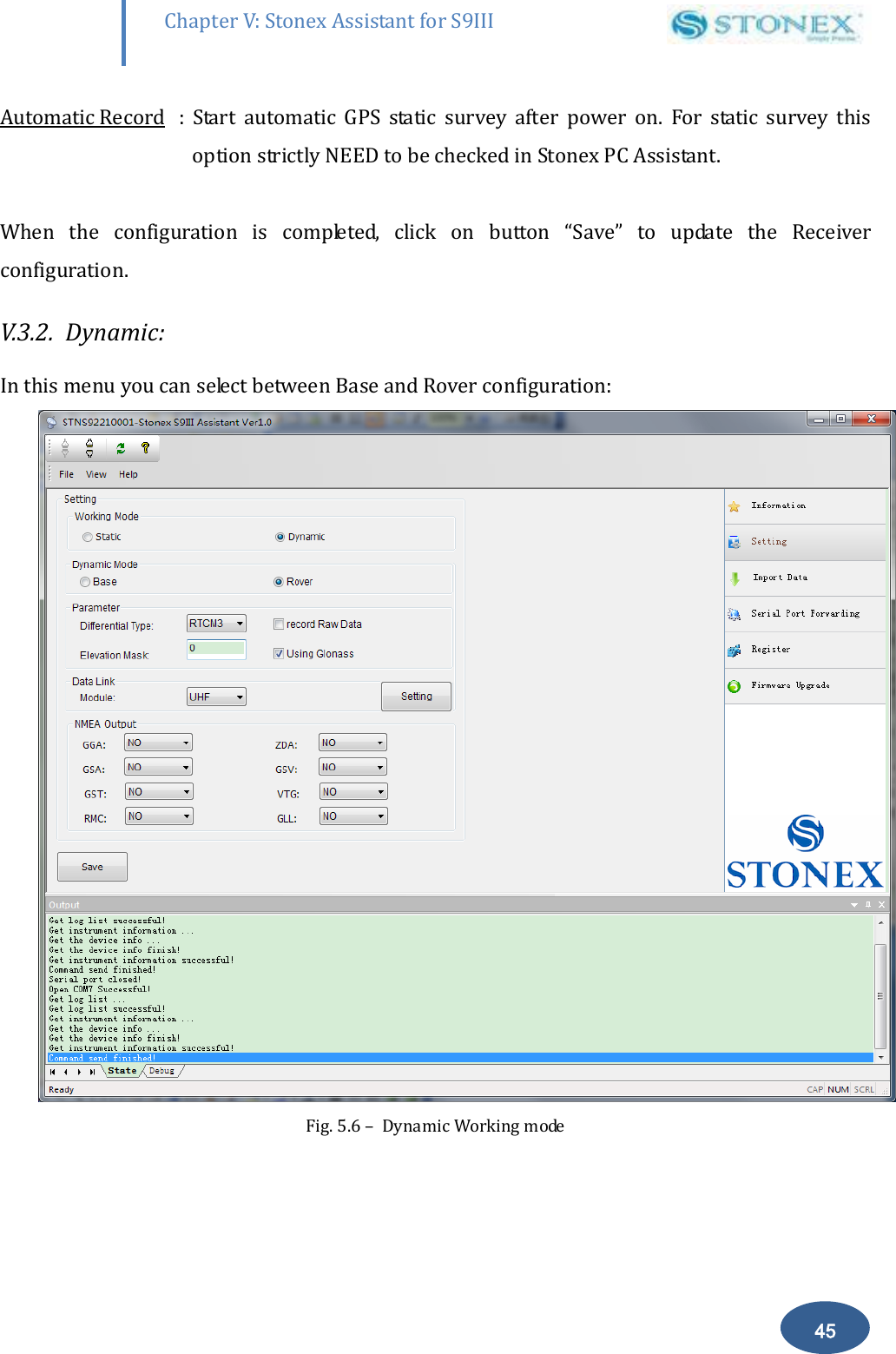
       45 Chapter V: Stonex Assistant for S9III DefRadSettings Automatic Record  :  Start  automatic  GPS  static  survey  after  power  on.  For  static  survey  this option strictly NEED to be checked in Stonex PC Assistant.  When  the  configuration  is  completed,  click  on  button  “Save”  to  update  the  Receiver configuration. V.3.2.  Dynamic: In this menu you can select between Base and Rover configuration:  Fig. 5.6 –  Dynamic Working mode
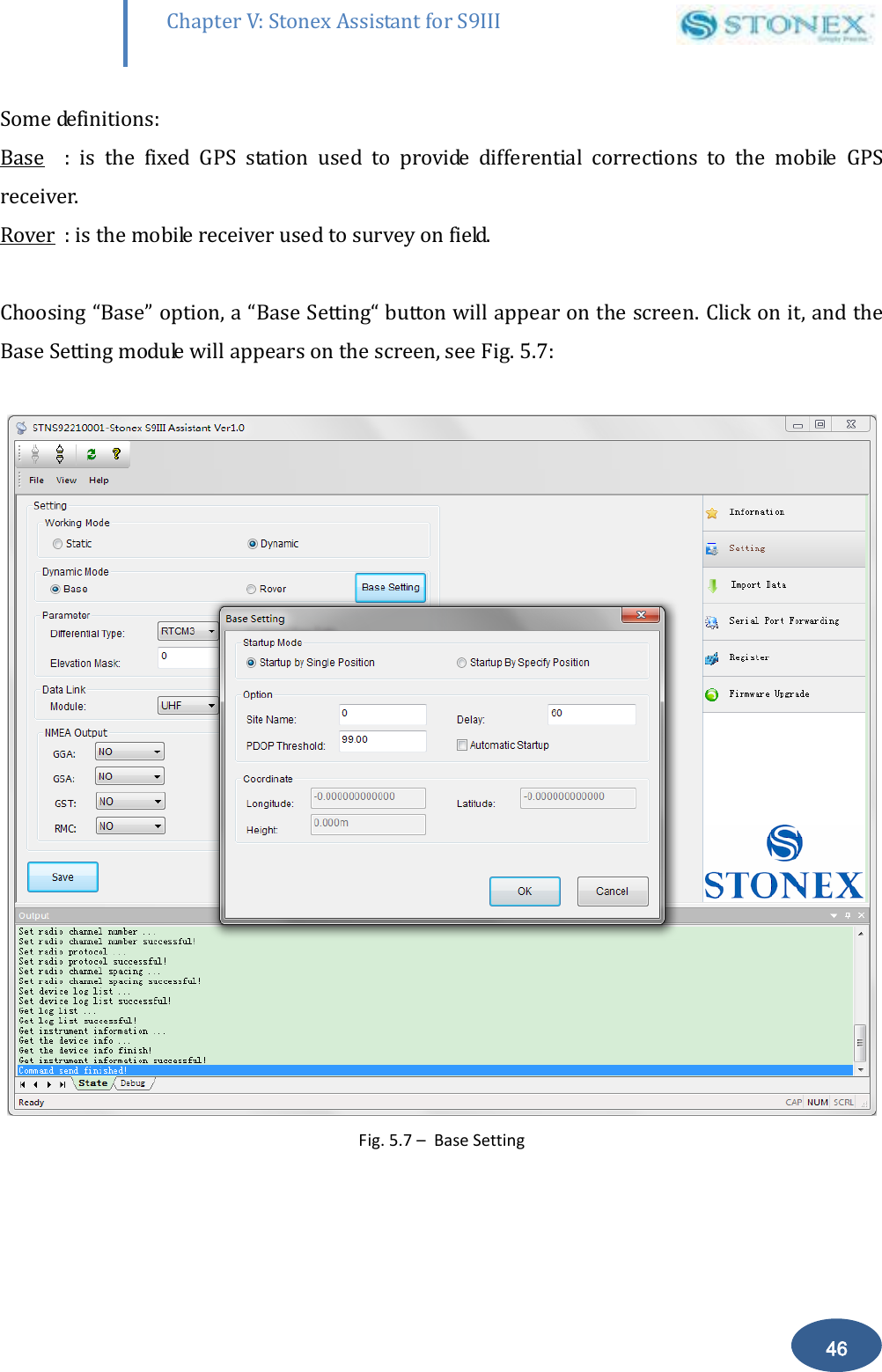
       46 Chapter V: Stonex Assistant for S9III DefRadSettings Some definitions: Base  :  is  the  fixed  GPS  station  used  to  provide  differential  corrections  to  the  mobile  GPS receiver. Rover  : is the mobile receiver used to survey on field.  Choosing “Base” option, a “Base Setting“ button will appear on the screen. Click on it, and the Base Setting module will appears on the screen, see Fig. 5.7:   Fig. 5.7 –  Base Setting
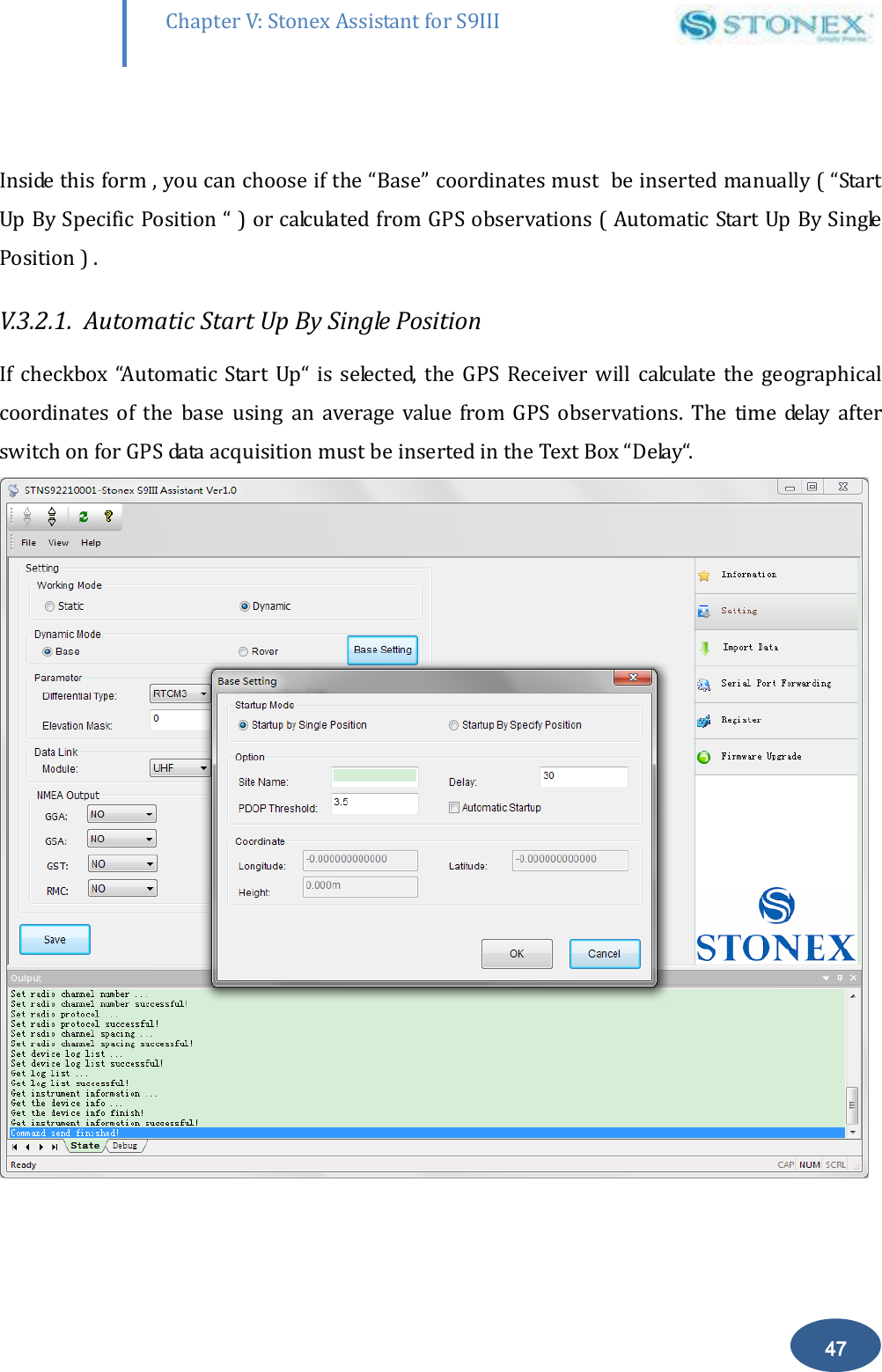
       47 Chapter V: Stonex Assistant for S9III DefRadSettings  Inside this form , you can choose if the “Base” coordinates must  be inserted manually ( “Start Up By Specific Position “ ) or calculated from GPS observations ( Automatic Start Up By Single Position ) . V.3.2.1.  Automatic Start Up By Single Position  If  checkbox  “Automatic  Start  Up“  is  selected,  the  GPS  Receiver will  calculate  the  geographical coordinates  of  the  base  using  an  average  value  from  GPS  observations.  The  time  delay  after switch on for GPS data acquisition must be inserted in the Text Box “Delay“.
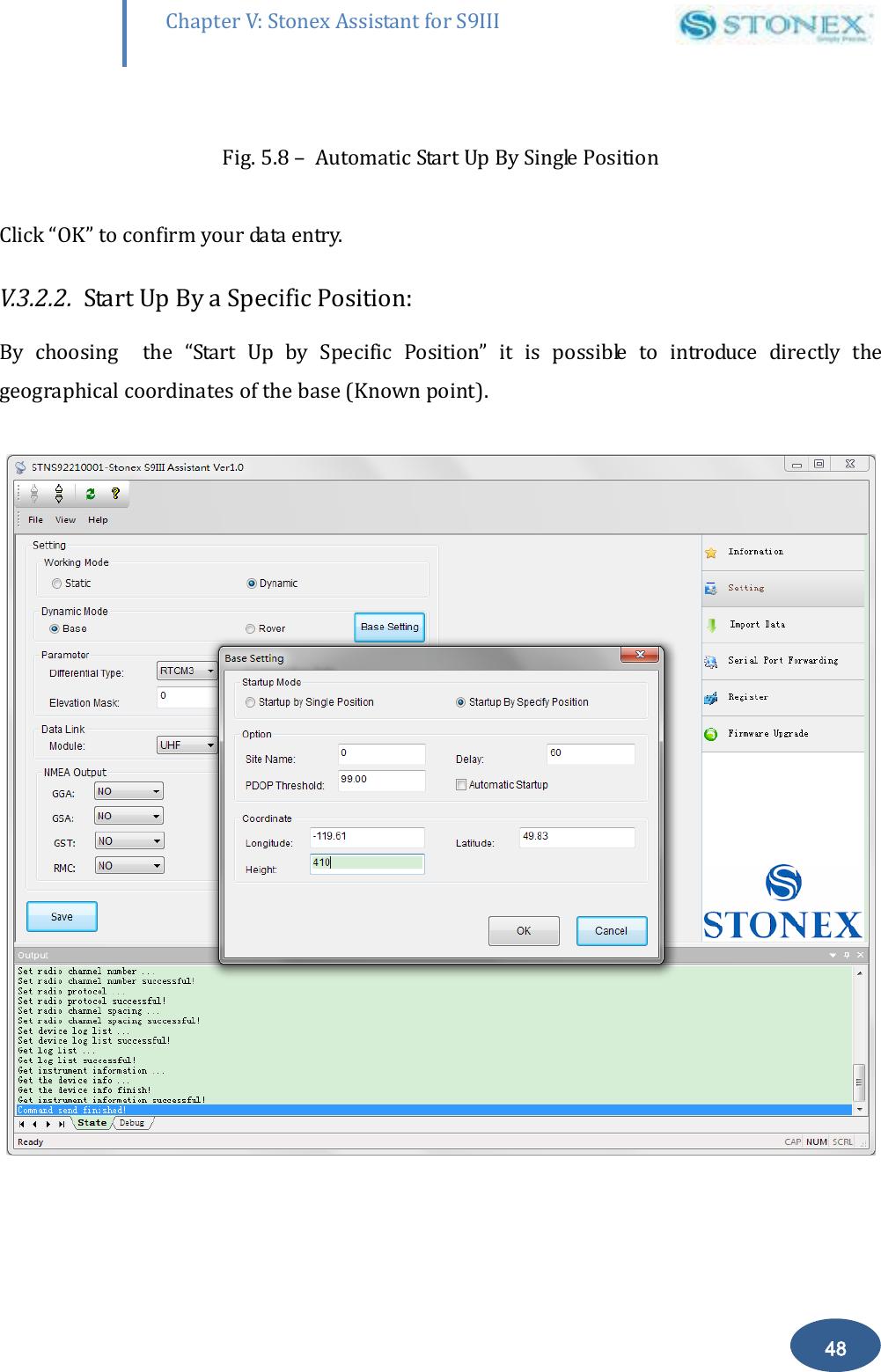
       48 Chapter V: Stonex Assistant for S9III DefRadSettings  Fig. 5.8 –  Automatic Start Up By Single Position  Click “OK” to confirm your data entry. V.3.2.2.  Start Up By a Specific Position: By  choosing    the  “Start  Up  by  Specific  Position”  it  is  possible  to  introduce  directly  the geographical coordinates of the base (Known point).
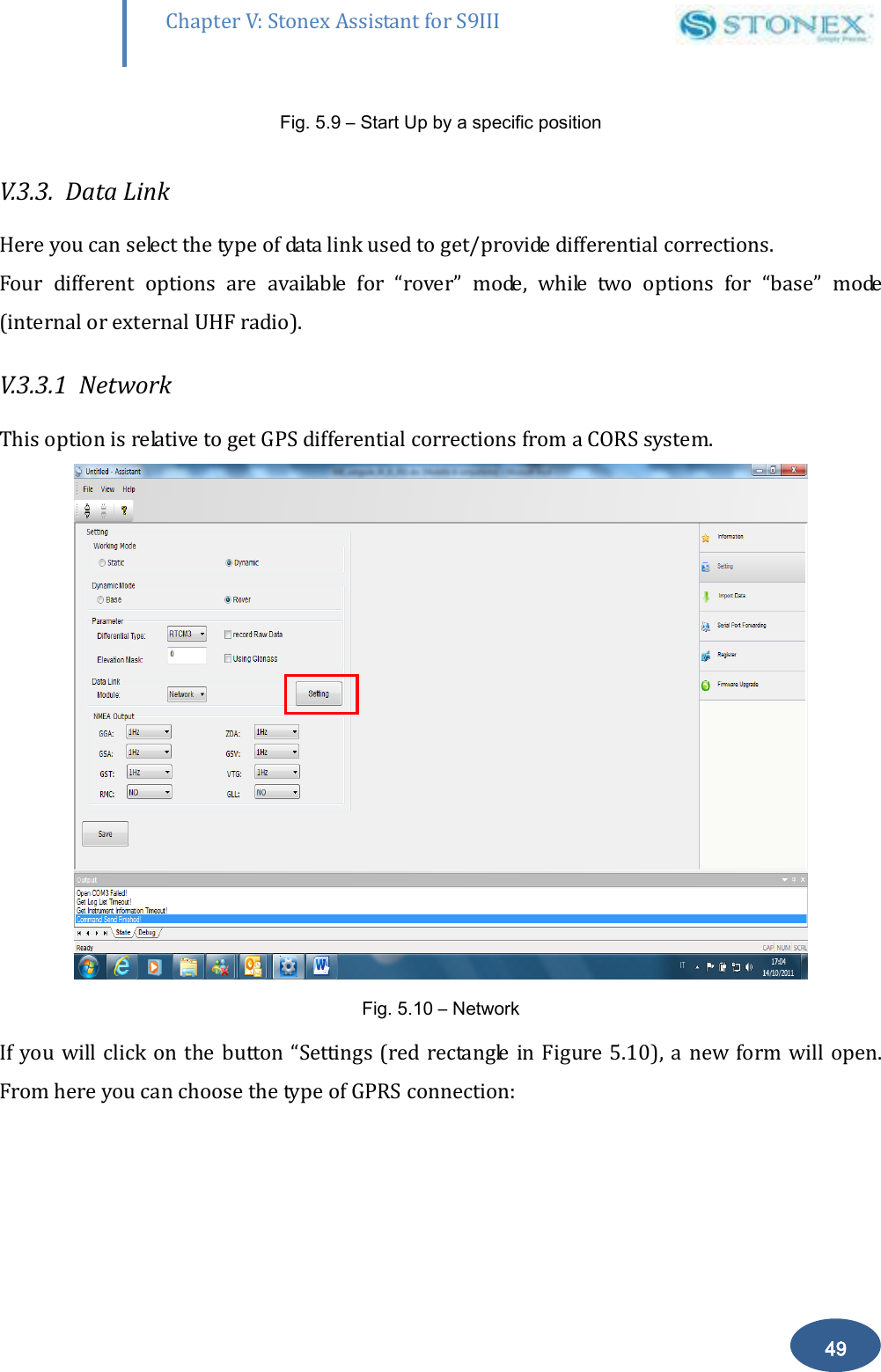
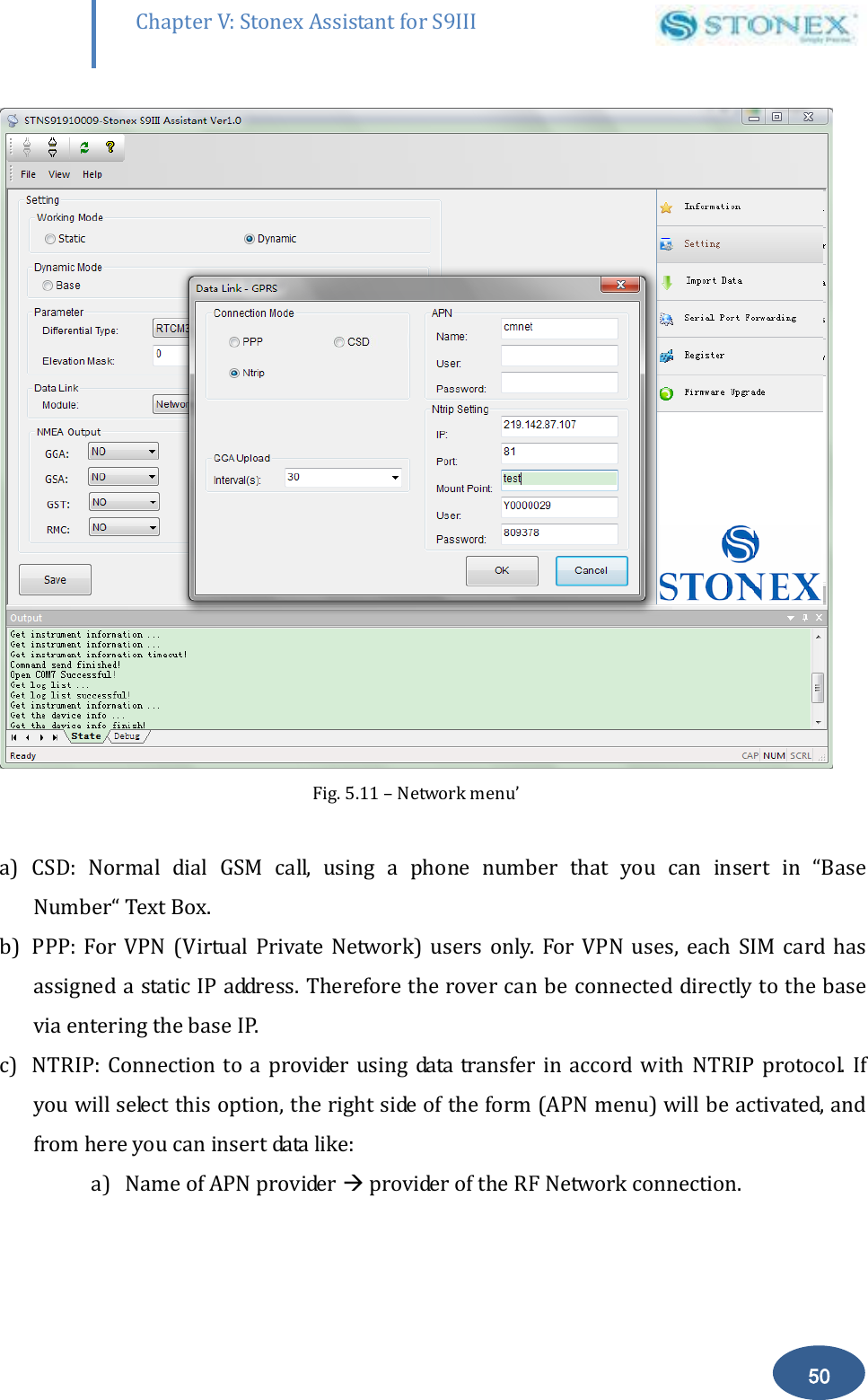
       49 Chapter V: Stonex Assistant for S9III DefRadSettings Fig. 5.9 – Start Up by a specific position   V.3.3.  Data Link   Here you can select the type of data link used to get/provide differential corrections. Four  different  options  are  available  for  “rover”  mode,  while  two  options  for  “base”  mode (internal or external UHF radio). V.3.3.1  Network This option is relative to get GPS differential corrections from a CORS system.  Fig. 5.10 – Network  If you will click on  the button “Settings (red rectangle in Figure 5.10),  a new form will open. From here you can choose the type of GPRS connection:
       50 Chapter V: Stonex Assistant for S9III DefRadSettings  Fig. 5.11 – Network menu’  a) CSD:  Normal  dial  GSM  call,  using  a  phone  number  that  you  can  insert  in  “Base Number“ Text Box. b) PPP:  For  VPN  (Virtual  Private  Network)  users  only.  For  VPN  uses,  each  SIM  card  has assigned a static IP address. Therefore the rover can be connected directly to the base  via entering the base IP. c) NTRIP: Connection to a provider using  data  transfer in  accord  with NTRIP protocol.  If you will select this option, the right side of the form (APN menu) will be activated, and from here you can insert data like: a) Name of APN provider  provider of the RF Network connection.
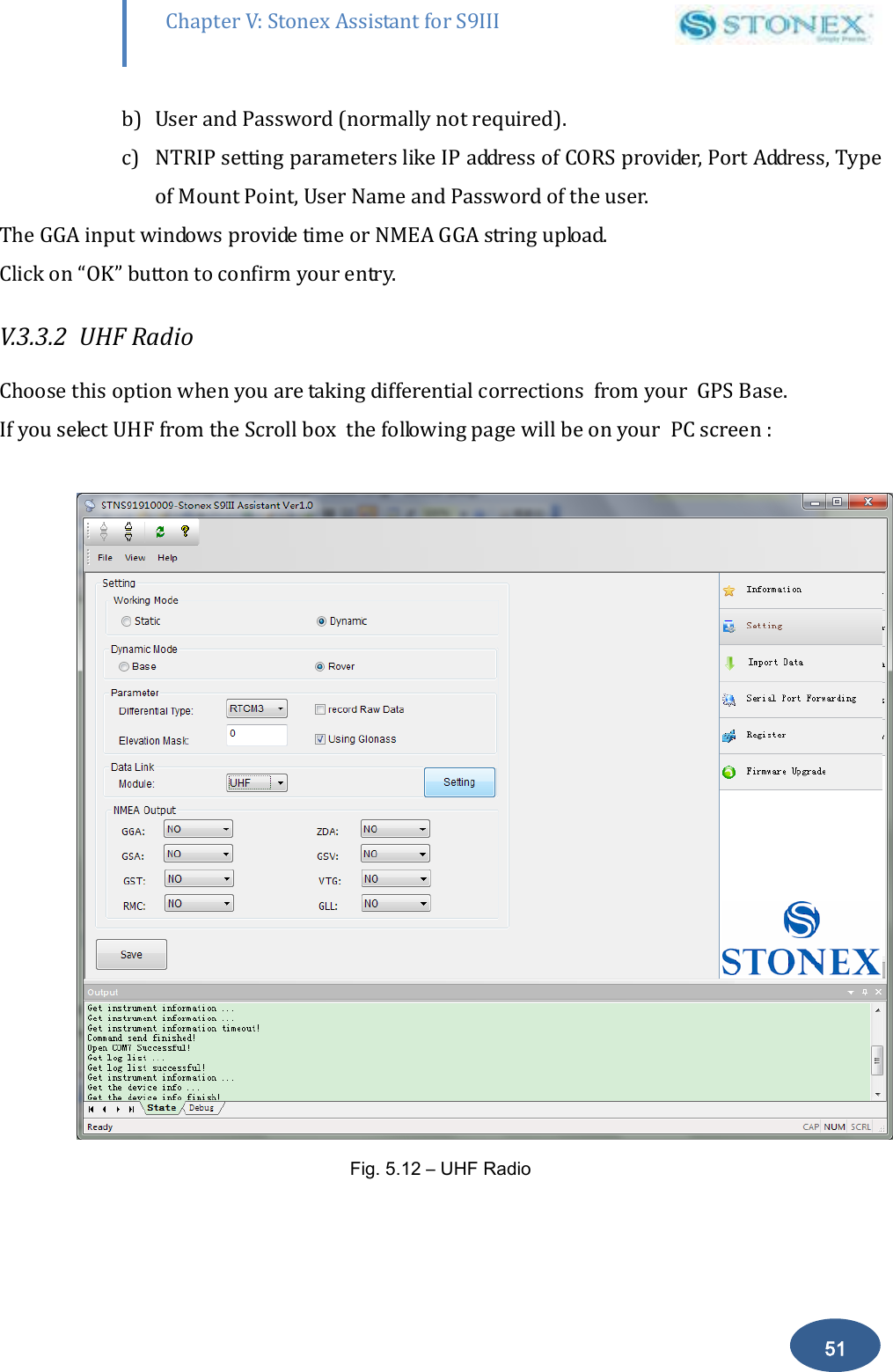
       51 Chapter V: Stonex Assistant for S9III DefRadSettings b) User and Password (normally not required). c) NTRIP setting parameters like IP address of CORS provider, Port Address, Type of Mount Point, User Name and Password of the user. The GGA input windows provide time or NMEA GGA string upload. Click on “OK” button to confirm your entry. V.3.3.2  UHF Radio    Choose this option when you are taking differential corrections  from your  GPS Base. If you select UHF from the Scroll box  the following page will be on your  PC screen :    Fig. 5.12 – UHF Radio
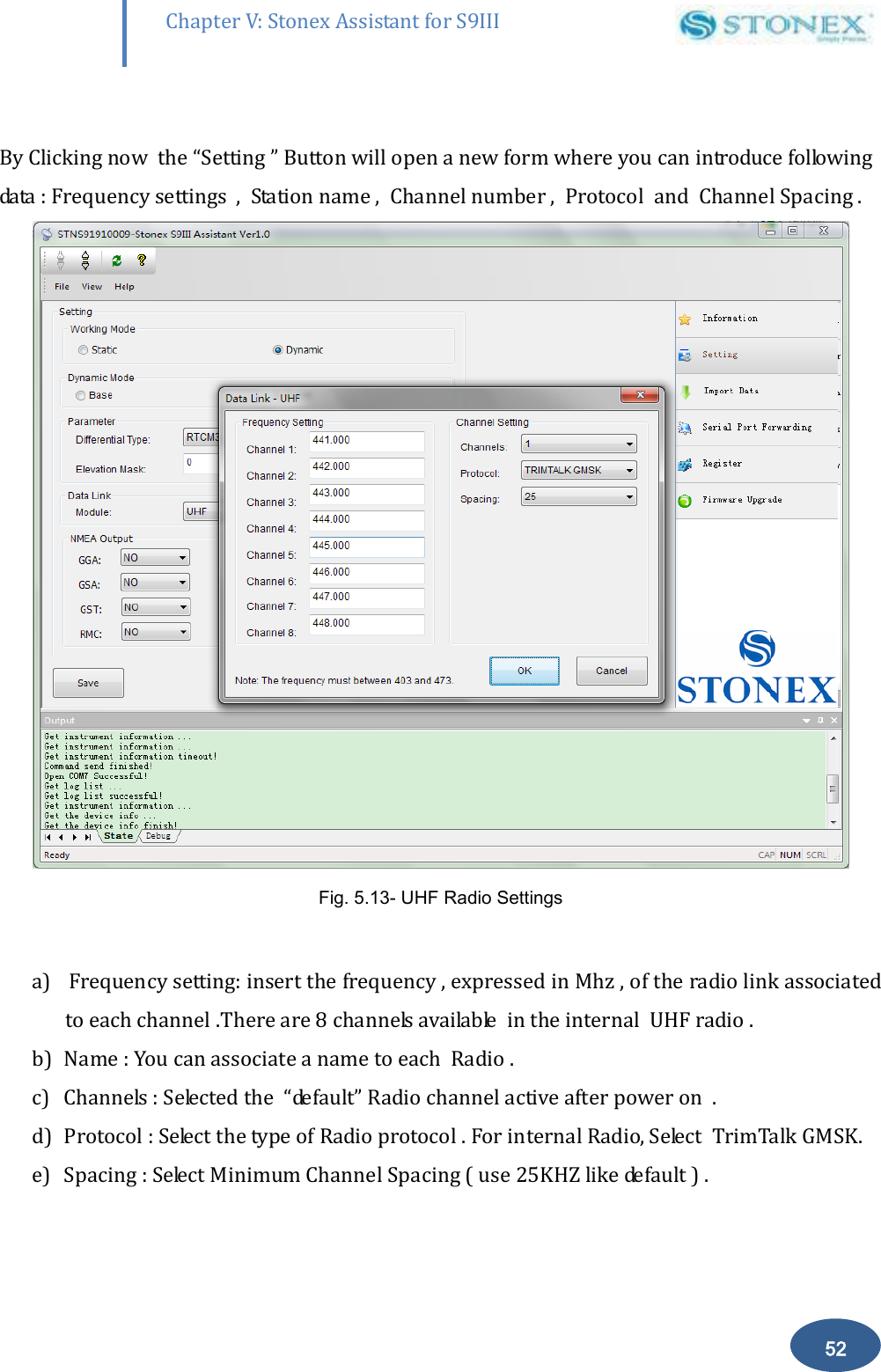
       52 Chapter V: Stonex Assistant for S9III DefRadSettings  By Clicking now  the “Setting ” Button will open a new form where you can introduce following data : Frequency settings  ,  Station name ,  Channel number ,  Protocol  and  Channel Spacing .  Fig. 5.13- UHF Radio Settings  a)  Frequency setting: insert the frequency , expressed in Mhz , of the radio link associated to each channel .There are 8 channels available  in the internal  UHF radio .  b) Name : You can associate a name to each  Radio .  c) Channels : Selected the  “default” Radio channel active after power on  . d) Protocol : Select the type of Radio protocol . For internal Radio, Select  TrimTalk GMSK. e) Spacing : Select Minimum Channel Spacing ( use 25KHZ like default ) .
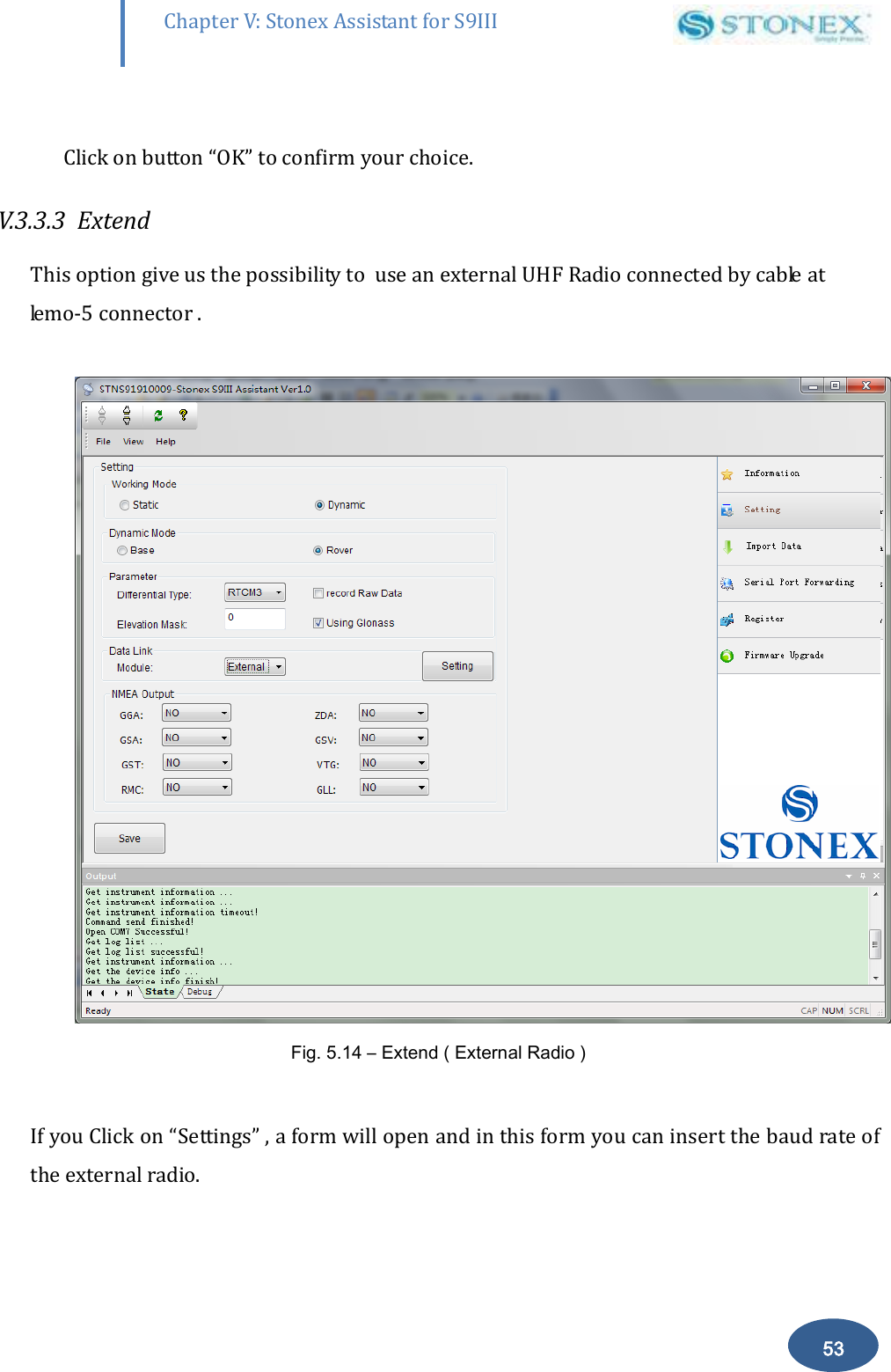
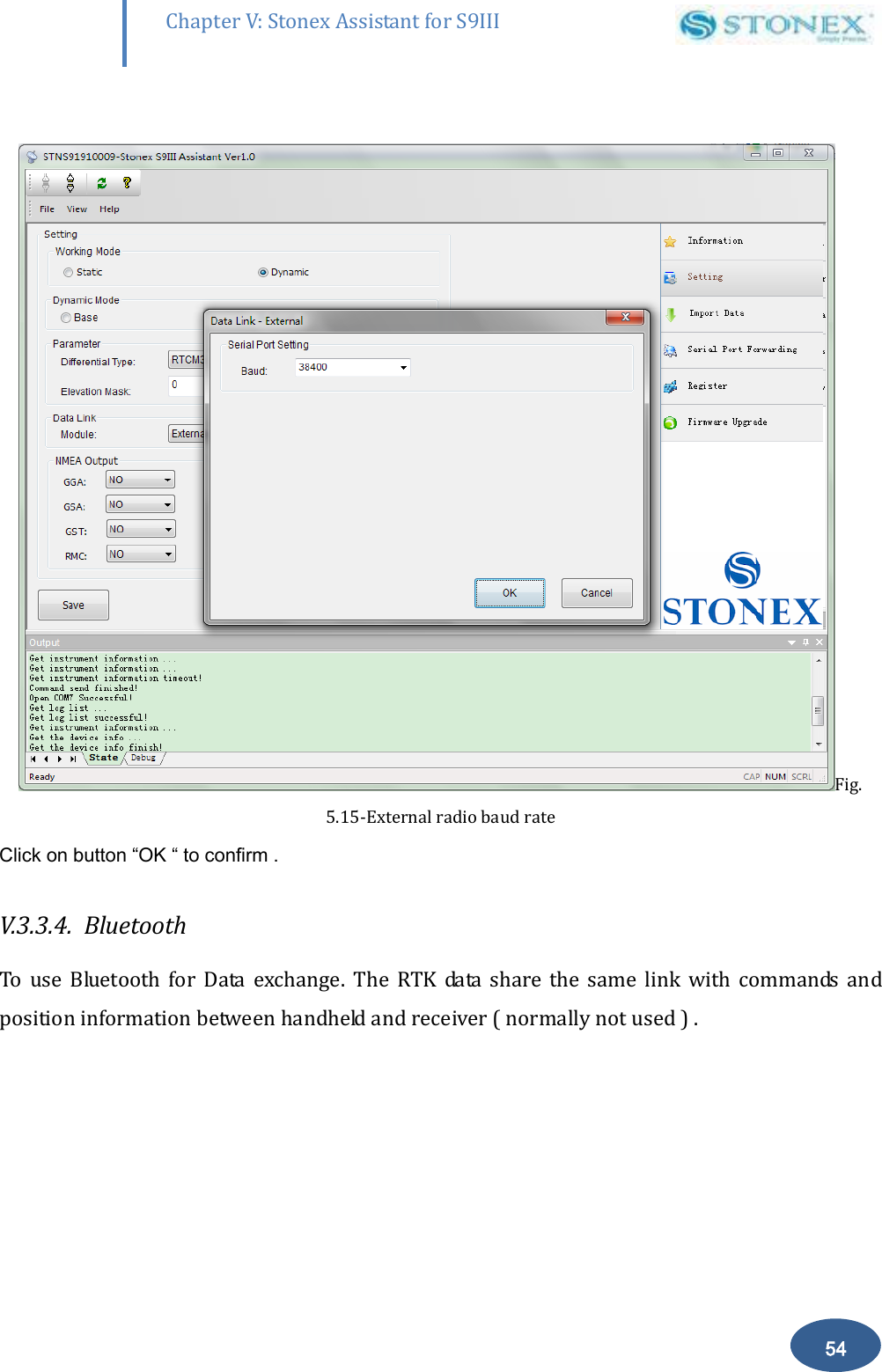
       53 Chapter V: Stonex Assistant for S9III DefRadSettings  Click on button “OK” to confirm your choice.  V.3.3.3  Extend  This option give us the possibility to  use an external UHF Radio connected by cable at lemo-5 connector .   Fig. 5.14 – Extend ( External Radio )  If you Click on “Settings” , a form will open and in this form you can insert the baud rate of the external radio.
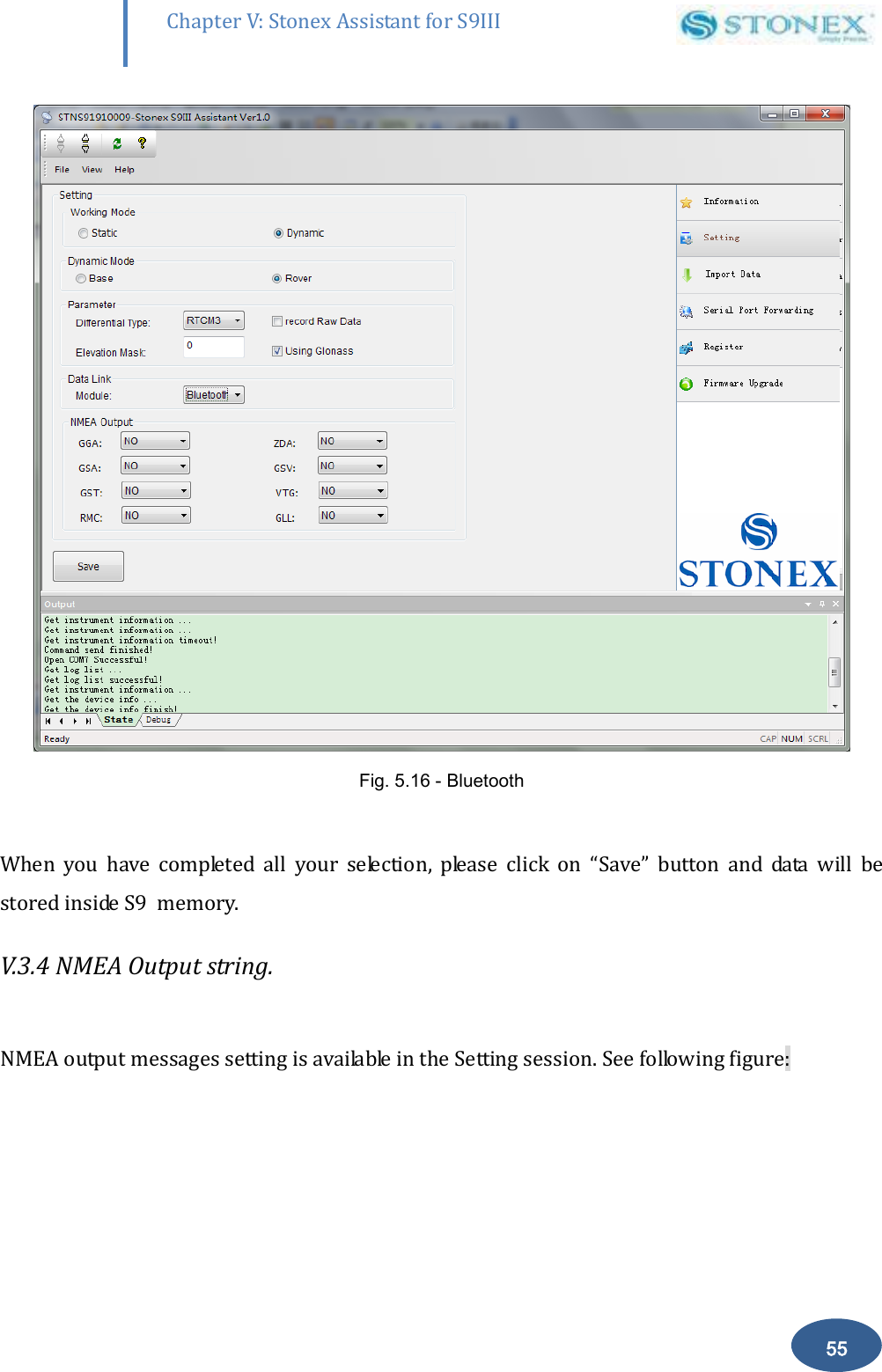
       54 Chapter V: Stonex Assistant for S9III DefRadSettings  Fig. 5.15-External radio baud rate Click on button “OK “ to confirm . V.3.3.4.  Bluetooth  To  use  Bluetooth  for  Data  exchange.  The  RTK  data  share  the  same  link  with  commands  and position information between handheld and receiver ( normally not used ) .
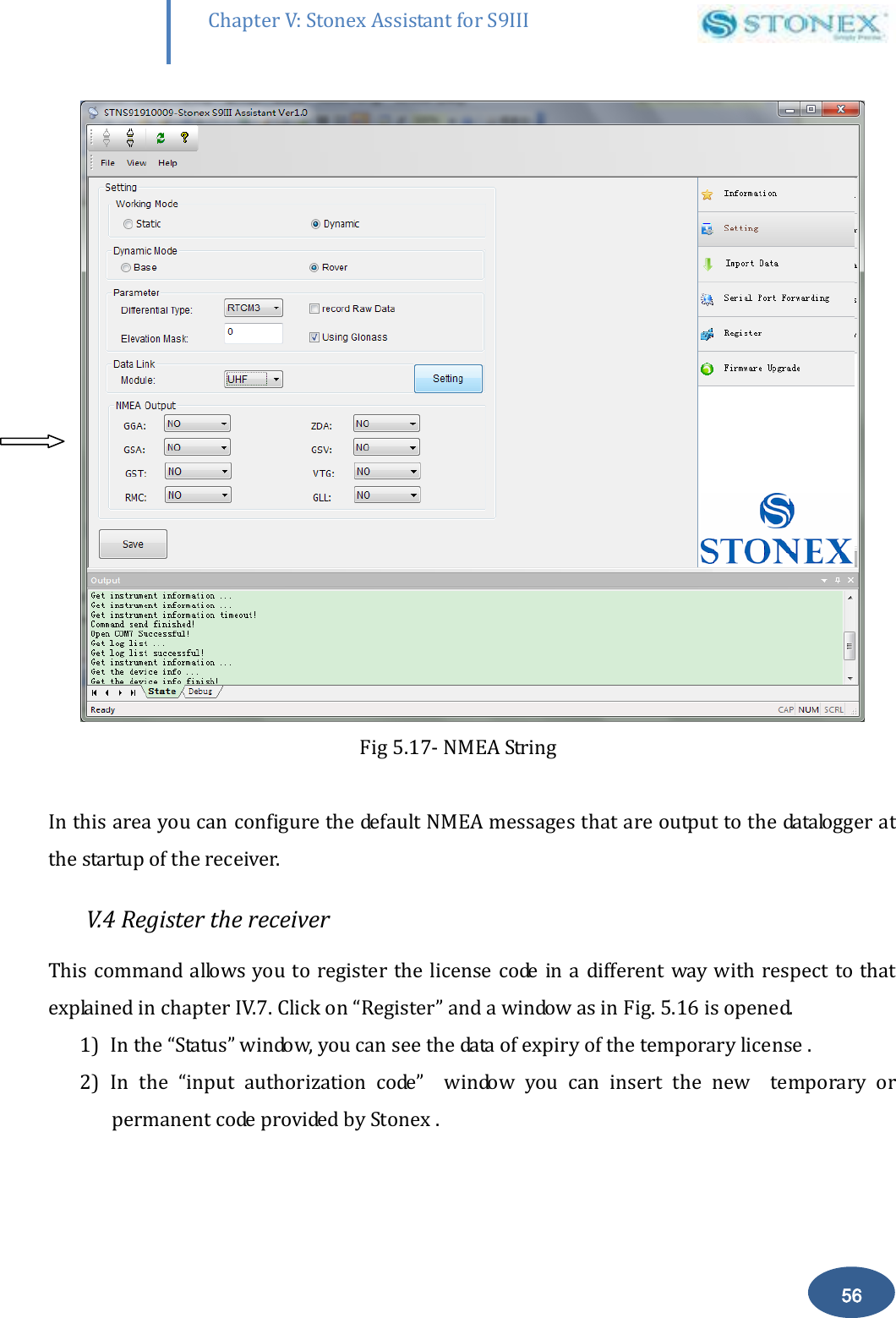
       55 Chapter V: Stonex Assistant for S9III DefRadSettings  Fig. 5.16 - Bluetooth  When  you  have  completed  all  your  selection,  please  click  on  “Save”  button  and  data  will  be stored inside S9  memory. V.3.4 NMEA Output string.   NMEA output messages setting is available in the Setting session. See following figure:
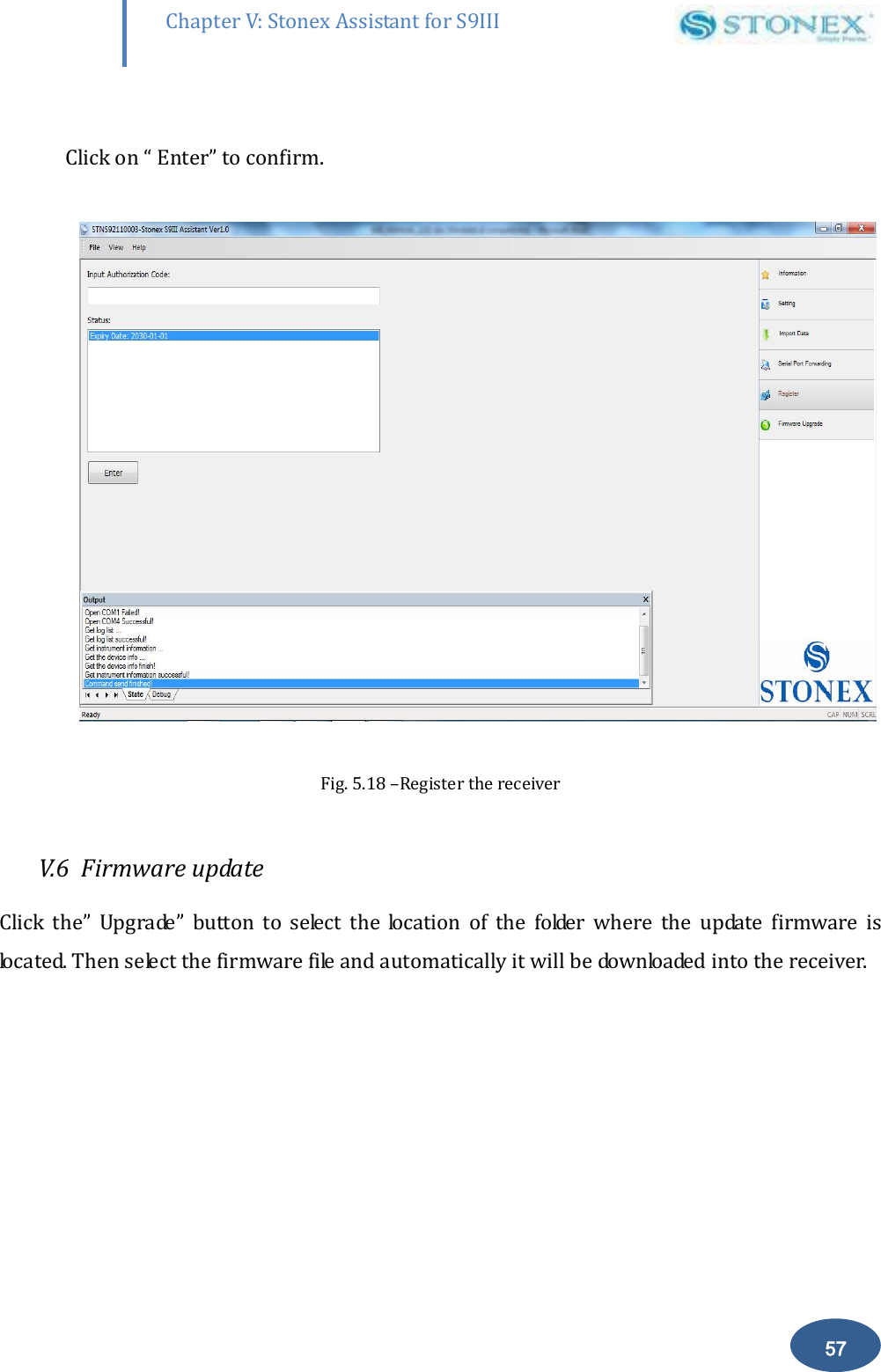
       56 Chapter V: Stonex Assistant for S9III DefRadSettings            Fig 5.17- NMEA String  In this area you can configure the default NMEA messages that are output to the datalogger at the startup of the receiver.  V.4 Register the receiver This command allows you to register the  license code in a different  way with  respect to that explained in chapter IV.7. Click on “Register” and a window as in Fig. 5.16 is opened.  1) In the “Status” window, you can see the data of expiry of the temporary license .  2) In  the  “input  authorization  code”    window  you  can  insert  the  new    temporary  or permanent code provided by Stonex .
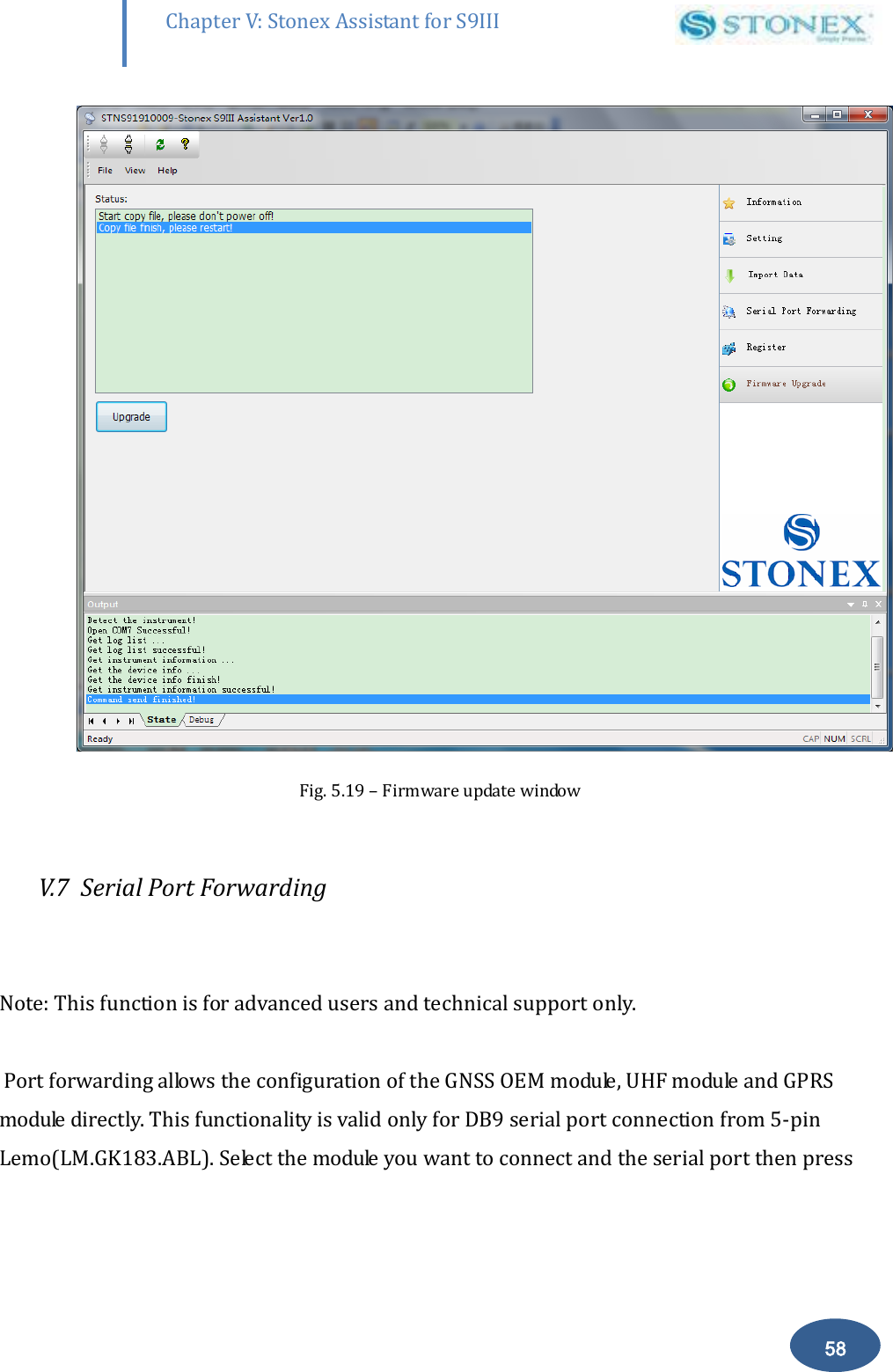
       57 Chapter V: Stonex Assistant for S9III DefRadSettings  Click on “ Enter” to confirm.    Fig. 5.18 –Register the receiver  V.6  Firmware update Click  the”  Upgrade”  button  to  select  the  location  of  the  folder  where  the  update  firmware  is located. Then select the firmware file and automatically it will be downloaded into the receiver.
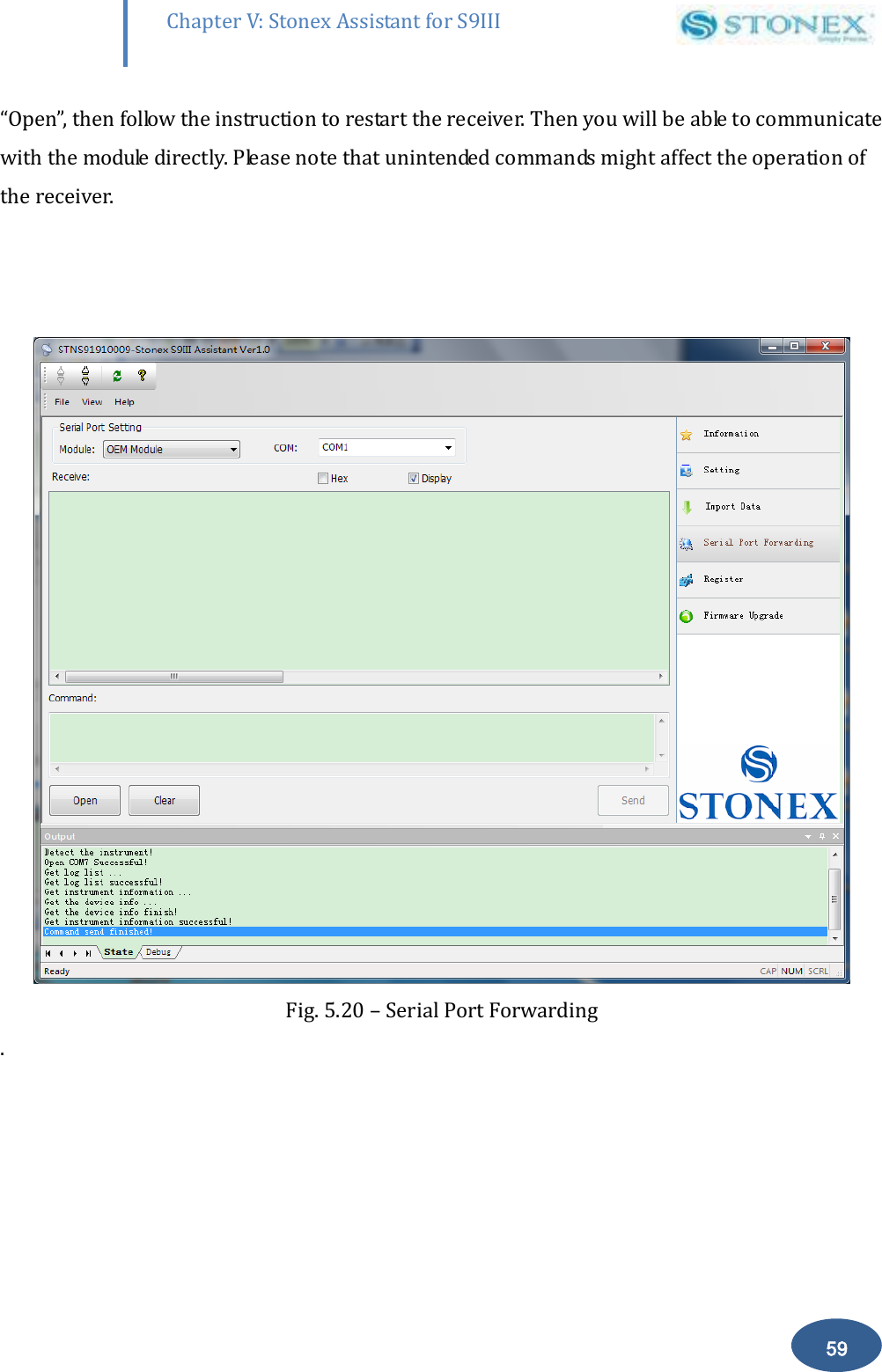
       58 Chapter V: Stonex Assistant for S9III DefRadSettings  Fig. 5.19 – Firmware update window  V.7  Serial Port Forwarding   Note: This function is for advanced users and technical support only.   Port forwarding allows the configuration of the GNSS OEM module, UHF module and GPRS module directly. This functionality is valid only for DB9 serial port connection from 5-pin Lemo(LM.GK183.ABL). Select the module you want to connect and the serial port then press
       59 Chapter V: Stonex Assistant for S9III DefRadSettings “Open”, then follow the instruction to restart the receiver. Then you will be able to communicate with the module directly. Please note that unintended commands might affect the operation of the receiver.      Fig. 5.20 – Serial Port Forwarding .
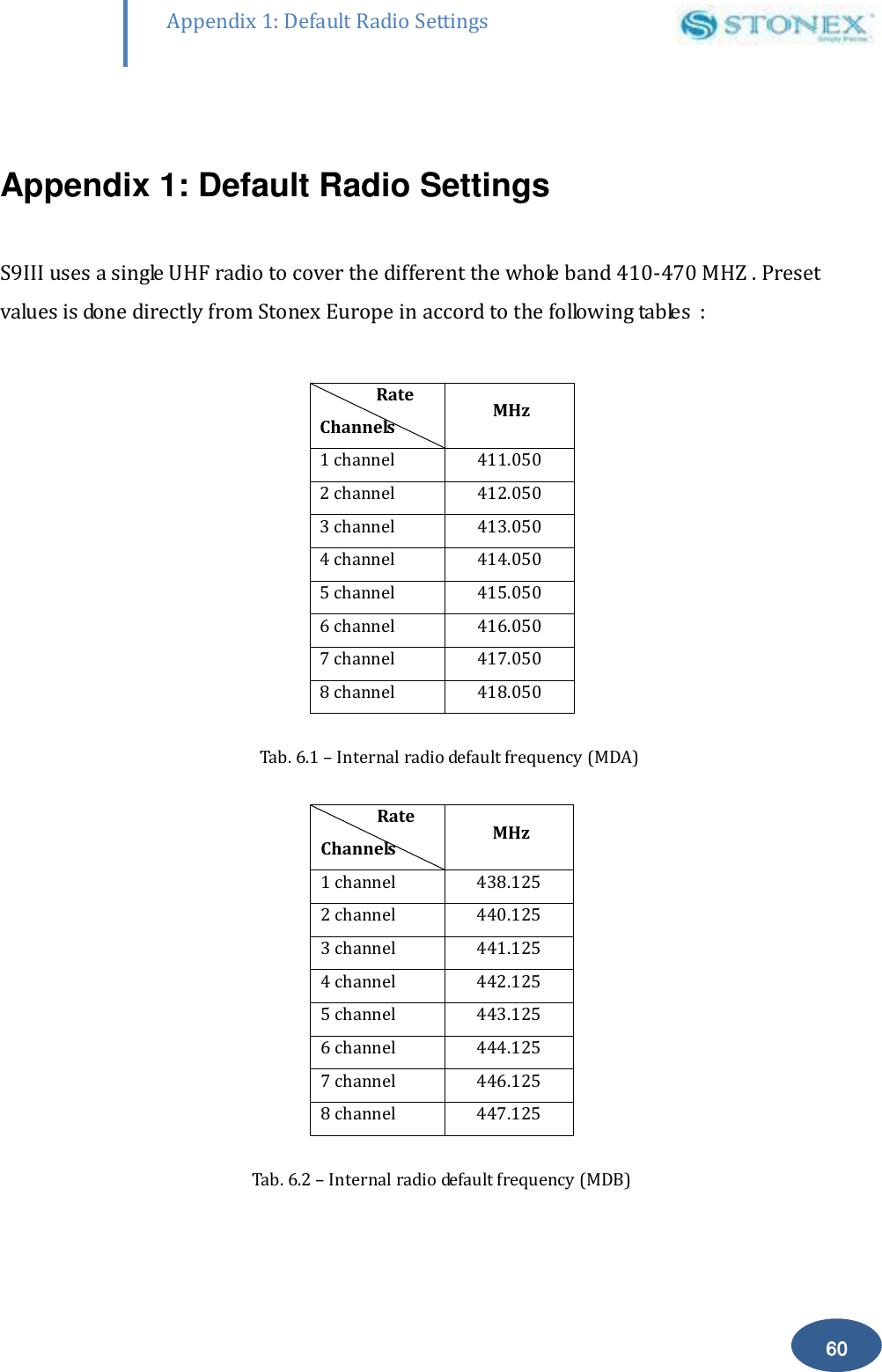
       60 Appendix 1: Default Radio Settings  Appendix 1: Default Radio Settings  S9III uses a single UHF radio to cover the different the whole band 410-470 MHZ . Preset values is done directly from Stonex Europe in accord to the following tables  :                 Rate Channels  MHz 1 channel 411.050 2 channel 412.050 3 channel 413.050 4 channel 414.050 5 channel 415.050 6 channel 416.050 7 channel 417.050 8 channel 418.050  Tab. 6.1 – Internal radio default frequency (MDA)                Rate Channels  MHz 1 channel 438.125 2 channel 440.125 3 channel 441.125 4 channel 442.125 5 channel 443.125 6 channel 444.125 7 channel 446.125 8 channel 447.125  Tab. 6.2 – Internal radio default frequency (MDB)
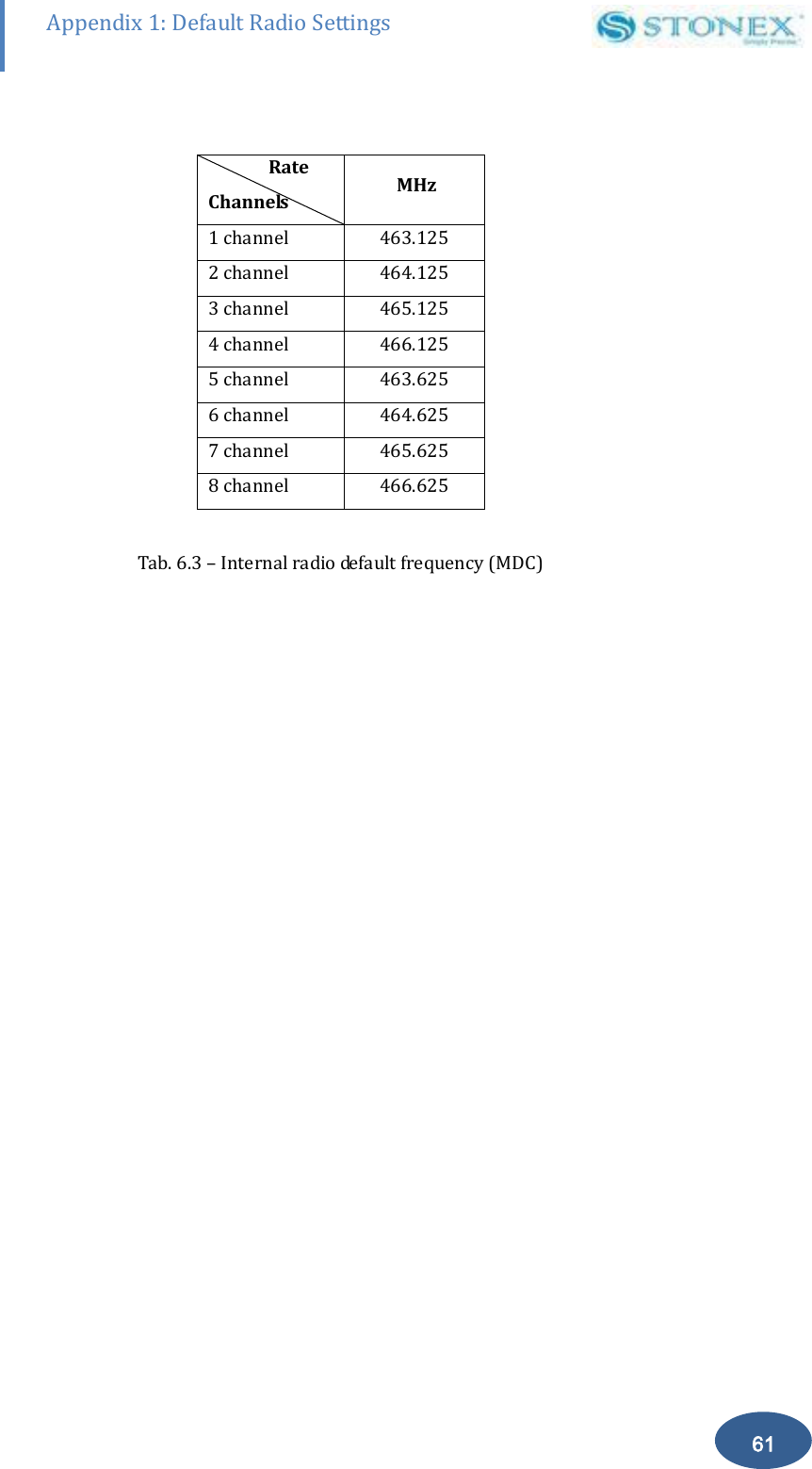
       61 Appendix 1: Default Radio Settings                Rate Channels  MHz 1 channel 463.125 2 channel 464.125 3 channel 465.125 4 channel 466.125 5 channel 463.625 6 channel 464.625 7 channel 465.625 8 channel 466.625  Tab. 6.3 – Internal radio default frequency (MDC)
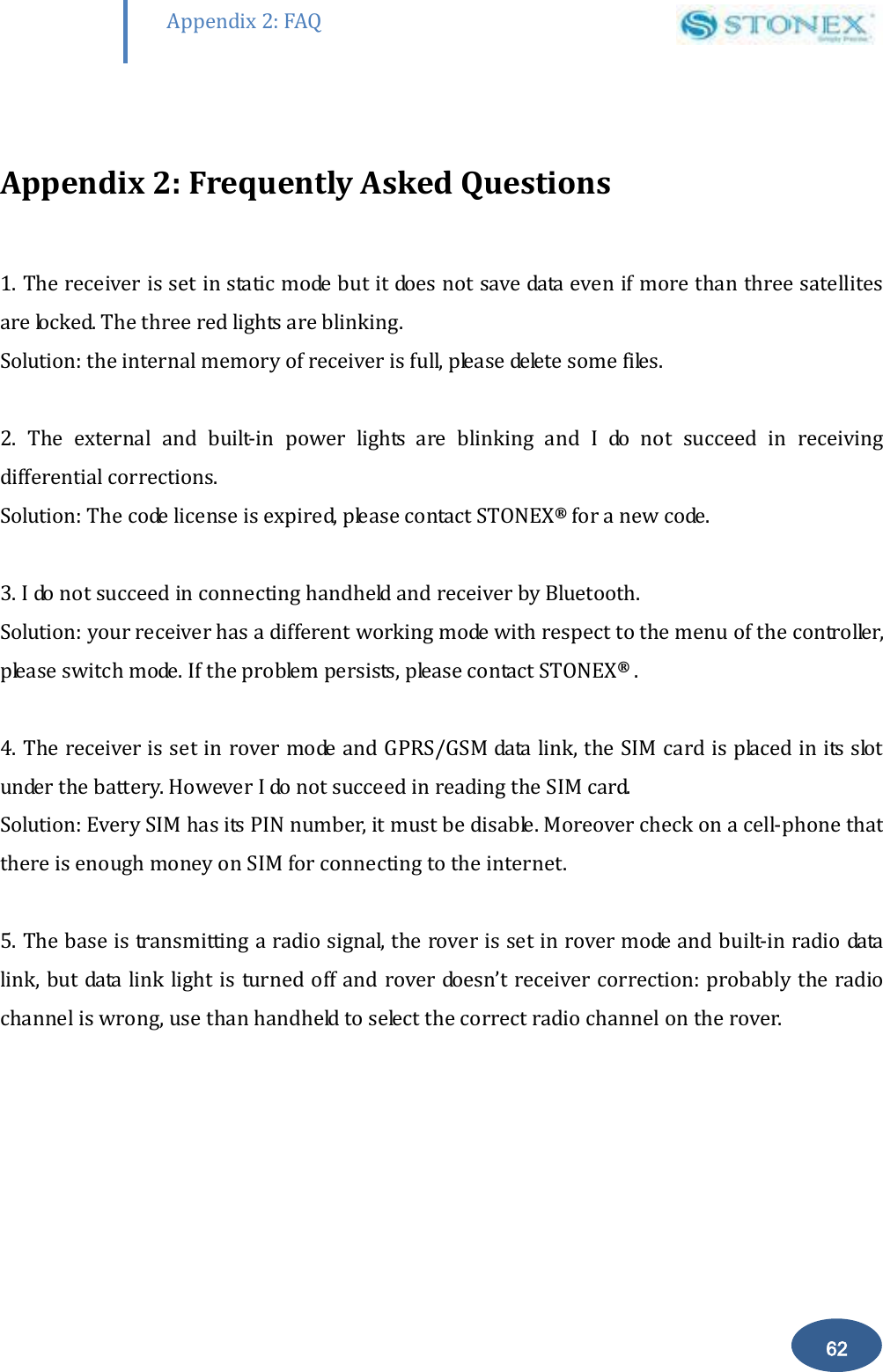
       62 Appendix 2: FAQ  Appendix 2: Frequently Asked Questions  1. The receiver is set in static mode but it does not save data even if more than three satellites are locked. The three red lights are blinking. Solution: the internal memory of receiver is full, please delete some files.  2.  The  external  and  built-in  power  lights  are  blinking  and  I  do  not  succeed  in  receiving differential corrections. Solution: The code license is expired, please contact STONEX® for a new code.  3. I do not succeed in connecting handheld and receiver by Bluetooth. Solution: your receiver has a different working mode with respect to the menu of the controller, please switch mode. If the problem persists, please contact STONEX® .  4. The receiver is set in rover mode and GPRS/GSM data link, the SIM card is placed in its slot under the battery. However I do not succeed in reading the SIM card.                                  Solution: Every SIM has its PIN number, it must be disable. Moreover check on a cell-phone that there is enough money on SIM for connecting to the internet.  5. The base is transmitting a radio signal, the rover is set in rover mode and built-in radio data link, but data link light is turned off and rover doesn’t receiver correction: probably the radio channel is wrong, use than handheld to select the correct radio channel on the rover.
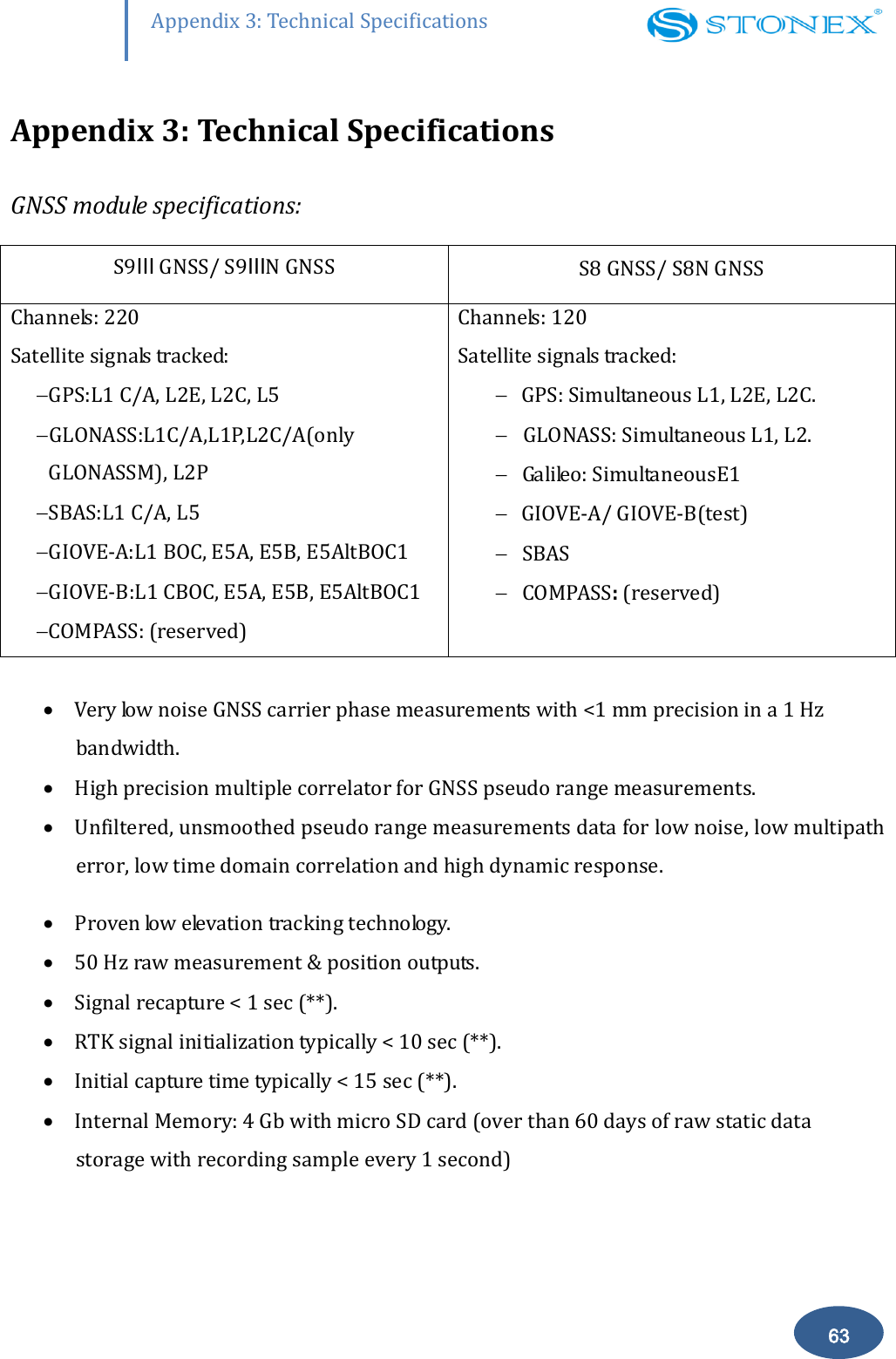
       63 Appendix 3: Technical Specifications Appendix 3: Technical Specifications GNSS module specifications: S9Ⅲ GNSS/ S9ⅢN GNSS S8 GNSS/ S8N GNSS Channels: 220 Satellite signals tracked:   GPS:L1 C/A, L2E, L2C, L5  GLONASS:L1C/A,L1P,L2C/A(only GLONASSM), L2P  SBAS:L1 C/A, L5  GIOVE-A:L1 BOC, E5A, E5B, E5AltBOC1  GIOVE-B:L1 CBOC, E5A, E5B, E5AltBOC1  COMPASS: (reserved) Channels: 120 Satellite signals tracked:   GPS: Simultaneous L1, L2E, L2C.  GLONASS: Simultaneous L1, L2.  Galileo: SimultaneousE1  GIOVE-A/ GIOVE-B(test)  SBAS  COMPASS: (reserved)   Very low noise GNSS carrier phase measurements with <1 mm precision in a 1 Hz bandwidth.  High precision multiple correlator for GNSS pseudo range measurements.  Unfiltered, unsmoothed pseudo range measurements data for low noise, low multipath error, low time domain correlation and high dynamic response.  Proven low elevation tracking technology.   50 Hz raw measurement & position outputs.  Signal recapture < 1 sec (**).  RTK signal initialization typically < 10 sec (**).  Initial capture time typically < 15 sec (**).  Internal Memory: 4 Gb with micro SD card (over than 60 days of raw static data storage with recording sample every 1 second)
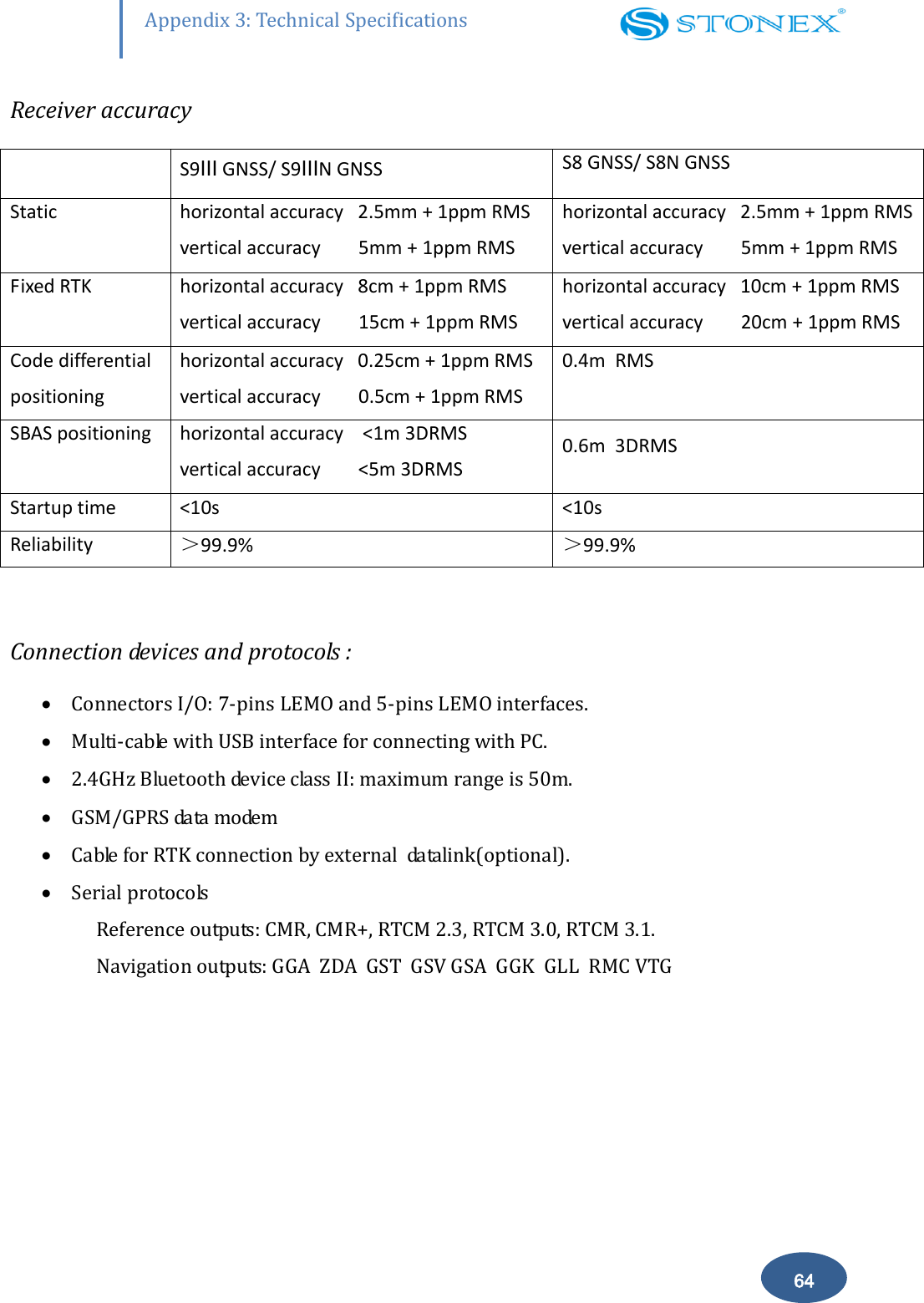
       64 Appendix 3: Technical Specifications Receiver accuracy  S9Ⅲ GNSS/ S9ⅢN GNSS S8 GNSS/ S8N GNSS Static horizontal accuracy   2.5mm + 1ppm RMS vertical accuracy        5mm + 1ppm RMS horizontal accuracy   2.5mm + 1ppm RMS vertical accuracy        5mm + 1ppm RMS Fixed RTK horizontal accuracy   8cm + 1ppm RMS vertical accuracy        15cm + 1ppm RMS horizontal accuracy   10cm + 1ppm RMS vertical accuracy        20cm + 1ppm RMS Code differential positioning horizontal accuracy   0.25cm + 1ppm RMS vertical accuracy        0.5cm + 1ppm RMS 0.4m  RMS  SBAS positioning horizontal accuracy    <1m 3DRMS vertical accuracy        <5m 3DRMS 0.6m  3DRMS Startup time <10s <10s Reliability >99.9% >99.9%  Connection devices and protocols :  Connectors I/O: 7-pins LEMO and 5-pins LEMO interfaces.   Multi-cable with USB interface for connecting with PC.  2.4GHz Bluetooth device class II: maximum range is 50m.  GSM/GPRS data modem  Cable for RTK connection by external  datalink(optional).  Serial protocols Reference outputs: CMR, CMR+, RTCM 2.3, RTCM 3.0, RTCM 3.1. Navigation outputs: GGA  ZDA  GST  GSV GSA  GGK  GLL  RMC VTG
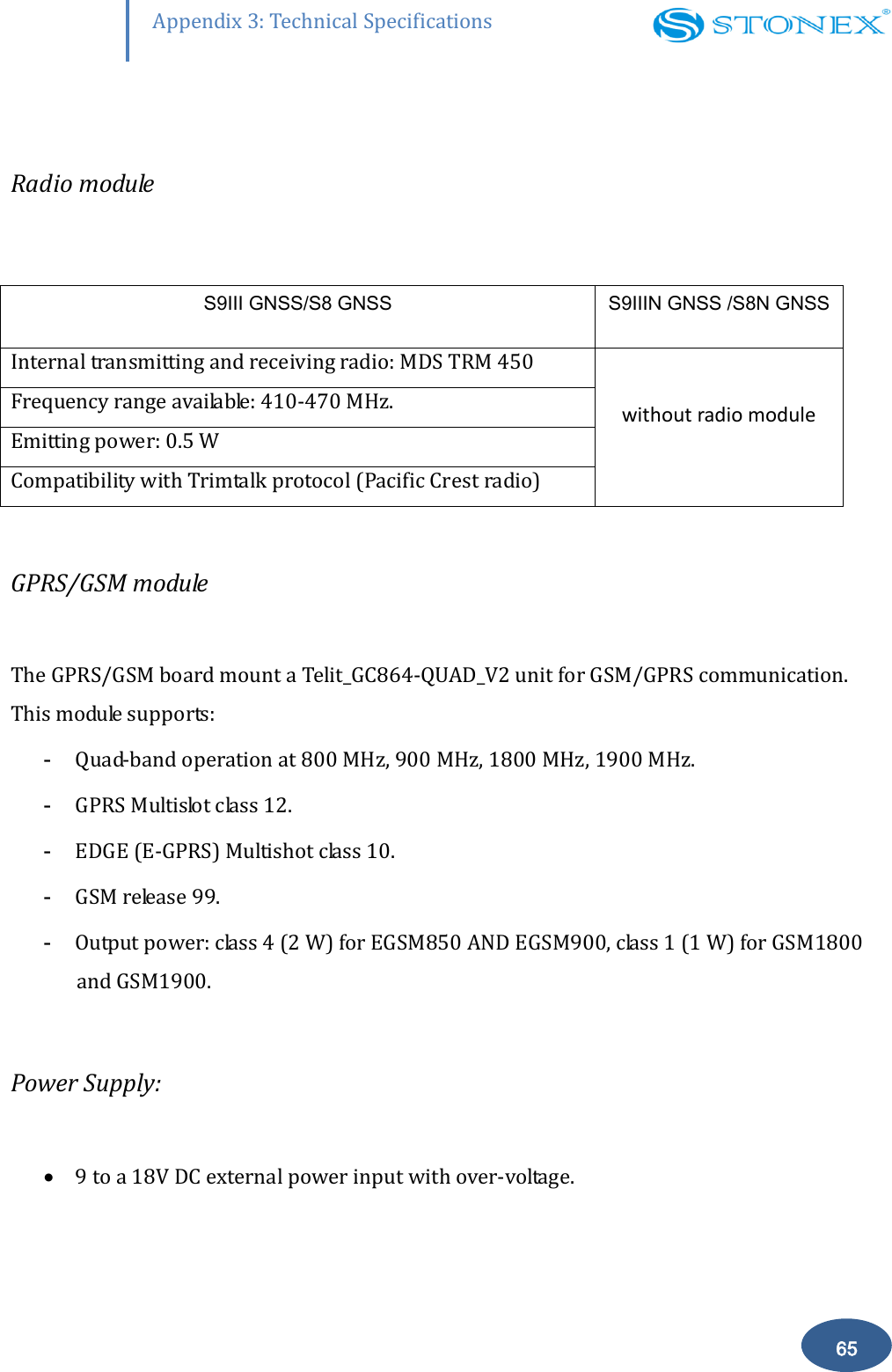
       65 Appendix 3: Technical Specifications  Radio module  S9Ⅲ GNSS/S8 GNSS S9ⅢN GNSS /S8N GNSS Internal transmitting and receiving radio: MDS TRM 450 without radio module Frequency range available: 410-470 MHz. Emitting power: 0.5 W Compatibility with Trimtalk protocol (Pacific Crest radio)  GPRS/GSM module  The GPRS/GSM board mount a Telit_GC864-QUAD_V2 unit for GSM/GPRS communication. This module supports: - Quad-band operation at 800 MHz, 900 MHz, 1800 MHz, 1900 MHz. - GPRS Multislot class 12. - EDGE (E-GPRS) Multishot class 10.  - GSM release 99. - Output power: class 4 (2 W) for EGSM850 AND EGSM900, class 1 (1 W) for GSM1800 and GSM1900.  Power Supply:   9 to a 18V DC external power input with over-voltage.
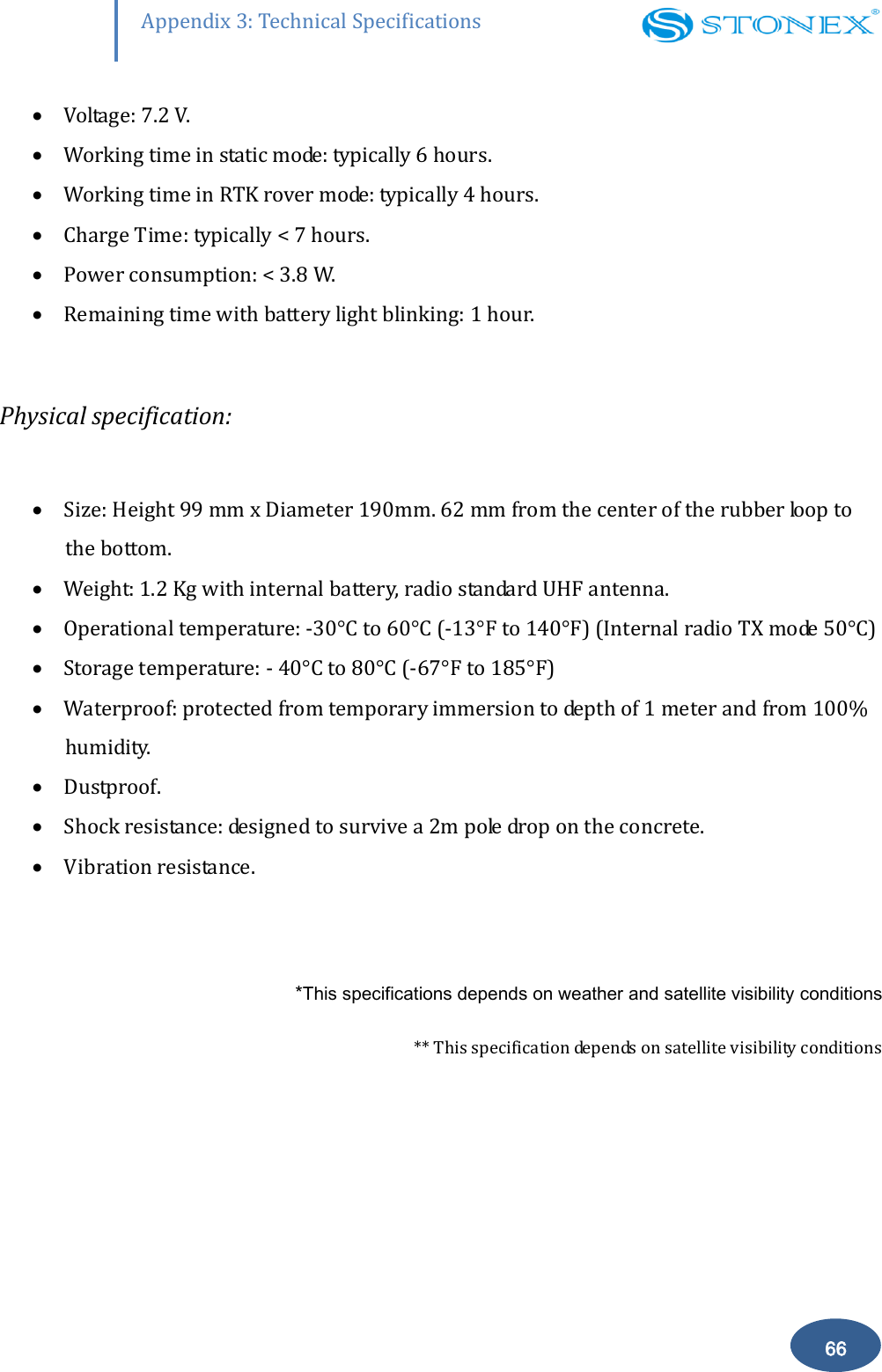
       66 Appendix 3: Technical Specifications  Voltage: 7.2 V.  Working time in static mode: typically 6 hours.  Working time in RTK rover mode: typically 4 hours.  Charge Time: typically < 7 hours.  Power consumption: < 3.8 W.  Remaining time with battery light blinking: 1 hour.  Physical specification:   Size: Height 99 mm x Diameter 190mm. 62 mm from the center of the rubber loop to the bottom.  Weight: 1.2 Kg with internal battery, radio standard UHF antenna.  Operational temperature: -30°C to 60°C (-13°F to 140°F) (Internal radio TX mode 50°C )  Storage temperature: - 40°C to 80°C (-67°F to 185°F)  Waterproof: protected from temporary immersion to depth of 1 meter and from 100% humidity.  Dustproof.  Shock resistance: designed to survive a 2m pole drop on the concrete.  Vibration resistance.  *This specifications depends on weather and satellite visibility conditions ** This specification depends on satellite visibility conditions
       67 Appendix 4: Copyrights, warranty and environmental recycling  Appendix 4: Copyrights, warranty and environmental recycling Copyrights and trademarks  ©  2012, STONEX® Limited. All rights reserved. STONEX®, the STONEX® logo, and S9III GNSS receiver are trademarks of STONEX® Limited STONEX® Assistant, STONEX® GPS Processor and STONEX® SurvCE are trademarks of STONEX® Limited. Bluetooth  is  a  trademark  owned  by  Bluetooth  SIG,  Inc.  and  licensed  to  Trimble  Navigation Limited. All other trademarks are the property of their respective owners. Release Notice This is the February 2012 release of the STONEX® S9III GNSS new model receiver user guide.  The following limited warranties give you specific legal rights. You may have others, which vary from state/jurisdiction to state/jurisdiction. Standard Limited Warranty Version  2012 The  terms  and  conditions  of  this  Limited  Warranty  constitute  the  complete  and  exclusive warranty  agreement  between  The  Customer  or  Dealer  and  STONEX®  for  the  Product  and supersedes  any  prior  agreement  or  representation  made  in  any STONEX®  sales  document  or advice that may be provided to Customer by any STONEX® representative in connection with Customer’s purchase of the Product. No change to the conditions of this Limited Warranty is valid unless it is made in written form and signed by an authorized STONEX® supervisor. STONEX ® Europe warrants that its Products:
       68 Appendix 4: Copyrights, warranty and environmental recycling  (1) are  free  from  defects  in  materials  or  workmanship  for  generally  2  years  (see appendix 4 ). a) accessories  or  specific  parts  for  which  different  limited  warranty  period  shall apply(see appendix 5). (2) have been tested/calibrated in proper working status prior to shipment. The  warranty  period  starts  from  date  of  first  sale  of  the  instruments.  At  its  sole  discretion, under  the  warranty  period,  STONEX®  Europe  will  repair  the  product  or  send  parts  for replacement  at  its  expense.  STONEX®  Europe  agrees  to  repair  or  replace  the  defected instrument  within thirty (30 ) days only if STONEX® Europe recognizes that the defects of the instrument  are  not caused by  human  factors  or  no  obvious  damage  to  its  surface is  visible. STONEX® Europe warrants any new replaced parts or products are warranted to be free from defects in materials and workmanship for thirty (30) days or for the remainder of the Limited Warranty Period of the Product in which they are installed, whichever is longer. Faulty Parts or Products replaced under this Limited Warranty shall become property of STONEX®Europe. All  products  that  have  to  be  repaired  have  to  be  returned  to  our  technical  representative office location via any delivery company the customer prefers, nevertheless STONEX® Europe is not accountable for the unlikely event that the Products gets lost in transit. Any damage inflicted by the customer or by third party after the products has been delivered to the  customer  is  excluded  from  the  limited  warranty  as  well  any  damage  arising  from  an improper  use,  from  any  action  or  use  not  provided  for  in  the  enclosed  user  guides  and/or manuals. Shipping policy. The Customer or the dealer is required to pay for the charges for shipping of fault  parts or instruments to STONEX® Europe representative office and STONEX®  Europe  is  providing  the  shipping  for  return.  Dealers  needs  to  follow  STONEX®   Europe repair/service procedure (see appendix 6) to achieve a better and prompt service result.
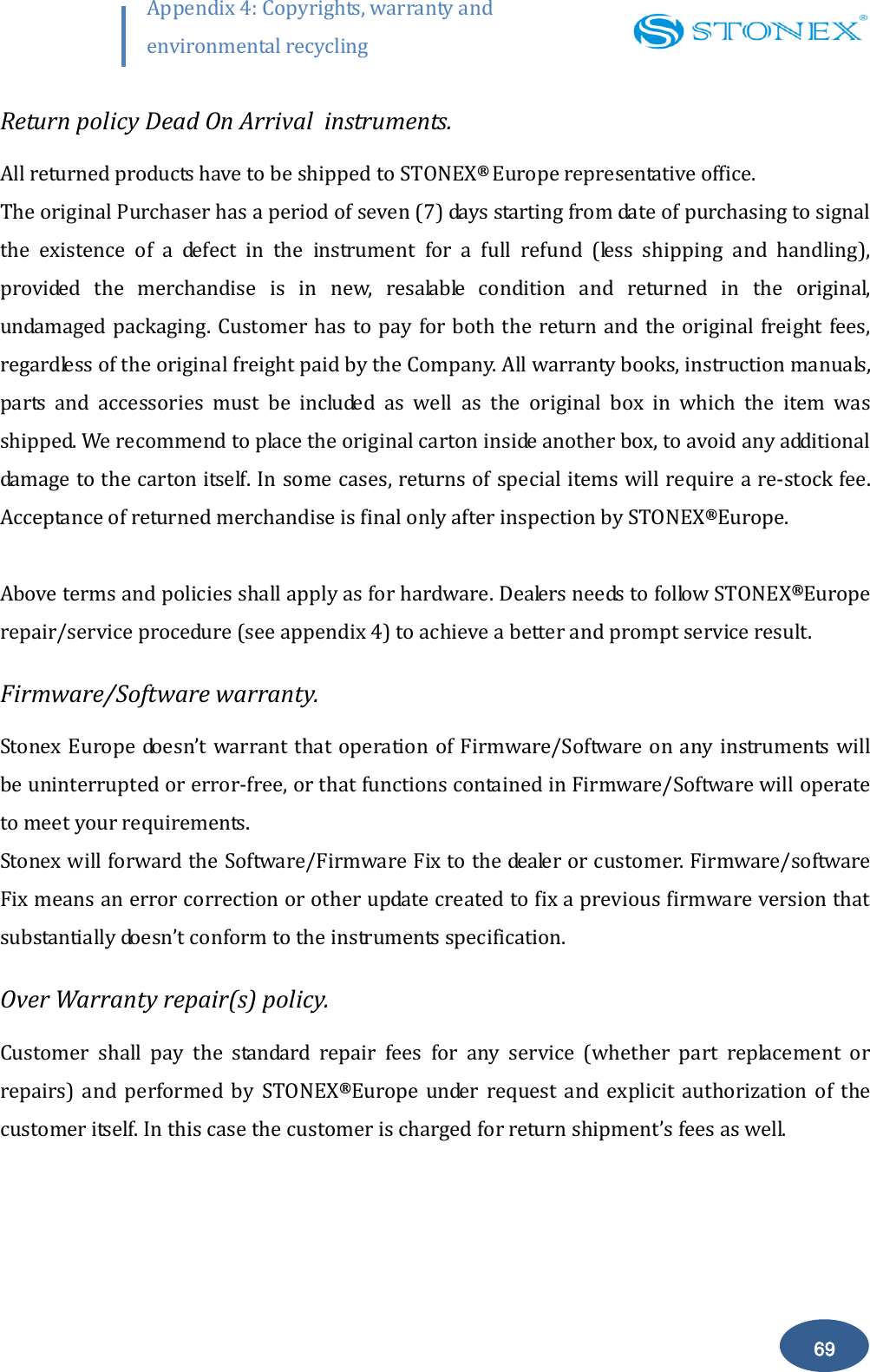
       69 Appendix 4: Copyrights, warranty and environmental recycling  Return policy Dead On Arrival  instruments. All returned products have to be shipped to STONEX®  Europe representative office. The original Purchaser has a period of seven (7) days starting from date of purchasing to signal the  existence  of  a  defect  in  the  instrument  for  a  full  refund  (less  shipping  and  handling), provided  the  merchandise  is  in  new,  resalable  condition  and  returned  in  the  original, undamaged packaging. Customer has to pay for both the return and the original freight fees, regardless of the original freight paid by the Company. All warranty books, instruction manuals, parts  and  accessories  must  be  included  as  well  as  the  original  box  in  which  the  item  was shipped. We recommend to place the original carton inside another box, to avoid any additional damage to the carton itself. In some cases, returns of special items will require a re-stock fee. Acceptance of returned merchandise is final only after inspection by STONEX®Europe.  Above terms and policies shall apply as for hardware. Dealers needs to follow STONEX®Europe repair/service procedure (see appendix 4) to achieve a better and prompt service result. Firmware/Software warranty. Stonex Europe doesn’t warrant that operation of Firmware/Software on any instruments will be uninterrupted or error-free, or that functions contained in Firmware/Software will operate to meet your requirements. Stonex will forward the Software/Firmware Fix to the dealer or customer. Firmware/software Fix means an error correction or other update created to fix a previous firmware version that substantially doesn’t conform to the instruments specification. Over Warranty repair(s) policy. Customer  shall  pay  the  standard  repair  fees  for  any  service  (whether  part  replacement  or repairs)  and  performed  by  STONEX®Europe  under  request  and  explicit  authorization  of  the customer itself. In this case the customer is charged for return shipment’s fees as well.
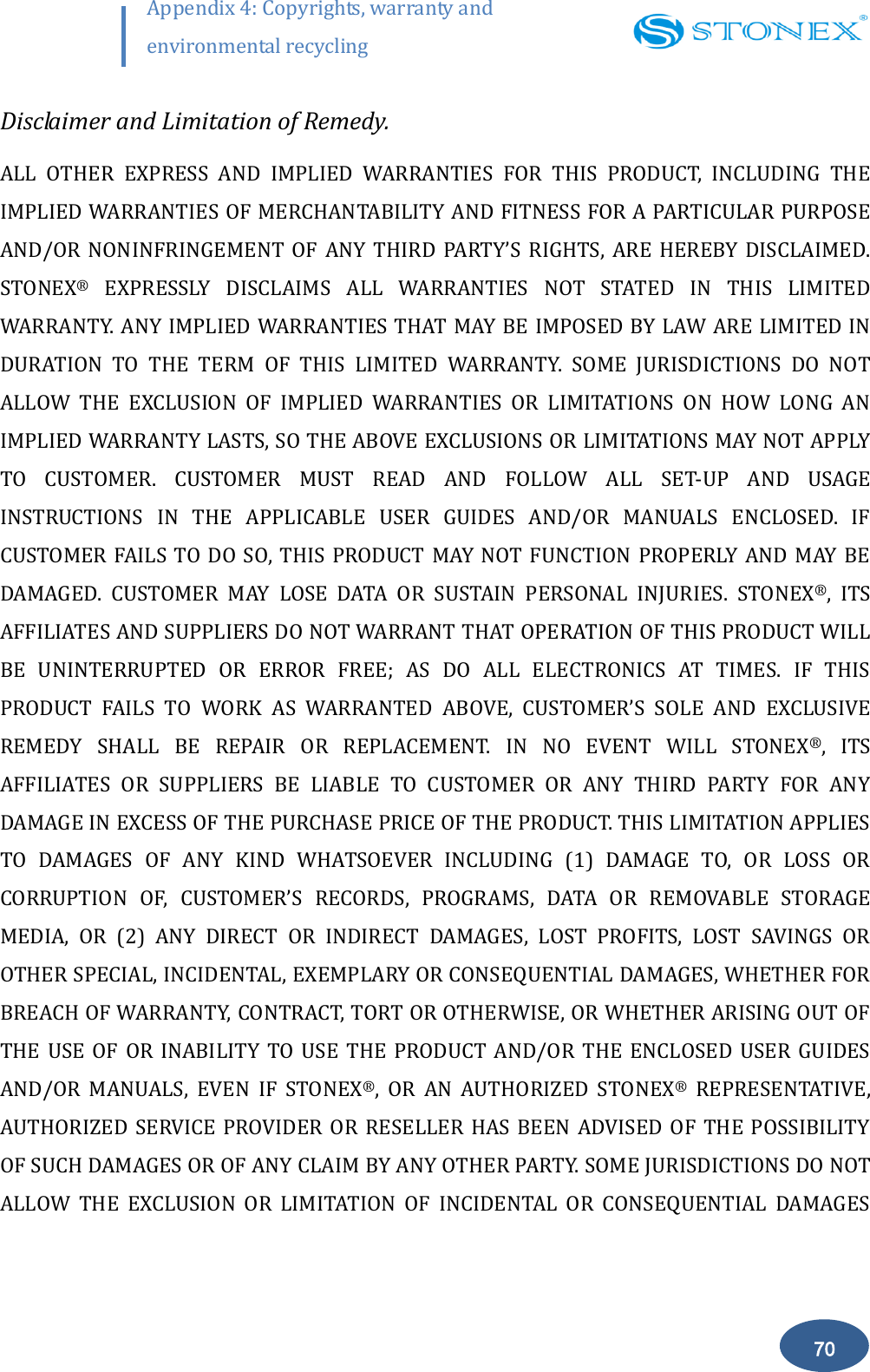
       70 Appendix 4: Copyrights, warranty and environmental recycling  Disclaimer and Limitation of Remedy. ALL  OTHER  EXPRESS  AND  IMPLIED  WARRANTIES  FOR  THIS  PRODUCT,  INCLUDING  THE IMPLIED WARRANTIES OF MERCHANTABILITY AND FITNESS FOR A PARTICULAR PURPOSE AND/OR  NONINFRINGEMENT  OF  ANY  THIRD  PARTY’S RIGHTS,  ARE  HEREBY  DISCLAIMED. STONEX®  EXPRESSLY  DISCLAIMS  ALL  WARRANTIES  NOT  STATED  IN  THIS  LIMITED WARRANTY. ANY IMPLIED WARRANTIES THAT MAY BE IMPOSED BY LAW ARE LIMITED IN DURATION  TO  THE  TERM  OF  THIS  LIMITED  WARRANTY.  SOME  JURISDICTIONS  DO  NOT ALLOW  THE  EXCLUSION  OF  IMPLIED  WARRANTIES  OR  LIMITATIONS  ON  HOW  LONG  AN IMPLIED WARRANTY LASTS, SO THE ABOVE EXCLUSIONS OR LIMITATIONS MAY NOT APPLY TO  CUSTOMER.  CUSTOMER  MUST  READ  AND  FOLLOW  ALL  SET-UP  AND  USAGE INSTRUCTIONS  IN  THE  APPLICABLE  USER  GUIDES  AND/OR  MANUALS  ENCLOSED.  IF CUSTOMER  FAILS TO DO  SO,  THIS PRODUCT MAY  NOT  FUNCTION  PROPERLY AND MAY BE DAMAGED.  CUSTOMER  MAY  LOSE  DATA  OR  SUSTAIN  PERSONAL  INJURIES.  STONEX®,  ITS AFFILIATES AND SUPPLIERS DO NOT WARRANT THAT OPERATION OF THIS PRODUCT WILL BE  UNINTERRUPTED  OR  ERROR  FREE;  AS  DO  ALL  ELECTRONICS  AT  TIMES.  IF  THIS PRODUCT  FAILS  TO  WORK  AS  WARRANTED  ABOVE,  CUSTOMER’S  SOLE  AND  EXCLUSIVE REMEDY  SHALL  BE  REPAIR  OR  REPLACEMENT.  IN  NO  EVENT  WILL  STONEX®,  ITS AFFILIATES  OR  SUPPLIERS  BE  LIABLE  TO  CUSTOMER  OR  ANY  THIRD  PARTY  FOR  ANY DAMAGE IN EXCESS OF THE PURCHASE PRICE OF THE PRODUCT. THIS LIMITATION APPLIES TO  DAMAGES  OF  ANY  KIND  WHATSOEVER  INCLUDING  (1)  DAMAGE  TO,  OR  LOSS  OR CORRUPTION  OF,  CUSTOMER’S  RECORDS,  PROGRAMS,  DATA  OR  REMOVABLE  STORAGE MEDIA,  OR  (2)  ANY  DIRECT  OR  INDIRECT  DAMAGES,  LOST  PROFITS,  LOST  SAVINGS  OR OTHER SPECIAL, INCIDENTAL, EXEMPLARY OR CONSEQUENTIAL DAMAGES, WHETHER FOR BREACH OF WARRANTY, CONTRACT, TORT OR OTHERWISE, OR WHETHER ARISING OUT OF THE  USE  OF  OR  INABILITY TO  USE  THE  PRODUCT  AND/OR  THE  ENCLOSED  USER  GUIDES AND/OR  MANUALS,  EVEN  IF  STONEX®,  OR  AN  AUTHORIZED  STONEX®  REPRESENTATIVE, AUTHORIZED  SERVICE PROVIDER  OR  RESELLER  HAS BEEN  ADVISED  OF  THE POSSIBILITY OF SUCH DAMAGES OR OF ANY CLAIM BY ANY OTHER PARTY. SOME JURISDICTIONS DO NOT ALLOW  THE  EXCLUSION  OR  LIMITATION  OF  INCIDENTAL  OR  CONSEQUENTIAL  DAMAGES
       71 Appendix 4: Copyrights, warranty and environmental recycling  FOR  SOME  PRODUCTS,  SO  THE  EXCLUSIONS  OR  LIMITATIONS  MAY  NOT  APPLY  TO CUSTOMER.  THIS  LIMITED  WARRANTY  GIVES  CUSTOMER  SPECIFIC  LEGAL  RIGHTS,  AND CUSTOMER  MAY  ALSO  HAVE  OTHER  RIGHTS  WHICH  VARY  FROM COUNTRY/STATE/JURISDICTION TO COUNTRY/STATE/ Instruments Two (2) years on STONEX®  Products: GPS receiver:       S9 GNSS Series/Vector/ Walker II / PLT1 Accessories. Accessories & Specific Parts Warranty : For Accessories provided by Stonex with the instruments S9 GNSS the following general warranty time is for reference: Batteries:      7 months. Battery chargers:    7 months. Adapters for battery chargers, Cables, Tribrach, Pole, Antennas: 2 years. Restriction for GPS Boards. For GPS receiving boards (Trimble, Novatel) used on S9 and S8 family of GPS receivers, Stonex Europe provides  warranty time for one (1) year. Service Procedure Repair/Service procedure for dealers. (1) S/N of the instrument and a detailed description of the defect (sometimes pictures or video) will be required to indicate the cause and problem. (2) If dealer wants to repair an instrument under warranty period on their site: 1) If dealers don’t have the part in stock they have to send an official order to STONEX® Europe and pay for it and so STONEX® Europe will send the new part to them so they can repair the instrument.
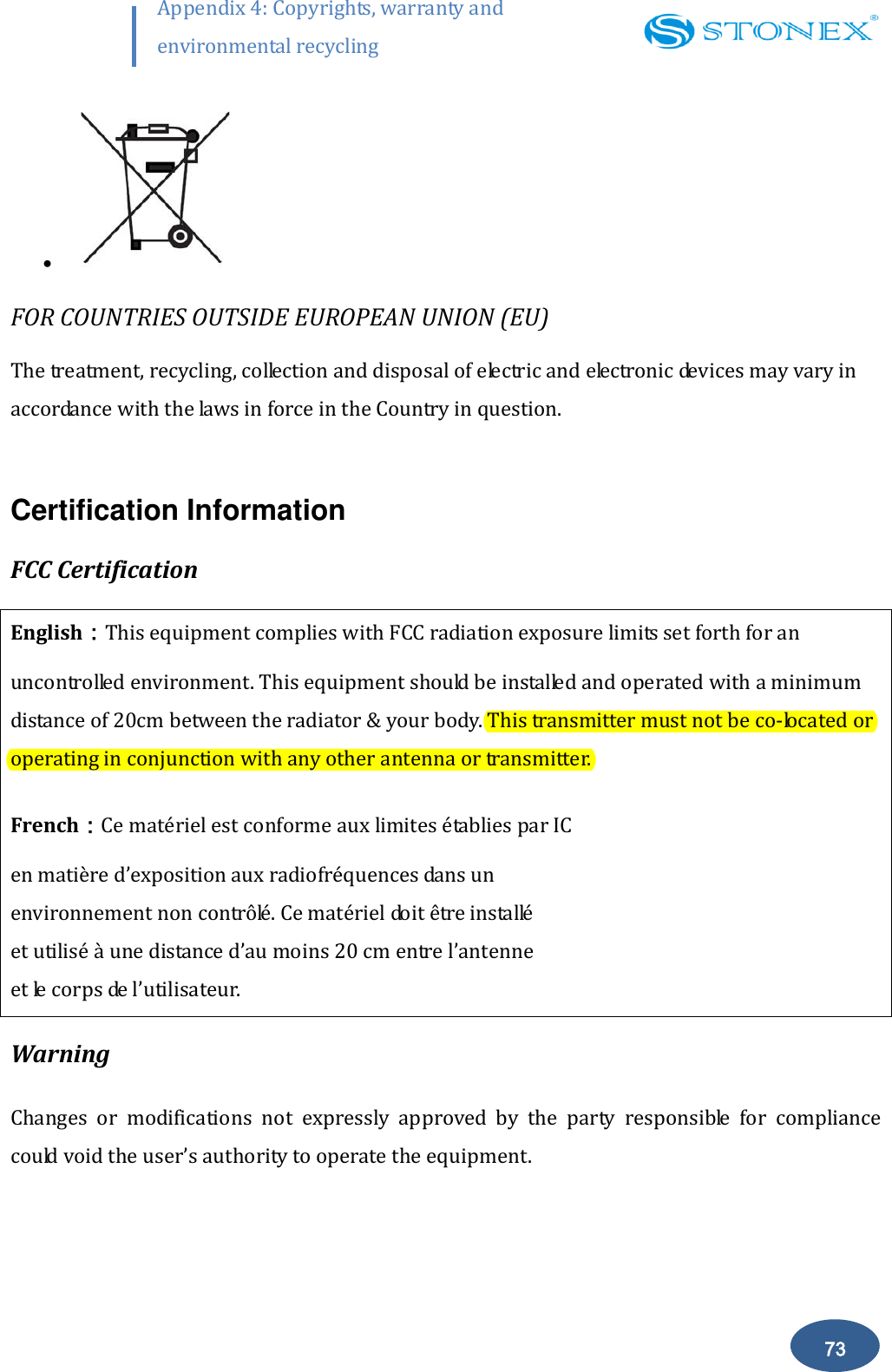
       72 Appendix 4: Copyrights, warranty and environmental recycling  2) When the repair is over, the  dealer has to fill the “Spare Part Refund” module and send it to the dedicated mail address. 3) wait for STONEX® Europe’s authorization SPR no; 4) when dealer receive the SPR authorization no they can send back to STONEX®  Europe appointed office the broken part with attached the SPR module; 5) when STONEX®  Europe receives the broken part STONEX®  Europe shall verify it and if  everything is ok the cost of the part shall be refund ( refund will be done only after  check of the failure part and final approval of STONEX®  Europe). (3) If the instrument needs to be sent back to STONEX®  Europe for repair/replacement, dealer/customer has to send to STONEX®  Europe a “Returned Merchandise Authorization (RMA)” before they send back the fault instrument. STONEX®  Europe shall, at its sole discretion, decide on the place of performance for work under warranty. Environmental recycling The cardboard box, the plastic in the package and the various parts of this product have to be recycled and disposed of in accordance with the current legislation of your Country. FOR COUNTRIES IN THE EUROPEAN UNION (EU) The disposal of electric and electronic device as solid urban waste is strictly prohibited: they must be collected separately.  Contact Local Authorities to obtain practical information about correct handling of the waste, location and times of waste collection centres. When you buy a new device of ours, you can give back to our dealer a used similar device.   The dumping of these devices at unequipped or unauthorized places may have hazardous effects on health and environment.  The crossed dustbin symbol means that the device must be taken to authorized collection centers and must be handled separately from solid urban waste.
       73 Appendix 4: Copyrights, warranty and environmental recycling    FOR COUNTRIES OUTSIDE EUROPEAN UNION (EU) The treatment, recycling, collection and disposal of electric and electronic devices may vary in accordance with the laws in force in the Country in question.  Certification Information FCC Certification English:This equipment complies with FCC radiation exposure limits set forth for an uncontrolled environment. This equipment should be installed and operated with a minimum distance of 20cm between the radiator & your body. This transmitter must not be co-located or operating in conjunction with any other antenna or transmitter. French:Ce matériel est conforme aux limites établies par IC  en matière d’exposition aux radiofréquences dans un  environnement non contrôlé. Ce matériel doit être installé  et utilisé à une distance d’au moins 20 cm entre l’antenne  et le corps de l’utilisateur.  Warning Changes  or  modifications  not  expressly  approved  by  the  party  responsible  for  compliance could void the user’s authority to operate the equipment.
       74 Appendix 4: Copyrights, warranty and environmental recycling  This equipment has been tested and found to comply with the limits for a Class B digital device, pursuant to Part 15 of the FCC Rules. These limits are designed to provide reasonable protection against harmful interference in a residential installation. This equipment generates, uses and can radiate radio frequency energy and, if not installed and used in accordance with the instructions, may cause harmful interference to radio communications. However, there is no guarantee that interference will not occur in a particular installation. If this equipment does cause harmful interference to radio or television reception, which can be determined by turning the equipment off and on, the user is encouraged to try to correct the interference by one or more of the following measures: -- Reorient or relocate the receiving antenna. -- Increase the separation between the equipment and receiver. -- Connect the equipment into an outlet on a circuit different from that to which the receiver is connected. --Consult the dealer or an experienced radio/TV technician for help. IC Certification English:This  device  complies  with  Industry  Canada  license-exempt  RSS  standard(s). Operation is subject to the following two conditions: (1) this device may not cause interference, and  (2)  this  device  must  accept  any  interference,  including  interference  that  may  cause undesired operation of the device. French:Le présent appareil est conforme aux CNR d'Industrie Canada applicables aux appareils radio exempts de licence. L'exploitation est autorisée aux deux conditions suivantes : (1) l'appareil ne doit pas produire de brouillage, et (2) l'utilisateur de l'appareil doit accepter tout brouillage radioélectrique subi, même si le brouillage est susceptible d'en compromettre le fonctionnement. English:This Class【B】 digital apparatus complies with Canadian ICES-003.
       75 Appendix 4: Copyrights, warranty and environmental recycling  French:Cet appareil numérique de la classe B est conforme à la norme NMB-003 du Canada.

Navigation menu