The Good Box Co Labs GB-CORE-V01 GOODBOX CORE User Manual Users manual
The Good Box Co Labs LTD GOODBOX CORE Users manual
Contents
- 1. Users manual
- 2. User manual
- 3. Users Manual
Users manual
1
Quick Start Guide
Product Name: GOODBOX CORE
Model Name: GB CORE, VERSION 1
Brand Name: GOODBOX
Manufacture: The Good Box Co Labs LTD
Brief Introduction
This guide is intended for a quick understanding our product. Here we made a brief introduction
and some basic operating instructions about button layout and settings by picture&text, and
some simple explanation of operations.
2
Contents
1)Button layout and definition ....................................................................................................... 3
2)System working process...............................................................................................................3
3)FCC warnings...............................................................................................................................4
4)CE Warnings................................................................................................................................5
5)Basic parameter...........................................................................................................................5
3
1、Button layout and definition
Button function description
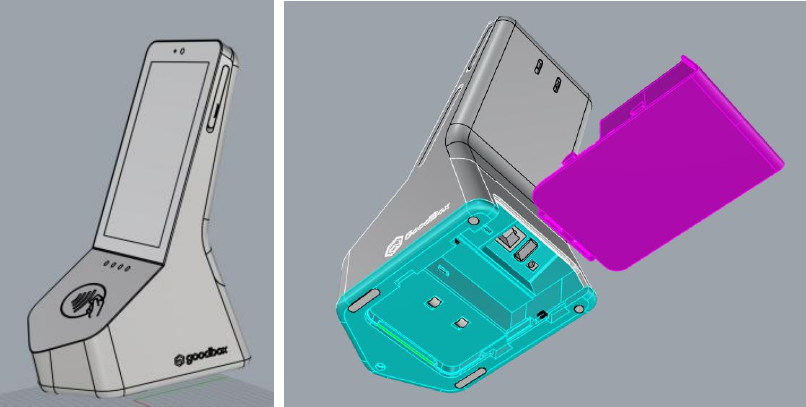
1) Power button
To be found on top left of the product, press 3 seconds to activate the device.
2) Micro USB
To be found under the slot on top right of product, it is used for system update via connection to
computer or for external OTG devices.
3) Micro HDMI
HD video output to TV
4) Sim Slot
Nano Sim card supportive. Single Sim only. Insert a card to have 4G LTE connections. Data only.
5) Kensington Slot
Use an Kensington lock to secure the device when it is placed on the table. 2 Slots for different
positions can be found in the bottom cabinet.
6) POE
Power over Ethernet. Plug iin the internet cable to have both power supply and internet access.
7) USB Type-A
USB port for external device support. Host only.
8) DC
DC 12V 2A port for long time power supply.
9) Front camera
5 Mega camera.
2. System working process
This is a left-alone product that requires only power on and off by hand. User’s do not have to set
the menu or change the software inside the device.
1) Power on the device by pressing the power button on top of unit.
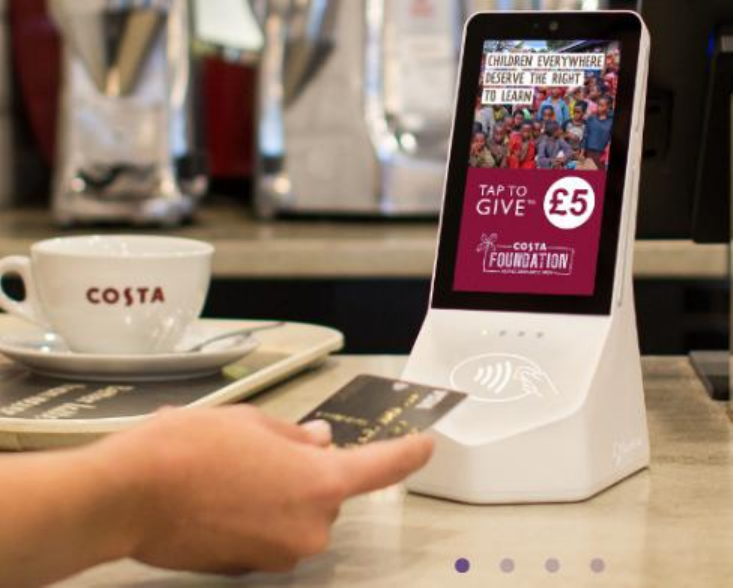
2) System will enter into Goodbox launcher application, waiting for an tap of card to realize a
donation. The first LED of the four LED lights shall be always on to indicate the working
4
condition.
3) Tap one card to the device, after you hear one beep sound and 4 LED lights shall be lit to fulfill
one donation.
4) Long press the power button 3 seconds to shut down the device.
3. FCC Warnings
a、§ 15.19 Labeling requirements.
This device complies with part 15 of the FCC Rules. Operation is subject to the following two
conditions: (1) This device may not cause harmful interference, and (2) this device must accept
any interference received, including interference that may cause undesired operation.
b、§ 15.21 Changes or modification warning.
Any Changes or modifications not expressly approved by the party responsible for compliance
could void the user's authority to operate the equipment.
c、§ 15.105 Information to the user.
Note: This equipment has been tested and found to comply with the limits for a Class B digital
device, pursuant to part 15 of the FCC Rules. These limits are designed to provide reasonable
protection against harmful interference in a residential installation. This equipment generates uses
and can radiate radio frequency energy and, if not installed and used in accordance with the
instructions, may cause harmful interference to radio communications. However, there is no
guarantee that interference will not occur in a particular installation. If this equipment does cause
harmful interference to radio or television reception, which can be determined by turning the
equipment off and on, the user is encouraged to try to correct the interference by one or more of
the following measures:
-Reorient or relocate the receiving antenna.
-Increase the separation between the equipment and receiver.
-Connect the equipment into an outlet on a circuit different from that to which the
receiver is connected.
-Consult the dealer or an experienced radio/TV technician for help.
d、Specific Absorption Rate (SAR) information:
This GOODBOX CORE meets the government's requirements for exposure to radio waves. The
guidelines are based on standards that were developed by independent scientific organizations
through periodic and thorough evaluation of scientific studies. The standards include a substantial
safety margin designed to assure the safety of all persons regardless of age or health.
e、FCC RF Exposure Information and Statement
The SAR limit of USA (FCC) is 1.6 W/kg averaged over one gram of tissue. Device types: GB
CORE (FCC ID: 2ASHQ-GB-CORE-V01) has also been tested against this SAR limit. The
highest SAR value reported under this standard during product certification for use when properly
on the body is 0.184W/kg. To maintain compliance with FCC RF exposure requirements, use
accessories that maintain a 5mm separation distance between the user's body and the back of the
handset. The use of belt clips, holsters and similar accessories should not contain metallic
components in its assembly. The use of accessories that do not satisfy these requirements may not

5
comply with FCC RF exposure requirements, and should be avoided.
4. Basic Parameter
model
GOODBOX CORE
Operation system
Android 5.1
Processor
RK3288W
Processor frame
ARM Cortex-A17
Processor frequency
1.8GHz
Processor core
4 core
graphics
Mail - T764
System memory
2GB
storage capacity
16G
camera
Front 5.0MP
screen
5.5’ 1080*1920
Touch Panel
Multi-touch
WiFi
802.11 b.g.n
Bluetooth
4.0
charge port
DC
Function buttons
Power button
Battery type
Li-Po battery,10050mAh
battery life
About 8 hours , depending on the using condition
power adapter
100V-240V AC power adapter
Dimension
220*130*90mm
weight
Appr. 600g
Material
Plastic
color
White