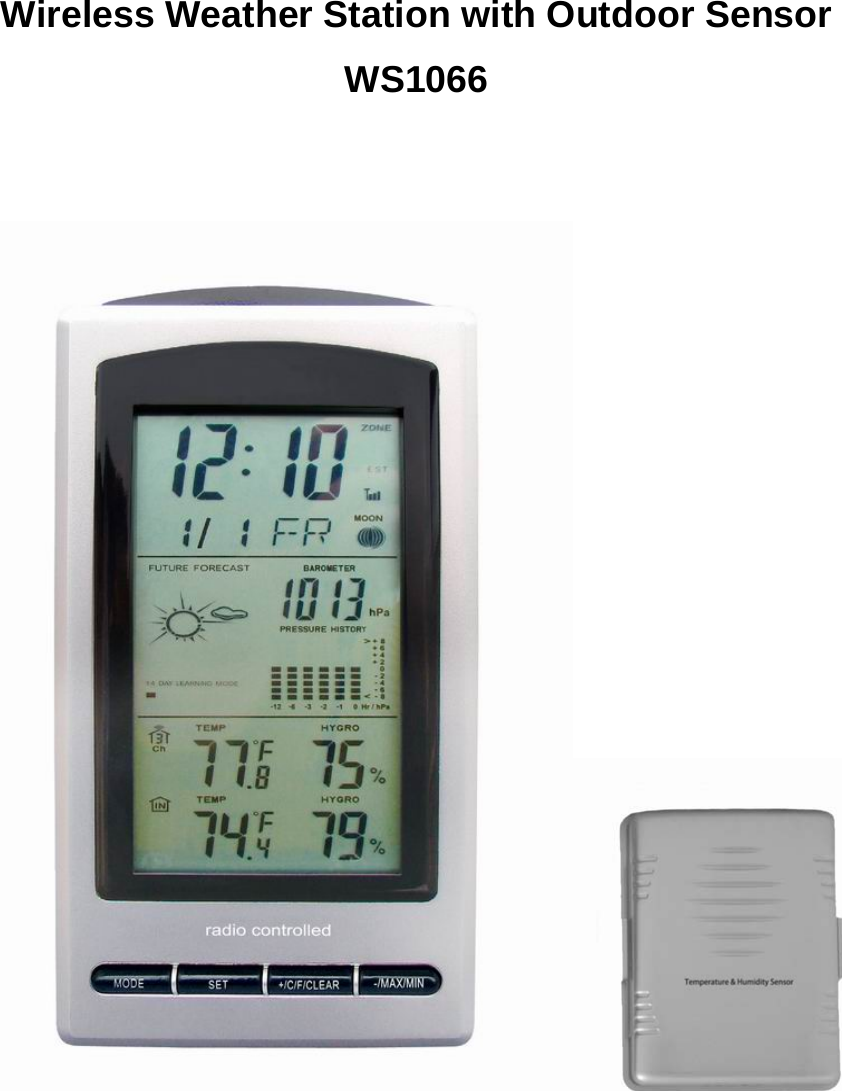
Tiankan Electronic Technology WS1066 Wireless Weather Station with Outdoor Sensor User Manual WS1066 mannual

Shenzhen TianKan Electronic Technology Co.,Ltd Wireless Weather Station with Outdoor Sensor WS1066 mannual

Users manual

                                                   Wireless Weather Station with Outdoor Sensor WS1066
  WIRELESS WEATHER STATION INSTRUCTION MANUAL  MODEL: WS1066                                                                                                                           Page 1  INTRODUCTION ..........................................................................................................................................- 4 - 1.1 PACKAGE CONTENTS ..............................................................................................................................- 4 - 1.2 FEATURES..................................................................................................................................................- 4 - 2. OVERVIEW.....................................................................................................................................................- 5 - 2.1BASE UNIT-LCD .........................................................................................................................................- 5 - 2.2 WEATHER FORCASTING DISPLAY:.....................................................................................................- 5 - 3. OPERATE DESCRIPTION ...........................................................................................................................- 5 - 3.1 POWER ON RESET ....................................................................................................................................- 5 - 3.2 TIME MODES DISPLAY.............................................................................................................................- 6 - 3.3 CLOCK ALARM MODES............................................................................................................................- 7 - 3.4 BAROMETRIC PRESSURE MODES..........................................................................................................- 9 - 3.5 AMBIENT TEMPERATURE&HUMIDITY ALARM MODES...................................................................- 10 - 3.6 DATE MODES:.........................................................................................................................................- 13 - 3.7 MIN/MAX VIEW MODES:........................................................................................................................- 15 - 3.8 RCC MODES.............................................................................................................................................- 16 - 3.9 MOON PHASE..........................................................................................................................................- 17 - 4 .DEFAULT VALUE ........................................................................................................................................- 17 - 5.TROUBLESHOOTING.................................................................................................................................- 19 - 6.TX4041 Transmitter.......................................................................................................................................- 19 - 6.1 FEATURES................................................................................................................................................- 19 - 6.2 Operation ..................................................................................................................................................- 20 - 6.3 POWPER SUPPLY....................................................................................................................................- 20 - 6.4 ASSEMBLY SKETCH ................................................................................................................................- 20 - 6.5 ATTENTION..............................................................................................................................................- 21 -
  1.  INTRODUCTION Thank you for purchasing WS1066 wireless weather station. Designed for everyday use, the weather station will prove to be an asset of great value for your personal use in the home or office. Please read this instruction manual thoroughly to fully understand the correct operation of your weather station and benefit from its unique features.  1.1 PACKAGE  CONTENTS  ·1x weather station base unit ·1x remote sensor with mounting bracket ·Mounting Screws ·Instruction manual  1.2 FEATURES  1) MCU power pressure 3V 2) MCU frequency : 32.768Khz and 3.58MHz(fast frequency) 3) LCD driver: 1/3Bias、1/8Duty、driver pressure 4.5V 4) 5 keys operation 5) Perpetual calender,clock alarm,snooze 6) Clock(clock format: 12/24H) 7) Wireless temperature and humidity outdoor receiving ,switch channel automatically and manually. 8) Indoor temperature range 0 ~70 ,accuracy ±1°C. Display 0  and 70  when out of℃℃ ℃ ℃  low/high temperature range. Sensor error display --.-℃. 9) Indoor humidity range 20%~95%,accuracy ±5%.Display 20% and 95% when out of low/high humidity. Sensor error display --% 10) Outdoor temperature range -40 ~70 ,accuracy ±1°C. Display ℃℃ -40  and 70  when out ℃℃of low/high temperature range. Sensor error display --.-℃. 11) Outdoor humidity range 20%~95%,accuracy ±5%.Display 20% and 95% when out of low/high humidity. Sensor error display --% 12) High/low and in/out door temperature and humidity alarm. 13) Wireless RF transmission with three channels. You can choose first;second or third channel, distance transmission about 100 meters in open outdoor. 14) Maximum/minimum record of in/out temperature and humidity. Clear max/min record by manual.  15) RCC—Radio Clock Controlled. (WWVB;DCF;MSF;NO RCC), default value depends on nations and regions.   16) Moon phase. 17) Barometric pressure range: 300hpa-1100hpa, accuracy ±5hpa 18) High/low barometric pressure alarm 19) Weather forecast tendency indicator 20) Low voltage indication with icon flash.
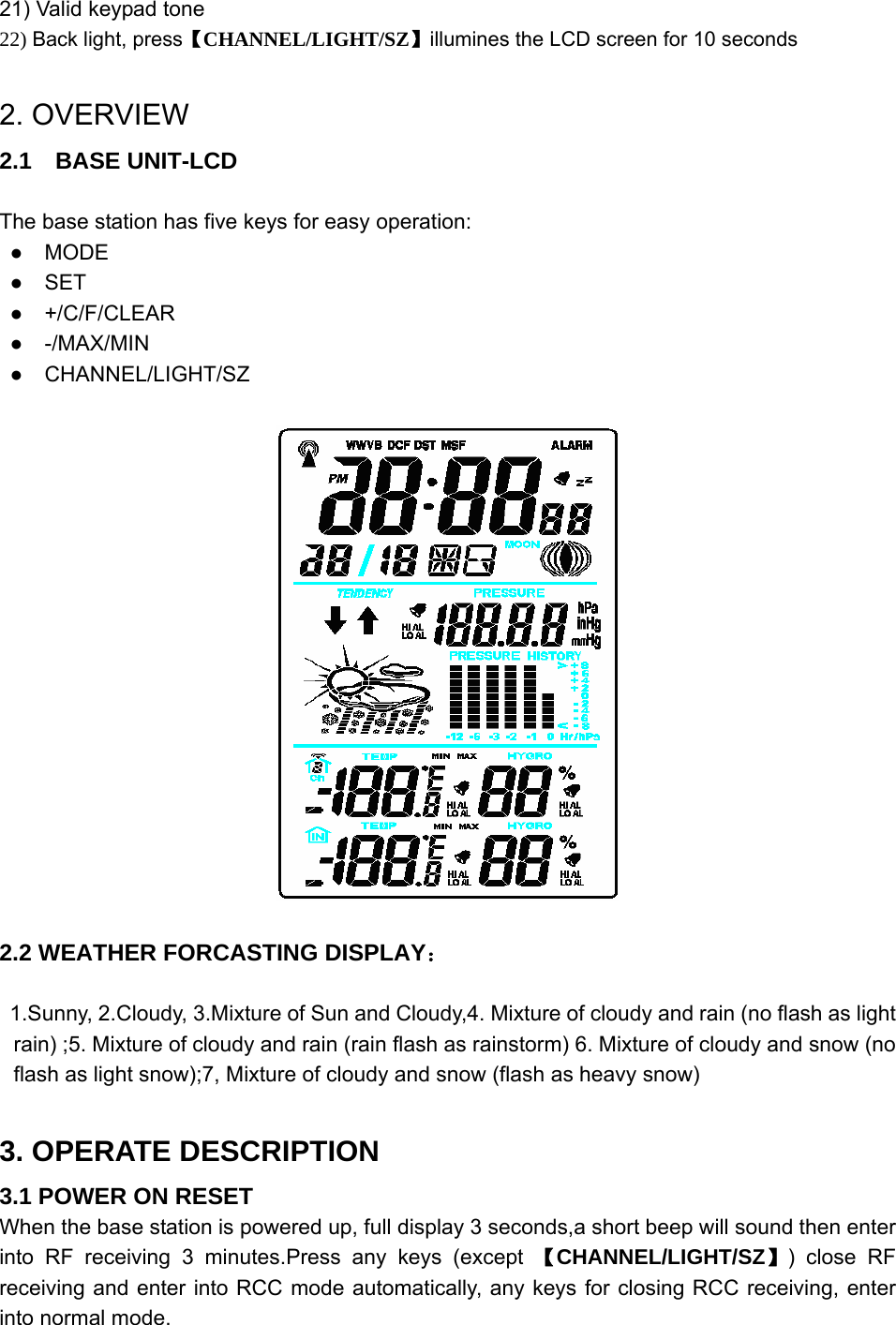
  21) Valid keypad tone 22) Back light, press【CHANNEL/LIGHT/SZ】illumines the LCD screen for 10 seconds  2. OVERVIEW 2.1  BASE UNIT-LCD  The base station has five keys for easy operation: ●  MODE ●  SET ●  +/C/F/CLEAR ●  -/MAX/MIN ●  CHANNEL/LIGHT/SZ    2.2 WEATHER FORCASTING DISPLAY:  1.Sunny, 2.Cloudy, 3.Mixture of Sun and Cloudy,4. Mixture of cloudy and rain (no flash as light rain) ;5. Mixture of cloudy and rain (rain flash as rainstorm) 6. Mixture of cloudy and snow (no flash as light snow);7, Mixture of cloudy and snow (flash as heavy snow)  3. OPERATE DESCRIPTION 3.1 POWER ON RESET When the base station is powered up, full display 3 seconds,a short beep will sound then enter into RF receiving 3 minutes.Press any keys (except 【CHANNEL/LIGHT/SZ】) close RF receiving and enter into RCC mode automatically, any keys for closing RCC receiving, enter into normal mode.
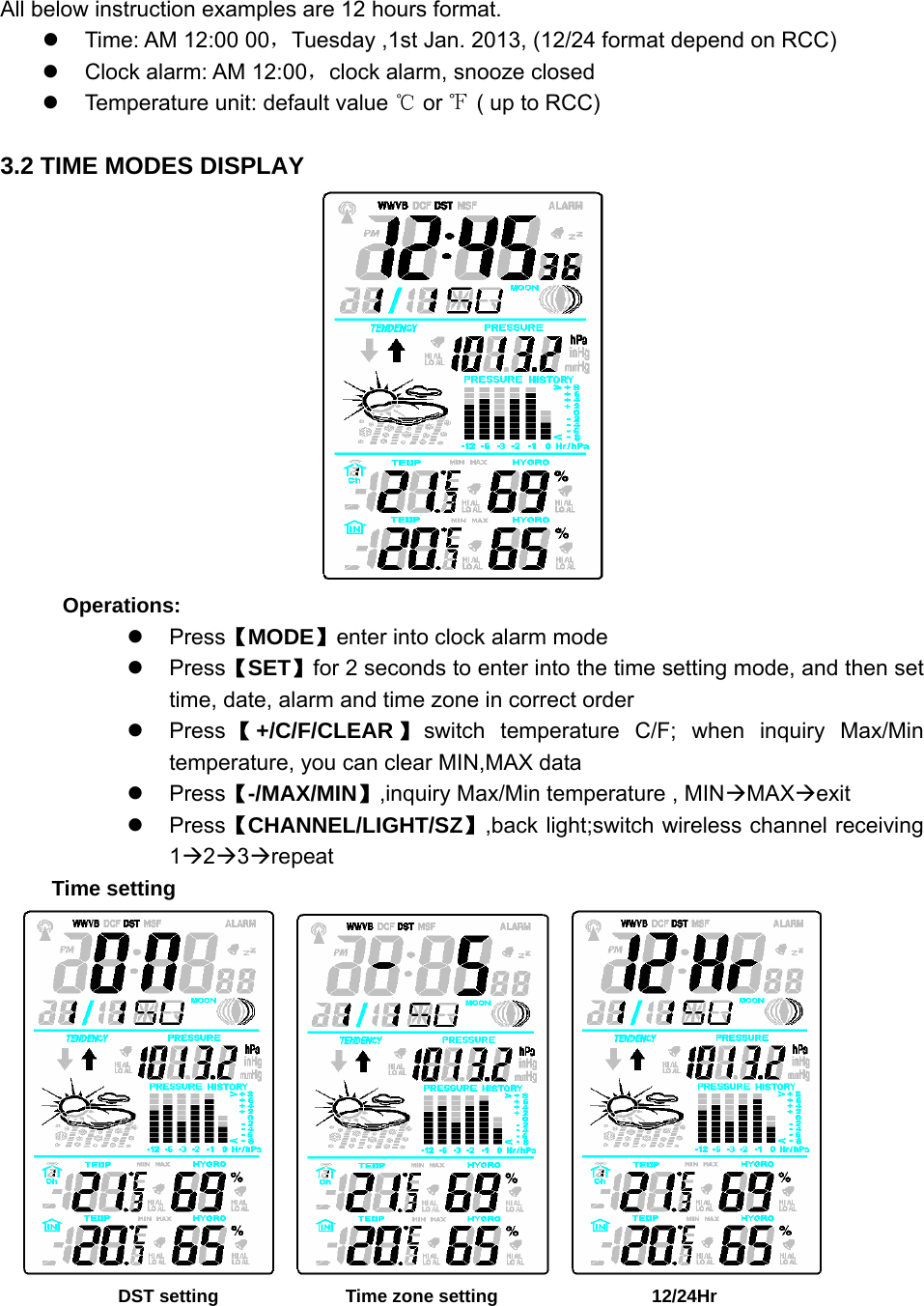
  All below instruction examples are 12 hours format. z  Time: AM 12:00 00,Tuesday ,1st Jan. 2013, (12/24 format depend on RCC) z  Clock alarm: AM 12:00,clock alarm, snooze closed z  Temperature unit: default value ℃ or ℉ ( up to RCC)  3.2 TIME MODES DISPLAY  Operations: z Press【MODE】enter into clock alarm mode z Press【SET】for 2 seconds to enter into the time setting mode, and then set time, date, alarm and time zone in correct order z Press 【+/C/F/CLEAR 】switch temperature C/F; when inquiry Max/Min temperature, you can clear MIN,MAX data z Press【-/MAX/MIN】,inquiry Max/Min temperature , MINÆMAXÆexit z Press【CHANNEL/LIGHT/SZ】,back light;switch wireless channel receiving 1Æ2Æ3Ærepeat Time setting                DST setting              Time zone setting                  12/24Hr
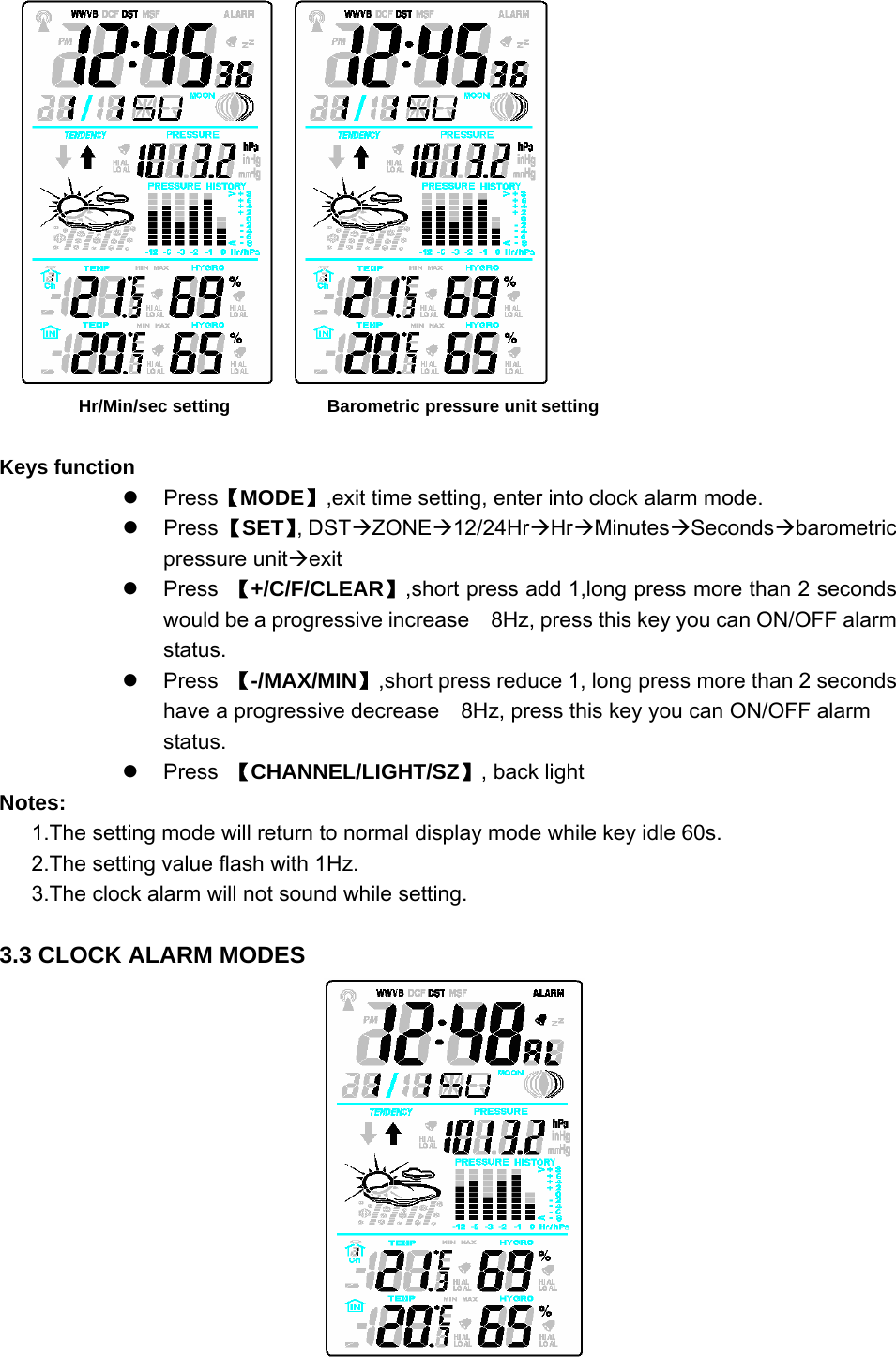
      Hr/Min/sec setting           Barometric pressure unit setting  Keys function z Press【MODE】,exit time setting, enter into clock alarm mode. z Press 【SET】, DSTÆZONEÆ12/24HrÆHrÆMinutesÆSecondsÆbarometric pressure unitÆexit z Press 【+/C/F/CLEAR】,short press add 1,long press more than 2 seconds would be a progressive increase    8Hz, press this key you can ON/OFF alarm status.  z Press 【-/MAX/MIN】,short press reduce 1, long press more than 2 seconds have a progressive decrease    8Hz, press this key you can ON/OFF alarm status.  z Press 【CHANNEL/LIGHT/SZ】, back light   Notes: 1.The setting mode will return to normal display mode while key idle 60s. 2.The setting value flash with 1Hz. 3.The clock alarm will not sound while setting.  3.3 CLOCK ALARM MODES
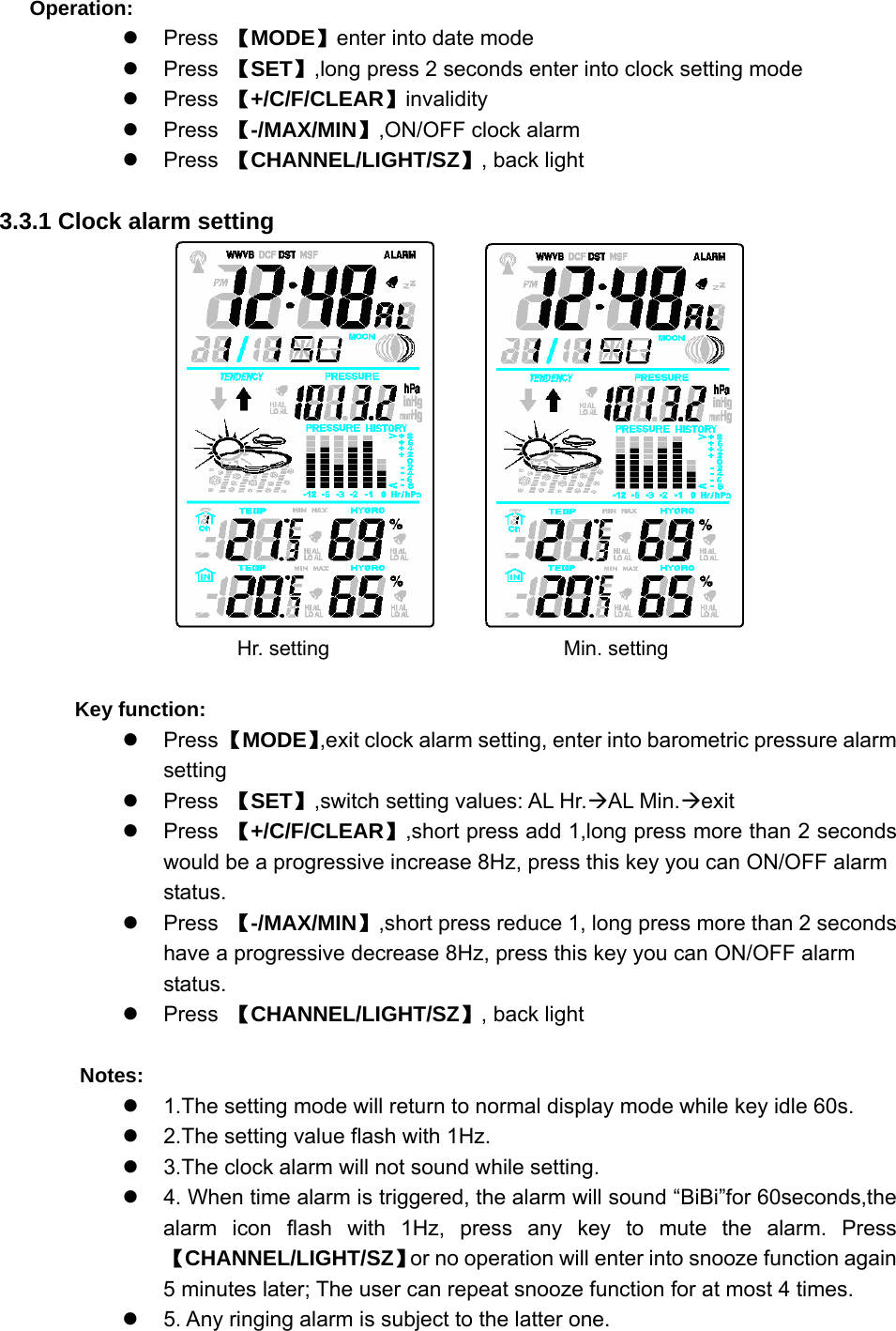
  Operation: z Press 【MODE】enter into date mode z Press 【SET】,long press 2 seconds enter into clock setting mode z Press 【+/C/F/CLEAR】invalidity z Press 【-/MAX/MIN】,ON/OFF clock alarm z Press 【CHANNEL/LIGHT/SZ】, back light  3.3.1 Clock alarm setting                              Hr. setting                   Min. setting      Key function: z Press 【MODE】,exit clock alarm setting, enter into barometric pressure alarm setting z Press 【SET】,switch setting values: AL Hr.ÆAL Min.Æexit z Press 【+/C/F/CLEAR】,short press add 1,long press more than 2 seconds would be a progressive increase 8Hz, press this key you can ON/OFF alarm status.  z Press 【-/MAX/MIN】,short press reduce 1, long press more than 2 seconds have a progressive decrease 8Hz, press this key you can ON/OFF alarm status.  z Press 【CHANNEL/LIGHT/SZ】, back light    Notes: z  1.The setting mode will return to normal display mode while key idle 60s. z  2.The setting value flash with 1Hz. z  3.The clock alarm will not sound while setting. z  4. When time alarm is triggered, the alarm will sound “BiBi”for 60seconds,the alarm icon flash with 1Hz, press any key to mute the alarm. Press 【CHANNEL/LIGHT/SZ】or no operation will enter into snooze function again     5 minutes later; The user can repeat snooze function for at most 4 times. z  5. Any ringing alarm is subject to the latter one.
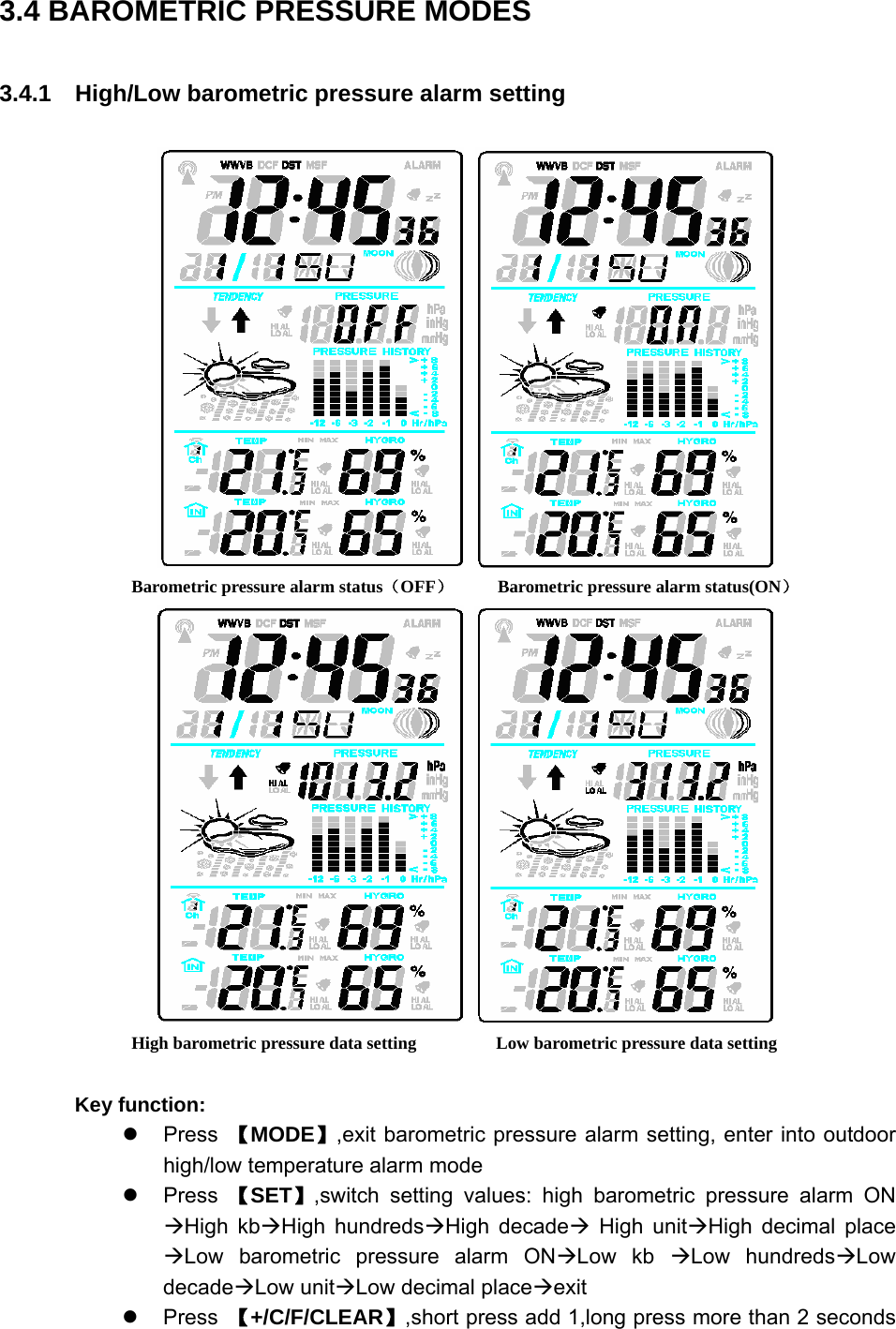
  3.4 BAROMETRIC PRESSURE MODES 3.4.1    High/Low barometric pressure alarm setting       Barometric pressure alarm status(OFF)     Barometric pressure alarm status(ON)         High barometric pressure data setting                  Low barometric pressure data setting  Key function: z Press 【MODE】,exit barometric pressure alarm setting, enter into outdoor high/low temperature alarm mode z Press 【SET】,switch setting values: high barometric pressure alarm ON ÆHigh kbÆHigh hundredsÆHigh decadeÆ High unitÆHigh decimal place ÆLow barometric pressure alarm ONÆLow kb ÆLow hundredsÆLow decadeÆLow unitÆLow decimal placeÆexit z Press 【+/C/F/CLEAR】,short press add 1,long press more than 2 seconds
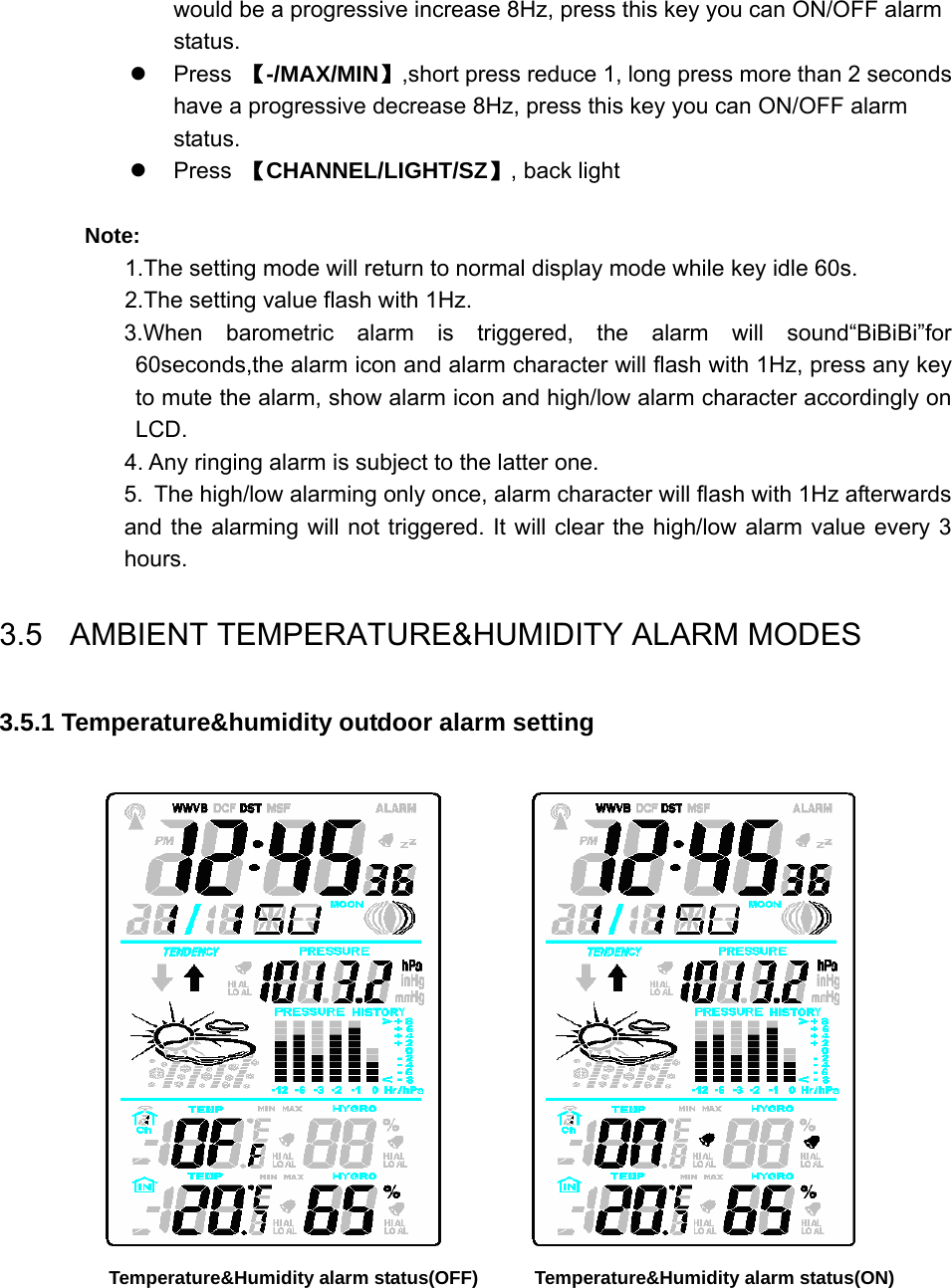
  would be a progressive increase 8Hz, press this key you can ON/OFF alarm status.  z Press 【-/MAX/MIN】,short press reduce 1, long press more than 2 seconds have a progressive decrease 8Hz, press this key you can ON/OFF alarm status.  z Press 【CHANNEL/LIGHT/SZ】, back light  Note: 1.The setting mode will return to normal display mode while key idle 60s. 2.The setting value flash with 1Hz. 3.When barometric alarm is triggered, the alarm will sound“BiBiBi”for 60seconds,the alarm icon and alarm character will flash with 1Hz, press any key to mute the alarm, show alarm icon and high/low alarm character accordingly on LCD.  4. Any ringing alarm is subject to the latter one. 5. The high/low alarming only once, alarm character will flash with 1Hz afterwards and the alarming will not triggered. It will clear the high/low alarm value every 3 hours. 3.5    AMBIENT TEMPERATURE&HUMIDITY ALARM MODES 3.5.1 Temperature&humidity outdoor alarm setting          Temperature&Humidity alarm status(OFF)            Temperature&Humidity alarm status(ON)
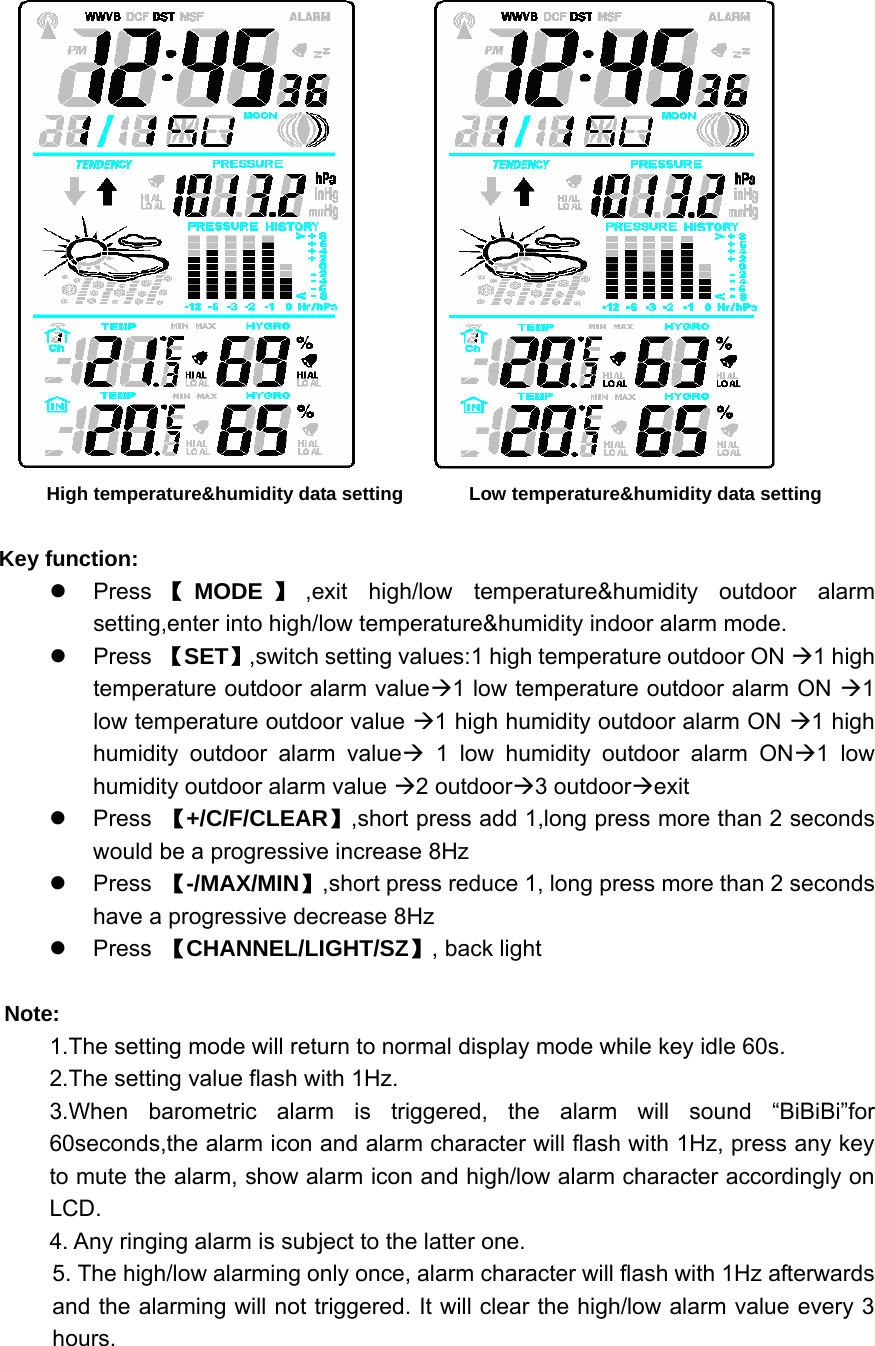
          High temperature&humidity data setting           Low temperature&humidity data setting  Key function: z Press 【MODE 】,exit high/low temperature&humidity outdoor alarm setting,enter into high/low temperature&humidity indoor alarm mode. z Press 【SET】,switch setting values:1 high temperature outdoor ON Æ1 high temperature outdoor alarm valueÆ1 low temperature outdoor alarm ON Æ1 low temperature outdoor value Æ1 high humidity outdoor alarm ON Æ1 high humidity outdoor alarm valueÆ 1 low humidity outdoor alarm ONÆ1 low humidity outdoor alarm value Æ2 outdoorÆ3 outdoorÆexit z Press 【+/C/F/CLEAR】,short press add 1,long press more than 2 seconds would be a progressive increase 8Hz z Press 【-/MAX/MIN】,short press reduce 1, long press more than 2 seconds have a progressive decrease 8Hz z Press 【CHANNEL/LIGHT/SZ】, back light  Note: 1.The setting mode will return to normal display mode while key idle 60s. 2.The setting value flash with 1Hz. 3.When barometric alarm is triggered, the alarm will sound “BiBiBi”for 60seconds,the alarm icon and alarm character will flash with 1Hz, press any key to mute the alarm, show alarm icon and high/low alarm character accordingly on LCD.  4. Any ringing alarm is subject to the latter one. 5. The high/low alarming only once, alarm character will flash with 1Hz afterwards and the alarming will not triggered. It will clear the high/low alarm value every 3 hours.
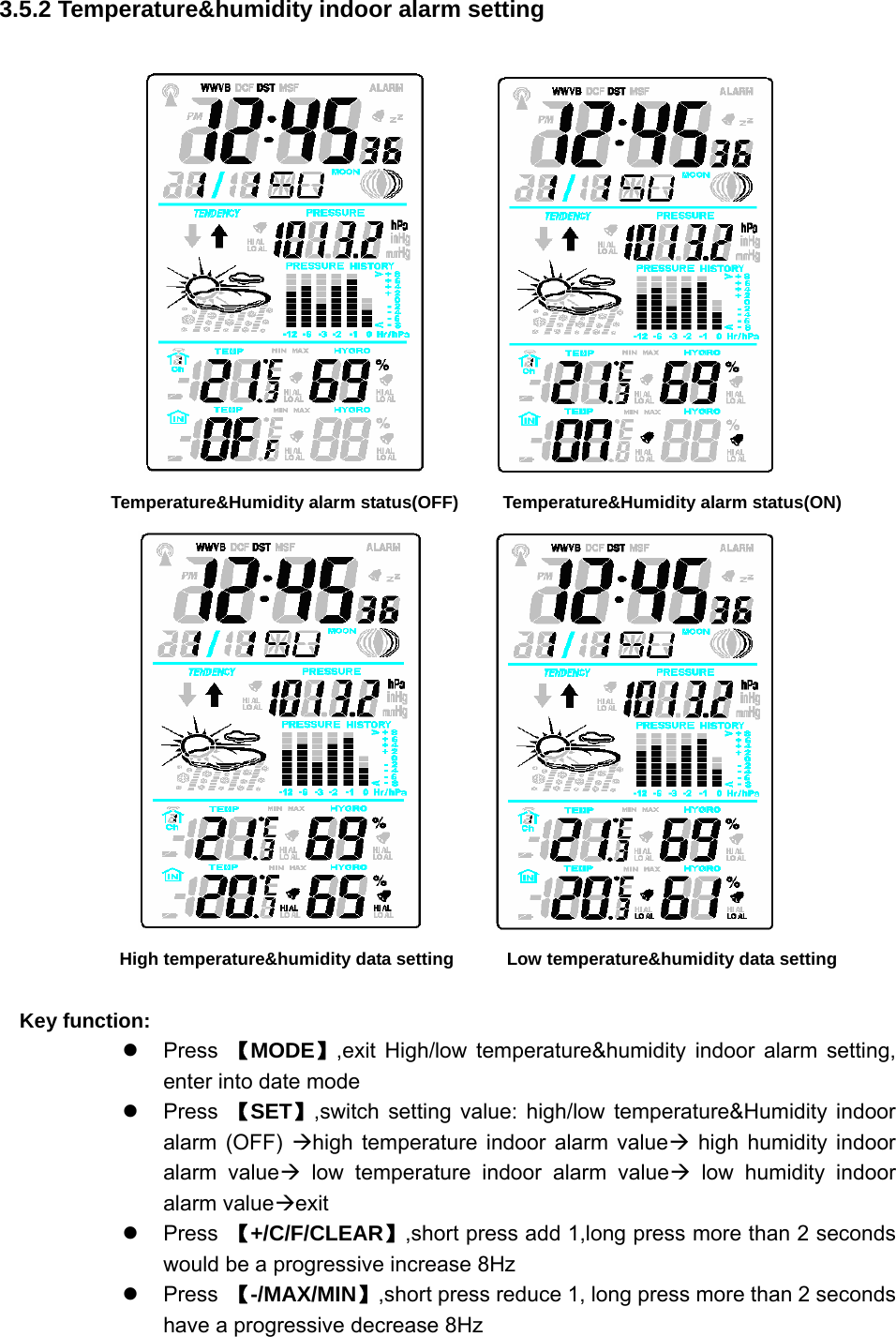
  3.5.2 Temperature&humidity indoor alarm setting           Temperature&Humidity alarm status(OFF)        Temperature&Humidity alarm status(ON)          High temperature&humidity data setting            Low temperature&humidity data setting  Key function: z Press 【MODE】,exit High/low temperature&humidity indoor alarm setting, enter into date mode z Press 【SET】,switch setting value: high/low temperature&Humidity indoor alarm (OFF) Æhigh temperature indoor alarm valueÆ high humidity indoor alarm valueÆ low temperature indoor alarm valueÆ low humidity indoor alarm valueÆexit z Press 【+/C/F/CLEAR】,short press add 1,long press more than 2 seconds would be a progressive increase 8Hz z Press 【-/MAX/MIN】,short press reduce 1, long press more than 2 seconds have a progressive decrease 8Hz
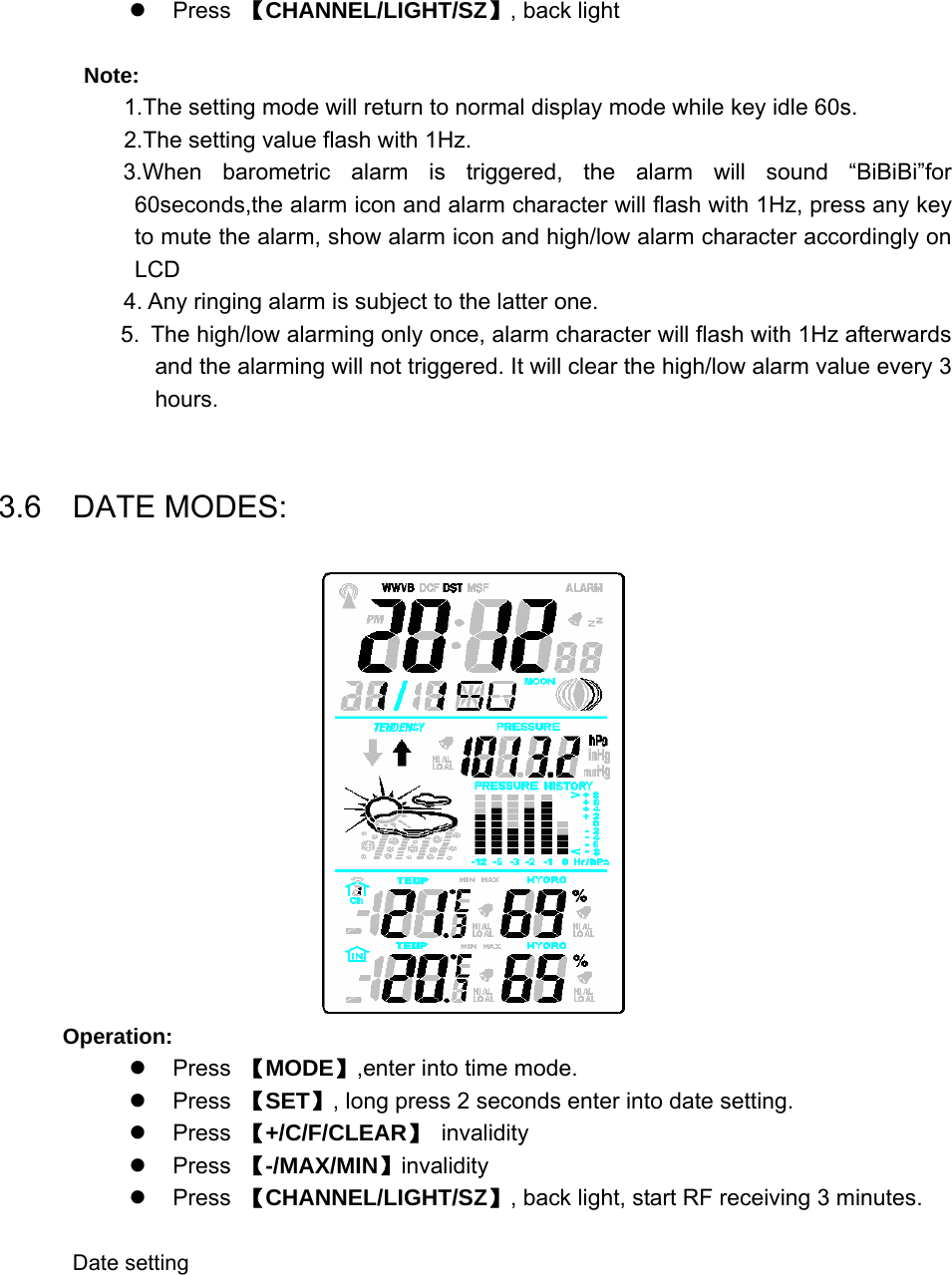
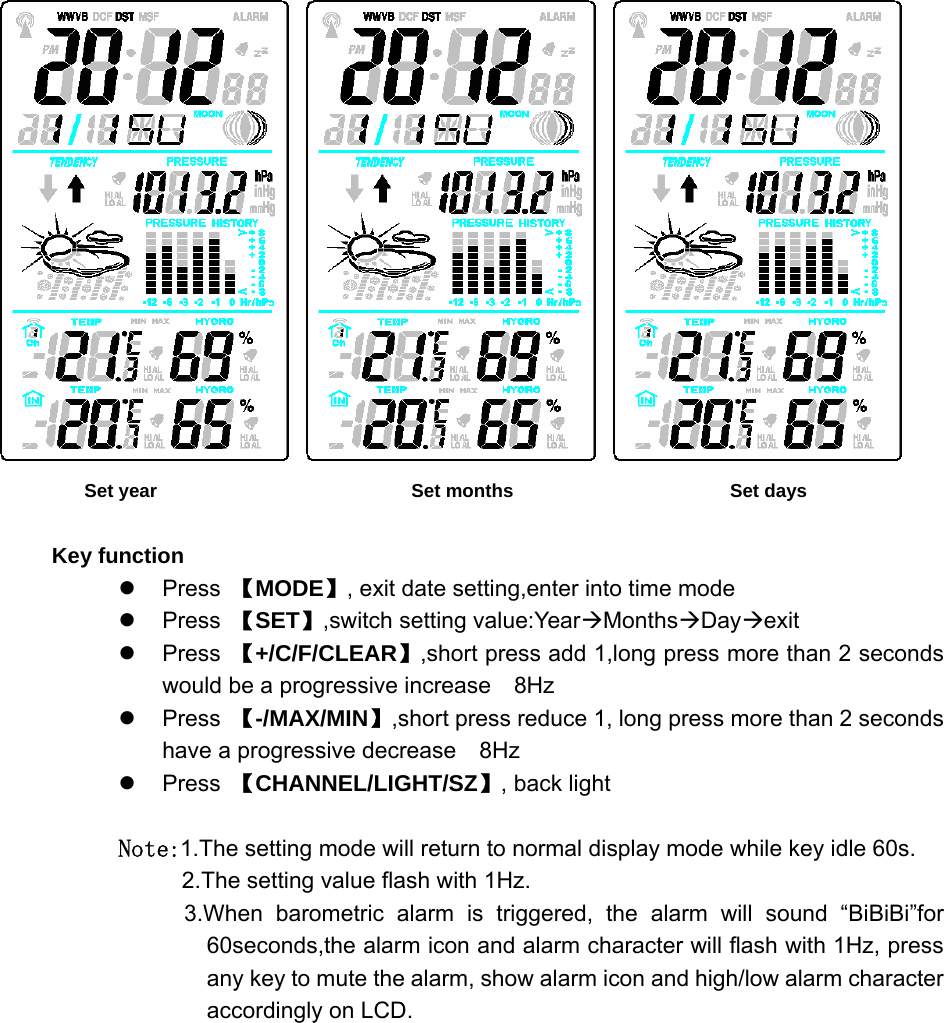
  z Press 【CHANNEL/LIGHT/SZ】, back light  Note: 1.The setting mode will return to normal display mode while key idle 60s. 2.The setting value flash with 1Hz. 3.When barometric alarm is triggered, the alarm will sound “BiBiBi”for 60seconds,the alarm icon and alarm character will flash with 1Hz, press any key to mute the alarm, show alarm icon and high/low alarm character accordingly on LCD 4. Any ringing alarm is subject to the latter one. 5. The high/low alarming only once, alarm character will flash with 1Hz afterwards and the alarming will not triggered. It will clear the high/low alarm value every 3 hours.  3.6  DATE MODES:  Operation: z Press 【MODE】,enter into time mode. z Press 【SET】, long press 2 seconds enter into date setting. z Press 【+/C/F/CLEAR】 invalidity z Press 【-/MAX/MIN】invalidity z Press 【CHANNEL/LIGHT/SZ】, back light, start RF receiving 3 minutes.  Date setting
                 Set year                           Set months                       Set days  Key function z Press 【MODE】, exit date setting,enter into time mode z Press 【SET】,switch setting value:YearÆMonthsÆDayÆexit z Press 【+/C/F/CLEAR】,short press add 1,long press more than 2 seconds would be a progressive increase    8Hz z Press 【-/MAX/MIN】,short press reduce 1, long press more than 2 seconds have a progressive decrease    8Hz z Press 【CHANNEL/LIGHT/SZ】, back light  Note:1.The setting mode will return to normal display mode while key idle 60s. 2.The setting value flash with 1Hz. 3.When barometric alarm is triggered, the alarm will sound “BiBiBi”for 60seconds,the alarm icon and alarm character will flash with 1Hz, press any key to mute the alarm, show alarm icon and high/low alarm character accordingly on LCD.
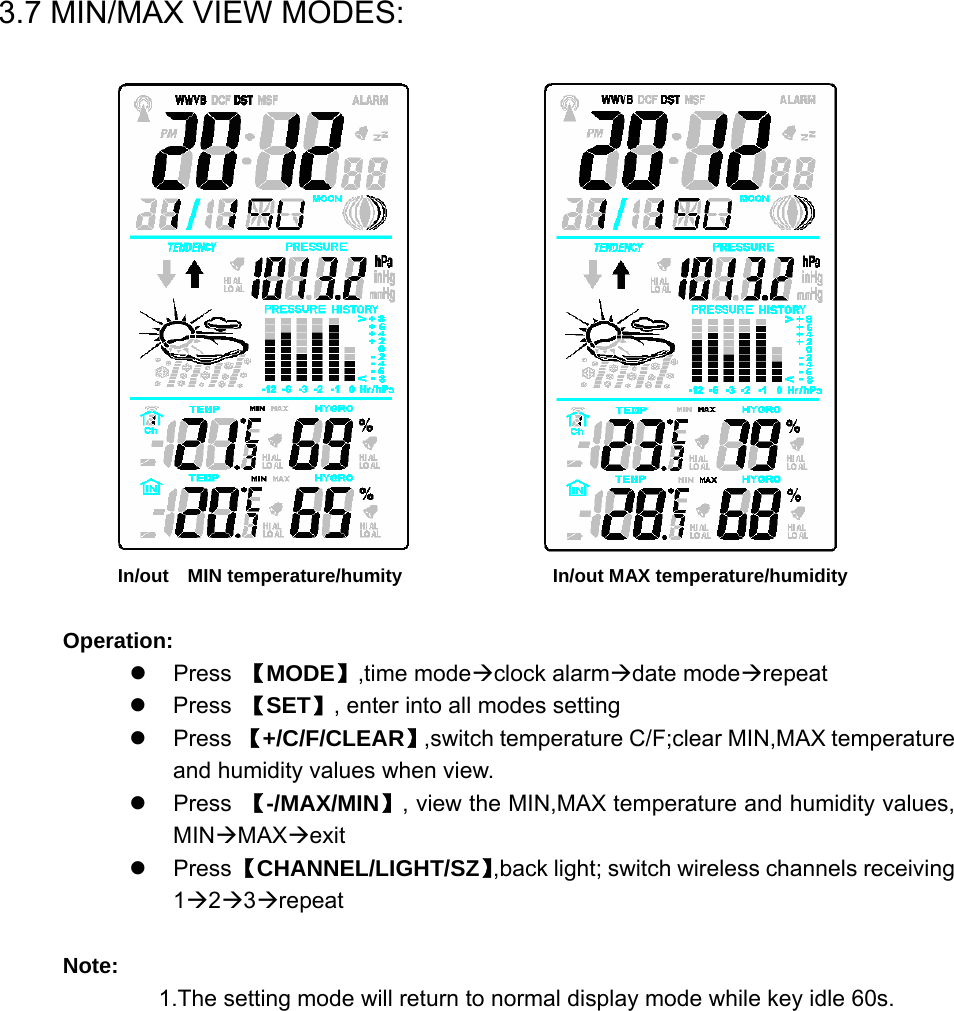
  3.7 MIN/MAX VIEW MODES:                         In/out  MIN temperature/humity                  In/out MAX temperature/humidity  Operation: z Press 【MODE】,time modeÆclock alarmÆdate modeÆrepeat z Press 【SET】, enter into all modes setting z Press 【+/C/F/CLEAR】,switch temperature C/F;clear MIN,MAX temperature and humidity values when view. z Press 【-/MAX/MIN】, view the MIN,MAX temperature and humidity values, MINÆMAXÆexit z Press 【CHANNEL/LIGHT/SZ】,back light; switch wireless channels receiving 1Æ2Æ3Ærepeat  Note: 1.The setting mode will return to normal display mode while key idle 60s.
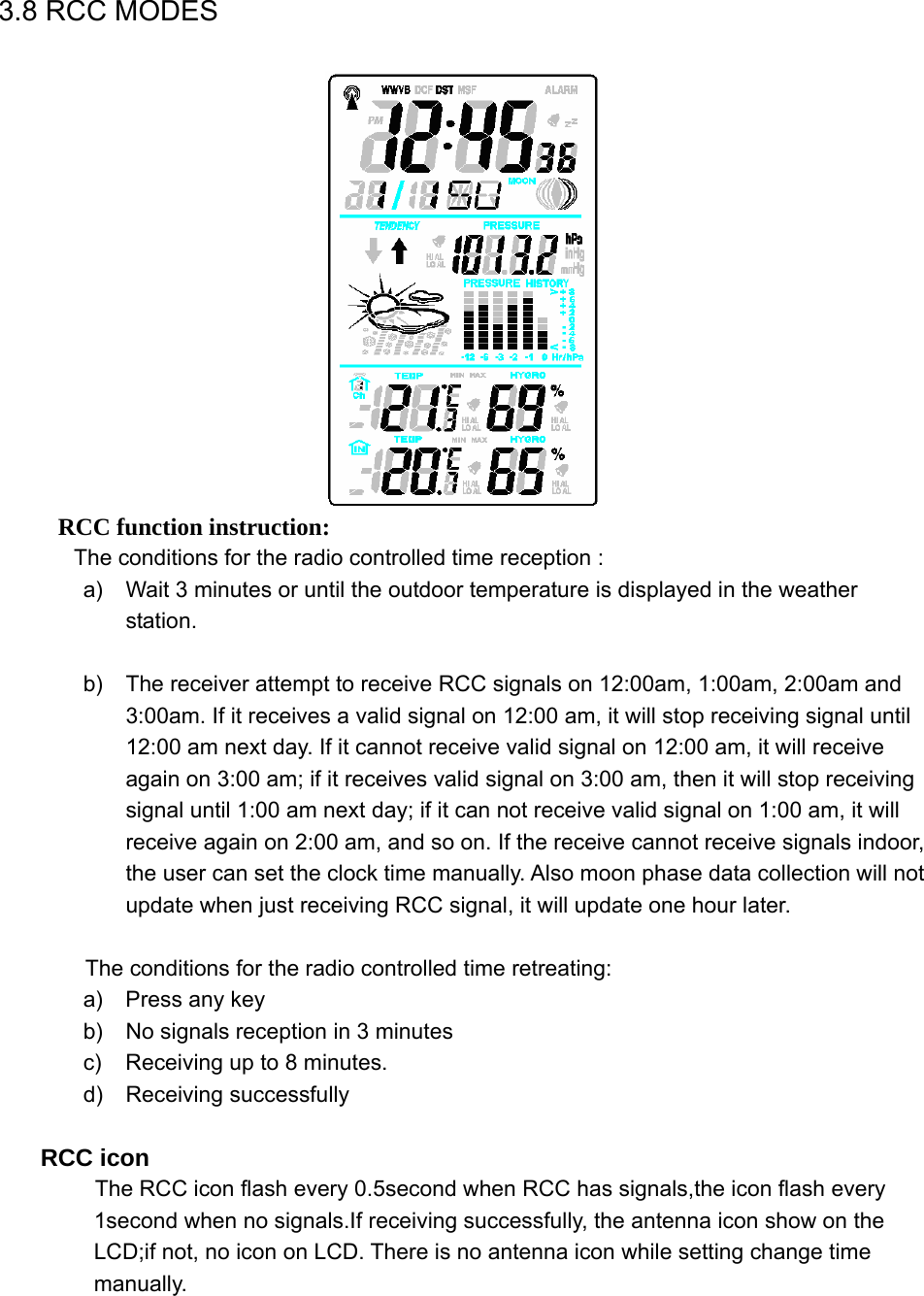
  3.8 RCC MODES      RCC function instruction:          The conditions for the radio controlled time reception : a)  Wait 3 minutes or until the outdoor temperature is displayed in the weather station.  b)  The receiver attempt to receive RCC signals on 12:00am, 1:00am, 2:00am and 3:00am. If it receives a valid signal on 12:00 am, it will stop receiving signal until 12:00 am next day. If it cannot receive valid signal on 12:00 am, it will receive again on 3:00 am; if it receives valid signal on 3:00 am, then it will stop receiving signal until 1:00 am next day; if it can not receive valid signal on 1:00 am, it will receive again on 2:00 am, and so on. If the receive cannot receive signals indoor, the user can set the clock time manually. Also moon phase data collection will not update when just receiving RCC signal, it will update one hour later.  The conditions for the radio controlled time retreating: a)  Press any key b)  No signals reception in 3 minutes c)  Receiving up to 8 minutes. d) Receiving successfully  RCC icon            The RCC icon flash every 0.5second when RCC has signals,the icon flash every 1second when no signals.If receiving successfully, the antenna icon show on the LCD;if not, no icon on LCD. There is no antenna icon while setting change time manually.
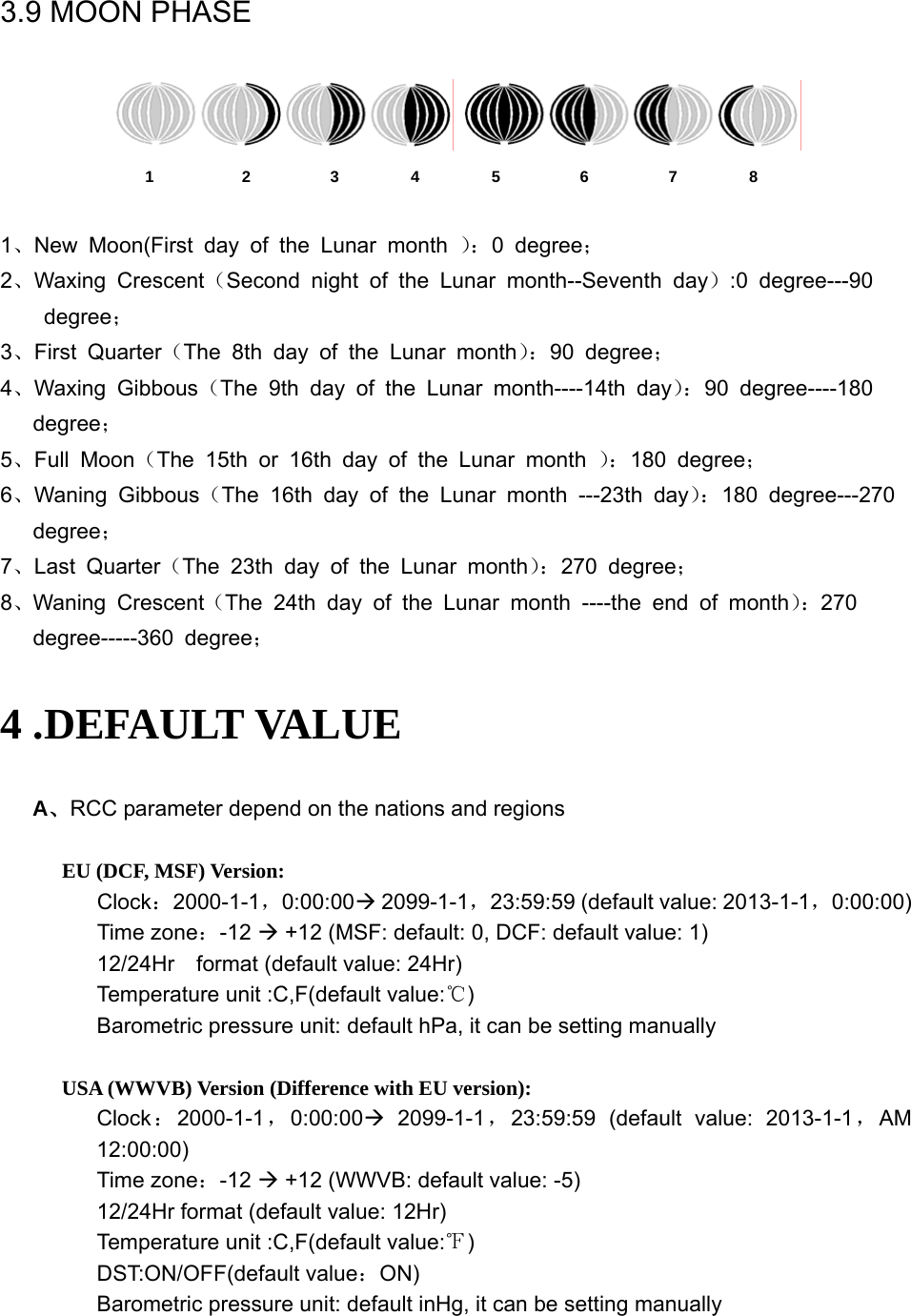
  3.9 MOON PHASE    1           2          3         4         5          6          7         8  1、New Moon(First day of the Lunar month ):0 degree; 2、Waxing Crescent(Second night of the Lunar month--Seventh day):0 degree---90   degree; 3、First Quarter(The 8th day of the Lunar month):90 degree; 4、Waxing Gibbous(The 9th day of the Lunar month----14th day):90 degree----180   degree; 5、Full Moon(The 15th or 16th day of the Lunar month ):180 degree; 6、Waning Gibbous(The 16th day of the Lunar month ---23th day):180 degree---270 degree; 7、Last Quarter(The 23th day of the Lunar month):270 degree; 8、Waning Crescent(The 24th day of the Lunar month ----the end of month):270     degree-----360 degree; 4 .DEFAULT VALUE A、RCC parameter depend on the nations and regions  EU (DCF, MSF) Version: Clock:2000-1-1,0:00:00Æ 2099-1-1,23:59:59 (default value: 2013-1-1,0:00:00) Time zone:-12 Æ +12 (MSF: default: 0, DCF: default value: 1) 12/24Hr    format (default value: 24Hr) Temperature unit :C,F(default value:℃) Barometric pressure unit: default hPa, it can be setting manually  USA (WWVB) Version (Difference with EU version): Clock:2000-1-1,0:00:00Æ 2099-1-1,23:59:59 (default value: 2013-1-1,AM 12:00:00) Time zone:-12 Æ +12 (WWVB: default value: -5) 12/24Hr format (default value: 12Hr) Temperature unit :C,F(default value:℉) DST:ON/OFF(default value:ON) Barometric pressure unit: default inHg, it can be setting manually
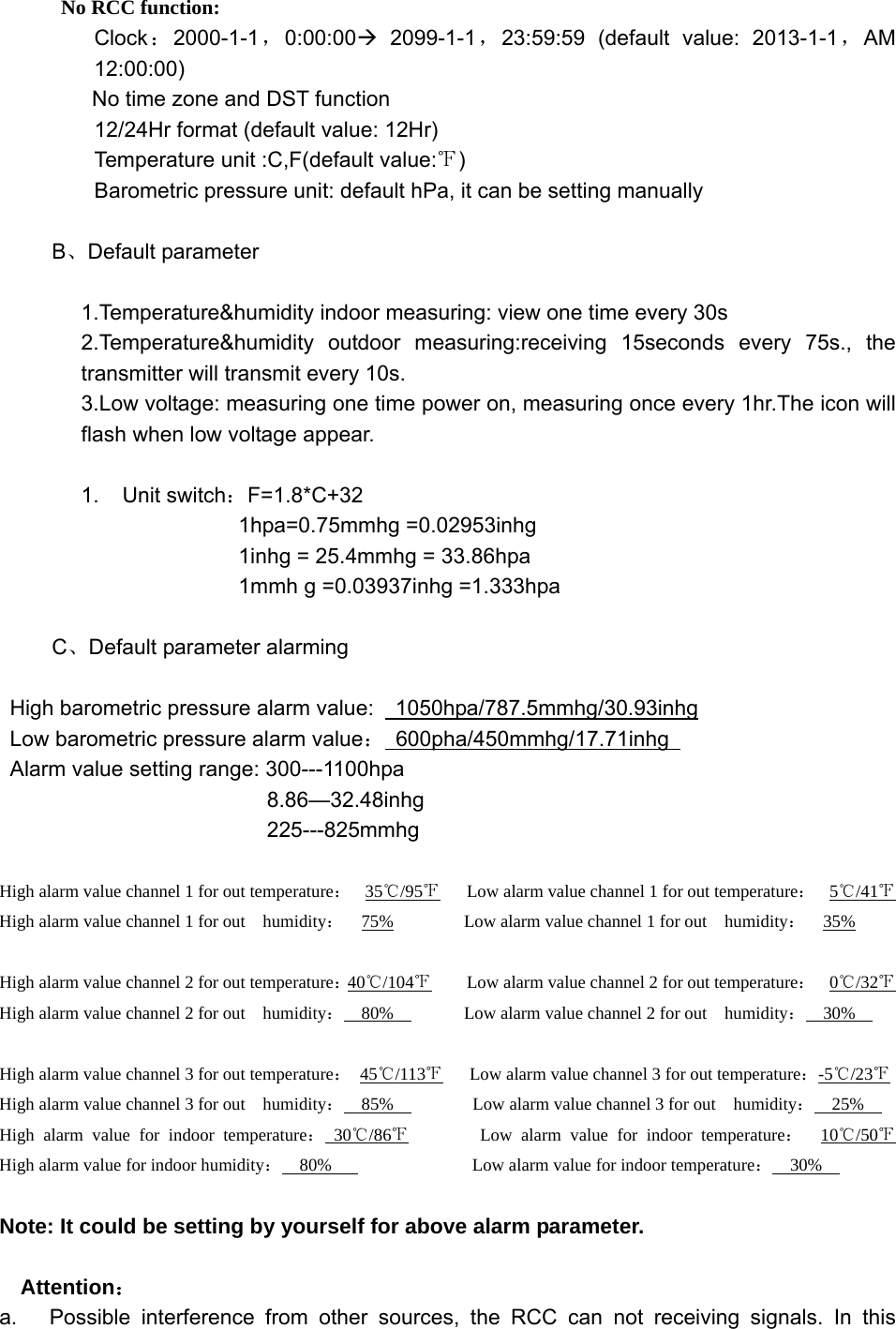
         No RCC function: Clock:2000-1-1,0:00:00Æ 2099-1-1,23:59:59 (default value: 2013-1-1,AM 12:00:00) No time zone and DST function 12/24Hr format (default value: 12Hr) Temperature unit :C,F(default value:℉) Barometric pressure unit: default hPa, it can be setting manually  B、Default parameter  1.Temperature&humidity indoor measuring: view one time every 30s   2.Temperature&humidity outdoor measuring:receiving 15seconds every 75s., the transmitter will transmit every 10s. 3.Low voltage: measuring one time power on, measuring once every 1hr.The icon will flash when low voltage appear.  1. Unit switch:F=1.8*C+32 1hpa=0.75mmhg =0.02953inhg 1inhg = 25.4mmhg = 33.86hpa 1mmh g =0.03937inhg =1.333hpa  C、Default parameter alarming  High barometric pressure alarm value:    1050hpa/787.5mmhg/30.93inhg  Low barometric pressure alarm value: 600pha/450mmhg/17.71inhg  Alarm value setting range: 300---1100hpa        8.86—32.48inhg        225---825mmhg  High alarm value channel 1 for out temperature:  35℃/95℉      Low alarm value channel 1 for out temperature:  5℃/41℉   High alarm value channel 1 for out    humidity:  75%        Low alarm value channel 1 for out  humidity:  35%    High alarm value channel 2 for out temperature:40℃/104℉        Low alarm value channel 2 for out temperature:  0℃/32℉   High alarm value channel 2 for out    humidity:  80%        Low alarm value channel 2 for out  humidity:  30%    High alarm value channel 3 for out temperature: 45℃/113℉      Low alarm value channel 3 for out temperature:-5℃/23℉   High alarm value channel 3 for out    humidity:  85%         Low alarm value channel 3 for out  humidity:  25%   High alarm value for indoor temperature: 30 /86℃℉        Low alarm value for indoor temperature:  10 /50℃℉    High alarm value for indoor humidity:  80%                Low alarm value for indoor temperature:  30%    Note: It could be setting by yourself for above alarm parameter.   Attention: a.   Possible interference from other sources, the RCC can not receiving signals. In this
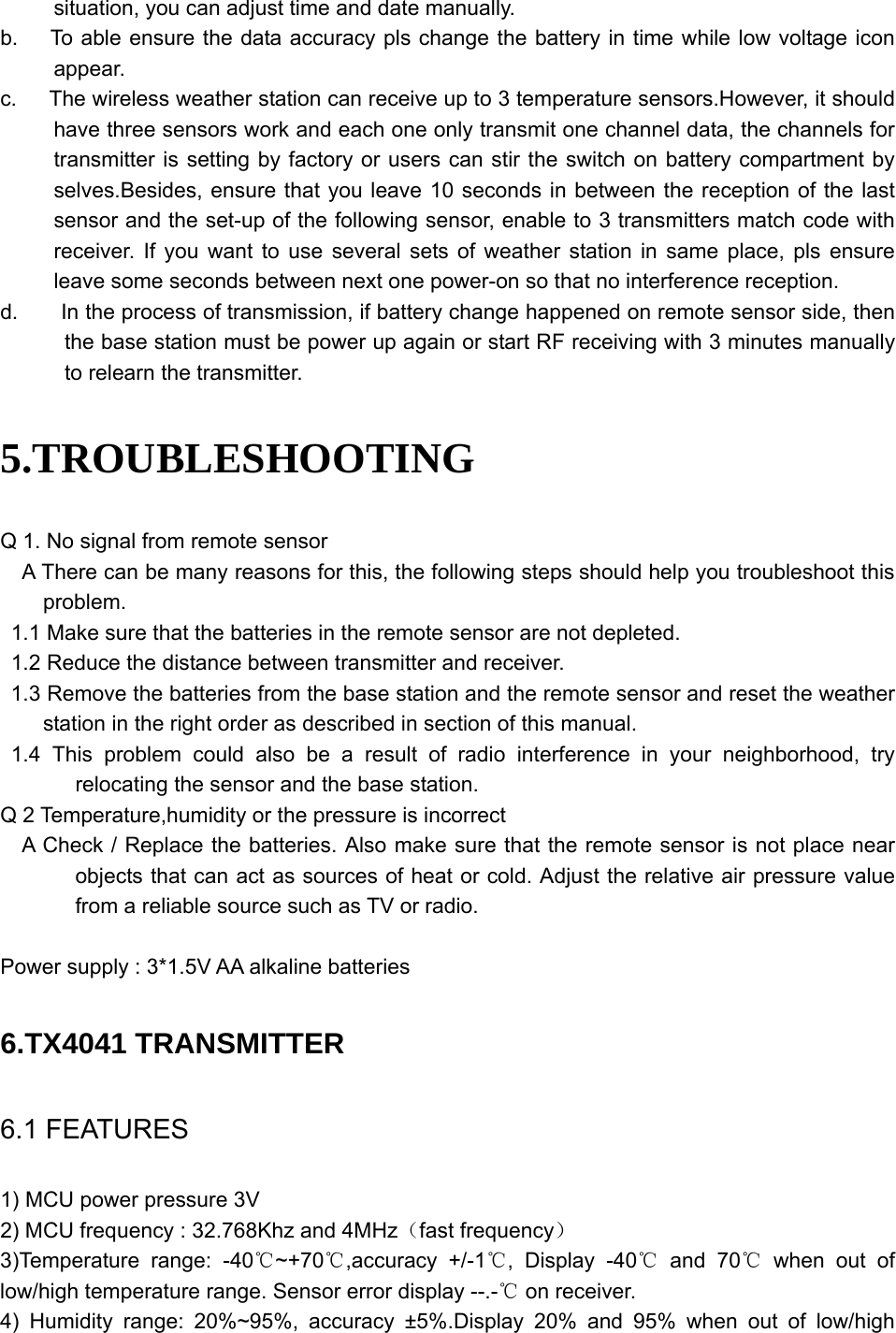
  situation, you can adjust time and date manually. b.      To able ensure the data accuracy pls change the battery in time while low voltage icon appear. c.      The wireless weather station can receive up to 3 temperature sensors.However, it should have three sensors work and each one only transmit one channel data, the channels for transmitter is setting by factory or users can stir the switch on battery compartment by selves.Besides, ensure that you leave 10 seconds in between the reception of the last sensor and the set-up of the following sensor, enable to 3 transmitters match code with receiver. If you want to use several sets of weather station in same place, pls ensure leave some seconds between next one power-on so that no interference reception.   d.        In the process of transmission, if battery change happened on remote sensor side, then the base station must be power up again or start RF receiving with 3 minutes manually to relearn the transmitter.   5.TROUBLESHOOTING Q 1. No signal from remote sensor     A There can be many reasons for this, the following steps should help you troubleshoot this problem. 1.1 Make sure that the batteries in the remote sensor are not depleted. 1.2 Reduce the distance between transmitter and receiver. 1.3 Remove the batteries from the base station and the remote sensor and reset the weather station in the right order as described in section of this manual.  1.4 This problem could also be a result of radio interference in your neighborhood, try relocating the sensor and the base station. Q 2 Temperature,humidity or the pressure is incorrect     A Check / Replace the batteries. Also make sure that the remote sensor is not place near objects that can act as sources of heat or cold. Adjust the relative air pressure value from a reliable source such as TV or radio.    Power supply : 3*1.5V AA alkaline batteries  6.TX4041 TRANSMITTER 6.1 FEATURES 1) MCU power pressure 3V 2) MCU frequency : 32.768Khz and 4MHz(fast frequency) 3)Temperature range: -40 ~+70 ,accuracy +/℃℃ -1 , Display ℃-40  and℃ 70  when out of ℃low/high temperature range. Sensor error display --.-  on receiver.℃ 4) Humidity range: 20%~95%, accuracy ±5%.Display 20% and 95% when out of low/high
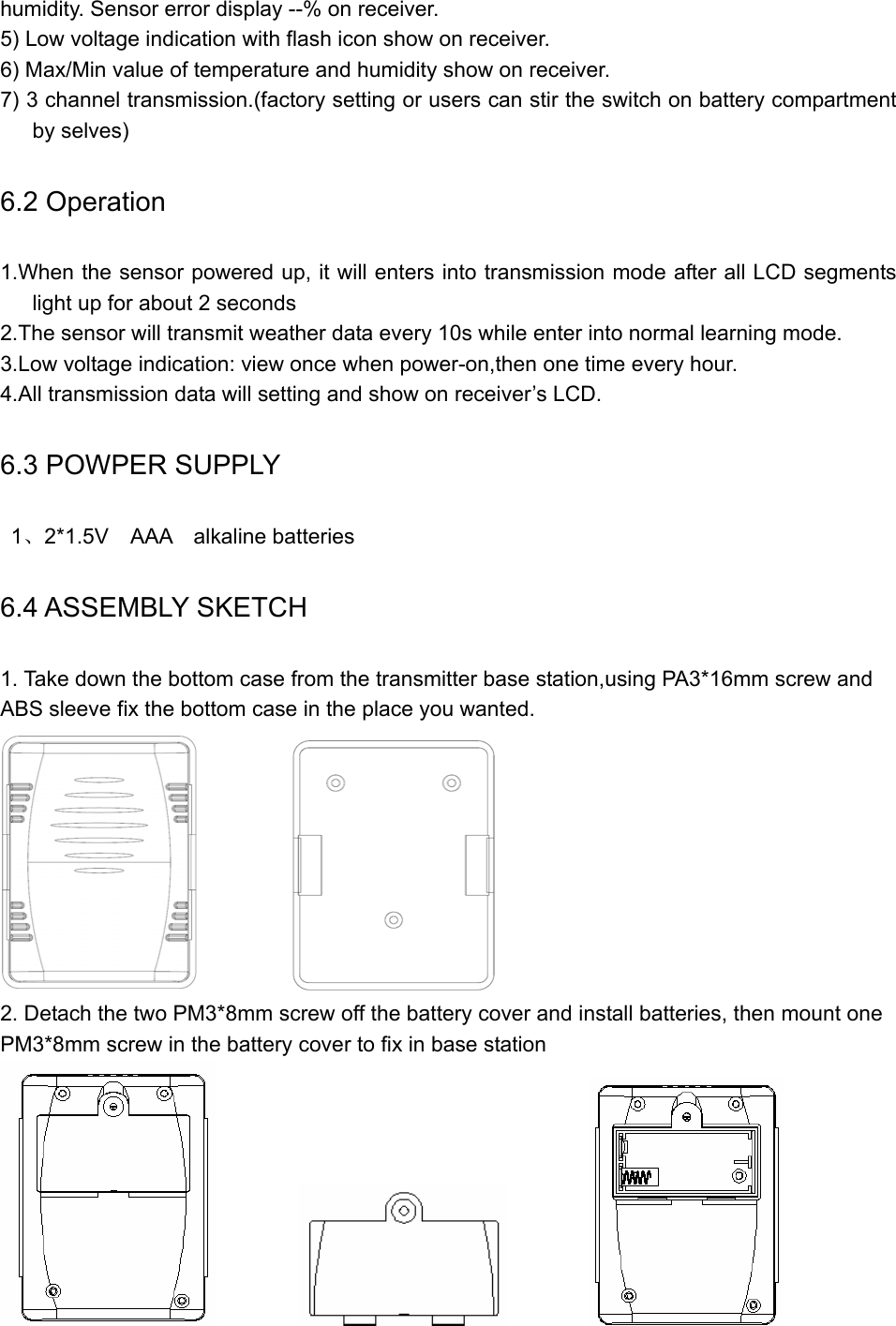
  humidity. Sensor error display --% on receiver. 5) Low voltage indication with flash icon show on receiver. 6) Max/Min value of temperature and humidity show on receiver. 7) 3 channel transmission.(factory setting or users can stir the switch on battery compartment by selves) 6.2 Operation 1.When the sensor powered up, it will enters into transmission mode after all LCD segments light up for about 2 seconds 2.The sensor will transmit weather data every 10s while enter into normal learning mode. 3.Low voltage indication: view once when power-on,then one time every hour. 4.All transmission data will setting and show on receiver’s LCD. 6.3 POWPER SUPPLY  1、2*1.5V  AAA  alkaline batteries 6.4 ASSEMBLY SKETCH 1. Take down the bottom case from the transmitter base station,using PA3*16mm screw and ABS sleeve fix the bottom case in the place you wanted.            2. Detach the two PM3*8mm screw off the battery cover and install batteries, then mount one PM3*8mm screw in the battery cover to fix in base station
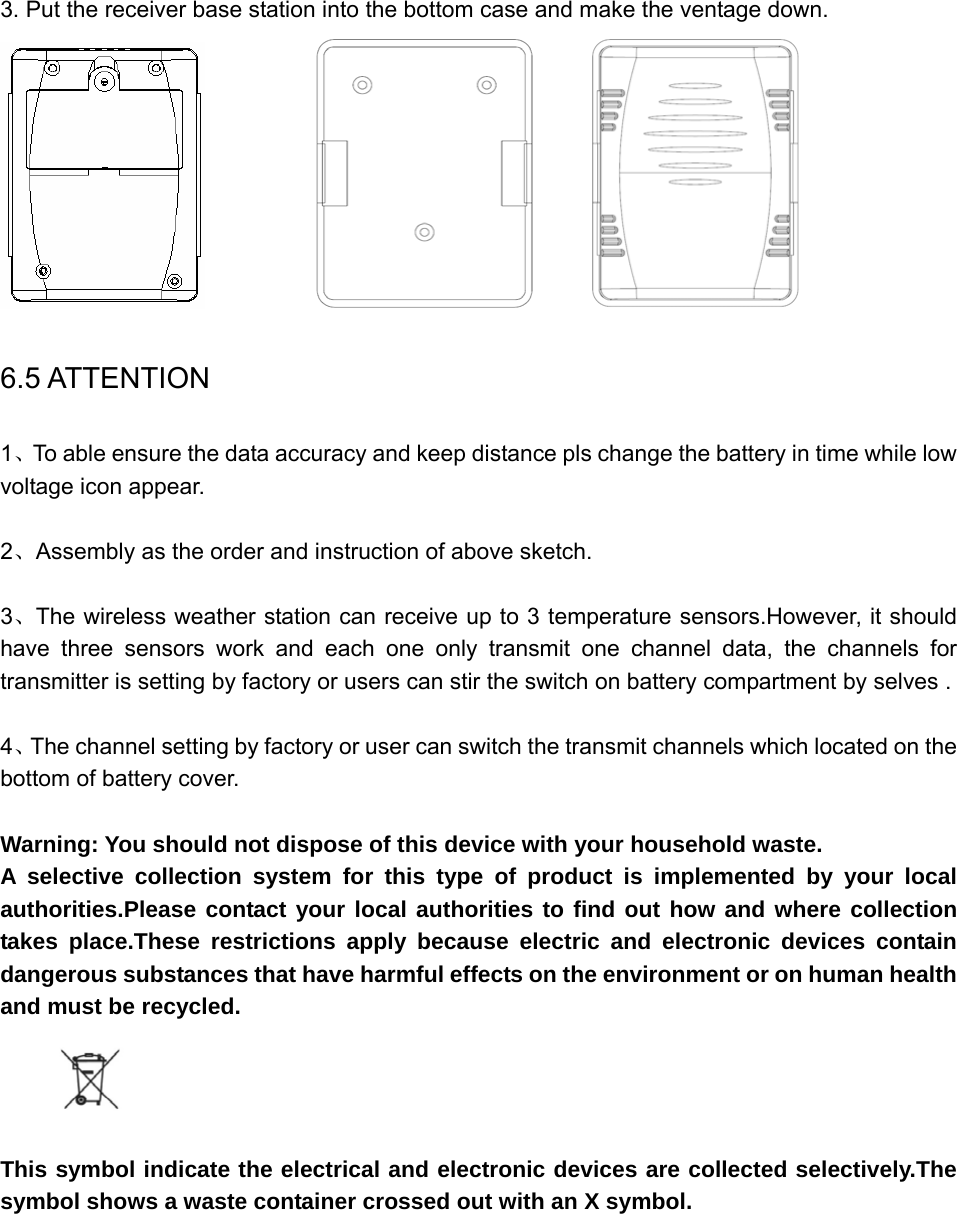
   3. Put the receiver base station into the bottom case and make the ventage down.                                     6.5 ATTENTION 1、To able ensure the data accuracy and keep distance pls change the battery in time while low voltage icon appear.  2、Assembly as the order and instruction of above sketch.  3、The wireless weather station can receive up to 3 temperature sensors.However, it should have three sensors work and each one only transmit one channel data, the channels for transmitter is setting by factory or users can stir the switch on battery compartment by selves .  4、The channel setting by factory or user can switch the transmit channels which located on the bottom of battery cover.  Warning: You should not dispose of this device with your household waste. A selective collection system for this type of product is implemented by your local authorities.Please contact your local authorities to find out how and where collection takes place.These restrictions apply because electric and electronic devices contain dangerous substances that have harmful effects on the environment or on human health and must be recycled.     This symbol indicate the electrical and electronic devices are collected selectively.The symbol shows a waste container crossed out with an X symbol.
  FCC Statement Changes or modifications not expressly approved by the party responsible for compliance could void the user's authority to operate the equipment. This equipment has been tested and found to comply with the limits for a Class B digital device, pursuant to Part 15 of the FCC Rules. These limits are designed to provide reasonable protection against harmful interference in a residential installation. This equipment generates uses and can radiate radio frequency energy and, if not installed and used in accordance with the instructions, may cause harmful interference to radio communications. However, there is no guarantee that interference will not occur in a particular installation. If this equipment does cause harmful interference to radio or television reception, which can be determined by turning the equipment off and on, the user is encouraged to try to correct the interference by one or more of the following measures: -- Reorient or relocate the receiving antenna. -- Increase the separation between the equipment and receiver. -- Connect the equipment into an outlet on a circuit different from that to which the receiver is connected. -- Consult the dealer or an experienced radio/TV technician for help This device complies with part 15 of the FCC rules. Operation is subject to the following two conditions (1)this device may not cause harmful interference, and (2) this device must accept any interference received, including interference that may cause undesired operation.

Navigation menu