

Ergomotion RF397AC Remote Control User Manual
Remote Control Overview
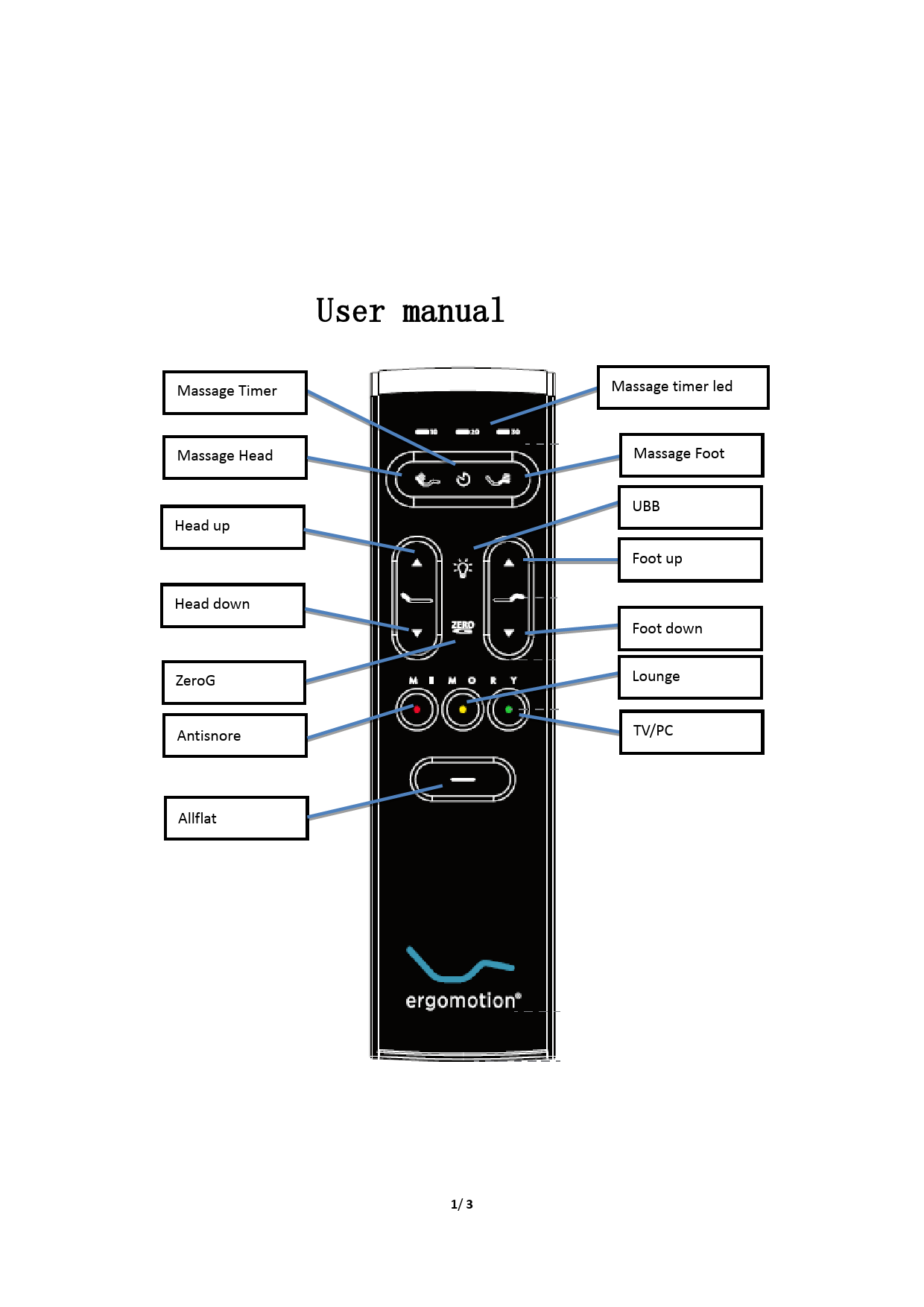
This document provides instructions for the Ergomotion RF397AC remote control. The remote features various buttons to control the functions of an Ergomotion bed.
The remote control includes the following labeled buttons:
- Massage Timer
- Massage Head
- Head up
- Head down
- ZeroG
- Antisnore
- Allflat
- Massage timer led
- Massage Foot
- UBB
- Foot up
- Foot down
- Lounge
- TV/PC
Additional controls include memory buttons (Memory I, II, III), a ZERO button, and a power/flat button.
Button Functions
1.1 Massage Head
Click the 'Massage Head' button to cycle through the massage intensity levels, which range from 0, 1, 3, to 6.
1.2 Massage Foot
Click the 'Massage Foot' button to cycle through the massage intensity levels for the foot, which range from 0, 1, 3, to 6.
1.3 Massage Timer
Click the 'Massage Timer' button to select the massage duration. The time cycles between 0, 10, 20, and 30 minutes.
1.4 Head Adjustment
Press and hold the 'Head Up' button to move the head actuator outwards. The movement stops when the button is released. Press and hold the 'Head Down' button to move the head actuator inwards. The movement stops when the button is released.
1.5 Foot Adjustment
Press and hold the 'Foot Up' button to move the foot actuator outwards. The movement stops when the button is released. Press and hold the 'Foot Down' button to move the foot actuator inwards. The movement stops when the button is released.
1.6 UBB (Bed Light)
Click the 'UBB' button to turn the bed light on. Click it again to turn the light off.
1.7 ZeroG
Click the 'ZeroG' button to move the actuator to the ZeroG position. The movement stops if any button is clicked during the operation.
1.8 Antisnore
Click the 'Antisnore' button to move the actuator to the antisnore position. The movement stops if any button is clicked during the operation.
1.9 Memory I (Music)
Click the designated 'Memory I' button to move the actuator to a pre-saved memory position 1. The movement stops if any button is clicked during the operation.
1.10 Memory II (Lounge)
Click the designated 'Memory II' button to move the actuator to a pre-saved memory position 1. The movement stops if any button is clicked during the operation.
1.11 Memory III (TV/PC)
Click the designated 'Memory III' button to move the actuator to a pre-saved memory position 2. The movement stops if any button is clicked during the operation.
1.12 FLAT
Click the 'FLAT' button to return the bed to a flat position. The movement stops if any button is clicked during the process.
Regulatory Compliance
FCC Statement
Any changes or modifications not expressly approved by the party responsible for compliance could void the user's authority to operate the equipment. This device complies with part 15 of the FCC Rules. Operation is subject to the following two conditions: (1) This device may not cause harmful interference, and (2) this device must accept any interference received, including interference that may cause undesired operation.
FCC Radiation Exposure Statement
The device has been evaluated to meet general RF exposure requirement. The device can be used in portable exposure condition without restriction.
Note: This equipment has been tested and found to comply with the limits for a Class B digital device, pursuant to part 15 of the FCC Rules. These limits are designed to provide reasonable protection against harmful interference in a residential installation. This equipment generates, uses and can radiate radio frequency energy and, if not installed and used in accordance with the instructions, may cause harmful interference to radio communications. However, there is no guarantee that interference will not occur in a particular installation. If this equipment does cause harmful interference to radio or television reception, which can be determined by turning the equipment off and on, the user is encouraged to try to correct the interference by one or more of the following measures:
- Reorient or relocate the receiving antenna.
- Increase the separation between the equipment and receiver.
- Connect the equipment into an outlet on a circuit different from that to which the receiver is connected.
- Consult the dealer or an experienced radio/TV technician for help.
ISED RSS Warning / ISED RF Exposure Statement
ISED RSS Warning: This device complies with Innovation, Science and Economic Development Canada licence-exempt RSS standard(s). Operation is subject to the following two conditions: (1) this device may not cause interference, and (2) this device must accept any interference, including interference that may cause undesired operation of the device.
Translation of French ISED RSS Warning: This device complies with ISED's applicable licence-exempt radio apparatus CNR. Operation is authorized under two conditions: (1) the device must not cause interference, and (2) the user of the device must accept any radio interference, even if the interference is likely to compromise its operation.
ISED RF exposure statement: This equipment complies with ISED radiation exposure limits set forth for an uncontrolled environment. The device has been evaluated to meet general RF exposure requirement.
Translation of French ISED RF exposure statement: The material complies with radiation exposure dose limits set for another environment. This device has been evaluated to meet the general RF exposure requirement.