

F06 Circular Fan
Product Instructions
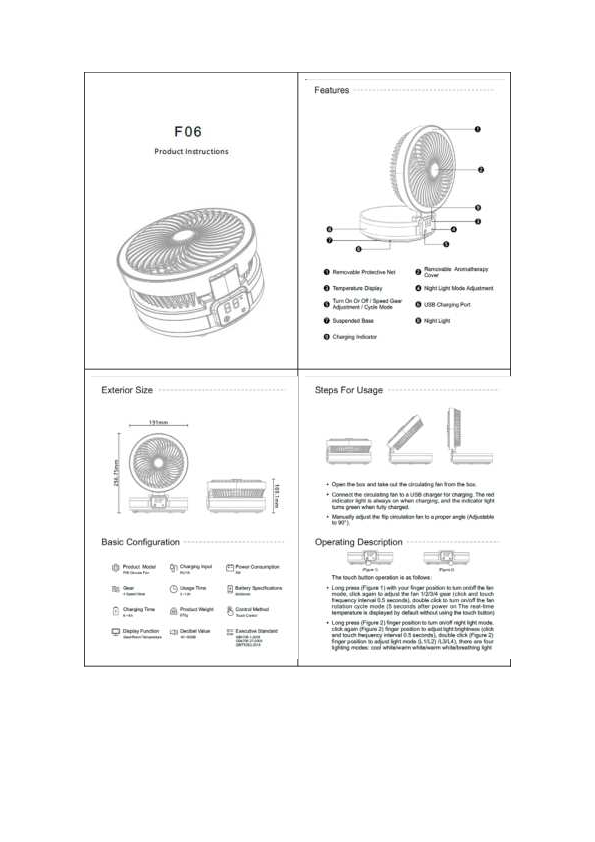
Features
- Removable Protective Net ?️
- Temperature Display ?️
- Turn On/Off / Speed Gear Adjustment / Cycle Mode ⚙️
- Suspended Base ⬆️
- Charging Indicator ?
- Removable Aromatherapy Cover ?️
- Night Light Mode Adjustment ?
- USB Charging Port ?
- Night Light ✨
Exterior Size
Height: 256.75mm
Width: 191mm
Depth: 109.1mm
Basic Configuration
- Product Model: F06 Circular Fan
- Charging Input: 5V/1A
- Power Consumption: 5W
- Gear: 4 Speed Gear
- Charging Time: 6-8h
- Usage Time: 3~12h
- Battery Specifications: 6000mAh
- Product Weight: 870g
- Control Method: Touch Control
- Display Function: Gear/Room Temperature
- Decibel Value: 40-50DB
- Executive Standard: GB4706.1-2005, GB4706.27-2008, QB/T5262-2018
Steps For Usage
- Open the box and take out the circulating fan.
- Connect the fan to a USB charger. The red indicator light is on during charging and turns green when fully charged.
- Adjust the fan to a proper angle (adjustable to 90°).
Operating Description
Touch Button Operation:
- Long press: Turn the fan mode on/off.
- Click: Adjust fan speed (1/2/3/4 gear).
- Double click: Turn the fan rotation cycle mode on/off (after 5 seconds of power-on, the real-time temperature is displayed by default).
- Night Light: Long press to turn the night light mode on/off.
- Click (Night Light): Adjust light brightness.
- Double click (Night Light): Adjust light mode (L1/L2/L3/L4 - cool white, warm white, warm white, breathing light).
Protective Net Removal
Follow these steps to remove the protective net for cleaning:
- Turn the fan to 90° and unscrew the screws on the back.
- Turn the protective net clockwise to a buckle position.
- Disassemble and clean the protective net with water.
Aromatherapy Cover Disassemble
Rotate the aromatherapy cover counterclockwise to remove it. (Note: The product does not contain aromatherapy.)
App Control
- Scan QR code to download and install the APP (Android/Apple).
- Turn on the fan and phone's Bluetooth. The fan will automatically connect to the phone.
- Open the APP to enter the operation page.
App Functions: Device switch, fan speed control, timing, marquee mode, breathing light, cold light mode, warm and cold light mode, warm light mode, circulating fan, turn off circulating fan.
Warranty Card
Username:
Contact Number:
Product Name: F06 Circular Fan
Dealer (Signature):
Purchase Date:
Installation Address:
This product has been strictly inspected before leaving the factory to ensure its quality meets various standards.
Maintenance Records:
| Repair Date | Maintenance Project | Maintenance Organization | Repairer's Signature |
|---|---|---|---|
Note:
- Keep this card properly and contact the after-sales service center with the warranty card and purchase invoice for repairs.
- Shenzhen Hansheng Technology Co., Ltd guarantees the F06 circulating fan for 1 year, covering the fan and control panel (excluding consumables and normal maintenance).
- The warranty card is valid only in China (excluding Hong Kong, Macao, and Taiwan).
- The warranty card shall not be altered or forged.
Warning
Changes or modifications not expressly approved by the party responsible for compliance could void the user's authority to operate the equipment.
FCC Statement: This device complies with Part 15 of the FCC Rules. Operation is subject to the following two conditions: (1) this device may not cause harmful interference, and (2) this device must accept any interference received, including interference that may cause undesired operation.
This equipment has been tested and found to comply with the limits for a Class B digital device, pursuant to Part 15 of the FCC Rules. These limits are designed to provide reasonable protection against harmful interference in a residential installation. This equipment generates, uses, and can radiate radio frequency energy and, if not installed and used in accordance with the instructions, may cause harmful interference to radio communications. However, there is no guarantee that interference will not occur in a particular installation. If this equipment does cause harmful interference to radio or television reception, which can be determined by turning the equipment off and on, the user is encouraged to try to correct the interference by one or more of the following measures:
- Reorient or relocate the receiving antenna.
- Increase the separation between the equipment and receiver.
- Connect the equipment into an outlet on a circuit different from that to which the receiver is connected.
- Consult the dealer or an experienced radio/TV technician for help.