

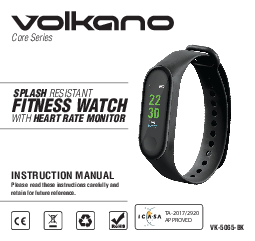
Volkano Core Series
SPLASH RESISTANT FITNESS WATCH WITH HEART RATE MONITOR
INSTRUCTION MANUAL
Please read these instructions carefully and retain for future reference.
[CE] [RoHS] ICASA TA-2017/2920 APPROVED
Model: VK-5065-BK
THE HIGHLIGHTS
- Heart Rate Monitor
- Pedometer
- Message & Call Notification
- 3 Day Battery Life
PACKAGE CONTENTS
- Volkano Active Tech Core Series Smart Watch
- USB Charging Cable
- Instruction Manual
SPECIFICATIONS
| Feature | Detail |
|---|---|
| Heart Rate Monitor | Built-in |
| Pedometer | Built-in |
| Alarm Clock | Yes |
| Notification | Yes via smartphone |
| Call Reminder | Yes |
| Screen Type | Colour LCD |
| App | Volkano Active |
| RAM | 16 Kb |
| ROM | 256 Kb |
| Screen Resolution | 160 x 80 |
| Screen Size | 0.96" |
| Bluetooth Version | 4.0 |
| Bluetooth Operating Distance | 10 m |
| Chipset | BK |
| Battery Capacity | 90 mAh |
| Battery Type | Lithium Polymer |
| Standby Time | 7 days |
| Playback Time | 3 days |
| Charge Time | 2 hrs |
DESCRIPTION OF PARTS
- Screen
- Virtual Key
- Heart Rate Sensor
- Charging Pogo Pins
INSTRUCTIONS FOR USE
CHARGING
Remove the watch from its strap and connect the charge cable. Plug the USB charging cable into a powered AC adapter or computer USB port. ?
POWER OFF
Long press the “Virtual Key” to turn off your watch when the “Off” option is selected from the “More” menu. ⏻
INSTALLING THE VOLKANO ACTIVE APP
To download the Volkano Active App, please direct your browser to the following website: https://volkano.co.za/active-app.
CONNECTING THE WATCH WITH A MOBILE PHONE
- Enable Bluetooth ? on your smartphone.
- Pair your smartphone with the watch (see "Locating the Bluetooth Menu" for more details).
- Open "Volkano Active App" on your smart phone, set your profile from the Settings menu in the “My Profile” tab.
- Tap "Connect the smart watch” in the Settings Menu.
- Select "VK-5065" from the list of devices.
- A success prompt will appear on-screen. Tap “Next” to navigate to the App's dashboard.
LOCATING THE BLUETOOTH MENU
iPhone
- On your iPhone device, go to "Settings".
- Select "Bluetooth" ?. If Bluetooth is not on, turn it on.
- Then open the Volkano Active App. Go to "Settings", click "Connect the smartwatch". You will see different options.
- Choose "VK-5065" and click "Connect".
Android™ Phones
- On your Android phone, go to “Settings”.
- Select "Bluetooth" ? (on older Android devices Bluetooth is found in the Wireless & Networks menu). If Bluetooth is not on, turn it on.
- Then open the Volkano Active App. Go to "Settings", click “Connect the smartwatch". You will see different options.
- Choose "VK-5065” and click "Connect”.
CONNECTING WITH PAIRED DEVICES
Once the Volkano Active is turned on, it will automatically connect with the last paired Bluetooth ? device that is on and within range. If the Volkano Active does not connect automatically, open the Bluetooth menu on your device and select "VK-5065" from the Bluetooth device list.
CONTROLS
- Press the “Virtual Key” to switch the main menu interface.
- Long press the "Virtual Key” to “Confirm”.
- Long hold the “Virtual Key” to switch on the watch from its powered-off state.
UNBIND THE VOLKANO ACTIVE FROM A MOBILE PHONE
- Open "Volkano Active App" on your smartphone.
- Tap "Disconnect Smart Watch” on Settings.
- Forget your device on your smartphone's Bluetooth ? settings. To do this, please refer to your smartphone's instruction manual.
FUNCTIONS
WATCH FACE
Long press the "Virtual Key” to change the way in which the watch's dashboard is displayed, and press the "Virtual Key" again to confirm your selection.
PEDOMETER
The watch will record your daily activity automatically. After synchronizing with the Volkano Active App, you can check your steps, calories and distance data on your smartphone.
MULTI-SPORT
Long press the "Virtual Key” to enter the Multi-sports function once it is selected. The Volkano Active has nine multi-sports modes: Walking ?, Running ?, Biking ?, Run Indoor, Basketball, Swimming, Table Tennis, Badminton and Climbing ?. Choose your desired mode by long pressing the "Virtual Key”. The Volkano Active will record the data of the selected sport mode and send it to the Volkano Active App.
SPORT EXIT
To exit the sport function, long press the “Virtual Key" then select [Stop] ⏹️ to stop your movement and save it. After synchronizing with the Volkano Active App, you can check your sport record.
Please note that if the sport time is less than one minute, the data will not be saved.
HEART RATE
Long press the "Virtual Key” to monitor your heart rate ❤️ once it is selected and long press to exit the heart rate monitor. After syncing with the Volkano Active App, you can check your heart rate data on your smartphone.
SLEEP MONITOR
The Volkano Active will monitor your sleep ? automatically. When sleep is ended, the Volkano Active will show your sleep report with the times of total sleep, light sleep and deep sleep. After synchronizing with the Volkano Active App, you can check a more detailed sleep report.
ALARM
Long press the "Virtual Key”, you can check an alarm ⏰ which you set on the Volkano Active App. When alarm is on, its icon will be animated and the watch will vibrate.
MESSAGE
Long press the “Virtual Key” to view the notification contents. Including incoming call, SMS, QQ, Wechat, Whatsapp, Facebook and Twitter message notifications. ?
MOVEMENT
Long press the "Virtual Key” to enter the “Movement” settings menu. Short press the "Virtual Key” to switch this mode “On” or “Off”. Long press the "Virtual Key" to exit. You can set more conditions in the App, including the start to the end of period, time interval (minutes), threshold value (steps) and repeat setting (weeks). The device will vibrate to remind the wearer to move after the set conditions are met.
FIND PHONE
Long press the "Virtual Key" after the watch is connected with the Volkano Active App, your smart phone ? will ring. If you use iPhone, you must keep your Volkano Active App displaying on the screen.
ABOUT
Long press the "Virtual Key”, you can check the Bluetooth Mac Address, Device name and Firmware Version of your Volkano Active. ?
POWER OFF
Long pressing the "Virtual Key" will turn off your Volkano Active. ⏻
VOLKANO ACTIVE APP DASHBOARD
The dashboard displays performance indicators of the day including weight, sleep and heart rate.
SHARE
This button allows you to share your progress through social media.
ENTRY WEIGHT
This page allows you to enter your current weight, set an ideal weight and the date you want to reach the ideal weight.
CALENDAR
This button displays the calendar.
ACTIVITY
This page displays a log of all the activities recorded while wearing the Volkano Active.
REMINDER
This page allows you to toggle and set reminders.
SETTINGS
MY PROFILE
This page allows you to change your profile information.
GOALS
This page allows you to change and set goals for Steps, Distance, Calories and Sleep. Once you have made changes, tap the save button.
NOTIFICATIONS
This page allows you to toggle which application notifications appear on the Volkano Active.
ADVANCED SETTINGS
This page allows you to toggle settings related to weather, movement, heart rate, drinking water, do not disturb and gesture control.
FIND THE SMART WATCH
Tapping this makes the Volkano Active vibrate to allow you to locate it.
GOOGLE FIT
Toggling this setting “On” will allow the Volkano Active App to send your performance data to Google fit.
THEME
The theme of the App can be changed from this page.
APP MANAGEMENT
CONNECT THE SMART WATCH
This page allows you to choose which Volkano Active watch or band to connect with.
FIRMWARE UPDATE
From this page the firmware of the Volkano Active can be updated. Please remember to keep the App running and a stable internet connection active when updating. Please note that data charges apply to your respective cellular service provider.
RESET
Tapping this clears all the stored performance data from the App.
ABOUT
This page displays the App's version information.
SAFETY PRECAUTIONS
- The product should only be used with the parts provided by the manufacturer.
- The Volkano Active is intended for personal use only. Commercial use invalidates the warranty and the supplier cannot be held responsible for injury or damage caused when using the device for any other purpose than that which it was intended for.
- This Volkano Active is not intended for use by young children, or persons with reduced physical, sensory or mental capabilities, or lack of experience and knowledge, unless they have been given supervision or instruction concerning use of the device by a person responsible for their safety. Extreme caution must be exercised.
- Children should be supervised to ensure that they do not play with the Volkano Active. Packaging must never be left within reach of children, since it is potentially dangerous.
CLEANING & CARE INSTRUCTIONS
- Before Cleaning: Ensure that your Volkano Active is not plugged into any device before cleaning or maintaining it. Switch it off before cleaning.
- Cleaning: Wipe down the surface of your Volkano Active using a soft, slightly damp cloth.
- Do not use any harsh or abrasive cleaning chemicals or materials on your Volkano Active as doing so may damage or scratch the surface finish.
- Do not expose your Volkano Active to high temperatures for extended periods of time.
- Do not store in temperatures over 60 °C.
ENVIRONMENTALLY FRIENDLY DISPOSAL
Do not dispose of electrical appliances as unsorted municipal waste, use separate collection facilities. Contact your local government for information regarding the collection systems available. If electrical appliances are disposed of in landfills or dumps, hazardous substances can leak into the groundwater and get into the food chain, damaging your health and well-being. ♻️
DISCLAIMER
- All product and company names are trademarks™ or registered® trademarks of their respective holders. Use of them does not imply any affiliation with or endorsement by them.
- While our heart rate monitor technology is very advanced and has been tested by a medical professional, there are limitations with the technology that may cause some of the heart rate readings to be inaccurate under certain circumstances. This may include the user's physical characteristics, the fit of the device and the type and intensity of user activity. The heart rate monitor is NOT intended to be used for medical purposes, nor is it intended to diagnose, treat, cure or prevent any disease or condition. You should not rely on the information on the device as an alternative to medical advice from your doctor or other professional healthcare provider. If you have any specific questions about any medical matter, you should consult your doctor or other professional healthcare provider. If you think you may be suffering from any medical condition, you should seek immediate medical attention. You should never delay seeking medical advice, disregard medical advice or discontinue medical treatment because of information on this device.
WARRANTY
This Volkano Active Tech Core Series Smart Watch includes a standard 12-month limited warranty against manufacturing defects and faults. Should your product be unboxed with any faulty parts, poor finishing or visible damage, or fail to perform due to a manufacturing defect or poor workmanship, please return it with your proof of purchase (till slip or invoice) to the store of purchase for an exchange, or repair, depending on the store's returns policy.
This warranty commences from the date of purchase. Kindly retain your proof of purchase as well as the packaging for your warranty period.
NOTE: The Warranty does not apply to a Product that:
- Has failed due to excessive wear and tear beyond what is considered to be reasonable.
- Has been misused or neglected.
- Has been damaged accidentally or by acts of God including fire and flooding.
- Has been used or operated contrary to operating or maintenance instructions outlined in this manual.
The Store of Purchase / Seller cannot accept any returned products that have not been returned in accordance to this warranty or which does not follow their own Returns Policy. Please refer to the Store of Purchase / Sellers Returns Policy for details.
Should you require any further assistance or have any questions on your warranty, please contact the store of purchase.
