

CANYON HKB-W20 Wireless keyboard "velvet tread" series User Guide
File info: application/pdf · 2 pages · 409.26KB
Wireless keyboard - Canyon
Warranty. EN: For the detailed information regarding warranty terms, please refer to: http://canyon.eu/ warranty-terms/. BG: За повече информация относно ...
Wireless keyboard "velvet tread" series - manuals.plus
31 août 2021 — Warranty. EN: For the detailed information regarding warranty terms, please refer to: http://canyon.eu/ warranty-terms/. BG: За повече информация относно ...
Extracted Text
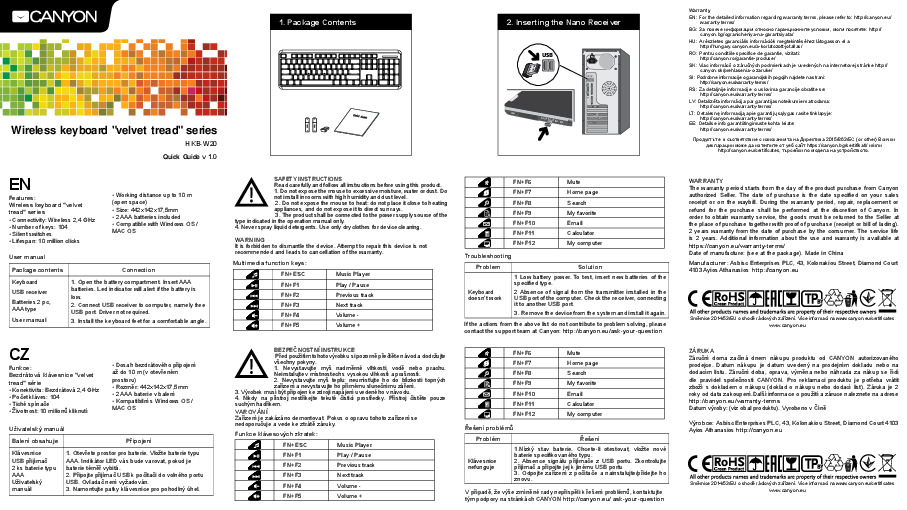
1. Package Contents

2. Inserting the Nano Receiver

Wireless keyboard "velvet tread" series
HKB-W20 Quick Guide v 1.0

EN
Features: Wireless keyboard "velvet tread" series � Connectivity: Wireless 2,4 GHz � Number of keys: 104 � Silent switches � Lifespan: 10 million clicks

� Working distance up to 10 m (open space) � Size: 442x142x17,5mm � 2 AAA batteries included � Compatible with Windows OS / MAC OS

User manual

Package contents

Connection

Keyboard
USB receiver Batteries 2 pc, AAA type
User manual

1. Open the battery compartment. Insert AAA batteries. Led indicator will alert if the battery is low.
2. Connect USB receiver to computer, namely free USB port. Driver not required.
3. Install the keyboard feet for a comfortable angle.

CZ
Funkce:
Bezdr�tov� kl�vesnice "velvet tread" s�rie � Konektivita: Bezdr�tov� 2,4 GHz � Pocet kl�ves: 104 � Tich� sp�nace � Zivotnost: 10 milion kliknut�

� Dosah bezdr�tov�ho pipojen� az do 10 m (v oteven�m prostoru) � Rozmr: 442x142x17,5mm � 2 AAA baterie v balen� � Kompatibiln� s Windows OS / MAC OS

Uzivatelsk� manu�l

Balen� obsahuje

Pipojen�

Kl�vesnice USB pij�mac 2 ks baterie typu AAA
Uzivatelsk� manu�l

1. Otevete prostor pro baterie. Vlozte baterie typu AAA. Indik�tor LED v�s bude varovat, pokud je baterie t�m vybit�. 2. Pipojte pij�mac USB k poc�taci do voln�ho portu USB. Ovladac nen� vyzadov�n. 3. Namontujte patky kl�vesnice pro pohodln� �hel.

SAFETY INSTRUCTIONS Read carefully and follow all instructions before using this product. 1. Do not expose the mouse to excessive moisture, water or dust. Do not install in rooms with high humidity and dust level. 2. Do not expose the mouse to heat: do not place it close to heating appliances, and do not expose it to direct sun rays. 3. The product shall be connected to the power supply source of the type indicated in the operation manual only. 4. Never spray liquid detergents. Use only dry clothes for device cleaning.

WARNING It is forbidden to dismantle the device. Attempt to repair this device is not recommended and leads to cancellation of the warranty.

Multimedia function keys:

FN+ESC FN+F1 FN+F2 FN+F3 FN+F4 FN+F5

Music Player Play / Pause Previous track Next track Volume Volume +

BEZPECNOSTN� INSTRUKCE Ped pouzit�m tohoto v�robku si pozorn pectte n�vod a dodrzujte vsechny pokyny. 1. Nevystavujte mys nadmrn� vlhkosti, vod nebo prachu. Neinstalujte v m�stnostech s vysokou vlhkost� a prasnost�. 2. Nevystavujte mys teplu: neum�sujte ho do bl�zkosti topn�ch za�zen� a nevystavujte ho p�m�mu slunecn�mu z�en�. 3. V�robek mus� b�t pipojen ke zdroji nap�jen� uveden�ho v n�vodu. 4. Nikdy na p�stroj nest�kejte tekut� cistic� prostedky. P�stroj cistte pouze such�m had�kem. VAROV�N� Za�zen� je zak�z�no demontovat. Pokus o opravu tohoto za�zen� se nedoporucuje a vede ke ztr�t z�ruky.
Funkce kl�vesov�ch zkratek:

FN+ESC

Music Player

FN+F1

Play / Pause

FN+F2

Previous track

FN+F3

Next track

FN+F4

Volume -

FN+F5

Volume +

FN+F6 FN+F7 FN+F8 FN+F9 FN+F10 FN+F11 FN+F12

Mute Home page Search My favorite Email Calculator My computer

Troubleshooting

Problem

Solution

Keyboard doesn`t work

1 Low battery power. To test, insert new batteries of the specified type. 2 Absence of signal from the transmitter installed in the USB port of the computer. Check the re ceiver, connecting it to another USB port. 3. Remove the device from the system and install it again.

If the actions from the above list do not contribute to problem solving, please contact the support team at Canyon: http://canyon.eu/ask-your-question

FN+F6 FN+F7 FN+F8 FN+F9 FN+F10 FN+F11 FN+F12

Mute Home page Search My favorite Email Calculator My computer

esen� probl�m

Probl�m Kl�vesnice nefunguje

esen� 1.N�zk� stav baterie. Chcete-li otestovat, vlozte nov� baterie specifikovan�ho typu. 2. Absence sign�lu pij�mace z USB portu. Zkontrolujte pij�mac a pipojte jej k jin�mu USB portu 3. Odpojte za�zen� z poc�tace a nainstalujte/pidejte ho znovu.

V p�pad, ze v�se zm�nn� rady nepispli k esen� probl�m, kontaktujte t�m podpory na str�nk�ch CANYON http://canyon.eu/ ask-your-question

Warranty EN: For the detailed information regarding warranty terms, please refer to: http://canyon.eu/
warranty-terms/ BG:      ,  : http://
canyon.bg/ogranicheniya-na-garantsiyata/ HU: A r�szletes garanci�lis inform�ci�k megtekint�s�hez l�togasson el a
http://hungary.canyon.eu/a-korlatozott-jotallas/ RO: Pentru conditiile specifice de garantie, vizitati:
http://canyon.ro/garantie-produse/ SK: Viac inform�ci� o z�rucn�ch podmienkach je uveden�ch na internetovej str�nke http://
canyon.sk/prehlasenia-o-zaruke/ SI: Podrobne informacije o garancijskih pogojih najdete na strani:
http://canyon.eu/warranty-terms/ RS: Za detaljnije informacije o uslovima garancije obratite se:
http://canyon.eu/warranty-terms/ LV: Detalizta informcija par garantijas noteikumiem atrodama:
http://canyon.eu/warranty-terms/ LT: Detalesn informacij apie garantij slygas rasite tinklapyje:
http://canyon.eu/warranty-terms/ EE: Detailse info garantiitingimuste kohta leiate:
http://canyon.eu/warranty-terms/
        2015/863/EC (or other)         https://canyon.bg/sertifikati/ / http://canyon.eu/certificates,     .
WARRANTY The warranty period starts from the day of the product purchase from Canyon authorized Seller. The date of purchase is the date specified on your sales receipt or on the waybill. During the warranty period, repair, replacement or refund for the purchase shall be performed at the discretion of Canyon. In order to obtain warranty service, the goods must be returned to the Seller at the place of purchase together with proof of purchase (receipt or bill of lading). 2 years warranty from the date of purchase by the consumer. The service life is 2 years. Additional information about the use and warranty is available at https://canyon.eu/warranty-terms/ Date of manufacture: (see at the package). Made in China Manufacturer: Asbisc Enterprises PLC, 43, Kolonakiou Street, Diamond Court 4103 Ayios Athanasios http://canyon.eu
Smrnice 2014/53/EU o shod r�diov�ch za�zen�. V�ce informac� na www.canyon.eu/certificates www.canyon.eu
Z�RUKA Z�rucn� doma zac�n� dnem n�kupu produktu od CANYON autorizovan�ho prodejce. Datum n�kupu je datum uveden� na prodejn�m dokladu nebo na dodac�m listu. Z�rucn� doba, oprava, v�mna nebo n�hrada za n�kup se �d� dle pravidel spolecnosti CANYON. Pro reklamaci produktu je poteba vr�tit zboz� s dokladem o n�kupu (doklad o n�kupu nebo dodac� list). Z�ruka je 2 roky od data zakoupen�.Dals� informace o pouzit� a z�ruce naleznete na adrese http://canyon.eu/warranty-terms Datum v�roby: (viz obal produktu). Vyrobeno v C�n
V�robce: Asbisc Enterprises PLC, 43, Kolonakiou Street, Diamond Court 4103 Ayios Athanasios http://canyon.eu
Smrnice 2014/53/EU o shod r�diov�ch za�zen�. V�ce informac� na www.canyon.eu/certificates www.canyon.eu

RU
 :    " " � : , 2.4  �  : 104 �

�   : 10  . �    10  ( ) � : 442x142x17,5  �   2    �    Windows / MAC OS


USB
 A 2 .


 1.    .    A. Led  ,   .
2.  USB   ,     USB-.   .
3.       .

UA
 :    � � � : , 2.4  �  : 104 �

�   : 10   �    10  ( ) � : 442x142x17,5  �   2   �    Windows / MAC OS


USB
 2 .,  AAA


1.    .    AAA  .       .
2.  USB-   USB- '.   .
3.       .

           .      . 1)    :              . 2)          ,      . 3)        USB .       .
   .           .
 :

FN+ESC


FN+F1

 /

FN+F2


FN+F3


FN+F4


FN+F5


             . 1.          ,    .        ,   . 2.     :            . 3.          ,      . 4.       .         .        .        .  :

FN+ESC


FN+F1

/

FN+F2


FN+F3


FN+F4


FN+F5


FN+F6


FN+F7


FN+F8


FN+F9


FN+F10


FN+F11


FN+F12


 1.  .       . 2.    ,   USB- .  ,     USB-. 3.        .

        , ,       Canyon http://canyon.eu/ask-your-question/.

FN+F6 FN+F7 FN+F8 FN+F9 FN+F10 FN+F11 FN+F12

          '


1.  .        2.   ,   USB- '.  ,     USB-. 3.        .

      ,      - Canyon: https://canyon.ua/tech-support-ua/

            Canyon.     ,          .     ,          Canyon.                 (   ).  2      .   2 .          http://canyon.ru/usloviya-garantii/  : (.  ).  :  : Asbisc Enterprises PLC, ,  4103,  , .  43,  . http://canyon.ru/    :  "", 129515, . , .  ,  13 . 1, . +7 495 775 06 41.
Smrnice 2014/53/EU o shod r�diov�ch za�zen�. V�ce informac� na www.canyon.eu/certificates www.canyon.eu
 `           CANYON.     ,     ,    .    ,          CANYON.                 (  ).  2      .   2 .          https://canyon.ua/garantiyni-umovy  : (.  ).  :  : Asbisc Enterprises PLC, ,  4103,  , .  43,   http://canyon.eu   :   �-�, 03061, . , . ,  30, . +38 044 455 44 11 https://canyon.ua
Smrnice 2014/53/EU o shod r�diov�ch za�zen�. V�ce informac� na www.canyon.eu/certificates www.canyon.eu
References
-
 Canyon | Mobile and Computer Accessories
-
Canyon | Mobile and Computer Accessories
-
User help desk - Canyon
-
User help desk - Canyon
-
Certificates
-
Limited warranty statement - Canyon
-
 Garantie produse
-
 Canyon | Мобильные и компьютерные аксессуары
-
 Canyon | Mobile and Computer Accessories
-
Certificates
-
 Сертификати
-
Limited warranty statement - Canyon
-
 Canyon | Мобільні та комп'ютерні аксесуари
-
Гарантійні умови
-
Canyon