

UD14536B Baseline B1 Dashcam User Manual V1.0 20190618
File info: application/pdf · 2 pages · 1.37MB
UD14536B Baseline B1 Dashcam User Manual V1.0 20190618
F Dashcam User Manual - electric.garden
User Manual x1 Regulatory Information Regulatory Information Regulatory Information Regulatory Information FCC Information Please t ake tt ention tht changes or modific tion not xpressly approved by the party responsible…
F Dashcam User Manual
User Manual
Hangzhou Hikvision Digital Technology Co., Ltd. AEB1 DashCam 2ADTD-AEB1 2ADTDAEB1 aeb1
Full PDF Document

If the inline viewer fails, it will open the original document in compatibility mode automatically. You can also open the file directly.
Extracted Text
Dashcam�B1 User Manual
Scan and download the APP

Regulatory Information
FCC Information
Please take attention that changes or modification not expressly approved by the party responsible for compliance could void the user's authority to operate the equipment. FCC compliance: This equipment has been tested and found to comply with the limits for a Class B digital device , pursuant to part 15 of the FCC Rules. These limits are designed to provide reasonable protection against harmful interference in a residential installation. This equipment generates, uses and can radiate radio frequency energy and, if not installed and used in accordance with the instructions, may cause harmful interference to radio communications. However, there is no guarantee that interference will not occur in a particular installation. If this equipment does cause harmful interference to radio or television reception, which can be determined by turning the equipment off and on, the user is encouraged to try to correct the interference by one or more of the following measures: --Reorient or relocate the receiving antenna. --Increase the separation between the equipment and receiver. --Connect the equipment into an outlet on a circuit different from that to which the receiver is connected. --Consult the dealer or an experienced radio/TV technician for help. This equipment should be installed and operated with a minimum distance 20cm between the radiator and your body.
1

Regulatory Information
FCC Conditions
This device complies with part 15 of the FCC Rules. Operation is subject to the following two conditions: 1. This device may not cause harmful interference. 2. This device must accept any interference received, including interference that may cause undesired operation.
EU Conformity Statement
This product and - if applicable - the supplied accessories too are marked with "CE" and comply therefore with the applicable harmonized European standards listed under the RE Directive 2014/53/EU, the EMC Directive 2014/30/EU, the LVD Directive 2014/35/EU, the RoHS Directive 2011/65/EU 2012/19/EU (WEEE directive): Products marked with this symbol cannot be disposed of as unsorted municipal waste in the European Union. For proper recycling, return this product to your local supplier upon the purchase of equivalent new equipment, or dispose of it at designated collection points. For more information see: www. recyclethis.info
2

Regulatory Information
The power supply must conform to LPS. The recommended adaptor model is TC16A, whose manufacturer is Jiangsu Tenwei Electronic Co.,Ltd. Use this kind of adaptor, and do not change the adaptor randomly.
Industry Canada ICES-003 Compliance
This device meets the CAN ICES-3 (B)/NMB-3(B) standards requirements.
This device complies with Industry Canada licence-exempt RSS standard(s). Operation is subject to the following two conditions: (1) this device may not cause interference, and (2) this device must accept any interference, including interference that may cause undesired operation of the device. Le pr�sent appareil est conforme aux CNR d'Industrie Canada applicables aux appareils radioexempts de licence. L'exploitation est autoris�e aux deux conditions suivantes : (1) l'appareil ne doit pas produire de brouillage, et (2) l'utilisateur de l'appareil doit accepter tout brouillage radio�lectrique subi, m�me si le brouillage est susceptible d'en compromettre le fonctionnement. Under Industry Canada regulations, this radio transmitter may only operate using an antenna of a type and maximum (or lesser) gain approved for the transmitter by Industry Canada. To reduce
3

Regulatory Information
potential radio interference to other users, the antenna type
and its gain should be so chosen that the equivalent isotropically radiated power (e.i.r.p.) is not more than that necessary for successful communication. Conform�ment � la r�glementation d'Industrie Canada, le pr�sent �metteur radio peut fonctionner avec une antenne d'un type et d'un gain maximal (ou inf�rieur) approuv� pour l'�metteur par Industrie Canada. Dans le but de r�duire les risques de brouillage radio�lectrique � l'intention des autres utilisateurs, il faut choisir le type d'antenne et son gain de sorte que la puissance isotrope rayonn�e �quivalente (p.i.r.e.) ne d�passe pas l'intensit� n�cessaire � l'�tablissement d'une communication satisfaisante. This equipment should be installed and operated with a minimum distance 20cm between the radiator and your body. Cet �quipement doit �tre install� et utilis� � une distance minimale de 20 cm entre le radiateur et votre corps.

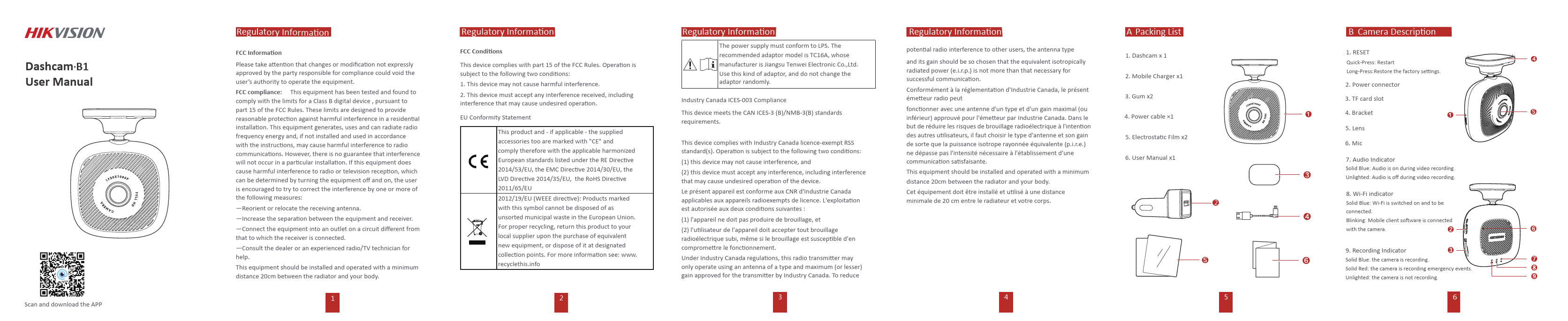
A Packing List
1. Dashcam x 1 2. Mobile Charger x1 3. Gum x2 4. Power cable �1 5. Electrostatic Film x2 6. User Manual x1
2

4

5

B Camera Description
1. RESET Quick-Press: Restart Long-Press:Restore the factory settings. 2. Power connector 3. TF card slot 4. Bracket
5. Lens
6. Mic
7. Audio Indicator Solid Blue: Audio is on during video recording. Unlighted: Audio is off during video recording.
8. Wi-Fi indicator Solid Blue: Wi-Fi is switched on and to be connected. Blinking: Mobile client software is connected with the camera.
9. Recording Indicator Solid Blue: the camera is recording. Solid Red: the camera is recording emergency events. Unlighted: the camera is not recording.
6

C Installation 2

D Mobile Phone Connection
1 Scan the QR code to download the HikDashcam app.

<

Rotate the bracket to connect it to the camera body, and make sure it's secured.

Clean the windscreen and paste the electrostatic film onto it. Avoid introducing air bubble.

3

4

2
Add the dashcam in app by connecting to its Wi-Fi. Step 1 .Run the HikDashcam app. Step 2 .In Wi-Fi list, select the Wi-Fi name of target dashcam and enter WiFi password to build connection.

E Basic Operation
Power on and Power off 1. Insert the cigarette lighter into the receptacle in automobile. 2. The dashcam powers on once the automobile starts up and powers off once the automobile flameouts. Recording Two recording types are provided: Normal Reording and Emergency Recording. You can switch recording type in app.

Route the power cord along the red line

Insert the USB cable into the car charger first, then insert the car charger into the cigarette lighter.

Dashcam Wi-Fi default parameters: �Wi-Fi name: HIKVISION-XXXX (XXXX refers to the last four characters of verification code.) �Wi-Fi password: 1234567890

7

87

9

F Preventions and Cautionary Tips
Tips for Dashcam � All the operation of dashcam should be strictly compliance with
the laws and regulations in your local region. � Keep the user manual properly for future reference. See initial
connection of dashcam in user manual. � Purchase the micro SD card from legal channel. To ensure safe and
stable data transmission, it is recommended to use class 10 micro SD card or above. � To protect micro SD card from damage, shut down the dashcam before installing and uninstalling micro SD card. � In case the dashcam is directly connected with the automobile powersystem, you are recommended to power off the dashcam when the automobile is off. Disconnect cigarette lighter in case the car lack of power supply and can not start. Reconnect cigarette lighter to ensure dashcam work normally when the car started. � Working temperature: [-20 C, +65 C ] ([-4 F, 149 F]). To protect the dashcam, do not use it in high-humidity and high-dust density environment and keep all liquids away from it. � The manual is subject to dashcam update. The functions of dashcam may vary according to different camera model.
10

G Trouble Shooting

Trouble The dashcam drops easily.
Starting dashcam failed.
The dashcam powers off frequently.

Solution
� Clean the glass before installation.
� Ensure the automobile started normally and the power supply is normal.
� If no indicator is lighting, re-connect the power cable.
� Ensure the power cable is well. � Ensure the connection between dashcam
and power cable is well.

� Ensure the dashcam is started normally.

Recording is abnormal � Ensure TF card is installed.

and recording indicator

is unlit.

� Check TF card status, e.g., its format and lifespan. If it is not well,replace it with a

good one.

Recorded videos are � Tear off the proof film on lens.

fuzzy.

� Clean the lens and glass.

Audio is not recorded with video.

� Enable "Tape When Recording".

Connecting the

� Ensure the app is well installed.

dashcam via app failed. � Restart the app and dashcam.

11

G Trouble Shooting

Trouble Connecting the dashcam via app failed. Playing video via app failed.
Failed to detect the TF card when connecting the dashcam and your computer with the power cable It takes a long time to connect the dashcam WiFi.
Dashcam Wi-Fi password is forgotten.

Solution � Ensure the app is well installed. � Restart the app and dashcam.
� The trouble may be relevant with � the mobile phone player or system.
Insert the TF card into your computer and play the videos.
The dashcam does not support data transmission. And the power cable is only for charging. If you need to transfer data, take out the TF card and connect it to your computer.
� It may be caused by the interference of the surrounding Wi-Fi signals. You can operate the dashcam in an environment with less interference. � Close unnecessary programs in your mobile phone to release some resources for the dashcam app.
Restore dashcam to factory defaults (default password 1234567890). And then reconnect the dashcam.

12

H Communication Matrix

Source Device

Dashcam B1

Dashcam B1

Source IP Address

192.168.42.1

192.168.42.1

Source Port Number 7878

9801

Destination Device HikDashcam app

HikDashcam app

Destination IP
Address Destination Port
Number(Listening)

Mobile phone app IP Mobile phone app IP

7878

9801

Protoco Port Description

TCP Used for downloading upgrade package

TCP
Used for private llive view protocol

Destination Port

NO

Configurable (Yes/No)

Authentication Mode None

NO None

Encryption Mode Enabled by Default (Yes/No) Version
Special Scenario

AES RSA YES All versions None

AES RSA YES All versions None

UD14536B-A

13