

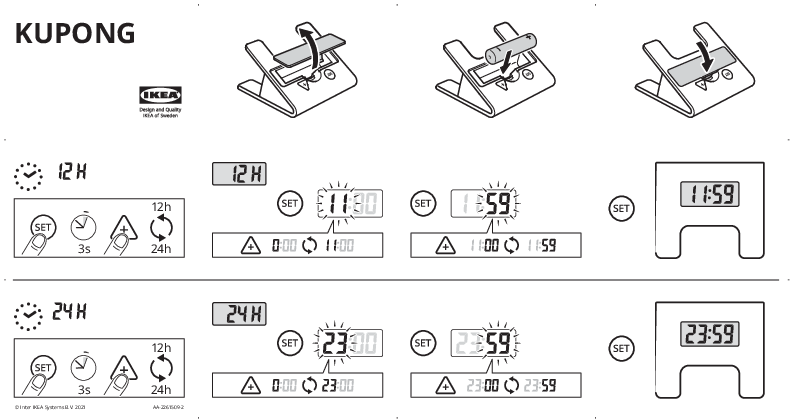
KUPONG Timer
IKEA Design and Quality
Product Overview
The KUPONG timer is designed for easy time management. This guide provides instructions on setting the time, switching between 12-hour and 24-hour formats, and configuring the alarm function.
The device features a digital display and a few control buttons for operation.
Setting the Time (12-Hour Format)
Follow these steps to set the time in the 12-hour format:
- Press the [SET button] to enter time setting mode. The hours will flash.
- Press the [SET button] again to advance the hours.
- To set the minutes, press the [SET button] and hold for approximately 3 seconds. The minutes will flash.
- Press the [SET button] to advance the minutes.
- Press the [SET button] to confirm the time. The display will show the current time, e.g., 11:59.
The device operates in 12-hour format (AM/PM) by default or after toggling.
Setting the Time (24-Hour Format)
Follow these steps to set the time in the 24-hour format:
- Press the [SET button] to enter time setting mode. The hours will flash.
- Press and hold the [SET button] for approximately 3 seconds to toggle between 12-hour and 24-hour formats. The display will switch modes.
- Once in 24-hour mode, press the [SET button] to advance the hours.
- To set the minutes, press and hold the [SET button] for approximately 3 seconds. The minutes will flash.
- Press the [SET button] to advance the minutes.
- Press the [SET button] to confirm the time. The display will show the current time, e.g., 23:59.
Setting the Alarm
To set an alarm:
- Press the [SET button] to enter alarm setting mode. The alarm time will be displayed or flash.
- Press the [SET button] to advance the alarm hour.
- Press and hold the [SET button] for approximately 3 seconds to set the alarm minutes.
- Press the [SET button] to advance the alarm minutes.
- Press the [SET button] to confirm the alarm time, e.g., 6:00 or 6:59.
Alarm Operation and Silencing
When the alarm is set, a bell icon ? may appear on the display.
- The alarm will sound at the set time.
- To silence the alarm, press the [STOP button].
- The alarm may also stop automatically after approximately 2 minutes if not manually silenced.
- A crossed-out bell icon [alarm off] indicates the alarm is disabled.
- A bell icon with a plus [increase alarm] might indicate alarm activation or volume adjustment (if applicable).
Important Symbols
- ⏰: Indicates time display or setting mode.
- [SET button]: Button used for setting time and modes.
- 3s: Indicates holding a button for 3 seconds.
- 24h: Indicates the 24-hour format setting.
- ⚠️: Warning symbol, indicating caution is needed.
- ℹ️: Information symbol, providing additional details.
- [STOP button]: Button used to stop the alarm.