
Installing a Processor
Follow the diagrams and video tutorial to correctly install your AMD AM4 CPU onto the motherboard.

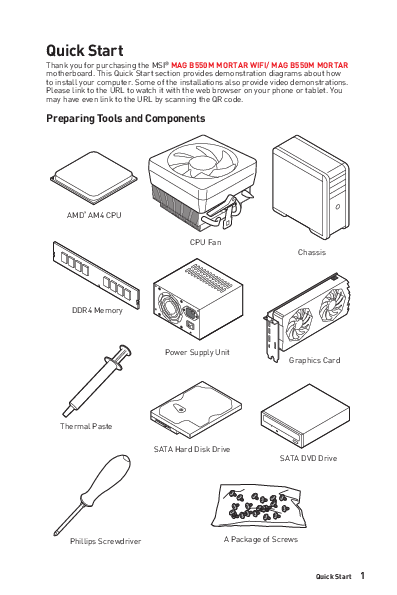
Welcome to the Quick Start Guide for the MSI MAG B550M MORTAR WIFI and MAG B550M MORTAR motherboards. This guide provides essential information and step-by-step instructions to help you assemble your new computer.
Important safety precautions are outlined to prevent damage from electrostatic discharge (ESD) and ensure proper handling of components. It is recommended to wear an ESD wrist strap and follow guidelines for safe assembly.
Before you begin, gather the necessary tools and components for PC assembly:
Follow the diagrams and video tutorial to correctly install your AMD AM4 CPU onto the motherboard.
Learn the proper method for installing DDR4 memory modules into the motherboard slots.
Detailed instructions on how to connect the front panel connectors (power switch, LEDs, reset) to the motherboard header.
Guidance on securely mounting the motherboard inside the computer chassis, including torque specifications for screws.
Instructions for connecting the main ATX power and CPU power connectors from the power supply unit to the motherboard.
Learn how to connect SATA hard disk drives and DVD drives to your system.
Step-by-step instructions for installing a graphics card into the appropriate PCI-Express slot.
Connect your monitor, keyboard, mouse, and speakers to the appropriate ports on the motherboard's rear I/O panel.
Final steps to connect the power cord and turn on your newly assembled computer.
Models: MAG B550M MORTAR WIFI, MAG B550M MORTAR, MAG B550M Mortar Wifi Gaming Motherboard, Gaming Motherboard
If the inline viewer fails, it will open the original document in compatibility mode automatically. You can also open the file directly.

 csr
csr