

EASTRON SDM230-LoRaWAN DIN Rail Smart Energy Meter User Manual
File info: application/pdf · 32 pages · 1.20MB
Eastron SDM630
SDM230-LoRaWAN User Manual - Eastron Europe
SDM230-LoRaWAN User Manual 2020 EASTRON EUROPE ALL RIGHTS RESERVED. www.eastroneurope.com - 4 - Note: Assume that the current meter's L1 current is 5.0A, since the data is in floating point format, the Hex data is c…
SDM230-LoRaWAN User Manual 2020 EASTRON EUROPE ALL RIGHTS RESERVED. www.eastroneurope.com - 4 - Note: Assume that the current meter's L1 current is 5.0A, since the data is in floating point format, the Hex data is conve…
Full PDF Document

If the inline viewer fails, it will open the original document in compatibility mode automatically. You can also open the file directly.
Extracted Text
SDM230-LoRaWAN User Manual
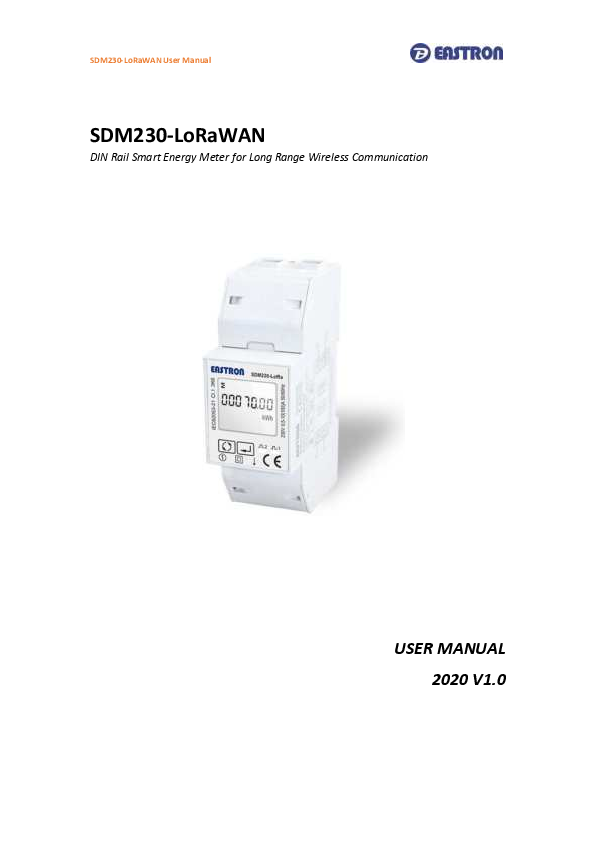
SDM230-LoRaWAN
DIN Rail Smart Energy Meter for Long Range Wireless Communication
USER MANUAL 2020 V1.0

SDM230-LoRaWAN User Manual

Contents

1. Introduction

1

1.1 Unit Characteristics

1

1.2 Pulse Outputs

1

1.3 LoRaWAN Classes

1

1.4 Active Upload Mode

1

1.5 Join

2

1.6 Communication

2

2. Start Up Screens

4

3. Measurements

5

4 Setting Up

10

4.1 Setting 1

11

4.1.1 Pulse Output Type

11

4.1.2 Pulse Constant

11

4.1.3 Pulse Duration

12

4.1.4 Demand Interval Time (DIT)

13

4.1.5 Automatic Scroll Time Interval

13

4.1.6 Backlight Time(LP)

14

4.1.7 Clear Demand Information

15

4.1.8 Password

16

4.1.9 Checking Meter Information

17

4.3 Setting 2

20

4.3.1 Join Information

20

4.3.2 Join Mode: OTAA/ABP

22

4.3.3 Re-Join

22

4.3.4 Auto: Upload ON/OFF, Upload Interval Time -------------------------------------------------------------23

4 3.5 Join Delay

24

4 3.6 OFF Line

25

43.7 Confirm Mode

26

5 Specifications

27

6 Maintenance

28

7 Installation

29

7.1 Safety

29

7.2 EMC Installation Requirements

29

7.3 Dimensions

30

7.4 Wiring Diagram

30

SDM230-LoRaWAN User Manual
1 Introduction
This document provides operating, maintenance and installation instructions . The unit measures and displays the characteristics of single phase two wire(1p2w) supplies, including kWh, kVArh, kW, kVAr, kVA, PF, Frequency, Voltage, Current, dmd. THD etc. It support Max.100A direct connection, saving the cost to install external CTs. Maximum demand current can be measured over preset periods of up to 60 minutes. This unit has a built-in LoRaWAN module which allows long range wireless communication. Two pulse outputs are available for real time energy measurement.

1.1 Unit Characteristics
The Unit can measure and display:  voltage and current  Frequency  Power, maximum power demand and power factor  Active energy imported and exported  Reactive energy imported and exported

The unit has password-protected set-up screens for:  Changing password  Demand Interval time, backlight time,scroll display time  Reset for demand and partial energy measurements  Pulse output type/ constant/ duration

1.2 Pulse outputs
The unit provides two pulse outputs. Both pulse outputs are passive type. Pulse output 1 is configurable. The pulse output can be set to generate pulses to represent total/ import/ export kWh or kVArh. The pulse constant can be set to generate 1 pulse per: 1 = 1 kWh/kVArh 10 = 10 kWh/kVArh 100 = 100 kWh/kVArh 1000=1000 kWh/kVArh Pulse width: 200/100(default)/60ms.

Pulse output 2 is non-configurable. It is fixed to export kWh. The constant is 1000imp/kWh.

1.3. LoRaWAN Classes
Eastron LoRaWAN energy meter is implement Class C functionality. The device will upload message after receiving the data sent from the network.

1.4 Active Upload Mode
The device also can be customized to active upload mode. Total 19 parameters can be set for automatic uploading. Interval time can be set from 0 to 255 through communication. 0 means the function is OFF. If

2020 EASTRON EUROPE ALL RIGHTS RESERVED.

www.eastroneurope.com
- 1 -

SDM230-LoRaWAN User Manual
there are many parameters, the interval shouldn't be set too short in case of conflicting on data uploading. The meter will upload automatically once it joins the network. And after the interval time, it will upload again. The interval time is calculated since the last data uploading. Sometimes the interval time may have around 1-2 minutes difference due to the timer error.
1.5 Join
The unit uses standard LoRaWAN protocol for long range communication. Before Communication, the meter has to join the LoRaWAN network first. There are two Activation Ways for Joining: OTAA(Over-the-Air Activatioin) and ABP(Activation by Personalization).
To ensure the meter join gateway successfully, below information must be confirmed:
I. DevEui, AppEui, Appkey or DevAddr, NwkSKey, AppSKey information are correctly recorded into the gateway. II. The Uplink and downlink frequency are same as the gateway. III. RX2 (frequency and SF) information are same as the gateway.
If the Join delay function is ON, the meter will join the network with a few seconds delay by random.
1.6 Communication
LoRaWAN meter communicate based on international general purpose protocol. The communication data is placed in data segment of LoRaWAN protocol, they will be appointed follow the specified command format.
The format of standard LoRaWAN is shown below:

The following description of the text is defined the data in the segment of FRMPayload region in LoRaWAN protocol. The software in PC only need to get this part of data from gateway. According to the following protocol definition to parse the data.
The data format and encoding of meter communication protocol are modified based on the Modbus ASCII transmission mode. Remove the start and end characters from the Modbus ASCII transmission mode and change LRC validation to CRC validation.

2020 EASTRON EUROPE ALL RIGHTS RESERVED.

www.eastroneurope.com
- 2 -

SDM230-LoRaWAN User Manual
Encoding of data: communication data is encoded with ASCII, and each byte of data is sent with two ASCII characters. E.g.: a byte data 0x5b is encoded as two characters: 0x35 and 0x62 (ASCII code 0x35= "5", 0x62= "b")
Command format definition: I: The data format of the gateway sending the copy command:

Reserved Function The first Address of The The Number of Registers CRC Check

Code

Register to Read Data

to Read Data

Codes

1byte

1byte

2byte

Note: the reserved bit is fixed as 0x01

2byte

2byte

II: the data format returned by the meter after receiving the copy command: Reserved Function The Length of Specific Data Returned by The

Code

Data Returned

Meter

1byte

1byte

1byte

Note: the reserved bit is fixed as 0x01

N byte

CRC Check Codes 2byte

III: Note: the above commands need to be ASCII, so 1byte data will have 2 characters.

E.g. 1). Suppose to read the current data of the meter L1, the data sent by the gateway is the ASCII coded data as shown in the following table:

Note: the first address of the register of the meter L1 current is 00 06 and the number of registers is 2.
2) After receiving the above command, the meter will return the current L1 current data of the meter, as shown in the following table after ASCII coding.

2020 EASTRON EUROPE ALL RIGHTS RESERVED.

www.eastroneurope.com
- 3 -

SDM230-LoRaWAN User Manual

Note: Assume that the current meter's L1 current is 5.0A, since the data is in floating point format, the Hex data is converted to 0x40, 0xa0, 0x00 and 0x00.

To ensure the successful communication, below information must be confirmed: 1. The command is sent through Class C mode. 2. The command is sent in ASCII format.

2. Start Up Screens

The first screen lights up all display segments and can be used as a display check.

The second screen indicates the firmware version. (left picture is for reference only)

2020 EASTRON EUROPE ALL RIGHTS RESERVED.

www.eastroneurope.com
- 4 -

SDM230-LoRaWAN User Manual

The interface performs a self-test and indicates the result if the test passes.

*After a short delay, the screen will display active energy measurements.
3. Measurements The buttons operate as follows:
Selects the measured parameters In Set-up Mode, this is the "Up" button. In Set-up Mode, this is the "Enter", "Left" and "Confirm" button

The display order by scroll button

:
Total kWh

Import kWh

2020 EASTRON EUROPE ALL RIGHTS RESERVED.

www.eastroneurope.com
- 5 -

SDM230-LoRaWAN User Manual

Export kWh

Resettable total kWh

Total kVArh

Import kVArh

2020 EASTRON EUROPE ALL RIGHTS RESERVED.

www.eastroneurope.com
- 6 -

SDM230-LoRaWAN User Manual

Export kVArh

Resettable total kVArh

Max. power demand

Voltage

2020 EASTRON EUROPE ALL RIGHTS RESERVED.

www.eastroneurope.com
- 7 -

SDM230-LoRaWAN User Manual

Current

Active Power

Reactive Power

Apparent Power

2020 EASTRON EUROPE ALL RIGHTS RESERVED.

www.eastroneurope.com
- 8 -

SDM230-LoRaWAN User Manual

Power Factor

Frequency

Pulse constant

ID (High address)

2020 EASTRON EUROPE ALL RIGHTS RESERVED.

www.eastroneurope.com
- 9 -

SDM230-LoRaWAN User Manual

ID (Low address)

Total running time

4. Setting Up To enter set-up mode, pressing the appears.

button for 3 seconds, until the password screen

Display

Descriptions The setting is done correctly

The setting is not correct

2020 EASTRON EUROPE ALL RIGHTS RESERVED.

www.eastroneurope.co
- 10

SDM230-LoRaWAN User Manual
4.2 Setting 1 Input Password "1000", press 4.2.1 Pulse Output Type:

for 3s to enter into the setting up page.
Pulse Output Type Default: kVArh Range: kVArh, imp kVArh, Exp kVArh, kWh, Exp kWh, imp kWh.

Press

for 3s, the red part will flash. Press

to choose the required selection.

Press

for 3s to confirm.

4.2.2 Pulse Constant Use this to set the energy represented by each pulse
Pulse Constant Default: 1000 kWh (means 1 impulse represent 1000kWh)
Range: 1 / 10/ 100/ 1000 kWh

2020 EASTRON EUROPE ALL RIGHTS RESERVED.

www.eastroneurope.co
- 11

SDM230-LoRaWAN User Manual

Press Press

for 3s, the red part will flash. to choose the required selection.

Press

for 3s to confirm the setting.

4.2.3 Pulse Duration

Pulse Duration Default: 200 Range: 60/ 100/ 200 mS

Press

for 3s, the red part will flash. Press

to choose the required selection.

2020 EASTRON EUROPE ALL RIGHTS RESERVED.

www.eastroneurope.co
- 12

SDM230-LoRaWAN User Manual

Press

for 3s to confirm the setting.

4.2.4 Demand Interval Time (DIT)

The screen will show the currently selected integration time. Default: 60 Range: 60/ 30/ 15/ 10/ 5/ OFF

Press

for 3s, the current demand

interval time will flash. Press the required selection.

to choose

Press

for 3s to confirm the setting.

4.2.5 Automatic Scroll Time Interval
2020 EASTRON EUROPE ALL RIGHTS RESERVED.

www.eastroneurope.co
- 13

SDM230-LoRaWAN User Manual

Automatic Scroll Time Interval Default: 0 S Option: 0 ~ 30S

Press

for 3s, the current system type will

flash. Press setting.

to choose the required

Press

for 3s to confirm.

4.2.6 Backlight Time (LP)

The screen will show the currently selected backlight time. Default: 60 minutes Range: 120/ 60/ 30/ 20 / 10/ 5 / OFF If it is seated as 5, the backlit will be off in 5 minutes.

2020 EASTRON EUROPE ALL RIGHTS RESERVED.

www.eastroneurope.co
- 14

SDM230-LoRaWAN User Manual

Press

for 3s, the current backlight time

will flash. Press selection.

to choose the required

Press

for 3s to confirm.

4.2.7 Clear Demand Information This option is to reset the demand and resettable kWh/kVArh information.
From the Set-up menu, use select the clear option.

buttons to

Press

for 3s. The CLR will flash.

Press resetting.

again for 3s to confirm the

2020 EASTRON EUROPE ALL RIGHTS RESERVED.

www.eastroneurope.co
- 15

SDM230-LoRaWAN User Manual

Press reset page.

button eneter into the kWh/kVArh

4.2.8 Password

Press

for 3s. The CLR will flash.

Press resetting.

again for 3s to confirm the

The screen shows the current password. Default: 1000 Range: 0001-9999

Press Press press

for 3s, the current digit will flash. to choose the required digit,
to move to the next digit.

2020 EASTRON EUROPE ALL RIGHTS RESERVED.

www.eastroneurope.co
- 16

SDM230-LoRaWAN User Manual

Press

for 3s to confirm.

4.2.14 Checking Meter Information This function allows to check meter setting information, also some of below information can be set through another password ( refer to section 4.3).

1) Join Information 1

Activation WayOTAA

DevEui: end-device identifier

****************(16 digits)

1-1

Activation WayABP

DevAddr: End-device address

********(8 digits)

2

Activation WayOTAA

AppEui: application identifier

****************(16 digits)

2020 EASTRON EUROPE ALL RIGHTS RESERVED.

www.eastroneurope.co
- 17

SDM230-LoRaWAN User Manual
2-1
3
3-1
2) Join Status 1

Activation WayABP NwkSKey: Network session key ********************************(32 digits)
Activation WayOTAA AppKey: Application key ********************************(32 digits)
Activation WayABP AppSKey: Application session key ********************************(32 digits)
JOIN OK Means the meter is connected to the gateway successfully

2020 EASTRON EUROPE ALL RIGHTS RESERVED.

www.eastroneurope.co
- 18

SDM230-LoRaWAN User Manual
1-1

JOIN FAIL Means the meter is failed to connect to the gateway Meanwhile, the display will show EER1

3) Join Mode 1

JOIN MOdE: OTAA

1-2

JOIN MOdE: Abp

4) AUTO

When AUTO function is ON, the meter will send a command to gateway automatically to check

the connection status with gateway. Interval time is configurable.

1

AUTO

2020 EASTRON EUROPE ALL RIGHTS RESERVED.

www.eastroneurope.co
- 19

SDM230-LoRaWAN User Manual
1-2

UP LOAd: OFF Means AUTO function is CLOSED, otherwise it will show ON

1-3

Interval Time

Option: 5/ 10/ 20/ 30/ 90/ 120/ 150/ 180/

210/ 240 minutes

5) Meter ID 1

Meter ID/ Serial Number ********( 8 digits)

4.3 Setting 2

Input Password "2308", press

and

together for 3s to enter the setting up

page.

The first page will show join status between the meter and gateway. Use options required.

to choose the

Below information can be adjusted through password "2308":

4.3.1 Join Information: Join information including DevEui, AppEui, Appkey under OTAA mode and DevAddr, NwkSKey, AppSKey under ABP mode.

2020 EASTRON EUROPE ALL RIGHTS RESERVED.

www.eastroneurope.co
- 20

SDM230-LoRaWAN User Manual
Take OTAA setting as an example:

DevEui: 9132000001324013 The 16 digits will be shown on 4 pages. Each page shows 4 digits.

Press page.

for 3s, enter into the P1 setting

Press

for 3s, the first digit will flash. Use

and

to choose the option.

Press

for 3s again to confirm the setting.

Press

to move to the P2 setting page.

Use

and

opeation as P1.

to do the same

And then set the same on P3 and P4

After P4 setting, Press

return to the

DevEui page, press

move to the next

setting page: AppEui and Appkey.

Use the same way to set AppEui and Appkey.

2020 EASTRON EUROPE ALL RIGHTS RESERVED.

www.eastroneurope.co
- 21

SDM230-LoRaWAN User Manual

After above setting, press
SAVE page. Long Press above setting.

to move to the button to save

4.3.2 Join Mode: OTAA/ ABP

Join mode Option: OTAA, ABP

Press Use

for 3s, the current option will flash. to choose the option.

Press

for 3s to confirm.

4.3.3 Re-Join
2020 EASTRON EUROPE ALL RIGHTS RESERVED.

www.eastroneurope.co
- 22

SDM230-LoRaWAN User Manual

Re-Join This function allows the meter re-join the network when disconnected.

Press

for 3s, the current option will flash.

Long press

again, the meter will re-join

the network automatically.

4.3.4 Auto: Upload ON/OFF, Upload Interval Time
When Auto is ON, the meter will send a command to gateway automatically. This is for the gateway to check if the meter is still online. Under Active upload mode, the Auto function is not used.

From the Set-up menu, use select the AUTO option.

buttons to

Press

for 3s enter to the setting page.

UP LOAd: OFF Range: ON/OFF

Press

for 3s, the current option will flash.

Use

to choose the option.

2020 EASTRON EUROPE ALL RIGHTS RESERVED.

www.eastroneurope.co
- 23

SDM230-LoRaWAN User Manual

Press

for 3s to confirm.

Interval Time Option: 30/ 60 / 90 / 120 / 150 / 180 / 210/ 240 minutes
30 means the meter will send a command to gateway every 30 minutes.

Press Use

for 3s, the current option will flash. to choose the option.

Press

for 3s to confirm.

4.3.5 Join Delay
When Join delay function is ON, the meter will join the LoRaWAN network with a few seconds delay after booting. When Join delay function is OFF, the meter will join the LoRaWAN network once the power is on.

2020 EASTRON EUROPE ALL RIGHTS RESERVED.

www.eastroneurope.co
- 24

SDM230-LoRaWAN User Manual

From the Set-up menu, use select the JOIN DLY option.

buttons to

Press

for 3s enter to the setting page.

DLY: OFF Range: ON/OFF

Press

for 3s, the current option will flash.

Use

to choose the option.

Press

for 3s to confirm.

4.3.6 OFF Line
This function is used to check the connection status between meter and the netwrok/gateway. To check the connections, the network will send data to the end-device at intervals. If over a period, the meter doesn't receive data from gateway, the meter will be considered OFF line and it will re-join the network.
OFF Line Option: 0/ 30/ 60/ 90/ 120/ 150/ 180/ 210/ 240 minutes Default: 60 minutes 60 minutes means from the last message received from gateway, if over 60 minutes not receiving message, the meter will be considered OFFLINE and will re-join the network automatically.

2020 EASTRON EUROPE ALL RIGHTS RESERVED.

www.eastroneurope.co
- 25

SDM230-LoRaWAN User Manual

Press Use

for 3s, the current option will flash. to choose the option.

Press

for 3s to confirm.

NOTE: Under the active upload mode, the OFF Line time should be set to a value bigger than the active upload interval time.
4.3.7 Confirm Mode
When the Comfirm mode is ON, the meter will request the LoRaWAN network to confirm the reception of its message. If there is no message received, it means the network has not received the uplink. The Meter will send uplink again, upon to 3 times.

From the Set-up menu, use select the Confirm mode option.

buttons to

Press Use

for 3s, the current option will flash. to choose the option.

2020 EASTRON EUROPE ALL RIGHTS RESERVED.

www.eastroneurope.co
- 26

SDM230-LoRaWAN User Manual

Press

for 3s to confirm.

5 Specifications

Electrical characteristics

Type of measurement

Measurement Active Energy

accuracy

Reactive Energy

Frequency

Current

Voltage

Power

Power Factor

Data Update Rate

Input Voltage Un

Measured Voltage with

Over-range

Impedance

Input Current Measured current with

Over-range

Withstand

Impedance

Frequency Range

Max. reading

RMS including harmonics on single phase AC system IEC 62053-21 Class 1 � 0.01 � 0.2% � 0.5% � 0.5% � 0.01 � 0.01 1 second nominal 230 V L-N 176 to 276 Vac L-L
1M  0.5-10(100)A
30 Imax. for 0.1 Seconds 1M  45~65Hz 99999.99 kWh/ kVArh

Mechanical Characteristics

Weight IP Degree of Protection (IEC 60529) Dimensions (WxHxD) Mounting Material of meter case Mechanical environment

250g IP51 (indoor)
100x36x63mm Din rail (DIN 43880) Self-extinguishing UL 94 V-0 M1

2020 EASTRON EUROPE ALL RIGHTS RESERVED.

www.eastroneurope.co
- 27

SDM230-LoRaWAN User Manual
Environmental Characteristics
Operating Temperature Storage Temperature Humidity Rating Pollution Degree Altitude Vibration
Safety
Measurement Category
Current Inputs
Over voltage Category Dielectric Withstand
Protective Class
Communications
Interface standard and protocol Frequency LoRaWAN Classes Coding Format Communication Distance

-25 to 55�C -40 to 70�C <95% RH at 50 �C (non-condensing) 2 2000m 10Hz to 50Hz, IEC 60068-2-6
Per IEC61010-1 CAT III Require external Current Transformer for Insulation CAT II As per IEC 61010-1 Double Insulated front panel display II
LoRaWAN EU868/AS923/AU915/ US902 Class C ASCII 2000M in an open area

6 Maintenance

In normal use, little maintenance is needed. As appropriate for service conditions, isolate electrical power, inspect the unit and remove any dust or other foreign material present. Periodically check all connections for freedom from corrosion and screw tightness, particularly if vibration is present.

The front of the case should be wiped with a dry cloth only. Use minimal pressure, especially over the viewing window area. If necessary, wipe the rear case with a dry cloth. If a cleaning agent is necessary, isopropyl alcohol is the only recommended agent and should be used sparingly. Water should not be used. If the rear case exterior or terminals should be contaminated accidentally with water, the unit must be thoroughly dried before further use. Should it be suspected that water might have entered the unit, factory inspection and refurbishment is recommended.
In the unlikely event of a repair being necessary, it is recommended that the unit be returned to the factory or nearest Eastron distributor.

2020 EASTRON EUROPE ALL RIGHTS RESERVED.

www.eastroneurope.co
- 28

SDM230-LoRaWAN User Manual
7 Installation
7.1 Safety
The unit is designed in accordance with IEC 61010-1:2017 � Permanently connected use, Normal condition. Installation category III, pollution degree 2, basic insulation for rated voltage.
7.2 EMC Installation Requirements
Whilst this unit complies with all relevant EU EMC (electro-magnetic compatibility) regulations, any additional precautions necessary to provide proper operation of this and adjacent equipment will be installation dependent and so the following can only be general guidance:
Avoid routing wiring to this unit alongside cables and products that are, or could be, a source of interference.
The auxiliary supply to the unit should not be subject to excessive interference. In some cases, a supply line filter may be required.
To protect the product against incorrect operation or permanent damage, surge transients must be controlled. It is good EMC practice to suppress transients and surges at the source. The unit has been designed to automatically recover from typical transients; however, in extreme circumstances it may be necessary to temporarily disconnect the auxiliary supply for a period of greater than 10 seconds to restore correct operation.
Screened communication leads are recommended and may be required. These and other connecting leads may require the fitting of RF suppression components, such as ferrite absorbers, line filters etc., if RF fields cause problems.
It is good practice to install sensitive electronic instruments that are performing critical functions in EMC enclosures that protect against electrical interference causing a disturbance in function.

Warning

 During normal operation, voltages hazardous to life may be present at some of the terminals of this unit. Installation and servicing should be performed only by qualified, properly trained personnel abiding by local regulations. Ensure all supplies are deenergized before attempting connection or other procedures.
 Terminals should not be user accessible after installation and external installation

provisions must be sufficient to prevent hazards under fault conditions.  This unit is not intended to function as part of a system providing the sole means of
fault protection - good engineering practice dictates that any critical function be protected by at least two independent and diverse means.

2020 EASTRON EUROPE ALL RIGHTS RESERVED.

www.eastroneurope.co
- 29

SDM230-LoRaWAN User Manual
 The unit does not have internal fuses therefore external fuses must be used for protection and safety under fault conditions.
 Never open-circuit the secondary winding of an energized current transformer.  This product should only be operated with CT secondary connections Earthed.  If this equipment is used in a manner not specified by the manufacturer, protection
provided by the equipment may be impaired. 7.3 Dimensions
7.4 Wiring Diagram

2020 EASTRON EUROPE ALL RIGHTS RESERVED.

www.eastroneurope.co
- 30