

Package Contents
Included in the box:
- 1x ROKR Z1 Speaker
- 1x USB Charging Cable
- 1x 3.5mm Audio Cable
- 1x Remote Control
- 1x Quick Start Guide
- 1x Warranty Card
- 1x Microphone
Layout
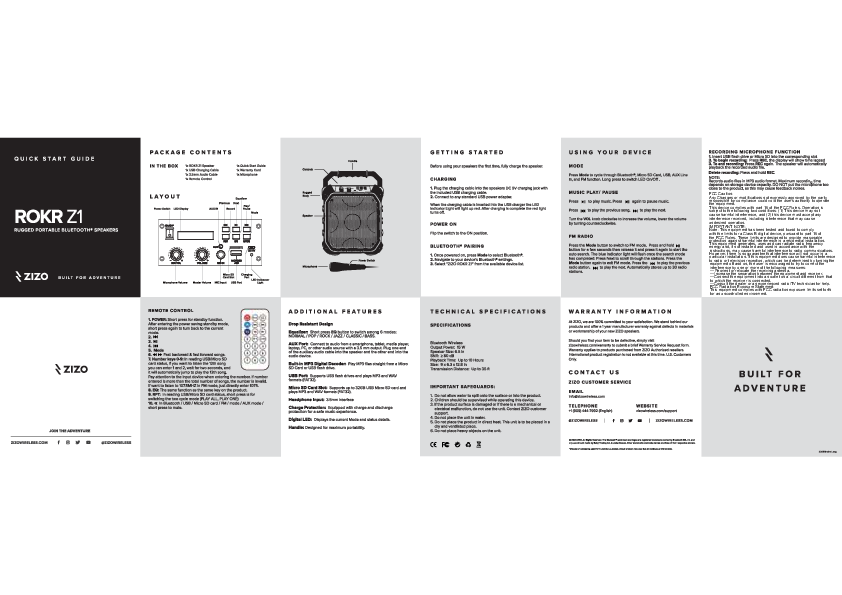
The ROKR Z1 speaker features a rugged body with a prominent handle for portability. Key controls and ports are located on the top and front panels. These include a Power Switch, LED Display, AUX IN port, Micro SD Card Slot, USB Port, and a Microphone Input. A microphone volume control and master volume knob are also present.
Controls: Power Switch, LED Display, AUX IN, ON/OFF, Previous, Next, Record, Equalizer, Play/Pause, Mode, REC, EQ, MODE, DC 5V, MICROSD, MIC VOL, VOLUME, MIC IN, USB.
Ports: Micro SD Card Slot, USB Port, MIC Input, AUX IN, DC 5V charging jack.
Other Features: LED Indicator Light, Microphone Volume, Master Volume, Rugged Body, Speaker, Microphone, Handle, Power Switch.
Getting Started
Charging
Before first use, fully charge the speaker. Plug the USB charging cable into the speaker's DC 5V charging jack and connect to a USB power adapter. The LED Indicator Light turns red while charging and turns off when complete.
Power On
Flip the Power Switch to the ON position.
Bluetooth® Pairing
- Once powered on, press the [Mode] button to select Bluetooth®.
- Navigate to your device's Bluetooth® settings.
- Select "ZIZO ROKR Z1" from the list of available devices.
Using Your Device
- Mode: Press [Mode] to cycle through Bluetooth®, Micro SD Card, USB, AUX Line-in, and FM functions. Long press to toggle LED lights On/Off.
- Music Play/Pause: Press the [Play/Pause] button to play or pause music.
- Track Selection: Press the [Previous] button for the previous song or the [Next] button for the next song.
- Volume Control: Turn the [VOLUME] knob clockwise to increase volume and counterclockwise to decrease it.
- FM Radio: Press [Mode] to switch to FM mode. Press and hold the [Play/Pause] button for a few seconds, then release and press again to start auto-search. The blue indicator light flashes upon completion. Use [Next] to scroll through stations. Press [Mode] again to exit FM. Use [Previous]/[Next] buttons for radio stations. Automatically stores up to 30 stations.
- Recording Microphone Function:
- Insert a USB flash drive or Micro SD card into the corresponding slot.
- To start recording: Press [REC]. The display shows time elapsed.
- To end recording: Press [REC] again. The speaker will playback the recorded audio.
- To delete recording: Press and hold [REC].
Note: Records audio in MP3 format. Maximum recording time depends on storage capacity. Avoid placing the microphone too close to the product to prevent feedback.
Remote Control
The remote control provides access to various functions:
- POWER: Short press for standby mode. Short press again to resume.
- Play/Pause: Controls music playback.
- Previous/Next: Navigate between songs or radio stations. Fast backward and fast forward are also available.
- Number Keys (0-9): For direct track selection from USB/Micro SD or FM frequency input (e.g., enter 1075 for 107.5MHz).
- Mode: Cycles through input modes.
- EQ: Cycles through equalizer presets (NORMAL, POP, ROCK, JAZZ, CLASSIC, BASS).
- RPT: Switches between playback modes (PLAY ALL, PLAY ONE) for USB/Micro SD.
- Mute: Short press to mute/unmute audio.
Additional Features
- Drop Resistant Design: Built to withstand drops.
- Equalizer: Six modes: NORMAL, POP, ROCK, JAZZ, CLASSIC, BASS.
- AUX Port: Connect external audio devices (smartphones, tablets, laptops) via a 3.5mm audio cable.
- Built-in MP3 Digital Decoder: Plays MP3 files directly from Micro SD Card or USB flash drive.
- USB Port: Supports USB flash drives, plays MP3 and WAV formats (FAT32).
- Micro SD Card Slot: Supports up to 32GB Micro SD cards, plays MP3 and WAV formats (FAT32).
- Headphone Input: 3.5mm interface.
- Charge Protection: Built-in protection for safe charging and discharging.
- Digital LED: Displays current mode and status.
- Handle: Designed for maximum portability.
Technical Specifications
Bluetooth Wireless: V5.0
Output Power: 15 W
Speaker Size: 6.5 inches
SNR: ≥ 80 dB
Playback Time: Up to 10 Hours
Dimensions: 9 x 6.3 x 12.8 inches (approx. 22.86 x 16.00 x 32.51 cm)
Transmission Distance: Up to 35 ft (approx. 10.67 m)
Important Safeguards
- Do not expose the product to water or moisture.
- Supervise children when using the device.
- Do not use if the product surface is damaged or if there is a mechanical or electrical malfunction. Contact ZIZO customer support.
- Do not immerse the unit in water.
- Avoid placing the product in direct heat; use in a dry, ventilated area.
- Do not place heavy objects on the unit.
Compliance Marks: CE, FC
Contact Us
ZIZO Customer Service
Email: info@zizowireless.com
Telephone: +1 (909) 444-7992 (English)
Website: zizowireless.com/support
Social Media: Facebook, Twitter, Instagram
Website: zizowireless.com
Built for Adventure.
© 2020 ZIZO. All Rights Reserved. The Bluetooth word mark and logos are registered trademarks owned by Bluetooth SIG, Inc. and any use of such marks by Balaji Trading Inc. is under license. Other trademarks and trade names are those of their respective owners.
Models: SPK-RKZ1, SPKRKZ1, 2AZ9BSPK-RKZ1, 2AZ9BSPKRKZ1, Z1 Rugged Portable Bluetooth Speaker, Rugged Portable Bluetooth Speaker, Bluetooth Speaker, Speaker
