

Tru-Bolt Classic Digital Lever with Keypad
Installation and Programming Guide
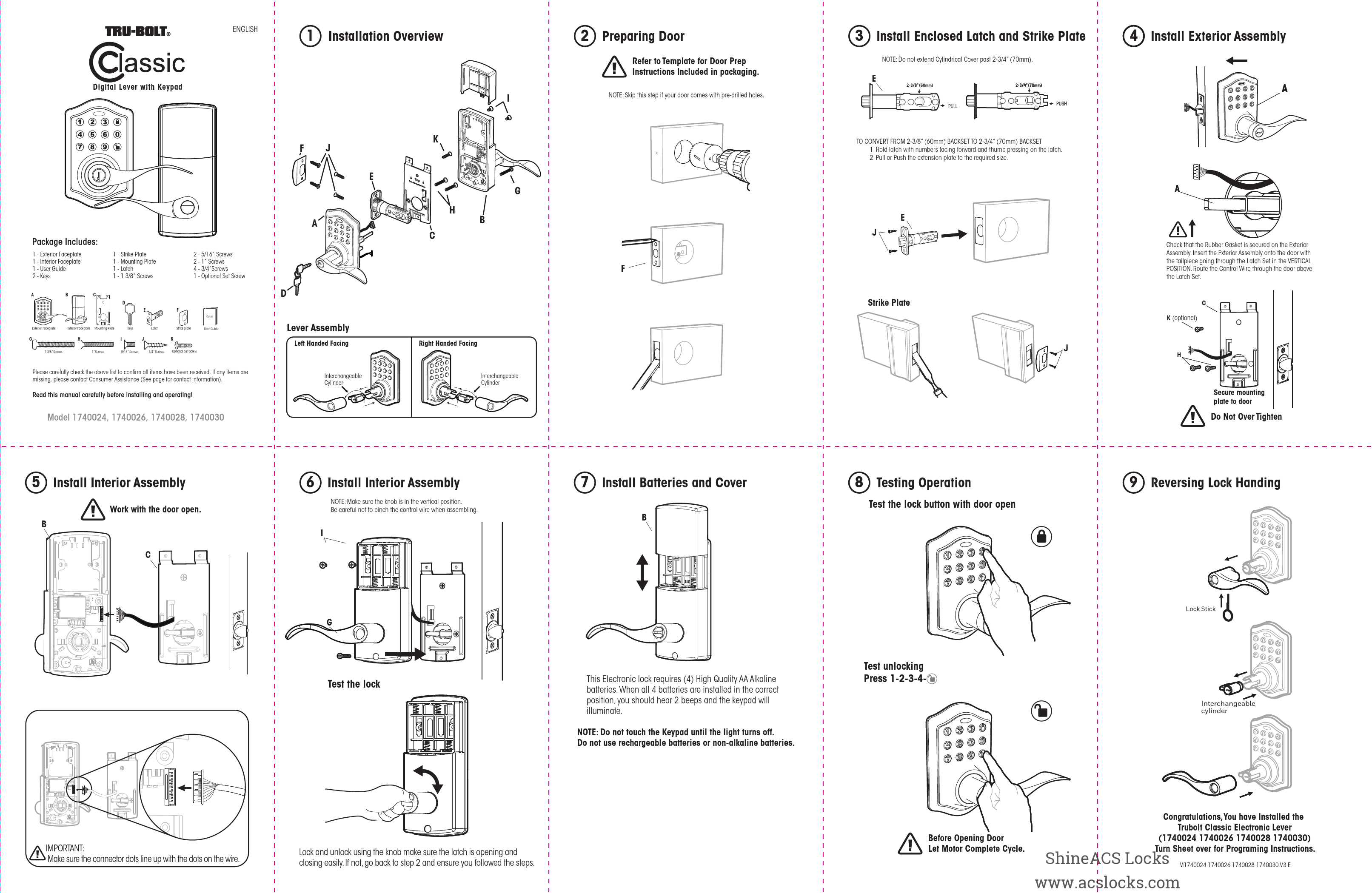
Package Includes:
- 1 - Exterior Faceplate
- 1 - Interior Faceplate
- 1 - User Guide
- 2 - Keys
- 1 - Strike Plate
- 1 - Mounting Plate
- 1 - Latch
- 1 - 1 3/8" Screws
- 2 - 5/16" Screws
- 2 - 1" Screws
- 4 - 3/4" Screws
- 1 - Optional Set Screw
Please carefully check the above list to confirm all items have been received. If any items are missing, please contact Consumer Assistance.
Read this manual carefully before installing and operating!
Installation Overview
Step 1: Installation Overview
Step 2: Preparing Door
Refer to Template for Door Prep Instructions Included in packaging. NOTE: Skip this step if your door comes with pre-drilled holes.
Step 3: Install Enclosed Latch and Strike Plate
NOTE: Do not extend Cylindrical Cover past 2-3/4" (70mm).
Converting Latch Backset:
TO CONVERT FROM 2-3/8" (60mm) BACKSET TO 2-3/4" (70mm) BACKSET:
- Hold latch with numbers facing forward and thumb pressing on the latch.
- Pull or Push the extension plate to the required size.
Step 4: Install Exterior Assembly
Check that the Rubber Gasket is secured on the Exterior Assembly. Insert the Exterior Assembly onto the door with the tailpiece going through the Latch Set in the VERTICAL POSITION. Route the Control Wire through the door above the Latch Set.
IMPORTANT: Make sure the connector dots line up with the dots on the wire.
Secure mounting plate to door. Do Not Over Tighten.
Step 5: Install Interior Assembly
Work with the door open.
Step 6: Install Interior Assembly
NOTE: Make sure the knob is in the vertical position. Be careful not to pinch the control wire when assembling.
Step 7: Install Batteries and Cover
This Electronic lock requires (4) High Quality AA Alkaline batteries. When all 4 batteries are installed in the correct position, you should hear 2 beeps and the keypad will illuminate.
NOTE: Do not touch the Keypad until the light turns off. Do not use rechargeable batteries or non-alkaline batteries.
Step 8: Testing Operation
Test the lock button with door open.
Test unlocking: Press 1-2-3-4-[Lock Symbol]
Lock and unlock using the knob, make sure the latch is opening and closing easily. If not, go back to step 2 and ensure you followed the steps.
Before Opening Door: Let Motor Complete Cycle.
Step 9: Reversing Lock Handing
Description of reversing lock handing using the lock stick and interchangeable cylinder.
Congratulations, You have Installed the TruBolt Classic Electronic Lever (1740024 1740026 1740028 1740030). Turn Sheet over for Programming Instructions.
Programming Instructions
1 Creating Administrator Code
Input Admin code (default 123456) [Lock Symbol]
2 Adding a User Code
Input Admin code [Lock Symbol] Press 1 [Lock Symbol] Input user number between 02-50 [Lock Symbol] Input new 4-8 digit user code [Lock Symbol] Repeat the 4-8 digit user code [Lock Symbol] Green light flashes confirming success
3 Unlocking Door with User Code
Enter User Code [Lock Symbol]
4 Deleting a User Code
Input Admin code [Lock Symbol] Press 4 [Lock Symbol] Input user number between 02-50 [Lock Symbol] Repeat the User # [Lock Symbol] Green light flashes confirming success
5 Deleting All User Codes
Input Admin code [Lock Symbol] Press 3 [Lock Symbol] Reenter Admin code [Lock Symbol] Green light flashes confirming success
6 Additional Programming Functions
Programming Symbols
- [Lock Symbol] Lock / Clear
- [Unlock Symbol] Unlock / Programming
- [Admin Symbol] Administrator Code
Automatic Lock Function
SET OR CANCEL AUTO LOCK
You can set the lock to automatically close after each time the lock is opened. Time value range = 20 - 900 seconds, enter the following:
- Set Auto Lock: [Admin Symbol] [5] [Time Value Symbol]
- Hear 1 beep and Light Indicator illuminates green.
To cancel Auto Lock set the time to 00, enter the following:
- Cancel Time Value Auto Lock: [Admin Symbol] [Admin Symbol] [5] [00] [Lock Symbol]
- Hear 1 beep and Light Indicator illuminates green.
TEMPORARILY DISABLE: While in Auto-Lock mode, unlock door using [Admin Symbol], within 10 seconds you must turn the locking knob by hand to the locked position, wait more than 2 seconds then turn the locking knob back to the unlock position. The Auto-Lock mode is now disabled.
RESTORE: To restore the Auto-Lock function, turn the locking knob by hand to the locked position, wait more than 2 seconds or press the [Lock Symbol] button on the keypad.
Vacation Mode
With Vacation Mode enabled, the system enters into low-power consumption mode. During this mode, all buttons and functions will be disabled until they are re-enabled.
- ENABLE: [Admin Symbol] [10] [1]
- Once the door is locked then vacation mode will be engaged and all buttons and functions will be disabled
- DISABLE: To disable the Vacation Mode, you must press and hold [Lock Symbol] for more than 3 seconds, then input [Admin Symbol] followed by [Unlock Symbol] to unlock the door. Vacation Mode is now disabled.
NOTE: If you only press the [Lock Symbol] for more than 3 seconds but do not input [Admin Symbol], the system will remain in Vacation Mode.
Secure Lock-out period
Warning sounds and LED flashes red after 4 incorrect code attempts: Keypad shuts down for 60 seconds.
7 Additional Programming Functions
SOUND ON AND OFF
You can "mute" or turn the "sound on" on your lock by entering the following. (Factory setting is sound on).
- [Admin Symbol] [6] [1 or 2]
- 1 = Sound Off
- 2 = Sound On
- Sound Off (1) - Light Indicator illuminates green.
- Sound On (2) - Hear 1 beep and Light Indicator illuminates green.
Restore Factory Settings
To reset the lock to the original factory settings including the Programming Code and all User Codes follow these steps:
- Remove one battery for 10 seconds.
- Reinsert the battery and wait for a long and short beep.
- Press [3] three times within 3 seconds.
- The lock will beep and the light indicator will turn green.
Low Battery Warning
Beeps and LED flashes red 7 times. Replace with good quality alkaline batteries. Note: Removing batteries does not erase active Administrator or User Codes.
Consumer Friendly Message Guide
- Unlock / Valid programming: 1 long beep and LED illuminates green
- Lock: 2 short beeps and LED illuminates red
- Invalid Programming: 2 short beeps and LED flashes red twice
- Low Voltage: Short beeps and LED flashes red seven times
- Super Low Voltage: 4 short beeps and LED flashes red four times
- 4 Incorrect code entry attempts: 2 short beeps and LED illuminates red each attempt
- Power on: 1 long beep and 1 short beep and LED illuminates green
- Chip Reset: 1 long beep and 1 short beep and LED illuminates green (may occur several times or once in a while)
- Lock Error: 3 long beeps
- Repeat operation after Lock Error: LED flashes red three times
Troubleshooting
| Issue | Solution |
|---|---|
| Interior Knob will not turn | Knob or vertical tailpiece is installed in incorrect position. Remove Interior Assembly and reposition the Interior Knob. With the Deadbolt Latch retracted verify that the tailpiece is vertical. |
| Lock will not function electronically | Check that all batteries are high quality Alkaline Batteries. Check for proper polarity (+ -) of all batteries. Check that the Control Wire is attached to the Interior Assembly and not damaged. Check each wire for loose or disconnected wires. Disconnect the wiring harness and reconnect the wiring harness. |
| Lock gives error signal when opening or locking and Deadbolt Latch will not extend or retract completely when door is closed | Unlock door using Key or Interior Knob. While door is open, check that the Deadbolt Latch operates smoothly. Check for proper alignment of the strike plate, adjust as needed to assure there is no binding against the Deadbolt Latch. Make sure tail piece is in the vertical position and straight up and down. |
| Deadbolt Latch is sticking | Installation screws of the lock may be too tight and have to be loosened. Remove Interior Assembly. Slightly loosen the Mounting Plate screws. Lock and unlock using the Key. Reattach Control Wire and Interior Assembly. |
| Keypad not working | Wait 60 seconds, keypad may be locked out due to incorrect code. Replace with 4 high quality alkaline batteries. |
| Keypad beeps and LED flashes | Replace with 4 high quality alkaline batteries. |
Warranty Information
Limited 1-Year Electronic Warranty
Limited Lifetime Mechanical and Finish Warranty
This Tru-Bolt® product comes with a 1-Year Limited Warranty on Electronic Parts and a Limited Lifetime Mechanical and Finish Warranty against defects in materials and workmanship under normal use to the original residential user. Proof of purchase and ownership is required for the warranty to be in effect. This warranty is non-transferable and applies to the original purchaser only, as long as the original purchaser occupies the residential premises upon which the product(s) was originally installed. This warranty DOES NOT COVER removal and reinstallation of product(s), scratches, abrasions, deterioration due to the use of paints, solvents or other chemicals, abuse, misuse, or product(s) used in commercial applications, does not cover any losses, injuries to persons/property or costs, and shipping and freight expenses required to return product(s). In no event shall Tru-Bolt® be liable for any special, incidental or consequential damages. If this product(s) is considered a consumer product, please be advised that some local and state laws do not allow limitations on incidental or consequential damages or how long an implied warranty lasts, so that the above limitations may not fully apply. Refer to your local laws for your specific rights under this warranty.
If there are any problems please call our customer service with any questions or concerns.
DO NOT RETURN TO STORE!
If any parts are missing or damaged, please call Customer Service Toll free at 1-800-860-1677 (Toll Free, M-F 7am – 5pm PST).
Online installation videos can be viewed at TruBoltLocks.info.
Contact Us
EMAIL: locks@lewishymaninc.com
WEBSITE: www.truboltlocks.info
ADDRESS: Consumer Assistance Dept.
Lewis Hyman, Inc.
860 East Sandhill Avenue
Carson, CA 90746 USA
TELEPHONE: US/Canada 800-860-1677 Ext. 1801 (Toll Free)