

锐飞V2四国语言说明书(未转曲)
File info: application/pdf · 8 pages · 3.77MB
锐飞V2四国语言说明书(未转曲)
Reflex system overview Reflex functions Operation instructions
Operation instructions 1.Utilizes a high-speed 32-bit ARM processor onboard. 2.Sensors: Solid-state 3 axis gyro and 3 axis accelerometer. 3.Automatically recognizes SBUS/PPM/PWM systems, compatible with all radio system…
Reflex - Minicars
Utilizes a high-speed 32-bit ARM processor onboard. 2.Sensors: Solid-state 3 axis gyro and 3 axis accelerometer. 3.Automatically recognizes SBUS/PPM/PWM ...
Full PDF Document

If the inline viewer fails, it will open the original document in compatibility mode automatically. You can also open the file directly.
Extracted Text
Reflex

Reflex system overview
1.Utilizes a high-speed 32-bit ARM processor onboard. 2.Sensors: Solid-state 3 axis gyro and 3 axis accelerometer. 3.Automatically recognizes SBUS/PPM/PWM systems, compatible with all radio systems with 4 channels or above. 4.Easy operation- the Reflex system is programmed specifically for the aircraft it is connected to. No further programming is needed. The user only needs to connect their receiver to the gyro and setup the aircraft normally.
Reflex functions

3 flight modes are available: Stabilized, Optimized or off. This is controlled with a 2 or 3 position switch on the transmitter. When assigned to a 2 position switch, the Reflex system switches between stabilized and optimized modes.

Stabilized mode-

.

Designed for beginners, Reflex will rapidly level the aircraft from any attitude when this mode is activated. Stabilized mode combines accelerometer

and gyro data to determine how to level the aircraft when the control sticks are released- giving pilots absolute peace of mind

Note: The aircraft will maintain level flight with 50~60% throttle. The aircraft will climb under full throttle.

.

OFFTurns off all gyro functionality, the aircraft is flown completely manually when the gyro is off. Optimized modeUtilizing advanced solid-state gyros, the Reflex system maintains aircraft attitude by counteracting inflight upsets- from gusts to crosswinds. With Reflex, even small aircraft will fly with the confidence of something much larger!
Operation instructions

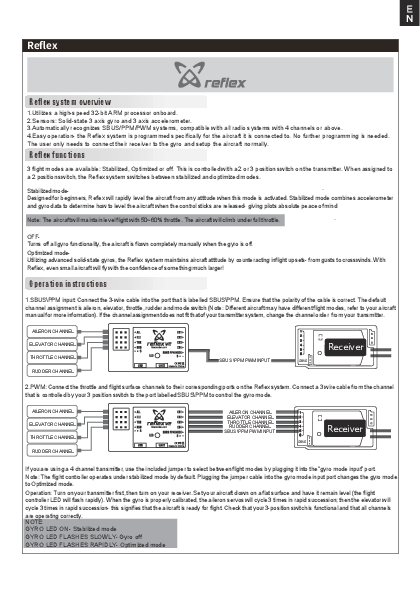
1.SBUS\PPM input: Connect the 3-wire cable into the port that is labelled SBUS\PPM. Ensure that the polarity of the cable is correct. The default channel assignment is aileron, elevator, throttle, rudder and mode switch (Note: Different aircraft may have different flight modes, refer to your aircraft manual for more information). If the channel assignment does not fit that of your transmitter system, change the channel order from your transmitter.

AILERON CHANNEL ELEVATOR CHANNEL THROTTLE CHANNEL RUDDER CHANNEL

SBUS \PPM PWM INPUT

Receiver
SBUS

2.PWM: Connect the throttle and flight surface channels to their corresponding ports on the Reflex system. Connect a 3 wire cable from the channel that is controlled by your 3 position switch to the port labelled SBUS\PPM to control the gyro mode.

AILERON CHANNEL ELEVATOR CHANNEL THROTTLE CHANNEL RUDDER CHANNEL

AILERON CHANNEL ELEVATOR CHANNEL THROTTLE CHANNEL RUDDER CHANNEL SBUS \PPM PWM INPUT

Receiver
SBUS

If you are using a 4 channel transmitter, use the included jumper to select between flight modes by plugging it into the "gyro mode input" port. Note: The flight controller operates under stabilized mode by default. Plugging the jumper cable into the gyro mode input port changes the gyro mode to Optimized mode.
Operation: Turn on your transmitter first, then turn on your receiver. Set your aircraft down on a flat surface and have it remain level (the flight controller LED will flash rapidly). When the gyro is properly calibrated, the aileron servos will cycle 3 times in rapid succession; then the elevator will cycle 3 times in rapid succession- this signifies that the aircraft is ready for flight. Check that your 3-position switch is functional and that all channels are operating correctly. NOTE: GYRO LED ON- Stabilized mode GYRO LED FLASHES SLOWLY- Gyro off GYRO LED FLASHES RAPIDLY- Optimized mode

Reflex
Aircraft model update
1. Visit https://www.fmsmodel.com/page/reflex/ , download the Reflex 2.0 software. 2. Double click on "FMS PARAM V2.0" to initiate the software. 3. Connect a type-C cable from your computer to the Reflex type-C port. 4. Once successfully connected, the interface will show all downloadable aircraft options along with what is currently loaded on the flight control software.
5. Double click on the new aircraft you would like to load onto Reflex. The software will show "FMS param update", click "OK" and wait for the audible tone (please turn up your system volume). The audible tone indicates that the new aircraft settings have been successfully loaded.
6. Update complete

D E Reflex

Reflex System �bersicht
1. Verwendet einen 32-Bit-Hochgeschwindigkeits ARM-Prozessor. 2.Sensoren: 3-Achs-Beschleunigungssensor und 3-Achs-Gyro-Sensor. 3.Erkennt automatisch SBUS/PPM/PWM-Systeme. Kompatibel mit allen Fernsteuerungssystemen mit 4 Kan�len oder mehr. 4.Einfache Bedienung � das Reflex System ist speziell f�r das Flugmodell programmiert, in dem das System verbaut ist. Es sind keine weiteren Programmierungen erforderlich. Das Reflex System muss lediglich mit einem kompatiblen Empf�nger verbunden werden.
Reflex Funktionen
Es stehen 3 Flugmodi zur Verf�gung: Stabilisiert, Optimiert oder "aus". Die Modi werden mit einem 2- oder 3-Kanalschalter am Sender gesteuert. Bei Zuweisung an einen Schalter mit 2 Positionen schaltet das Reflex-System zwischen stabilisiertem und optimiertem Modus um.
Stabilisierter Modus Das Reflex-System wurde f�r Anf�nger entwickelt und stabilisiert das Flugzeug aus jeder Lage, wenn der stabilisierte Modus aktiviert ist. Der stabilisierte Modus kombiniert Beschleunigungsmesser- und Gyrodaten, um zu bestimmen, wie das Flugzeug beim Loslassen der Steuerkn�ppel zu nivellieren ist.
Hinweis: Das Flugmodell wird mit 50~60% Drosselklappe den Horizontalflug beibehalten. Das Flugzeug steigt bei Vollgas.
OFF: Schaltet alle Kreiselfunktionen ab. Das Flugzeug wird bei ausgeschaltetem Kreisel vollst�ndig manuell geflogen. Optimierter ModusDurch den Einsatz moderner Kreisel h�lt das Reflex-System die Fluglage des Flugzeugs aufrecht, indem es St�rungen w�hrend des Fluges - von B�en bis hin zu Seitenwind - entgegenwirkt. Mit Reflex k�nnen selbst kleine Flugzeuge mit dem Vertrauen auf etwas viel Gr��eres fliegen!

Anschlu� an das System
1.SBUS/PPM-Eingang: Schlie�en Sie das Kabel des Reflex System am SBUS/PPM-Eingang Ihres Empf�ngers an. Stellen Sie dabei sicher, dass die Polarit�t des Kabels korrekt ist. Die voreingestellte Kanalzuweisung ist Querruder, H�henruder, Gas, Seitenruder oder Modi-Umschaltung (Hinweis: f�r verschiedene Modelle gelten ggf. verschiedene Flugmodi. Lesen Sie dazu die Anleitung Ihres Modells). Wenn die Kanalzuordnung nicht der Ihres Sendersystems entspricht, �ndern Sie die Reihenfloge entsprechend.

Querruder Ausgang

H�henruder Ausgang Gas Ausgang
Seitenruder Ausgang

SBUS/PPM PWM Eingang

Empf�nger
SBUS

2.PWM: Verbinden Sie die Servos und den Regler mit den entsprechenden Anschl�ssen des Reflex-Systems. Schlie�en Sie ein 3-adriges Kabel von dem Kanal, der von Ihrem 3-Positionsschalter gesteuert wird, an den mit SBUS \ PPM gekennzeichneten Anschluss an, um den Kreiselmodus zu steuern.

Querruder Ausgang H�henruder Ausgang
Gas Ausgang Seitenruder Ausgang

PWM Querruder Eingang PWM H�henruder Eingang PWM Gas Eingang PWM Seitenruder Eingang SBUS/PPM PWM Eingang

Empf�nger
SBUS

Wenn Sie einen 4-Kanal-Sender verwenden, k�nnen Sie mit dem mitgelieferten Jumper zwischen den Flugmodi w�hlen, in dem Sie ihn an den "Gyro-Eingang" anschlie�en.
Start: Schalten Sie zuerst den Sender und dann den Empf�nger ein. Stellen Sie Ihr Flugzeug auf waagerecht auf eine ebene Fl�che (die LED des Reflex Systems blinkt schnell). Wenn der Kreisel richtig kalibriert ist, schlagen die Querruder-Servos 3-mal in Folge aus. Danach schl�gt das H�henruder-Servo 3 mal aus. Das bedeutet, dass das Flugmodell und das Reflex System flugbereit sind. Vergewissern Sie sich, ob Ihr Modi-Positionsschalter funktionsf�hig ist und alle Kan�le korrekt funktionieren. HINWEIS: Gyro LED an - Stabilized mode Gyro LED blink langsam � Reflex System Ausgeschaltet Gyro LED blinkt schnell - Optimized mode

D E
Reflex
Flugmodell Update
1. Besuchen Sie https://www.fmsmodel.com/page/reflex/, um die Reflex 2.0-Software herunterzuladen. 2. Doppelklicken Sie auf "FMS PARAM V2.0", um die Software zu starten. 3. Schlie�en Sie ein Typ-C-Kabel von Ihrem Computer an den Reflex Typ-C-Anschluss an. 4. Sobald die Verbindung erfolgreich hergestellt ist, zeigt die Schnittstelle alle herunterladbaren Flugzeugoptionen zusammen mit den aktuell geladenen Flugsteuerungssoftware.
5. Doppelklicken Sie auf das neue Flugzeug, das Sie auf das Reflex-System laden m�chten. Die Software zeigt "FMS param update" an, klicken Sie auf "OK" und warten Sie auf den Signalton (bitte drehen Sie Ihre Systemlautst�rke auf). Der akustische Ton zeigt an, dass die neuen Flugzeugeinstellungen erfolgreich geladen wurden.
6. Update erfolgreich

F R Reflex

Pr�sentation du syst�me Reflex
1. Utilise un processeur rapide ARM 32 bits int�gr�. 2.Capteurs : Gyroscope 3 axes et acc�lerom�tre 3 axes. 3.Reconna�t automatiquement les syst�mes SBUS/PPM/PWM. Compatible avec tous les ensembles radio � 4 voies ou plus. 4.Utilisation facile : Le syst�me Reflex est programm� sp�cifiquement pour l'avion auquel il est connect�. Aucune programmation suppl�mentaire n'est n�cessaire. L'utilisateur n'a qu'� connecter son r�cepteur au gyro et � r�gler normalement l'avion.

Fonctions de Reflex
Trois modes de pilotage sont disponibles : Stabilis�, Optimis� et Off. La s�lection se fait � l'aide d'une voie command�e par un interrupteur � trois positions sur l'�metteur. Si un interrupteur � deux positions est affect� � la voie, le syst�me Reflex bascule entre les modes Stabilis� et Optimis�. Mode Stabilis� Con�u pour les d�butants. Quand ce mode est activ�, le Reflex remet rapidement l'a�ronef � plat, quelle que soit l'attitude initiale, quand les manches sont rel�ch�s. Le mode Stabilis� combine les informations des acc�l�rom�tres et des gyroscopes pour d�terminer le meilleur moyen de remettre le mod�le � plat quand les manches sont rel�ch�s, ce qui rassure compl�tement le pilote.
Note : L'avion vole en palier avec 50 � 60 % de la puissance. Plein gaz, il prend de l'altitude.
Mode Off Coupe les fonctionnalit�s du Reflex. Le mod�le est pilot� manuellement sans assistance.
Mode Optimis� Ce mode utilise les gyroscopes � semi-conducteurs. Le syst�me Reflex lisse la trajectoire en contrant les effets des rafales de vent et les turbulences. Avec le Refex, m�me de petits avions volent la stabilit� d'un mod�le bien plus grand !

Instructions d'utilisation
1.Entr�e SBUS/PPM : Connecter le cordon � 3 fils sur le port not� SBUS/PPM. Assurez-vous que la polarit� du cordon est correcte. L'affectation par d�faut des voies est : Ailerons, Profondeur, Gaz, Direction et inter de mode (Note : Des avions diff�rents peuvent avoir des modes de vol diff�rents, reportez-vous au manuel de l'avion pour plus d'informations). Si l'affectation des voies ne correspond pas � votre �metteur, modifiez l'ordre des voies de votre �metteur.

Sortie de la voie des ailerons Sortie voie de la profondeur
Sortie voie des gaz Sortie voies de la direction

SBUS/Entr�e PPM PWM

SBUS

R�cepteur

2.PWM : Connectez les voies des gaz et des gouvernes sur les ports correspondants du syst�me Reflex. Branchez un cordon � trois fils entre la voie command�e par l'interrupteur � 3 positions et le port not� SBUS/PPM afin de contr�ler le mode du gyro.

Sortie de la voie des ailerons Sortie voie de la profondeur
Sortie voie des gaz Sortie voies de la direction

Entr�e PWM Ailerons Entr�e PWM Profondeur Entr�e PWM Gaz Entr�e PWM Direction SBUS/Entr�e PPM PWM

R�cepteur
SBUS

Si vous utilisez un �metteur � 4 voies, utilisez le cavalier fourni pour choisir entre les modes de pilotage en le branchant sur le port � Gyro Mode Input �.
Utilisation : Allumez d'abord votre �metteur, puis allumez le r�cepteur. Posez votre avion sur une surface plane et laissez-le de niveau (la LED du contr�leur va clignoter rapidement). Quand le gyro est correctement calibr�, le servo des ailerons va cycler rapidement 3 fois, puis celui de la profondeur va cycler rapidement 3 fois, ce qui indique que le mod�le est pr�t � voler. V�rifiez que l'interrupteur � 3 position est actif et que toutes les voies fonctionnent correctement. NOTE : LED GYRO Allum�e fixe : Mode Stabilis� LED GYRO clignote lentement : Gyro coup� LED GYRO clignote rapidement : Mode Optimis�

F R
Reflex
Mise � jour des mod�les d'avions
1. Rendez-vous sur https://www.fmsmodel.com/page/reflex/ et t�l�chargez le logiciel Reflex 2.0. 2. Double-cliquez sur " FMS PARAM V2.0" pour initialiser le logiciel. 3. Connectez un cordon USB type C entre votre ordinateur et le port USB Type C du module Reflex. 4. Une fois la connexion r�ussie, l'interface va afficher toutes des options d'avions t�l�chargeables ainsi que ce qui est actuellement charg� dans le logiciel de contr�le de vol.
5. Double-cliquez sur le nouveau mod�le que vous souhaitez charger dans le module Reflex. Le logiciel affichera "FMS param update", cliquez OK et attendez un signal sonore (pensez � activer le volume de votre ordinateur). Le signal sonore indique que les param�tres du nouveau mod�le ont �t� charg�s avec succ�s.
6. La mise � jour est termin�e.

C N


132ARM 233 3SBUS\PPM\PWM44 4  5 FMS

33
2
   ""
(100%50% - 60%


1SBUS\PPMSBUS\PPM 5 7


SBUS


SBUS

2PWMSBUS\PPM23


SBUS

LED3 33LED LEDLED


C N


1 https://www.fmsmodel.com/page/reflex/ , reflex 2.0  2"FMS PARAM V 2.0" 3C(TYPE-C) USB 4
5."FMS param update""OK"
6.