

Rocketfish TV Dock Kit for Nintendo Switch™ and Switch™ OLED
Model Numbers: RF-NSDKHU / RF-NSDKHU2-C / RF-NSDKHUW
Features
- Compatible with Nintendo Switch and Switch OLED
- Compact design for easy portability
- Includes a USB 2.0 output for USB 2.0 connection
- Charges console while in use via the AC adapter (included)
- Weighted base for stability
Safety Information
- You must use the included AC adapter to power the dock.
- Do not disassemble any of the components. Refer all services to qualified personnel only.
- Do not place or store the product in a humid area and do not expose it to water or rain.
- Use the product only as instructed. Read all instructions before operating the product.
- Failure to follow these directions may void the warranty.
- Do not use voltage transformers or plugs that deliver reduced amounts of electricity.
Using the TV Dock
-
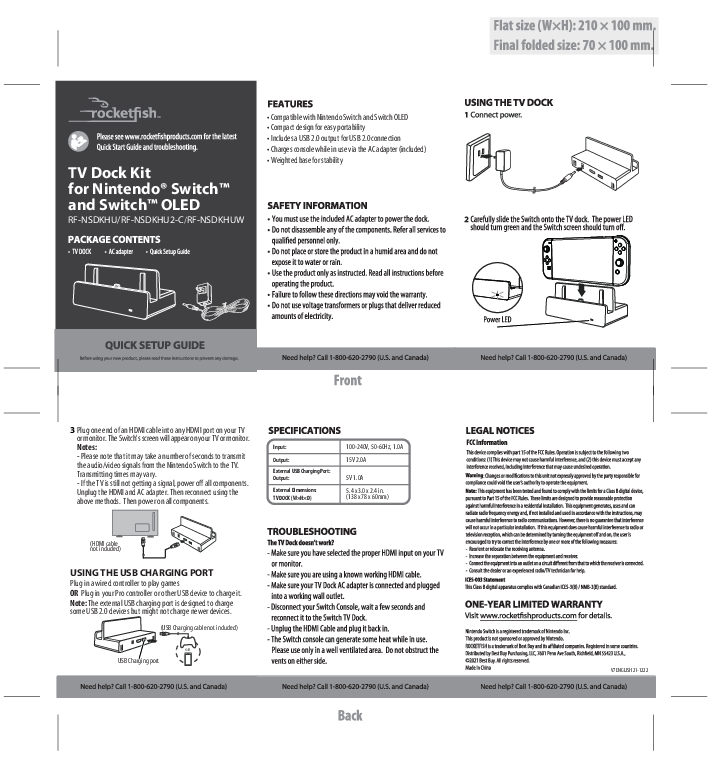
Connect power.
An AC adapter connects to a wall outlet and then to the TV Dock.
-
Connect the console.
Carefully slide the Switch console onto the TV dock. The power LED should turn green and the Switch screen should turn off.
(Diagram Description: The Nintendo Switch console is shown being slid into the TV Dock. A power LED indicator is visible on the dock.)
Quick Setup Guide
Before using your new product, please read these instructions to prevent any damage.
-
Connect to TV
Plug one end of an HDMI cable into any HDMI port on your TV or monitor. The Switch's screen will appear on your TV or monitor.
Notes:
- Please note that it may take a number of seconds to transmit the audio/video signals from the Nintendo Switch to the TV. Transmitting times may vary.
- If the TV is still not getting a signal, power off all components. Unplug the HDMI and AC adapter. Then reconnect using the above methods. Then power on all components.
(Diagram Description: An HDMI cable connects from the TV Dock to an HDMI port on a TV or monitor. Text indicates "HDMI cable not included".)
-
Using the USB Charging Port
Plug in a wired controller to play games OR Plug in your Pro controller or other USB device to charge it.
Note: The external USB charging port is designed to charge some USB 2.0 devices but might not charge newer devices.
(Diagram Description: A USB port on the TV Dock is labeled for charging controllers or other USB devices. Text indicates "USB Charging cable not included".)
Specifications
| Parameter | Value |
|---|---|
| Input | 100-240V, 50-60Hz, 1.0A |
| Output | 15V 2.0A |
| External USB Charging Port Output | 5V 1.0A |
| External Dimensions (TV DOCK W×H×D) | 5.4 x 3.0 x 2.4 in. (138 x 78 x 60mm) |
Troubleshooting
The TV Dock doesn't work?
- Make sure you have selected the proper HDMI input on your TV or monitor.
- Make sure you are using a known working HDMI cable.
- Make sure your TV Dock AC adapter is connected and plugged into a working wall outlet.
- Disconnect your Switch Console, wait a few seconds and reconnect it to the Switch TV dock.
- Unplug the HDMI Cable and plug it back in.
- The Switch console can generate some heat while in use. Please use only in a well ventilated area. Do not obstruct the vents on either side.
Legal Notices
FCC Information
This device complies with part 15 of the FCC Rules. Operation is subject to the following two conditions: (1) This device may not cause harmful interference, and (2) this device must accept any interference received, including interference that may cause undesired operation.
Warning: Changes or modifications to this unit not expressly approved by the party responsible for compliance could void the user's authority to operate the equipment.
Note: This equipment has been tested and found to comply with the limits for a Class B digital device, pursuant to Part 15 of the FCC Rules. These limits are designed to provide reasonable protection against harmful interference in a residential installation. This equipment generates, uses and can radiate radio frequency energy and, if not installed and used in accordance with the instructions, may cause harmful interference to radio communications. However, there is no guarantee that interference will not occur in a particular installation. If this equipment does cause harmful interference to radio or television reception, which can be determined by turning the equipment off and on, the user is encouraged to try to correct the interference by one or more of the following measures:
- Reorient or relocate the receiving antenna.
- Increase the separation between the equipment and receiver.
- Connect the equipment into an outlet on a circuit different from that to which the receiver is connected.
- Consult the dealer or an experienced radio/TV technician for help.
ICES-003 Statement
This Class B digital apparatus complies with Canadian ICES-3(B)/NMB-3(B) standard.
One-Year Limited Warranty
Visit www.rocketfishproducts.com for details.
Nintendo Switch is a registered trademark of Nintendo Inc.
This product is not sponsored or approved by Nintendo.
ROCKETFISH is a trademark of Best Buy and its affiliated companies. Registered in some countries.
Distributed by Best Buy Purchasing, LLC, 7601 Penn Ave South, Richfield, MN 55423 U.S.A., ©2021 Best Buy. All rights reserved.
Made in China
V7 ENGLISH 21-1222
