

legrand ZLGP12 Wireless and Batteryless Roller Shutter Control Instructions
File info: application/pdf · 4 pages · 1.12MB
User manual ZLGP12
LEGRAND FRANCE ISERE ST-MARCELLIN ZLGP1X Switch wireless without battery 2ACN8-ZLGP1X 2ACN8ZLGP1X zlgp1x
UROS Ltd. ZLGP1X Switch wireless without battery 2ACN9-ZLGP1X 2ACN9ZLGP1X zlgp1x
Full PDF Document

If the inline viewer fails, it will open the original document in compatibility mode automatically. You can also open the file directly.
Extracted Text
Wireless and batteryless roller shutter control 0 676 46L/47L - 0 677 64L 0 770 55L - 6 000 87L 7 418 08L/38L/68L

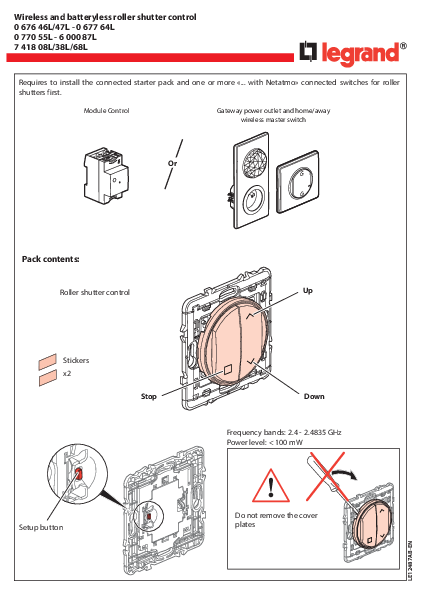
Requires to install the connected starter pack and one or more �... with Netatmo� connected switches for roller shutters first.

Module Control

Gateway power outlet and home/away wireless master switch

Or

Pack contents: Roller shutter control

Stickers x2

Stop

Setup button

Up
Down Frequency bands: 2.4 - 2.4835 GHz Power level: < 100 mW
Do not remove the cover plates

LE12487AB-EN

1 Start the configuration
Press the configuration button of Module Control or press the middle of the wireless master switch until its light briefly turns green, and then stop pressing. All wired products lights will turn green.
Or > 3 s
2

2 Pair the wireless, batteryless switch to control the connected roller shutter switches
Make sure that the indicator lights on the wired products are green. If not, go back to precedent step. 1 .
B
+
A

C

A Tap 3 times the roller shutter switch you want to control with the wireless, batteryless control. The light of the roller shutter switch flashes rapidly.
B While pressing the �setup� button, press briefly the �Stop� or �Up� or �Down� button. C The indicator lights of the product to control will briefly turn blue, and then will turn green again.
The pairing was successful.
Check the correct pairing by pressing Up and then Down buttons
Multiple pairing : You can control several roller shutter switches with the same wireless, batteryless switch by repeating the operation for each product that you want to control.

3 Complete the installation

If necessary, erase the configuration of the wireless batteryless control (factory reset)

Or

< 1 s

< 1 s

+

5 s

To complete your installation, briefly press the configuration of the Module Control or the middle of the wireless Home / Away master switch.
All the indicator lights on the products switch off.

While holding the "setup" button on the wireless, batteryless control, press the "Up" button for 5 seconds. Confirm that your control is correctly reset by making an Up command, then Down.

3

Put the stickers in place

Before fixing the wireless switch(es) with the removable stickers provided, test one on a non-visible area of the wall.

H < 2 m H > 2 m

You can also fix the wireless switch(es) permanently to the wall with screws.

www.legrandoc.com/067646L
LEGRAND - Pro and Consumer Service - BP 30076 87002 LIMOGES CEDEX FRANCE � www.legrand.com

The undersigned, Legrand declares that the radio-electric equipment type (0 676 46L/47L - 0 677 64L - 0 770 55L - 6 000 87L - 7 418 08L/38L/68L) complies with directive 2014/53/EU. The full text of the EU declaration of conformity is available on the following website: www.legrandoc.com

Download the app Your installation is ready. You can download the Legrand Home + Control application to control your roller shutters remotely.

FCC ID: 2ACN8-ZLGP1X

IC: 12132A-ZLGP1X

Model : ZLGP12

This device contains licence-exempt transmitter(s)/receiver(s) that comply with FCC RF and Innovation, Science and Economic Development Canada's licence-exempt RSS(s). Operation is subject to the following two conditions: (1) this device may not cause interference, and (2) This device must accept any interference, including interference that may cause undesired operation of the device. This device complies with FCC and ISED radiation exposure limits set forth for general population. This device must not be co-located or operating in conjunction with any other antenna or transmitter. FCC Caution: the user that changes or modifications not expressly approved by the party responsible for compliance could void the user's authority to operate the equipment.

FCC NOTE: This equipment has been tested and found to comply with the limits for a Class B digital device, pursuant to part 15 of the FCC Rules. These limits are designed to provide reasonable protection against harmful interference in a residential installation. This equipment generates, uses and can radiate radio frequency energy and, if not installed and used in accordance with the instruction, may cause harmful interference to radio communications. However, there is no guarantee that interference will not occur in a particular installation. If this equipment does cause harmful interference to radio or television reception which can be determined by turning the equipment off and on, the user is encouraged to try to correct interference by one or more of the following measures: - Reorient or relocate the receiving antenna. - Increase the separation between the equipment and receiver. - Connect the equipment into an outlet on circuit different from that to which the receiver is connected. - Consult the dealer or an experienced radio/TV technician for help.

Safety instructions Make sure the power supply is disconnected before any intervention. Strictly comply with instructions for installation and use.
4

Model: ZLGP12
 Legrand E-catalog International | Electrical Ranges of products & Connected Solutions