

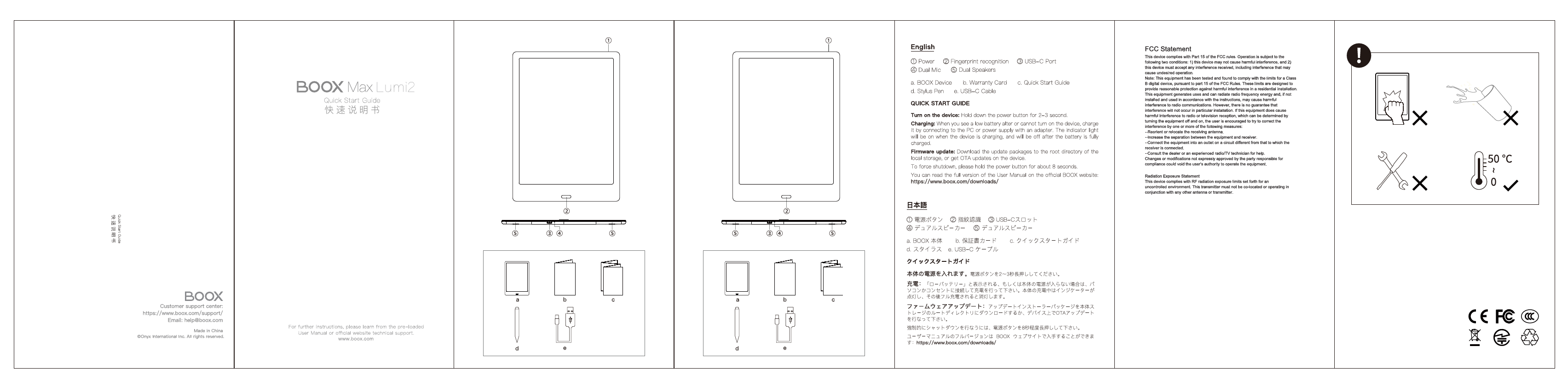
BOOX Max Lumi2 Quick Start Guide
Brand: BOOX
Welcome to the Quick Start Guide for the BOOX Max Lumi2. This document provides essential information to get you started with your device.
For comprehensive instructions, please refer to the pre-loaded User Manual on your device or visit the official BOOX website.
Customer Support: https://www.boox.com/support/
Email: help@boox.com
Manufactured in China.
© Onyx International Inc. All rights reserved.
Device Components
Included in the Box:
- BOOX Device
- Warranty Card
- Quick Start Guide
- Stylus Pen
- USB-C Cable
Device Features:
- Power Button: Used for turning the device on/off and force shutdown.
- Fingerprint Recognition: For secure and convenient unlocking.
- USB-C Port: For charging and data transfer.
- Dual Speakers: For audio output.
- Dual Mic: For voice input.
Getting Started
Powering On
To turn on the device, press and hold the power button for 2-3 seconds.
Charging the Device
If the device shows a low battery alert or fails to power on, connect it to a PC or a power supply using an adapter. The indicator light will illuminate during charging and turn off when the battery is fully charged.
Firmware Updates
You can update the firmware by downloading update packages to the root directory of the device's local storage or by using Over-The-Air (OTA) updates directly on the device.
Force Shutdown
To force a shutdown, press and hold the power button for approximately 8 seconds.
Safety and Compliance
Important Information
Note: This device has been tested and found to comply with the limits for a Class B digital device, pursuant to Part 15 of the FCC Rules. These limits are designed to provide reasonable protection against harmful interference in a residential installation.
This equipment generates, uses, and can radiate radio frequency energy. If not installed and used according to instructions, it may cause harmful interference to radio communications. However, there is no guarantee that interference will not occur in a particular installation.
If this equipment causes harmful interference to radio or television reception, which can be determined by turning the equipment off and on, users are encouraged to try to correct the interference by one or more of the following measures:
- Reorient or relocate the receiving antenna.
- Increase the separation between the equipment and receiver.
- Connect the equipment into an outlet on a circuit different from that to which the receiver is connected.
- Consult the dealer or an experienced radio/TV technician for help.
Changes or modifications not expressly approved by the party responsible for compliance could void the user's authority to operate the equipment.
Radiation Exposure Statement
This device complies with RF radiation exposure limits set forth for an uncontrolled environment. This transmitter must not be co-located or operating in conjunction with any other antenna or transmitter.
Compliance Marks: The device displays CE and FCC certification marks, indicating compliance with relevant standards.
Usage Guidance: A safety icon (❗) highlights important information. A visual guide shows correct usage with a checkmark (✔️) and incorrect usage with an X (❌). For instance, a correct device connection is shown, contrasted with an incorrect power connection (❌).
Additional Resources
For the full User Manual, please visit: https://www.boox.com/downloads/
