

Anko Battery Power Pack for PS5 Controller
Instruction Manual
Keycode: 43055807
Safety Instructions
- Use a soft, dry cloth to clean the product. Do not use solvents or other chemicals.
- Do not wipe with a chemically-treated cleaning cloth.
- Do not place the Charging Stand in direct sunlight or high-temperature, humid environments.
- Do not disassemble the charging stand.
- Do not touch the product with wet hands.
- Do not throw or drop the product or subject it to strong physical shock.
- Do not touch the ports or insert any foreign objects into the product.
- Keep the product out of the reach of small children, as they may swallow small parts or wrap cables around themselves, potentially causing injury or malfunction.
Features
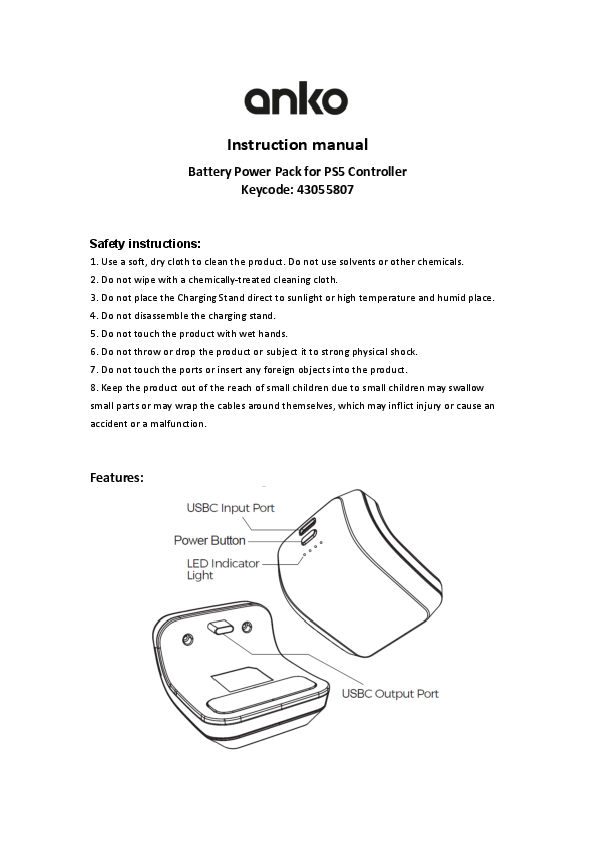
The product features a battery power pack and a charging stand. The power pack includes a USB-C Input Port, a Power Button, and an LED Indicator Light to show battery status. The charging stand has a USB-C Output Port.
Diagram Description: A visual representation shows the battery power pack and its accompanying charging stand. Key connection points and controls are labeled, including the USB-C input port, power button, and LED indicator lights on the power pack itself, and a USB-C output port on the charging stand.
Standby Mode
- When the battery pack is in standby mode, a short press of the power button will display the battery level via the LED indicator light.
- A long press of the power button for 3 seconds will turn off the power pack. Alternatively, the power pack will turn off automatically after 30 seconds of inactivity.
Charging the Power Pack
- Connect a USB power adapter (not included) with DC 5V/1A to a power source.
- Connect the included USB-C cable to the power pack and the USB power adapter.
- While charging, the number of illuminated LED indicator lights represents the current battery capacity. Remaining LED lights will flash or twinkle to indicate charging is in progress.
- Once the battery pack is fully charged, all four LED indicator lights will remain on until the 5V/1A adapter is unplugged.
Note: Do not charge the PS5 controller while the battery pack itself is charging.
Charging the PS5 Controller
- Connect the PS5 controller to the battery pack. The LED indicator light on the battery pack will display the controller's battery capacity.
- When the controller's battery capacity is lower than 10%, the LED indicator light will flash.
- After the PS5 controller is fully charged by the battery pack, the battery pack will stop discharging. Remove the power pack from the controller.
Package Includes
- 1 x Power pack for PS5 Controller
- 1 x USB-C cable
- 1 x User manual
Specifications
- Input Voltage: DC 5V/1A
- Output Voltage: DC 5V/600mAh
- Built-in battery: 3.7V/ 1500mAh
