

JXB-183 Non-Contact Infrared Thermometer
Quick Start Guide
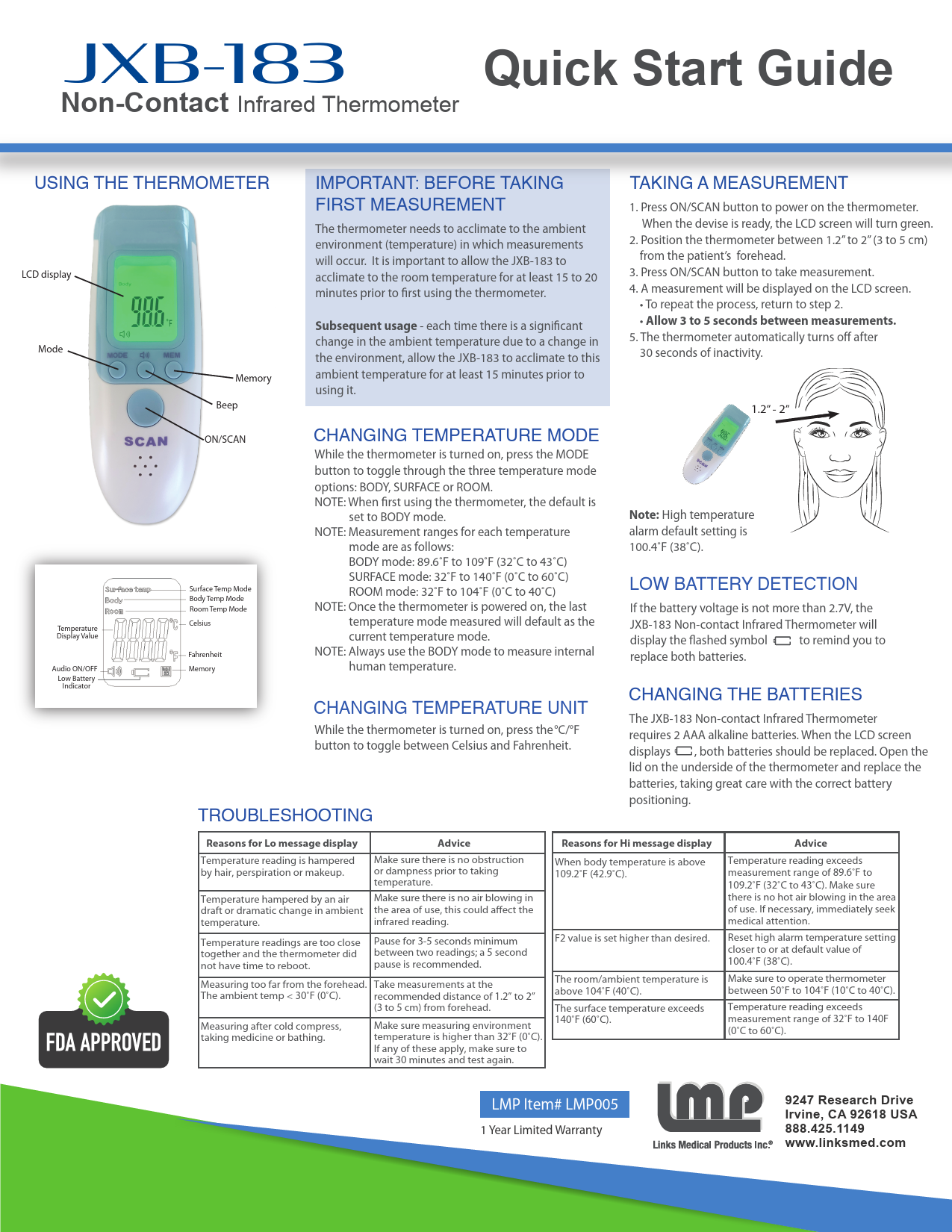
Using the Thermometer
This section details the components and basic operation of the JXB-183 Non-Contact Infrared Thermometer.
Key Components:
- LCD display: Shows temperature readings and status.
- Mode Button: Selects measurement mode (Body, Surface, Room).
- Memory Button: Accesses stored readings.
- Beep Button: Toggles audible beep on/off.
- ON/SCAN Button: Powers the device on and initiates measurement.
- Audio ON/OFF Indicator: Shows if audible beep is active.
- Low Battery Indicator: Alerts when batteries need replacement.
Changing Temperature Mode
While the thermometer is on, press the MODE button to cycle through three modes: BODY, SURFACE, or ROOM.
The default mode upon first use is BODY.
Measurement Ranges:
- BODY mode: 89.6°F to 109°F (32°C to 43°C)
- SURFACE mode: 32°F to 140°F (0°C to 60°C)
- ROOM mode: 32°F to 104°F (0°C to 40°C)
The last measured mode will be the default for subsequent use.
Always use BODY mode for human temperature measurements.
Changing Temperature Unit
While the thermometer is on, press the °C/°F button to switch between Celsius and Fahrenheit.
Important: Before Taking First Measurement
The thermometer requires acclimation to the ambient environment. Allow the JXB-183 to adjust to the room temperature for at least 15 to 20 minutes before its first use.
If there is a significant change in ambient temperature, allow the thermometer at least 15 minutes to acclimate before using it again.
Taking a Measurement
- Press the ON/SCAN button to power on the thermometer. The LCD screen will turn green when ready.
- Position the thermometer 1.2" to 2" (3 to 5 cm) from the patient's forehead.
- Press the ON/SCAN button to take the measurement.
- The measurement will be displayed on the LCD screen.
- To repeat, return to step 2. Allow 3 to 5 seconds between measurements.
- The thermometer automatically turns off after 30 seconds of inactivity.
High temperature alarm default setting is 100.4°F (38°C).
Low Battery Detection
If the battery voltage drops below 2.7V, the JXB-183 will display a flashing battery symbol ? to indicate that both batteries need replacement.
Changing the Batteries
The JXB-183 requires 2 AAA alkaline batteries. When the low battery indicator appears, replace both batteries.
Open the battery compartment lid on the underside of the thermometer and replace the batteries, ensuring correct polarity.
Troubleshooting
| Reason for Message Display | Advice |
|---|---|
| Lo Message: Temperature reading is hampered by hair, perspiration, or makeup. | Ensure the measurement area is clear of obstructions and moisture. |
| Lo Message: Temperature hampered by an air draft or dramatic change in ambient temperature. | Ensure there is no air blowing in the measurement area, as this can affect readings. |
| Lo Message: Temperature readings are too close together, and the thermometer did not have time to reboot. | Pause for 3-5 seconds between readings; a 5-second pause is recommended. |
| Lo Message: Measuring too far from the forehead. The ambient temp < 30°F (-1°C). | Measure at the recommended distance of 1.2" to 2" (3 to 5 cm) from the forehead. Ensure the measuring environment temperature is above 32°F (0°C). If conditions like cold compress, medication, or bathing apply, wait 30 minutes before testing again. |
| Hi Message: When body temperature is above 109.2°F (42.9°C). | Temperature reading exceeds the measurement range of 89.6°F to 109.2°F (32°C to 43°C). Ensure no hot air is blowing in the area. Seek immediate medical attention if necessary. |
| Hi Message: F2 value is set higher than desired. | Reset the high alarm temperature setting to the default value of 100.4°F (38°C) or closer. |
| Hi Message: The room/ambient temperature is above 104°F (40°C). | Operate the thermometer between 50°F to 104°F (10°C to 40°C). |
| Hi Message: The surface temperature exceeds 140°F (60°C). | Temperature reading exceeds the measurement range of 32°F to 140°F (0°C to 60°C). |

 Links Medical Products, Inc.®