

Samsung Galaxy Tab S7 FE 5G Quick Start Guide
Welcome to your new device. This guide will help you get started.
Need support?
Access user manuals, tips, and more directly from your device.
-
User manual
Access from your device via 'Settings' ➔ 'Tips and help' ⚙️.
-
Samsung Care+
Get coverage for repairs and 24/7 dedicated support. Learn more at Samsung.com/us/support/samsung-care-plus.
-
Samsung Support
Get direct access to FAQs, tips and tricks, videos, and more. Visit Samsung.com/us/support.
-
Samsung Care - YouTube
Check out the latest support videos to help you with your Samsung product. Visit Youtube.com/samsungcare.
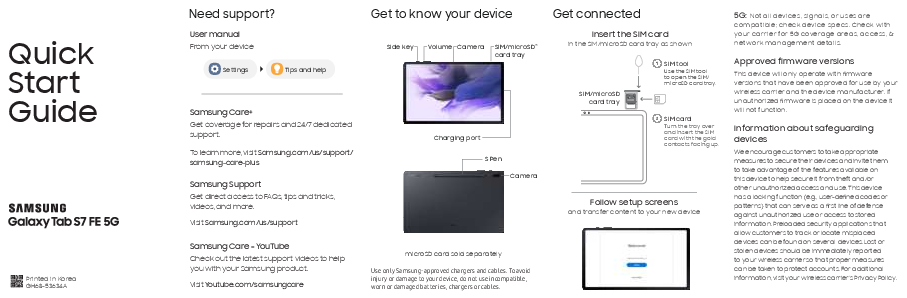
Get to know your device
Power button and other functions.
Adjusts volume levels.
Capture photos and videos.
Insert SIM and microSD cards here. microSD card sold separately.
Connect the charger here.
Stylus for enhanced interaction.
Get connected
Follow the on-screen setup instructions to transfer content to your new device.
Insert the SIM card
Insert the SIM card into the SIM/microSD card tray as shown.
Use the SIM tool to open the SIM/microSD card tray.
Turn the tray over and insert the SIM card with the gold contacts facing up.
Note: Use only Samsung-approved chargers and cables. To avoid injury or damage to your device, do not use incompatible, worn or damaged batteries, chargers or cables.
Follow setup screens
Complete the on-screen prompts to set up your device and transfer content.
Important Information
5G: Not all devices, signals, or uses are compatible; check device specs. Check with your carrier for 5G coverage areas, access, & network management details.
Approved firmware versions: This device will only operate with firmware versions that have been approved for use by your wireless carrier and the device manufacturer. If unauthorized firmware is placed on the device it will not function.
Information about safeguarding devices: Samsung encourages customers to take appropriate measures to secure their devices and utilize the available features to help prevent theft and unauthorized access. The device has a locking function (e.g., user-defined codes or patterns) as a first line of defense. Preloaded security applications can help track or locate misplaced devices. Lost or stolen devices should be immediately reported to your wireless carrier to protect accounts. For additional information, visit your wireless carrier's Privacy Policy.
Terms and Conditions: Read and keep important Terms and Conditions for future reference. Acceptance is indicated by electronic acceptance, opening packaging, or using the Product. The Arbitration Agreement, Standard One-year Limited Warranty, End User License Agreement (EULA), and Health & Safety Information are available at: www.samsung.com/us/support/legal/LGL01210804/ (English) or www.samsung.com/us/support/legal/LGL01210886/ (Spanish). You can also find this information on the device: Settings > About phone or About device or About tablet > Legal information > Samsung legal.
FCC Part 15 Information and Notices: This device complies with part 15 of the FCC Rules. Operation is subject to conditions: (1) This device may not cause harmful interference, and (2) this device must accept any interference received, including interference that may cause undesired operation.
Specific Absorption Rate (SAR) certification information: For information about SAR, visit: www.fcc.gov/general/radio-frequency-safety-0, www.fcc.gov/encyclopedia/specific-absorption-rate-sar-cellular-telephones, or www.samsung.com/sar.
Exposure to Radio Frequency (RF) signals: For information, go to www.samsung.com/us/support/legal/mobile > Health and Safety Information > Exposure to Radio Frequency (RF) signals.
Samsung mobile products and recycling: WARNING! Never dispose of batteries in a fire because they may explode. Do not disassemble, crush, puncture, heat, burn or reuse. For more recycling information, go to www.samsung.com/recycling or call 1-800-SAMSUNG.
Emergency calls: Emergency calls may not be possible on all wireless mobile device networks or when certain network services and/or mobile device features are in use. Check with local service providers. If certain features are in use (e.g. call blocking) you may first need to deactivate those features before you can make an emergency call.
Energy Star: As an ENERGY STAR® Partner, Samsung has determined that this product meets the ENERGY STAR Guidelines for energy efficiency. Samsung is a proud ENERGY STAR Partner and commits to meet the guidelines for this product to be ENERGY STAR certified. By selecting an Energy Star certified product, you reduce greenhouse emissions and save energy. For more information, see www.energystar.gov/. The Power Management setting of this product has been enabled by default and has various timing settings (of up to 10-30 minutes). To change this in Settings, go to the Display menu > Screen timeout option. This product can be awakened from sleep mode by pressing the Power button.
