

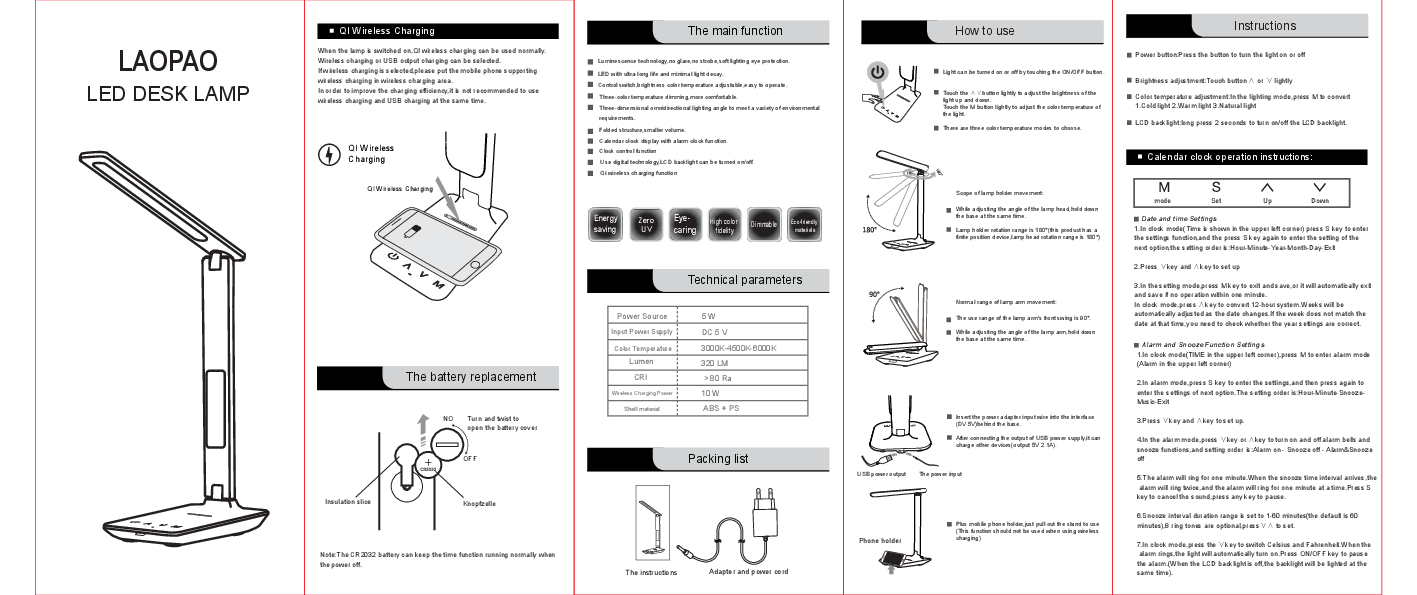
LAOPAO LED Desk Lamp
Product Overview
The LAOPAO LED Desk Lamp is a versatile and modern lighting solution designed for various environments, including offices and homes. It features QI wireless charging, adjustable brightness and color temperature, a built-in calendar clock with alarm functionality, and a USB power output for charging other devices.
Key Features
- QI Wireless Charging: Supports wireless charging for compatible devices.
- Adjustable Lighting: Features three color temperature modes (cold, warm, natural) and adjustable brightness.
- Eye Protection: Designed with luminescence technology to prevent glare and strobe effects, providing soft lighting.
- Foldable Design: Compact and foldable for easy storage and portability.
- Clock and Alarm: Includes a calendar clock display with alarm and snooze functions.
- USB Output: Provides a 5V 2.1A USB output for charging external devices.
- LED Technology: Utilizes an ultra-long-life LED with minimal light decay.
How to Use
Power and Lighting Control:
- Press the power button to turn the light on or off.
- Touch the 'A' or 'V' button to adjust the brightness up or down.
- Touch the 'M' button to cycle through the three color temperature modes: Cold light, Warm light, and Natural light.
- Long press the power button for 2 seconds to turn the LCD backlight on or off.
Clock and Alarm Settings:
- In clock mode, press 'S' to enter settings. Press 'S' again to cycle through Hour, Minute, Year, Month, Day, and Exit.
- Use the 'V' and 'A' buttons to adjust the values.
- Press 'M' to exit and save settings, or it will auto-save after one minute of inactivity.
- Press the 'M' button in clock mode to switch to alarm mode. Press 'S' to enter alarm settings (Hour, Minute, Snooze, Music).
- Use 'V' and 'A' to set alarm parameters. Press 'V' or 'A' in alarm mode to toggle alarm and snooze functions (Alarm on, Snooze off, Alarm & Snooze off).
- The alarm rings for one minute. The snooze function allows for repeated alarms at set intervals (1-60 minutes). Press 'S' to cancel the sound, or any key to pause.
- Press the 'V' button in clock mode to switch between Celsius and Fahrenheit for temperature display.
- When the alarm rings, the light will automatically turn on. Pressing the ON/OFF key pauses the alarm.
Wireless Charging:
- When the lamp is on, QI wireless charging can be used. Place a Qi-compatible mobile phone on the wireless charging area.
- It is recommended not to use wireless charging and USB charging simultaneously for optimal efficiency.
USB Power Output:
- Connect the power adapter to the DC 5V input port.
- The USB output port (5V 2.1A) can be used to charge other devices.
Mobile Phone Holder:
- Pull out the stand to use the mobile phone holder. This feature should not be used while wireless charging is active.
Battery Replacement
The CR2032 button battery is used to maintain the clock function when the lamp is powered off. To replace the battery:
- Turn and twist the battery cover to open it.
- Replace the CR2032 battery, ensuring correct polarity (+/-).
- Close the battery cover securely.
Technical Parameters
| Parameter | Specification |
|---|---|
| Power Source | 5 W |
| Input Power Supply | DC 5 V |
| Color Temperature | 3000K-4500K-6000K |
| Lumen | 320 LM |
| CRI | > 80 Ra |
| Wireless Charging Power | 10 W |
| Shell Material | ABS + PS |
Packing List
- LED Desk Lamp
- Adapter and power cord
- Mobile phone holder
Lamp Adjustments
Lamp Holder Movement:
- To adjust the angle of the lamp head, hold the base firmly while adjusting. The lamp head rotation range is 180°.
Lamp Arm Movement:
- The front swing range of the lamp arm is 90°.
- To adjust the angle of the lamp arm, hold the base firmly while adjusting.