

File info: application/pdf · 4 pages · 1.16MB
LIEBERT GXT5™ UPS '(& fL && g ),&&& L7 ic Installation Gie
3. If necessary, use the LCD display or a connected computer to make any required settings. (Refer to the User Guide for configuration set up.)
Liebert GXT5 120-V 500-3000VA Quick Install Guide - Vertiv
Quick Installation Guide. 590-1932-501A/SL-70307 REV0. 1. IMPORTANT: Before installing, connecting to supply or operating your Liebert GXT5 UPS, please.
Guide for configuration set up.) 4. Close all output breakers on the rear of the UPS (or in an external panel board, if used). 5. If external battery cabinets are included, close the breakers on the rear of each cabinet…
Full PDF Document

If the inline viewer fails, it will open the original document in compatibility mode automatically. You can also open the file directly.
Extracted Text
LIEBERT� GXT5TM UPS 120V 500 � 3,000 VA
Quick Installation Guide

IMPORTANT: Before installing, connecting to supply or operating your Liebert GXT5 UPS, please review the Safety and Regulatory Statements sheet. For detailed installation, operating, maintenance and troubleshooting info rmation refer to the GXT5 User Guide for your model available at www.VertivCo.com.
INSTALLATION
1. Inspecting the UPS
Inspect the UPS for any signs of obvious damage. If damage is visible, do not proceed and call our warranty support line for assistance at 1-800-222-5877 menu option 3, or email at microups.warranty@vertivco.com.
2. Choosing a location
Install the UPS in a temperaturecontrolled environment that is free of corrosive and conductive contaminants. Avoid locations near heat or water sources and exposed to direct sunlight. For proper ventilation, leave four inches clearance on all sides of the UPS.
The input outlet should be nearby and easily accessible.
3. Installing the UPS
The UPS and optional External Battery Cabinets may be installed in either a tower or rack configuration. For tower installation, assemble and attach the tower support stands. For rack installation, attach the brackets to the UPS, install the rail kit in the rack if needed, and install the UPS in the rack.
NOTE: This UPS is not for use in a computer room as defined in the standard for the protection of electronic computer/data processing equipment of ANSI/ NFPA 75.

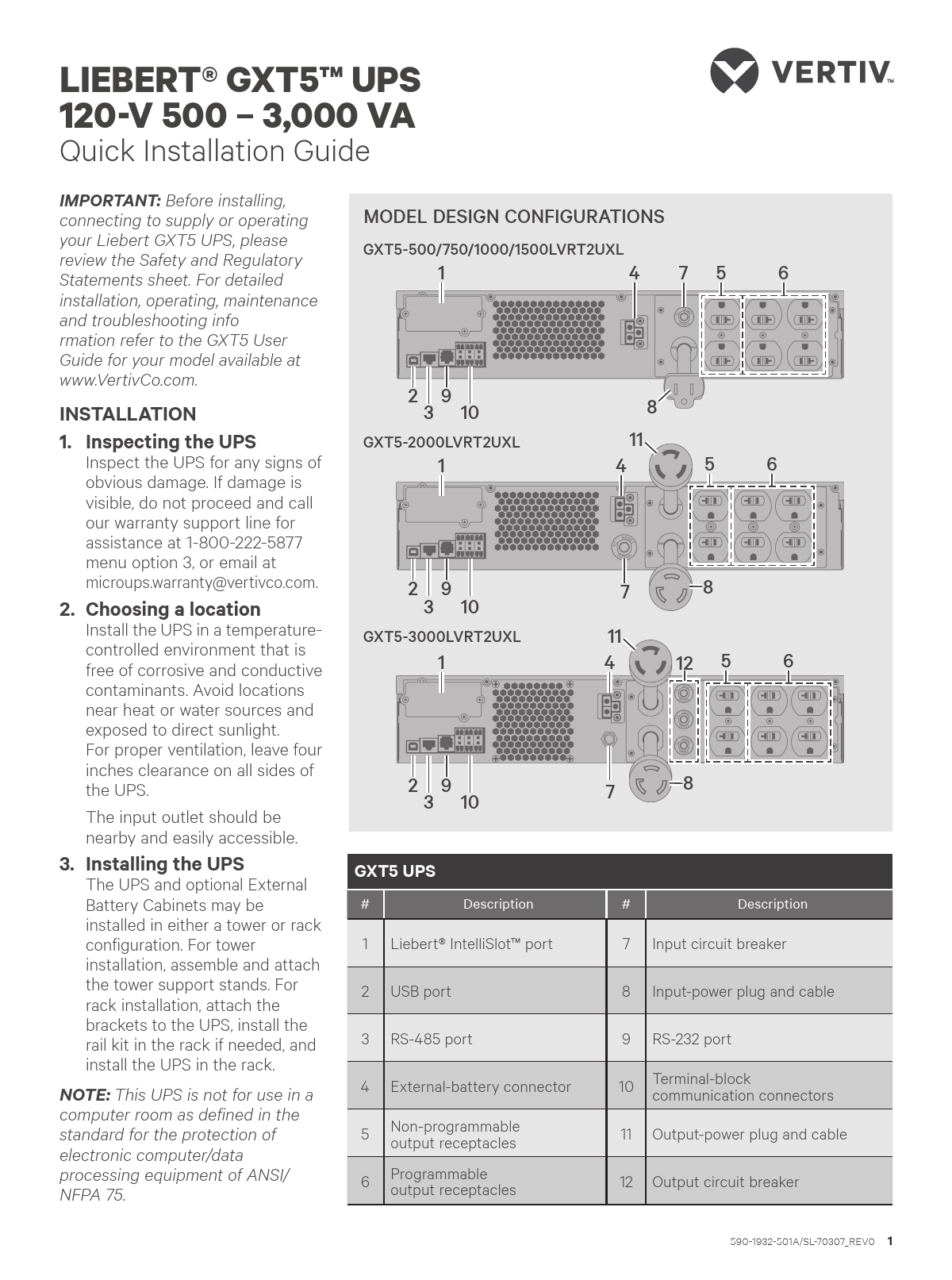
MODEL DESIGN CONFIGURATIONS

GXT5500/750/1000/1500LVRT2UXL

1

4 75

6

29 3 10
GXT52000LVRT2UXL
1

8

11

4

5

6

29 3 10
GXT53000LVRT2UXL
1

7

8

11

4

12 5

6

29 3 10

7

8

GXT5 UPS
#

Description

1 Liebert� IntelliSlotTM port

2 USB port

3 RS-485 port

4 External-battery connector

5

Non-programmable output receptacles

6

Programmable output receptacles

#

Description

7 Input circuit breaker

8 Input-power plug and cable

9 RS-232 port

10

Terminal-block communication connectors

11 Output-power plug and cable

12 Output circuit breaker

590-1932-501A/SL-70307_REV0 1

LIEBERT� GXT5TM UPS 120-V 500 � 3,000 VA Quick Installation Guide
GXT5TM UPS to External Battery Cabinet Connections
GXT5-3000LVRT2UXL Shown

EBC terminal

Single/First EBC Second EBC

CONNECTIONS
4. Connecting External Battery Cabinet (Optional)
External battery cabinets (EBC) provide longer battery run-time for connected devices. Refer to GXT5 User Guide, to select the appropriate model and quantity for your GXT5 model and applications.
� Verify that the EBC breaker is in the "Off" position.
� Connect one end of the supplied EBC cable to the UPS and one end to the battery cabinet. If connecting more than one external battery, connect one end of the external battery cable to the second connector on the battery cabinet, then connect the other end to the next battery cabinet.
5. Connecting the UPS to Receptacle
The UPS is cord and plug connected using a L6-30P input plug. Perform all wiring in accordance to all local and national electrical codes.

WIRING

Model

Recommended external over-current protection (Maximum)

GXT5-500LVRT2UXL

GXT5-750LVRT2UXL

12 A

GXT5-1000LVRT2UXL

GXT5-1500LVRT2UXL

15 A

GXT5-2000LVRT2UXL

20 A

GXT5-3000LVRT2UXL

30 A

The UPS is equipped with output receptacles. Connect the equipment to be protected to the output receptacles.
NOTE: Allow the batteries to charge at-least 8 hours before first start-up to ensure adequate back-up time. The batteries charge when the UPS is connected to AC input regardles of the off/on status of the UPS.

POWERING THE UPS
NOTE: Do not start the UPS until after the installation has been finished, the system is commissioned by an authorized engineer, and the external input circuit breakers have been closed.
1. If an optional POD is installed, make sure the bypass switch is in "UPS" position.
2. Make sure the breaker supplying power to the UPS is closed, and close the input breaker on the rear of the UPS.

2 590-1932-501A/SL-70307_REV0

LIEBERT� GXT5TM UPS 120-V 500 � 3,000 VA Quick Installation Guide

3. If necessary, use the LCD display or a connected computer to make any required settings. (Refer to the User Guide for configuration set up.)
4. Close all output breakers on the rear of the UPS (or in an external panel board, if used).
5. If external battery cabinets are included, close the breakers on the rear of each cabinet.
6. Power-on the UPS using the Operation and Display Panel (see the illustration to the right) by pressing and holding the power button until the confirmation dialog appears. Use the Up/Down arrows to select "YES", then press Enter.
NOTE: During operation, the UPS may sound an alarm as the output receptacles are powered. You may press the Esc button for 2 seconds to silence the audible alarm.

Operation and Display Panel

Alarm

Run

Power

Display screen
Up Enter Escape Down

590-1932-501A/SL-70307_REV0 3

To contact Vertiv Technical Support: visit www.VertivCo.com
� 2018 Vertiv Co. All rights reserved. Vertiv and the Vertiv logo are trademarks or registered trademarks of Vertiv Co. All other names and logos referred to are trade names, trademarks or registered trademarks of their respective owners. While every precaution has been taken to ensure accuracy and completeness herein, Vertiv Co. assumes no responsibility, and disclaims all liability, for damages resulting from use of this information or for any errors or omissions. Specifications are subject to change without notice.
4 590-1932-501A/SL-70307_REV0