

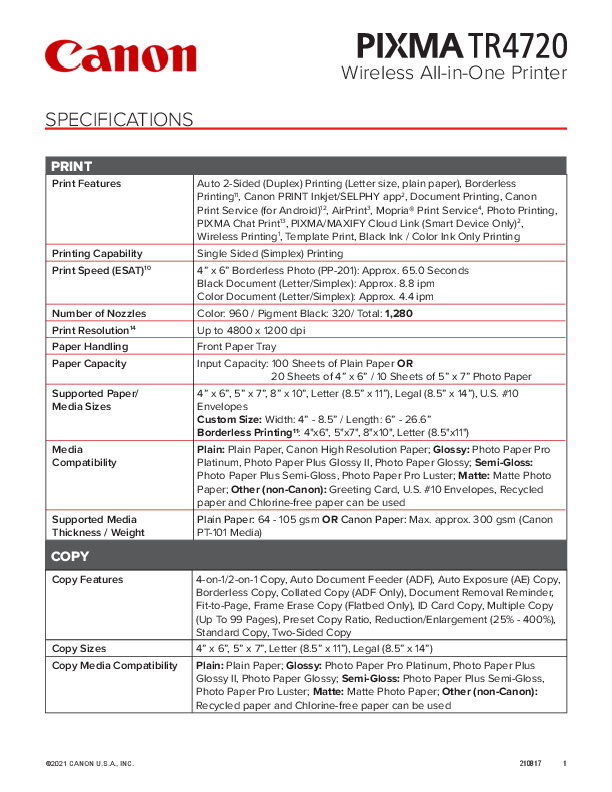
Canon PIXMA TR4720 Wireless All-in-One Printer Specifications
Discover the comprehensive features of the Canon PIXMA TR4720, a versatile wireless all-in-one printer designed for home and small office use. This document outlines the printer's capabilities in printing, copying, scanning, and faxing, alongside its connectivity options and software support.
Key Features
- Printing: Offers auto 2-sided (duplex) printing, borderless printing, and mobile printing via the Canon PRINT Inkjet/SELPHY app, AirPrint, and Mopria Print Service. Supports various paper sizes and media types.
- Copying: Features include 4-on-1/2-on-1 copying, Auto Document Feeder (ADF) support, and borderless copying.
- Scanning: Equipped with a flatbed scanner and ADF, supporting wireless scanning and saving to PC or cloud services.
- Faxing: Includes PC fax capabilities, speed dialing, and memory transmission.
- Connectivity: Supports Hi-Speed USB, Wi-Fi (2.4 GHz), and Wireless Direct Connection. Compatible with smart assistants like Amazon Alexa and Google Assistant.
- Software: Comes with a range of software including the PIXMA TR4720 Wireless All-in-One Printer Driver, IJ Scan Utility, and Easy-PhotoPrint Editor.
- Ink System: Utilizes PG-275 Pigment Black and CL-276 Dye Color ink cartridges, available in standard and XL sizes.
General Information
The PIXMA TR4720 features a 2-line LCD display, Auto Power On/Off, and is ENERGY STAR certified. It supports 32 selectable languages and comes with a 1-year limited warranty.
Compatibility
This printer is compatible with Windows, macOS, Chromebooks, iOS, and Android mobile operating systems, providing broad usability across different devices and platforms.
Models: TR 4720, Printer
Full PDF Document

If the inline viewer fails, it will open the original document in compatibility mode automatically. You can also open the file directly.
 Canon Support | ISO Productivity Standards | Canon U.S.A., Inc.