

Waves Infected Mushroom Pusher User Guide
File info: application/pdf · 10 pages · 1.04MB
Waves Infected Mushroom Pusher User Guide
IMPusher, IM Pusher, Infected Mushroom, Pusher, Waves, EMP, EDM, help, support, manual, user guide, electronic music production
IMPusher;, IM, Pusher;, Infected, Mushroom;, Pusher;, Waves;, EMP;, EDM;, help;, support;, manual;, user, guide;, electronic, music, production
infected-mushroom-pusher
Extracted Text
WAVES
Infected Mushroom Pusher
User Guide

TABLE OF CONTENTS
Chapter 1 � Introduction.
  .....................................................................................................
3
1.1 Welcome ............................................................................................................3 1.2 Product Overview .............................................................................................3 1.3 A Word from Infected Mushroom ....................................................................4 1.4
   Components
.   .........................................................................................................................
 4
Chapter 2 � Quick Start Guide
  ..........................................................................................
5   Chapter 3 � Interface and Controls
 .  ................................................................................
6
3.1 Interface .............................................................................................................6 3.2 Controls .............................................................................................................7 3.3 WaveSystem Toolbar........................................................................................10
Waves Infected Mushroom Pusher User Guide - 2 -

Chapter 1 � Introduction
1.1 Welcome
Thank you for choosing Waves! In order to get the most out of your new Waves plugin, please take a moment to read this user guide.
To install software and manage your licenses, you need to have a free Waves account. Sign up at www.waves.com. With a Waves account you can keep track of your products, renew your Waves Update Plan, participate in bonus programs, and keep up to date with important information.
We suggest that you become familiar with the Waves Support pages: www.waves.com/ support. There are technical articles about installation, troubleshooting, specifications, and more. Plus, you'll find company contact information and Waves Support news.
1.2 Product Overview
Pusher is an innovative multiband sonic enhancer and limiter/clipper designed to bring new sound possibilities to your music by giving you Infected Mushroom's "secret mixing sauce."
Infected Mushroom Pusher is a quick and easy solution for putting a finishing touch on your mix, and sculpting your sound while mixing or mastering. It can be placed on the master buss, groups, or individual tracks. It boosts loudness like a classic limiter, or uses clipping to push the sound without affecting dynamics.
Infected Mushroom Pusher can also be used on drums, bass, vocals, synth pads or leads � or any other track you want to sonically color, enhance, boost or fatten up.

1.3 A Word from Infected Mushroom
"We wanted to combine our mixing and mastering tricks that we've been working on for 20 years into one plugin. Pusher will make almost anything sound better in a matter of seconds." � Erez and Duvdev, a.k.a. Infected Mushroom
1.4 Components
WaveShell technology enables us to split Waves processors into smaller plugins, which we call components. Having a choice of components for a particular processor gives you the flexibility to choose the configuration best suited to your material. Infected Mushroom Pusher has two components:
� IMPusher Mono � mono in to mono out � IMPusher Stereo � stereo in to stereo out
Waves Infected Mushroom Pusher User Guide - 4 -

Chapter 2 � Quick Start Guide
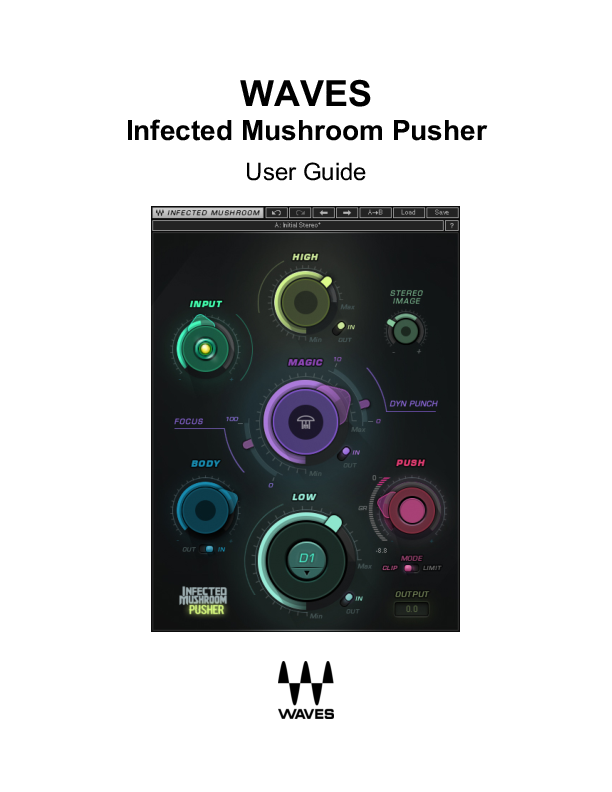
Using Infected Mushroom Pusher is largely intuitive, so how you work with it is really up to you. Pusher consists of several control sections, each of which provides a specific sound enhancement. The sequence in which you use the controllers depends on the effect you're after, but it's recommended that you first set the Input level. Adjust the Input knob until the LED indicator is steady yellow. This usually provides an optimal average input level. Low: Enhances low frequencies and adds harmonics. You can set the frequency where the Low process begins, based on note or frequency. Higher LOW settings will result in more low frequency boost. Body: Adds low-midrange dynamics and frequency processing. In general, this controls the weight of the middle frequencies. Magic: Excites and boosts the dynamics of all frequencies at once. There are additional controls to add Focus and Dynamic Punch. High: Enhances the high frequencies and adds "sparkle." Stereo imager: Widens the stereo field in the higher frequencies. Push: Pushes the level to the maximum loudness. You can choose between the two Push processes: Clipping or Limiting. Output: Attenuates plugin output level.
Note: Plugin output never exceeds -0.1 dBFS, no matter how hard you drive the plugin.
Waves Infected Mushroom Pusher User Guide - 5 -

Chapter 3 � Interface and Controls
3.1 Interface
Waves Infected Mushroom Pusher User Guide - 6 -

3.2 Controls
Input
Adjusts the plugin's input level. Input level will not change when you load a preset. Range: -24 to 24 dB in 0.1 dB increments Default: 0 Reset : 0
Sensitivity LED
Indicates when appropriate levels are reached: o LED off (too low) o Green (good) o Yellow (optimal) o Red (very hot)
Turn the Input control until the LED lights up to the desired color. For best results while mastering, use the section of your track with the highest peaks/loudest part.
Low
Determines the amount of the Low processing added to the signal. Range: 0 (min) to 20 (max) in 0.1 increments Default: 0 Reset: 0
Low Note/Freq
Determines where the Low processing begins, according to Note/Freq. Toggle/Pull down Menu:
D1=37Hz, D#1=39Hz, E=41Hz, F=44Hz, F#=46Hz, G=49Hz, G#=52Hz, A=55Hz, A#=58Hz, B=62Hz, C=65Hz, C#=69, D2=73Hz, D#2=78Hz. Default: D1=37Hz Reset: D1=37Hz
Waves Infected Mushroom Pusher User Guide - 7 -

Low In/Out
Toggles the Low process on or off.
Body
Determines the amount of low-midrange dynamics and frequency applied to the signal. Range: 0 (min) to 20 (max) in 0.1 increments Default: 0 Reset: 0
Body In/Out
Toggles the Body process on or off.
Magic
Determines the amount dynamics boost and excitement at all frequencies. Range: 0 (min) to 100 (max) in 0.1 increments Default: 0 Reset: 0
Magic In/Out Toggles on and off the Magic, Focus, Dynamic Punch, and Stereo Image processes. Default: On Reset: On
Focus
Adds high-midrange dynamics and frequency processing. Range: 0 (min) to 100 (max) in 0.1 increments Default: 0 Reset: 0
Waves Infected Mushroom Pusher User Guide - 8 -

DYN Punch
Controls the amount of punch and crispness. Range: 0 (min) to 10 (max) in 0.1 increments Default: 0 Reset: 0
High
Controls the amount of high frequency enhancement. Range: 0 (min) to 10 (max) in 0.1 increments Default: 0 Reset: 0
High In/Out
Toggles the High process on or off.
Stereo Image
Controls the amount of widening of the stereo field at higher frequencies. Range: 0 (min) to 20 (max) in 0.1 increments Default: 0 Reset: 0
Push
Sets the amount of Push for achieving maximum loudness. Range: 0 to 24 dB in 0.1 dB increments Default: 0 Reset : 0
Waves Infected Mushroom Pusher User Guide - 9 -

Clipper/Limiter Mode Toggle
Toggles between Clipper (pink) and Limiter (orange) mode. Default: Clipper Reset: Clipper
Gain Reduction/Clipping Meter
Indicates the amount of gain reduction in Limit mode and amount of clipping in Clip mode. Range: 0 to I 30 dB in 1 dB increments.
Output
Attenuates the output level of the plugin. Range: 0 to -24 dB in 0.1 dB increments. Default: 0 Reset : 0 Note: Plugin output never exceeds -0.1 dBFS, no matter how hard you drive the plugin.
3.3 WaveSystem Toolbar
Use the bar at the top of the plugin to save and load presets, compare settings, undo and redo steps, and resize the plugin. To learn more, click the icon at the upper-right corner of the window and open the WaveSystem Guide.
Waves Infected Mushroom Pusher User Guide - 10 -