

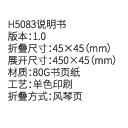
Govee H5083 Smart Plug User Manual
Version: 1.0
Product Overview
This document provides instructions and specifications for the Govee H5083 Smart Plug. The Govee Smart Plug allows remote control of home appliances via a network-connected mobile phone or by pressing the device itself.
Key Features
- Remote control of appliances
- Voice control compatibility (Alexa, Google Assistant)
- Scheduling and timer functions
- Compact design
Physical Specifications
- Folding Size: 45×45 mm
- Unfolded Size: 450×45 mm
- Material: 80G book paper
- Craft: Single color printing
- Folding Method: Accordion fold
At a Glance
LED Indicator Status
- Solid blue: Power on, Wi-Fi connected.
- No light: Power off, Wi-Fi connected.
- Solid purple: Power on, Wi-Fi disconnected.
- Solid red: Power off, Wi-Fi disconnected.
- Flashing blue: Connecting to Wi-Fi.
Device Components
- Flame Resistant Material
- Power Plug
- On-Off/Connecting Button
Installing Your Device
Plug the device into a power socket. Ensure the location is within 100ft of your Wi-Fi router and minimize obstructions like walls or windows between the device and the router.
Pairing Your Plug with the Govee Home App
Requirements
- A Wi-Fi router supporting 2.4GHz (802.11 b/g/n bands). 5GHz is not supported.
- A smartphone or tablet running iOS 8.0 or Android 4.3 (or above).
Setup Steps
- Download the Govee Home app from the App Store or Google Play.
- Turn on Bluetooth on your smartphone.
- Open the app, tap the "+" icon, and search for "H5083".
- Tap the device icon and follow the on-screen instructions to complete pairing.
Using Your Device
App Control
- Remote: Turn the device on/off remotely.
- Timer: Schedule automatic on/off times.
- Off Delay: Set a countdown to automatically turn the device off.
Voice Control
The Govee H5083 supports voice control via Alexa and Google Assistant. Refer to the "Using guidance" section within the Govee Home app for activation instructions.
Troubleshooting
Fail to connect to Wi-Fi
- Ensure the device is within 100ft of the router and minimize obstructions.
- Verify correct Wi-Fi name and password.
- Confirm connection to a 2.4GHz network.
Lost Wi-Fi connection / App issues
- Check your home Wi-Fi network's stability.
- Verify if the Wi-Fi password has been changed.
- Minimize obstructions between the device and router.
- Check the LED indicator; if red, reconnect the device to Wi-Fi.
Specifications
| Rated Voltage | AC 120 V |
| Rated Current | 10A Resistive (Max) |
| AC Frequency | 60 Hz |
| Max Total Output Power | 1200W |
| Working Temperature | -20°C to 40°C (-4°F to 104°F) |
| Wireless Standard | IEEE 802.11 b/g/n, 2.4GHz |
| App Support | iOS/Android |
Safety Instructions
- Recommended for indoor use in dry locations only.
- Use within the specified outlet rating.
- Contact Govee for replacements if damaged during transport.
- Plug in correctly and keep away from children.
- Ensure the plug is fully inserted for safety.
- Do not disassemble the device to avoid damage or hazards.
Compliance and Regulatory Information
FCC and ISED Canada Statement
This device complies with FCC Part 15 and Industry Canada licence-exempt RSS standards. Operation is subject to two conditions: (1) no harmful interference, and (2) acceptance of any received interference. Changes or modifications not expressly approved by the responsible party may void the user's authority to operate the equipment.
This equipment has been tested and found to comply with Class B digital device limits (FCC Part 15). These limits provide reasonable protection against harmful interference in residential installations. The equipment generates, uses, and can radiate radio frequency energy. If not installed and used per instructions, it may cause harmful interference to radio communications. If interference occurs, users are encouraged to try correcting it by: reorienting/relocating the receiving antenna, increasing separation between equipment and receiver, connecting to a different circuit, or consulting a dealer/technician.
FCC and IC Radiation Exposure Statement
This equipment complies with FCC and IC radiation exposure limits for uncontrolled environments. Install and operate with a minimum distance of 20cm between the radiator and your body.
Customer Service and Support
- Warranty: 18-Month Limited Warranty
- Support: Lifetime Technical Support
- Email: support@govee.com
- Official Website: https://www.govee.com
- Social Media: [Facebook] @Govee, [Instagram] @Govee, [Twitter] @Govee, [YouTube] @Goveeofficial