

ELECJET PowerPie 20000mAh Instructions
Model: PowerPie P20/P20K
Product Description
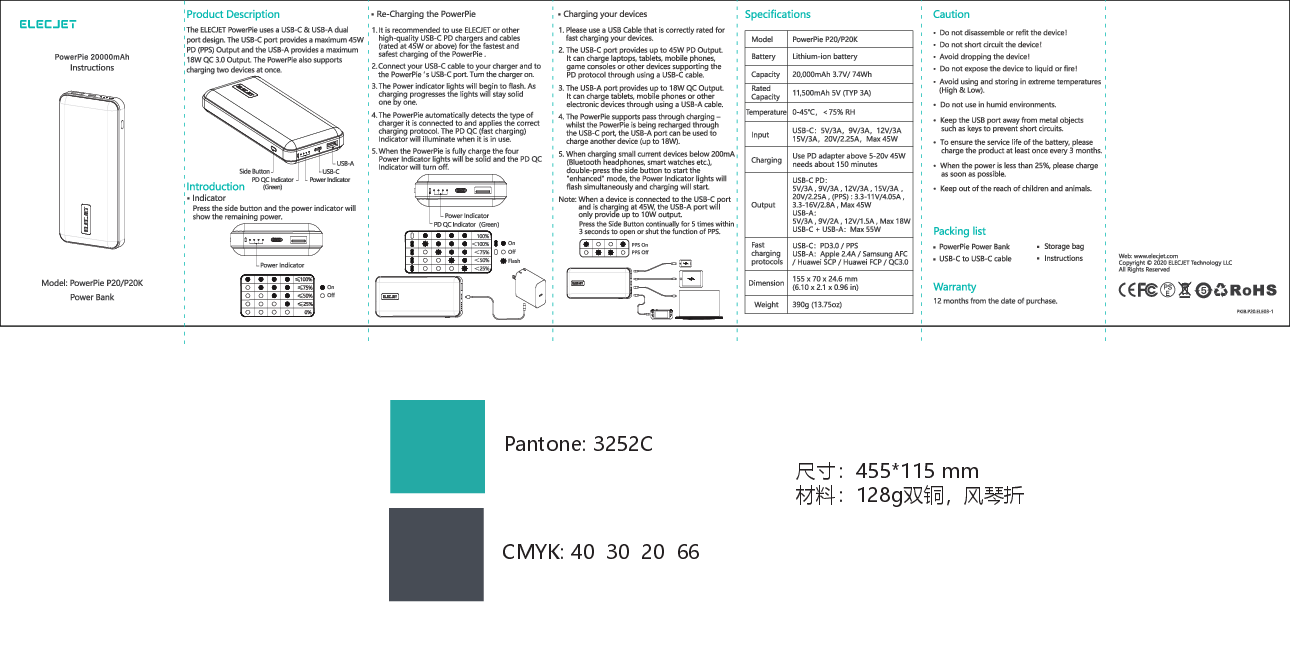
The ELECJET PowerPie uses a USB-C & USB-A dual port design. The USB-C port provides a maximum 45W PD (PPS) Output and the USB-A provides a maximum 18W QC 3.0 Output. The PowerPie also supports charging two devices at once.
Introduction
Side Button
Press the side button and the power indicator will show the remaining power.
Indicator
Power Indicator: Four LEDs show remaining power.
PD QC Indicator (Green): Indicates fast charging status.
Re-Charging the PowerPie
- It is recommended to use ELECJET or other high-quality USB-C PD chargers and cables (rated at 45W or above) for the fastest and safest charging.
- Connect your USB-C cable to your charger and to the PowerPie's USB-C port. Turn the charger on.
- The Power indicator lights will begin to flash. As charging progresses the lights will stay solid one by one.
- The PowerPie automatically detects the type of charger it is connected to and applies the correct charging protocol. The PD QC (fast charging) Indicator will illuminate when it is in use.
- When the PowerPie is fully charged, the four Power Indicator lights will be solid and the PD QC Indicator will turn off.
Charging your devices
- Please use a USB Cable that is correctly rated for fast charging your devices.
- The USB-C port provides up to 45W PD Output. It can charge laptops, tablets, mobile phones, game consoles or other devices supporting the PD protocol through using a USB-C cable.
- The USB-A port provides up to 18W QC Output. It can charge tablets, mobile phones or other electronic devices through using a USB-A cable.
- The PowerPie supports pass-through charging - whilst the PowerPie is being recharged through the USB-C port, the USB-A port can be used to charge another device (up to 18W).
- When charging small current devices below 200mA (Bluetooth headphones, smart watches etc.), double-press the side button to start the "enhanced" mode, the Power Indicator lights will flash simultaneously and charging will start.
Note: When a device is connected to the USB-C port and is charging at 45W, the USB-A port will only provide up to 10W output.
To open or shut the PPS function, press the Side Button continually for 5 times within 3 seconds.
Specifications
| Feature | Details |
|---|---|
| Model | PowerPie P20/P20K |
| Battery | Lithium-ion battery, 20,000mAh 3.7V/74Wh |
| Rated Capacity | 11,500mAh 5V (TYP 3A) |
| Temperature | 0-45°C, <75% RH |
| Input (USB-C PD) | 5V/3A, 9V/3A, 12V/3A, 15V/3A, 20V/2.25A, (PPS): 3.3-11V/4.05A, 3.3-16V/2.8A, Max 45W. Requires PD adapter above 5-20V 45W. Charging time: approx. 150 minutes. |
| Output |
|
| Fast charging protocols |
|
| Dimension | 155 x 70 x 24.6 mm (6.10 x 2.1 x 0.96 in) |
| Weight | 390g (13.75oz) |
Caution
- Do not disassemble or refit the device.
- Do not short circuit the device.
- Avoid dropping the device.
- Do not expose the device to liquid or fire.
- Avoid using and storing in extreme temperatures (High & Low).
- Do not use in humid environments.
- Keep the USB port away from metal objects such as keys to prevent short circuits.
- To ensure the service life of the battery, please charge the product at least once every 3 months.
- When the power is less than 25%, please charge it as soon as possible.
- Keep out of the reach of children and animals.
Packing List
- PowerPie Power Bank
- USB-C to USB-C cable
- Storage bag
- Instructions
Warranty
12 months from the date of purchase.
