

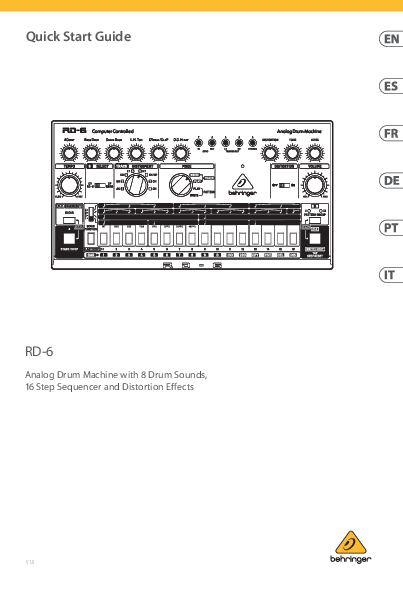
Behringer RD-6 Quick Start Guide
Analog Drum Machine with 8 Drum Sounds, 16 Step Sequencer and Distortion Effects
Version 1.0
Important Safety Instructions
General Warnings:
- Read and keep these instructions.
- Heed all warnings and follow all instructions.
- Do not use near water.
- Clean only with a dry cloth.
- Do not block ventilation openings.
- Do not install near heat sources.
- Protect the power cord from damage.
- Use only manufacturer-specified attachments/accessories.
- Use only with specified carts, stands, tripods, brackets, or tables.
- Unplug during lightning storms or long periods of non-use.
- Refer all servicing to qualified personnel.
- Apparatus must be connected to a MAINS socket outlet with protective earthing.
- Disconnect device must remain readily operable.
Disposal: This product must not be disposed of with household waste (WEEE Directive). Take it to a licensed collection center for recycling of electrical and electronic equipment (EEE). This helps protect the environment and human health.
Warranty: Refer to musictribe.com/warranty for terms and conditions.
Symbols:
- ⚡ (Risk of Electric Shock): Terminals carry sufficient current to constitute a shock risk. Use only professional speaker cables.
- ⚠️ (Dangerous Voltage): Alerts to uninsulated dangerous voltage inside the enclosure.
- ℹ️ (Important Information): Alerts to important operating and maintenance instructions.
Hook-Up Diagrams
The RD-6 can be connected in various system configurations:
Studio System
This setup involves connecting the RD-6 to a Desktop Computer via USB (for MIDI and audio interface), an Audio Interface, Studio Monitors, and Headphones. A MIDI Keyboard can be connected via MIDI IN/OUT ports.
Band/Practice System
This setup is simpler, connecting the RD-6 directly to a Keyboard Amplifier, Headphones, and a Power Adapter. It can also be used in a practice system with just Headphones and a Power Adapter.
RD-6 Controls
The RD-6 features several sections for sound shaping, sequencing, and global control.
Voice Section
- ACCENT: Adjusts the accent level for programmed steps.
- BASS DRUM, SNARE DRUM, LO HI TOM, CYMBAL/CLAP, OPEN/CLOSED HI HAT: Adjust the output level for each drum sound.
Distortion Section
- DISTORTION: Adjusts the amount of distortion.
- TONE: Adjusts the tone of the distortion.
- LEVEL: Adjusts the distortion level.
General Controls
- TEMPO: Adjusts the playback speed of patterns and tracks.
- CYMBAL/CLAP SELECT: Selects between RD-6 Cymbal and BR110 Clap sounds.
- TRACK/INSTRUMENT SELECT: Selects the track or instrument for writing or editing.
- MODE SELECTOR: Choose between TRACK WRITE, TRACK PLAY, PATTERN PLAY, PATTERN WRITE modes.
- POWER LED: Indicates power is supplied to the unit.
- DISTORTION ON/OFF: Bypasses the distortion circuit.
- VOLUME: Adjusts the overall output level for rear panel and headphone outputs.
Sequencer Section
- D.C./BAR RESET/CLEAR: Clears patterns, resets tracks, or signals the end of a pattern sequence.
- SCALE SELECTOR: Determines the number of steps per beat.
- PATTERN GROUP INDICATOR: Shows the current pattern group (I or II).
- PATTERN GROUP: Selects between pattern banks.
- START/STOP: Starts or stops pattern and track playback.
- FUNCTION: A multi-purpose switch used for various writing functions.
- STEP SELECTOR: 16 buttons for step input and pattern creation.
- TAP: Used for real-time rhythm input or other functions depending on the mode.
Patch Bay (3.5 mm TS connections)
- SYNC IN: External clock and start/stop signal input.
- SYNC OUT: External clock and start/stop signal output.
- LT TRIGGER OUT / HT TRIGGER OUT: Send +15V pulses to trigger external devices.
Rear Panel
Note: Inserting a jack into a voice out removes that voice from the main mix out.
- OH/CH VOICE OUT: Open and Closed Hi-Hat output.
- CP VOICE OUT: Clap output.
- CY VOICE OUT: Cymbal output.
- LT/HT VOICE OUT: Low Tom and Hi Tom output.
- SD VOICE OUT: Snare Drum output.
- BD VOICE OUT: Bass Drum output.
- MIX OUT: Main mixed output.
- START/STOP: Foot pedal input for start/stop control.
- MIDI OUT/THRU: MIDI data output and thru connection.
- MIDI IN: MIDI data input.
- USB: For computer connection, updates, and MIDI control.
- POWER: Turns the unit on/off.
- DC INPUT: Connects the supplied 9V DC power adapter.
Getting Started
This guide helps you set up the RD-6 and introduces its capabilities.
Overview
The RD-6 is an analog rhythm designer with 8 drum sounds, a 16-step sequencer, and distortion effects.
Connection
Consult the connection guide earlier in this document for system setup.
Software Setup
The RD-6 is a USB Class Compliant MIDI device; no drivers are required for Windows or MacOS.
Hardware Setup
Make all system connections with the RD-6 powered off. Use only the supplied power adapter. Turn the RD-6 on before power amplifiers and off last to prevent speaker pops.
Warm Up Time
Allow at least 15 minutes for the RD-6 to warm up for optimal performance of its analog circuits.
Setting Sync and Clock Type
Use Step keys 1-4 for clock source (INT, MIDI, USB, TRIG) and Step keys 5-8 for clock rate (1PPS, 2PPQ, 24PPQ, 48PPQ). Press Function, then PATTERN GROUP and WRITE/NEXT simultaneously to enter Sync setting mode. Changes are saved automatically after 3 seconds of inactivity.
MIDI Channel Selection
Hold FUNCTION, press PATTERN GROUP, then use Step keys 1-16 to select the channel. Press PATTERN GROUP again to switch between MIDI transmit (out) and receive (in).
Patch Bay Section
Provides versatile connections for external units and modular synthesizers using standard 3.5 mm TS jacks. Note: Do not overload the sync input; use only specified voltage levels.
Firmware Update
Check behringer.com for updates to the Behringer Synth Tool app, which can also be used to change RD-6 settings.
Writing a Pattern
- Select PATTERN WRITE mode.
- Select a step (1-16).
- Press START.
- Set pattern length (default 16 steps) by holding FUNCTION/LAST STEP and selecting the end step.
- Select the instrument.
- Select steps for the instrument to sound, or use the TAP button for real-time rhythm input.
- Repeat for other instruments. Press STOP to finish.
Pattern Play Mode
Select patterns (1-16) and switch between pattern groups (I/II) using the PATTERN GROUP button. Edits can be made in real-time.
Pattern Chain
Chain up to 16 patterns together (up to 256 steps) by holding the first pattern and pressing the last in the chain.
Track Write Mode
Select a track (1-8). Use CLEAR/BAR RESET to return to the start. Play patterns and press WRITE/NEXT to sequence them. Press CLEAR then WRITE/NEXT after the last pattern to finalize.
Track Play Mode
Select a track (1-8), press CLEAR/BAR RESET, then press START to play.
TAP Button
Functions vary by MODE selector and RUN/STOP status. In PATTERN WRITE, it's for real-time rhythm input. In PATTERN PLAY, it's a STEP RESET. When stopped, it advances one bar. When running in TRACK PLAY, it returns to an assigned measure. In TRACK WRITE, it performs a WRITE/NEXT function.
Random Pattern
In PATTERN WRITE mode, press CLEAR and START/STOP simultaneously to generate a random pattern (overwrites current pattern).
Trigger Outputs
Two programmable +15V trigger outputs allow interfacing with external synthesizers or sequencers. They can be used to activate trigger/gate inputs or control rhythm/arpeggio functions.
Specifications
| Category | Details |
|---|---|
| Voices | Number of sounds: 8 Analog, Simultaneous voices: 8 |
| Voice Controls | Accent, Bass Drum, Snare Drum, Low Tom, Hi Tom, Cymbal, Clap, Open Hat, Closed Hat (all Level controls) |
| Connectivity | DC Input, Power Switch, USB (Type B), MIDI In/Out/Thru, Start/Stop (1/4" TS), Mix Out (1/4" TS), Voice Out (6 x 1/8" TS), Sync In/Out (1/8" TRS), Trigger Outs (2 x +15V), Phones (1/8" TRS Stereo) |
| USB | Class compliant USB 2.0, Type B, Supported OS: Windows 7+, Mac OS X 10.6.8+ |
| Pattern/Storage | 2 x 16 patterns, 16 steps per pattern |
| Power Requirements | External power adapter: 9V DC, 670 mA |
| Power Consumption | 2W max. |
| Indicator | Power LED |
| Environmental | Operating temperature: 5°C-40°C (41°F - 104°F) |
| Physical | Dimensions (H x W x D): 56 x 305 x 165 mm (2.2 x 12 x 6.5"), Weight: 0.9 kg (2.0 lbs), Shipping Weight: 1.6 kg (3.5 lbs) |
MIDI Information
MIDI messages for Note Off, Note On, and All Notes Off are detailed, along with examples for Bass Drum, Snare Drum, Low Tom, Hi Tom, Clap, Cymbal, Open Hat, and Closed Hat, typically using MIDI Note No. 36 for Bass Drum and Channel 1.
FCC Compliance Information
This equipment complies with FCC Rules Part 15 as a Class B digital device. It is designed to provide reasonable protection against harmful interference in residential installations. Operation is subject to two conditions: (1) it may not cause harmful interference, and (2) it must accept any interference received.
Important information: Changes or modifications not expressly approved by Music Tribe can void the user's authority to operate the equipment.
 Behringer | Home
  Music Tribe