

File info: application/pdf · 2 pages · 785.85KB
ルーターの初期設定 ハードウェアの接続 - TP-Link
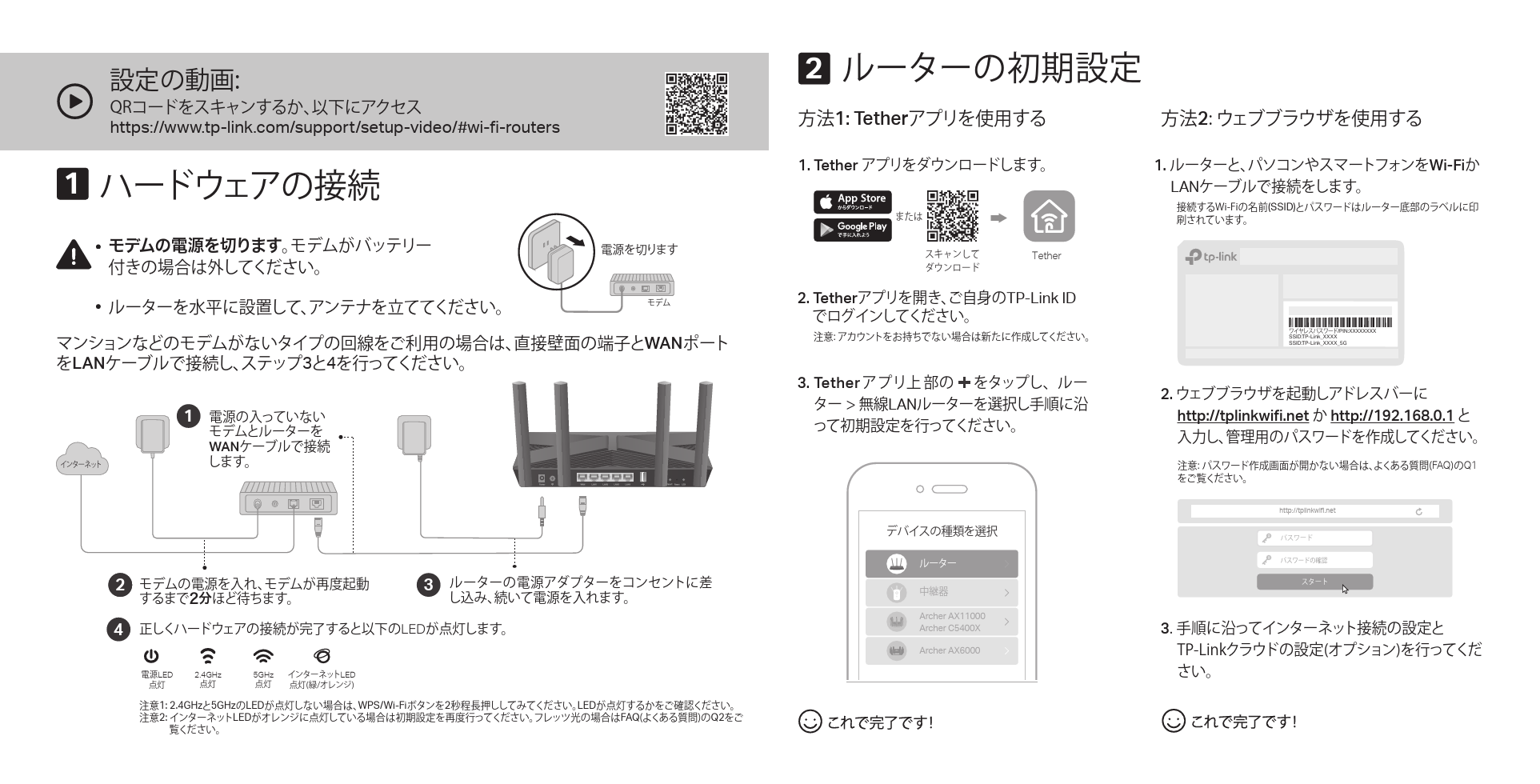
注意1: 2.4GHzと5GHzのLEDが点灯しない場合は、WPS/Wi-Fiボタンを2秒程長押ししてみてください。LEDが点灯するかをご確認ください。
ルーターの初期設定 ハードウェアの接続
Extracted Text
23 https://www.tp-link.com/support/setup-video/#wi-fi-routers

1


WAN LAN34


1
 WAN

2


3


4 LED

LED

2.4GHz

5GHz LED


1: 2.4GHz5GHzLEDWPS/Wi-Fi2LED 2: LEDFAQ
Q2


2

1: Tether

2

1. Tether


Tether

2. TetherTP-Link ID


1. Wi-Fi LAN
8J'J(SSID)
Model: Archer AX3000 AX3000 Gigabit Wi-Fi Router
/PIN:XXXXXXXX SSID:TP-Link_XXXX SSID:TP-Link_XXXX_5G

3. Tether   LAN

  Archer AX11000 Archer C5400X Archer AX6000

2.  http://tplinkwifi.net  http://192.168.0.1
 FAQ
Q1
http://tplinkwifi.net


3 51-JOL


WPS/Wi-Fi
814 814 8J'J
Reset
LED

LED
-&%
64#
64#64# https://www.tp-link.com/app/usb
 64#
 64#
 64#
 '"2 https://www.tp-link.com/support/

FAQ

Q1.

*1*1  %)$1
 http://tplinkwifi.net  http://192.168.0.1 http://192.168.1.1     5FUIFS 8J'J
Q2.
 -"/     *1  -&% 111P&
Q3.
 -"/ http://tplinkwifi.net

Q4.
51-JOL*%  3FTFU-&%
�2020 TP-Link 7106508718 REV1.0.3


"98J'J