

Hunter X2 Quick Programming Guide
Model: X2
Brand: Hunter
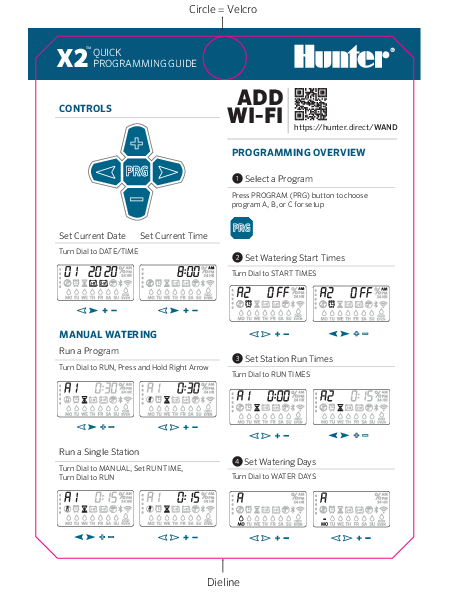
Controls
The controller features a dial and several buttons for programming:
- Dial: Used to select options, dates, times, and run times.
- + Button: Increases values or moves forward.
- - Button: Decreases values or moves backward.
- PRG Button: Selects programs (A, B, or C) for setup or runs programs manually.
- Right Arrow Button: Confirms selections or advances through steps.
Date and Time Setting: Turn the dial to DATE/TIME to set the current date and time.
Add Wi-Fi
Enhance your controller's functionality by adding Wi-Fi connectivity. Visit the following URL for setup instructions:
Programming Overview
Follow these steps to set up your watering programs:
- Select a Program: Press the PROGRAM (PRG) button to choose program A, B, or C for setup.
- Set Watering Start Times: Turn the dial to START TIMES. The display shows options like 'ODD', 'EVEN', 'MO TU WE TH FR SA SU', and specific times (e.g., 8:00% AM).
- Set Station Run Times: Turn the dial to RUN TIMES. For each station (zone), set the desired watering duration (e.g., A1 0:30%).
- Set Watering Days: Turn the dial to WATER DAYS. Select the days of the week or choose 'ODD' or 'EVEN' watering schedules.
Manual Watering
Run a Program: Turn the dial to RUN, then press and hold the Right Arrow button to start a selected program.
Run a Single Station: Turn the dial to MANUAL, set the desired RUN TIME for a specific station, then turn the dial to RUN to start that station.
Watering Schedule Details
A program is a watering schedule that includes a start time(s), run time(s), and water day(s). A start time is the time of day the stations in the program start watering. A run time is the watering length per station (zone). One start time is needed to run the entire program.
| Parameter | Program A | Program B | Program C |
|---|---|---|---|
| DAYS OF THE WEEK | MTWTFSS | MTWTFSS | MTWTFSS |
| INTERVAL OR ODD/EVEN | |||
| NON-WATER DAYS | |||
| PROGRAM START TIMES | 1 2 3 4 | 1 2 3 4 | 1 2 3 4 |
Station Run Times
| STATION | LOCATION | STATION RUN TIME (Program A) | STATION RUN TIME (Program B) | STATION RUN TIME (Program C) |
|---|---|---|---|---|
| 1 | ||||
| 2 | ||||
| 3 | ||||
| 4 | ||||
| 5 | ||||
| 6 | ||||
| 7 | ||||
| 8 | ||||
| 9 | ||||
| 10 | ||||
| 11 | ||||
| 12 | ||||
| 13 | ||||
| 14 |
For more information, visit: https://hunter.direct/X2help
