

Shark POWERDETECT™ Clean & Empty Vacuum IP3225 Series - Quick Start Guide
Please be sure to read and save the warnings on the other side prior to using your unit.
Assembly
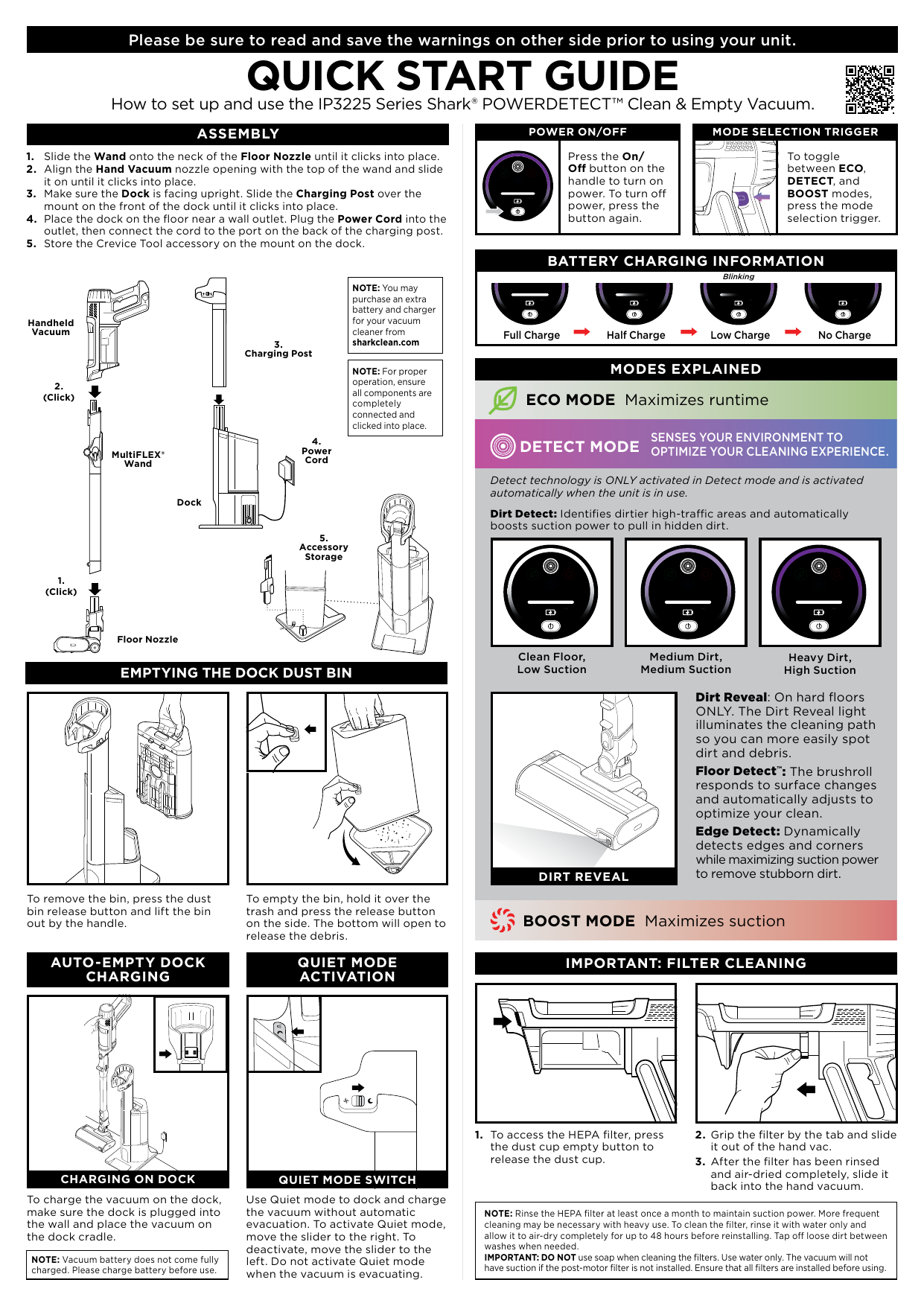
Follow these steps to assemble your Shark POWERDETECT™ Clean & Empty Vacuum:
- Slide the Wand onto the neck of the Floor Nozzle until it clicks into place.
- Align the Hand Vacuum nozzle opening with the top of the wand and slide it on until it clicks into place.
- Make sure the Dock is facing upright. Slide the Charging Post over the mount on the front of the dock until it clicks into place.
- Place the dock on the floor near a wall outlet. Plug the Power Cord into the outlet, then connect the cord to the port on the back of the charging post.
- Store the Crevice Tool accessory on the mount on the dock.
Key Components: Handheld Vacuum, MultiFLEX® Wand, Floor Nozzle, Dock, Charging Post, Power Cord, Accessory Storage.
Power On/Off
Press the On/Off button on the handle to turn on power. To turn off power, press the button again.
Mode Selection
To toggle between ECO, DETECT, and BOOST modes, press the mode selection trigger located on the handle.
- ECO MODE: Maximizes runtime.
- DETECT MODE: Senses your environment to optimize your cleaning experience. Detect technology is ONLY activated in Detect mode and is activated automatically when the unit is in use.
- Dirt Detect: Identifies dirtier high-traffic areas and automatically boosts suction power to pull in hidden dirt.
- Dirt Reveal: On hard floors ONLY. The Dirt Reveal light illuminates the cleaning path so you can more easily spot dirt and debris.
- Floor Detect™: The brushroll responds to surface changes and automatically adjusts to optimize your clean.
- Edge Detect: Dynamically detects edges and corners while maximizing suction power to remove stubborn dirt.
- BOOST MODE: Maximizes suction.
Battery Charging Information
When charging, the battery indicator light will show the charge status:
- ? Full Charge
- ? Half Charge
- ? Low Charge
- ? No Charge (indicator may be blinking when charging)
Emptying the Dock Dust Bin
To remove the dust bin from the vacuum, press the dust bin release button and lift the bin out by the handle.
To empty the bin, hold it over the trash and press the release button on the side. The bottom of the bin will open to release the debris.
Auto-Empty Dock Charging
To charge the vacuum on the dock, ensure the dock is plugged into the wall and place the vacuum on the dock cradle.
Quiet Mode Activation
Use Quiet mode to dock and charge the vacuum without automatic evacuation. To activate Quiet mode, move the slider to the right. To deactivate, move the slider to the left. Do not activate Quiet mode when the vacuum is evacuating.
Important: Filter Cleaning
Regular filter cleaning is essential for maintaining suction power.
- To access the HEPA filter, press the dust cup empty button to release the dust cup.
- Grip the filter by the tab and slide it out of the hand vac.
- After the filter has been rinsed and air-dried completely, slide it back into the hand vacuum.
Important Safety Instructions
WARNING: TO REDUCE THE RISK OF INJURY, USER MUST READ INSTRUCTION MANUAL • HOUSEHOLD USE ONLY
- This vacuum consists of a motorized nozzle, wand, and handheld vacuum. These components contain electrical connections, electrical wiring, and moving parts that potentially present risk to the user.
- Before each use, carefully inspect all parts for any damage. If a part is damaged, discontinue use.
- Use only identical replacement parts.
- This vacuum contains no serviceable parts.
- Use only as described in this manual. DO NOT use the vacuum for any purpose other than those described in this manual.
- With the exception of the filters and dust cup, DO NOT expose any parts of the vacuum to water or other liquids.
- Keep the appliance and its cord out of reach of children. DO NOT allow the appliance to be used by children. DO NOT allow to be used as a toy. Close supervision is necessary when used near children.
GENERAL USE
- This appliance can be used by persons with reduced physical, sensory, or mental capabilities or lack of experience and knowledge if they have been given supervision or instruction concerning use of the appliance in a safe way and understand the hazards involved. Cleaning and user maintenance shall not be made by children.
- Always turn off the vacuum before connecting or disconnecting any current carrying hoses, motorized nozzles, chargers, batteries, or other electrical or mechanical parts.
- DO NOT handle plug or vacuum with wet hands.
- DO NOT use without dust cup, HEPA and pre-motor filters, and brushroll in place.
- Only use Shark® branded filters and accessories. Failure to do so will void the warranty.
- DO NOT put any objects into nozzle or accessory openings. DO NOT use with any opening blocked; keep free of dust, lint, hair, and anything that may reduce airflow.
- DO NOT use if nozzle or accessory airflow is restricted. If the air paths or the motorized floor nozzle become blocked, turn the vacuum off. Remove all obstructions before you turn on the unit again.
- Keep nozzle and all vacuum openings away from hair, face, fingers, uncovered feet, or loose clothing.
- DO NOT use if vacuum is not working as it should, or has been dropped, damaged, left outdoors, or dropped into water.
- Use extra care when cleaning on stairs.
- DO NOT leave the vacuum unattended while powered on.
- When powered on, keep the vacuum moving over the carpet surface at all times to avoid damaging the carpet fibers.
- DO NOT place vacuum on unstable surfaces such as chairs or tables.
- DO NOT use to pick up:
- Liquids
- Large objects
- Hard or sharp objects (glass, nails, screws, or coins)
- Large quantities of dust (including drywall, fireplace ash, or embers). DO NOT use as an attachment to power tools for dust collection.
- Smoking or burning objects (hot coals, cigarette butts, or matches)
- Flammable or combustible materials (lighter fluid, gasoline, or kerosene)
- Toxic materials (chlorine bleach, ammonia, or drain cleaner)
- DO NOT use in the following areas:
- Poorly lit areas
- Wet or damp surfaces
- Outdoor areas
- Spaces that are enclosed and may contain explosive or toxic fumes or vapors (lighter fluid, gasoline, kerosene, paint, paint thinners, mothproofing substances, or flammable dust)
- Turn off the vacuum before plugging in or unplugging the charger.
- Turn off the vacuum before any adjustment, cleaning, maintenance or troubleshooting.
- During cleaning or routine maintenance, DO NOT cut anything other than hair, fibers, or string wrapped around the brushrolls.
- Allow all filters to air-dry completely before replacing in the vacuum to prevent liquid from being drawn into electric parts.
- DO NOT modify or attempt to repair the vacuum or the battery yourself, except as indicated in this manual. DO NOT use the battery or vacuum if it has been modified or damaged. Damaged or modified batteries may exhibit unpredictable behavior resulting in fire, explosion, or risk of injury.
- Always turn off this appliance before connecting or disconnecting motorized nozzle or hand tool.
BATTERY PACK
- The battery is the power source for the vacuum. Carefully read and follow all charging instructions.
- To prevent unintentional starting, ensure it is powered off before picking up or carrying the vacuum. DO NOT carry the appliance with your finger on the power switch.
- Use only the XDCKIP3000NO charging dock. Use of incorrect charger may result in no charging and/or unsafe conditions.
- Keep the battery away from all metal objects such as paper clips, coins, keys, nails, or screws. Shorting the battery terminals increases the risk of fire or burns.
- Under abusive conditions, liquid may be ejected from the battery. Avoid contact with this liquid, as it may cause irritation or burns. If contact occurs, flush with water. If liquid contacts eyes, seek medical help.
- Battery should not be stored at temperatures below 3°C (37.4°F) or above 104°F (40°C) to maintain long-term battery life.
- DO NOT charge battery at temperatures below 5°C (40°F) or above 104°C (104°F). Charging improperly or at temperatures outside of the specified range may damage the battery and increase the risk of fire.
- Store the appliance indoors. DO NOT use or store it below 3°C (37.4°F). Ensure the appliance is at room temperature before operating.
- DO NOT expose the battery to fire or temperatures above 265°F (130°C) as it may cause explosion.
- Use appliances only with specifically designated battery packs. Use of any other battery packs may create a risk of injury and fire.
- Disconnect the battery pack from the appliance before making any adjustments, changing accessories, or storing appliance. Such preventive safety measures reduce the risk of starting the appliance accidentally.
- For IP3000 Series use only with Shark battery pack XBATR640US.
- If the charging cord plug does not fit fully into the outlet, reverse the plug. If it still does not fit, contact a qualified electrician. DO NOT force into outlet or try to modify to fit.
- To reduce the risk of shock and unintended operation, turn off power and remove the Li-Ion battery before servicing.
Read and Save These Instructions
Visit qr.sharkclean.com/IP3000seriesmanual or scan the QR code for full instructions & replacement parts.
