

Universal Eclipse P400 Manual V1.0-WEB
File info: application/pdf · 2 pages · 2.90MB
Universal Eclipse P400 Manual V1.0-WEB
Manual - Phanteks
This manual is applicable for the following products: PH-EC400ATG
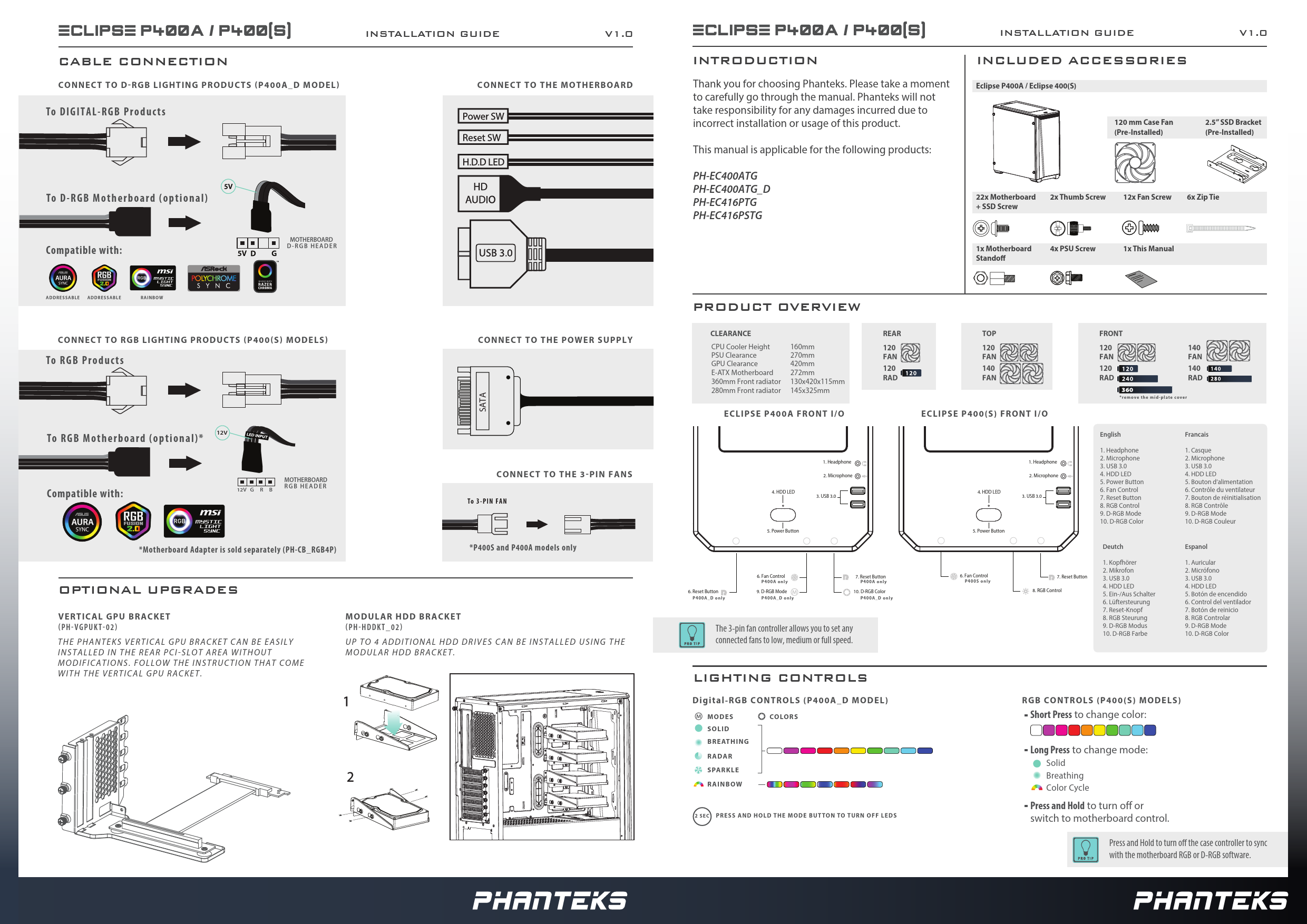
ECLIPSE P400A / P400(S) INSTAL ATION GUIDE V1.0 ECLIPSE ...
CLEARANCE CPU Cooler Height 120160mm PSU Clearance 270mm GPU Clearance 420mm E-ATX Motherboard 360mm Front radiator 280mm Front radiator 272mm 130x420x115mm
Eclipse P400A / P400 introduction. Thank you for choosing Phanteks. Please take a moment to carefully go through the manual. Phanteks will not take responsibility...
Extracted Text
ECLIPSE P400A / P400(S) CABLE CONNECTION
CONNECT TO D RGB LIGHTING PRODUCTS P400A_D MODEL
To DIGITAL-RGB Products

INSTALLATION GUIDE

V1.0

CONNECT TO THE MOTHERBOARD

To D-RGB Motherboard (optional) Compatible with:

MOTHERBOARD D-RGB HEADER

ADDRESSABLE ADDRESSABLE

RAINBOW

CONNECT TO RGB LIGHTING PRODUCTS P400 S MODELS
To RGB Products

CONNECT TO THE POWER SUPPLY

SATA

12V
To RGB Motherboard (optional)*

Compatible with:

12V G R B

MOTHERBOARD RGB HEADER

CONNECT TO THE 3 PIN FANS
To 3-PIN FAN

*Motherboard Adapter is sold separately (PH-CB_RGB4P)

*P400S and P400A models only

OPTIONAL UPGRADES
VERTICAL GPU BRACKET PH VGPUKT 02 THE PHANTEKS VERTICAL GPU BRACKET CAN BE EASILY INSTALLED IN THE REAR PCI SLOT AREA WITHOUT MODIFICATIONS. FOLLOW THE INSTRUCTION THAT COME WITH THE VERTICAL GPU RACKET.

MODULAR HDD BRACKET PH HDDKT_02
UP TO 4 ADDITIONAL HDD DRIVES CAN BE INSTALLED USING THE MODULAR HDD BRACKET.

ECLIPSE P400A / P400(S)
INTRODUCTION
Thank you for choosing Phanteks. Please take a moment to carefully go through the manual. Phanteks will not take responsibility for any damages incurred due to incorrect installation or usage of this product.
This manual is applicable for the following products:
PH-EC400ATG PH-EC400ATG_D PH-EC416PTG PH-EC416PSTG

INSTALLATION GUIDE
INCLUDED ACCESSORIES
Eclipse P400A / Eclipse 400(S)

V1.0

120 mm Case Fan (Pre-Installed)

2.5" SSD Bracket (Pre-Installed)

22x Motherboard 2x Thumb Screw + SSD Screw

12x Fan Screw 6x Zip Tie

1x Motherboard Stando

4x PSU Screw

1x This Manual

PRODUCT OVERVIEW

CLEARANCE
CPU Cooler Height PSU Clearance GPU Clearance E-ATX Motherboard 360mm Front radiator 280mm Front radiator

160mm 270mm 420mm 272mm 130x420x115mm 145x325mm

ECLIPSE P400A FRONT I/O

REAR
120 FAN 120 RAD

4. HDD LED

1. Headphone 2. Microphone
3. USB 3.0

5. Power Button

6. Reset Button P400A_D only

6. Fan Control P400A only
9. D-RGB Mode P400A_D only

7. Reset Button P400A only
10. D-RGB Color P400A_D only

The 3-pin fan controller allows you to set any connected fans to low, medium or full speed.

TOP

FRONT

120

120

140

FAN

FAN

FAN

140

120

140

FAN

RAD

RAD

ECLIPSE P400(S) FRONT I/O

*remove the mid-plate cover

4. HDD LED
5. Power Button
6. Fan Control P400S only

1. Headphone 2. Microphone
3. USB 3.0

English
1. Headphone 2. Microphone 3. USB 3.0 4. HDD LED 5. Power Button 6. Fan Control 7. Reset Button 8. RGB Control 9. D-RGB Mode 10. D-RGB Color

7. Reset Button 8. RGB Control

Deutch
1. Kopfh�rer 2. Mikrofon 3. USB 3.0 4. HDD LED 5. Ein-/Aus Schalter 6. L�ftersteurung 7. Reset-Knopf 8. RGB Steurung 9. D-RGB Modus 10. D-RGB Farbe

Francais
1. Casque 2. Microphone 3. USB 3.0 4. HDD LED 5. Bouton d'alimentation 6. Contr�le du ventilateur 7. Bouton de r�initialisation 8. RGB Contr�le 9. D-RGB Mode 10. D-RGB Couleur
Espanol
1. Auricular 2. Micr�fono 3. USB 3.0 4. HDD LED 5. Bot�n de encendido 6. Control del ventilador 7. Bot�n de reinicio 8. RGB Controlar 9. D-RGB Mode 10. D-RGB Color

LIGHTING CONTROLS

Digital-RGB CONTROLS (P400A_D MODEL)

MODES SOLID B R E AT H I N G

COLORS

RADAR SPARKLE RAINBOW

2 SEC PRESS AND HOLD THE MODE BUTTON TO TURN OFF LEDS

RGB CONTROLS (P400(S) MODELS)
Short Press to change color:
Long Press to change mode:
Solid Breathing Color Cycle
Press and Hold to turn o or switch to motherboard control.
Press and Hold to turn o the case controller to sync with the motherboard RGB or D-RGB software.

ECLIPSE P400A / P400(S)

INSTALLATION GUIDE

INTRODUCTION
There are three panels that can be removed from the P400 Chassis; the left side tempered glass panel, the right side panel and the front panel. Follow these steps below.

LEFT SIDE PANEL

1. R E M O V E 4 T H U M B S C R E W S

1.

2.

REMOVE: 4x

2. R E M O V E T E M P E R E D G L A S S P A N E L

RIGHT SIDE PANEL

1. L O O S E N T H U M B S C R E W S

1.

2.

LOOSEN: 2x

2. S L I D E S I D E P A N E L O F F

FRONT PANEL
1. R E M O V E F R O N T P A N E L B Y P U L L I N G
ON THE PANEL FROM BELOW

With the P400(S) models you can acces the dust lters after removing the front panel. We recommend to clean the dust lters every month for optimal performance.

V1.0

ECLIPSE P400A / P400(S)

INSTALLATION GUIDE

HARDWARE INSTALLATION
MOTHERBOARD
1. I N S T A L L T H E M O T H E R B O A R D W I T H 9 M O T H E R B O A R D S C R E W S

INSTALL: 9x

Micro - ATX
POWER SUPPLY
1. I N S T A L L T H E P O W E R S U P P L Y W I T H 4 P S U S C R E W S
INSTALL: 4x

V1.0

2.5" SSD
1. I N S T A L L T H E S S D D R I V E W I T H 4 S S D S C R E W S
INSTALL: 4x
3.5" HDD
1. I N S T A L L T H E H D D D R I V E I N T H E T O O L L E S H D D T R A Y A N D S L I D E I T B A C K I N T O T H E C H A S S I S
The HDD Tray can also hold a 2.5" SSD