

File info: application/pdf · 11 pages · 701.38KB
VSTMTK3PRO Infrared Thermometer User Manual - KJB ...
VSTMTK3PRO Infrared Thermometer User Manual ... 红外测温传感器:Infrared temperature sensor ... Working mode: count mode, body temp, surface temp.
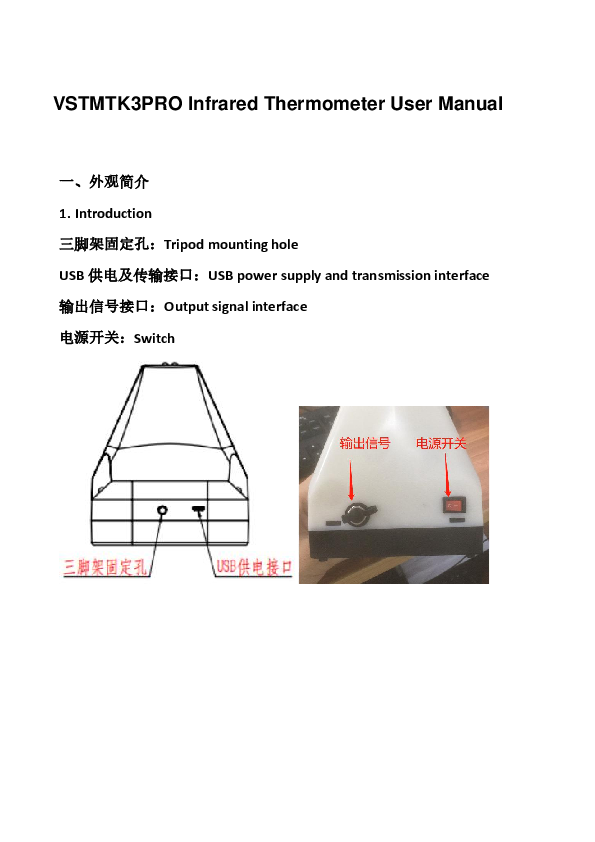
VSTMTK3PRO Infrared Thermometer User Manual. 一、外观简介. 1. Introduction ... 红外测温传感器:Infrared temperature sensor ... 电池盖:Battery cover.
VSTMTK3PRO Infrared Thermometer User Manual - KJB Security ...
测温精度:精度±0.2℃(35~42℃,需放置工作坏境30 分钟后开始使用). 1. Accuracy:±0.2 degrees(35~42℃,place it in the operating environment for 30 minutes ...
Full PDF Document

If the inline viewer fails, it will open the original document in compatibility mode automatically. You can also open the file directly.
Extracted Text
VSTMTK3PRO Infrared Thermometer User Manual
 1. Introduction Tripod mounting hole USB USB power supply and transmission interface Output signal interface Switch

Infrared temperature sensor Distance sensor Display Alarm Light :Set button Hanging hole Battery cover

2.Specification
Model: VSTMTK3PRO
1. �0.23542 30  1. Accuracy:�0.2 degrees(35~42place it in the operating environment for 30 minutes before use ) 2. + 2.Alarm mode: abnormal automatic alarm, flash + sound alarm for about 10 seconds 3. 5cm~15cm  3.Measuring distance: 5cm~15cm automatic measurement 4.LCD  4.Display: LCD display 5.USB Type C

5. Transmission interface: USB Type C 6.4  AA  6. Adaptable power supply: 4 AA batteries (external power supply and internal power supply can be switched at will) 7. 7. Install method: nail hook, bracket fixing 8.10 ~40  15~35  8. Environment temperature: 10~40 (recommended 15~35) 9.0~50 9. Measuring range: 0~50 10.0.5s 10. Response time: 0.5s 11. 30S  11. Standby: 30S automatic standby during non-working hours 12. DC 5V 500MA 12. Input: DC 5V 500MA 13.303g 13. Weight:303g 14.170X115X140mm 14. Dimensions: 170X115X140mm 15.9999  15. Counting capacity: 9999 times

3.Display Description

1 1. Working mode: count mode, body temp, surface temp. 2USB  2. Status indication: expression, USB connection status, volume, power. 3 3. Measurement result: temperature value or count value. 4 4. Temperature unit: Celsius or Fahrenheit. 5M**F** 5. Setting item or historical record: M** indicates the current historical record number; F** indicates the setting item number. 6 6. It will shows History temp or Environment temp 7 7. Environment temperature

4.State description
1.  1 1.Standby: The backlight is turned off and the temperature remains displayed. (Fig. 1)

2.  2 2. Insufficient power: The display indicates that the battery is empty and the icon flashes.(Fig. 2)
3.  3) 3.Normal temperature: Flashing green lights on both sides
4.  4 4.Abnormal temperature:Flashing red lights on both sides
5.  35  LO ( 5) 42  HI  6 5.Out of range(in body mode) `Lo': Ultra-low temperature than 35 degrees Celsius(Fig. 5) HI': Ultra-high temperature than 42 degrees Celsius(Fig. 6)

5

6

 5.Operation Instruction
1. ( 7) 1. Temperature measurement: Front of the thermometer, approach it within 5-15cm.(Fig. 7)
7

2.  M** 30
2. Historical temperature query: In the working mode, press the left and right buttons to query the historical temperature, M** represents the current historical temperature. The device currently supports up to 30 historical temperatures.

3.  SET  1  F1
3. Temperature unit switching: In the working mode, press the SET button once(F1). The temperature unit is switched. Press the left and right

buttons to switch between Celsius and Fahrenheit. :Celsius F:Fahrenheit
4.  SET  2  F2Count Mode
""Body Mode ""Surface Mode "" 4.Mode switching: Press the SET button twice in the working mode(F2).The working mode is switched. Press the left and right buttons to switch the working mode. Body temp: body mode, Surface temp: Surface mode
5.  SET  3  F3 37.0~38.0  37.3   5. Alarm temperature setting: Press the SET button 3 times in the working mode(F3). It is the alarm setting state of the body mode. Press the left and right buttons to switch the alarm temperature between 37.0~38.0. The default is 37.3 degrees Celsius. Note: The alarm value is only valid in the body mode, there is no alarm temperature in the surface mode and count mode.

6.  SET  4  F4  6. Volume setting: In the working mode, press the SET button 4 times(F4). It is the volume setting state. Press the left and right buttons to adjust the volume. The more parentheses behind the small speaker, the greater the volume, and the disappearance of the small speaker represents mute.
7.  SET  5  F5ON  OFF  7. Backlight setting: Press the SET button 5 times in the working mode(F5). It is the backlight setting state. Press the left and right buttons to turn the backlight on or off(ON and OFF)

8.  SET  6  F6CH EN  LCD  8. Language setting: In the working mode, press the SET button 6 times(F6). It is the language setting state. Press the left and right buttons to switch the language of the voice broadcast. CH stands for Chinese and EN stands for English.
9.  SET  7  F7 S1 S2   9. Output signal setting: Press the SET button 7 times in the working mode(F7). It is the output signal setting state. Press the left and right buttons to switch the output signal type. S1 represents the switch mode and S2 represents the pulse mode. For more instructions on the use of output signals, please refer to the instruction manual of the output signal.

10.USB   Type C  USB   10.USB connection: Use Type C USB cable to connect to the computer, open the corresponding host computer software on the computer, you can connect with the device and store the measurement results in real time. For more online instructions, please refer to the instruction manual of the host computer. 11.
 11. Battery installation and replacement:
Open the back battery cover, remove the old battery, and install the new battery correctly according to the battery polarity.
12. 12. Install method: nail hook, bracket fixing

nail hook

bracket fixing


1. 2. 3. 30  4. 5. 6. 7. Warnings 1.It is the user's responsibility to ensure the electromagnetic compatibility environment of the device so that it can work normally. 2. It is recommended to evaluate the electromagnetic environment before using the device. 3. When changing the operating environment, the device must be left to stand for more than 30 minutes. 4. Please measure the forehead to the thermometer. 5. Please avoid direct sunlight when using outdoors. 6. Keep away from the air conditioner, fans, etc. 7. Please use qualified and safety-certified batteries. Unqualified batteries may cause fire or explosion.