

JBL TUNE510BT Quick Start Guide
Welcome to your new JBL TUNE510BT headphones!
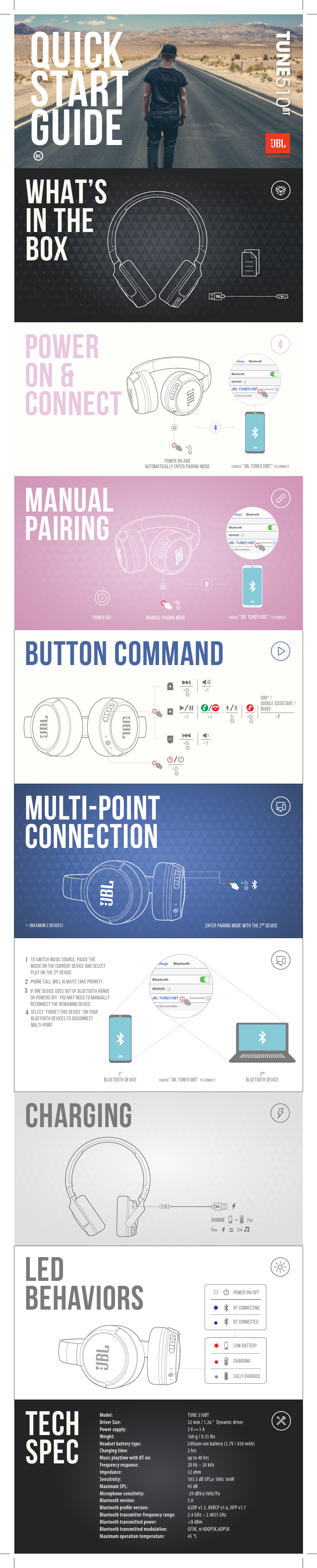
What's in the Box
- JBL TUNE510BT headphones
- USB-C charging cable
- Detachable audio cable
- Warranty card
- Quick start guide
Power On & Connect
Power On & Automatic Pairing: Press and hold the power button for 2 seconds. The headphones will automatically enter pairing mode.
Manual Pairing: Turn off the headphones. Press and hold the power button for 5 seconds to enter manual pairing mode.
Connecting: On your device's Bluetooth settings, choose "JBL TUNE510BT" to connect.
Visual Description: The image shows a smartphone screen with Bluetooth settings open, displaying "JBL TUNE510BT Connected" as a discoverable device.
Multi-Point Connection
Connect to two Bluetooth devices simultaneously (maximum 2 devices).
- To switch music sources, pause music on the current device and select play on the 2nd device.
- Phone calls will always take priority.
- If one device goes out of Bluetooth range or powers off, you may need to manually reconnect the remaining device.
- To disconnect multi-point, select "Forget This Device" on your Bluetooth devices.
Visual Description: Diagrams illustrate connecting to a first and second Bluetooth device, showing the process of entering pairing mode with the second device.
Charging
Connect the USB-C cable to charge the headphones. A full charge takes approximately 2 hours. 5 minutes of charging provides up to 2 hours of music playtime.
Visual Description: An illustration shows a USB-C cable connected to the headphones for charging.
LED Behaviors
- Solid Red: Charging
- Off: Fully Charged
- Flashing Blue: BT Connecting
- Solid Blue: BT Connected
- Flashing Red: Low Battery
- Power On/Off: Indicated by sound prompts.
Technical Specifications
| Spec | Value |
|---|---|
| Model | TUNE510BT |
| Driver Size | 32 mm / 1.26" Dynamic driver |
| Power Supply | 5V-1A |
| Weight | 160 g / 0.35 lbs |
| Headset Battery Type | Lithium-ion battery (3.7V / 450 mAh) |
| Charging Time | Up to 2 hrs |
| Music Playtime with BT On | Up to 40 hrs |
| Frequency Response | 20 Hz - 20 kHz |
| Impedance | 32 ohm |
| Sensitivity | 103.5 dB SPL@ 1kHz 1mW |
| Maximum SPL | 95 dB |
| Microphone Sensitivity | -29 dBV@1kHz/Pa |
| Bluetooth Version | 5.0 |
| Bluetooth Profile Version | A2DP v1.3, AVRCP v1.6, HFP v1.7 |
| Bluetooth Transmitter Frequency Range | 2.4 GHz-2.4835 GHz |
| Bluetooth Transmitter Power | <8 dBm |
| Bluetooth Transmitter Modulation | GFSK, π/4DQPSK, 8DPSK |
| Maximum Operation Temperature | 45 °C |
