

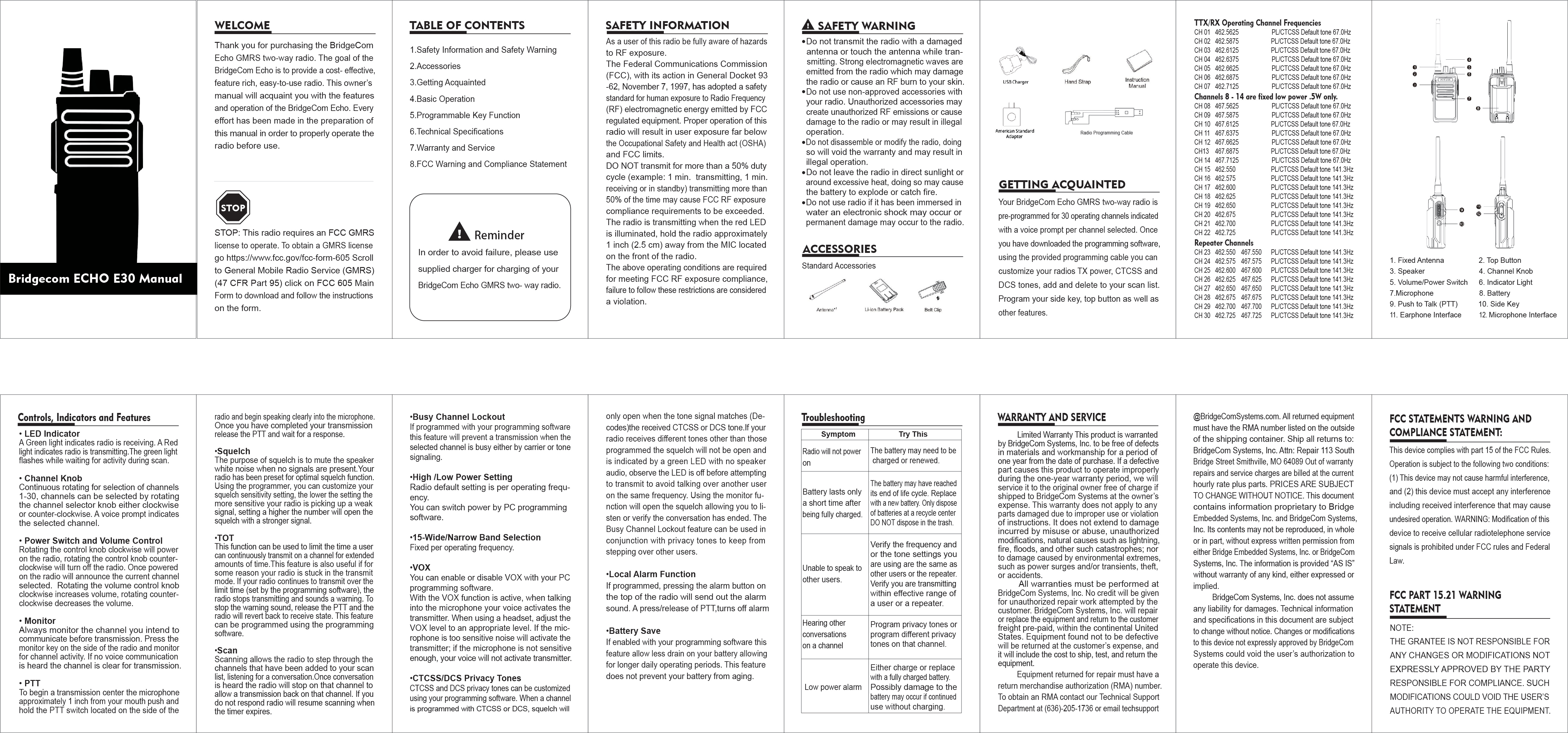
BridgeCom ECHO E30 Manual
Welcome
Thank you for purchasing the BridgeCom Echo GMRS two-way radio. The goal of the BridgeCom Echo is to provide a cost-effective, feature-rich, easy-to-use radio. This owner's manual will acquaint you with the features and operation of the BridgeCom Echo. Every effort has been made in the preparation of this manual to ensure proper operation of the radio before use.
STOP: This radio requires an FCC GMRS license to operate. To obtain a GMRS license, go to https://www.fcc.gov/fcc-form-605. Scroll to General Mobile Radio Service (GMRS) (47 CFR Part 95), click on FCC 605 Main Form to download and follow the instructions on the form.
Table of Contents
- Safety Information and Safety Warning
- Accessories
- Getting Acquainted
- Basic Operation
- Programmable Key Function
- Technical Specifications
- Warranty and Service
- FCC Warning and Compliance Statement
Reminder: In order to avoid failure, please use the supplied charger for charging of your BridgeCom Echo GMRS two-way radio.
Safety Information
As a user of this radio, be fully aware of hazards to RF exposure.
The Federal Communications Commission (FCC), with its action in General Docket 93-62, November 7, 1997, has adopted a safety standard for human exposure to Radio Frequency (RF) electromagnetic energy emitted by FCC regulated equipment. Proper operation of this radio will result in user exposure far below the Occupational Safety and Health Act (OSHA) and FCC limits.
DO NOT transmit for more than a 50% duty cycle (example: 1 min. transmitting, 1 min. receiving or in standby). Transmitting more than 50% of the time may cause FCC RF exposure compliance requirements to be exceeded.
The radio is transmitting when the red LED is illuminated. Hold the radio approximately 1 inch (2.5 cm) away from the MIC located on the front of the radio.
The above operating conditions are required for meeting FCC RF exposure compliance; failure to follow these restrictions is considered a violation.
Safety Warning
- Do not transmit the radio with a damaged antenna or touch the antenna while transmitting. Strong electromagnetic waves are emitted from the radio which may damage the radio or cause an RF burn to your skin.
- Do not use non-approved accessories with your radio. Unauthorized accessories may create unauthorized RF emissions or cause damage to the radio or may result in illegal operation.
- Do not disassemble or modify the radio; doing so will void the warranty and may result in illegal operation.
- Do not leave the radio in direct sunlight or around excessive heat; doing so may cause the battery to explode or catch fire.
- Do not use the radio if it has been immersed in water; an electronic shock may occur or permanent damage may occur to the radio.
Accessories
Standard Accessories:
- Antenna
- Li-ion Battery Pack
- Belt Clip
- USB Charger
- American Standard Adapter
- Radio Programming Cable
- Hand Strap
- Instruction Manual
Getting Acquainted
Your BridgeCom Echo GMRS two-way radio is pre-programmed for 30 operating channels indicated with a voice prompt per channel selected. Once you have downloaded the programming software, using the provided programming cable, you can customize your radio's TX power, CTCSS and DCS tones, add and delete to your scan list. Program your side key, top button, as well as other features.
Operating Channel Frequencies
Channels 1-7 and 15-22 are standard simplex channels.
| CH | Operating Frequency | PL/CTCSS Default Tone |
|---|---|---|
| 01 | 462.5625 | 67.0Hz |
| 02 | 462.5875 | 67.0Hz |
| 03 | 462.6125 | 67.0Hz |
| 04 | 462.6375 | 67.0Hz |
| 05 | 462.6625 | 67.0Hz |
| 06 | 462.6875 | 67.0Hz |
| 07 | 462.7125 | 67.0Hz |
| 08 | 467.5625 | 67.0Hz |
| 09 | 467.5875 | 67.0Hz |
| 10 | 467.6125 | 67.0Hz |
| 11 | 467.6375 | 67.0Hz |
| 12 | 467.6625 | 67.0Hz |
| 13 | 467.6875 | 67.0Hz |
| 14 | 467.7125 | 67.0Hz |
| 15 | 462.550 | 141.3Hz |
| 16 | 462.575 | 141.3Hz |
| 17 | 462.600 | 141.3Hz |
| 18 | 462.625 | 141.3Hz |
| 19 | 462.650 | 141.3Hz |
| 20 | 462.675 | 141.3Hz |
| 21 | 462.700 | 141.3Hz |
| 22 | 462.725 | 141.3Hz |
Note: Channels 8-14 are fixed low power 0.5W only.
Repeater Channels
| CH | TX Frequency | RX Frequency | PL/CTCSS Default Tone |
|---|---|---|---|
| 23 | 462.550 | 467.550 | 141.3Hz |
| 24 | 462.575 | 467.575 | 141.3Hz |
| 25 | 462.600 | 467.600 | 141.3Hz |
| 26 | 462.625 | 467.625 | 141.3Hz |
| 27 | 462.650 | 467.650 | 141.3Hz |
| 28 | 462.675 | 467.675 | 141.3Hz |
| 29 | 462.700 | 467.700 | 141.3Hz |
| 30 | 462.725 | 467.725 | 141.3Hz |
Controls, Indicators and Features
Radio Diagram Description: The radio features the following components:
- 1. Fixed Antenna: For transmitting and receiving signals.
- 2. Top Button: Programmable function button.
- 3. Speaker: Outputs audio.
- 4. Channel Knob: Selects operating channels.
- 5. Volume/Power Switch: Controls power and audio volume.
- 6. Indicator Light: Shows radio status (transmit/receive).
- 7. Microphone: Captures voice for transmission.
- 8. Battery: Powers the radio.
- 9. Push to Talk (PTT): Activates transmission.
- 10. Side Key: Programmable function button.
- 11. Earphone Interface: For connecting an external earphone.
- 12. Microphone Interface: For connecting an external microphone.
Detailed Features:
- LED Indicator: A green light indicates the radio is receiving. A red light indicates the radio is transmitting. The green light flashes while waiting for activity during scan.
- Channel Knob: Continuous rotation for selection of channels 1-30, clockwise or counter-clockwise. A voice prompt indicates the selected channel.
- Power Switch and Volume Control: Rotating the control knob clockwise powers on the radio; counter-clockwise turns it off. Once powered on, the radio announces the current channel selected. Rotating the volume control knob clockwise increases volume; counter-clockwise decreases volume.
- Monitor: Always monitor the channel you intend to communicate on before transmission. Press the monitor key on the side of the radio and monitor for channel activity. If no voice communication is heard, the channel is clear for transmission.
- PTT (Push to Talk): To begin a transmission, center the microphone approximately 1 inch from your mouth, push and hold the PTT switch located on the side of the radio, and speak clearly into the microphone. Once transmission is complete, release the PTT and wait for a response.
- Squelch: The purpose of squelch is to mute speaker white noise when no signals are present. Your radio has been preset for optimal squelch function. Using the programmer, you can customize your squelch sensitivity setting. A lower setting makes the radio more sensitive to weak signals; a higher setting requires a stronger signal to open the squelch.
- TOT (Time-Out Timer): This function limits the time a user can continuously transmit on a channel. It is also useful if the radio gets stuck in transmit mode. If the radio transmits beyond the programmed limit, it stops transmitting and sounds a warning. To stop the warning, release the PTT; the radio reverts to receive state. This feature can be programmed using the programming software.
- Scan: Scanning allows the radio to step through channels added to your scan list, listening for conversations. The radio stops on a channel with activity, allowing a transmission back. If no response is received, scanning resumes after a timer expires.
- Busy Channel Lockout: If programmed via the software, this feature prevents transmission when the selected channel is busy by carrier or tone signaling.
- High/Low Power Setting: Radio default setting is per operating frequency. Power can be switched via PC programming software.
- 15-Wide/Narrow Band Selection: Fixed per operating frequency.
- VOX (Voice Activated Exchange): VOX can be enabled or disabled using the PC programming software. When VOX is active, your voice activates the transmitter. When using a headset, adjust the VOX level appropriately. If the microphone is too sensitive, noise may activate the transmitter; if not sensitive enough, your voice may not activate the transmitter.
- CTCSS/DCS Privacy Tones: CTCSS and DCS privacy tones can be customized using the programming software. When a channel is programmed with CTCSS or DCS, squelch only opens when the tone signal matches the received tone. If the radio receives different tones, squelch will not open, indicated by a green LED with no speaker audio. Observe the LED is off before attempting to transmit to avoid talking over other users on the same frequency. The monitor function opens squelch for listening or verifying conversation end. Busy Channel Lockout can be used with privacy tones to prevent stepping on other users.
- Local Alarm Function: If programmed, pressing the alarm button on the top of the radio sends out an alarm sound. A press/release of the PTT turns off the alarm.
- Battery Save: If enabled via software, this feature reduces battery drain for longer operating periods. It does not prevent battery aging.
Troubleshooting
| Symptom | Try This |
|---|---|
| Radio will not power on | The battery may need to be charged or renewed. Either charge or replace with a fully charged battery. Low power alarm: Possibly damage to the battery may occur if continued use without charging. |
| Battery lasts only a short time after being fully charged. | The battery may have reached its end of life cycle. Replace with a new battery. Only dispose of batteries at a recycle center; DO NOT dispose in the trash. |
| Unable to speak to other users. | Verify the frequency and/or the tone settings you are using are the same as other users or the repeater. Verify you are transmitting within effective range of a user or a repeater. |
| Hearing other conversations on a channel | Program privacy tones or program different privacy tones on that channel. |
Warranty and Service
Limited Warranty: This product is warranted by BridgeCom Systems, Inc. to be free of defects in materials and workmanship for a period of one year from the date of purchase. If a defective part causes this product to operate improperly during the one-year warranty period, BridgeCom Systems will service it to the original owner free of charge if shipped to BridgeCom Systems at the owner's expense.
This warranty does not apply to any parts damaged due to improper use or violation of instructions. It does not extend to damage incurred by misuse or abuse, unauthorized modifications, natural causes such as lightning, fire, floods, and other such catastrophes; nor to damage caused by environmental extremes, such as power surges and/or transients, theft, or accidents.
All warranties must be performed at BridgeCom Systems, Inc. No credit will be given for unauthorized repair work attempted by the customer. BridgeCom Systems, Inc. will repair or replace the equipment and return it to the customer freight pre-paid, within the continental United States.
Equipment found not to be defective will be returned at the customer's expense, and it will include the cost to ship, test, and return the equipment.
Equipment returned for repair must have a return merchandise authorization (RMA) number. To obtain an RMA, contact the Technical Support Department at (636)-205-1736 or email techsupport@BridgeComSystems.com. All returned equipment must have the RMA number listed on the outside of the shipping container.
Ship all returns to: BridgeCom Systems, Inc. Attn: Repair, 113 South Bridge Street, Smithville, MO 64089.
Out-of-warranty repairs and service charges are billed at the current hourly rate plus parts. Prices are subject to change without notice.
This document contains information proprietary to Bridge Embedded Systems, Inc. and BridgeCom Systems, Inc. Its contents may not be reproduced, in whole or in part, without express written permission from either Bridge Embedded Systems, Inc. or BridgeCom Systems, Inc. The information is provided "AS IS" without warranty of any kind, either expressed or implied.
BridgeCom Systems, Inc. does not assume any liability for damages. Technical information and specifications in this document are subject to change without notice. Changes or modifications to this device not expressly approved by BridgeCom Systems could void the user's authorization to operate this device.
FCC Statements Warning and Compliance Statement
This device complies with Part 15 of the FCC Rules. Operation is subject to the following two conditions:
- This device may not cause harmful interference, and
- This device must accept any interference, including received interference that may cause undesired operation.
WARNING: Modification of this device to receive cellular radiotelephone service signals is prohibited under FCC rules and Federal Law.
FCC Part 15.21 Warning Statement
NOTE: The grantee is not responsible for any changes or modifications not expressly approved by the party responsible for compliance. Such modifications could void the user's authority to operate the equipment.
