

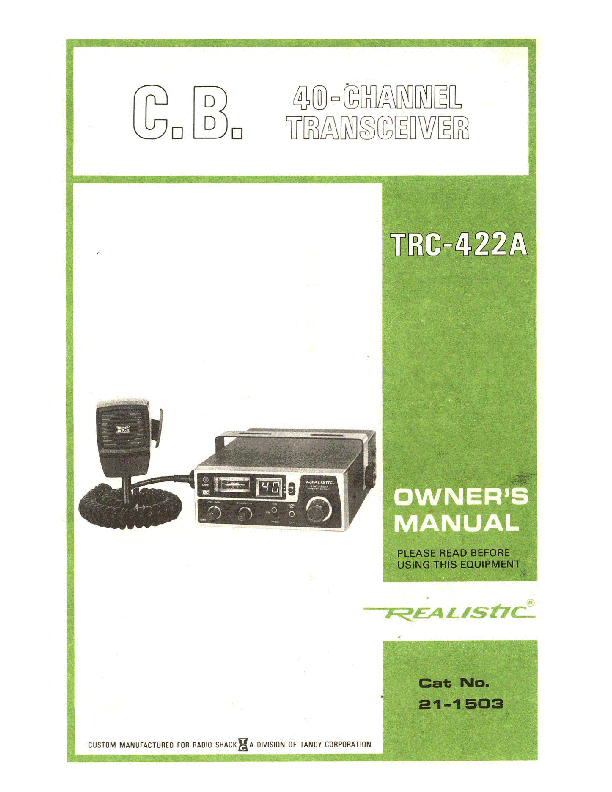
REALISTIC TRC-422A 40-CHANNEL C.B. TRANSCEIVER
OWNER'S MANUAL
PLEASE READ BEFORE USING THIS EQUIPMENT
Cat No. 21-1503
Introduction
The REALISTIC TRC-422A is a compact 2-way 40-channel radio designed for Class D CB Mobile operation. It features all solid-state circuitry, a built-in 40-channel PLL synthesizer for tight frequency control and superior reliability.
Features
- Monolithic crystal and ceramic filters for superior selectivity and freedom from adjacent channel interference.
- Bright red LED channel indicator.
- Emergency Switch for instant access to Channel 9 or 19.
- Switchable Automatic Noise Limiter (ANL).
- LED Modulation Indicator to show voice modulation level.
- Hysteresis-type Squelch circuit to eliminate signal "chopping" during message reception.
- Sensitive front end circuitry with two-stage Automatic Gain Control (AGC) for superior reception.
- Public Address (PA) capability with an optional PA speaker.
- Three-way CB-PA-MONitor switch.
- Signal Strength/RF Output Power Meter.
- Dynamic Communications Microphone with locking connector.
- Operates in any 12-volt DC system, positive or negative ground.
- Utilizes 5 ICs, 19 Transistors, 1 FET, 20 Diodes, 1 LED, and a two-digit LED display.
FCC License (U.S.A.)
Before transmitting, an FCC Class D Citizens Radio Service License is required. FCC Form 555-B can be used for a temporary license. FCC Form 505 is the application for a CB License. Refer to FCC Rules and Regulations, Part 95 for operation guidelines.
D.O.C. License (Canada)
Canadian users must obtain a Department of Communications (D.O.C.) General Radio Service License. Canadian models are D.O.C. approved and intended for use only in Canada.
Specifications
Receiver
- Frequency Coverage: All 40 CB Channels (Class D), 26.965 to 27.405 MHz
- Sensitivity: Not specified, but described as extremely sensitive.
- Adjacent Channel Rejection: Not specified.
- Intermediate Frequency: Not specified.
- Audio Output: Not specified.
- Frequency Response: Not specified.
- Cross-Modulation: Not specified.
- Squelch: Hysteresis-type.
Transmitter
- Frequency Coverage: All 40 CB Channels (Class D), 26.965 to 27.405 MHz
- RF Power Output: 4 watts (maximum).
- Emission: 8A3.
- Modulation Capability: 90-100%.
- Spurious Radiation: 70 dB.
- Frequency Tolerance: Better than 0.002%.
- Antenna Impedance: 50 ohms.
- Current Drain (13.8 volt supply): 1200 mA (without modulation), 1800 mA (full modulation).
Public Address
- Output Power: 6 watts (maximum).
- Output at 10% Distortion: 5 watts.
- Mic. Sensitivity for 4W Output Power (PA mode): 3 mV (at 1 kHz).
- Frequency Response +/-6 dB: 450-2500 Hz.
Power Requirements
12 - 16 volts DC positive or negative ground.
Dimensions
2-7/32" x 5-21/32" x 9-29/32" (5.6 cm x 14.4 cm x 25.2 cm) HWD
Weight
2 lbs. 14 ozs. (1.3 Kg)
Controls and Their Functions
Front Panel
- S/RF Meter: Indicates relative signal strength for Receiver or Transmit.
- Modulation LED: Lights when transmitting and flashes with modulation.
- VOLUME On/OFF Switch: Turns power on and adjusts sound level.
- SQUELCH Control: Permits cutting out background noise; keeps receiver silent until an audible message is received.
- CB-PA-MONitor Switch: Selects desired mode: CB, Public Address, or Monitor.
- Channel Selector: Selects any of the 40 available channels.
- ANL (Automatic Noise Limiter): Aids in reducing impulse-type noise during reception.
Microphone
High-quality dynamic microphone with a push-to-talk button. Press to transmit, release to receive. Ensure the locking connector is securely plugged into the MIC jack.
Rear Panel
- ANTenna Connector: Connects a PL-259 male-type coaxial connector for your CB Antenna.
- Public Address Speaker jack: Connect an 8 ohm speaker for PA use.
- External Speaker jack (EXT SPKR): Connect an external 8 ohm speaker. This automatically disconnects the internal speaker. Requires a miniature phone plug.
- Power Cables: Red wire to positive (+) terminal, Black wire to negative (-) terminal of a 12-volt DC source.
Using Your Transceiver
To Receive
- Ensure 12 volts DC is applied and an antenna is attached.
- Connect the microphone plug to the MIC jack.
- Set the CB-PA-MON Switch to the CB position.
- Set the Emergency Switch to the center position.
- Turn the VOLUME On/OFF switch clockwise to apply power.
- Set the Channel Selector to the desired channel.
- Adjust VOLUME for a comfortable listening level.
- Adjust SQUELCH clockwise until background noise just stops. This ensures the receiver remains silent until a signal is received. Avoid setting SQUELCH too high, which may block weak signals.
To Transmit
- Select the desired channel.
- Connect the microphone plug to the MIC jack.
- Press and hold the push-to-talk button on the microphone, holding it 2-3 inches (5-7.5 cm) from your mouth, and speak in a normal voice.
- Release the button to receive.
Note: Shouting into the microphone does not increase power; it may cause distortion. The internal circuit optimizes modulation.
Emergency Switch
The Emergency Switch allows instant selection of Channel 9 (up position) for emergency communications or Channel 19 (down position) for road and traffic information. Move the switch to the center position to return to the previously selected channel.
To Use Public Address Function
An 8-ohm speaker (5 watts or more) must be connected to the PA SPKR jack on the rear.
- Connect the speaker to the PA SPKR jack.
- Set the CB-PA-MON switch to the PA position.
- Press and hold the push-to-talk button on the microphone and speak in a normal voice.
- Adjust VOLUME for a suitable public address level.
- To monitor CB calls while using PA, set the CB-PA-MON switch to the MON position.
Important: Face the PA speaker away from the microphone to prevent feedback (howling).
Remote Speaker Operation
Connect an 8 ohm, 3-10 watt speaker to the EXT. SPKR jack. This disconnects the internal speaker, allowing monitoring through the remote speaker.
Summary of Operating Modes
The following table summarizes operating modes based on external speaker connections and the CB-PA-MON switch position:
| CB-PA-MON Switch | EXT/PA SPKR Jack Connection | CB Mode | PA Mode | MON Mode |
|---|---|---|---|---|
| Release (CB) | No Connection | Internal Speaker (CB) | No Output | No Output |
| Hold (Transmit) | No Connection | Transmit | No Output | No Transmit |
| Release (CB) | EXT SPKR | External Speaker (CB) | No Output | No Output |
| Hold (Transmit) | EXT SPKR | Transmit | No Output | No Transmit |
| Release (CB) | PA SPKR | Internal Speaker (CB) | PA Speaker (PA) | PA Speaker (CB) |
| Hold (Transmit) | PA SPKR | Transmit | PA Speaker (PA) | PA Speaker (PA) |
| Release (CB) | EXT & PA SPKR | External Speaker (CB) | PA Speaker (PA) | PA Speaker (CB) |
| Hold (Transmit) | EXT & PA SPKR | Transmit | PA Speaker (PA) | PA Speaker (PA) |
Note: When the CB-PA-MON switch is in the PA position, the LED display is OFF. In the MON position, the LED display shows the selected channel number.
Connecting the Locking Mic Plug
The locking microphone connector ensures a secure connection. To connect, press the side tab, align the plug and jack, and insert. To release, press the tab, push the plug in to release the lock, and then pull out.
Getting the Most Out of Your Transceiver
- ANL Switch: Enables the Automatic Noise Limiter to reduce impulse noise. Leave in the OUT position if not needed.
- S/RF Meter: Shows RF output power when transmitting (upper scale) and incoming signal strength when receiving (lower scale).
- Modulation LED: Lights when transmitting and indicates modulation level by its brilliance.
- Remote External Speaker: Connect to the EXT SPKR jack for added versatility. The internal speaker is disconnected when an external speaker is plugged in.
Hints for CB Enjoyment
- Wait for a pause before calling "Break".
- If no answer, sign off, wait, and try again later.
- Do not "Dead Key" (hold the transmitter button without speaking).
- Assist other users with information.
- Avoid harassment on the air.
- Be courteous and treat others respectfully.
Installation
Mount the transceiver in a location accessible to the operator without interfering with vehicle operation. Ensure cables are clear of pedals and do not obstruct passenger legroom. Use the mounting bracket as a template for drilling holes, avoiding wiring or trim.
Mounting Illustration: A diagram shows the bracket, microphone clip, and hardware for mounting the transceiver.
Installation (Cont.)
The transceiver can be installed in any location with 12 volts DC power. Connect the Red wire (with fuse holder) to the positive (+) terminal and the Black wire to the negative (-) terminal of the power source.
- Negative Ground Systems: Connect Red wire to the accessory terminal of the ignition switch. Connect Black wire to the vehicle frame.
- Positive Ground Systems: Connect Black wire to the accessory terminal of the ignition switch. Connect Red wire to the vehicle frame.
Connecting to the cigarette lighter plug via an auto accessory plug is possible, but direct connection to the ignition switch accessory terminal is recommended to prevent unauthorized use and accidental battery drain.
Connect the antenna system to the ANTenna connector and any external speaker to the EXT SPKR jack.
Citizens Band Frequency Chart
A table lists all 40 CB channels and their corresponding frequencies from 26.965 MHz to 27.405 MHz.
Antenna System
A mobile antenna system involves the antenna, transmission line, and vehicle. Use 50-ohm coaxial cable (RG-58/U for lengths under 100', RG-8/U for longer lengths). Keep transmission line length to a minimum. An SWR Meter helps gauge antenna system efficiency.
Mobile Antennas
General rules for mobile antenna installation:
- Mount as far as possible from the vehicle's main body.
- Position as much of the antenna as possible above the highest point of the vehicle.
- Ensure the antenna remains vertical during operation.
- Mount away from noise sources (ignition, gauges) and keep transmission lines clear of them.
A boat installation requires a ground plane of 12 sq. ft. (1 m²) or more. Some antennas, like Radio Shack Catalog Number 21-912, do not require additional grounding.
Types of mobile antennas include full-length whips and loaded whips. Vertically polarized whip antennas are best for mobile service. Popular mounting positions include:
- Roof Mount: Provides omni-directional radiation. Often uses a shortened, loaded whip (e.g., Fiberglass Roof-Mount Catalog Number 21-925).
- Front Cowl Mount: Offers easier mounting and can double as an AM/FM antenna with a coupler (e.g., Catalog Number 21-930).
- Rear Deck: Allows use of full quarter-wave or shorter, loaded whips (e.g., Catalog Numbers 21-926, 21-908, or 102" whips).
- Bumper Mount: Provides radiation in front and rear of the vehicle. Full-length whips generally give best results. Easy removal without drilling holes (e.g., Bumper-mount fiberglass whip, Catalog Number 21-927).
Base Station Antennas
For base station use with a 120V AC/12V DC power supply, consider these antenna types:
- Ground Plane Antenna: Omni-directional, good for contacting fixed and mobile stations (e.g., Radio Shack 21-901).
- Coaxial Antenna: High-efficiency radiator, omni-directional, performs well in most applications (e.g., 21-902, 21-1133, 21-964).
- Beam Antenna: Provides maximum gain and directivity, reducing noise from other directions. Requires a rotor for optimal use (e.g., 3-Element Beam, 21-933).
Ensure the antenna system is adequately grounded and use a lightning arrestor. An SWR meter is recommended for proper antenna matching.
For more information, consult the REALISTIC GUIDE TO CB RADIO available at Radio Shack stores.
Noise
Vehicle and boat electrical systems can cause noise interference. If noise varies with engine speed and sounds like popping, it likely originates from the ignition system.
- Ignition System Noise Reduction:
- Use "radio suppression type" high voltage ignition wire.
- Inspect high voltage ignition wire and connections for leakage.
- Replace spark plugs with suppressor resistor types.
- Other Noise Sources: Generator/alternator, regulator, gauges, and static discharge can be reduced with bypass capacitors. Check Radio Shack for noise reduction accessories.
Service and Maintenance
Treat the transceiver with care. Avoid severe shock, dirt, or moisture.
Troubleshooting
- Receiving Problems:
- Check VOLUME ON/OFF switch.
- Ensure SQUELCH is properly adjusted (not over-squelched).
- Verify the unit is on an active channel.
- Confirm the microphone plug is securely connected.
- Transmitting Problems:
- Check transmission line connection to the ANTenna Connector.
- Verify antenna installation for proper operation.
- Ensure all transmission line connections are secure and free of corrosion.
- Confirm the Push-To-Talk Button is fully pressed.
- Ensure the Mic connector is firmly seated.
- Check the PA-CB-MON switch setting.
- Completely Inoperative Unit:
- Check the power cable and the in-line fuse. Replace only with an identical 2 amp fuse.
Warning: Do not attempt internal repairs or adjustments yourself. Internal adjustments require an FCC 1st or 2nd Class Radio Operator's License. Unauthorized modifications can lead to illegal operation and serious consequences.
Typical Applications
Personal and Family
- Stay in touch while driving.
- Communicate between family vehicles.
- Contact friends and neighbors.
- Call for assistance in emergencies (car trouble, out of gas).
- Enhance outdoor activities like camping, hunting, and fishing.
- Use the PA amplifier for calling companions.
Business Uses
- Coordinate field employee activities.
- Sales and service personnel can save time and improve contact rates.
- Doctors and nurses can stay in touch with offices/hospitals.
- Security personnel benefit for safety and efficiency.
- Truck drivers and delivery personnel can share road/traffic information and locate destinations.
- Construction crews can coordinate material delivery and work crews.
10-Codes
Citizens band radio operators commonly use 10-codes for faster and clearer communication:
| Code | Meaning | Code | Meaning |
|---|---|---|---|
| 10-1 | Receiving poorly | 10-10 | Standing by |
| 10-2 | Receiving well | 10-13 | Advise road/weather conditions. |
| 10-3 | Stop Transmitting | 10-20 | What is your location? |
| 10-4 | OK | 10-33 | Emergency traffic |
| 10-7 | Out of Service | 10-36 | Correct time |
| 10-8 | In Service | 10-41 | Switch to Channel. |
| 10-9 | Repeat | 10-62 | Cannot copy you. |
Radio Shack Limited Warranty
This equipment is warranted against defects for 90 days from the date of purchase. Radio Shack will repair it free of charge for parts and labor within this period. Proof of purchase (sales slip) is required. Warranty does not cover transportation costs or damage due to misuse or accidental damage. This warranty provides specific legal rights, which may vary by state.
We Service What We Sell
RADIO SHACK
A DIVISION OF TANDY CORPORATION
U.S.A.: FORT WORTH, TEXAS 76102
CANADA: BARRIE, ONTARIO L4M 4W5
TANDY CORPORATION
AUSTRALIA: 280316 VICTORIA ROAD, RYDALMERE N S W 2116
BELGIUM: PARC INDUSTRIEL DE NANINNE, 5140 NANINNE
U K: BILSTON ROAD WEDNESBURY, WEST MIDLANDS WSIO JJN