

HP Dock Solutions
File info: application/pdf · 44 pages · 1.48MB
HP Dock Solutions
HP Ultra-light Docking Stations
QuickSpec;, c04168358;, DA, 13639;, Worldwide
https://www8.hp.com/h20195/v2/getpdf.aspx/c04168358
Thunderbolt dock G2 - can connect 4 monitors? - HP Support Community - 7697653
Extracted Text
QuickSpecs
Introduction
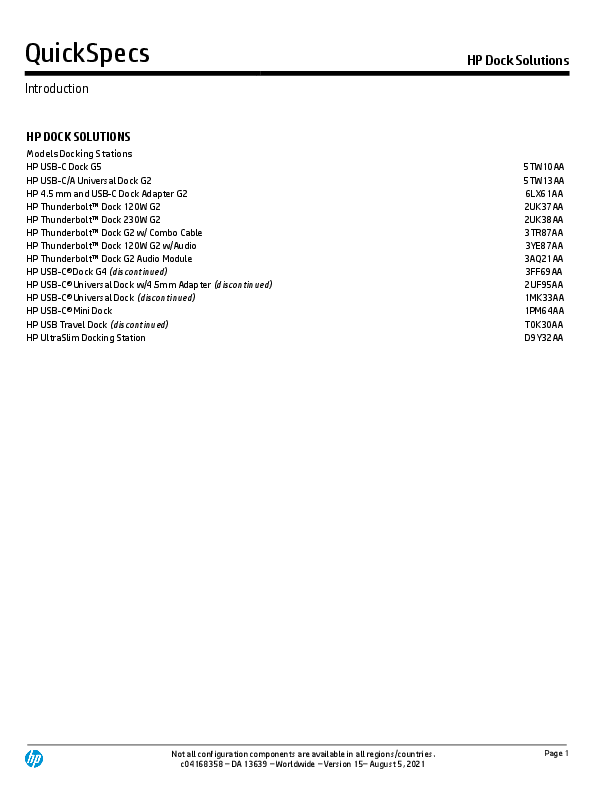
HP DOCK SOLUTIONS
Models Docking Stations HP USB-C Dock G5 HP USB-C/A Universal Dock G2 HP 4.5 mm and USB-C Dock Adapter G2 HP ThunderboltTM Dock 120W G2 HP ThunderboltTM Dock 230W G2 HP ThunderboltTM Dock G2 w/ Combo Cable HP ThunderboltTM Dock 120W G2 w/Audio HP ThunderboltTM Dock G2 Audio Module HP USB-C� Dock G4 (discontinued) HP USB-C� Universal Dock w/4.5mm Adapter (discontinued) HP USB-C� Universal Dock (discontinued) HP USB-C� Mini Dock HP USB Travel Dock (discontinued) HP UltraSlim Docking Station

HP Dock Solutions
5TW10AA 5TW13AA 6LX61AA 2UK37AA 2UK38AA 3TR87AA 3YE87AA 3AQ21AA 3FF69AA 2UF95AA 1MK33AA 1PM64AA T0K30AA D9Y32AA

Not all configuration components are available in all regions/countries. c04168358 � DA 13639 � Worldwide � Version 15� August 5, 2021

Page 1

QuickSpecs
Introduction

HP Dock Solutions

Introduction
It is common practice to use more than one dock with your computer. There are users who have a dock at the office, carry a travel hub or dock for use while traveling and also have a dock at home. There are many reasons to use a lock with your computer and your dock. The currently shipping docks:

HP USB-C Dock G5 HP USB-C/A Universal Dock G2 HP ThunderboltTM Dock 120W G2 HP ThunderboltTM Dock 230W G2 HP ThunderboltTM Dock G2 w/ Combo Cable HP ThunderboltTM Dock 120W G2 w/Audio

5TW10AA 5TW13AA 2UK37AA 2UK38AA 3TR87AA 3YE87AA

are compatible with the following HP locks:

HP Dual Head Keyed Cable Lock HP Keyed Cable Lock 10mm HP Combination Lock

T1A64AA T1A62AA T0Y15AA

Not all configuration components are available in all regions/countries. c04168358 � DA 13639 � Worldwide � Version 15� August 5, 2021

Page 2

QuickSpecs
Technical Specifications

HP Dock Solutions

Front and Side View

1. 1 LED power button

4. 2 USB 3.0 charging ports

2. 1 Type-C� USB 3.0 port with data and power out (15W) 5. 1 Combo audio jack

3. 1 USB-C� cable to connect to host system (1 meter

length)

Not all configuration components are available in all regions/countries. c04168358 � DA 13639 � Worldwide � Version 15� August 5, 2021

Page 3

QuickSpecs
Technical Specifications

HP USB-C Dock G5

HP Dock Solutions

1.

2 USB 3.0 charging ports

2.

2 DisplayPortTM 1.4 ports

3.

1 Standard lock slot

Back View
4. 5.

1 HDMI 2.0 port 1 RJ45 port

Bottom View

1.

1. Insert 4.5 mm barrel from included 120W power supply.

Not all configuration components are available in all regions/countries. c04168358 � DA 13639 � Worldwide � Version 15� August 5, 2021

Page 4

QuickSpecs
Technical Specifications

HP Dock Solutions

Part number Product dimensions (L x W x H) Package dimensions (L x W x H) Weight Top components Front components Side components Back components
External monitor support Power to system Power to host (USB-C PD) Operating systems1
Power Supply Power Barrel Connector

Components 5TW10AA
4.80 x 4.80 x 1.77 in (122 x 122 x 45 mm)
7.63 x 6.18 x 6.57 in (194 x 157 x 167 mm)
1.49 lb (0.68 kg)
LED and power button to power or wake host system1
One Type-C� USB 3.0 port with data and power out (15W) One USB-C� cable to connect to host system (1 meter cable length)
Two USB 3.0 charging ports One combo audio jack
Two USB 3.0 charging ports Two DisplayPortTM 1.4 ports One RJ45 port One HDMI 2.0 port One standard lock slot
3 displays is the maximum displays supported, depending on the capabilities of the host machine. Triple 4K displays requires a DP 1.4 machine with DSC2 in high res mode.
Up to 100W via USB-C� (up to 75W on non HP machines) Separate AC power needed for HP ZBooks that require more than 100W power delivered via USB-C alt mode.
5V , 9V, 10V, 12V, 15V, 20V all at 5A MAX
Win 7 Win 10 MacOS
120W
4.5mm

1. For USB-C� functionality, host PC must support the DisplayPortTM Alt mode protocol through its USB-C� port. ThunderboltTM-enabled notebooks will function at USB-C� speeds. Charging and port replication is supported on notebooks that have implemented USB-C� industry
specifications. Power button to turn on or wake the system, Wake-on LAN from warm and cold dock, Wake-on LAN from S4/S5, and MAC Address Pass-Through S0, S3, S4, S5 warm and cold dock features only function on HP or HP-supported notebooks. HP does not provide Ethernet and audio drivers on Mac PCs. 2. The DSC supported version and color format depends on GFX capability. DSC is disabled when display is attached to the VGA port or to an external DP2 VGA dongle.

Video Resolution (Continue on the next page)

This table shows which ports to use to achieve the display configuration. You must refer to the next table to see the limitations and requirements to achieve these resolutions.
For Chrome users, dual displays are supported at full HD. Triple displays are only supported on select Chromebox machines. For Apple users, the maximum display resolution using Apple is one display on a DP 1.4 host at UHD@60Hz. On an Apple DP 1.2 host you will get QHD~2.5K

Display Configurations

Output ports

Single Display (1) 2.5k Display

Any port

(1) 4k Display

Any port

(1) 5K single cable*

Either DP port

(1) 5K dual cable

Both DP ports

Not all configuration components are available in all regions/countries. c04168358 � DA 13639 � Worldwide � Version 15� August 5, 2021

Page 5

QuickSpecs
Technical Specifications

HP Dock Solutions

Dual Displays Triple Displays

(1) 8K dual cable (1) 8K single cable* (2) FHD Displays (2) 2.5k Displays (1) 4K and (1) FHD (2) 4k Displays (1) 5K single* + 1 FHD (1) 5K dual cable + 1 FHD (3) 1680 x 1050 Displays (3) FHD Displays (2) 2.5K and (1) FHD (3) 2.5K (1) 4K + (1) 2.5k + (1) FHD (1) 4k and (2) 2.5k Displays (2) 4K and (1) FHD (3) 4K (2) 5K single cable* and (1) 4K

Both DP ports Either DP port
Any 2 ports Any 2 ports Any 2 ports Any 2 ports 5K on either DP, FHD on any other port Both DP ports for 5K and FHD on HDMI All 3 ports All 3 ports Any 3 ports All 3 ports Any 3 ports Any 3 ports Any 3 ports Any 3 ports 5K on either DP, 4K on HDMI

*Information provided for when single cable 5K and 8K displays are available on the market.

Display Configurations1

Single Display Dual Displays Triple Displays

(1) 2.5K Display (1) 4K Display (1) 5K single cable* (1) 5K dual cable (1) 8K dual cable (1) 8K single cable* (2) FHD Displays (2) 2.5K Displays (1) 4K and (1) FHD (2) 4K Displays (1) 5K single* + 1 FHD (1) 5K dual cable + 1 FHD (3) 1680 x 1050 Displays (3) FHD Displays (2) 2.5K and (1) FHD

Video Resolution

Host

High Res mode DP Alt Mode (DP x4)

Multi-Function (default)(DP x2)

DP 1.2 DP 1.3/1.4 DP 1.4w/DSC** DP 1.2 MF DP1.3/1.4MF

DP1.4 MF w/DSC**

Y

Y

Y

Y

Y

Y

Y

Y

Y

Y

Y

Y

Y

Y

Y (D5) Y (D5)

Y (D5)

Y (D5)

Y (D5)

Y

Y

Y

Y

Y

Y

Y

Y

Y

Y

Y

Y

Y

Y

Y

Y (D3)

Y

Y (D1)

Y

Y

Y (D4)

Y

Y

Y (D5)

Y (D5)

Y

Y

Y

Y

Y

Y

Y

Y

Y

Y

Y

Y

Y

Y

Y

Not all configuration components are available in all regions/countries. c04168358 � DA 13639 � Worldwide � Version 15� August 5, 2021

Page 6

QuickSpecs
Technical Specifications

HP Dock Solutions

(3) 2.5K (1) 4K + (1) 2.5K + (1) FHD (1) 4K and (2) 2.5K Displays (2) 4K and (1) FHD (3) 4K (2) 5K single cable* and (1) 4K

Y

Y

Y

Y

Y (D1)

Y

Y

Y

Y

Y Y Y Y (D2)

1. Assumes the host supports up to 3 simultaneous displays with no resolution limitations. Some lower power processors may have a resolution limitation. NOTES: D1 - Only supports up to 3840 x 2160 (UHD 4K) D2 - Only supports up to dual 3840 x 2160 (UHD 4K) and 1920 x 1080 (FHD) D3 - Only supports up to 4096 x 2160 (4K) @ 30Hz D4 - Supports up to 5120 x 2880 (5K) and 1920 x 1080 (FHD) with reduced blanking timing D5 - Both DP cables must be connected to the same graphics controller and the graphics driver must support the tile display feature under MST. Currently, no GPU (in 2019) supports tiled 5K and 8K over MST. However, it is possible that future GPUs may add this support. Unless noted, displays are driven @ 60Hz, 8bpp *Information provided for when single cable 5K and 8K displays are available on the market. ** The DSC supported version and color format depends on GFX capability. DSC is disabled when display is attached to the VGA port or to an external DP2VGA dongle FHD = 1920 x1200 or 1920 x 1080 2.5K = 2560 x 1600 or 2560 x 1440 4K = 4096 x 2160 or 3840 x 2160 5K = 5120 x 2880

Not all configuration components are available in all regions/countries. c04168358 � DA 13639 � Worldwide � Version 15� August 5, 2021

Page 7

QuickSpecs
Technical Specifications

HP USB-C/A Universal Dock G2

HP Dock Solutions

Front and Side View

1. 1 LED power button 2. 1 Type-C� USB 3.0 port with data and power out (15W) 3. 1 USB-C� cable to connect to host system (1 meter length)

4. USB-A Adapter 5. 1 Combo audio jack 6. 2 USB 3.0 charging ports

Not all configuration components are available in all regions/countries. c04168358 � DA 13639 � Worldwide � Version 15� August 5, 2021

Page 8

QuickSpecs
Technical Specifications

HP USB-C/A Universal Dock G2

HP Dock Solutions

1. 2 USB 3.0 charging ports 2. 2 DisplayPortTM 1.2 ports 3. 1 Standard lock slot

Back View
4. 1 HDMI 2.0 port 5. 1 RJ45 port

Bottom View

1.

1. Insert 4.5 mm barrel from included 120W power supply.

Not all configuration components are available in all regions/countries. c04168358 � DA 13639 � Worldwide � Version 15� August 5, 2021

Page 9

QuickSpecs
Technical Specifications

HP Dock Solutions

Components

This table shows how to achieve the resolutions provided in the previous table. Please refer to the notes at the bottom of the table.

Part number

5TW13AA

Product dimensions (L x W x H) 4.80 x 4.80 x 1.77 in (122 x 122 x 45 mm)

Package dimensions (L x W x H) 7.63 x 6.18 x 6.57 in (194 x 157 x 167 mm)

Weight

1.53 lb (0.695 kg)

Top components

LED and power button to power or wake host system1

Front components

One Type-C� USB 3.0 port with data and power out (15W) One USB-C� cable to connect to host system (1 meter cable length)

Side components

Two USB 3.0 charging ports One combo audio jack

Back components

Two USB 3.0 charging ports Two DisplayPortTM 1.2 ports One RJ45 port One HDMI 2.0 port One standard lock slot

External monitor support

Maximum resolution is triple 4K displays, depending on the capabilities of the host machine (see below tables for configurations required).

Power to system

Up to 100W via USB-C� (up to 75W on non HP machines) Separate AC power needed for HP ZBooks that require more than 100W power delivered via USB-C alt mode.

Power to host (USB-C PD)

5V, 9V, 10V, 12V, 15V, 20V all at 5A MAX

Operating systems

Win 7 Win 10 Chrome OS MacOS

Drivers

DisplayLink drivers must be downloaded either through the HP support site or via Microsoft Windows updates.

Power Supply

120W

Power Barrel Connector

4.5mm

1. For USB-C� functionality, host PC must support the DisplayPortTM Alt mode protocol through its USB-C� port. ThunderboltTM-enabled notebooks will function at USB-C� speeds. Charging and port replication is supported on notebooks that have implemented USB-C� industry
specifications. Power button to turn on or wake the system, Wake-on LAN from warm and cold dock, Wake-on LAN from S4/S5, and MAC Address Pass-Through S0, S3, S4, S5 warm and cold dock features only function on HP or HP-supported notebooks. HP does not provide Ethernet and audio drivers on Mac PCs.

Not all configuration components are available in all regions/countries. c04168358 � DA 13639 � Worldwide � Version 15� August 5, 2021

Page 10

QuickSpecs
Technical Specifications

HP Dock Solutions

Display Configurations1

Single Display Dual Displays

(1) 4K Display (1) 5K dual cable (2) 4K Displays (1) 5K dual cable + (1) 2.5K

Triple Displays

(1) 5K dual cable + (1) 4K (3) 2.5K Displays (2) 4K Displays + (1) 2.5K (3) 4K Displays

Video Resolution

DP1

DP2

HDMI

Any port Both DP ports Any 2 ports *D1 Both DP ports for 5K and 2.5K on
HDMI Both DP ports for 5K and 4K on HDMI
All 3 ports 4K on DP ports *D1, 2.5k on HDMI 4K on DP ports *D1 and 4K on HDMI

Host

Multi-Function (default)(x2 DP)

DP 1.2 MF

DP1.3/1.4MF

DP1.4 MF w/DSC

Y

Y

Y

Y (D2)

Y (D1)

Y

Y

Y

Y

Y

Y

Y

Y (D2)

Y (D1)

Y

Display Configurations/High
Resolution Mode1

Single Display (1) 4K Display

Dual Displays (2) 4k Displays

Triple Displays

(3) 4K Displays

High Res Video Resolution

Host

DP1

DP2

HDMI

Any port2
Any 2 ports; DP ports limited to UHD 4K2
4K on both DP ports (D1) and 4K on HDMI2

High Res mode DP Alt Mode (DP x4) **

DP 1.2

DP1.3/1.4

DP1.4 w/DSC

Y

Y

Y

Y

Y

Y

Y

Y

Y

1. Assumes the host supports up to 3 simultaneous displays with no resolution limitations. Some lower power processors may have a resolution limitation. 2. In High Res mode, DisplayLink is running at USB2.0 speeds. This has a significant performance impact on DP1 and DP2 output. NOTES: D1 - Only supports 3840 x 2160 (UHD 4K) D2 - Only supports 4096 x 2160 (4K @ 30Hz) on HDMI **DP host is only applicable to the HDMI output when BOTH DP ports are active, or when the host is in High Res mode Unless noted, displays are driven @ 60Hz, 8bpp FHD = 1920 x 1200 or 1920 x 1080 2.5K = 2560 x 1600 or 2560 x 1440 4K = 4096 x 2160 or 3840 x 2160 5K = 5120 x 2880

Not all configuration components are available in all regions/countries. c04168358 � DA 13639 � Worldwide � Version 15� August 5, 2021

Page 11

QuickSpecs
Technical Specifications

HP 4.5 mm and USB-C Dock Adapter G2

HP Dock Solutions

1. 1 Type-C� USB 3.0 port to connect your HP USB-C/A Universal Dock G2 Type-C� cable
2. 1 4.5 mm barrel AC adapter (65 W) 3. 1 Type-A USB 3.0 Plug Port

HP 4.5 mm and USB-C Dock Adapter G2 shown with the HP USB-C/A Universal Dock G2
Not all configuration components are available in all regions/countries. c04168358 � DA 13639 � Worldwide � Version 15� August 5, 2021

Page 12

QuickSpecs
Technical Specifications

HP Dock Solutions

Components

Part number

6LX61AA

Model Number

HSA-Q001

Dimensions

without cable: 1.77 x 1.33 x 0.39 in (45 x 34 x 10 mm) with cable: 8.14 x 1.33 x 0.39 in (206.9 x 34 x 10 mm)

Weight

0.053 lb (0.024 kg)

Front components

1 Type-A USB 3.0 Plug Port (USB signal only) 1 x 4.5 mm DC Barrel Plug Connector (Power only)

Rear components

USB-C Receptacle (USB signal + PD power)

Input power

20V/3.3A (66W) max

Output power

20V/3.25A (65W) max

Operating systems

Windows 7 and above, Windows10 S4, Chrome

Normal operation voltage

20V

Average operation power

0.7W

Max operation power

1W

Temperature (operation)

32~104 F (0~�C)

Temperature (non-operation)

-4~140 F (-20~+60�C)

Relative humidity (operation)

20%~90% RH, non-condensing

Relative humidity (non-operation) 20%~95% RH, non-condensing

Altitude (operation)

10000ft (3048m)

Altitude (non-operation)

30000ft (9144m)

Shock (operation)

40G, 2 ms, half-sine

Shock (non-operation)

240G, 2 ms, half-sine

Random vibration (operation)

~0.21Grms, 50~2000 Hz

Random vibration (non-operation) ~2.09Grms, 50~2000, non-operating

Option kit contents

HP 4.5mm and USB-C Dock Adapter G2

Dock compatibility

HP USB-C/A Universal Dock G2

NOTE: The HP 4.5mm and USB-C Dock Adapter G2 is only compatible with the HP USB-C/A Universal Dock G2.

Not all configuration components are available in all regions/countries. c04168358 � DA 13639 � Worldwide � Version 15� August 5, 2021

Page 13

QuickSpecs
Technical Specifications
HP ThunderboltTM Dock G2� Left View (120W/230W)

HP Dock Solutions

1. 1 power button1 2. 1 Type-C� USB 3.1 Gen 2 port with data and power out (15W) 3. 1 USB-C� cable to connect to host system (0.7m cable length)

4. 1 headphone/microphone combo jack 5. 1 USB 3.0 charging port 6. 1 standard lock slot

1. The dock power button is not functional when connected to non-supported HP notebooks or non-HP notebooks.

Not all configuration components are available in all regions/countries. c04168358 � DA 13639 � Worldwide � Version 15� August 5, 2021

Page 14

QuickSpecs
Technical Specifications

HP Dock Solutions

HP ThunderboltTM Dock G2 � Back side (120W/230W)

7. 2 USB 3.0 ports 8. 1 VGA port 9. 2 DisplayPortTM 1.4 ports 10. 1 Type-C� USB 3.1 Gen 2 port with DisplayPortTM 1.4
data and power out (15W)

11. 1 Ethernet port 12. 1 AC Adapter connector (7.4mm) 13. 1 ThunderboltTM port

Not all configuration components are available in all regions/countries. c04168358 � DA 13639 � Worldwide � Version 15� August 5, 2021

Page 15

QuickSpecs
Technical Specifications

HP Dock Solutions

Part Number Ports
Dimensions (H x W x D) Weight Top components Front components Side components
Back components
Network manageability features
External monitor support Power delivery (PD) Profiles Power to system Operating voltage and current Temperature (operating) Relative humidity noncondensing (operating) Maximum altitude unpressurized (operating) Operating Systems5

Components 2UK37AA 1 Type-C� USB 3.1 Gen 2 port with data and power out (15W) 1 Type-C� USB 3.1 Gen 2 port with DisplayPortTM 1.4 data and power out (15W) 1 USB-C� ThunderboltTM port 2 USB 3.0 ports 1 USB 3.0 charging port 1 power adapter port 2 DisplayPortTM 1.4 ports 1 Ethernet port (10/100/1000) 1 combo audio port 1 standard lock slot 3.9 x 3.9 x 2.7 in (98 x 98 x 69 mm)
1.76 lb (0.8 kg)
LED and power button to power or wake host system1
One Type-C� USB 3.1 Gen 2 port with data and power out (15W) One USB-C� cable to connect to host system (0.7meter cable length)
One USB 3.0 charging port One combo audio Jack One standard lock slot
One ThunderboltTM port One Type-C� USB 3.1 Gen 2 port with DisplayPortTM 1.4 data and power out (15W) Two DisplayPortTM 1.4 ports One VGA port Two USB 3.0 ports One RJ45 port AC adapter connector (7.4mm)
PXE Boot Wake on LAN (from the Off, Sleep or Hibernation States2) MAC Address Pass-Through (from the On, Off, Sleep or Hibernation States3) WLAN-LAN Switching4
Up to 4
5V/5A, 9V/5A, 12V/5A, 15V/5A, 20V/5A
Up to 100W (up to 75W on non HP machines) Separate AC power needed for HP ZBooks that require more than 100W power delivered via USB-C alt mode.
19.7 V dc @ 6.1 A � 120W 19.7 V dc @ 11.8 A � 230W
0 C to 35 C (32 F to 95 F)
10 % to 90 %
15 m to 3,048 m (- 50 ft to 10,000 ft)
Win 7, Win 10 and MacOS

1. Requires host notebook to support in its BIOS. 2. Your computer might support Wake On LAN from the Off, Sleep or Hibernate States, or only when the computer is On or in Sleep. 3. Your computer might support MAC Address Pass-Through the On, Off, Sleep or Hibernate States, or only when the computer is On or in Sleep. 4. WLAN � LAN switching is supported only on select computers running Windows 10 operating system.

Not all configuration components are available in all regions/countries. c04168358 � DA 13639 � Worldwide � Version 15� August 5, 2021

Page 16

QuickSpecs
Technical Specifications

HP Dock Solutions

5. The HP ThunderboltTM Dock G2 is designed to USB-C�/ThunderboltTM Industry specs and will support charging and port replication for notebooks that have implemented USB-C� and ThunderboltTM industry specifications.
ThunderboltTM host systems require ThunderboltTM software (minimum SW17.x). Ethernet and audio drivers need to be installed separately on non-HP Windows systems for headset auto switching functionality. Drivers available on HP Support website. For MacOS PCs, HP does not provide Ethernet and audio drivers. Firmware updates on Window-based host systems only. Certain features are not functional on non-HP supported nor non-HP notebooks (see points below): Power button to turn on or wake the system. Wake on LAN from warm and cold dock. Wake on LAN from S4/S5. MAC Address Pass-Through S0, S3, S4, S5 warm and cold dock.

HP ThunderboltTM Dock G2 Video resolution specifications

HP ThunderboltTM Dock G2 video resolution specifications when the dock is connected to a ThunderboltTM system:

Host Specification

# of displays

Resolution

Supported configuration

1

(1) 4096x2160 @ 60Hz

1 DP or

1 TB or

1 USB-C� alt mode

2

(2) 4096 x 2160 @

1 DP + 1 TB port or

60Hz

1 USB-C� Alt mode port + 1 TB port

3

(1) 4096 x 2160 @

(1) 4096 x 2160 @ 60Hz from TB port

60Hz +

(2) 2560x1440 @ 60Hz from DP ports or DP + USB-

DP 1.2 ThunderboltTM host

(2) 2560 x 1440 @

C� Alt

60Hz

4

(1) 4096 x 2160 @

(1) 4096 x 2160 @ 60Hz from TB port

60Hz +

(2) 2560x1440 @ 60Hz from DP ports or DP + USB-

(2) 2560 x 1440 @

C� alt

60Hz+

(1) 1920 x 1080 @ 60Hz from DP or USB-C� Alt

(1) 1920 x 1080 @

mode

60Hz

Host Specification

# of displays

Resolution

Supported configuration

on dock

1

(1) 5120 � 2880 @

1 DP or

60Hz

1 TB or

1 USB-C� alt mode

2

(2) 4096 x 2160 @

1 DP + 1 TB port or

60Hz

1 USB-C� alt mode + 1 TB port

2

(2) 3840 x 2160 @

2 DP ports or

60Hz

1 DP + 1 USB-C� Alt mode port or

1 DP + 1 TB port or

1 TB + 1 USB-C� alt mode

DP 1.3 ThunderboltTM host

3

(2) 3840 x 2160 @ (2) 3840 x 2160@60Hz from DP ports or DP + USB-

60Hz +

C� alt

(1) 1920 x 12000 @

(1) 1920x1200 @ 60Hz from TB port

60Hz

3

(3) 2560 x 1600 @

2 DP ports + USB-C� Alt mode

60hz

4

(1) 3840 x 2160 @

(1) 3840x2160 @ 60Hz from DP or USB-C� Alt

60Hz +

mode

(2) 2560 x 1440 @ (2) 2560x1440 @ 60Hz from DP ports or DP + USB-

60Hz+

C� alt

Not all configuration components are available in all regions/countries. c04168358 � DA 13639 � Worldwide � Version 15� August 5, 2021

Page 17

QuickSpecs
Technical Specifications

HP Dock Solutions

(1)1920 x 1200 @ 60Hz

(1) 1920 x 1200@ 60Hz from TB port

NOTE: Chart is based on 8bit DP1.2 displays (except for 5120x2880 single cable display) NOTE: with a DP1.3 ThunderboltTM host, when 3 or more displays are attached, the ThunderboltTM port is limited to a 1920x1200 @ 60hz DP1.2 display, or a 2560x1440@60hz DP1.3 display.

HP ThunderboltTM Dock G2 video resolution specifications when the dock is connected to a USB-C� alt-mode system1:

Host Specification DP 1.2 USB-C� host
DP 1.3 USB-C� host

# of monitors 1 2 3
1 2 3
4

2560x1440 @ 60Hz 1920x1200 @ 60Hz (1) 1920x1200 @ 60Hz (2) 1280x768 @ 60Hz 3840x2160 @ 60hz 2560x1600 @ 60Hz (1) 2560x1600 @ 60Hz (2) 1680x1050 @ 60Hz 1680 x 1050 @ 60Hz (requires MST)

1. USB-C� systems will perform at USB 3.0 Gen1 speeds
ThunderboltTM port will function as a USB 2.0 port with only data and power out (15W); no video

HP ThunderboltTM Dock G2 cable types

HP TB Dock G2 120W cable Part #: 3XB94AA
*NOTE: Requires 230W AC adapter

HP TB Dock G2 230W cable* Part #: 3XB95AA

HP TB Dock G2 Combo Cable* Part #: 3XB96AA

Not all configuration components are available in all regions/countries. c04168358 � DA 13639 � Worldwide � Version 15� August 5, 2021

Page 18

QuickSpecs
Technical Specifications

HP Dock Solutions

HP ThunderboltTM Dock 120W G2 w/Audio� Left View

1. LED indicator (power button to power, wake, sleep host 6. Hang up / decline call

system)1

7. 1 Type-C(R) USB 3.1 Gen 2 port with data and power out (15W)

2. Pick up / accept / hold call

8. 1 headphone/microphone combo jack

3. Mic Mute

9. 1 USB 3.0 charging port

4. Volume down

10. 1 standard lock slot

5. Volume up

11. 1 USB-C� cable to connect to host system (0.7m cable length)

1. The dock power button is not functional when connected to non-supported HP notebooks or non-HP notebooks.
Not all configuration components are available in all regions/countries. c04168358 � DA 13639 � Worldwide � Version 15� August 5, 2021

Page 19

QuickSpecs
Technical Specifications

HP Dock Solutions

HP ThunderboltTM Dock 120W G2 w/Audio � Back View

11. 2 USB 3.0 ports

15. 1 Ethernet port

12. 1 VGA port

16. 1 AC adapter connector (7.4mm)

13. 2 DisplayPortTM 1.4 ports

17. 1 ThunderboltTM port

14. Type-C� USB 3.1 Gen 2 port with DisplayPortTM 1.4 data

and power out (15W)

Not all configuration components are available in all regions/countries. c04168358 � DA 13639 � Worldwide � Version 15� August 5, 2021

Page 20

QuickSpecs
Technical Specifications

HP Dock Solutions

Part Number Ports
Dimensions (H x W x D) Weight Top components1
Front components Side components Back components
Network manageability features External monitor support Power delivery (PD) profiles Speaker rated power Operating voltage and current Temperature (operating)

Components 3YE87AA 1 Type-C� USB 3.1 Gen 2 port with data and power out (15W) 1 USB-C� cable to connect to host system (0.7m cable length) 1 USB 3.0 charging port 1 combo audio jack 1 standard lock slot 1 ThunderboltTM port 1 Type-C� USB 3.1 Gen 2 port with DisplayPortTM 1.4 data and power out (15W) 2 DisplayPortTM 1.4 ports 1 VGA port 2 USB 3.0 ports 1 RJ45 port 1 AC adapter
3.9 x 3.9 x 4.5 in (98 x 98 x 114 mm)
2 lb (0.91 kg)
LED indicator (power button2 to power, wake, sleep host system) Pick up / accept / hold call Mic mute Volume up Volume down Hang up / decline call
NOTE: This feature requires Skype for Business or Lync 2013 running on Microsoft Exchange or Office 365 servers.
One USB-C� port with data and power out (15W) One USB-C� cable to connect to host system (0.7m cable length) One USB 3.0 charging port One combo audio jack One standard lock slot One ThunderboltTM port One Type-C� USB 3.1 Gen 2 port with DisplayPortTM 1.4 data and power out (15W) Two DisplayPortTM 1.4 ports One VGA port Two USB 3.0 ports One RJ45 port One AC adapter PXE Boot Wake on Lan (from the Off, Sleep or Hibernation States3) MAC Address Pass-Through (from the On, Off, Sleep or Hibernation States4) WLAN-LAN Switching4 Maximum resolution is triple 4K6 displays, depending on the capabilities of the host machine (see below tables for configurations required). PD 3.0: 5V/5A, 9V/5A, 12V/5A, 15V/5A, 20V/5A
2W
19.7 V dc @ 6.1 A � 120W 19.7 V dc @ 11.8 A � 230W 0� C to 35� C (32� F to 95� F)

Not all configuration components are available in all regions/countries. c04168358 � DA 13639 � Worldwide � Version 15� August 5, 2021

Page 21

QuickSpecs
Technical Specifications

HP Dock Solutions

Relative humidity noncondensing (operating) Maximum altitude unpressurized (operating) Operating systems LED colored ring
Speakers/mics Microphone type Analog audio Number of channels Power to system

10 % to 90 %
15 m to 3,048 m (- 50 ft to 10,000 ft)
Win 7, Win 10 and MacOS5 Incoming call (blinking green) On call (solid green) On muted call (solid red) Hold (blinking green) Two side-firing speakers and two microphones Omni-directional Yes Stereo (left and right channels) Up to 100W via USB-C� (up to 75W on non HP machines) Separate AC power needed for HP ZBooks that require more than 100W power delivered via USB-C alt mode.

1. Some audio buttons no longer work with Skype due to Microsoft changes in support. Some do not work with Teams or Zoom. 2. The dock power button is not functional when connected to non-supported HP notebooks or non-HP notebooks. 3. Your computer might support Wake On Lan from the Off, Sleep or Hibernate States, or only when the computer is On or in Sleep. 4. Your computer might support MAC Address Pass-Through the On, Off, Sleep or Hibernate States, or only when the computer is On or in Sleep. 5. WLAN � LAN switching is supported only on select computers running Windows 10 operating system.
6. The HP ThunderboltTM Dock G2 is designed to USB-C�/ThunderboltTM Industry specs and will support charging and port replication for notebooks that have implemented USB-C� and ThunderboltTM industry specifications.
ThunderboltTM host systems require ThunderboltTM software (minimum SW17.x). Ethernet and audio drivers need to be installed separately on non-HP Windows systems for headset auto switching functionality. Drivers available on HP website. For MacOS PCs, HP does not provide Ethernet and audio drivers. Firmware updates on Window-based host systems only. Certain features are not functional on non-HP supported nor non-HP notebooks: � Power button to turn on or wake the system. � Wake on LAN from warm and cold dock. � Wake on LAN from S4/S5. � MAC Address Pass-Through S0, S3, S4, S5 warm and cold dock. NOTE: For video specifications, please refer to page 16 of this quick specs

Not all configuration components are available in all regions/countries. c04168358 � DA 13639 � Worldwide � Version 15� August 5, 2021

Page 22

QuickSpecs
Technical Specifications

HP ThunderboltTM Dock G2 Audio Module

HP Dock Solutions

1. LED indicator (power button to power, wake, sleep host system)1 4. Volume down

2. Pick up / accept / hold call

5. Volume up

3. Mic Mute

6. Hang up / decline call

1. The dock power button is not functional when connected to non-supported HP notebooks or non-HP notebooks. NOTE: Some audio buttons no longer work with Skype due to Microsoft changes in support. Some do not work with Teams or Zoom.

Not all configuration components are available in all regions/countries. c04168358 � DA 13639 � Worldwide � Version 15� August 5, 2021

Page 23

QuickSpecs
Technical Specifications

HP Dock Solutions

Part Number Dimensions (H x W x D) Weight Top cover buttons
LED colored ring
Speakers/mics Microphone type Analog audio Number of channels Speaker rated power

Components 3AQ21AA
3.9 x 3.9 x 1.28 in (98 x 98 x 32.5 mm)
0.66 lb (0.30 kg)
LED indicator (power button to power, wake, sleep host system) Pick up / accept / hold call Mic Mute Volume up Volume down Hang up / decline call
NOTE: This feature requires Skype for Business or Lync 2013 running on Microsoft Exchange or Office 365 servers.
Incoming call (blinking green) On call (solid green) On muted call (solid red) Hold (blinking green)
Two side-firing speakers and two microphones
Omni-directional
Yes
Stereo (left and right channels)
2W

Not all configuration components are available in all regions/countries. c04168358 � DA 13639 � Worldwide � Version 15� August 5, 2021

Page 24

QuickSpecs
Technical Specifications

HP USB-C� Dock G4 - Front View

HP Dock Solutions

1. 1 power button 2. 1 combo audio jack 3. 1 USB-C� port with power and data out only

4. 1 USB 3.0 port with data and power out only 5. 1 USB-C� port connects to computers 6. 1 standard lock slot

Not all configuration components are available in all regions/countries. c04168358 � DA 13639 � Worldwide � Version 15� August 5, 2021

Page 25

QuickSpecs
Technical Specifications

HP USB-C� Dock G4- Rear View

HP Dock Solutions

7. 1 Smart AC adapter 8. 1 powered USB 3.0 port, 2 USB 2.0 ports 9. 1 Gigabit Ethernet port

10. 1 HDMI 2.0 port 11. 2 DisplayPortTM ports

Part Number Ports
Dimensions (H x W x D) Weight Resolution Front components Side / rear components

Components
3FF69AA
1 USB 3.0 port with data and power out only 1 USB-C� port with data and power out only 1 Combo audio jack connects to headphone 1 power button to power and wake host system4 1 Smart AC adapter 1 powered USB 3.0 port 2 USB 2.0 ports 1 Gigabit Ethernet port 1 HDMI 2.0 port 2 DisplayPortTM ports 1 USB-C� port3 connects to computers 1 standard lock slot
7.79 x 2.71 x 0.87 in (198 x 69 x 22 mm)
0.77 lb (0.36 kg)
Single display: up to 3840 x 1440 @ 60Hz Dual display: up to 1920 x 1200 @ 60Hz Triple display: up to 1680 x 1050 @ 60Hz
One USB 3.0 port with data and power out only USB-C� port with power and data out only Combo audio jack connects to headphone Power button to power and wake host system4
Smart AC adapter One powered USB 3.0 port Two USB 2.0 ports Gigabit Ethernet port

Not all configuration components are available in all regions/countries. c04168358 � DA 13639 � Worldwide � Version 15� August 5, 2021

Page 26

QuickSpecs
Technical Specifications

HP Dock Solutions

Normal operating power Average operation power 65W Max operating power 100W Power Delivery (PD) profile USB-C� power to Host Temperature (operating) Relative humidity (operating) Altitude (operating) Shock (operating) Random vibration (operating) Operating Systems Option kit contents

One HDMI 2.0 port Two DisplayPortTM ports One USB-C� port3 connects to computers One standard lock slot 90W Average operation power 65W
Max operating power 100W
USB-C� PD 3.0 supporting 5V/3A, 9V/3A,10V/3A, 12V/3A, 15V/3A and 20V/3A
Up to 60W
32 to 104 F (0 to +40C)
0%~90%RH
10000 ft (3048m)
40G, 2ms duration, half-sine wave shock
1.043g
Windows 10, Windows 10 mobile
HP USB-C� Dock G4, AC power cable, 90W A/C Adapter, USB-C� (1m) cable, documentation

1. Supports DisplayPortTM Alt Mode (video, charging and USB 3.1) over the USB-C� connector. Also compatible with USB Type-C� ThunderboltTM
enabled ports. 2. The dock power button is not functional when connected to non-supported HP notebooks or non-HP notebooks. Power button is not functional with Chromebooks.

Not all configuration components are available in all regions/countries. c04168358 � DA 13639 � Worldwide � Version 15� August 5, 2021

Page 27

QuickSpecs
Technical Specifications

HP USB-C� Universal Dock - Front View

HP Dock Solutions

1. 1 USB 3.0 charging/data port 2. 1 USB-C� charging/data port

3. 1 Combo audio port
HP USB-C� Universal Dock - Rear View

4. 2 Dual DisplayPortTM ports 5. 1 Ethernet port 6. 3 USB 2.0 ports

7. 1 power adapter port 8. 1 standard lock slot

Not all configuration components are available in all regions/countries. c04168358 � DA 13639 � Worldwide � Version 15� August 5, 2021

Page 28

QuickSpecs
Technical Specifications

HP Dock Solutions

Part Number Ports
Dimensions (H x W x D) Weight Video resolution Front components Rear components Side components Network manageability features
Power Delivery (PD) profile USB-C� power to Host Operating systems

Components 1MK33AA 1 USB-C� charging/data port 4 USB ports (1 USB 3.0, 3 USB 2.0) 1 power adapter port 2 DisplayPortTM ports 1 Ethernet port (10/100/1000) 1 combo audio port 1 standard lock slot 7.87 x 2.76 x 1.1 in (200 x 70 x 28 mm)
0.77 lb (0.35 kg)
Single display: up to 5120 x 2880 @ 60Hz, Dual display: up to 3840 x 2160 @ 60Hz
One powered USB 3.0 port, One USB-C� port (data), Combo Audio Jack
Two DisplayPortTM ports, Gigabit Ethernet port, Three USB 2.0 ports, AC adapter power connector
One standard lock slot, One USB-C� cable that connects to computers
PXE Boot Wake On Lan (WoL)
NOTE: your computer might support WoL from the Off, Sleep or Hibernation States, or only when the computer is On or in Sleep.
MAC Address Pass Through1 WLAN � LAN switching2
USB-C� PD 3.0 supporting 5V/3A, 9V/3A, 10V/3A, 12/3A, 15V/3A, 20V/3A
Up to 60W
Windows 7 and above, Windows10 S3, Chrome4, MacOS5

1. Your computer might support MAC Address Pass Through from the On, Off, Sleep or Hibernation States, or only when the computer is On or in Sleep; supported for UEFI PXE Boot); 2. Supported only on select computers running Windows 10 operating system. 3.To install the dock drivers on computers running Windows 10 S operating system, run Windows Update. 4. Chrome PCs: native DisplayLink Driver into the OS. Realtek Ethernet drivers not available on Chrome PCs 5. MacOS PCs: DisplayLink drivers for MacOS PCs must be downloaded separately from DisplayLink website. Realtek driver for Ethernet must also be installed (drivers not provided by HP)
NOTE: The HP USB-C� Universal Dock is designed to USB-C� Industry specs and will support charging and port replication for notebooks that have
implemented
USB-C� and ThunderboltTM industry specifications.
Certain features are not functional on non-HP supported nor non-HP notebooks (see points below): Wake on LAN from warm and cold dock. Wake on LAN from S4/S5. MAC Address Pass-Through S0, S3, S4, S5 warm and cold dock.

Stand-alone power requirements Normal Operating Voltage Average Operating Power Max Operating Power Temperature Operating

19.5V 77W 88W
32~104 �F (0~40 �C)

Not all configuration components are available in all regions/countries. c04168358 � DA 13639 � Worldwide � Version 15� August 5, 2021

Page 29

QuickSpecs
Technical Specifications

HP Dock Solutions

Non-operating Relative humidity Operating Non-operating Altitude Operating Non-operating Shock Operating Non-operating Random vibration Operating Non-operating Option Kit Contents
Part Number

-4~140 �F (-20~+60 �C)
5%~90% RH, non-condensing 5%~95% RH, non-condensing
10000 ft (3048 m) 30000 ft (9144 m)
40G, 2ms, half-sine 240G, 2ms, half-sine
~0.21g, 5~500 Hz ~2.09g, 5-500 Hz, Non-Operating HP USB-C� Universal Dock, AC power cord, 90W A/C adapter, USB-A to USB-C� adapter, and documentation 1MK33AA
HP USB-C� Universal Dock w/4.5mm Adapter- Front View

1. 1 USB 3.0 charging/data port 2. 1 USB-C� charging/data port

3. 1 Combo audio port 4. 1 Adapter (4.5mm)

Not all configuration components are available in all regions/countries. c04168358 � DA 13639 � Worldwide � Version 15� August 5, 2021

Page 30

QuickSpecs
Technical Specifications

HP Dock Solutions

Part Number Ports
Dimensions (H x W x D) Weight Video resolution Front components Rear components
Side components Network manageability features
Power Delivery (PD) profile Operating systems

Components See Option Kit Contents for part numbers below 1 USB-C� charging/data port 4 USB ports (1 USB 3.0, 3 USB 2.0) 1 power adapter port 2 DisplayPortTM ports 1 Ethernet port (10/100/1000) 1 combo audio port 1 standard lock slot
7.87 x 2.76 x 1.1 in (200 x 70 x 28 mm)
0.77 lb (0.35 kg)
Single display: up to 5120 x 2880 @ 60Hz, Dual display: up to 3840 x 2160 @ 60Hz
One powered USB 3.0 port One USB-C� port (data) One combo audio jack
Two DisplayPortTM ports One Gigabit Ethernet port Three USB 2.0 ports One AC adapter power connector
One standard lock slot, One USB-C� cable that connects to computers
PXE Boot Wake On Lan (WoL) MAC Address Pass Through1 WLAN � LAN switching2
NOTE: Your computer might support WoL from the Off, Sleep or Hibernation States, or only when the computer is On or in Sleep
USB-C� PD 3.0 supporting 5V/3A, 9V/3A, 10V/3A, 12/3A, 15V/3A, 20V/3A
Windows 7, Windows10 S3, Chrome4, MacOS5

1. Your computer might support MAC Address Pass-Through from the On, Off, Sleep or Hibernation States, or only when the computer is On or in Sleep; supported for UEFI PXE Boot); 2. Supported only on select computers running Windows 10 operating system. 3.To install the dock drivers on computers running Windows 10 S operating system, run Windows Update. 4. Chrome PCs: native DisplayLink Driver into the OS. Realtek Ethernet drivers not available on Chrome PCs 5. MacOS PCs: DisplayLink drivers for MacOS PCs must be downloaded separately from DisplayLink website. Realtek driver for Ethernet must also be installed (drivers not provided by HP)
NOTE: The HP USB-C� Universal Dock is designed to USB-C� Industry specs and will support charging and port replication for notebooks that have implemented USB-C� and ThunderboltTM industry specifications.
Certain features are not functional on non-HP supported nor non-HP notebooks (see points below): Wake on LAN from warm and cold dock. Wake on LAN from S4/S5. MAC Address Pass-Through S0, S3, S4, S5 warm and cold dock.

Not all configuration components are available in all regions/countries. c04168358 � DA 13639 � Worldwide � Version 15� August 5, 2021

Page 31

QuickSpecs
Technical Specifications

HP Dock Solutions

Stand-alone power requirements Normal Operating Voltage Average Operating Power Max Operating Power Temperature Operating Non-operating Relative humidity Operating Non-operating Altitude Operating Non-operating Shock Operating Non-operating Random vibration Operating Non-operating Contents
Drivers

19.5V 77W 88W
32~104 �F (0~40 �C) -4~140 �F (-20~+60 �C)
5%~90% RH, non-condensing 5%~95% RH, non-condensing
10000 ft (3048 m) 30000 ft (9144 m)
40G, 2ms, half-sine 240G, 2ms, half-sine
~0.21g, 5~500 Hz ~2.09g, 5-500 Hz, Non-Operating HP USB-C� Universal Dock with no Flash Drive, 4.5mm and USB Dock Adapter, AC power cord, 90W A/C adapter and documentation HP USB-C� Universal Dock (1MK33AA) Drivers are on the dock HP USB-C� Universal Dock with USB & 4.5mm Adapter (2UF95AA) Drivers are on the dock. HP USB-C� Universal Dock Non-Flash with USB & 4.5mm Adapter (3DV65AA) Dock drivers need to be downloaded via the web: 1. Go to http://www.hp.com/support 2. Follow the online instructions to get software and drivers

Option Kit Contents

HP USB-C� Universal Dock (1MK33AA) HP USB-C� Universal Dock, AC power cord, 90W A/C adapter, USB-A to USB-C� adapter, and documentation HP USB-C� Universal Dock with USB & 4.5mm Adapter (2UF95AA) HP USB-C� Universal Dock, AC power cord, 90W A/C adapter, USB-A to USB-C� adapter, and documentation
HP USB-C� Universal Dock Non-Flash with USB & 4.5mm Adapter (3DV65AA) HP USB-C� Universal Dock with no Flash Drive, 4.5mm and USB Dock Adapter, AC power cord, 90W A/C adapter and documentation

Not all configuration components are available in all regions/countries. c04168358 � DA 13639 � Worldwide � Version 15� August 5, 2021

Page 32

QuickSpecs
Technical Specifications
HP USB-C� Universal Dock Cables and Adapters HP USB-A to USB-C� Adapter (3RV49AA)

HP Dock Solutions

NOTE: Included with HP USB-C� Universal Dock (1MK33AA)

Not all configuration components are available in all regions/countries. c04168358 � DA 13639 � Worldwide � Version 15� August 5, 2021

Page 33

QuickSpecs
Technical Specifications

HP USB-C� Mini Dock - Front View

HP Dock Solutions

1. 1 USB-C� charging/data port

HP USB-C� Mini Dock - Rear View

2. 1 HDMI port 3. 1 VGA port

4. 1 Ethernet port 5. 2 USB-A ports (1 USB 3.0, 1 USB 2.0)

Not all configuration components are available in all regions/countries. c04168358 � DA 13639 � Worldwide � Version 15� August 5, 2021

Page 34

QuickSpecs
Technical Specifications

HP Dock Solutions

Part Number
Dimensions (H x W x D) Weight Video resolution
Network manageability features
Power Delivery (PD) profiles
Option Kit Contents Maximum power provided to the notebook Stand-alone power requirements Normal Operating Voltage Average Operating Power Max Operating Power Temperature Operating Non-operating Relative humidity Operating Non-operating Altitude Operating Non-operating Shock Operating Non-operating Random vibration

Components 1PM64AA 1 USB-C� charging/data port 2 USB ports (1 USB 3.0, 1 USB 2.0) 1 Ethernet port (10/100/1000) 1 VGA port 1 HDMI 5.7 x 2.17 x 0.69 in (145x55x17.5 mm) 0.29 lb (0.132 kg) Only single display supported HDMI: 4096 x 2160 @ 30Hz VGA: 1920 x 1080 PXE Boot Wake On Lan (WoL)
NOTE: Your computer might support WoL from the Off, Sleep or Hibernation States, or only when the computer is On or in Sleep.
MAC Address Pass Through
NOTE: Your computer might support MAC Address Pass-Through from the On, Off, Sleep or Hibernation States, or only when the computer is On or in Sleep; supported for UEFI PXE Boot)
WLAN � LAN switching
NOTE: Supported only on select computers running Windows 10 operating system.
USB-C� PD 3.0 supporting 90W, 65W, 45W, 15W and 10W USB-C� AC Adapters (not included) 90W USB-C� AC Adapter supports 5V/3A, 9V/3A, 12V/3A, 15V/3A, 20V/3A 65W USB-C� AC Adapter supports 5V/3A, 9V/3A, 12V/3A, 15V/3A, 20V/2.25A 45W USB-C� AC Adapter supports 5V/3A, 9V/3A, 12V/2.3A, 15V/2A 15W USB-C� AC Adapter supports 5V/1A 10W USB-C� AC Adapter supports 5V/0.5A HP USB-C� Mini Dock, Documentation 60W (requires 90W power supply)
5V 12W 15W
32~104 �F (0~40 �C) -4~140 �F (-20~+60 �C)
5%~90% RH, non-condensing 5%~95% RH, non-condensing
10000 ft (3048 m) @2 hours 30000 ft (9144 m) @ 2 hours
40G, 2ms, half-sine 240G, 2ms, half-sine

Not all configuration components are available in all regions/countries. c04168358 � DA 13639 � Worldwide � Version 15� August 5, 2021

Page 35

QuickSpecs
Technical Specifications
Operating Non-operating

~0.21g, 5~500 Hz ~2.09g, 5-500 Hz, Non-Operating
HP USB Travel Dock - Front View

HP Dock Solutions

1. USB ports (2)

HP USB Travel Dock - Rear View

2. 1 Ethernet port 3. 1 VGA port

4. 1 HDMI port

Ports
Dimensions (W x D x H) Weight Power requirements Powered from VBUS Operating Systems Supported Option Kit Contents

Components 2 USB ports (1 USB 3.0, 1 USB 2.0) 1 Ethernet port (10/100/1000) 1 VGA port 1 HDMI 5.0 x 1.5 x 0.75 in (127 x 38.1 x 19 mm) 0.21 lb (0.095 kg)
5 Volts/3 Amps Microsoft-Windows XP/Vista/Win7/Win8.1/Win10 (install updated driver) HP USB Travel Dock, documentation

Not all configuration components are available in all regions/countries. c04168358 � DA 13639 � Worldwide � Version 15� August 5, 2021

Page 36

QuickSpecs
Technical Specifications

HP UltraSlim Docking Station � Front side

HP Dock Solutions

1. 2 docking posts 2. 2 locking mechanism 3. 1 docking station cable lock slot

4. 1 connection button 5. 1 power on/off

HP UltraSlim Docking Station � Rear side
6. 1 standard lock slot 7. 1 docking station cable lock slot 8. 1 side docking connector 9. 1 VGA port 10. 1 LAN/Ethernet port 11. 2 DisplayPortTM

12. 3 USB 3.0 ports 13. 1 USB 3.0 charging port 14. 1 power connector 15. 1 line in jack 16. 1 line out jack

Part Number Ports
Dimensions (H x W x D) Weight Front components

Components D9Y32AA 1 standard lock slot 1 docking station cable lock slot 1 side docking connector 1 VGA port 1 LAN/Ethernet port 1 1Gb LAN/Ethernet port (10/100/1000) 3 USB 3.0 ports 1 USB 3.0 charging port 1 power connector 1 line in jack 1 line out jack
1.7 x 14.5 x 4.2 in (44 x 368x 107 mm)
1.69 lb (0.76 kg)
Two Docking posts Two Computer connect/ release mechanisms One Docking connector
Not all configuration components are available in all regions/countries. c04168358 � DA 13639 � Worldwide � Version 15� August 5, 2021

Page 37

QuickSpecs

HP Dock Solutions

Technical Specifications

Rear components

One Connect button One Power on/off button
One standard lock slot One docking station cable lock slot One Side docking connector One VGA port One LAN/Ethernet port One 1Gb LAN/Ethernet port (10/100/1000) Three USB 3.0 ports One USB 3.0 charging port One Power connector One Line in jack One Line out jack

NOTE: Your computer, docking station, and monitor must all support USB 3.0 and DisplayPortTM 1.2 to benefit from the advanced speeds or features that these technologies provide. If one of the devices does not support these technologies, you will still have USB 2.0 and DisplayPortTM 1.1 functionality.

Stand-alone power requirements

Normal Operating Voltage

18.5 V

Average Operating Power

18.5 W

Max Operating Power

< 65 W

Temperature

Operating

32� to 95� F (0� to 35� C)

Non-operating

4� to 140� F (-20� to 60� C)

Relative humidity

Operating

10% to 90%, non-condensing

Non-operating

5% to 95%, 101.6� F (38.7� C) maximum wet bulb temperature

Altitude

Operating

-50 to 10,000 ft (-15.24 to 3,048 m)

Non-operating

-50 to 40,000 ft (-15.24 to 12,192 m)

Shock

Operating

125 G, 2 ms, half-sine

Non-operating

200 G, 2 ms, half-sine

Random vibration

Operating

0.75g

Non-operating

1.50g

Option Kit Contents

HP UltraSlim Docking Station, AC power adapter, documentation

Part Number

D9Y32AA

Not all configuration components are available in all regions/countries. c04168358 � DA 13639 � Worldwide � Version 15� August 5, 2021

Page 38

QuickSpecs

HP Dock Solutions

Technical Specifications

COMPATIBILITY Docking Station HP USB-C� Dock G5
HP USB-C/A Universal Dock G2

HP Dock Solutions are compatible with HP notebooks as follows:
Compatible Notebooks Check your notebook power requirements. If your HP notebook requires more than 100W of power, you must use your notebook power supply in addition to the USB-C dock connection. This is true for most workstations and notebooks that have discreet graphics cards, including models listed below with *.
HP Elite x2 1012 G2, G4 HP Elite x2 1013 G1, G3, G4 HP EliteBook Folio G1 HP Elite Dragonfly HP EliteBook 1030 G4 HP EliteBook x360 1030 G2, G3, G4, G7 HP EliteBook x360 1040 G4, G5, G6, G7 HP EliteBook 1050 G1 HP EliteBook 800 series G5, G6, G7 HP EliteBook 800 HC series G5, G6 HP EliteBook 840r G4 HP EliteBook 700 series G5, G6 HP ProBook 600 series G4, G5, G7 HP ProBook 400 series G5, G6, G7, G8 HP Probook x360 435 G7 HP ProBook x360 440 G1 HP Pro x2 612 G2 HP ZBook x2 G4 HP ZBook Firefly 14 G7 HP ZBook Firefly 15 G8 HP ZBook 14u/15u G5 HP ZBook 15/17 G5* HP ZBook Power G7 HP ZBook Fury 15/17 G7* HP ZBook Create G7* HP ZBook Studio G7* HP ZBook Studio x360 G5* HP ZHAN 66 Pro 13/14/15 G2 HP ZHAN 66 Pro 14 G4 HP ZHAN 66 Pro 14/A14/15 G3 HP ZHAN 66 AMD Pro 14 G3
HP Elite x2 1012 G2, G4 HP Elite x2 1013 G1, G3, G4 HP EliteBook Folio G1 HP Elite Dragonfly HP EliteBook 1030 G4 HP Elitebook 1040 G4 HP EliteBook x360 1020 G2 HP EliteBook x360 1030 G2, G3, G4, G7 HP EliteBook x360 1040 G4, G5, G6, G7 HP EliteBook 1050 G1 HP EliteBook 800 series G5, G6, G7 HP EliteBook 820 G5 HP EliteBook 840 G32 HP EliteBook 800 HC series G5, G6 HP EliteBook 840/820 G3

Not all configuration components are available in all regions/countries. c04168358 � DA 13639 � Worldwide � Version 15� August 5, 2021

Page 39

QuickSpecs
Technical Specifications
HP ThunderboltTM Dock 120W G2

HP Dock Solutions
HP EliteBook 850 G42 HP EliteBook 840r G4 HP EliteBook 700 series G5, G6 HP ProBook 600 series G4, G5, G7 HP ProBook 640 G22 HP ProBook 400 series G5, G6, G7, G8 HP ProBook 430 G4 HP ProBook 470 G7 HP Probook x360 435 G7 HP ProBook x360 440 G1 HP Pro x2 612 G2 HP ProBook x360 11 EE G3, G4 G5, G61 HP 340/340S/348 G7, G81 HP 240/245/255 G7, G82 HP Chromebook 11/11a EE G6, G7 HP Chromebook 14 G5 HP Chromebook x360 11 G1, G2 HP Chromebox G3 HP ZBook x2 G4 HP ZBook Firefly 14 G7 HP ZBook Firefly 15 G8 HP ZBook 14u/15u G5 HP ZBook 15/17 G5* HP ZBook Power G7 HP ZBook Fury 15/17 G7* HP ZBook Create G7* HP ZBook Studio G7* HP ZBook Studio x360 G5* HP ZHAN 66 Pro 13/14/15 G2 HP ZHAN 66 Pro 14 G4 HP ZHAN 66 Pro 14/A14/15 G3 HP ZHAN 66 AMD Pro 14 G3
HP Elite x2 1012 G1, G2, G4 HP Elite x2 1013 G1, G4 HP Pro x2 612 G2 HP EliteBook Folio G1 HP EliteBook x360 1030 G2, G3, G4, G7 HP EliteBook x360 1040 G5, G6, G7 HP Elitebook 1020 G2 HP EliteBook 1040 G4 HP EliteBook 1030 G4 HP EliteBook 800 series G5, G6, G7, G8 HP EliteBook HC G5, G6 HP EliteBook x360 830 G6, G7 HP EliteBook 700 series G5, G6 HP ProBook 640 G4, G5, G7, HP ProBook 645 G4 HP ProBook 650 G5, G7, G8 HP ProBook 400 series G5, G6, G7 HP ProBook x360 435 G7 HP ZBook x2 G4 HP ZBook 14u G1, G5 HP ZBook 15u G3, G5, G7 HP ZBook Firefly 14 G7, G8

Not all configuration components are available in all regions/countries. c04168358 � DA 13639 � Worldwide � Version 15� August 5, 2021

Page 40

QuickSpecs
Technical Specifications
HP ThunderboltTM Dock 230W G2 HP ThunderboltTM Dock w/Combo Cable (This dock comes with 230W power)
HP ThunderboltTM Dock 120W G2 w/Audio

HP Dock Solutions
HP ZBook Firefly 15 G7, G8 HP Zbook 17 G3 HP ZHAN 66 Pro series G1, G2, G3, G4 HP ZHAN Pro 13, 14, 15 G2 HP ZAHN X13 G2
HP ZBook 15/17 G3, G4, G5, HP ZBook Studio G3, G4, G5, G7 HP ZBook x2 G4 HP ZBook 14u/15u G5, G6 HP ZBook Create G7 HP ZBook Fury15/17 G7 HP ZBook Power G7 HP EliteBook 800/700 G5, G6 HP ZHAN 99 G2 Mobile Workstation
HP Elite x2 1012 G1, G2, G4 HP Elite x2 1013 G1, G4 HP Pro x2 612 G2 HP EliteBook Folio G1 HP EliteBook x360 1030 G2, G3, G4, G7 HP EliteBook x360 1040 G5, G6, G7 HP Elitebook 1020 G2 HP EliteBook 1040 G4 HP EliteBook 1030 G4 HP EliteBook 800 series G5, G6, G7, G8 HP EliteBook HC G5, G6 HP EliteBook x360 830 G6, G7 HP EliteBook 700 series G5, G6 HP ProBook 640 G4, G5, G7 HP ProBook 645 G4 HP ProBook 650 G5, G7, G8 HP ProBook 400 series G5, G6, G7 HP ProBook x360 435 G7 HP ZBook x2 G4 HP ZBook 14u G1, G5 HP ZBook 15u G3, G5, G7 HP ZBook Firefly 14 G7, G8 HP ZBook Firefly 15 G7, G8 HP Zbook 17 G3 HP ZHAN 66 Pro series G1, G2, G3, G4 HP ZHAN Pro 13, 14, 15 G2 HP ZAHN X13 G2 HP ZBook 15 G3, G4, G5, G6 HP ZBook 17 G4, G5, G6 HP ZBook Power G7 HP ZBook Fury 15 G7 HP ZBook Fury 17 G7 HP ZBook Studio x360 G5 HP ZBook Studio G3, G4, G7 HP ZBook X2 G4 HP ZBook Create G7 HP ZHAN 99 G2 Mobile Workstation
HP Elite x2 1012 G1, G2, G4 HP Elite x2 1013 G1, G4 HP Pro x2 612 G2

Not all configuration components are available in all regions/countries. c04168358 � DA 13639 � Worldwide � Version 15� August 5, 2021

Page 41

QuickSpecs
Technical Specifications
HP ThunderboltTM Dock G2 Audio Module

HP Dock Solutions
HP EliteBook Folio G1 HP EliteBook x360 1030 G2, G3, G4, G7 HP EliteBook x360 1040 G6, G7 HP Elitebook 1020 G2 HP EliteBook 1040 G4 HP EliteBook 1030 G4 HP EliteBook 800 series G5, G6, G7, G8 HP EliteBook HC G5, G6 HP EliteBook x360 830 G6, G7 HP EliteBook 700 series G5, G6 HP Elite Dragonfly HP ProBook 640 G4, G5, G7 HP ProBook 645 G4 HP ProBook 650 G5, G8 HP ProBook 400 series G5, G6, G7 HP ProBook x360 435 G7 HP ZBook x2 G4 HP ZBook 14u G1, G5 HP ZBook 15u G5, G7 HP Zbook 17 G3 HP ZBook Firefly 14 G7, G8 HP ZBook Firefly 15 G7, G8 HP ZBook Power G7 HP ZBook Fury 17 G7 HP ZBook Studio G3 HP ZHAN 66 Pro series G1, G2, G3, G4 HP ZHAN Pro 14, 15 G2
HP ThunderboltTM Dock G2 required HP Elite x2 1012 G1, G2, G4 HP Elite x2 1013 G1, G4 HP Pro x2 612 G2 HP EliteBook Folio G1 HP EliteBook x360 1030 G2, G3, G4, G7 HP EliteBook x360 1040 G6, G7 HP Elitebook 1020 G2 HP EliteBook 1040 G4 HP EliteBook 1030 G4 HP EliteBook 800 series G5, G6, G7, G8 HP EliteBook HC G5, G6 HP EliteBook x360 830 G6, G7 HP EliteBook 700 series G5, G6 HP ProBook 640 G4, G5, G7 HP ProBook 645 G4 HP ProBook 650 G5, G8 HP ProBook 430, 440, 450, 470 G5 HP ProBook 430, 440, 445R, 70 G6 HP ProBook 430, 435, 440, 445, 470 G7 HP ProBook x360 435 G7 HP ProBook 430, 440, 450 G8 HP ZBook x2 G4 HP ZBook 14u G1, G5 HP ZBook 15u G5, G7 HP Zbook 17 G3 HP ZBook Firefly 14 G7, G8

Not all configuration components are available in all regions/countries. c04168358 � DA 13639 � Worldwide � Version 15� August 5, 2021

Page 42

QuickSpecs

HP Dock Solutions

Technical Specifications

HP USB-C� Dock G4
HP USB Travel Dock HP UltraSlim Docking Station

HP ZBook Firefly 15 G7, G8 HP ZBook Power G7 HP ZBook Fury 17 G7 HP ZBook Studio G3 HP ZHAN 66 Pro series G1, G2, G3, G4 HP ZHAN Pro 14, 15 G2
HP ProBook 600 G4, 400 G5, G6 HP EliteBook 800 G5, 700 G5 HP EliteBook x360 1030 G6 & 1020 G2, G3, G4 HP EliteBook 1040 G4 ChromeBook x360 HP Elite x2 1012 G2 HP Elite x2 1013 G3, G4 HP Pro x2 612 G2 HP ChromeBook 13 HP Spectre Pro 13 G1 Notebook PC HP EliteBook Folio G1; HP Elite x2 1012 G1
All HP notebooks with a powered USB-A port
HP EliteBook Folio 1020 G1 HP EliteBook Folio 1040 G1, G3 HP EliteBook 1040 G2 HP EliteBook Revolve 810 G1, G3 HP EliteBook 800 G7 HP EliteBook 820 G1, G2, G3, G4 HP EliteBook 840 & 850 G1, G2, G3, G4, G5, G6 HP EliteBook 830 G5, G6 HP EliteBook 720, 740, 750 G1, G2 HP EliteBook 725 G3, G4, G5 HP EliteBook 745, 755 G3, G4, G5, G6 HP EliteBook 735 G5, G6 HP ProBook 640, 650 G2, G3, G4, G5 HP ProBook 645 G2, G3, G4, G5 HP ProBook 655 G2, G3, G4 HP EliteBook Folio 9480m, 9470m HP ZBook 14u G4, G5, G6 HP ZBook 15u G3, G4, G5, G6

1. Limited support: USB-C data and power is not supported. 2. Notebook AC Adapter or HP 4.5mm and USB-C Dock Adapter G2 (part number: 6LX61AA) required for charging. *Notebook AC Adapter connection required.

NOTE: Your computer, docking station, and monitor must all support USB 3.0 and DisplayPortTM 1.2 at minimum to benefit from the advanced speeds or features that these technologies provide. If one of the devices does not support these technologies, you will still benefit from USB 2.0 and DisplayPortTM 1.1 functionality.

Service and Support HP Dock Solutions are supported by a one-year limited warranty. Additional support is available 24 hours a day, seven days a week by phone as well as online support forums.
NOTE: Certain restrictions and exclusions apply. Consult the HP Customer Support Center for details.

Not all configuration components are available in all regions/countries. c04168358 � DA 13639 � Worldwide � Version 15� August 5, 2021

Page 43

QuickSpecs
Summary of Changes

HP Dock Solutions

Date of change July 6, 2018 October 5, 2018 May 7, 2019 June 25, 2019 September, 2019 March 10,2020 May 27, 2020 July 29, 2020
October 16, 2020 January 5, 2020 January 19, 2020
March 2, 2021 April 26, 2021 August 5, 2021

Version 1 to 2 V1 to V2 V1 to V2 V2 to V3 V3 to V4 V4 to V5 V5 to V6 V6 to V7 V7 to V8 V8 to V9
V9 to V10 V10 to V11 V11 to V12
V12 to V13 V13 to V14 V14 to V15

Launch Update Update Update Update Update Update Update Update
Update Update Update
Update Removal Update

Description of change
Typo corrected on "LED colored ring" specs 1050 G1 added to HP Thunderbolt Dock 230W G2 (2UK38AA) and HP Thunderbolt Dock 230W G2 cable (3XB95AA) compatibility HP USB-C Dock G5, HP USB-C/A Universal Dock G2 and HP 4.5 mm and USB-C Dock Adapter G2 added General update General Update HP UltraSlim Docking Station � Rear side image call out #11 corrected HP USB-C Dock G5 operating systems updated Image call outs and call outs section corrected for Thunderbolt Dock G2 Typo in HP ZHANN Pro 13 G2 corrected ZBook Firefly 14/15 G7added to Thunderbolt Dock 120W G2 HP ZHAN 99 Mobile Workstation added to HP ZHAN 99 G1, G2, added G7 to Studio, added ZBook Create G7, added ZBook Firefly 14/ 15 G7 into compatibility table. General update HP ZBook Firefly 14/15 G7, G8 from HP ThunderboltTM Dock 230W G2 compatible notebooks ZBook 15u G7 removed Reference footnote sign removed from Firefly 14/15 G7 and G8 HP 4.5mm and USB Dock Adapter and HP USB-C� Universal Dock NonFlash with USB & 4.5mm Adapter removed Video Resolution table updated (p5 and p6) HP EliteBook 800/700 G7 and G8 from HP ThunderboltTM Dock 230W G2 compatibility statement. (discontinued) added to index / Introduction added / Footnote and NOTE added to item listed in the introduction / Footnote arrangement on HP TB 120W G2 w/Audio

� Copyright 2021 HP Development Company, L.P. The information contained herein is subject to change without notice. The only warranties for HP products and services are set forth in the express warranty statements accompanying such products and services. Nothing herein should be construed as constituting an additional warranty. HP shall not be liable for technical or editorial errors or omissions contained herein. ThunderboltTM is a trademark of Intel Corporation in the U.S. and other countries. USB TypeC� and USB-C� are trademarks of USB Implementers Forum.

Not all configuration components are available in all regions/countries. c04168358 � DA 13639 � Worldwide � Version 15� August 5, 2021

Page 44