

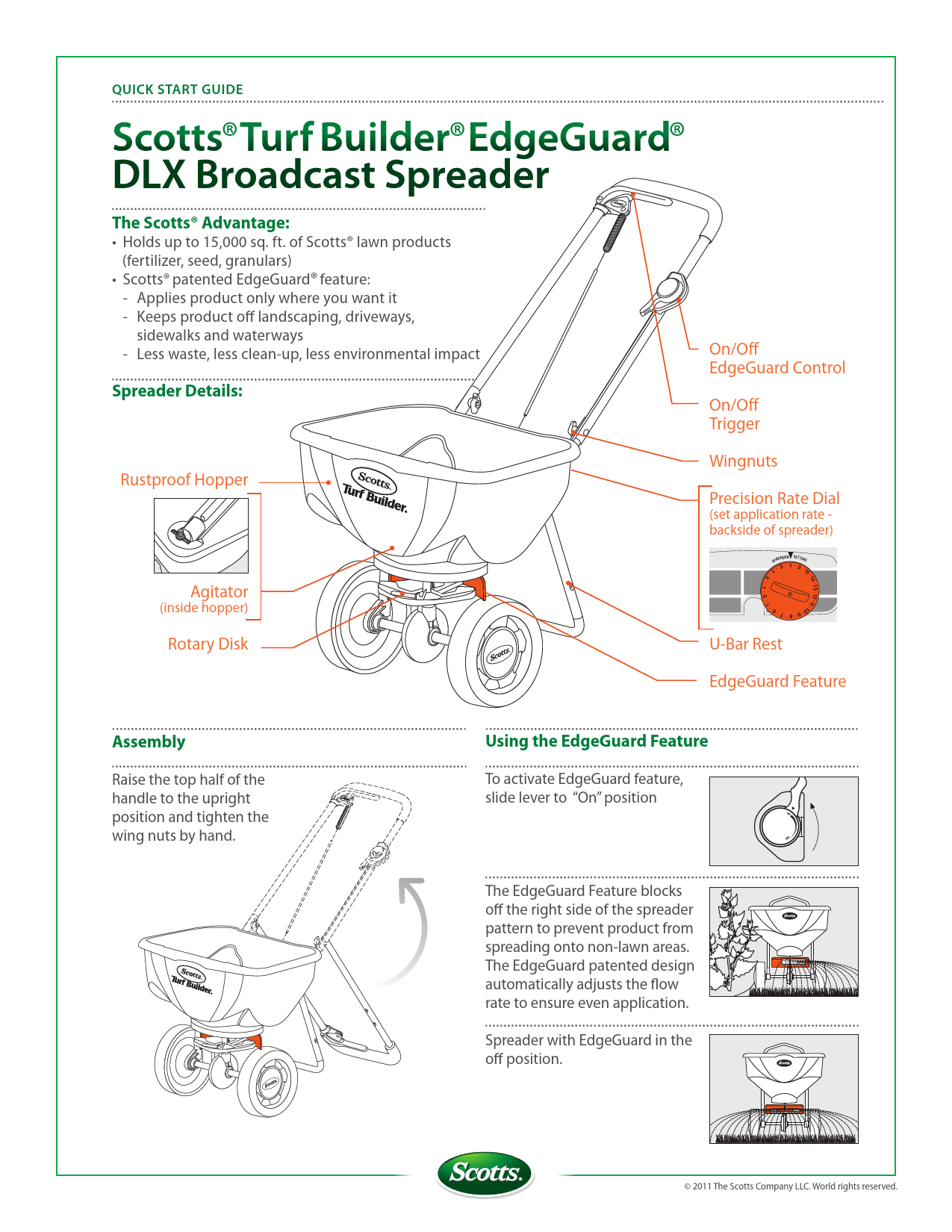
Scotts Turf Builder EdgeGuard DLX Broadcast Spreader Quick Start Guide
The Scotts® Advantage
- Holds up to 15,000 sq. ft. of Scotts® lawn products (fertilizer, seed, granulars).
- Features Scotts® patented EdgeGuard® technology:
- Applies product only where you want it.
- Keeps product off landscaping, driveways, sidewalks, and waterways.
- Results in less waste, less clean-up, and less environmental impact.
Spreader Details
Key components of the spreader:
- Rustproof Hopper: The main container for lawn products.
- Agitator (inside hopper): Helps to ensure consistent product flow.
- Rotary Disk: Distributes the product.
- On/Off EdgeGuard Control: A lever to activate or deactivate the EdgeGuard feature.
- On/Off Trigger: Controls the flow of product while walking.
- Wingnuts: Used for securing the handle assembly.
- Precision Rate Dial: Located on the backside of the spreader, used to set the application rate based on product packaging.
- U-Bar Rest: Provides stability for the spreader.
- EdgeGuard Feature: The patented mechanism that controls product spread to the right side.
Assembly
To assemble the handle:
- Raise the top half of the handle to the upright position.
- Tighten the wing nuts by hand to secure the handle.
Using the EdgeGuard Feature
The EdgeGuard feature is designed to prevent product from spreading onto non-lawn areas, such as driveways or landscaping.
- To activate EdgeGuard: Slide the lever to the "On" position. This blocks off the right side of the spreader pattern.
- The EdgeGuard patented design automatically adjusts the flow rate to ensure even application when activated.
- When the EdgeGuard is in the "Off" position, the spreader operates with its full pattern.
Quick Start Instructions
- Fill the hopper with your chosen Scotts® lawn product.
- Turn the orange rate dial to the correct setting. This setting is typically found in the "Spreader Setting" section on the back of each Scotts product package, under "Scotts® Broadcast/Rotary Spreaders".
- To apply product, begin walking at a steady pace (approximately 4 feet per second). Squeeze and hold the trigger to dispense product.
- When finished, sweep any stray particles back onto the lawn. If product lands on hard surfaces like driveways, sidewalks, or roads, sweep it back onto the lawn to prevent it from being washed into storm sewers and surface waters.
- Never leave product in the spreader. Pour any leftover material back into its original package and seal it tightly.
After each use, wash the spreader thoroughly to remove any clinging material. Hot water may be needed for stubborn residue. Allow the spreader to dry completely in the sun. Store your spreader in a clean, dry place.
Application Tips
For Rectangular Lawns:
Apply two "header strips" across each end of the lawn to create a turning area. Then, apply product back and forth in the longest direction of the lawn.
Diagram shows a rectangular lawn with arrows indicating application passes, including header strips at the ends.
For Irregular-Shaped Lawns:
Apply one "header strip" around the entire perimeter of the lawn to establish a turning area. Then, apply product back and forth across the lawn.
Diagram shows an irregularly shaped lawn with arrows indicating application passes, including a perimeter header strip.
Spreader Overlap:
To ensure proper overlap and even lawn coverage, use your wheel tracks as a guide. Make each pass approximately 5 feet from the previous one. Do not leave the spreader open when making turns.
Diagram illustrates spreader overlap, showing a 5-foot swath width and the concept of aligning passes.
