

K202控制板使用说明
File info: application/pdf · 2 pages · 190.00KB
K202控制板使用说明
User manual for control board K216 - Banggood
User manual for control board K216. Technical parameter. P1: Powe
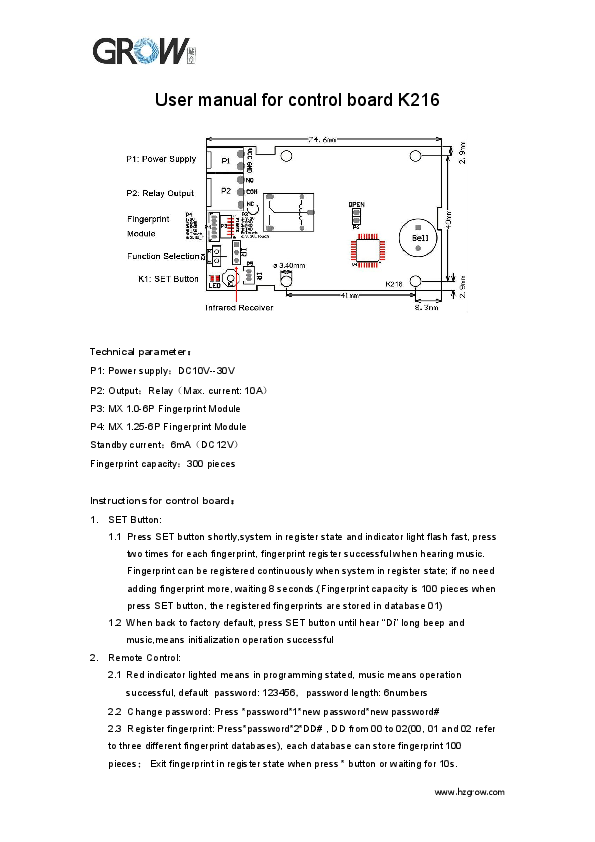
User manual for control board K216. Technical parameter:. P1: Power supply:DC10V--30V. P2: Output:Relay(Max. current: 10A).
UsermanualforcontrolboardK216 - Banggood
www.hzgrow.com UsermanualforcontrolboardK216 Technicalparameter: P1:Powersupply:DC10V--30V P2:Output:Relay(Max.current:10A) P3:MX1.0-6PFingerprintModule
Full PDF Document

If the inline viewer fails, it will open the original document in compatibility mode automatically. You can also open the file directly.
Extracted Text
User manual for control board K216
Technical parameter P1: Power supplyDC10V--30V P2: OutputRelayMax. current: 10A P3: MX 1.0-6P Fingerprint Module P4: MX 1.25-6P Fingerprint Module Standby current6mADC12V Fingerprint capacity300 pieces
Instructions for control board 1. SET Button:
1.1 Press SET button shortly,system in register state and indicator light flash fast, press two times for each fingerprint, fingerprint register successful when hearing music. Fingerprint can be registered continuously when system in register state; if no need adding fingerprint more, waiting 8 seconds.(Fingerprint capacity is 100 pieces when press SET button, the registered fingerprints are stored in database 01)
1.2 When back to factory default, press SET button until hear "Di" long beep and music,means initialization operation successful
2. Remote Control: 2.1 Red indicator lighted means in programming stated, music means operation successful, default password: 123456password length: 6numbers 2.2 Change password: Press *password*1*new password*new password# 2.3 Register fingerprint: Press*password*2*DD# , DD from 00 to 02(00, 01 and 02 refer to three different fingerprint databases), each database can store fingerprint 100 pieces Exit fingerprint in register state when press * button or waiting for 10s. www.hzgrow.com

2.4. Empty fingerprint: Press *password*3*password# 2.5. Control Work Mode:
Press *password*4*00# Fingerprint module touch standby function ON Press *password*4*01# Fingerprint module touch standby function OFF(Normally on Mode) 2.6. Delay time for closing relayPress *password*5*SS #; SS from 00 to 20, SS means the closing time for relay(from 0.5s to 20s), e.g.: 00 means 0.5s, 20 means 20s; Default time is 5s. 2.7. Delete fingerprintPress *password*6*DD#, DD from 00 to 02 (00, 01 and 02 refer to three different fingerprint databases). 2.8. Password UsingPress *password and relay closed, press # and relay opened. 3 Function Set For function selection, when chose 2, closing time of the relay is 5s after pass fingerprint(5s is default time, and it can be adjusted by remote control);When chose 1, relay closed when fingerprint passed, relay will be opened when removing finger.
www.hzgrow.com