

NETSCOUT LSPRNTR-300
File info: application/pdf · 2 pages · 595.36KB
LinkSprinter™ - NetAlly
to the list of Wi-Fi networks. ... Wi-Fi. Choose a Network... ON. LinkSprinter. AuthorizedGuest. HPC1234567. HPE710. ... Follow the claiming instructions on the.
6. TCP port open or ping the cloud (www) LinkSprinter Wi ...
manual, may cause harmful interference to radio communications. Operation of this equipment in a residential area is likely to cause harmful inter-ference, in which case the user will be required to correct the interfer…
Extracted Text
LinkSprinterTM
Network Tester

User Guide
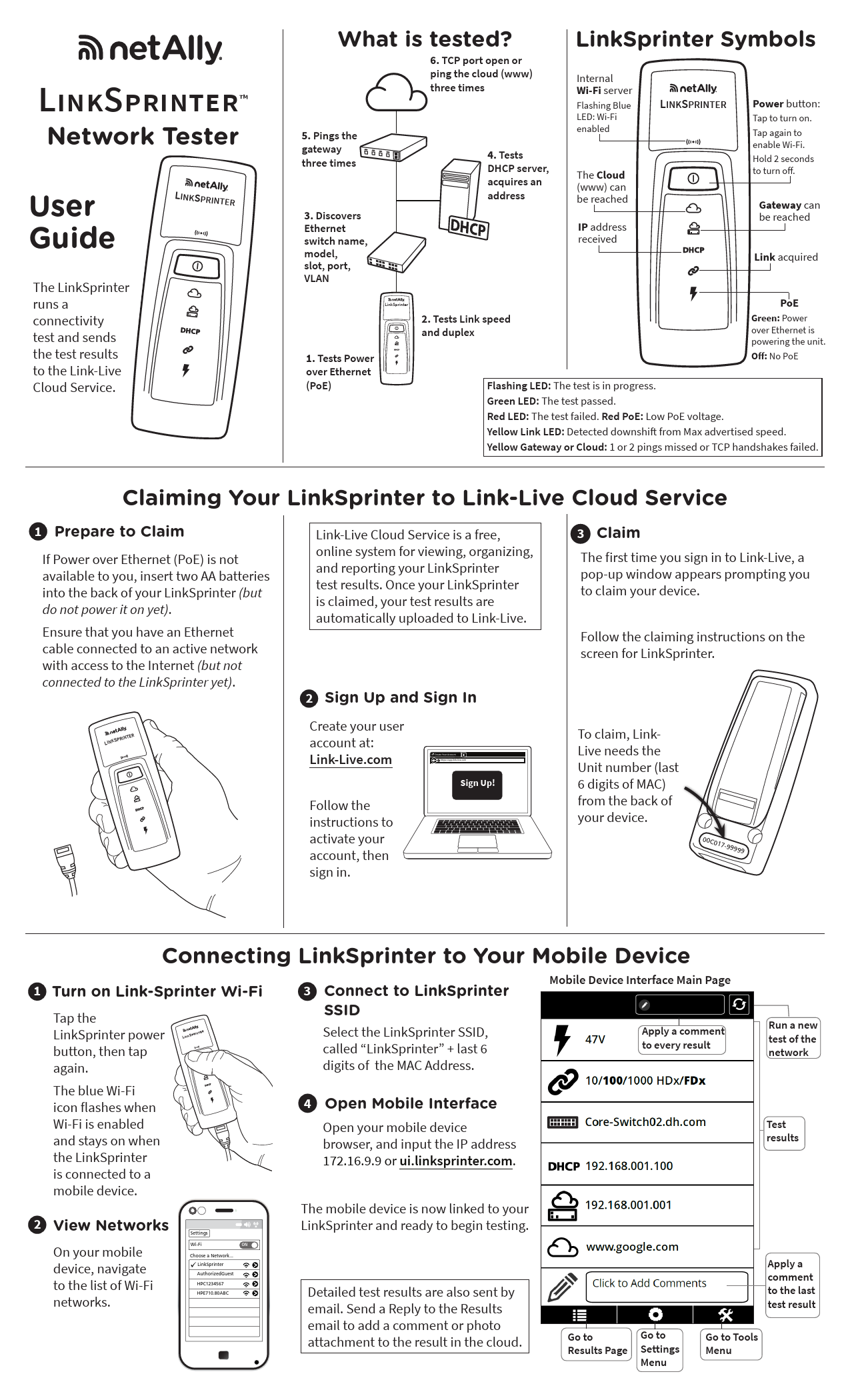
The LinkSprinter runs a connectivity test and sends the test results to the Link-Live Cloud Service.

LINKSPRINTER

What is tested?
6. TCP port open or ping the cloud (www) three times

5. Pings the gateway three times
3. Discovers Ethernet switch name, model, slot, port, VLAN

4. Tests DHCP server, acquires an address

LinkSprinter Symbols

Internal Wi-Fi server Flashing Blue LED: Wi-Fi enabled
The Cloud (www) can be reached
IP address received

LINKSPRINTER

Power button: Tap to turn on. Tap again to enable Wi-Fi. Hold 2 seconds to turn off.
Gateway can be reached
Link acquired

LinkSprinter
1. Tests Power over Ethernet (PoE)

2. Tests Link speed and duplex

PoE
Green: Power over Ethernet is powering the unit.
Off: No PoE

Flashing LED: The test is in progress. Green LED: The test passed. Red LED: The test failed. Red PoE: Low PoE voltage. Yellow Link LED: Detected downshift from Max advertised speed. Yellow Gateway or Cloud: 1 or 2 pings missed or TCP handshakes failed.

Claiming Your LinkSprinter to Link-Live Cloud Service

1 Prepare to Claim
If Power over Ethernet (PoE) is not available to you, insert two AA batteries into the back of your LinkSprinter (but do not power it on yet). Ensure that you have an Ethernet cable connected to an active network with access to the Internet (but not connected to the LinkSprinter yet).
LINKSPRINTER

Link-Live Cloud Service is a free, online system for viewing, organizing, and reporting your LinkSprinter test results. Once your LinkSprinter is claimed, your test results are automatically uploaded to Link-Live.

2 Sign Up and Sign In

Create your user account at: Link-Live.com
Follow the instructions to activate your account, then sign in.

Create Your Account https://app.link-live.com
Sign Up!

3 Claim The first time you sign in to Link-Live, a pop-up window appears prompting you to claim your device.
Follow the claiming instructions on the screen for LinkSprinter.

To claim, LinkLive needs the Unit number (last 6 digits of MAC) from the back of your device.

00C017-99999

Connecting LinkSprinter to Your Mobile Device

1 Turn on Link-Sprinter Wi-Fi
Tap the LinkSprinter power LINKSPRINTER button, then tap again.

3 Connect to LinkSprinter SSID
Select the LinkSprinter SSID, called "LinkSprinter" + last 6 digits of the MAC Address.

Mobile Device Interface Main Page

Apply a comment to every result

Run a new test of the network

The blue Wi-Fi icon flashes when Wi-Fi is enabled and stays on when the LinkSprinter is connected to a mobile device.

2 View Networks
On your mobile device, navigate to the list of Wi-Fi networks.

Settings

Wi-Fi

ON

Choose a Network...
� LinkSprinter
AuthorizedGuest
HPC1234567
HPE710.80ABC

4 Open Mobile Interface
Open your mobile device browser, and input the IP address 172.16.9.9 or ui.linksprinter.com.

Test results

The mobile device is now linked to your LinkSprinter and ready to begin testing.
Detailed test results are also sent by email. Send a Reply to the Results email to add a comment or photo attachment to the result in the cloud.

Go to

Go to

Results Page Settings

Menu

Apply a comment to the last test result
Go to Tools Menu

Results Page

Power over Ethernet

47V

voltage

47V
10/100/1000 HDx/FDx
Advertise: 10/100/1000 HDx/FDx Rx Pair: 1,2 Polarity: normal
Core-Switch02.dhr.com
Name: Core-Switch02.dhr.com Port: GigabitEthernet1/0/47 VLAN: 21 Model: cisco WS-C2960S-48TS-L IP/MAC: 172.031.163.010
192.168.001.100
Server: 193.211.132.127 Subnet: 255.255.254.000 DNS1: 192.181.002.170 DNS2: 192.181.002.173
192.168.001.001
2ms, 5ms,�
www.google.com
Type: TCP Port: 80(HTTP) IP: 172.016.200.100 84ms, 89ms, 73ms

Bold indicates actual link speed and duplex
Advertised Link Speed and Duplex, Receive Pair and polarity
Name of nearest switch
Switch Port Advertisement from LLDP or CDP (optional)
DHCP address received
DHCP server, subnet and DNS server address
Gateway IP address
Ping response times (3)-- means no response
Target DNS name or IP address Ping or TCP port
IP address if DNS name TCP or PING response times (3)

Mobile Interface
Settings Menu
Test at 1 Gb when advertised. Off by default.
3-minute Auto-off
Send test results to cloud
Set units for cable test
Configure DHCP or static IP address
Configure target DNS name or IP address and Configure PING or TCP port test type
Configure SSID and channel of built-in AP Configure web proxy settings (if required by network administrator)

Tools Menu

Cable FlashPort

Run the Cable Test

Flash a switch port to confirm wiring

< Back
1 2
3 6 4 5
7 8

Cable
Open <3.3ft Good 10.5ft Good 10.5ft Good 10.5ft

Go to NetAlly.com/products/LinkSprinter for more information about your LinkSprinter.

Environmental and Regulatory Specifications

Environmental

Operating Temperature 32�F to 122�F (0�C to 50�C ), Relative and Relative Humidity Humidity 5% to 90%, Non-condensing

Storage temperature -4�F to 140�F (-20�C to 60�C)

Shock and vibration

Random 2g, 5Hz - 500 Hz (class 2), 1 m drop

Safety

IEC 61010-1, CAT none, Pollution degree 2

Operating altitude Storage altitude EMC
Specification Compliance Frequency Channels Operating Frequency Regulatory Domain
Dimensions Weight with batteries

13,123 ft (4,000 m) 39,370 ft (12,000 m) IEC 61326-1, Portable
Wireless
IEEE 802.11 b/g
802.11 Channels 1 thru 11, default is 11 2.412~2.484 Ghz, ISM Band EN 301 489-1/17
General 4.36"x 1.6" x 1.28" (11.07 cm x 4.06 cm x 3.25 cm) 0.255 lb (0.116 kg)

Battery

2 AA Alkaline, IEC LR6, or ANSI/NEDA 15A

Browser

Internet Explorer 9.0, Firefox 3.6, Chrome 5.0, Safari 5.1 (minimum revision).

NetAlly.com

Useful Websites
NetAlly.com/products/LinkSprinter for product information
NetAlly.com/Support for customer assistance
NetAlly.com/Terms-and-Conditions for warranty
NetAlly.com/Registration to register your product and receive updates from NetAlly
*770-000046*
PN 770-000046 07/2019 � 2019 NetAlly Wi-Fi� is a registered trademark of the Wi-Fi Alliance.

Software Notice
This product uses: FreeRTOS - Copyright (C) 2010 Real Time Engineers Ltd FreeRTOS information can be found at www.freertos.org. lwIP - Copyright (c) 2001-2004 Swedish Institute of Computer Science. jQuery/jQuery mobile - Copyright 2013 The jQuery Foundation. uIP - Copyright (c) 2004, Swedish Institute of Computer Science. All rights reserved. Software license statements and files are available at Link-Live.com/OpenSource.
lwIP is licensed under the BSD license: Copyright (c) 2001-2004 Swedish Institute of Computer Science. All rights reserved. Redistribution and use in source and binary forms, with or without modification, are permitted provided that the following conditions are met: 1. Redistributions of source code must retain the above copyright notice, this list of conditions and the following disclaimer. 2. Redistributions in binary form must reproduce the above copyright notice, this list of conditions and the following disclaimer in the documentation and/or other materials provided with the distribution. 3. The name of the author may not be used to endorse or promote products derived from this software without specific prior written permission. THIS SOFTWARE IS PROVIDED BY THE AUTHOR "AS IS" AND ANY EXPRESS OR IMPLIED WARRANTIES, INCLUDING, BUT NOT LIMITED TO, THE IMPLIED WARRANTIES OF MERCHANTABILITY AND FITNESS FOR A PARTICULAR PURPOSE ARE DISCLAIMED. IN NO EVENT SHALL THE AUTHOR BE LIABLE FOR ANY DIRECT, INDIRECT, INCIDENTAL, SPECIAL, EXEMPLARY, OR CONSEQUENTIAL DAMAGES (INCLUDING, BUT NOT LIMITED TO, PROCUREMENT OF SUBSTITUTE GOODS OR SERVICES; LOSS OF USE, DATA, OR PROFITS; OR BUSINESS INTERRUPTION) HOWEVER CAUSED AND ON ANY THEORY OF LIABILITY, WHETHER IN CONTRACT, STRICT LIABILITY, OR TORT (INCLUDING NEGLIGENCE OR OTHERWISE) ARISING IN ANY WAY OUT OF THE USE OF THIS SOFTWARE, EVEN IF ADVISED OF THE POSSIBILITY OF SUCH DAMAGE.
Copyright 2013 jQuery Foundation and other contributors http://jquery.com/ Permission is hereby granted, free of charge, to any person obtaining a copy of this software and associated documentation files (the"Software"), to deal in the Software without restriction, including without limitation the rights to use, copy, modify, merge, publish, distribute, sub-license, and/or sell copies of the Software, and to permit persons to whom the Software is furnished to do so, subject to the following conditions: The above copyright notice and this permission notice shall be included in all copies or substantial portions of the Software. THE SOFTWARE IS PROVIDED "AS IS", WITHOUT WARRANTY OF ANY KIND, EXPRESSED OR IMPLIED, INCLUDING BUT NOT LIMITED TO THE WARRANTIES OF MERCHANTABILITY, FITNESS FOR A PARTICULAR PURPOSE AND NON-INFRINGEMENT. IN NO EVENT SHALL THE AUTHORS OR COPYRIGHT HOLDERS BE LIABLE FOR ANY CLAIM, DAMAGES OR OTHER LIABILITY, WHETHER IN AN ACTION OF CONTRACT, TORT OR OTHERWISE, ARISING FROM, OUT OF OR IN CONNECTION WITH THE SOFTWARE OR THE USE OR OTHER DEALINGS IN THE SOFTWARE.


FCC Statement
Note: This equipment has been tested and found to comply with the limits for a Class A digital device, pursuant to Part 15 of the FCC Rules. These limits are designed to provide reasonable protection against harmful interference when the equipment is operated in a commercial environment. This equipment generates, uses, and can radiate radio frequency energy and, if not installed and used in accordance with the instruction manual, may cause harmful interference to radio communications. Operation of this equipment in a residential area is likely to cause harmful interference, in which case the user will be required to correct the interference at his own expense.

Properly shielded and grounded cables and connectors must be used in order to meet FCC emission limits. The manufacturer is not responsible for any radio or television interference caused by using other than recommended cables and connectors or by unauthorized changes or modifications to this equipment. Unauthorized changes or modifications could void the user's authority to operate the equipment.

This device complies with Part 15 of the FCC rules. Operation is subject to the following two conditions: (1) this device may not cause harmful interference, and (2) this device must accept any interference received, including interference that may cause undesired operation.

) IC

This device complies with Industry Canada license-exempt RSS standard(s). Operation is subject to the following two conditions: (1) this device may not cause interference, and (2) this device must accept any interference, including interference that may cause undesired operation of the device.

Le pr�sent appareil est conforme aux CNR d'Industrie Canada applicables aux appareils radio exempts de licence. L'exploitation est autoris�e aux deux conditions suivantes : (1) l'appareil ne doit pas produire de brouillage, et (2) l'utilisateur de l'appareil doit accepter tout brouillage radio�lectrique subi, m�me si le brouillage est susceptible d'en compromettre le fonctionnement.

The radio transmitter has been approved by Industry Canada to operate only with the antenna supplied. Use of any other antenna is strictly prohibited for use with this product.

L'�metteur radio a �t� approuv� par Industrie Canada pour fonctionner uniquement avec l'antenne fournie. L'utilisation de toute autre antenne est strictement interdit d'utiliser ce produit.
The term "IC" before the radio certification number
IC only signifies the device meets Industry's Canada technical specifications.